Redhat Developers  Logo
  • AI

    Get started with AI

    • Red Hat AI
      Accelerate the development and deployment of enterprise AI solutions.
    • AI learning hub
      Explore learning materials and tools, organized by task.
    • AI interactive demos
      Click through scenarios with Red Hat AI, including training LLMs and more.
    • AI/ML learning paths
      Expand your OpenShift AI knowledge using these learning resources.
    • AI quickstarts
      Focused AI use cases designed for fast deployment on Red Hat AI platforms.
    • No-cost AI training
      Foundational Red Hat AI training.

    Featured resources

    • OpenShift AI learning
    • Open source AI for developers
    • AI product application development
    • Open source-powered AI/ML for hybrid cloud
    • AI and Node.js cheat sheet

    Red Hat AI Factory with NVIDIA

    • Red Hat AI Factory with NVIDIA is a co-engineered, enterprise-grade AI solution for building, deploying, and managing AI at scale across hybrid cloud environments.
    • Explore the solution
  • Learn

    Self-guided

    • Documentation
      Find answers, get step-by-step guidance, and learn how to use Red Hat products.
    • Learning paths
      Explore curated walkthroughs for common development tasks.
    • Guided learning
      Receive custom learning paths powered by our AI assistant.
    • See all learning

    Hands-on

    • Developer Sandbox
      Spin up Red Hat's products and technologies without setup or configuration.
    • Interactive labs
      Learn by doing in these hands-on, browser-based experiences.
    • Interactive demos
      Click through product features in these guided tours.

    Browse by topic

    • AI/ML
    • Automation
    • Java
    • Kubernetes
    • Linux
    • See all topics

    Training & certifications

    • Courses and exams
    • Certifications
    • Skills assessments
    • Red Hat Academy
    • Learning subscription
    • Explore training
  • Build

    Get started

    • Red Hat build of Podman Desktop
      A downloadable, local development hub to experiment with our products and builds.
    • Developer Sandbox
      Spin up Red Hat's products and technologies without setup or configuration.

    Download products

    • Access product downloads to start building and testing right away.
    • Red Hat Enterprise Linux
    • Red Hat AI
    • Red Hat OpenShift
    • Red Hat Ansible Automation Platform
    • See all products

    Featured

    • Red Hat build of OpenJDK
    • Red Hat JBoss Enterprise Application Platform
    • Red Hat OpenShift Dev Spaces
    • Red Hat Developer Toolset

    References

    • E-books
    • Documentation
    • Cheat sheets
    • Architecture center
  • Community

    Get involved

    • Events
    • Live AI events
    • Red Hat Summit
    • Red Hat Accelerators
    • Community discussions

    Follow along

    • Articles & blogs
    • Developer newsletter
    • Videos
    • Github

    Get help

    • Customer service
    • Customer support
    • Regional contacts
    • Find a partner

    Join the Red Hat Developer program

    • Download Red Hat products and project builds, access support documentation, learning content, and more.
    • Explore the benefits

Managing development environments with Red Hat CodeReady Workspaces 2

<p>&nbsp;</p> <quillbot-extension-portal></quillbot-extension-portal>

January 2, 2020
Don Schenck
Related topics:
Developer toolsIDEs
Related products:
Developer Toolset

    The release of Red Hat CodeReady Workspaces 2.0 (CRW) brings changes. Based on Eclipse Che 7 and the Theia online editor, CRW 2.0 frees the developer from the confines of a specially configured PC in favor of multiple specially configured workspaces. Imagine having a separate work environment for each language, version, tools and more, all available from a browser. This article discusses some of the features of CRW.

    The components of a modern development environment

    Workspaces

    At the heart of CRW is the concept and implementation of "workspaces." A workspace is a development environment that can be likened to a PC loaded up with an operating system, programming language, tools, editor, and one or more development projects. You can even access a command line running in your browser.

    You might have a workspace that has Java and Maven installed on a CoreOS image. Another workspace might be based on Red Hat Enterprise Linux (RHEL) with Node.js and MongoDB installed. Need to work on some .NET Core 3.0 code? No problem, simply create a workspace. Yes, while Che 7 and CRW might have been initially created with Java developers in mind it is, in fact, very much language neutral. Its use of the Language Server Protocol ensures future language support. Yes, even COBOL is supported. Grace Hopper meets Tim Berners-Lee.

    In each case, you can optionally—and probably should—include a software project. For most use cases, this will be source code stored in a Git repository. CodeReady Workspaces handles this, as GitHub integration is built in.

    In CRW, you simply start a workspace just as you would power on a PC. In seconds, the code editor is open in front of you, your project is loaded, and all the tools and language support you need are at hand. Several workspaces can be defined and switching between them is easy. Start and stop workspaces with a mouse click. Stop now, here, and restart the workspace later from a different computer. Indeed, all you need is a browser.

    In-browser editor

    The online editor for CRW is Theia, which is a browser-based editor based on Microsoft's Monaco editor. That name might not be familiar, so consider this: Monaco is the editor on which Visual Studio Code (VS Code) is built. This all really ties the editor together because some VS Code plugins will be API-compatible with Theia. In simpler terms: Some VS Code plugins will work with CRW.

    Because VS Code is so popular, switching to CRW is a breeze. Indeed, if you put your browser in full-screen mode (by pressing F11), you'll soon forget that you're working in a browser. Very slick.

    Aside: Just to underscore this and demonstrate how off-the-wall I can be, I took my old Windows 10 mobile phone, connected it to my Microsoft Continuum adapter, and wrote Node.js code in the Edge browser. That's right; I wrote code using a mobile phone. I mean, somebody had to do it.

    The bottom line is this: If you have an internet connection and a browser, you can edit your code in an environment that feels just like working on a local PC.

    Stack configurations

    A stack is a combination of operating system, programming language support, tools, and any other bits necessary to create a workspace. A workspace is built using a stack as the starting point. Think of it this way: A stack is a definition much like a class in software, while a workspace is the instance of a stack, like an object is an instance of a class. Several pre-configured stacks are supplied with CRW out of the box, and you can  easily create your own stacks to meet your specific needs.

    Factories

    A factory is the means by which you build and share your workspace(s). That is, after you have a workspace that is tailored to exactly what you need to do, you then create a factory that builds that workspace. Once built, a factory is shared by simply sharing the URL. When a teammate visits the URL, the factory will build the workspace and they'll have the exact same environment you do.

    Example

    With the basics covered, above, let's see how to get CRW running and a workspace provisioned.

    How to get started

    The first step is to get an OpenShift cluster provisioned and CodeReady Workspaces up and running. You can find detailed instructions on the Red Hat Developer CodeReady Workspaces page.

    Creating a workspace

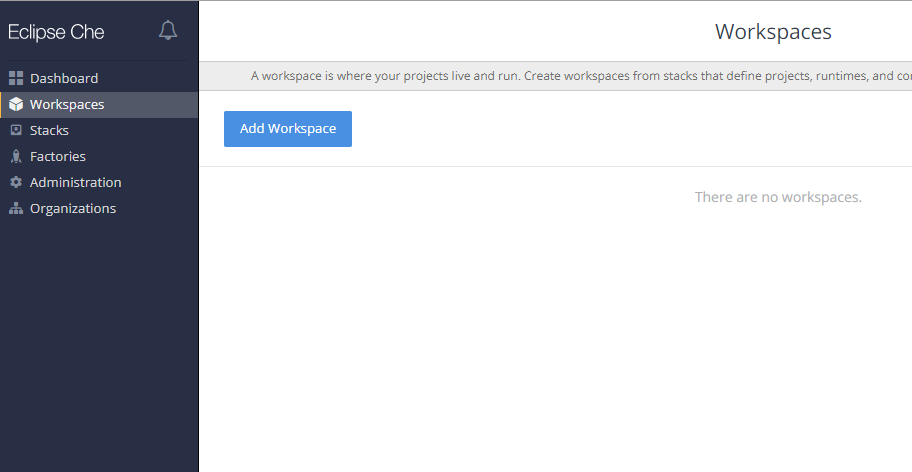
    The quickest and easiest way to ease into CRW is to create a predefined workspace. From the main Workspaces page of the dashboard, click on the Add Workspace button to get started.
    The next page will be where we can select a workspace.
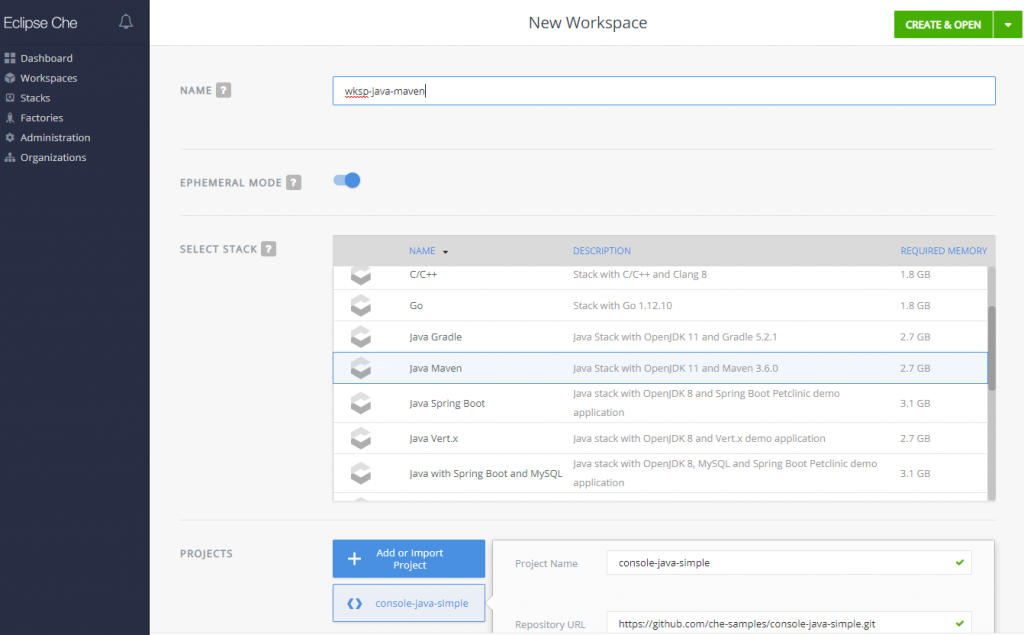
    For this article, I'm choosing the Java-Maven workspace. I've also changed the workspace name to wksp-java-maven. You will probably want to make this a habit because the default names provide very little information about the workspace.

    Click the CREATE & OPEN button. There's one at the top of the page and another at the bottom—either will do the same thing—and wait a minute or so. Instant workspace.

    We're just getting started

    So, now you have some code in a workspace. My next article will guide you through the edit-build-debug-commit cycle.

    See also

    • Red Hat CodeReady Workspaces 2: New tools to speed Kubernetes development
    • CodeReady Workspaces devfile, demystified
    Last updated: November 8, 2023

    Recent Posts

    • Every layer counts: Defense in depth for AI agents with Red Hat AI

    • Fun in the RUN instruction: Why container builds with distroless images can surprise you

    • Trusted software factory: Building trust in the agentic AI era

    • Build a zero trust AI pipeline with OpenShift and RHEL CVMs

    • Red Hat Hardened Images: Top 5 benefits for software developers

    Red Hat Developers logo LinkedIn YouTube Twitter Facebook

    Platforms

    • Red Hat AI
    • Red Hat Enterprise Linux
    • Red Hat OpenShift
    • Red Hat Ansible Automation Platform
    • See all products

    Build

    • Developer Sandbox
    • Developer tools
    • Interactive tutorials
    • API catalog

    Quicklinks

    • Learning resources
    • E-books
    • Cheat sheets
    • Blog
    • Events
    • Newsletter

    Communicate

    • About us
    • Contact sales
    • Find a partner
    • Report a website issue
    • Site status dashboard
    • Report a security problem

    RED HAT DEVELOPER

    Build here. Go anywhere.

    We serve the builders. The problem solvers who create careers with code.

    Join us if you’re a developer, software engineer, web designer, front-end designer, UX designer, computer scientist, architect, tester, product manager, project manager or team lead.

    Sign me up

    Red Hat legal and privacy links

    • About Red Hat
    • Jobs
    • Events
    • Locations
    • Contact Red Hat
    • Red Hat Blog
    • Inclusion at Red Hat
    • Cool Stuff Store
    • Red Hat Summit
    © 2026 Red Hat

    Red Hat legal and privacy links

    • Privacy statement
    • Terms of use
    • All policies and guidelines
    • Digital accessibility

    Chat Support

    Please log in with your Red Hat account to access chat support.