Redhat Developers  Logo
  • Products

    Platforms

    • Red Hat Enterprise Linux
      Red Hat Enterprise Linux Icon
    • Red Hat AI
      Red Hat AI
    • Red Hat OpenShift
      Openshift icon
    • Red Hat Ansible Automation Platform
      Ansible icon
    • See all Red Hat products

    Featured

    • Red Hat build of OpenJDK
    • Red Hat Developer Hub
    • Red Hat JBoss Enterprise Application Platform
    • Red Hat OpenShift Dev Spaces
    • Red Hat OpenShift Local
    • Red Hat Developer Sandbox

      Try Red Hat products and technologies without setup or configuration fees for 30 days with this shared Red Hat OpenShift and Kubernetes cluster.
    • Try at no cost
  • Technologies

    Featured

    • AI/ML
      AI/ML Icon
    • Linux
      Linux Icon
    • Kubernetes
      Cloud icon
    • Automation
      Automation Icon showing arrows moving in a circle around a gear
    • See all technologies
    • Programming languages & frameworks

      • Java
      • Python
      • JavaScript
    • System design & architecture

      • Red Hat architecture and design patterns
      • Microservices
      • Event-Driven Architecture
      • Databases
    • Developer experience

      • Productivity
      • Tools
      • GitOps
    • Automated data processing

      • AI/ML
      • Data science
      • Apache Kafka on Kubernetes
    • Platform engineering

      • DevOps
      • DevSecOps
      • Red Hat Ansible Automation Platform for applications and services
    • Secure development & architectures

      • Security
      • Secure coding
  • Learn

    Featured

    • Kubernetes & cloud native
      Openshift icon
    • Linux
      Rhel icon
    • Automation
      Ansible cloud icon
    • AI/ML
      AI/ML Icon
    • See all learning resources

    E-books

    • GitOps cookbook
    • Podman in action
    • Kubernetes operators
    • The path to GitOps
    • See all e-books

    Cheat sheets

    • Linux commands
    • Bash commands
    • Git
    • systemd commands
    • See all cheat sheets

    Documentation

    • Product documentation
    • API catalog
    • Legacy documentation
  • Developer Sandbox

    Developer Sandbox

    • Access Red Hat’s products and technologies without setup or configuration, and start developing quicker than ever before with our new, no-cost sandbox environments.
    • Explore the Developer Sandbox

    Featured Developer Sandbox activities

    • Get started with your Developer Sandbox
    • OpenShift virtualization and application modernization using the Developer Sandbox
    • Explore all Developer Sandbox activities

    Ready to start developing apps?

    • Try at no cost
  • Blog
  • Events
  • Videos

Run privileged commands more securely in OpenShift Dev Spaces

December 12, 2025
Mario Loriedo Pradipta Banerjee Ilya Buziuk
Related topics:
Application modernizationContainersDeveloper ProductivityDeveloper ToolsIDEsKubernetesOpen sourceVirtualization
Related products:
Developer ToolsRed Hat OpenShift Dev SpacesRed Hat OpenShift

    Running containers as a privileged user in a Red Hat OpenShift cluster is a security issue. Installing a package, running nested containers, and other tasks that require sudoers privileges are usually not allowed in the cloud. When containers run with root privileges, they may compromise the host system, either intentionally or unintentionally.

    This is problematic when running cloud development environments (CDEs) in an OpenShift cluster, such as Red Hat OpenShift Dev Spaces. Developer tools often require privileges that are beyond the default, restricted, privileges of an OpenShift container.

    The challenge, therefore, is to run CDE in privileged containers without compromising cluster security. This may look contradictory, but as we will discuss in this article, the enhanced isolation provided by Kata containers makes it possible.

    Note

    This article explains a technique for running privileged commands in CDEs, including commands to install new packages. While installing a new tool can be useful when experimenting with it, we discourage updating CDEs in this manner. Containers should be considered immutables. Any newly installed package will disappear after restarting the CDE. For the recommended way to update an OpenShift Dev Spaces CDE, please refer to this blog.

    Kata containers to the rescue

    Kata containers provide pod sandboxing by leveraging virtualization. Each pod runs in a VM, isolating its containers from the host system. This isolation allows running privileged pods while still protecting the host. Running as root inside the container is no longer a security issue.

    The OpenShift sandboxed containers solution brings Kata containers support to OpenShift.

    The diagram in Figure 1 compares a standard pod to an OpenShift sandboxed container pod. Note the additional green VM layer for isolation.
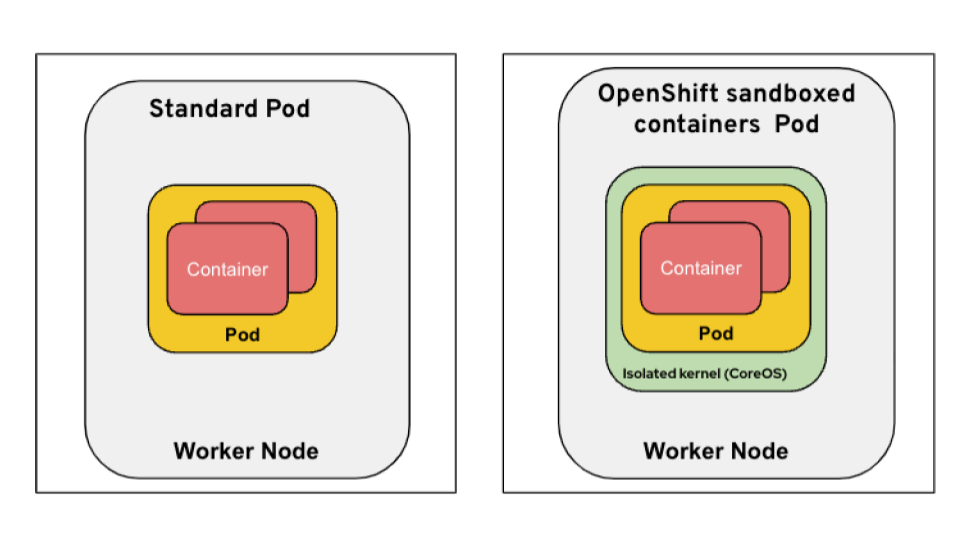
    Sandboxed Pod
    Figure 1: This diagram compares a standard pod to an OpenShift sandboxed container pod.

    You can read more about OpenShift sandboxed containers in this blog post.

    A policy to run privileged and secured containers

    Service accounts, along with roles and roleBindings, define the actions a user or application can perform within the OpenShift cluster. To enable the creation of privileged containers, we define a privileged role and assign it to a specific service account. This service account will have the necessary permissions to create privileged containers.

    Further, to ensure these privileged containers don't compromise the host, we can implement a Kyverno policy that enforces the use of sandboxed (Kata) containers for any pods created by this privileged service account. This ensures that any privileged container cannot impact the host.

    Configuring OpenShift sandboxed containers

    Follow the official product guide to deploy OpenShift sandboxed containers on bare metal worker nodes.

    Red Hat OpenShift Dev Spaces runs cloud development environments (CDEs). The default IDE running in the pod is Visual Studio Code. By default, the CDEs are unprivileged, so dnf install and podman run won’t work. But if you have configured the cluster like the Kata containers and privileged service account in the previous section (limited by a Kyverno policy for each developer namespace), then we can configure Dev Spaces to run the CDE as privileged Kata containers, where dnf install and podman run will work.

    Figure 2 shows that, when Dev Spaces uses Kata containers, privileged commands such as podman run -ti --rm hello-world execute successfully.
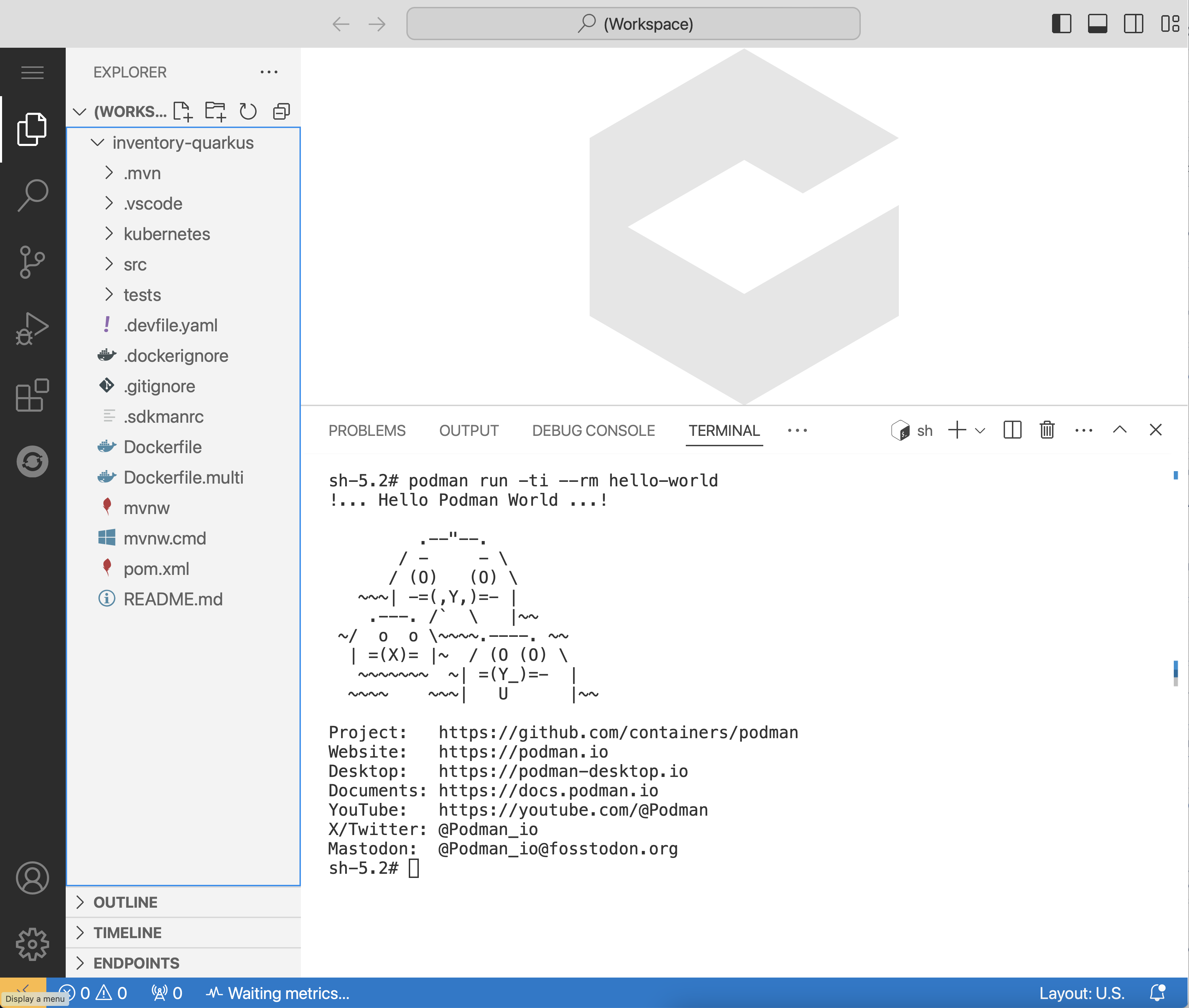
    The image shows that "podman run" is executed successfully from Dev Spaces terminal
    Figure 2: This image shows a privileged command executed successfully in Dev Spaces.

    You can find the step-by-step instructions on how to set up a cluster, OpenShift sandboxed containers operator, OpenShift Dev Spaces operator, and Kyverno in the Red Hat Developer repository. 

    Limits and alternatives

    Running Kata containers requires a Kubernetes cluster with bare-metal worker nodes. We did our tests using an OpenShift cluster with AWS m5.metal worker nodes. The OpenShift cluster bot provisions such a cluster with the launch 4.20 metal,ovn command. 

    Another approach to run privileged commands in a CDE is to enable user namespaces in containers so the container's root user doesn’t match the node's root user. Recently, we added this feature to OpenShift 4.20, which is extensively covered in this article.

    Final thoughts

    In this article, you learned about a technique for running privileged commands within cloud development environments (CDEs) in OpenShift Dev Spaces, addressing the common security issue of running containers as a privileged user in an OpenShift cluster. The solution is using Kata containers (provided by OpenShift sandboxed containers), which use virtualization to run each pod in a separate VM. This isolation protects the host system, allowing privileged containers to run without compromising cluster security. For more information, you can visit our GitHub repository.

    Related Posts

    • Cloud bursting with confidential containers on OpenShift

    • Confidential VMs: The core of confidential containers

    • IBM Hyper Protect with OpenShift sandboxed containers

    • AI meets containers: My first step into Podman AI Lab

    • How to debug confidential containers securely

    Recent Posts

    • LLM Compressor 0.9.0: Attention quantization, MXFP4 support, and more

    • A deep dive into OpenShift Container Platform 4.20 performance

    • Introducing the Dynamic Plug-ins Factory for Developer Hub

    • Diagnose Java applications using Cryostat 4.1

    • AI-driven vulnerability management with Red Hat Lightspeed MCP

    What’s up next?

    Enhance security with automation_Share

    Enhance security with automation

    Red Hat
    Red Hat Developers logo LinkedIn YouTube Twitter Facebook

    Platforms

    • Red Hat AI
    • Red Hat Enterprise Linux
    • Red Hat OpenShift
    • Red Hat Ansible Automation Platform
    • See all products

    Build

    • Developer Sandbox
    • Developer tools
    • Interactive tutorials
    • API catalog

    Quicklinks

    • Learning resources
    • E-books
    • Cheat sheets
    • Blog
    • Events
    • Newsletter

    Communicate

    • About us
    • Contact sales
    • Find a partner
    • Report a website issue
    • Site status dashboard
    • Report a security problem

    RED HAT DEVELOPER

    Build here. Go anywhere.

    We serve the builders. The problem solvers who create careers with code.

    Join us if you’re a developer, software engineer, web designer, front-end designer, UX designer, computer scientist, architect, tester, product manager, project manager or team lead.

    Sign me up

    Red Hat legal and privacy links

    • About Red Hat
    • Jobs
    • Events
    • Locations
    • Contact Red Hat
    • Red Hat Blog
    • Inclusion at Red Hat
    • Cool Stuff Store
    • Red Hat Summit
    © 2026 Red Hat

    Red Hat legal and privacy links

    • Privacy statement
    • Terms of use
    • All policies and guidelines
    • Digital accessibility

    Report a website issue