Redhat Developers  Logo
  • AI

    Get started with AI

    • Red Hat AI
      Accelerate the development and deployment of enterprise AI solutions.
    • AI learning hub
      Explore learning materials and tools, organized by task.
    • AI interactive demos
      Click through scenarios with Red Hat AI, including training LLMs and more.
    • AI/ML learning paths
      Expand your OpenShift AI knowledge using these learning resources.
    • AI quickstarts
      Focused AI use cases designed for fast deployment on Red Hat AI platforms.
    • No-cost AI training
      Foundational Red Hat AI training.

    Featured resources

    • OpenShift AI learning
    • Open source AI for developers
    • AI product application development
    • Open source-powered AI/ML for hybrid cloud
    • AI and Node.js cheat sheet

    Red Hat AI Factory with NVIDIA

    • Red Hat AI Factory with NVIDIA is a co-engineered, enterprise-grade AI solution for building, deploying, and managing AI at scale across hybrid cloud environments.
    • Explore the solution
  • Learn

    Self-guided

    • Documentation
      Find answers, get step-by-step guidance, and learn how to use Red Hat products.
    • Learning paths
      Explore curated walkthroughs for common development tasks.
    • Guided learning
      Receive custom learning paths powered by our AI assistant.
    • See all learning

    Hands-on

    • Developer Sandbox
      Spin up Red Hat's products and technologies without setup or configuration.
    • Interactive labs
      Learn by doing in these hands-on, browser-based experiences.
    • Interactive demos
      Click through product features in these guided tours.

    Browse by topic

    • AI/ML
    • Automation
    • Java
    • Kubernetes
    • Linux
    • See all topics

    Training & certifications

    • Courses and exams
    • Certifications
    • Skills assessments
    • Red Hat Academy
    • Learning subscription
    • Explore training
  • Build

    Get started

    • Red Hat build of Podman Desktop
      A downloadable, local development hub to experiment with our products and builds.
    • Developer Sandbox
      Spin up Red Hat's products and technologies without setup or configuration.

    Download products

    • Access product downloads to start building and testing right away.
    • Red Hat Enterprise Linux
    • Red Hat AI
    • Red Hat OpenShift
    • Red Hat Ansible Automation Platform
    • See all products

    Featured

    • Red Hat build of OpenJDK
    • Red Hat JBoss Enterprise Application Platform
    • Red Hat OpenShift Dev Spaces
    • Red Hat Developer Toolset

    References

    • E-books
    • Documentation
    • Cheat sheets
    • Architecture center
  • Community

    Get involved

    • Events
    • Live AI events
    • Red Hat Summit
    • Red Hat Accelerators
    • Community discussions

    Follow along

    • Articles & blogs
    • Developer newsletter
    • Videos
    • Github

    Get help

    • Customer service
    • Customer support
    • Regional contacts
    • Find a partner

    Join the Red Hat Developer program

    • Download Red Hat products and project builds, access support documentation, learning content, and more.
    • Explore the benefits

Scale Testing ACM 2.10

June 21, 2024
Dan Radez
Related products:
Red Hat Advanced Cluster Management for Kubernetes

    In March this year Red Hat released Advanced Cluster Management 2.10. Part of the preparation for this release included scale testing ACM. In this article we’ll take a look at an overview of how this scale testing is carried out and what results came from the testing. Our overall goal for this testing is to ensure ACM does not regress in performance when managing 3500 Single Node Openshift clusters in a disconnected IPv6 environment with network latency and bandwidth limits enabled. This testing is designed to simulate an environment that would represent how our telco customers would use ACM. Simulation is key here, 3500 plus servers to run this simulation would be an excessive amount of hardware to manage. To reduce this burden, all of the SNOs are virtualized. Virtualizing them reduces the physical hardware requirement from more than 3500 physical nodes to just 140 nodes.


    The test environment includes a jump host, three OpenShift control-plane hub nodes, and the rest of the machines are hypervisors to host the virtualized managed SNO clusters. The jump host provides access to the disconnected IPv6 environment and runs infrastructure services such as the onprem assisted-service that installed the hub cluster, an http server, an image registry, coredns, and GOGs: a self-hosted git instance. The hub cluster is a compact OpenShift cluster consisting of three nodes that share control-plane and worker roles.. Hypervisor machines are vanilla libvirt machines running Red Hat Enterprise Linux. Virtual machines are managed directly through libvirt and have virtual redfish access provided by sushy-tools.


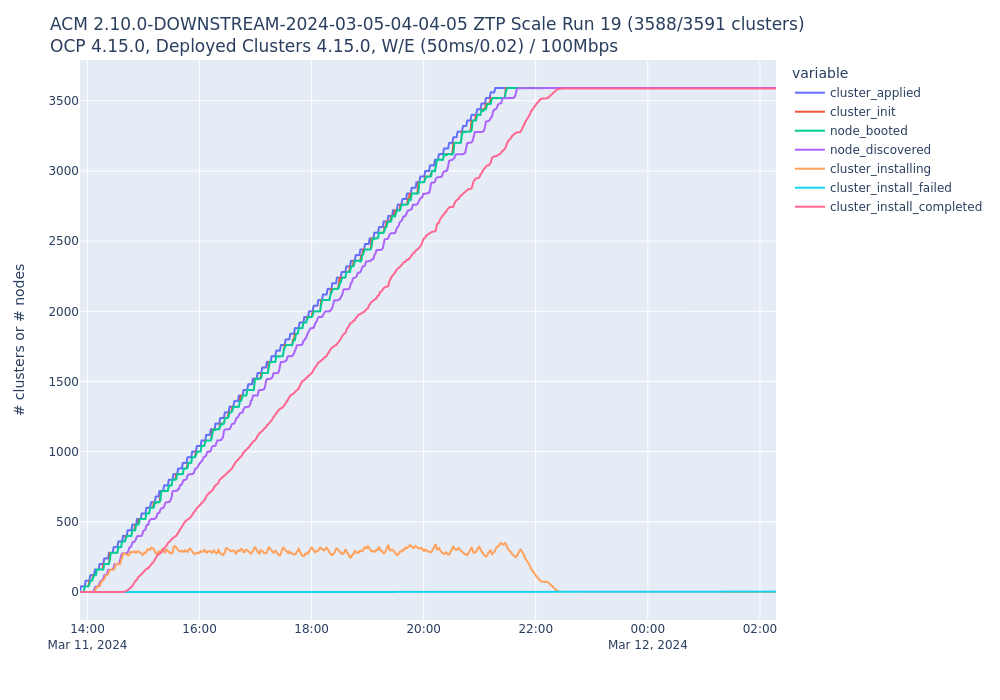
    Test execution happens using ZTP and GitOps in batches of 500 SNOs per hour or 40 SNOs per 5 minutes. Test rates are 500/1hr and 40/5m to simulate two extremes of a workload: one that has large spikes and one that is small but constantly running. Each batch of managed nodes is first provisioned and managed by ACM, then has a set of policies applied to them that simulates the set of policies that would represent our telco customer’s target environment. Once the managed nodes are provisioned, managed, and have telco policies applied to them we collect data that shows the time it takes for each of these steps to happen on each managed cluster and the resources used across all the clusters. Using this data we are able to both see the performance improvements of ACM 2.10 relative to past releases and test for regressions in ACM scalability. A simple example of the results that are collected is the deployment statistics. Here are two graphs that show the 500/1hr and 40/5m managed cluster deployments.
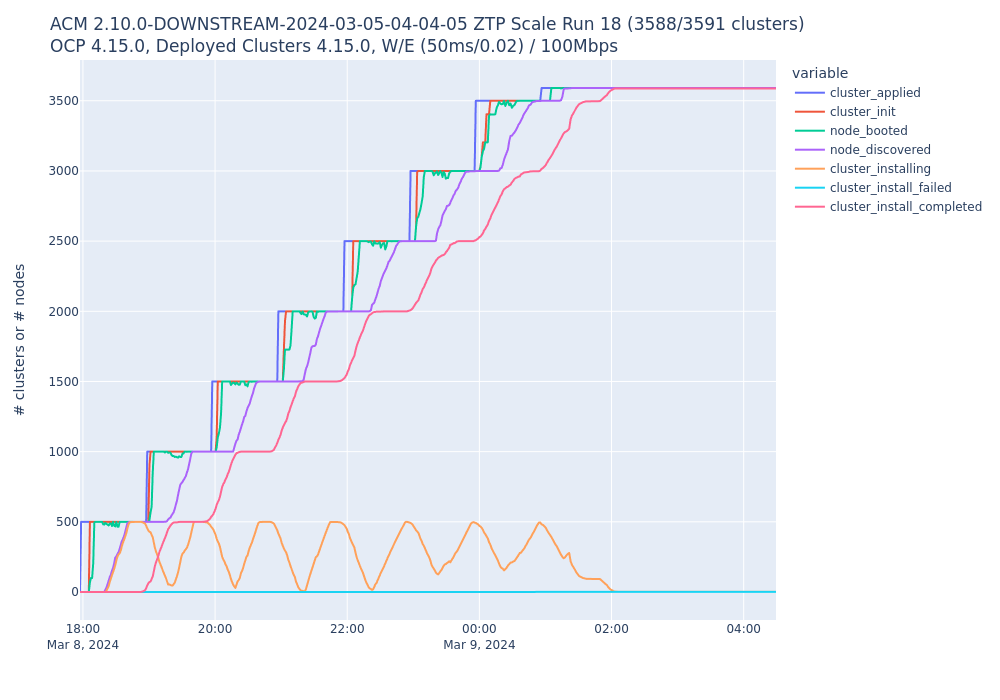
    500 clusters per hour
    40 clusters per 5 minutes

    For the ACM 2.10 large scale testing, there were twenty two completed test runs. These runs take over an hour, at minimum, to prepare and eight to twelve hours to complete. Upgrade runs take an additional 2 business days or more to both run the managed cluster upgrades and gather upgrade results. (It is important to note that the length of time it takes for our tests to complete are not in any way representative of what a customer will experience with ACM. The time necessary to run our tests include a significant amount of effort to maintain and prepare our simulation environment and gather results after the tests are completed. This extra overhead is not part of a customer’s requirements to install and/or maintain ACM.) Nineteen of these runs were non-upgrade runs that only provision the managed nodes and apply policies intending node policy compliance. Three of these runs included managed node upgrades. Overall results indicate that ACM 2.10 can deploy, manage, and configure 3500+ SNOs with a less than 0.7% rate of failure. Further, hub cluster performance running ACM 2.10 on OCP 4.15 is better than ACM 2.9 on OCP 4.14. There was a general reduction in CPU and memory utilization from ACM 2.9 to 2.10 and the time that managed clusters took to install and become policy compliant were comparable from 2.9 to 2.10.

    This testing is an important part of our release cycle. It brings confidence to our company and our customers in the value provided by our products. The results we provide to our customers help them to make critical decisions about the infrastructure they’re maintaining to run their business. We are very pleased with the results of the ACM 2.10 large scale testing that has been completed. ACM 2.11 large scale testing is underway to ensure that Advanced Cluster Management is a product Red Hat’s customers can continue to rely on for future versions to come.

    Disclaimer: Please note the content in this blog post has not been thoroughly reviewed by the Red Hat Developer editorial team. Any opinions expressed in this post are the author's own and do not necessarily reflect the policies or positions of Red Hat.

    Recent Posts

    • MCP servers vs. skills: Choosing the right context for your AI

    • How to route external and local LLMs with Models-as-a-Service

    • Protect data offloaded to GPU-accelerated environments with OpenShift sandboxed containers

    • Case study: Measuring energy efficiency on the x64 platform

    • How to prevent AI inference stack silent failures

    Red Hat Developers logo LinkedIn YouTube Twitter Facebook

    Platforms

    • Red Hat AI
    • Red Hat Enterprise Linux
    • Red Hat OpenShift
    • Red Hat Ansible Automation Platform
    • See all products

    Build

    • Developer Sandbox
    • Developer tools
    • Interactive tutorials
    • API catalog

    Quicklinks

    • Learning resources
    • E-books
    • Cheat sheets
    • Blog
    • Events
    • Newsletter

    Communicate

    • About us
    • Contact sales
    • Find a partner
    • Report a website issue
    • Site status dashboard
    • Report a security problem

    RED HAT DEVELOPER

    Build here. Go anywhere.

    We serve the builders. The problem solvers who create careers with code.

    Join us if you’re a developer, software engineer, web designer, front-end designer, UX designer, computer scientist, architect, tester, product manager, project manager or team lead.

    Sign me up

    Red Hat legal and privacy links

    • About Red Hat
    • Jobs
    • Events
    • Locations
    • Contact Red Hat
    • Red Hat Blog
    • Inclusion at Red Hat
    • Cool Stuff Store
    • Red Hat Summit
    © 2026 Red Hat

    Red Hat legal and privacy links

    • Privacy statement
    • Terms of use
    • All policies and guidelines
    • Digital accessibility

    Chat Support

    Please log in with your Red Hat account to access chat support.