Managing security for secondary networks (i.e., additional interfaces attached via Multus) is a massive operational headache. While multi-network policies are powerful, they are incredibly operationally expensive. The nightmare begins as every cluster, namespace, and network attachment requires its own manual set of rules. The process of keeping these consistent across dev, staging, and production is error-prone and leads to dangerous configuration drift. This article presents a solution using Red Hat Advanced Cluster Management for Kubernetes to simplify and automate the management of multi-network policies (MNP) at scale.
Define once, enforce everywhere
What if you could define your network rules just once as simple ConfigMaps on your hub cluster and let automation handle the rest? This architecture demonstrates a fully automated, ConfigMap-driven pipeline using Red Hat Advanced Cluster Management.
By using the PolicyGenerator framework and a hybrid hub-to-managed-cluster templating technique, the system does the following:
- Discovers the unique NetworkAttachmentDefinitions (NADs) on every managed cluster.
- Renders your central hub rules into localized MultiNetworkPolicies automatically.
- Enforces your security posture at scale, ensuring your clusters stay compliant without manual intervention.
Try the complete open-source reference implementation.
Figure 1 shows a possible architecture diagram of how Red Hat Advanced Cluster Management can provide multi-network scaling across all your environments.
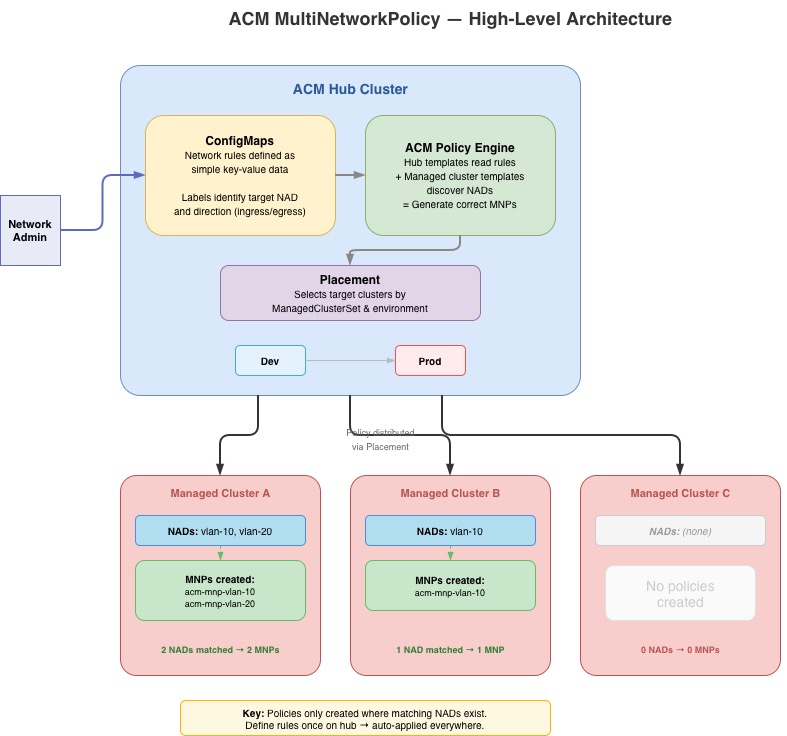
The solution: ConfigMap-driven policies
The approach demonstrated in this repository inverts the problem. Instead of authoring MultiNetworkPolicies directly, administrators define rules as simple ConfigMaps on the Red Hat Advanced Cluster Management hub cluster.
Think of the Red Hat Advanced Cluster Management policy template as your automation engine. It handles the heavy lifting by reading ConfigMaps from the hub, discovering local NADs, and generating consolidated policies for every namespace.
Every team can focus on their superpower with the creation of a clean separation of concerns as follows:
Configuration Layer
- Responsibility: Determine which rules to enforce (ports, CIDRs, protocols).
- Managed by:
ConfigMapson the hub created by network/security teams via GitOps.
Deployment Layer
- Responsibility: Where to enforce (which clusters, which environments).
- Managed by: Red Hat Advanced Cluster Management placements and policy sets. Admin teams working with security teams determine which clusters get which policies.
Rendering Layer
- Responsibility: How to translate rules into multi-network policies.
- Managed by: Use Red Hat Advanced Cluster Management policy templates to aggregate or disaggregate rules into multi-network policies based on requirements.
Operationalize the design
An admin would create the following ConfigMap on the hub cluster to allow web traffic into the vlan-10 network.
yaml
apiVersion: v1
kind: ConfigMap
metadata:
 name: vlan-10-ingress-allow-web
 namespace: multinetpolicy-configs
 labels:
   multinetpolicy-nad: vlan-10
   multinetpolicy-type: ingress
data:
 rules: |
   [
     {
       "protocol": "TCP",
       "port": "443",
       "cidr": "10.0.0.0/24",
       "except": ["10.0.0.5/32", "10.0.0.6/32"]
     },
     {
       "protocol": "TCP",
       "port": "8080",
       "cidr": "172.16.0.0/16"
     }
   ]
The Red Hat Advanced Cluster Management policy would use the label multinetpolicy-nad and multinetpolicy-type to determine how to process this ConfigMap. Once processed, this single ConfigMap will produce ingress rules on every managed cluster that has a vlan-10 NAD in every namespace where that NAD exists. The HTTPS traffic is allowed from 10.0.0.0/24 (excluding two specific hosts) and HTTP traffic from 172.16.0.0/16.
How does Red Hat Advanced Cluster Management affect the ConfigMap as policy? It starts with hub-side data collection.
yaml
object-templates-raw: |
 {{hub- $allCMs := (lookup "v1" "ConfigMap" "multinetpolicy-configs" ""
   "multinetpolicy-nad").items hub}}
 {{hub- $nadConfigs := dict hub}}

 {{hub- range $cm := $allCMs hub}}
   {{hub- $nadName := (index $cm.metadata.labels "multinetpolicy-nad") hub}}
   {{hub- $ruleType := (index $cm.metadata.labels "multinetpolicy-type") hub}}
   {{hub- $parsedRules := (fromJson (index $cm.data "rules")) hub}}

   {{hub- if eq $ruleType "ingress" hub}}
     {{hub- /* aggregate ingress rules by NAD name */ hub}}
   {{hub- else if eq $ruleType "egress" hub}}
     {{hub- /* aggregate egress rules by NAD name */ hub}}
   {{hub- end hub}}
 {{hub- end hub}}
The hub template begins by querying all ConfigMaps in the multinetpolicy-configs namespace that have the multinetpolicy-nad label. It then iterates through them, parsing the JSON rules and organizing them into a dictionary keyed by NAD name. Each entry tracks ingress rules, egress rules, and whether ConfigMaps of each type were found. This is important for the deny-all pattern where an empty rules array still needs to produce a policyTypes entry.
yaml
 {{- range $nad := (lookup "k8s.cni.cncf.io/v1"
   "NetworkAttachmentDefinition" "" "").items }}
   {{hub- range $nadName, $conf := $nadConfigs hub}}
     {{- if eq $nad.metadata.name "{{hub $nadName hub}}" }}
This is where the two template systems intersect. The managed cluster template discovers all NADs on the local cluster where it runs; and for each one, the hub template checks if there are matching rules. The expression eq $nad.metadata.name "{{hub $nadName hub}}" is evaluated in two phases: the hub resolves $nadName to a literal string (e.g., vlan-10), and the managed cluster compares it against the local NAD's name.
Finally when it finds a match, the template emits a complete MultiNetworkPolicy object as follows:
yaml
 - complianceType: mustonlyhave
   objectDefinition:
     apiVersion: k8s.cni.cncf.io/v1beta1
     kind: MultiNetworkPolicy
     metadata:
       name: acm-mnp-{{hub $nadName hub}}
       namespace: '{{ $nad.metadata.namespace }}'
       annotations:
         k8s.v1.cni.cncf.io/policy-for: >-
           {{ $nad.metadata.namespace }}/{{hub $nadName hub}}
       labels:
         managed-by: acm-multinetpolicy
     spec:
       podSelector: {}
       policyTypes: ...
       ingress: ...
       egress: ...
The mustonlyhave compliance type guarantees that Red Hat Advanced Cluster Management rigorously enforces this precise specification. The result is declarative network security, where the hub ConfigMaps serve as the definitive single source of truth. Any rules added manually on managed clusters are automatically removed, and any missing necessary rules are added.
The advantages of this approach
This article described a solution for multi-network policy management. Adopting Red Hat Advanced Cluster Management offers substantial advantages. For example, simplified rule management entails adding or removing a rule, which is as simple as editing one ConfigMap. Also, automated provisioning provides new clusters secured the moment their networks are provisioned. Finally, the Red Hat Advanced Cluster Management dashboard provides centralized compliance with a single-pane-of-glass view of your security posture across the entire fleet.

