The NVIDIA RTX PRO 4500 Blackwell Server Edition brings GPU acceleration to the world's most widely adopted enterprise data center and edge computing platforms. It offers a significant performance increase compared to traditional CPU-only servers. For Red Hat customers, this server edition provides compact acceleration across the Red Hat AI portfolio, including Red Hat AI Inference Server, Red Hat Enterprise Linux AI, and Red Hat AI Enterprise. This gives organizations a practical path to build, optimize, deploy, and scale AI workloads across enterprise datacenter and edge environments.
Optimized for Red Hat AI
The NVIDIA RTX PRO 4500 Blackwell Server Edition is a reliable choice for compact, power-efficient AI deployments. It provides inference performance without adding unnecessary operational complexity. For Red Hat AI users, it offers a practical mix of memory capacity, performance, and efficiency for running modern models in enterprise datacenter and edge environments.
This hardware also stands out as a compelling successor to the NVIDIA L4 for this type of deployment. With more memory, greater performance headroom, and support for low-precision inference, organizations can better tune model size, throughput, latency, and overall deployment efficiency to match workload requirements.
Quantization provides much of that value. 8-bit integer (INT8) is a widely adopted option for inference, while 4-bit integer (INT4) helps fit larger models into more constrained memory footprints. FP8 has also become increasingly important for modern accelerator-based deployments. Blackwell supports NVFP4, giving Red Hat AI users flexibility for advanced model optimization and inference.
NVIDIA RTX PRO Servers with RTX PRO 4500 Blackwell Server Edition are also featured as part of the updated NVIDIA Enterprise AI Factory validated design and the NVIDIA AI Data Platform, a customizable reference design for building modern storage systems for enterprise agentic AI.
Configure the RTX PRO 4500 Blackwell Server Edition on Red Hat AI Enterprise
To use the RTX PRO 4500 Blackwell Server Edition in Red Hat OpenShift, install the Node Feature Discovery and the NVIDIA GPU Operator (Figure 1).
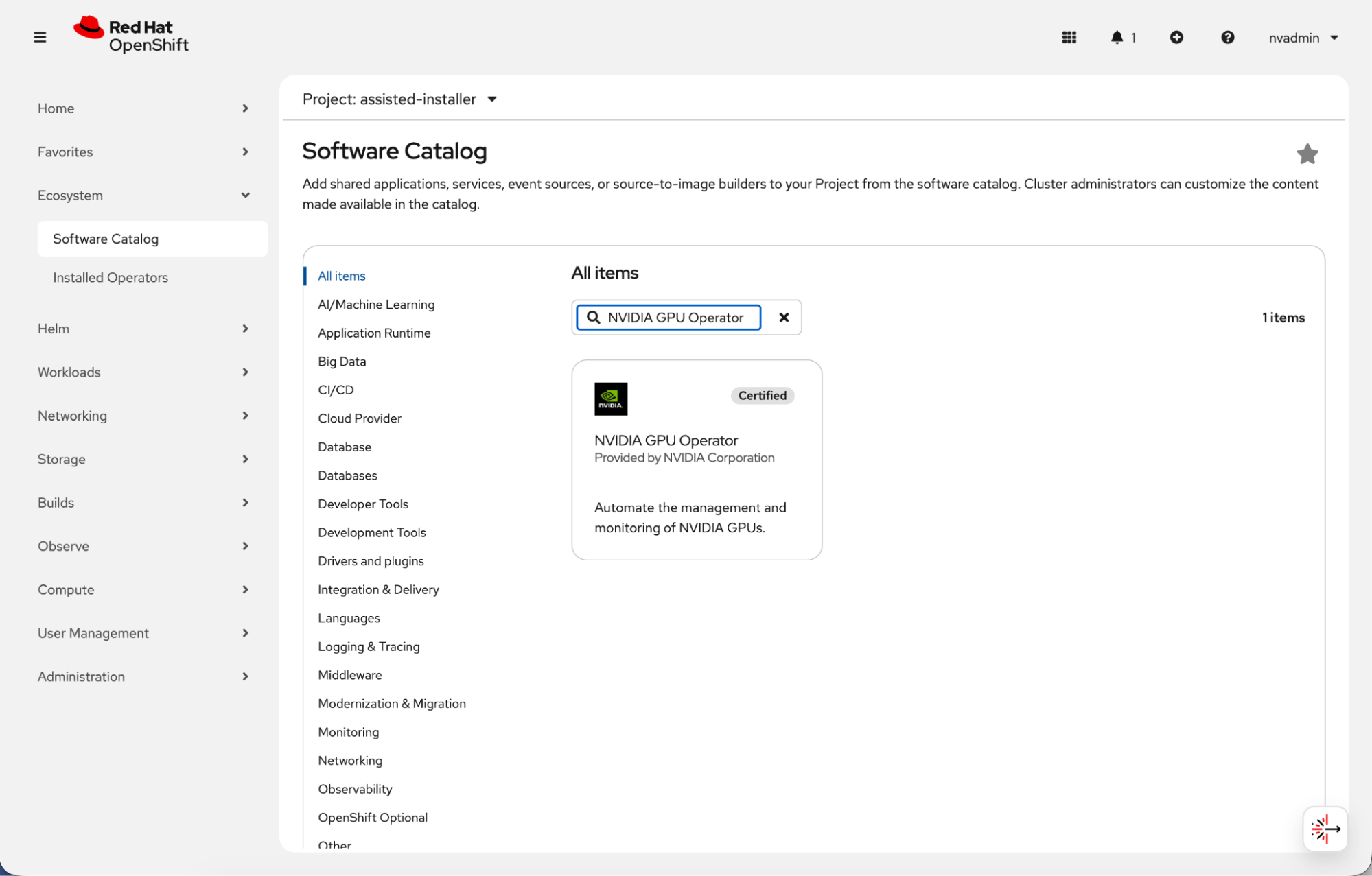
Set these parameters in the NVIDIA GPU Operator installation UI:
- Set the NVIDIA GPU Operator
ClusterPolicyto version580.126.16(version 595 will be the officially supported NVIDIA driver release). Enter this value in the driver version field to deploy the required driver image tag across the cluster. - Enter
nvcr.io/nvidiain the repository field of theClusterPolicyso the operator pulls the container from the correct registry. - Enter
driverin the image field of theClusterPolicyto reference the correct driver container image. - Set
kernelModuleTypeto open in the NVIDIA GPU OperatorClusterPolicyto use open GPU kernel modules during installation.
You can also edit with the cluster policy and add these parameters:
$ oc edit clusterpolicy
driver:
   version: 580.126.16
   image: driver
   repository: nvcr.io/nvidia
   kernelModuleType: open
Once installed, you can use the RTX PRO 4500 Blackwell Server Edition with OpenShift (Figure 2).
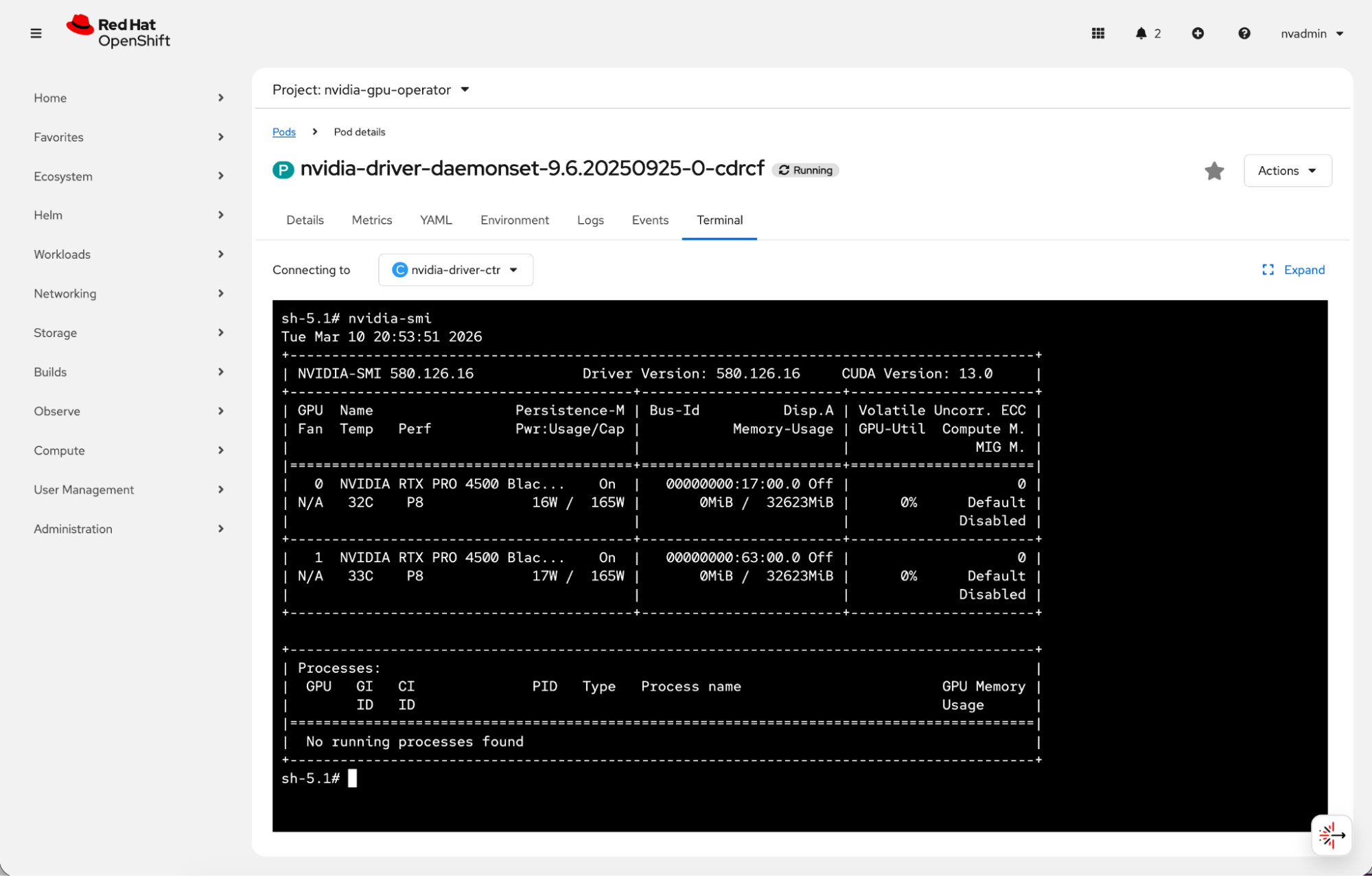
Running nvidia-smi from the NVIDIA driver daemonset in the OpenShift web console confirms that both NVIDIA RTX PRO 4500 Blackwell Server Edition GPUs are detected correctly
Verify the hardware
This validation environment uses Red Hat OpenShift 4.20.15.
$ oc get clusterversion
NAME      VERSION   AVAILABLE   PROGRESSING   SINCE   STATUS
version   4.20.15   True        False         24m     Cluster version is 4.20.15
The deployment uses a single-node Red Hat OpenShift cluster running Kubernetes 1.33.6.
$ oc get nodes
NAME                         STATUS   ROLES                         AGE     VERSION
redhat-validation-02-gpu01   Ready    control-plane,master,worker   6h24m   v1.33.6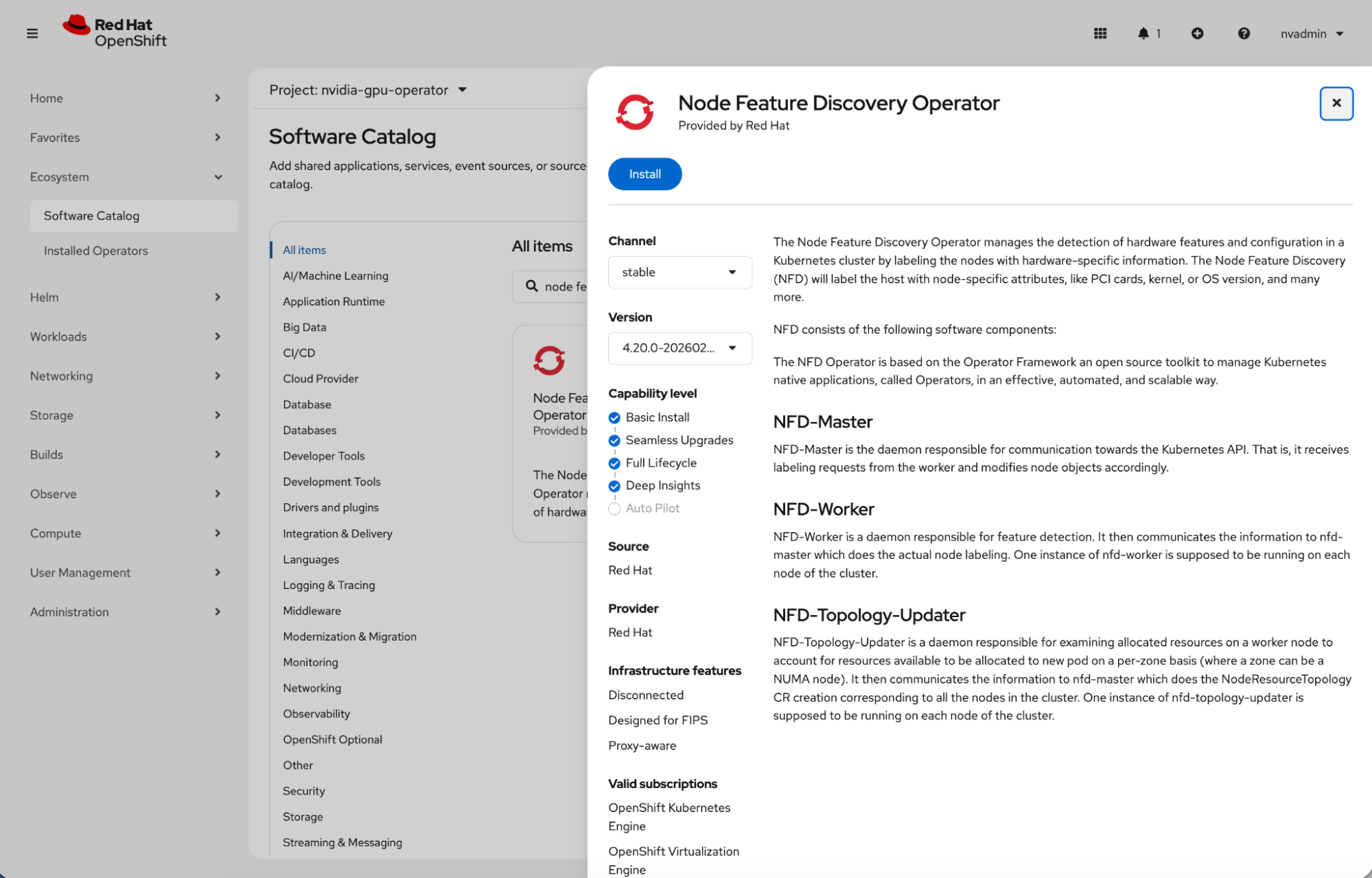
After you install the Node Feature Discovery Operator (Figure 3), the node identifies as hosting an NVIDIA PCI device with Single Root I/O Virtualization (SR-IOV) capabilities.
$ oc describe node/redhat-validation-02-gpu01 | grep pci-10de
                    feature.node.kubernetes.io/pci-10de.present=true
                    feature.node.kubernetes.io/pci-10de.sriov.capable=true
The NVIDIA GPU Operator deploys into the nvidia-gpu-operator project.
$ oc project nvidia-gpu-operator
Now using project "nvidia-gpu-operator" on server "https://api.launchpad.nvidia.com:6443".
During installation, the NVIDIA GPU Operator starts components in sequence. These include the driver daemonset, container toolkit, device plug-in, NVIDIA Data Center GPU Manager (DCGM), GPU Feature Discovery, node status exporter, and operator validator.
$ oc get pods
NAME                                           READY   STATUS     RESTARTS   AGE
gpu-feature-discovery-sftmv                    0/1     Init:0/1   0          2m21s
gpu-operator-595d9f95cf-rv2jr                  1/1     Running    0          13m
nvidia-container-toolkit-daemonset-5h99p       1/1     Running    0          2m21s
nvidia-dcgm-exporter-6trh8                     0/1     Init:0/2   0          2m21s
nvidia-dcgm-r5gsn                              0/1     Init:0/1   0          2m21s
nvidia-device-plugin-daemonset-j7s74           0/1     Init:0/1   0          2m21s
nvidia-driver-daemonset-9.6.20250925-0-cdrcf   2/2     Running    0          2m28s
nvidia-node-status-exporter-5wflx              1/1     Running    0          2m27s
nvidia-operator-validator-vbwlr                0/1     Init:0/4   0          2m21s
Once the installation completes, verify that the NVIDIA GPU Operator components are operational. These include the driver daemonset, MIG Manager, and the node status exporter.
$ oc get pods
NAME                                           READY   STATUS      RESTARTS      AGE
gpu-feature-discovery-sftmv                    1/1     Running     0             3m16s
gpu-operator-595d9f95cf-rv2jr                  1/1     Running     0             14m
nvidia-container-toolkit-daemonset-5h99p       1/1     Running     0             3m16s
nvidia-cuda-validator-pv4mv                    0/1     Completed   0             42s
nvidia-dcgm-exporter-6trh8                     1/1     Running     2 (22s ago)   3m16s
nvidia-dcgm-r5gsn                              1/1     Running     0             3m16s
nvidia-device-plugin-daemonset-j7s74           1/1     Running     0             3m16s
nvidia-driver-daemonset-9.6.20250925-0-cdrcf   2/2     Running     0             3m23s
nvidia-mig-manager-w5ncg                       1/1     Running     0             23s
nvidia-node-status-exporter-5wflx              1/1     Running     0             3m22s
nvidia-operator-validator-vbwlr                1/1     Running     0             3m16s
Running nvidia-smi confirms that OpenShift exposes the NVIDIA RTX PRO 4500 Blackwell Server Edition. The output shows driver version 580.126.16 and CUDA 13.0, with the GPUs idle and ready for workload validation.
$ oc exec -it nvidia-driver-daemonset-9.6.20250925-0-cdrcf   -- nvidia-smi
Tue Mar 10 20:46:45 2026
+-----------------------------------------------------------------------------------------+
| NVIDIA-SMI 580.126.16             Driver Version: 580.126.16     CUDA Version: 13.0     |
+-----------------------------------------+------------------------+----------------------+
| GPU  Name                 Persistence-M | Bus-Id          Disp.A | Volatile Uncorr. ECC |
| Fan  Temp   Perf          Pwr:Usage/Cap |           Memory-Usage | GPU-Util  Compute M. |
|                                         |                        |               MIG M. |
|=========================================+========================+======================|
|   0  NVIDIA RTX PRO 4500 Blac...    On  |   00000000:17:00.0 Off |                    0 |
| N/A   33C    P8             16W /  165W |       0MiB /  32623MiB |      0%      Default |
|                                         |                        |             Disabled |
+-----------------------------------------+------------------------+----------------------+
|   1  NVIDIA RTX PRO 4500 Blac...    On  |   00000000:63:00.0 Off |                    0 |
| N/A   34C    P8             17W /  165W |       0MiB /  32623MiB |      0%      Default |
|                                         |                        |             Disabled |
+-----------------------------------------+------------------------+----------------------+
+-----------------------------------------------------------------------------------------+
| Processes:                                                                              |
|  GPU   GI   CI              PID   Type   Process name                        GPU Memory |
|        ID   ID                                                               Usage      |
|=========================================================================================|
|  No running processes found                                                             |
+-----------------------------------------------------------------------------------------+
Verify the full GPU names with the following command:
$ oc exec -it nvidia-driver-daemonset-9.6.20250925-0-cdrcf -- \
  nvidia-smi --query-gpu=name --format=csv
name
NVIDIA RTX PRO 4500 Blackwell Server Edition
NVIDIA RTX PRO 4500 Blackwell Server Edition
At idle, the NVIDIA RTX PRO 4500 Blackwell Server Edition reports temperatures of 32–33°C and a power draw of approximately 17 W against a 165 W power limit.
$ oc exec -it nvidia-driver-daemonset-9.6.20250925-0-cdrcf -- \
  nvidia-smi --query-gpu=index,name,temperature.gpu,power.draw,power.limit,fan.speed --format=csv
index, name, temperature.gpu, power.draw [W], power.limit [W], fan.speed [%]
0, NVIDIA RTX PRO 4500 Blackwell Server Edition, 32, 16.74 W, 165.00 W, [N/A]
1, NVIDIA RTX PRO 4500 Blackwell Server Edition, 33, 17.40 W, 165.00 W, [N/A]
Each GPU exposes 32 GB of memory:
$ oc exec -it nvidia-driver-daemonset-9.6.20250925-0-cdrcf -- \
  nvidia-smi --query-gpu=index,name,utilization.gpu,utilization.memory,memory.total,memory.used,memory.free --format=csv
index, name, utilization.gpu [%], utilization.memory [%], memory.total [MiB], memory.used [MiB], memory.free [MiB]
0, NVIDIA RTX PRO 4500 Blackwell Server Edition, 0 %, 0 %, 32623 MiB, 0 MiB, 32128 MiB
1, NVIDIA RTX PRO 4500 Blackwell Server Edition, 0 %, 0 %, 32623 MiB, 0 MiB, 32128 MiB
At idle, the graphics and streaming multiprocessor (SM) clocks run at 180 MHz, with memory clocks at 405 MHz.
$ oc exec -it nvidia-driver-daemonset-9.6.20250925-0-cdrcf -- \
  nvidia-smi --query-gpu=index,name,clocks.current.graphics,clocks.current.sm,clocks.current.memory --format=csv
index, name, clocks.current.graphics [MHz], clocks.current.sm [MHz], clocks.current.memory [MHz]
0, NVIDIA RTX PRO 4500 Blackwell Server Edition, 180 MHz, 180 MHz, 405 MHz
1, NVIDIA RTX PRO 4500 Blackwell Server Edition, 180 MHz, 180 MHz, 405 MHz
Topology reporting shows that the GPUs and Mellanox NICs are attached within the same platform fabric, with both GPUs sharing NUMA affinity and standard PCIe-based connectivity.
$ oc exec -it nvidia-driver-daemonset-9.6.20250925-0-cdrcf -- \
  nvidia-smi topo -m
        GPU0    GPU1    NIC0    NIC1    NIC2    NIC3    CPU Affinity    NUMA Affinity   GPU NUMA ID
GPU0     X      NODE    NODE    SYS     SYS     SYS     0-31,64-95      0               N/A
GPU1    NODE     X      NODE    SYS     SYS     SYS     0-31,64-95      0               N/A
NIC0    NODE    NODE     X      SYS     SYS     SYS
NIC1    SYS     SYS     SYS      X      PIX     NODE
NIC2    SYS     SYS     SYS     PIX      X      NODE
NIC3    SYS     SYS     SYS     NODE    NODE     X
Legend:
  X    = Self
  SYS  = Connection traversing PCIe as well as the SMP interconnect between NUMA nodes (e.g., QPI/UPI)
  NODE = Connection traversing PCIe as well as the interconnect between PCIe Host Bridges within a NUMA node
  PHB  = Connection traversing PCIe as well as a PCIe Host Bridge (typically the CPU)
  PXB  = Connection traversing multiple PCIe bridges (without traversing the PCIe Host Bridge)
  PIX  = Connection traversing at most a single PCIe bridge
  NV#  = Connection traversing a bonded set of # NVLinks
NIC Legend:
  NIC0: mlx5_0
  NIC1: mlx5_1
  NIC2: mlx5_2
  NIC3: mlx5_3
MIG is disabled, compute mode remains in the default setting, and both persistence mode and ECC are enabled.
nvidia@redhat-validation-02-bastion:~$ oc exec -it nvidia-driver-daemonset-9.6.20250925-0-cdrcf -- \
  nvidia-smi --query-gpu=index,mig.mode.current,compute_mode,persistence_mode,ecc.mode.current --format=csv
index, mig.mode.current, compute_mode, persistence_mode, ecc.mode.current
0, Disabled, Default, Enabled, Enabled
1, Disabled, Default, Enabled, Enabled
Run Red Hat AI inference
Use the registry.redhat.io/rhaiis/vllm-cuda-rhel9:3.3.0-1771898916 container image to run Red Hat AI Inference Server 3.3.
The Red Hat AI inference CUDA image supports NVIDIA's NVFP4 quantization format on RTX PRO 4500 Blackwell-based GPUs. This allows for efficient, low-cost large-model inference with vLLM. NVFP4 is a 4-bit floating-point format introduced with the NVIDIA Blackwell architecture that uses hardware acceleration.
We have reliably deployed NVFP4-quantized models. Using Red Hat AI Inference Server 3.3, results for completions, tool calling, reasoning, and accuracy are consistent with original full-precision models. Tests confirm good accuracy RedHatAI/Qwen3-30B-A3B-NVFP4 (TP1) and RedHatAI/Llama-3.3-70B-Instruct-NVFP4 (TP2).
| Model name | Completions | Chat completion | Tool calling | Accuracy |
RedHatAI/Qwen3-30B-A3B-NVFP4 | Yes | Yes | Yes | 80% |
RedHatAI/Llama-3.3-70B-Instruct-NVFP4 | Yes | Yes | Yes | 93% |
The following is a sample deployment that serves the model using Red Hat AI Inference Server. An init container downloads the model weights from Hugging Face, and the main container launches vLLM with tensor parallelism across two GPUs with tool-calling support enabled.
Create the necessary resources, such as Hugging Face secret for authentication (needed for gated model) and a persistent volume for caching the model weights, and then apply the deployment:
# Create the HF token secret
oc create secret generic hf-token-secret \
  --from-literal=HUGGING_FACE_TOKEN=<your-token>
# Create a PVC for model caching
oc apply -f - <<EOF
apiVersion: v1
kind: PersistentVolumeClaim
metadata:
  name: model-cache
spec:
  accessModes: [ReadWriteOnce]
  resources:
    requests:
      storage: 100Gi
EOF
# Create model deployment with basic confguration
oc apply -f - <<EOF
kind: Deployment
apiVersion: apps/v1
metadata:
name: llm-deploy-929
namespace: test-rhaiis
labels:
app: rhaiis-runner
spec:
replicas: 1
selector:
matchLabels:
app: rhaiis-runner
template:
metadata:
name: rhaiis-runner
labels:
app: rhaiis-runner
spec:
restartPolicy: Always
initContainers:
- name: download
command:
- /bin/bash
- '-c'
env:
- name: HF_HUB_OFFLINE
value: '0'
- name: HF_HOME
value: /mnt/model
- name: HUGGING_FACE_HUB_TOKEN
valueFrom:
secretKeyRef:
name: hf-token-secret
key: HUGGING_FACE_TOKEN
volumeMounts:
- name: cache-volume
mountPath: /mnt/model
terminationMessagePolicy: File
image: registry.redhat.io/rhaiis/vllm-cuda-rhel9:3.3.0-1771898916
args:
- huggingface-cli download RedHatAI/Qwen3-30B-A3B-NVFP4
imagePullSecrets:
- name: quay-secrets
containers:
- resources:
limits:
cpu: '16'
memory: 30Gi
nvidia.com/gpu: '1'
requests:
cpu: 10m
memory: 29Gi
nvidia.com/gpu: '1'
name: rhaiis
command:
- /bin/bash
- '-c'
env:
- name: HF_HUB_OFFLINE
value: '0'
- name: HF_HOME
value: /mnt/model
- name: HUGGING_FACE_HUB_TOKEN
valueFrom:
secretKeyRef:
name: hf-token-secret
key: HUGGING_FACE_TOKEN
ports:
- containerPort: 8000
protocol: TCP
volumeMounts:
- name: cache-volume
mountPath: /mnt/model
- name: dshm
mountPath: /dev/shm
image: registry.redhat.io/rhaiis/vllm-cuda-rhel9:3.3.0-1771898916
args:
- vllm serve RedHatAI/Qwen3-30B-A3B-NVFP4 --uvicorn-log-level debug --trust-remote-code --enable-chunked-prefill --tensor-parallel-size 1 --max-model-len 10000
volumes:
- name: cache-volume
persistentVolumeClaim:
claimName: model-cache
- name: dshm
emptyDir:
medium: Memory
EOFUse the following commands and outputs to validate model completions, chat performance, and accuracy benchmarks.
1. Completion (POST /v1/completions)
  curl -s -X POST http://localhost:9000/v1/completions \
-H "Content-Type: application/json" \
-d '{
"model": "RedHatAI/Qwen3-30B-A3B-NVFP4",
"prompt": "The capital of France is",
"max_tokens": 32,
"temperature": 0.0
}' | jq -r '.choices[0].text'
" Paris. The capital of the United Kingdom is London. The capital of the United States is Washington, D.C. The capital of Germany is Berlin. The capital",
2.  Chat Completion - single turn:
 curl -X POST http://localhost:9000/v1/chat/completions -H Content-Type: application/json -d {
        "model": "RedHatAI/Qwen3-30B-A3B-NVFP4",
        "messages": [{"role": "user", "content": "What is the capital of France? Answer in one sentence."}],
        "max_tokens": 64,
        "temperature": 0.0
    }
HTTP STATUS: 200
3.  Accuracy(gsm8k):
local-completions ({'model': 'RedHatAI/Qwen3-30B-A3B-NVFP4', 'base_url': 'http://localhost:9000/v1/completions', 'num_concurrent': 100, 'tokenized_requests': False}), gen_kwargs: ({'max_gen_toks': 4048}), limit: None, num_fewshot: None, batch_size: 16
|Tasks|Version|     Filter     |n-shot|  Metric   |   |Value |   |Stderr|
|-----|------:|----------------|-----:|-----------|---|-----:|---|-----:|
|gsm8k|      3|flexible-extract|     5|exact_match|↑  |0.9067|±  |0.0080|
|     |       |strict-match    |     5|exact_match|↑  |0.9052|±  |0.0081|
Performance validation
After confirming accuracy with NVFP4 quantized models, we validated performance characteristics using the GuideLLM benchmarking tool. The tests measured throughput and latency across five NVFP4 models deployed with Red Hat AI Inference Server 3.3 on the RTX PRO 4500 Blackwell Server Edition GPUs. See the full list of NVFP4 quantized models from Red Hat.
Test configuration
The validation used a standardized workload profile with 1,000 input tokens and 1,000 output tokens per request. We tested multiple concurrency levels to identify throughput limits and latency behavior under load. Each concurrency level ran for 2-4 minutes to ensure stable measurements.
All deployments used a dual-replica configuration with tensor parallelism set to 1 (TP=1), meaning each replica ran on a single GPU.
Performance results
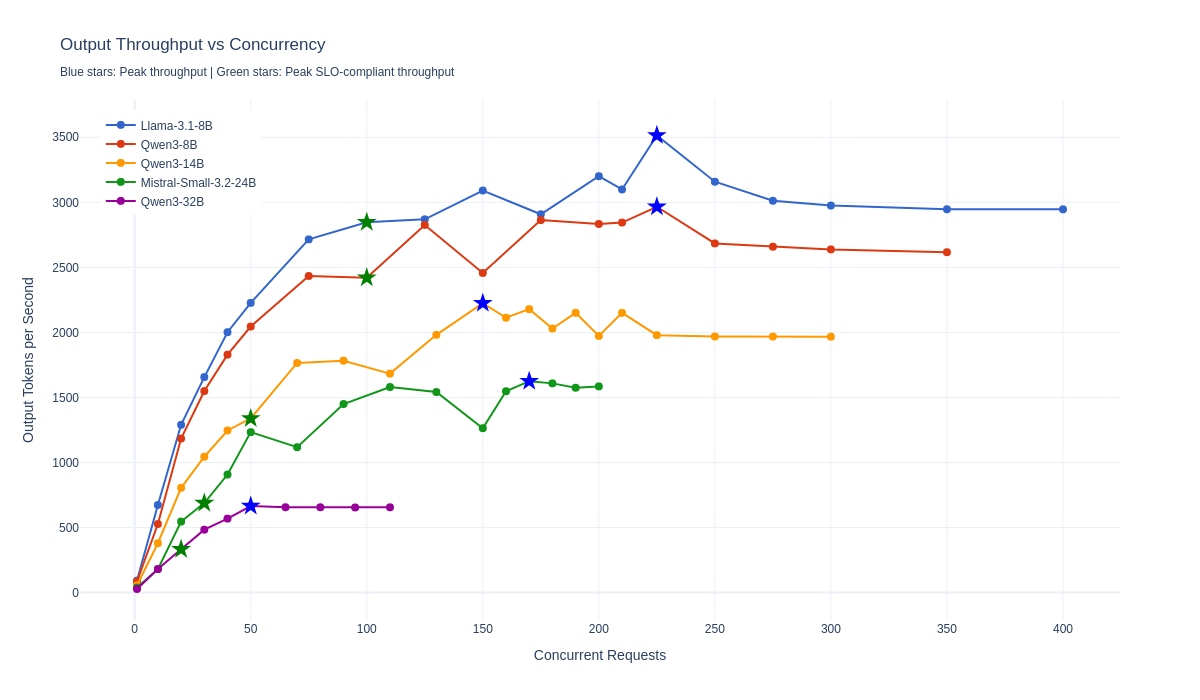
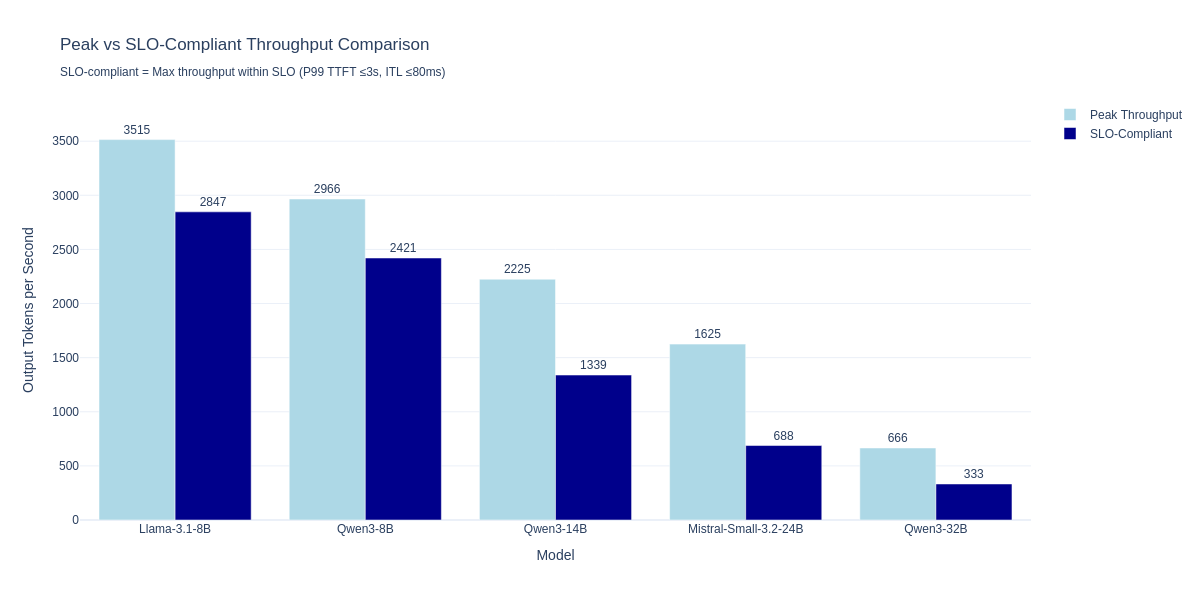
The following table shows peak throughput and peak SLO-compliant throughput for each model. Peak SLO-compliant concurrency is the highest level where P99 Time to First Token (TTFT) is at or below 3,000 ms and P99 Inter-Token Latency (ITL) is at or below 80 ms.
| Model | Size | Peak throughput (tok/s) | Peak concurrency | Peak SLO-compliant throughput (tok/s) | Peak SLO-compliant concurrency | P99 TTFT (ms) | P99 ITL (ms) |
|---|---|---|---|---|---|---|---|
| Llama-3.1-8B | 8B | 3,515 | 225 | 2,847 | 100 | 2,645 | 31 |
| Qwen3-8B | 8B | 2,966 | 225 | 2,421 | 100 | 2,531 | 32 |
| Qwen3-14B | 14B | 2,225 | 150 | 1,339 | 50 | 2,719 | 33 |
| Mistral-Small-3.2-24B | 24B | 1,625 | 170 | 688 | 30 | 2,137 | 34 |
| Qwen3-32B | 32B | 666 | 50 | 333 | 20 | 2,076 | 43 |
Key findings:
- The 8B models demonstrate linear throughput scaling up to 100 concurrent requests and maintain sub-3 second P99 response times.
- The 14B model provides a balance between capability and performance, supporting up to 50 concurrent requests within the prescribed SLO.
- The 24B and larger models are best suited for lower-concurrency workloads where model capability is prioritized over throughput.
The scaling behavior for these models across concurrent requests is shown in Figure 4, and the comparison of peak versus SLO-compliant throughput is shown in Figure 5.
Conclusion
The NVFP4 quantized models running on dual RTX PRO 4500 Blackwell Server Edition GPUs deliver high-speed inference performance across various model sizes. This platform demonstrates that 4-bit NVFP4 quantization, combined with modern GPU architecture and optimized inference engines, delivers more reliable AI inference at scale.
Red Hat OpenShift AI
With the accelerator environment already prepared and validated, the next step is to add Red Hat OpenShift AI so teams can start using those resources for model serving, inference, and other AI workflows at scale. This is the point where the validated hardware configuration becomes available through the OpenShift AI experience and can be used by data scientists, developers, and platform teams.
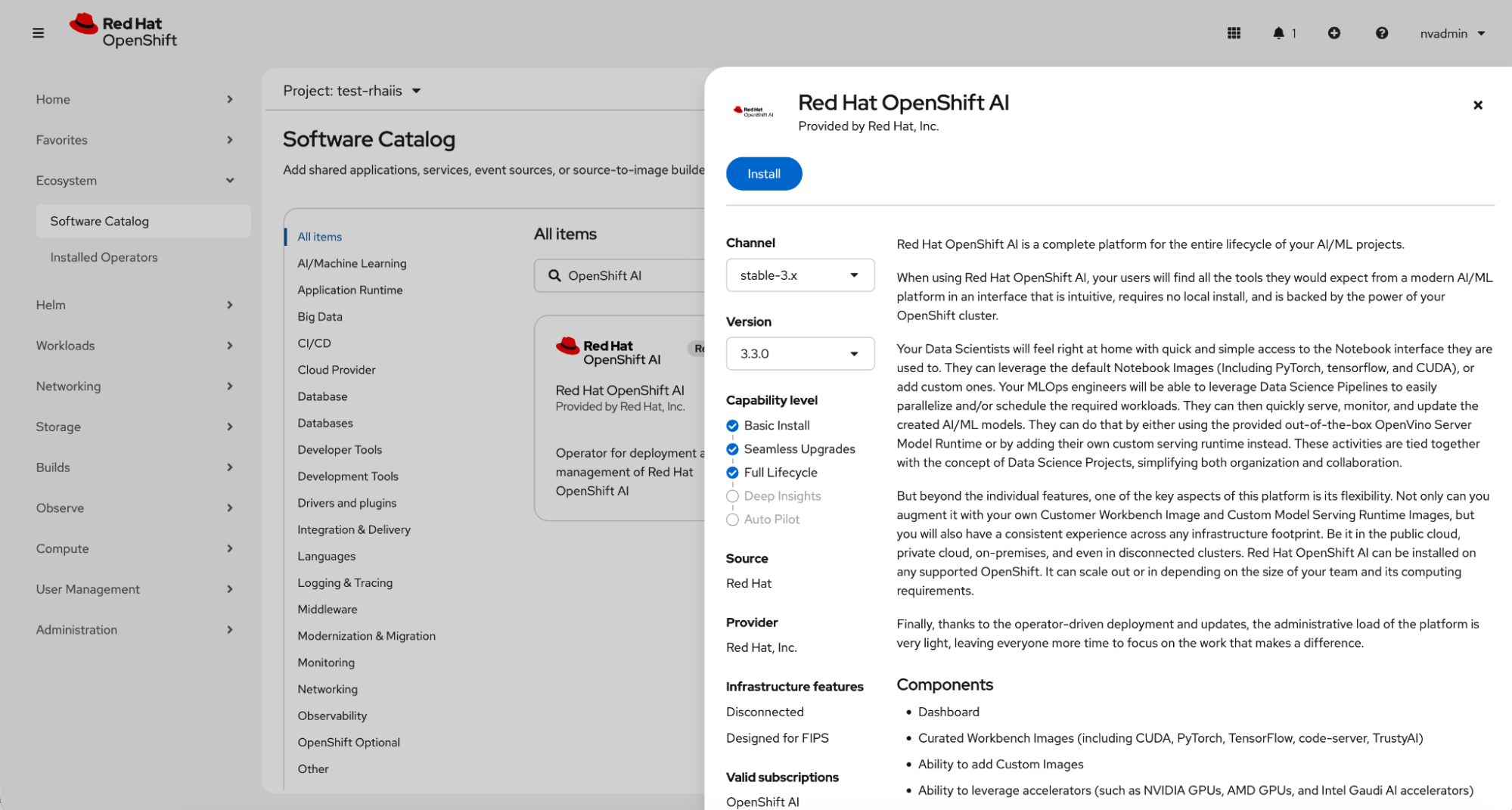
Install Red Hat OpenShift AI from the Software Catalog using the stable channel stable-3.x and version 3.3.0. Once installed, the platform can make use of the available accelerator resources for AI workloads (Figure 6).
To make the NVIDIA RTX PRO 4500 Blackwell Server Edition available as a reusable accelerator option in Red Hat OpenShift AI, we created a dedicated hardware profile. In OpenShift AI, hardware profiles define the resource configuration that users can select for workbenches and other AI workloads, combining CPU, memory, and accelerator settings into a single reusable profile.
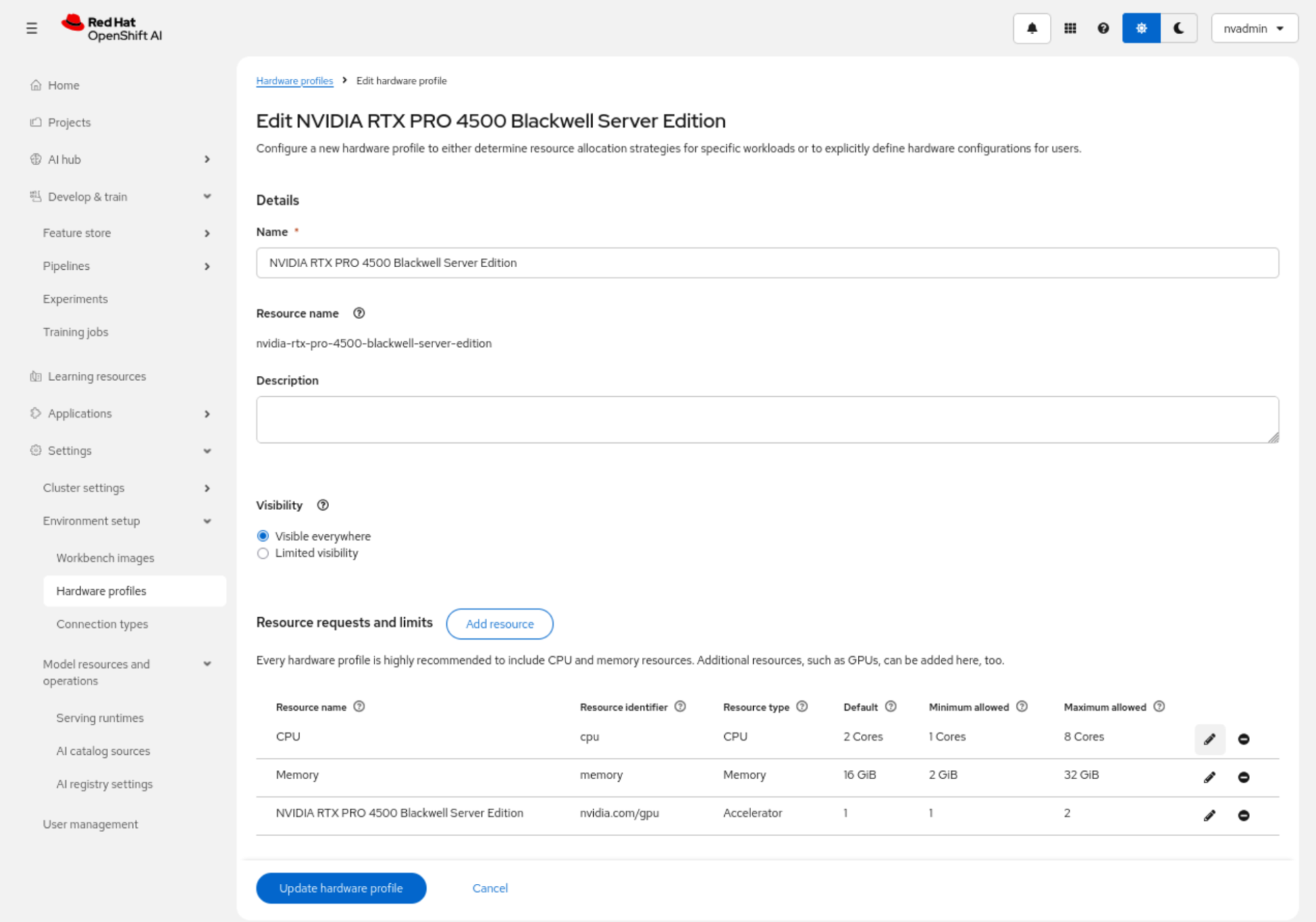
For this configuration, we created a profile named NVIDIA RTX PRO 4500 Blackwell Server Edition and associated it with the accelerator resource identifier nvidia.com/gpu. We then defined the default and allowed resource ranges for CPU, memory, and GPU allocation. In this example, the profile was configured with a default of 2 CPU cores, 16 GiB of memory, and 1 GPU, with support for scaling to 8 CPU cores, 32 GiB of memory, and 2 GPUs as required (Figure 7).
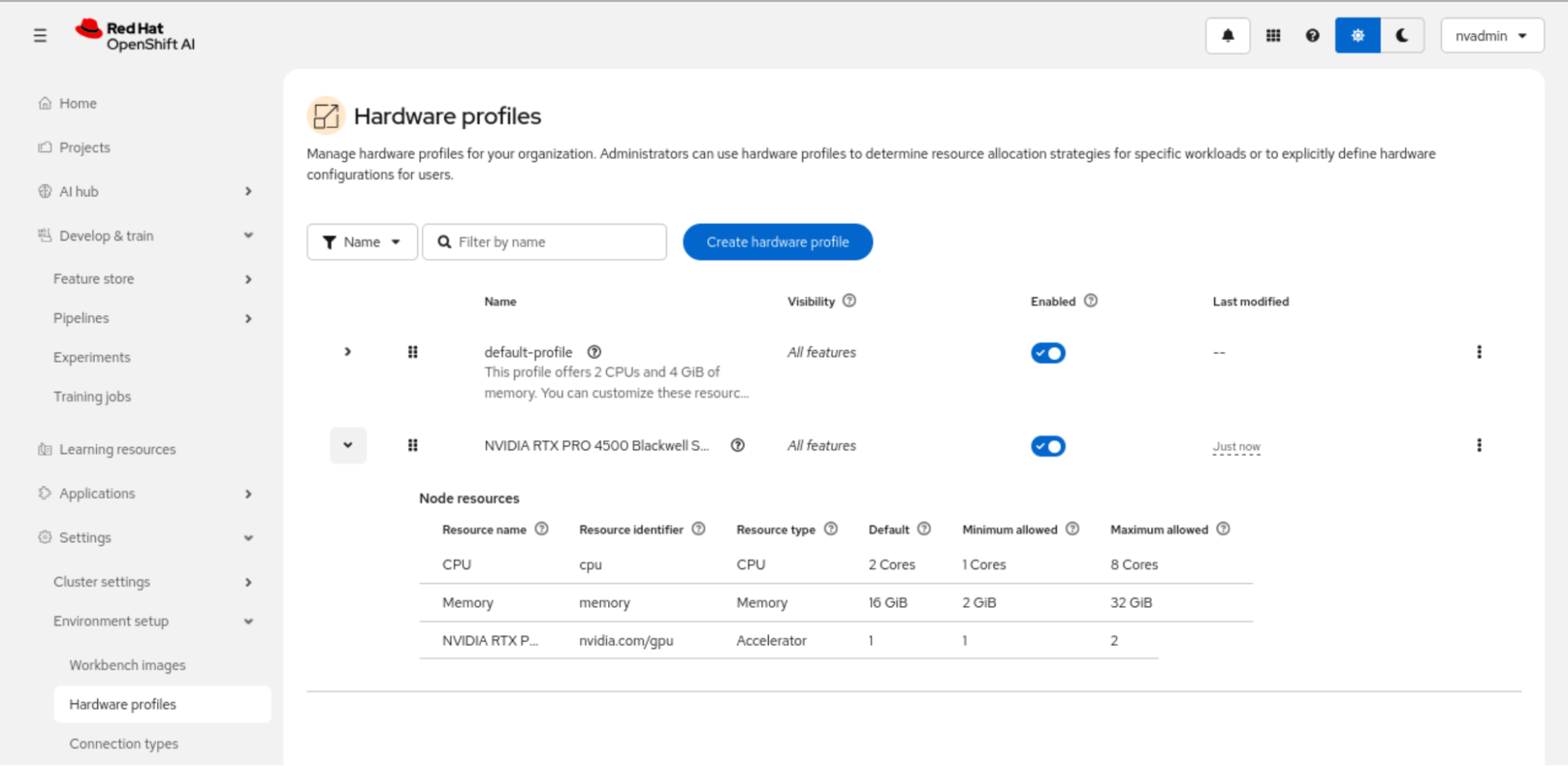
After the profile is updated, it is listed as an enabled hardware profile in OpenShift AI and can be used as a standard accelerator-backed configuration for supported workloads (Figure 8).
For example, we created a distributed training job using Kubeflow Trainer to fine-tune a large language model (LLM) on Red Hat OpenShift AI using two NVIDIA RTX PRO 4500 Blackwell Server Edition GPUs. Figure 9 illustrates the training configuration and metrics during the distributed model fine-tuning process directly from a Jupyter notebook using TensorBoard.
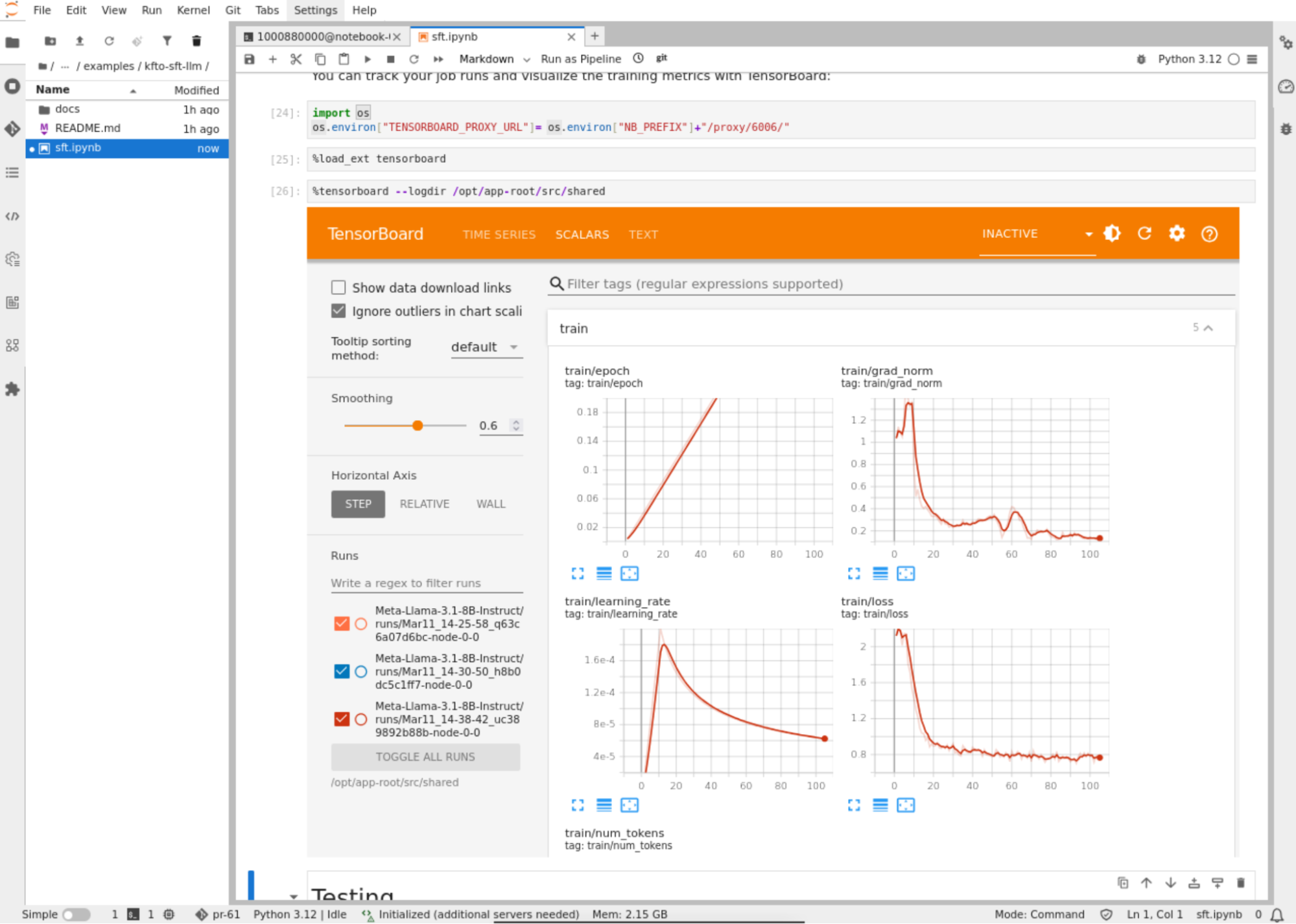
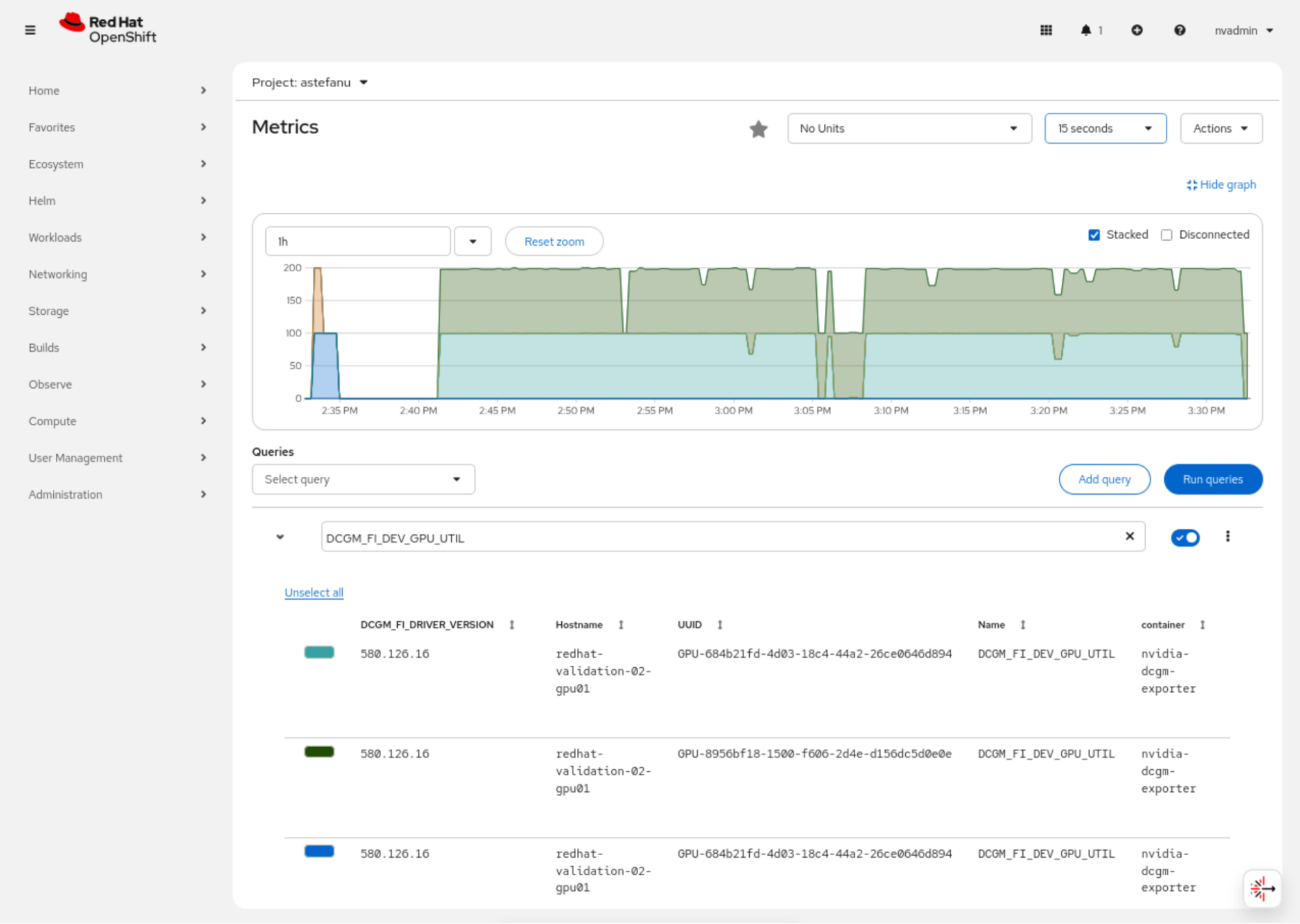
Figure 10 displays the OpenShift web console observability dashboard, which allows you to monitor the GPU metrics in real time and shows the high utilization of the two NVIDIA RTX PRO 4500 Blackwell Server Edition GPUs during the fine-tuning job.
Summary and next steps
The NVIDIA RTX PRO 4500 Blackwell Server Edition provides a clear upgrade path for teams moving beyond the NVIDIA L4. By using the NVFP4 format on Red Hat OpenShift, you can maximize inference efficiency while maintaining a compact hardware footprint. Use the configuration steps in this guide to begin validating Blackwell-class workloads in your environment.
Learn more about the NVIDIA RTX PRO 4500 Blackwell Server Edition GPU and view the technical specifications.
Last updated: March 17, 2026
