In our previous guide, we explored how to build a zero trust environment on Red Hat OpenShift using Red Hat Connectivity Link. I demonstrated how to manage secure connectivity between services and identity providers, using Keycloak and Authorino to handle authentication and authorization.
While standard rate limiting helps prevent system abuse by counting requests, advanced architectures—especially those using large language model (LLM) APIs—require a more precise approach. For these services, resource use and costs are tied to the number of tokens processed rather than the number of requests made.
This article introduces the TokenRateLimitPolicy, a custom resource that lets you limit rates based on token use. I will show you how to find token data in API responses and apply different limits to user groups, ensuring fair use and better cost management in your AI workflows.
TokenRateLimitPolicy: Advanced rate limiting for token-based APIs
While traditional rate limiting focuses on the number of requests, TokenRateLimitPolicy provides a more sophisticated approach for APIs that consume tokens (Figure 1). This is particularly useful for large language model (LLM) APIs, where cost and resource use are more closely related to the number of tokens processed than the number of requests.
TokenRateLimitPolicy is a custom resource that enables rate limiting based on token consumption rather than request count. This policy extends the Envoy rate limit service (RLS) protocol with automatic token use extraction, making it particularly valuable for protecting LLM APIs where the cost per request can vary significantly based on the number of tokens in the input and output.
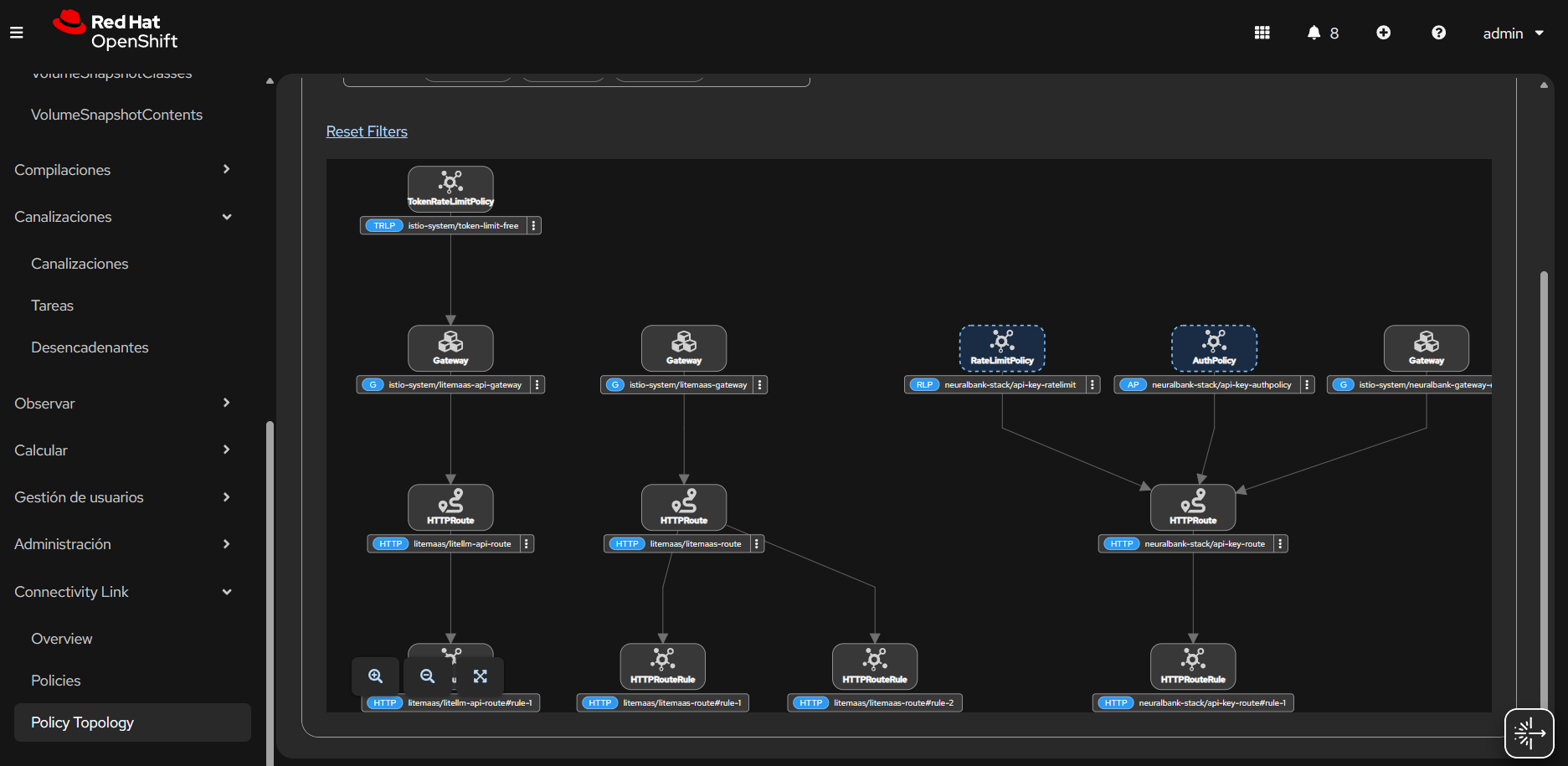
How TokenRateLimitPolicy works
The token-based rate limiting process follows these steps:
- Authentication: The
AuthPolicyvalidates API keys and enriches requests with user metadata, including user groups and subscription levels. - Token extraction:
TokenRateLimitPolicyautomatically extracts token use from LLM API responses. It supports standard OpenAI-compatible response formats that include token use information. - Rate limiting: Tokens are counted against user-specific limits based on their subscription level or group membership.
- Enforcement: If a user goes over their limit, the system rejects the request with an HTTP 429 (Too Many Requests) status code. This prevents abuse and ensures fair use based on actual resource consumption.
Example configuration
The following example demonstrates how to configure different daily token limits for different user tiers:
apiVersion: kuadrant.io/v1alpha1
kind: TokenRateLimitPolicy
metadata:
  name: llm-token-limits
spec:
  targetRef:
    group: gateway.networking.k8s.io
    kind: Gateway
    name: api-gateway
  limits:
    free:
      rates:
        - limit: 20000
          window: 24h
      when:
        - predicate: request.path == "/v1/chat/completions"
        - predicate: >
            request.auth.identity.metadata.annotations["kuadrant.io/groups"].split(",").exists(g, g == "free")
      counters:
        - expression: auth.identity.userid
    gold:
      rates:
        - limit: 200000
          window: 24h
      when:
        - predicate: request.path == "/v1/chat/completions"
        - predicate: >
            request.auth.identity.metadata.annotations["kuadrant.io/groups"].split(",").exists(g, g == "gold")
      counters:
        - expression: auth.identity.userid
In this configuration, users in the "free" tier have a daily limit of 20,000 tokens, while "gold" tier users can use up to 200,000 tokens per day. The policy applies to requests matching the /v1/chat/completions path and verifies group membership through identity metadata annotations.
MaaS backend: Subscription and API key management
Model as a Service (MaaS) provides AI models through an API. Instead of hosting a large model on your own hardware, you use a service that manages the model for you. This helps you add AI features to your applications without managing the complex systems behind them.
When you use TokenRateLimitPolicy with a MaaS server, the MaaS backend must handle subscription and API key management. Because MaaS will manage the APIs, you need to create subscriptions and API keys from the MaaS backend service itself.
The MaaS backend should provide functionality to:
- Create subscriptions: Allow users or administrators to create subscription tiers (for example, "free", "developer", "enterprise") with specific token limits.
- Generate API keys: Create API keys for authenticated users, associating each key with a specific subscription tier and user identity.
- Manage API key metadata: Store API key metadata including the associated user group, subscription tier, and token limits in a format that can be consumed by the
AuthPolicy. - Validate API keys: Provide an endpoint or mechanism for the gateway to validate API keys and retrieve associated metadata.
When a user creates a subscription through the MaaS backend, the system should:
- Create a subscription record with the selected tier (for example, "developer", "enterprise")
- Generate an API key associated with that subscription
- Store the API key with metadata including the user's group membership, which will be used by the
AuthPolicyto enrich requests with identity information - Ensure the API key metadata includes annotations like kuadrant.io/groups that match the groups defined in your
TokenRateLimitPolicy
This backend management is necessary because TokenRateLimitPolicy relies on AuthPolicy to extract user identity and group membership in the API key metadata. The MaaS backend must ensure that API keys are properly annotated with group information that corresponds to the subscription tiers defined in your rate limiting policies.
Example API call with TokenRateLimitPolicy
Once you have configured the TokenRateLimitPolicy and created a subscription with an API key through the MaaS backend, you can make API calls to the MaaS service. Here's an example of how to make a request to a MaaS endpoint protected by token-based rate limiting:
# Make a request to the MaaS chat completions endpoint
curl -X POST https://maas.apps.rm2.thpm.p1.openshiftapps.com/v1/chat/completions \
  -H "Content-Type: application/json" \
  -H "Authorization: Bearer sk-your-api-key-here" \
  -d '{
    "model": "gpt-4",
    "messages": [
      {
        "role": "user",
        "content": "Explain how TokenRateLimitPolicy works"
      }
    ],
    "temperature": 0.7,
    "max_tokens": 500
  }'
In this example:
- The request goes to the MaaS gateway endpoint at
https://maas.apps.rm2.thpm.p1.openshiftapps.com/v1/chat/completions. - The API key is provided in the Authorization header using the Bearer token format.
- The request includes standard OpenAI-compatible parameters (
model,messages,temperature,max_tokens). - The
AuthPolicyvalidates the API key and enriches the request with user metadata (including group membership). - The
TokenRateLimitPolicyextracts token use from the response and counts it against the user's subscription tier limits.
The response from the MaaS service will include token use information in a format like this:
{
  "id": "chatcmpl-abc123",
  "object": "chat.completion",
  "created": 1677652288,
  "model": "gpt-4",
  "choices": [
    {
      "index": 0,
      "message": {
        "role": "assistant",
        "content": "TokenRateLimitPolicy is a custom resource..."
      },
      "finish_reason": "stop"
    }
  ],
  "usage": {
    "prompt_tokens": 15,
    "completion_tokens": 485,
    "total_tokens": 500
  }
}
TokenRateLimitPolicy automatically extracts the total_tokens value from the usage field and counts it against the user's daily limit based on their subscription tier. If the user exceeds their limit, subsequent requests will return an HTTP 429 status code until the time window resets.
If you exceed your token limit, you'll receive a response like:
HTTP/1.1 429 Too Many Requests
Content-Type: application/json

{
  "error": {
    "message": "Rate limit exceeded. Token limit for your subscription tier has been reached.",
    "type": "rate_limit_error",
    "code": "token_limit_exceeded"
  }
}
Key features of TokenRateLimitPolicy:
- Automatic token extraction: The policy finds token use in OpenAI-compatible API responses. You do not need to parse them manually.
- Tiered access control: You can set different token limits for different user groups or subscription levels.
- Path-based rules: You can apply different limits to specific API endpoints.
- Time-window based: The policy works with various time windows, such as hourly or daily.
- Integration with
AuthPolicy: This policy works with authentication policies to identify users and their group memberships.
This approach is particularly valuable for organizations offering LLM APIs where costs are directly tied to token consumption. By implementing token-based rate limiting, you can provide fair use policies that align with actual resource consumption, enabling more accurate cost management and preventing abuse while allowing legitimate high-volume users to operate within their tier limits.
Deploy a MaaS server with TokenRateLimitPolicy
You can see a practical application of TokenRateLimitPolicy in Figure 2. This example shows a Model as a Service (MaaS) server within your OpenShift cluster. MaaS servers provide LLM capabilities as a service, and managing token consumption is critical for cost control and fair resource allocation.
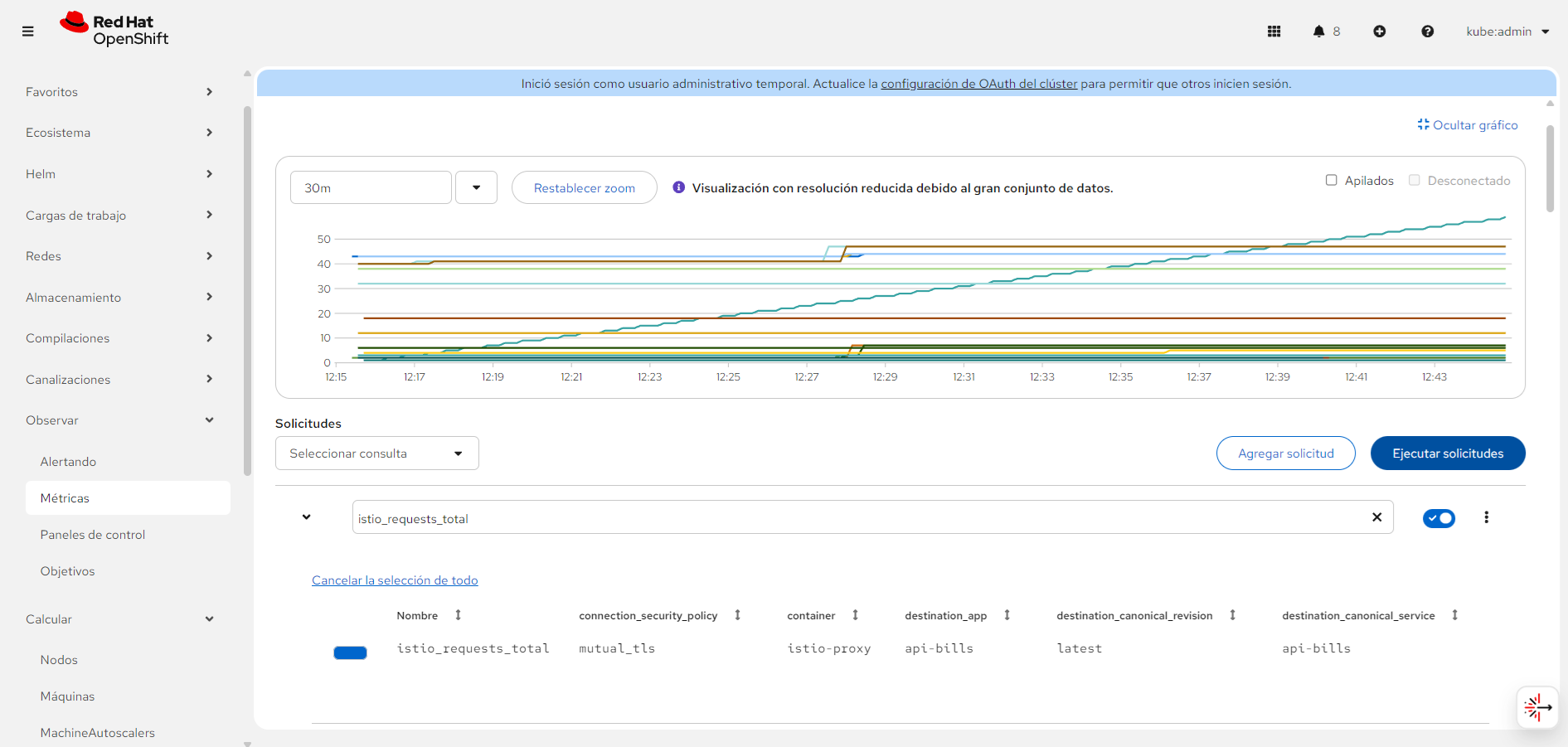
LiteMaaS deployment
For a complete MaaS implementation example, you can deploy LiteMaaS, a proof-of-concept application for managing LLM subscriptions, API keys, and use. LiteMaaS integrates with LiteLLM to provide a unified interface for accessing multiple LLMs and budget management. The repository includes deployment configurations for OpenShift and Kubernetes, making it an ideal companion for implementing TokenRateLimitPolicy in production environments.
When deploying a MaaS server in your cluster, you have two primary architectural approaches for implementing token-based rate limiting: you can use a dedicated gateway with API key authentication or connect through Model Context Protocol (MCP) endpoints.
Option 1: A dedicated gateway with API key authentication
The first approach involves creating a separate gateway specifically for the MaaS service, configured with API key authentication. This provides a clean separation between your main application gateway (which uses OIDC) and the MaaS gateway (which uses API keys for programmatic access).
In this scenario, you would:
- Create a new gateway: Deploy a dedicated Kubernetes
Gatewayresource for the MaaS service. Keep it separate from your main application gateway. This gateway handles traffic specifically for LLM API endpoints. - Configure API key authentication: Use an
AuthPolicywith API key authentication to validate requests. API keys are ideal for programmatic access to LLM services, as they don't require the interactive OIDC flow. - Apply
TokenRateLimitPolicy: Attach aTokenRateLimitPolicyto the MaaS gateway that extracts token use from responses and enforces limits based on the API key's associated user group or subscription tier. - Route configuration: Create
HTTPRouteresources that route MaaS-specific paths (for example,/v1/chat/completions,/v1/completions) to your MaaS backend service.
Here's an example configuration for a MaaS gateway with API key authentication and token-based rate limiting:
apiVersion: gateway.networking.k8s.io/v1
kind: Gateway
metadata:
  name: maas-gateway
  namespace: istio-system
spec:
  gatewayClassName: istio
  listeners:
    - name: https
      port: 443
      protocol: HTTPS
      hostname: "maas.apps.rm2.thpm.p1.openshiftapps.com"
---
apiVersion: kuadrant.io/v1beta2
kind: AuthPolicy
metadata:
  name: maas-api-key-auth
spec:
  targetRef:
    group: gateway.networking.k8s.io
    kind: Gateway
    name: maas-gateway
  rules:
    - hostnames:
        - "maas.apps.rm2.thpm.p1.openshiftapps.com"
      auths:
        apiKey:
          selector:
            matchLabels:
              group: "maas-users"
---
apiVersion: kuadrant.io/v1alpha1
kind: TokenRateLimitPolicy
metadata:
  name: maas-token-limits
spec:
  targetRef:
    group: gateway.networking.k8s.io
    kind: Gateway
    name: maas-gateway
  limits:
    developer:
      rates:
        - limit: 50000
          window: 24h
      when:
        - predicate: request.path == "/v1/chat/completions"
        - predicate: >
            request.auth.identity.metadata.annotations["kuadrant.io/groups"].split(",").exists(g, g == "developer")
      counters:
        - expression: auth.identity.userid
    enterprise:
      rates:
        - limit: 500000
          window: 24h
      when:
        - predicate: request.path == "/v1/chat/completions"
        - predicate: >
            request.auth.identity.metadata.annotations["kuadrant.io/groups"].split(",").exists(g, g == "enterprise")
      counters:
        - expression: auth.identity.userid
Option 2: MCP endpoint integration
You can also use Model Context Protocol (MCP) endpoints for the MaaS service. MCP is a standardized protocol for interacting with AI models and tools that provides a structured approach to LLM interactions. Use this if you want to integrate MaaS capabilities directly into existing application workflows instead of using a separate API.
When using MCP endpoints, the architecture changes as follows:
- MCP endpoint configuration: Configure your MaaS server to expose MCP-compatible endpoints. These endpoints follow the MCP specification for tool invocation and context management.
- Gateway route updates: Instead of creating a separate gateway, you can add MCP-specific routes to your existing gateway using path-based routing to distinguish MCP endpoints (for example,
/mcp/tools,/mcp/context). - Unified authentication: Use the same OIDC authentication flow as your main application, but apply different rate limiting policies to MCP endpoints. This provides a consistent authentication experience while allowing specialized token-based limits for LLM operations.
TokenRateLimitPolicyfor MCP: Apply aTokenRateLimitPolicythat specifically targets MCP endpoints, extracting token use from MCP response formats and enforcing limits based on user identity.
Here's an example of applying TokenRateLimitPolicy to MCP endpoints within your existing gateway:
apiVersion: kuadrant.io/v1alpha1
kind: TokenRateLimitPolicy
metadata:
  name: mcp-token-limits
spec:
  targetRef:
    group: gateway.networking.k8s.io
    kind: HTTPRoute
    name: mcp-route
  limits:
    standard-user:
      rates:
        - limit: 100000
          window: 24h
      when:
        - predicate: request.path.startsWith("/mcp/")
        - predicate: >
            request.auth.identity.metadata.annotations["kuadrant.io/groups"].split(",").exists(g, g == "standard")
      counters:
        - expression: auth.identity.userid
    premium-user:
      rates:
        - limit: 1000000
          window: 24h
      when:
        - predicate: request.path.startsWith("/mcp/")
        - predicate: >
            request.auth.identity.metadata.annotations["kuadrant.io/groups"].split(",").exists(g, g == "premium")
      counters:
        - expression: auth.identity.userid
How to pick the right approach for your needs
The choice between a dedicated gateway with API keys versus MCP endpoint integration depends on your specific requirements:
- Dedicated gateway with API keys: Best suited when you want to provide MaaS as a standalone service with programmatic access. This approach offers clear separation of concerns, easier API key management, and is ideal for external consumers or third-party integrations.
- MCP Endpoint integration: More appropriate when MaaS capabilities are tightly integrated into your application workflow. This approach provides a unified authentication experience, simpler routing configuration, and better alignment with application-specific use cases.
Both approaches use TokenRateLimitPolicy to ensure fair use and cost control, but they differ in their authentication mechanisms and architectural patterns. The dedicated gateway approach provides more flexibility for external API consumers, while the MCP endpoint approach offers better integration with existing application architectures.
Monitoring API calls
You can monitor API calls through several mechanisms:
- Argo CD console: Monitor the health and synchronization status of all deployed components.
- Service mesh metrics: View detailed metrics about service-to-service communication through Istio's observability tools.
- Keycloak audit logs: Review authentication events and security incidents in the Keycloak console.
- API Gateway metrics: Track request rates, latency, and error rates at the gateway level.
These observability capabilities provide comprehensive visibility into your system's health, performance, and security posture, enabling proactive management and rapid problem resolution.
Observability: Understanding what's happening
Security and functionality are important, but you also need visibility into what's happening in your system. This architecture includes \ observability capabilities that provide insights at every layer.
At the service mesh level, Istio provides rich observability through metrics, logs, and distributed traces. This gives you detailed visibility into service-to-service communication, helping you understand traffic patterns, identify bottlenecks, and troubleshoot issues. Argo CD monitoring tracks application deployment status and synchronization health, ensuring your GitOps workflow is functioning correctly and alerting you to any drift between desired and actual state.
Security observability comes through Keycloak audit logs, which capture authentication events and security incidents. These logs are invaluable for security analysis, compliance auditing, and incident response. At the API Gateway level, metrics track request rates, latency, and error rates, providing a clear picture of API performance and helping you identify issues before they affect users.
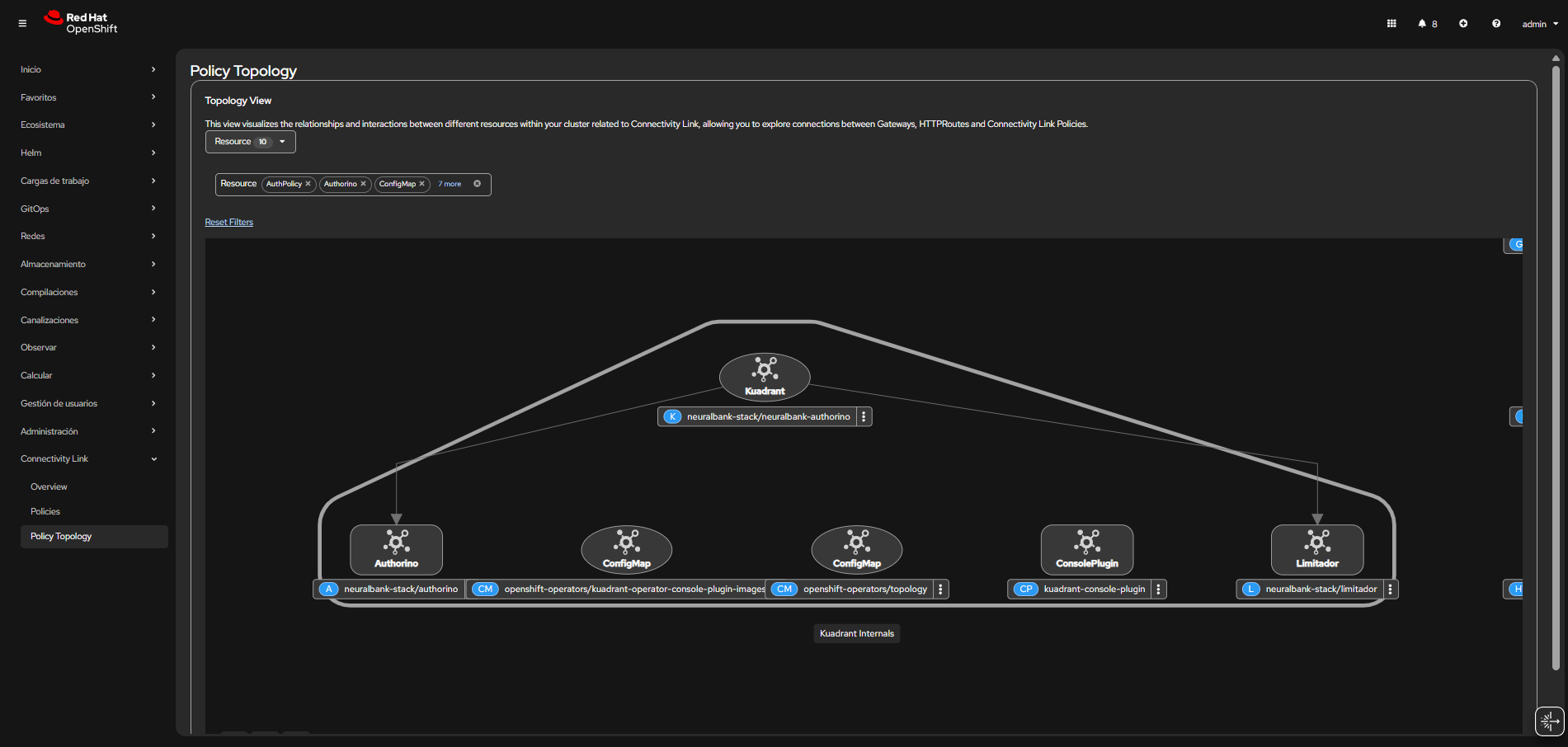
Together, these observability capabilities create a provide a clear view of your system's health, performance, and security posture. Figure 3 shows a dashboard that helps you find and fix problems quickly.
Real-world applications: Where this architecture shines
While this implementation serves as an excellent demonstration, it addresses real-world challenges that organizations face every day. Understanding the use cases helps clarify when and why you might choose this approach.
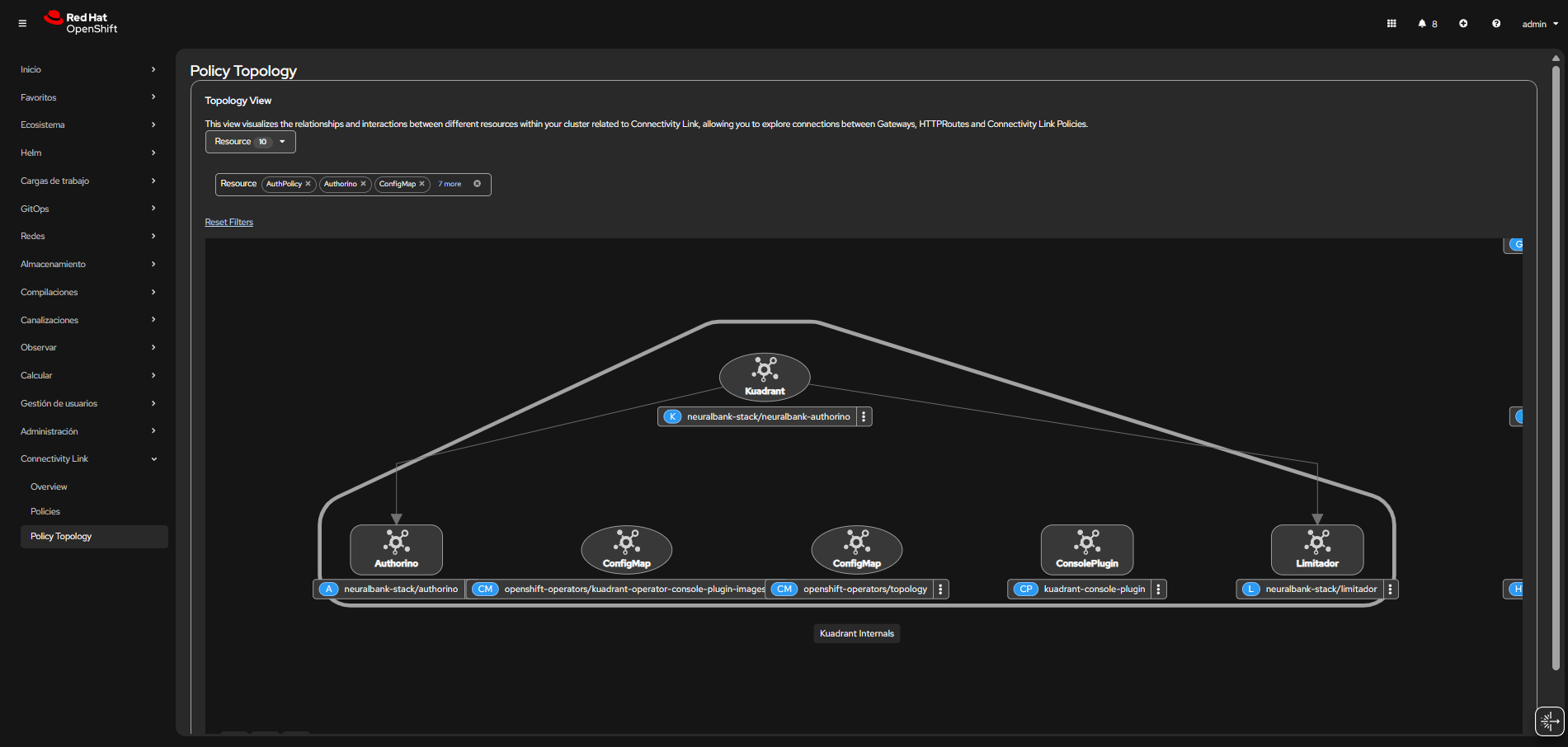
These diverse application patterns and security requirements are addressed by Connectivity Link, as shown in Figure 4.
Enterprise microservices
For enterprise microservices architectures, this implementation provides a proven pattern for securing complex distributed systems with zero trust principles. The combination of service mesh security, gateway-level authentication, and policy-based authorization creates a defense-in-depth strategy that helps protect sensitive business applications.
API management
When it comes to API management, the OIDC-based API protection with rate limiting addresses common concerns around API security and availability. Whether you're building public APIs, partner integrations, or internal service APIs, this pattern provides consistent, declarative security that scales with your API portfolio.
Multi-tenant applications
Multi-tenant applications benefit particularly from Keycloak's realm-based isolation, which allows you to serve multiple customers or business units from a single infrastructure while maintaining strict separation. The GitOps workflow makes it straightforward to manage tenant-specific configurations while maintaining consistency across the platform.
GitOps
For organizations embracing GitOps workflows, this implementation serves as a comprehensive example of infrastructure-as-code and declarative deployments. It demonstrates how complex security configurations can be managed through version control, enabling collaboration, auditability, and rapid iteration.
Application deployment
Finally, for developer platforms and internal tooling, this architecture provides security-focused, self-service application deployment capabilities. You can deploy applications with confidence, knowing that security is built into the platform rather than requiring manual configuration for each new service.
Best practices and lessons from production
As you implement this architecture in your own environment, there are several best practices that can help ensure success. These recommendations come from real-world experience and address common challenges.
Manage secrets securely
Secret management deserves particular attention. Don't hardcode sensitive data like client secrets in YAML files. Use Kubernetes Secrets or external secret management systems instead. This approach provides better security, easier rotation, and proper access controls. Consider tools like Sealed Secrets or external secret operators that integrate with your existing secret management infrastructure.
Use version control for workflows
Your GitOps workflow should maintain all configurations in version control with proper branching strategies. Use feature branches for changes, require pull request reviews, and maintain a clear promotion path from development through staging to production. This discipline pays dividends when you need to roll back changes or understand why a configuration was modified.
Monitor all security components
Set up alerts for authentication failures, authorization denials, rate limit violations, and service mesh policy violations. These alerts warn you about security issues and help you understand how your security policies are performing in practice.
Set up security alerts
Keep cluster-specific configurations documented and versioned. While the base configuration is portable, each cluster will have unique aspects like domain names, network policies, or resource limits. Documenting these differences helps with troubleshooting and ensures consistency when setting up new environments.
Test changes before production
Always validate configurations in non-production environments before deploying to production. The declarative nature of this approach makes it easy to test changes, but you should still have a proper testing process that validates both functionality and security.
Limit access permissions
Finally, follow the principle of least privilege when configuring Argo CD and operator permissions. While cluster-admin access is needed for initial setup, the ongoing operations should use more restricted permissions where possible. This reduces the blast radius if credentials are compromised and aligns with security best practices.
Conclusion
Red Hat Connectivity Link is a production-ready way to implement zero trust architecture on OpenShift. What makes this approach particularly valuable is how it combines multiple powerful technologies—GitOps workflows, modern service mesh technologies, and industry-standard authentication protocols—into a cohesive solution that achieves reliable security while maintaining operational simplicity and scalability.
The journey from a basic application to a fully secured zero trust implementation might seem complex at first, but this declarative approach makes it easier. You define desired states in Kubernetes manifests, and GitOps handles the rest. The combination of Argo CD and Kubernetes operators enables rapid deployment and consistent configuration across environments, whether you're working with a single cluster or managing deployments across multiple regions.
This foundation supports modern microservices architectures while maintaining the highest security standards. As your organization grows and evolves, the patterns and practices demonstrated here will scale with you, providing a robust platform for secure application delivery. The investment in understanding and implementing these patterns pays dividends in improved security posture, operational efficiency, and developer productivity.
Connectivity Link simplifies what was once a complex network and security configuration task. By adopting a declarative approach, you ensure your infrastructure is reproducible, auditable, and, above all, secure by default. Whether you're just beginning your cloud native journey or looking to enhance existing infrastructure, the Connectivity Link implementation provides a proven path forward. The combination of open standards, declarative configuration, and comprehensive security creates a foundation that will serve your organization well as you build the next generation of applications.

