Redhat Developers  Logo
  • AI

    Get started with AI

    • Red Hat AI
      Accelerate the development and deployment of enterprise AI solutions.
    • AI learning hub
      Explore learning materials and tools, organized by task.
    • AI interactive demos
      Click through scenarios with Red Hat AI, including training LLMs and more.
    • AI/ML learning paths
      Expand your OpenShift AI knowledge using these learning resources.
    • AI quickstarts
      Focused AI use cases designed for fast deployment on Red Hat AI platforms.
    • No-cost AI training
      Foundational Red Hat AI training.

    Featured resources

    • OpenShift AI learning
    • Open source AI for developers
    • AI product application development
    • Open source-powered AI/ML for hybrid cloud
    • AI and Node.js cheat sheet

    Red Hat AI Factory with NVIDIA

    • Red Hat AI Factory with NVIDIA is a co-engineered, enterprise-grade AI solution for building, deploying, and managing AI at scale across hybrid cloud environments.
    • Explore the solution
  • Learn

    Self-guided

    • Documentation
      Find answers, get step-by-step guidance, and learn how to use Red Hat products.
    • Learning paths
      Explore curated walkthroughs for common development tasks.
    • See all learning

    Hands-on

    • Developer Sandbox
      Spin up Red Hat's products and technologies without setup or configuration.
    • Interactive labs
      Learn by doing in these hands-on, browser-based experiences.
    • Interactive demos
      Click through product features in these guided tours.

    Browse by topic

    • AI/ML
    • Automation
    • Java
    • Kubernetes
    • Linux
    • See all topics

    Training & certifications

    • Courses and exams
    • Certifications
    • Skills assessments
    • Red Hat Academy
    • Learning subscription
    • Explore training
  • Build

    Get started

    • Red Hat build of Podman Desktop
      A downloadable, local development hub to experiment with our products and builds.
    • Developer Sandbox
      Spin up Red Hat's products and technologies without setup or configuration.

    Download products

    • Access product downloads to start building and testing right away.
    • Red Hat Enterprise Linux
    • Red Hat AI
    • Red Hat OpenShift
    • Red Hat Ansible Automation Platform
    • See all products

    Featured

    • Red Hat build of OpenJDK
    • Red Hat JBoss Enterprise Application Platform
    • Red Hat OpenShift Dev Spaces
    • Red Hat Developer Toolset

    References

    • E-books
    • Documentation
    • Cheat sheets
    • Architecture center
  • Community

    Get involved

    • Events
    • Live AI events
    • Red Hat Summit
    • Red Hat Accelerators
    • Community discussions

    Follow along

    • Articles & blogs
    • Developer newsletter
    • Videos
    • Github

    Get help

    • Customer service
    • Customer support
    • Regional contacts
    • Find a partner

    Join the Red Hat Developer program

    • Download Red Hat products and project builds, access support documentation, learning content, and more.
    • Explore the benefits

How I used Cursor AI to migrate a Bash test suite to Python

September 23, 2025
Petr Hracek
Related topics:
Artificial intelligenceContainersDeveloper productivityDeveloper tools
Related products:
Developer ToolsetMigration Toolkit for Applications

    Migrating a large codebase from one language to another can be time-consuming. What if an AI tool could do the heavy lifting for you? Our team recently needed to migrate our Bash container test suite, container-common-scripts, to a new Python-based CI suite (container-ci-suite). I decided to experiment with the Cursor AI code editor to see if it could speed up the process. This article walks how easy it is to migrate a project from one programming or scripting language to another with Cursor.

    Getting started

    To get started, you first need to install the Cursor AI code editor. Then, log in with your Red Hat account. 

    Once you've logged in, let's run the editor.  I enabled the following models in the Cursor AI code editor for the migration, as shown in Figure 1:

    • claude-4-sonnet
    • claude-4-sonnet-1m
    • gpt-5
    • grok-code-fast-1
    Cursor AI enabled models
    Figure 1: Cursor AI-enabled models.

    Starting the AI migration

    First, clone the repository that will be migrated. For this example, we'll use the following command:

    git clone git+https://github.com/sclorg/container-common-scripts.git

    Next, open the project that you want to migrate in Cursor. The main Bash test suite is stored in container-common-scripts repository in the test-lib.sh file.

    To start the conversion, you should tell Cursor what it needs to do. Now, we'll give the Cursor AI our aim for the migration:

    Convert bash scripts test-lib.sh to Python

    Figure 2 shows the output from Cursor.

    Start of migration by Cursor AI
    Figure 2: Cursor confirms it will help convert the bash script to Python and describes the next steps it will take.

    Next, Cursor will analyze the Bash script and create a Python library, as shown in Figure 3.

    Create main Python library
    Figure 3: Cursor creating the main Python library.

    As a final task, the Cursor AI code editor automatically creates a basic test for this library (Figure 4).

    Creation of basic tests
    Figure 4: Cursor tests the converted Python library for basic functionality.

    For the last step of the migration, Cursor provides a summary of what was accomplished (Figure 5).

    Cursor AI summary
    Figure 5: Cursor summarizes the completed conversion, features implemented, backward compatibility, and more.

    The migration also includes a summarization of the integration and testing and a list of files that were created and modified (Figure 6).

    Integration tests and files
    Figure 6: The integration and testing summary, along with a list of created and modified files.

    Perfect. With that, everything is almost done.

    Updating the created test suite with an existing one

    Our Python-based suite is stored in container-ci-suite repository. Clone it using the following command.

    git clone git+https://github.com/sclorg/container-ci-suite

    The migration is complete from the Cursor side, but the container-ci-suite also includes a Python file called container_ci_suite/utils.py that contains a function called run_command. Let's use this one instead of using subprocess.run.

    I asked Cursor to replace this functionality in the newly created test suite, as shown in Figure 7.
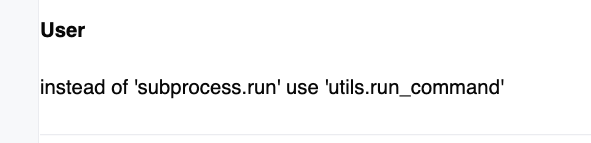
    Replace 'subprocess.run' with 'utils.run_command'
    Replace 'subprocess.run' with 'utils.run_command'
    Figure 7: Asking Cursor to run utils.run_command instead of subprocess.run.

    Cursor confirmed it would take on the job (Figure 8).

    Cursor response for replacing
    Figure 8: Cursor response.

    After executing the task, all subprocess.run commands should be replaced with utils.run_command.

    As a developer, I shouldn't be fully satisfied with this migration. We also need to create a test suite for the migrated container suite. So, let's give the Cursor AI code editor a chance.

    Create a PyTest suite for newly created suite

    To create the test suite, let's prompt Cursor as follows:

    Create PyTest suite for ContainerTestLib class

    Here is Cursor's response:

    **Cursor**
    
    I'll create a comprehensive PyTest suite for the ContainerTestLib class. Let me start by creating a proper test structure.
    
    First, let me create a tests directory and the main test configuration:

    First, Cursor creates a main unit test for core functionality. The next step is to create integration tests for more complex container operations. It's almost done. Cursor then creates error-handling and edge-case tests before generating a pytest configuration file and a simple test runner script.

    Finally, Cursor summarizes all the tests, as shown in Figure 9.

    Test suite - summarization
    Figure 9: Cursor summarizes the test suite.

    It also summarizes the type of pytest markers, fixtures, and so on that were used (Figure 10).

    Markers, Fixtures, etc. there were used
    Figure 10: Summarizing the test markers, fixtures, and other components used for the test suite.

    Our real-world results

    As soon as the migration was done, the converted library was pushed to the container-ci-suite GitHub repository by this pull request. The conversion itself was not so smooth; the library had a few issues that were fixed by pull request.

    You might be wondering how the container testing went. The first container that used the new library was our httpd-container, specifically through this pull request. The tests are, in fact, passing.

    Conclusion

    As you can see, you can use the Cursor AI code editor with a specific AI model to migrate languages from one to the other. However, I strongly recommend having a human developer oversee the entire migration process.

    This migration saved me a lot of development time; I would say around 1.5 months.

    You can see the entire migration process in my GitHub documentation repository called documentation. The migration process itself is stored in a Markdown file exported from Cursor AI code editor, CURSOR_TEST_LIB_MIGRATION.md. The conversion document is stored in the CONTAINER_TEST_LIB_CONVERSION.md file.

    Related Posts

    • AI meets containers: My first step into Podman AI Lab

    • Open source AI coding assistance with the Granite models

    • How to run AI models in cloud development environments

    • How RamaLama runs AI models in isolation by default

    • How to build a simple agentic AI server with MCP

    • Integrate a private AI coding assistant into your CDE using Ollama, Continue, and OpenShift Dev Spaces

    Recent Posts

    • Tekton joins the CNCF as an incubating project

    • Federated identity across the hybrid cloud using zero trust workload identity manager

    • Confidential virtual machine storage attack scenarios

    • Introducing virtualization platform autopilot

    • Integrate zero trust workload identity manager with Red Hat OpenShift GitOps

    What’s up next?

    Open source AI for developers introduces and covers key features of Red Hat OpenShift AI, including Jupyter Notebooks, PyTorch, and enhanced monitoring and observability tools, along with MLOps and continuous integration/continuous deployment (CI/CD) workflows.

    Get the e-book
    Red Hat Developers logo LinkedIn YouTube Twitter Facebook

    Platforms

    • Red Hat AI
    • Red Hat Enterprise Linux
    • Red Hat OpenShift
    • Red Hat Ansible Automation Platform
    • See all products

    Build

    • Developer Sandbox
    • Developer tools
    • Interactive tutorials
    • API catalog

    Quicklinks

    • Learning resources
    • E-books
    • Cheat sheets
    • Blog
    • Events
    • Newsletter

    Communicate

    • About us
    • Contact sales
    • Find a partner
    • Report a website issue
    • Site status dashboard
    • Report a security problem

    RED HAT DEVELOPER

    Build here. Go anywhere.

    We serve the builders. The problem solvers who create careers with code.

    Join us if you’re a developer, software engineer, web designer, front-end designer, UX designer, computer scientist, architect, tester, product manager, project manager or team lead.

    Sign me up

    Red Hat legal and privacy links

    • About Red Hat
    • Jobs
    • Events
    • Locations
    • Contact Red Hat
    • Red Hat Blog
    • Inclusion at Red Hat
    • Cool Stuff Store
    • Red Hat Summit
    © 2026 Red Hat

    Red Hat legal and privacy links

    • Privacy statement
    • Terms of use
    • All policies and guidelines
    • Digital accessibility

    Chat Support

    Please log in with your Red Hat account to access chat support.