Key takeaways
- Ollama and vLLM serve different purposes, and that's a good thing for the AI community: Ollama is ideal for local development and prototyping, while vLLM is built for high-performance production deployments.
- vLLM outperforms Ollama at scale: vLLM delivers significantly higher throughput (achieving a peak of 793 TPS compared to Ollama's 41 TPS) and lower P99 latency (80 ms vs. 673 ms at peak throughput). vLLM delivers higher throughput and lower latency across all concurrency levels(1-256 concurrent users), even when Ollama is tuned for parallelism.
- Ollama prioritizes simplicity, vLLM prioritizes scalability: Ollama keeps things lightweight for single users, while vLLM dynamically scales to handle large, concurrent workloads efficiently.
In Ollama or vLLM? How to choose the right LLM serving tool for your use case, we introduced Ollama as a good tool for local development and vLLM as the go-to solution for high-performance production serving. We argued that while Ollama prioritizes ease of use for individual developers, vLLM is engineered for the scalability and throughput that enterprise applications demand.
Now, it's time to move from theory to practice. In this follow-up article, we'll put these two inference engines to the test in a head-to-head performance benchmark. Using concrete data, we’ll demonstrate how each inference server behaves under pressure and provide clear evidence to help you choose the right tool for your deployment needs.
The benchmarking setup
To ensure a true "apples-to-apples" comparison, we created a controlled testing environment on OpenShift using default arguments and original model weights without compression. The goal was to measure how each server performed while handling an increasing number of simultaneous users.
- Hardware and software:
- GPU: Single NVIDIA A100-PCIE-40GB GPU
- NVIDIA driver version: 550.144.03
- CUDA version: 12.4
- Platform: OpenShift version 4.17.15
- Models: meta-llama/Llama-3.1-8B-instruct for vLLM and llama3.1:8b-instruct-fp16 for Ollama
- vLLM version: 0.9.1
- Ollama version: 0.9.2
- Python version: 3.13.5
Benchmarking tool:
We used GuideLLM (version 0.2.1) to conduct our performance tests. GuideLLM is a benchmarking tool specifically designed to measure the performance of LLM inference servers. Refer to the article GuideLLM: Evaluate LLM deployments for real-world inference or this video to learn more about GuideLLM. We ran it as a container from within the same OpenShift cluster to ensure tests were conducted on the same network as our vLLM and Ollama services. We use its concurrency feature to simulate multiple simultaneous users by sending requests concurrently at various rates.
- Methodology:
- We used a fixed dataset of prompt-response pairs to ensure that every request was identical for both servers, eliminating variables from synthetic data generation. Each entry in this dataset specified the exact prompt to be sent to the model and the pre-calculated prompt and expected output token counts.
- We simulated multiple simultaneous users by running concurrent requests, with concurrency levels tested from 1 up to 256. The concurrency level represents a fixed number of "virtual users" that continuously send requests. For example, the "64 concurrency" rate maintains a constant 64 active requests on the server. Each test runs for 300 seconds.
- Key performance metrics:
- Requests Per Second (RPS): The average number of requests the system can successfully complete each second. Higher is better.
- Output Tokens Per Second (TPS): The total number of tokens generated per second, measuring the server's total generative capacity. Higher is better.
- Time to First Token (TTFT): How long it takes from sending a request to receiving the first piece of the response (token). This measures initial responsiveness. Lower is better.
- Inter-token Latency (ITL): The average time between each subsequent token in a response, measuring the text generation speed. Lower is better.
For TTFT and ITL, we used P99 (99th percentile) as the measure. P99 means that 99% of requests had a TTFT/ITL at or below this value, making it a good measure of "worst-case" responsiveness.
Comparison 1: Default settings showdown
First, we compared vLLM and Ollama using their standard, out-of-the-box configurations. By default, Ollama is configured to handle a maximum of four requests in parallel, as it's primarily designed for single-user scenarios.
Throughput (RPS and TPS)
The difference in throughput was immediate and stark.
- vLLM's throughput (both RPS and TPS) scaled impressively as concurrency increased, handling a much heavier user load.
- Ollama's performance remained flat, quickly hitting its maximum capacity due to the default cap on parallel requests.
As seen in the graphs (Figures 1 and 2), vLLM's peak performance is several times higher than Ollama's default configuration, demonstrating its superior ability to manage many concurrent user requests.
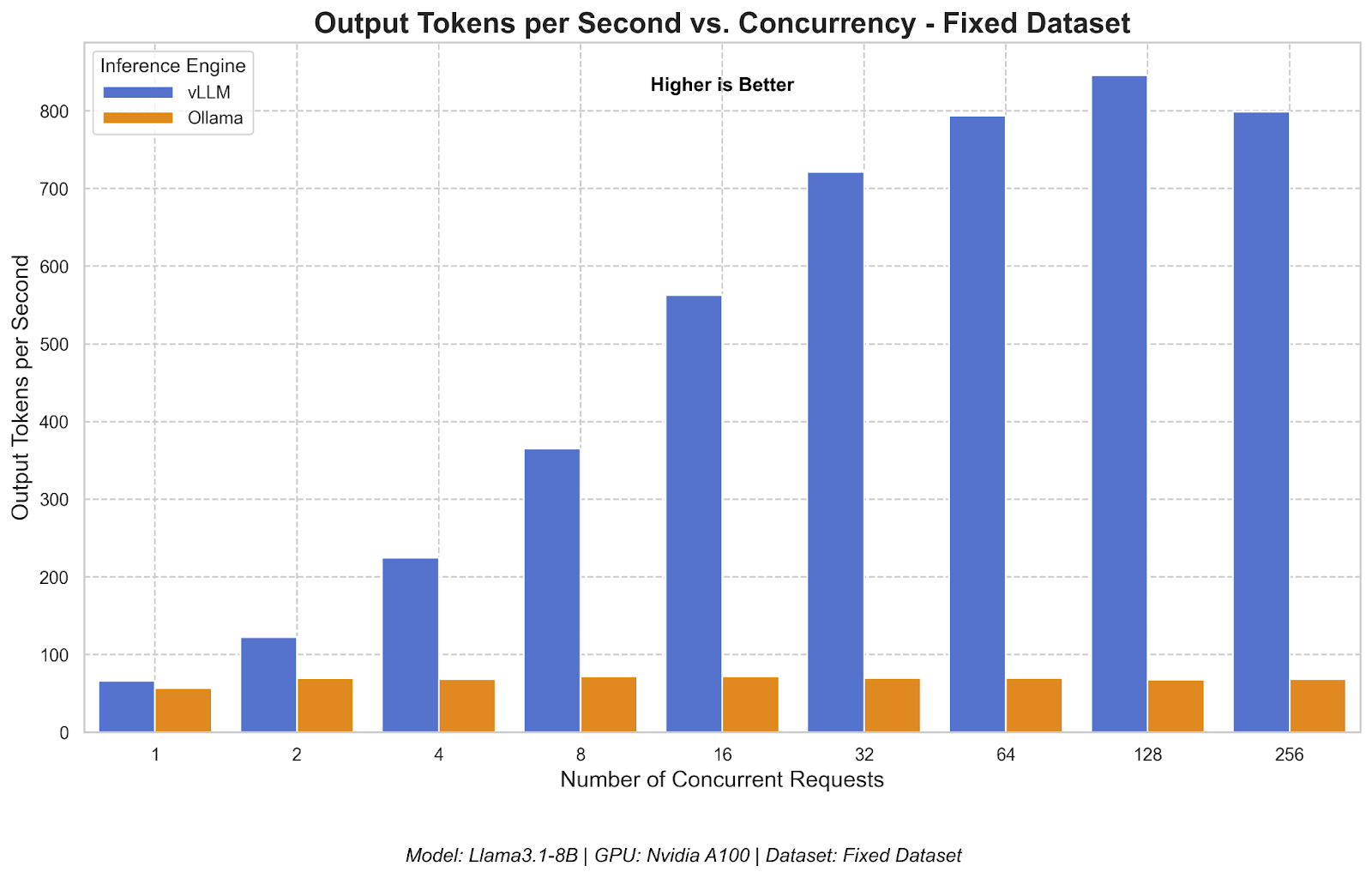

vLLM's throughput scales with user load, while Ollama's performance remains flat.
Responsiveness (TTFT and ITL)
Here, we see an interesting trade-off between how the two engines handle load.
Time to First Token: vLLM consistently delivered a much lower TTFT, meaning users get a faster initial response, even under heavy load. Ollama's TTFT rose dramatically with more users because incoming requests had to wait in a queue before being processed (Figure 3).
"Worst-case" (P99) Time To First Token shows vLLM is significantly more responsive under load.

- Inter-token Latency: At very high concurrency (above 16), vLLM's ITL began to rise, while Ollama's remained stable and low. This is because Ollama throttles requests, keeping its active workload small and predictable at the expense of making many users wait (high TTFT). In contrast, vLLM processes a much larger batch of requests at once to maximize overall throughput, which can slightly increase the time to generate each individual token within that large batch (Figure 4).

Even when tuned for parallelism, Ollama's throughput can't keep up with vLLM.
Comparison 2: Tuned Ollama versus vLLM
Recognizing that Ollama's default settings aren't meant for high-concurrency, we tuned it for maximum performance. We set its parallel request limit to 32 (OLLAMA_NUM_PARALLEL=32), which was the highest stable value for our NVIDIA A100 GPU. vLLM isn't limited by a fixed number of parallel requests like OLLAMA_NUM_PARALLEL. Instead, its scaling is dynamic.
We show only results up to load test concurrency of 64, as anything above that is oversaturated.
Throughput (RPS and TPS)
Even after tuning, vLLM remained the clear leader, as shown in Figures 5 and 6.
- vLLM's throughput continued to scale almost linearly, showcasing its dynamic and efficient scheduling.
- Ollama, despite the tuning, saw its performance plateau and was unable to match vLLM's capacity at any concurrency level.


Responsiveness (TTFT and ITL)
Tuning Ollama for higher parallelism revealed significant stability challenges under load.
- Time to First Token: vLLM's TTFT remained extremely low and stable. In contrast, Ollama's TTFT still increased sharply, as juggling more requests meant each new one had to wait longer to begin processing (Figure 7).
- Inter-token Latency: This is where the difference becomes most apparent. vLLM's token generation speed stayed fast and fluid across all loads. Ollama's ITL, however, became extremely erratic, with massive spikes at higher concurrency. This indicates significant performance degradation and potential "head-of-line blocking," where a single stalled request can slow down an entire batch (Figure 8).

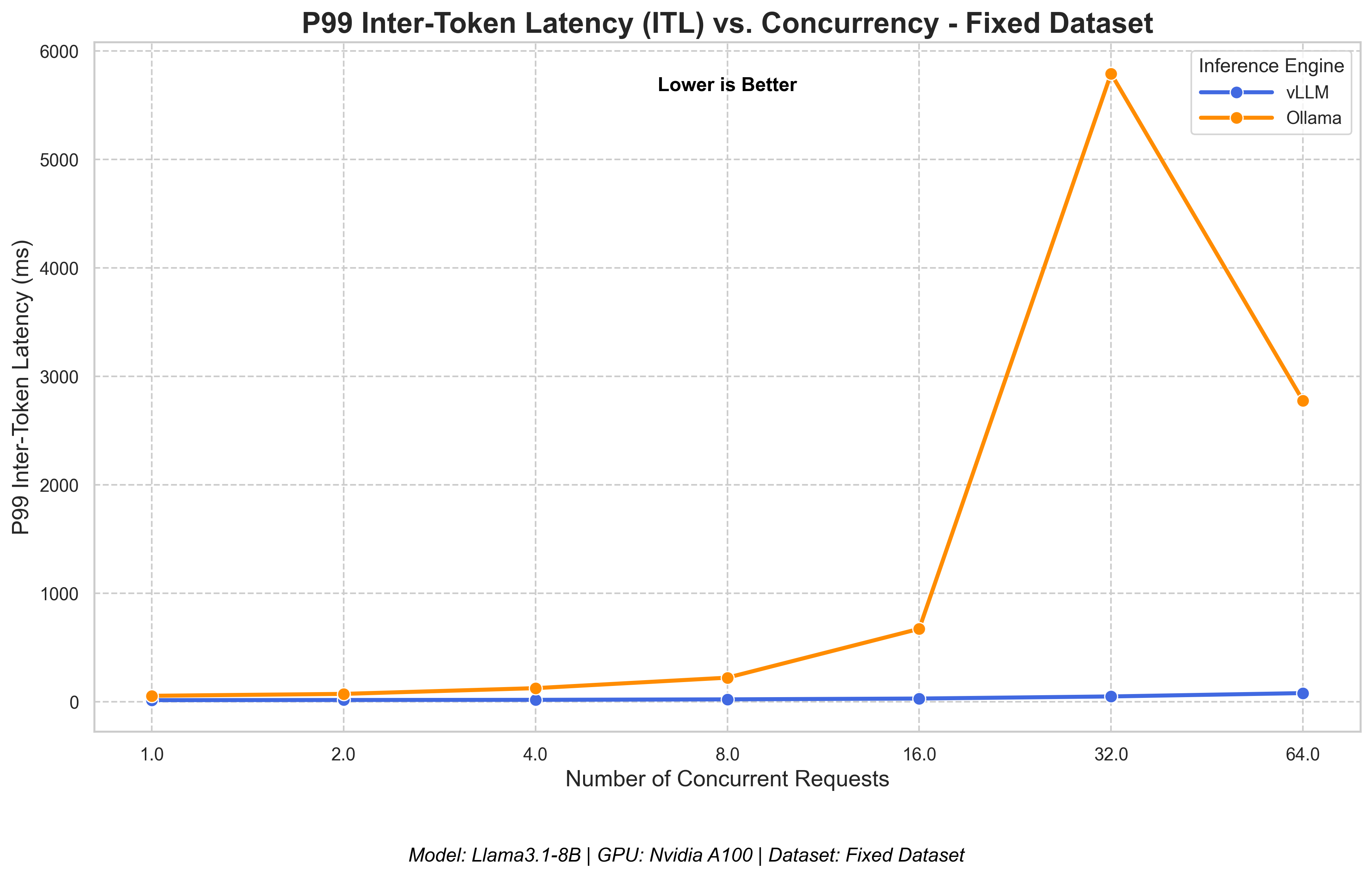
vLLM maintains stable generation speed, while tuned Ollama becomes erratic under load.
The right tool for the job
This benchmark comparison data provides definitive proof for our initial guidance:
- Ollama excels in its intended role: a simple, accessible tool for local development, prototyping, and single-user applications. Its strength lies in its ease of use, not its ability to handle high-concurrency production traffic, where it struggles even when tuned.
- vLLM is unequivocally the superior choice for production deployment. It is built for performance, delivering significantly higher throughput and lower latency under heavy load. Its dynamic batching and efficient resource management make it the ideal engine for scalable, enterprise-grade AI applications.
Ultimately, the choice depends on where you are in your development journey. For developers experimenting locally, Ollama is a fantastic starting point. But for teams moving toward production, this performance data confirms that vLLM is the powerful, scalable, and efficient foundation needed to serve LLMs reliably at scale.
Discover how Red Hat AI Inference Server, powered by vLLM, enables fast, cost-effective AI inference.
Last updated: July 13, 2026
