This blog recaps the February 6th vLLM Office Hour, where host Michael Goin was joined by Roger Wang, a vLLM committer from Roblox, to discuss the new multimodal capabilities in vLLM V1.
In the AI space, efficient inference isn’t just about speed; it’s about flexibility, scalability, and the ability to seamlessly handle diverse data modalities—beyond just text. vLLM has emerged as the open source standard for serving language model inference, supporting models from Hugging Face and more across a wide array of hardware. With robust support for GPUs, TPUs, and even CPUs, vLLM is paving the way for next-generation multimodal applications.
In this article, we dive into the innovations behind vLLM V1 (V1 Alpha), which addresses the challenges of multimodal inference encountered in V0. We’ll explore the design decisions that enhance performance, from encoder caching to optimized data processing and share benchmark results that highlight the improvements. Finally, we’ll outline our vision for future work to further push the boundaries of efficient, scalable AI.
About vLLM
vLLM is the go-to open source model serving framework for LM inference. Its design emphasizes:
- Speed and ease of use: vLLM works out-of-the-box with models from Hugging Face and supports dozens of key models.
- Hardware versatility: Built on PyTorch, vLLM isn’t limited to NVIDIA GPUs. It extends support to AMD GPUs, Google TPUs, AWS Accelerators, Intel accelerators, and even CPUs.
- Beyond text-only models: Today’s applications demand multimodal capabilities. vLLM now supports not only text but also images, audio, and video inputs—enabling tasks like document parsing, object recognition, video understanding, and computer use.
- Advanced inference optimizations: With features like quantization, chunked prefill, and prefix caching, vLLM is continually optimized for both high-throughput and low-latency inference.
Learn more: Meet vLLM: For faster, more efficient LLM inference and serving
Overview of large multimodal models
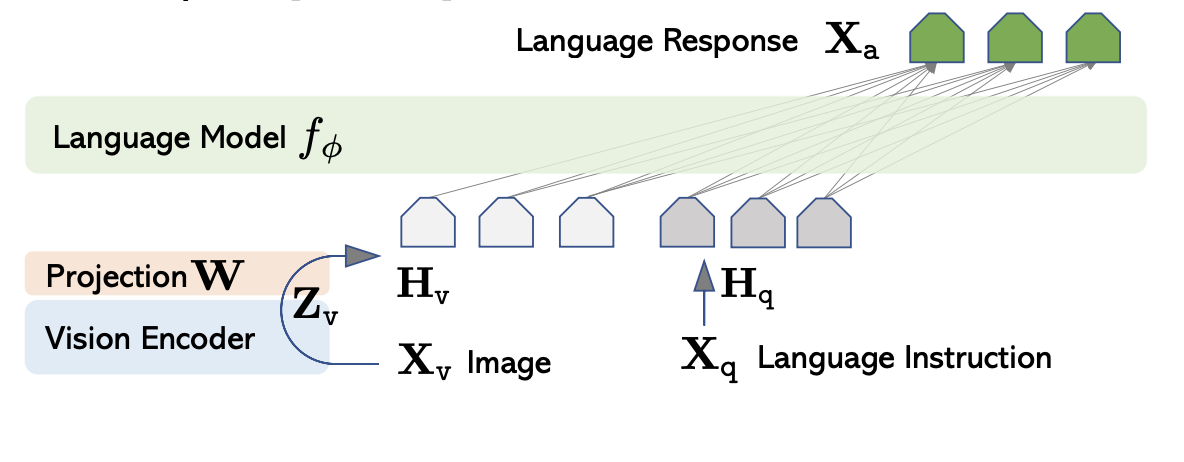
Modern large multimodal models typically leverage a decoder-only language model (LM) backbone paired with an encoder for non-text modalities. In practice, when you provide an image or audio clip, it’s first transformed into embeddings by a dedicated encoder. These embeddings are then merged with text embeddings and fed into the decoder LM.
For example:
- LLaVA: Uses CLIP to encode images into embeddings before merging them with text (see Figure 1).
- Qwen2-audio: Uses a Whisper audio encoder to process audio inputs, which are then merged with text embeddings for decoding.
Source: https://encord.com/blog/llava-large-language-vision-assistant/
vLLM’s flexible architecture now supports this diverse range of inputs, setting the stage for richer, more capable multimodal applications.
What went wrong in vLLM V0
While vLLM V0 set the foundation, it wasn’t without limitations, especially when dealing with multimodal inputs.
Chunked prefill challenges
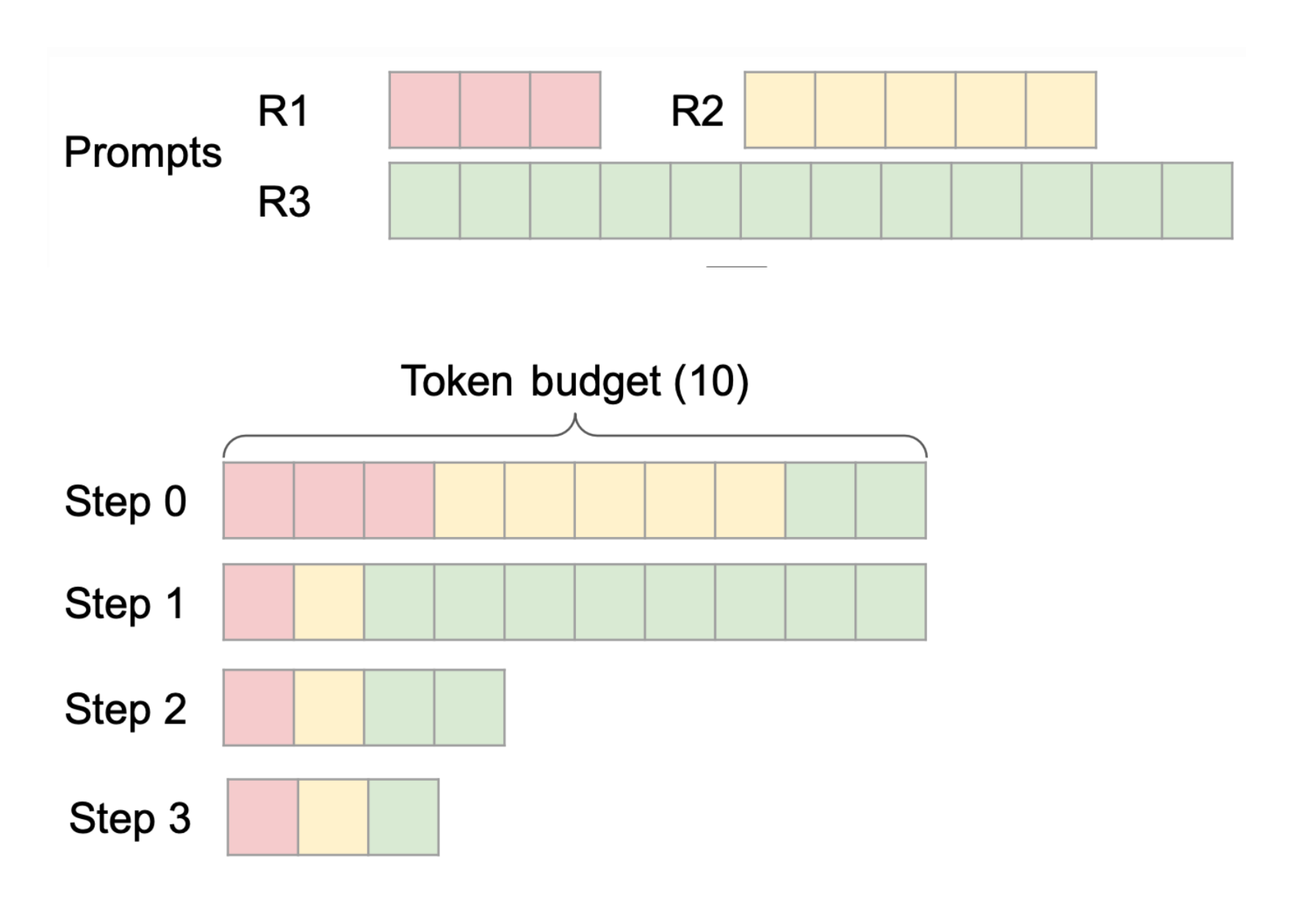
Chunked prefill allows prompts to be partially prefilled so that long requests don’t block the entire decoding process of existing requests. For example, with three incoming requests (R1, R2, R3), R1 and R2 might be fully prefilled, while only a portion of R3 is prefilled initially. This staggered approach, illustrated in Figure 2, keeps latency in check.
Source: https://docs.google.com/presentation/d/1SZOJ1lCOj6BpHcwqCMcRNfjCNvEPInv8/edit#slide=id.p1
However, multimodal embeddings are continuous by nature and cannot be broken into discrete tokens to be incrementally produced. If an image produces 10 embeddings but only 2 tokens are reserved in a prefill chunk, a shape mismatch occurs. Early designs assumed a direct merge into text embeddings, which proved problematic.
Prefix caching limitations
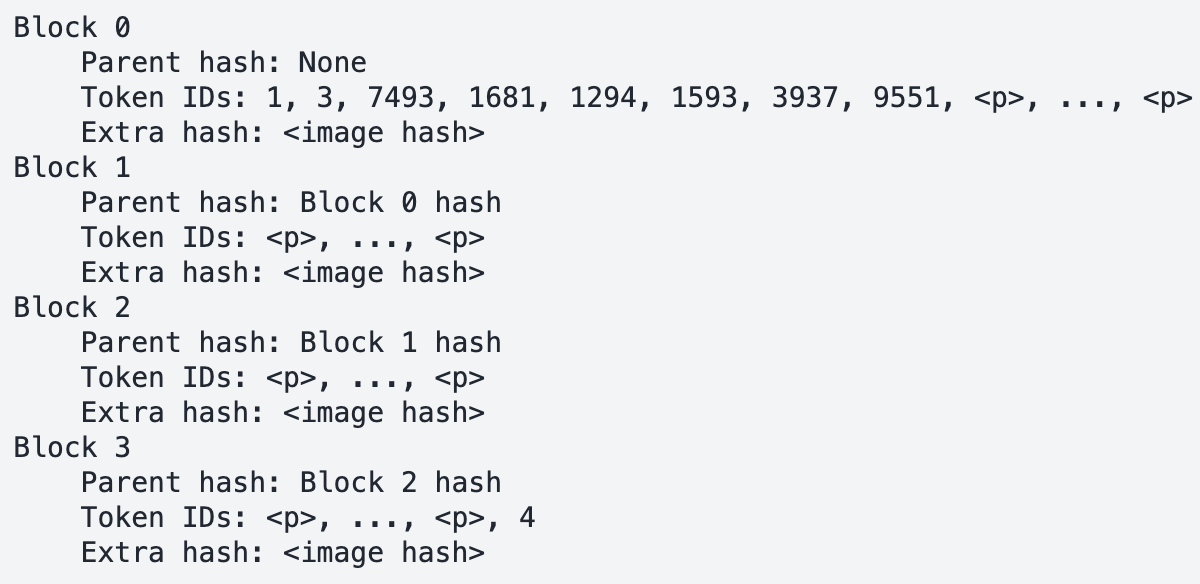
In V0, prefix caching was based solely on token IDs. For multimodal inputs, where placeholder tokens (e.g., <image>) are identical across requests, this led to cache collisions. Different images sharing the same placeholder would mistakenly trigger cached results, compromising correctness.
Innovations in vLLM V1
vLLM V1 introduces several key improvements to overcome these challenges.
1. Encoder cache and encoder-aware scheduler
The challenge: Repeatedly regenerating multimodal embeddings for every prefill operation can be inefficient, especially when a single image may generate thousands of embeddings (e.g., Pixtral produces 4096 embeddings for a single 1024x1024 image).
The V1 solution:
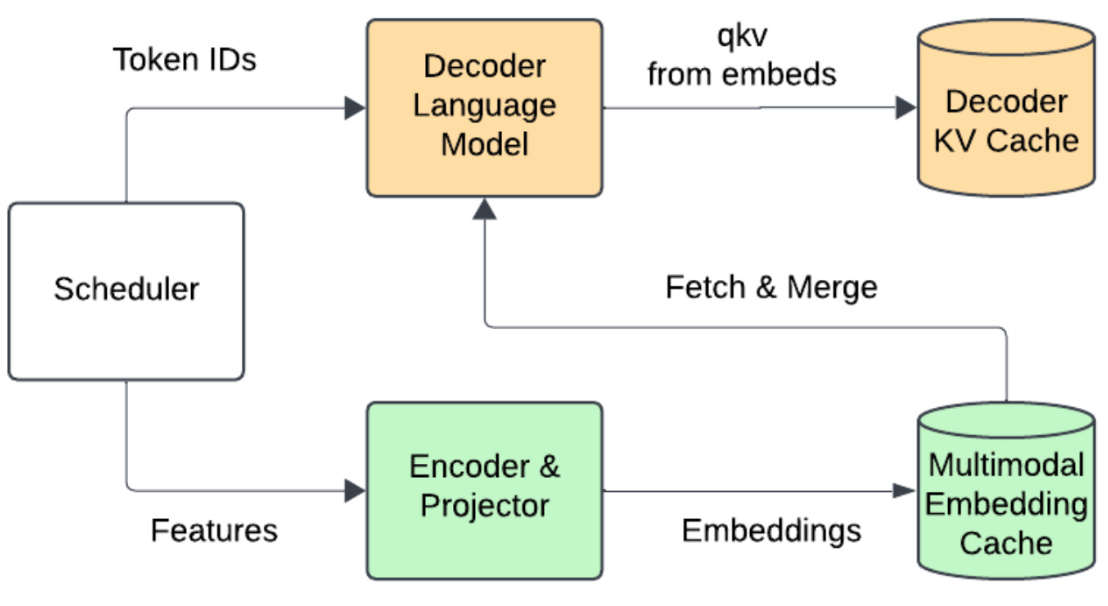
- Encoder cache: Multimodal embeddings are computed once and stored directly on the GPU.
- Encoder-aware scheduler: The scheduler tracks the positions of multimodal embeddings within each request. When merging with text embeddings, it retrieves cached data, eliminating redundant encoder execution. See Figure 3.
Source: https://docs.google.com/presentation/d/1SZOJ1lCOj6BpHcwqCMcRNfjCNvEPInv8/edit#slide=id.p1
Why a GPU cache?
Transferring tensors to and from CPU memory is often more expensive than re-executing the encoder. Keeping the cache on the GPU minimizes latency.
2. Enhanced prefix caching with metadata
To address the shortcomings of token-ID–based caching, V1 incorporates additional metadata, such as hashes of images or audio chunks, into the caching mechanism (Figure 4). This ensures that even if placeholder tokens are identical, the underlying multimodal content is correctly distinguished.
Source: https://docs.google.com/presentation/d/1SZOJ1lCOj6BpHcwqCMcRNfjCNvEPInv8/edit#slide=id.p1
3. Optimized multimodal data processing
In V0, converting raw data (e.g., PIL images) to tensors was a blocking CPU operation, often stalling GPU kernels. V1 tackles this by decoupling the processes:
- Process 0 (CPU): Handles input processing and raw data conversion.
- Process 1 (GPU): Executes the forward pass independently.
This asynchronous pipeline ensures that heavy CPU operations do not block GPU performance, leading to significant latency reductions.
4. Multimodal feature caching
Beyond prefix caching, V1 introduces feature caching for raw data conversion:
- Dual mirror caches: Both CPU and GPU processes maintain mirrored caches on CPU memory, minimizing data transfers.
- Efficient hashing: Using consistent hashes for raw data allows the system to skip redundant conversions, improving throughput in both online and offline scenarios.
Benchmark results
vLLM V1’s improvements have been validated across two key scenarios: online serving and offline inference.
Online serving
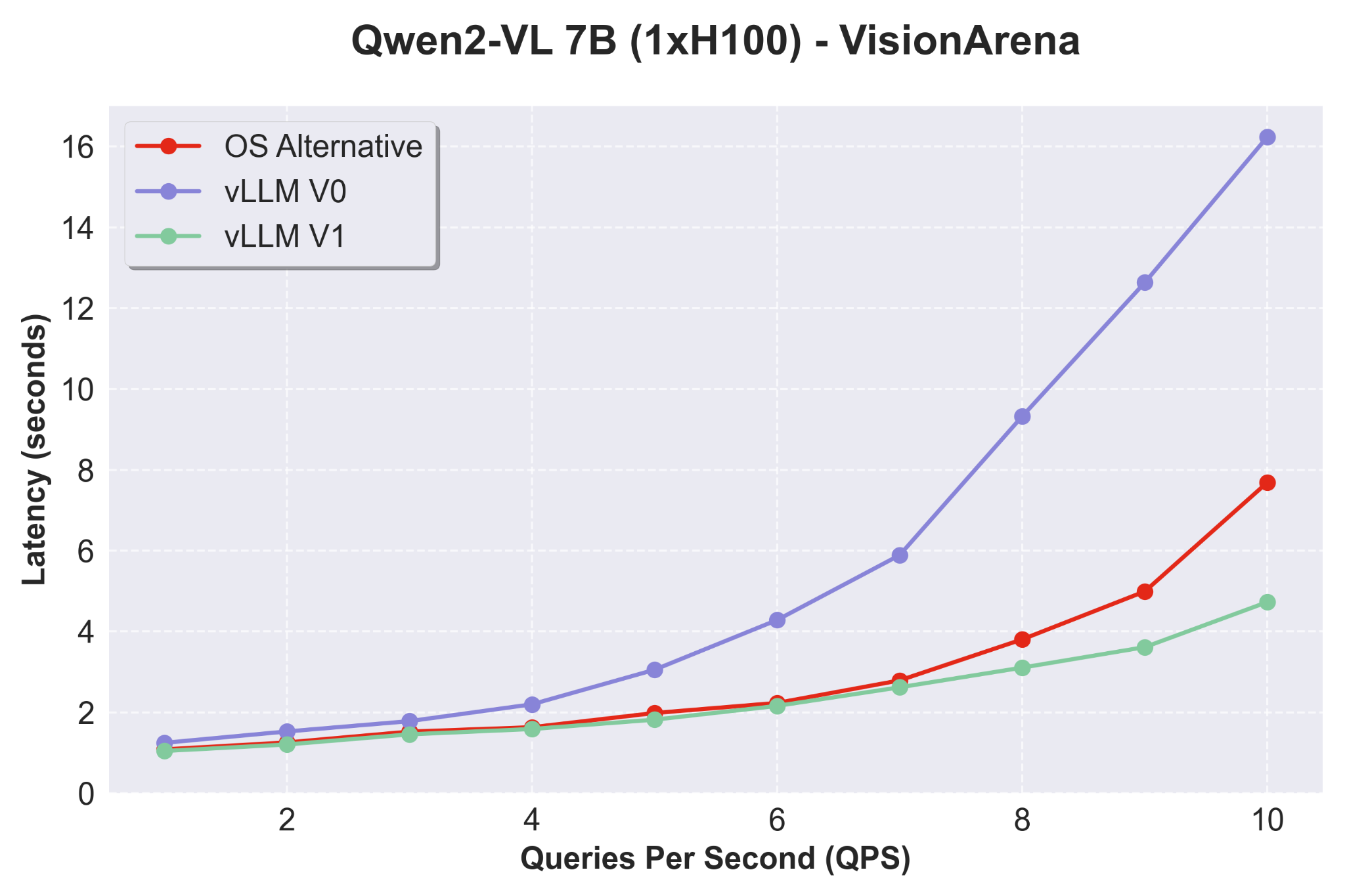
Using the Qwen2-VL 7B model on the VisionArena dataset—a real-world vision QA benchmark—vLLM V1 demonstrates:
- Low latency at high QPS: While differences are subtle at low QPS, at higher throughput, V1 significantly outperforms V0, as shown in Figure 5.
- Competitive edge: When compared with other open source alternatives, V1 maintains superior performance in high QPS regimes.
Source: https://docs.google.com/presentation/d/1SZOJ1lCOj6BpHcwqCMcRNfjCNvEPInv8/edit#slide=id.p1
Offline inference
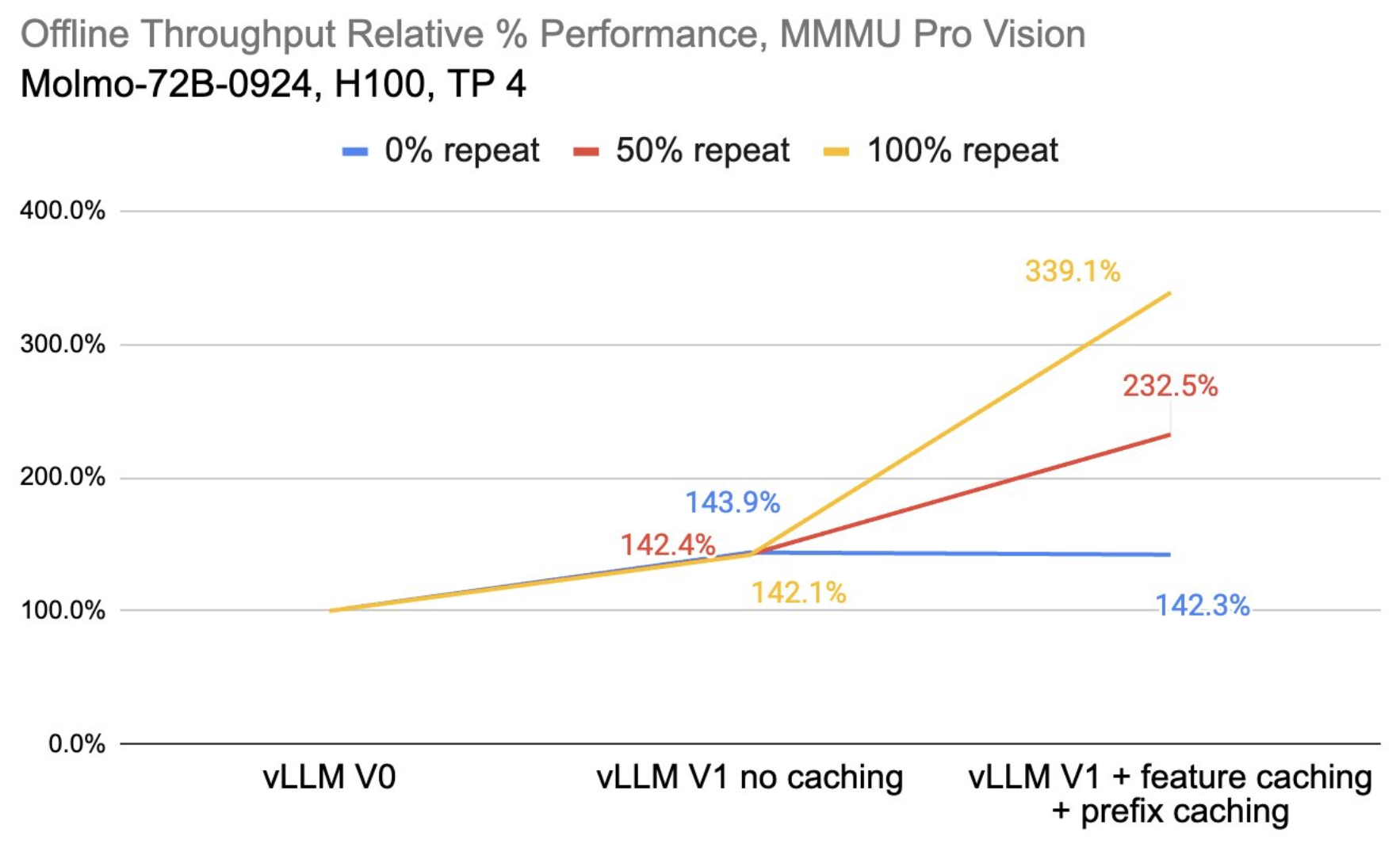
For offline inference, we benchmarked using the MMMU Pro Vision dataset with the Molmo-72B model using 4xH100s. Figure 6 shows the following results:
- Throughput gains: vLLM V1, even without caching, shows around a 40% performance boost over V0.
- Caching benefits: With both prefix and feature caching enabled, scenarios with repeated requests (up to 100% repeat) experience dramatic throughput improvements. Even for unique prompts, the overhead is minimal compared to the benefits.
Source: https://docs.google.com/presentation/d/1SZOJ1lCOj6BpHcwqCMcRNfjCNvEPInv8/edit#slide=id.p1
Conclusion
vLLM V1 marks a pivotal upgrade in serving large, multimodal language models. By addressing the challenges of chunked prefill, enhancing caching mechanisms, and optimizing data processing pipelines, V1 delivers lower latency, higher throughput, and robust performance across diverse hardware platforms.
Neural Magic (now part of Red Hat) is proud to be a top commercial contributor to vLLM, driving these innovations forward and empowering the community with open, efficient, and scalable AI solutions. We invite you to explore vLLM V1, experiment with our open source tools, and join us in shaping the future of multimodal inference.
For more information and to get started with vLLM, visit the GitHub repository. See more on the support vLLM provides for multi-modal models here.
Feel free to reach out with questions or share your feedback on the vLLM Slack workspace as we continue to evolve vLLM!
Last updated: March 31, 2025
