Managing user access for Red Hat Enterprise Linux (RHEL) within Red Hat Lightspeed (formerly Red Hat Insights) on console.redhat.com just got easier. Three new, streamlined system roles are available within the User Access service in Red Hat Hybrid Cloud Console. This provides you with intuitive and precise control over user permissions across your RHEL environments and Red Hat Lightspeed services.
New cross-service roles
We've designed these roles with clarity and ease of use in mind. There are three:
- RHEL administrator: Provides comprehensive administrative privileges across Red Hat Lightspeed and your RHEL systems. Users assigned this role can manage system configurations, inventory, compliance policies, notifications, patch management, remediations, malware detection, and advisor recommendations. Significantly, they also have the authority to view and modify all vulnerability settings.
- RHEL operator: Empowering users to actively manage your environment, the RHEL operator role grants a user the ability to edit system configurations, inventory details, policies, and notification and integration settings. Operators have broad capabilities, mirroring many administrative functions, but they're restricted from editing compliance policies, content source templates, or policies, or tasks. They cannot execute remediation plans.
- RHEL viewer: For users who need visibility without the ability to make changes, the RHEL viewer role offers read-only access to Red Hat Lightspeed for RHEL. This includes viewing system configurations, compliance reports, inventory data, patch information, vulnerabilities, and resource states and activities. The only action permitted with this role is to generate activation keys.
Why you need new system roles
The previous approach, with its multitude of service-specific roles, presented several challenges.
First, there was the potential for inadvertently granting too many privileges to a user. Each user on your system should be granted only the permissions that their responsibilities require.
Navigating, finding, and assigning specific permissions for every user adds management overhead to what ought to be a simple task. Additionally, the default access groups lacked the necessary precision organizations needed to effectively align with diverse user responsibilities.
These new RHEL and Red Hat Lightspeed roles directly address these pain points:
- Simplified role-based access control (RBAC): Provides clear, persona-based roles that are easy to understand and assign, making user management more intuitive.
- Enhanced security posture: Adhering to the principle of least privilege, the new roles only grant users the necessary permissions to perform their tasks. The introduction of the operator role is particularly valuable in preventing the need to grant full administrative rights to permit a user access to many common operational tasks.
- Boost operational efficiency: Reduces the time and effort required for administrators to manage user access effectively.
- Provides greater flexibility: Accommodates a wide spectrum of user responsibilities with distinct and well-defined levels of access.
Red Hat Lightspeed for RHEL roles in user access
Integrating these new roles into your user management workflow within the Red Hat Hybrid Cloud Console's user access service is straightforward. Learn the process in this demo:
1. Log in
First, navigate to User Access. Log into console.redhat.com and click the gear icon in the header to access the User Access section. You must be an Organizational Administrator or User Access Administrator to make these changes.
2. Adjust default access
Optionally (but highly recommended especially for a large organization), consider reviewing and adjusting the default access group to establish a baseline set of permissions aligned with the new role model for all users. The console's RBAC is additive, so any permissions granted at the default access level remains unless specifically removed. Red Hat Lightspeed roles that are currently in the default access group include:
- Compliance viewer
- Content Template viewer
- Directory and Domain Services viewer
- Inventory Hosts administrator
- Patch viewer
- Policies viewer
- Remediations user
- Repositories viewer
- Resource Optimization user
- RHC user
- RHEL Advisor administrator
- Vulnerability viewer
You might want to consider adding the RHEL viewer role if you want all authenticated users to have basic read-only access to Red Hat Lightspeed.
Once you make a change to the default access group, it becomes the custom default access group.
3. Manage user groups
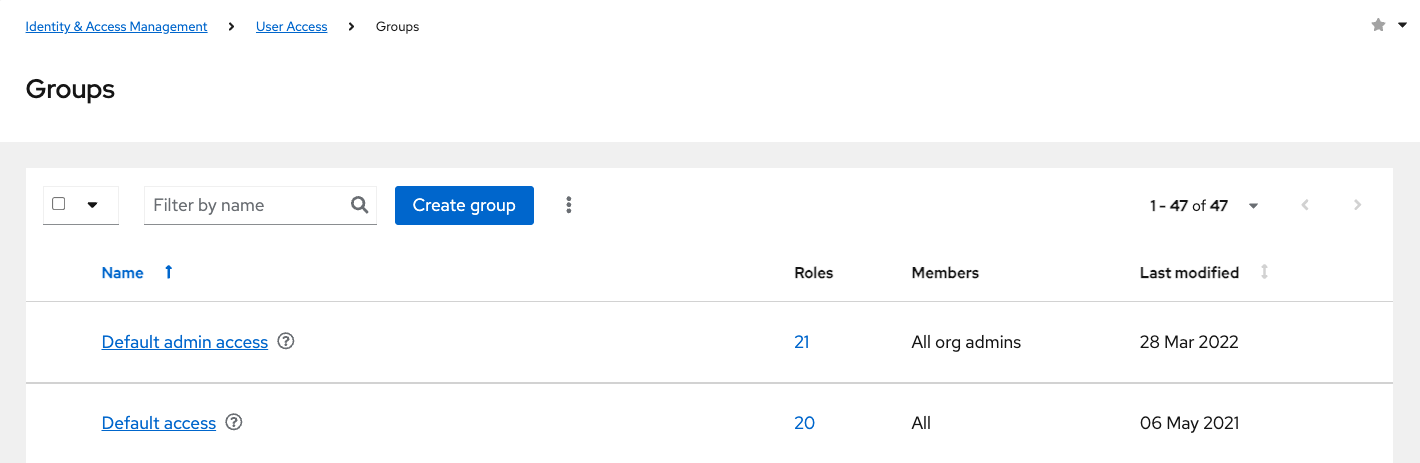
User access enables you to organize users into logical groups, as shown in Figure 1. You can either:
- Select an existing user group you wish to manage.
- Create new user groups specifically tailored for the new RHEL roles (for example, RHEL administrators, RHEL operators, and so on). This allows precise permission management.
4. Assign roles to user groups
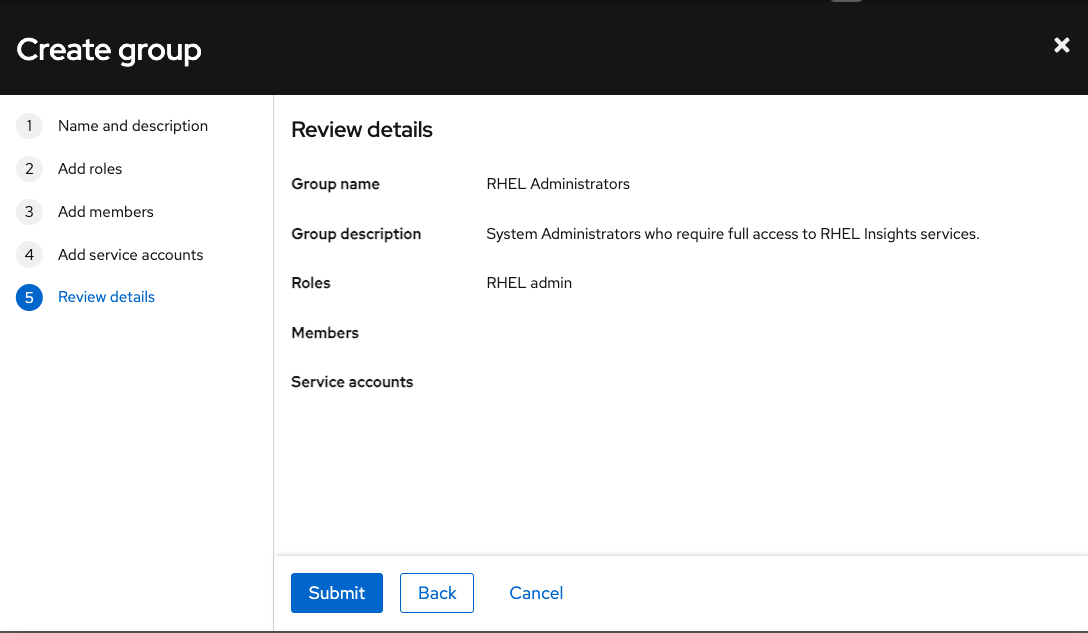
Within your chosen user group, locate the options Add roles or Manage roles. In the role assignment interface, you now see the RHEL admin, RHEL operator, and RHEL viewer roles. Figure 2 shows the RHEL admin role in the Review details step.
Select the role that best corresponds to the required level of access for the users within that group for RHEL and Red Hat Lightspeed functionalities. While you can assign multiple roles to a user group, utilizing the new, comprehensive RHEL roles minimizes the need for this.
Optionally, you can explore precise controls with All Roles for specific, less common use cases that demand very specific permissions. Clear any filter to display the complete list of service-specific roles. This allows you to create custom role assignments as necessary. However, for the majority of scenarios, the new RHEL administrator, operator, and viewer roles provide the necessary level of control.
5. Submit changes
Once you have selected the appropriate roles, save or apply the changes to the user group. The defined permissions are immediately effective for all users within that group for RHEL and Red Hat Lightspeed features.
Use the new roles
By strategically adopting the new RHEL admin, operator, and viewer roles within the user access service, and by managing your default access group and user groups, you can significantly simplify the administration of RHEL and Red Hat Lightspeed users. This streamlined approach not only enhances your security posture by adhering to the principle of least privilege, it also improves overall operational efficiency.
Stay tuned for future updates. We plan to introduce similar streamlined roles for other Red Hat services, including Subscription Management, Red Hat OpenShift, and Red Hat Ansible Automation Platform!
Try them out today at console.redhat.com/iam/user-access/roles.
Last updated: January 29, 2026
