Redhat Developers  Logo
  • AI

    Get started with AI

    • Red Hat AI
      Accelerate the development and deployment of enterprise AI solutions.
    • AI learning hub
      Explore learning materials and tools, organized by task.
    • AI interactive demos
      Click through scenarios with Red Hat AI, including training LLMs and more.
    • AI/ML learning paths
      Expand your OpenShift AI knowledge using these learning resources.
    • AI quickstarts
      Focused AI use cases designed for fast deployment on Red Hat AI platforms.
    • No-cost AI training
      Foundational Red Hat AI training.

    Featured resources

    • OpenShift AI learning
    • Open source AI for developers
    • AI product application development
    • Open source-powered AI/ML for hybrid cloud
    • AI and Node.js cheat sheet

    Red Hat AI Factory with NVIDIA

    • Red Hat AI Factory with NVIDIA is a co-engineered, enterprise-grade AI solution for building, deploying, and managing AI at scale across hybrid cloud environments.
    • Explore the solution
  • Learn

    Self-guided

    • Documentation
      Find answers, get step-by-step guidance, and learn how to use Red Hat products.
    • Learning paths
      Explore curated walkthroughs for common development tasks.
    • Guided learning
      Receive custom learning paths powered by our AI assistant.
    • See all learning

    Hands-on

    • Developer Sandbox
      Spin up Red Hat's products and technologies without setup or configuration.
    • Interactive labs
      Learn by doing in these hands-on, browser-based experiences.
    • Interactive demos
      Click through product features in these guided tours.

    Browse by topic

    • AI/ML
    • Automation
    • Java
    • Kubernetes
    • Linux
    • See all topics

    Training & certifications

    • Courses and exams
    • Certifications
    • Skills assessments
    • Red Hat Academy
    • Learning subscription
    • Explore training
  • Build

    Get started

    • Red Hat build of Podman Desktop
      A downloadable, local development hub to experiment with our products and builds.
    • Developer Sandbox
      Spin up Red Hat's products and technologies without setup or configuration.

    Download products

    • Access product downloads to start building and testing right away.
    • Red Hat Enterprise Linux
    • Red Hat AI
    • Red Hat OpenShift
    • Red Hat Ansible Automation Platform
    • See all products

    Featured

    • Red Hat build of OpenJDK
    • Red Hat JBoss Enterprise Application Platform
    • Red Hat OpenShift Dev Spaces
    • Red Hat Developer Toolset

    References

    • E-books
    • Documentation
    • Cheat sheets
    • Architecture center
  • Community

    Get involved

    • Events
    • Live AI events
    • Red Hat Summit
    • Red Hat Accelerators
    • Community discussions

    Follow along

    • Articles & blogs
    • Developer newsletter
    • Videos
    • Github

    Get help

    • Customer service
    • Customer support
    • Regional contacts
    • Find a partner

    Join the Red Hat Developer program

    • Download Red Hat products and project builds, access support documentation, learning content, and more.
    • Explore the benefits

Streamline multi-cloud operations with Ansible and ServiceNow

June 19, 2025
Raul Leite
Related topics:
Automation and managementDevOpsHybrid cloudIntegration
Related products:
Red Hat Ansible Automation PlatformRed Hat Ansible Automation Platform on Microsoft AzureRed Hat Ansible Automation Platform from AWS

    Hybrid and multi-cloud environments introduce operational complexity. However, integrating Red Hat Ansible Automation Platform with ServiceNow for public cloud bridges the gap between automation and IT service management (ITSM). This article explains how this integration enables teams to operate more swiftly, intelligently, and with fewer manual bottlenecks. 

    4 benefits of the Ansible & ServiceNow integration

    Keeping IT operations smooth while managing multi-cloud environments (i.e., Amazon Web Services, AWS and Azure) is a growing challenge. Let's dive into how this powerful combination transforms cloud and IT operations, from automated incident remediation to self-service provisioning and real-time CMDB synchronization. 

    Figure 1 depicts this integration in a multi-cloud architecture environment.
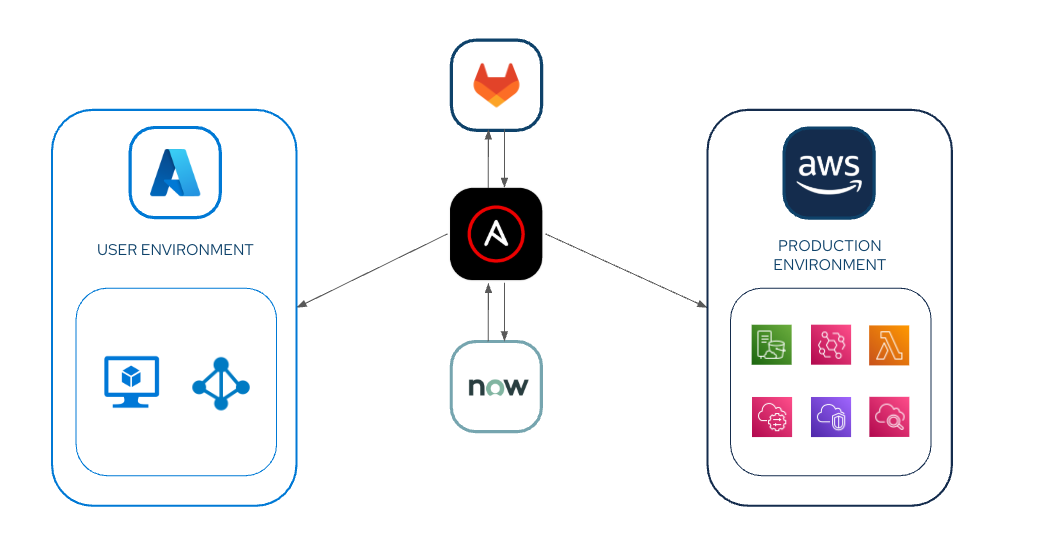
    Diagram depicting multi-cloud architecture environment.
    Figure 1: Multi-cloud architecture environment.

    1. Automated incident resolution

    When cloud infrastructure fails—whether it's an AWS EC2 crash, CPU spike, an Azure virtual machine (VM) disk filling up, or a network misconfiguration—ServiceNow can automatically trigger Ansible playbooks to fix the issue before it impacts users.  

    For example, let's say ServiceNow receives an alert from AWS CloudWatch about a spiking CPU.  

    An Ansible playbook executes to:  

    • Scale up the instance (or deploy a new one).
    • Restart the failing service.
    • Log all actions back in ServiceNow for audit trails.  

    The cpu_remmediation.yaml playbook follows:

    ---
    - name: Use ServiceNow CMDB as Dynamic Inventory
      hosts: servicenow.cmdb_ci_cloud_instance
      connection: local
      gather_facts: false
      tasks:
        - name: List all AWS EC2 instances from ServiceNow
          debug:
            msg: "Instance {{ item.name }} (ID: {{ item.sys_id }}) is in {{ item.cloud }}"
          loop: "{{ query('servicenow.snow_record', table='cmdb_ci_cloud_instance',
            query='cloud=AWS') }}"

    2. Effortless multi-cloud infrastructure deployment  

    Deploying and managing resources across AWS, Azure, and on-premise environments becomes seamless with the Ansible Automation Platform infrastructure-as-code (IaC) capabilities tracked within ServiceNow.  

    In this example, a compliance policy requires OS updates across 500 servers. The Ansible Automation Platform applies the patch and logs the change in ServiceNow for audit trails.

    The dynamic_inventory_snow.yml playbook follows: 

    ---
    - name: Use ServiceNow CMDB as Dynamic Inventory
      hosts: servicenow.cmdb_ci_cloud_instance
      connection: local
      gather_facts: false
      tasks:
        - name: List all AWS EC2 instances from ServiceNow
          debug:
            msg: "Instance {{ item.name }} (ID: {{ item.sys_id }}) is in {{ item.cloud }}"
          loop: "{{ query('servicenow.snow_record', table='cmdb_ci_cloud_instance',
            query='cloud=AWS') }}"

    3. Self-service cloud provisioning

    Self-service cloud provisioning allows teams to request cloud resources (i.e., AWS S3 buckets or Azure VMs) through the ServiceNow service catalog, while Ansible Automation Platform handles the deployment behind the scenes.

    In this example, a developer requests an Azure Kubernetes (AKS) cluster via ServiceNow. Ansible Automation Platform automates the provisioning, ensuring proper tagging and security policies.

    The following is the provisioning_az_rhel.yml playbook:

    ---
    - name: Provision Azure RHEL VM from ServiceNow Request
      hosts: localhost
      vars:
        snow_request_id: "{{ snow_request_id }}"
      tasks:
        - name: Get request details from ServiceNow
          servicenow.itsm.request_item:
            sys_id: "{{ snow_request_id }}"
          register: request_details
        - name: Deploy Azure RHEL VM
          azure.azcollection.azure_rm_virtualmachine:
            resource_group: "{{ request_details.resource_group }}"
            name: "{{ request_details.vm_name }}"
            vm_size: Standard_B2s
            admin_username: azureuser
            ssh_public_keys:
              - path: /home/azureuser/.ssh/authorized_keys
                key_data: ssh-rsa AAAAB3NzaC1yc2EAAAADAQABAAABA...
            image:
              offer: RHEL
              publisher: RedHat
              sku: 8-lvm
              version: latest
            os_disk_size_gb: 64
        - name: Register VM in ServiceNow CMDB
          servicenow.itsm.cmdb_ci_cloud_instance:
            name: "{{ request_details.vm_name }}"
            ip_address: "{{ azure_vm.ip_address }}"
            cloud: Azure
            operational_status: In Production
            sys_class_name: cmdb_ci_cloud_instance
        - name: Update ServiceNow request as fulfilled
          servicenow.itsm.request_item:
            sys_id: "{{ snow_request_id }}"
            state: Closed
            close_notes: "RHEL VM {{ request_details.vm_name }} provisioned in Azure (IP: {{
              azure_vm.ip_address }})."
    

    4. Cloud cost optimization

    Ansible Automation Platform can automatically decommission unused cloud resources (i.e., idle AWS EC2 instances) based on ServiceNow data, reducing waste and controlling costs.

    In this example, ServiceNow flags an untagged, unused virtual machine (VM). Ansible Automation Platform shuts it down, terminates it, and updates the CMDB.

    The cost_svgs_untag.yml playbook is as follows: 

    ---
    - name: Delete Unused AWS EC2 Instances
      hosts: localhost
      vars:
        unused_threshold_days: 30
      tasks:
        - name: Get all EC2 instances not in ServiceNow CMDB
          amazon.aws.ec2_instance_info:
            filters:
              tag:Owner: absent
          register: aws_instances
        - name: Terminate unused instances
          amazon.aws.ec2_instance:
            instance_id: "{{ item.instance_id }}"
            state: terminated
          loop: "{{ aws_instances.instances }}"
          when: item.launch_time | datetime_diff('now', 'days') > unused_threshold_days
        - name: Log deleted instances in ServiceNow
          servicenow.itsm.change_request:
            short_description: Cleaned up unused EC2 instances
            description: "Terminated: {{ aws_instances.instances |
              map(attribute='instance_id') | list }}"

    Why this integration matters

    Combining the power of Ansible Automation Platform with the capabilities of ServiceNow ITSM creates a seamless, event-driven cloud management experience. Whether you’re handling incidents, changes, or provisioning, this integration helps IT teams work smarter across multi-cloud environments, as well as:

    • Faster response times: Event-driven automation means fewer manual tickets.
    • Consistency: You can enforce policies uniformly across AWS, Azure, and hybrid environments.
    • Audit-friendly features: You can track every automated action in ServiceNow.

     Figure 2 shows a the overall workflow discussed in this article.
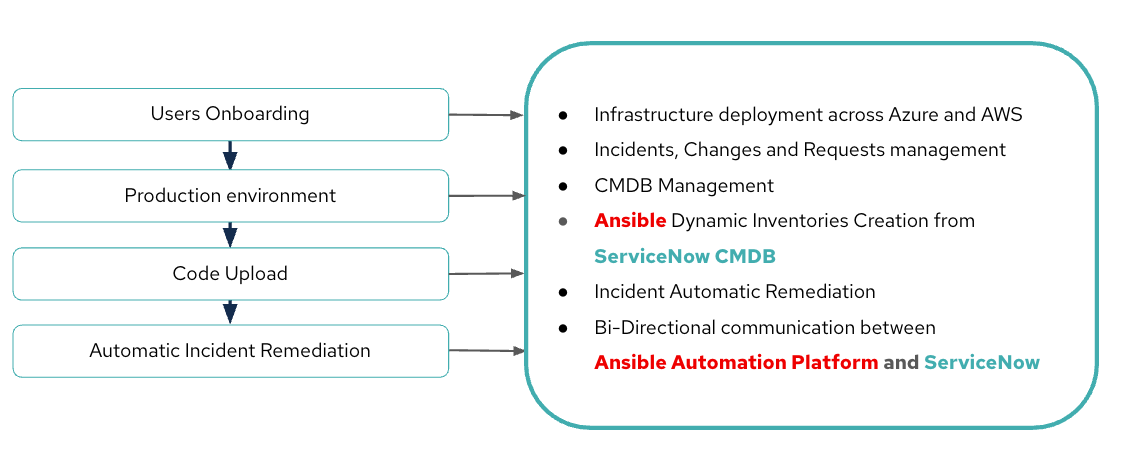
    Diagram depicting a summary of the workflow explained in the article.
    Figure 2: Summary of the workflow explained in the article.

    Explore more

    Want to dive deeper? Start by exploring the Ansible Automation Platform and ServiceNow modules to experiment with simple playbooks and witness the impact firsthand.

    Explore the Ansible Automation Platform and ServiceNow integration:

    • Ansible Certified Content Collection for ServiceNow ITSM
    • Simplify ServiceNow ITSM with Red Hat

    Related Posts

    • Transforming ITSM with Ansible Automation: A Gradual Approach

    • How to deploy applications using Ansible Automation Platform

    • How Ansible Automation task scheduling improves productivity

    • Multi-cloud storage strategies for SaaS applications

    • Event-driven architecture: What is an event?

    Recent Posts

    • MCP servers vs. skills: Choosing the right context for your AI

    • How to route external and local LLMs with Models-as-a-Service

    • Protect data offloaded to GPU-accelerated environments with OpenShift sandboxed containers

    • Case study: Measuring energy efficiency on the x64 platform

    • How to prevent AI inference stack silent failures

    What’s up next?

    Automate time-consuming tasks like credentials, accounts, and templates and create a centralized process with Ansible Automation Platform and the Developer Sandbox.

    Start the activity
    Red Hat Developers logo LinkedIn YouTube Twitter Facebook

    Platforms

    • Red Hat AI
    • Red Hat Enterprise Linux
    • Red Hat OpenShift
    • Red Hat Ansible Automation Platform
    • See all products

    Build

    • Developer Sandbox
    • Developer tools
    • Interactive tutorials
    • API catalog

    Quicklinks

    • Learning resources
    • E-books
    • Cheat sheets
    • Blog
    • Events
    • Newsletter

    Communicate

    • About us
    • Contact sales
    • Find a partner
    • Report a website issue
    • Site status dashboard
    • Report a security problem

    RED HAT DEVELOPER

    Build here. Go anywhere.

    We serve the builders. The problem solvers who create careers with code.

    Join us if you’re a developer, software engineer, web designer, front-end designer, UX designer, computer scientist, architect, tester, product manager, project manager or team lead.

    Sign me up

    Red Hat legal and privacy links

    • About Red Hat
    • Jobs
    • Events
    • Locations
    • Contact Red Hat
    • Red Hat Blog
    • Inclusion at Red Hat
    • Cool Stuff Store
    • Red Hat Summit
    © 2026 Red Hat

    Red Hat legal and privacy links

    • Privacy statement
    • Terms of use
    • All policies and guidelines
    • Digital accessibility

    Chat Support

    Please log in with your Red Hat account to access chat support.