As organizations scale their Kubernetes deployments, Red Hat Advanced Cluster Management for Kubernetes hub clusters can become overwhelmed. A single hub that manages hundreds of clusters often experiences significant strain. This pressure can cause resource exhaustion, which burdens the CPU and memory, and increased API server latency, which slows down policy enforcement. Consequently, some hubs may become overloaded while others sit idle. These factors create scaling bottlenecks, making it difficult to add more clusters to capacity-constrained hubs. Traditional solutions require expensive vertical scaling or complex hub redeployments. In this article, we will discuss a new approach—dynamically redistributing managed clusters across hubs using a multicluster global hub.
A new approach: Dynamic cluster redistribution
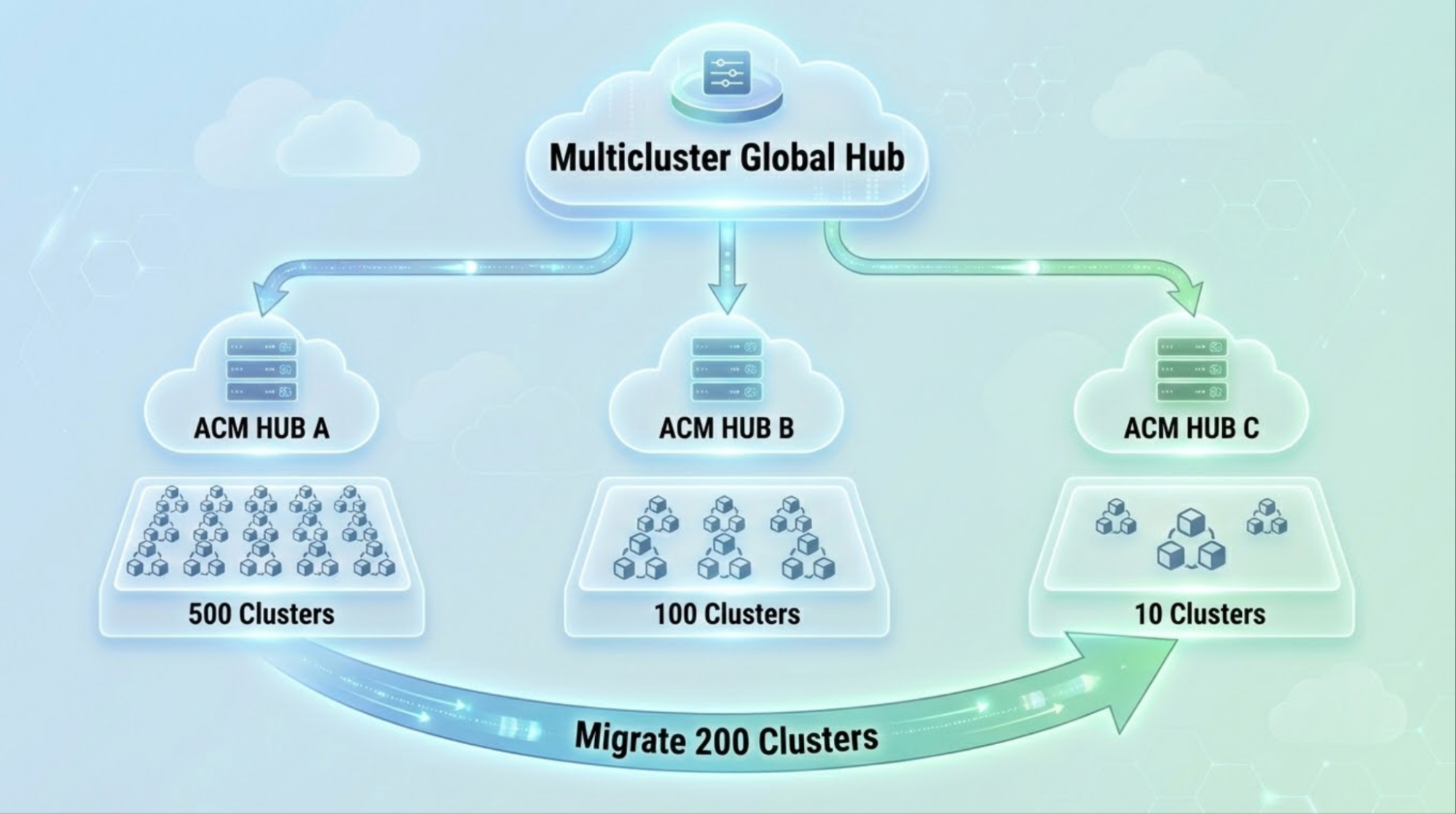
The multicluster global hub enables control plane workload rebalancing through managed cluster migration. You can now move clusters between hubs based on capacity needs and balance workloads across multiple hub clusters. You can also scale horizontally by adding new hubs and redistributing clusters as well as optimize resources by consolidating underutilized hubs.
The global hub provides the coordination layer to move clusters between hubs while maintaining cluster state and management continuity. Figure 1 illustrates the architecture for multi-hub workload rebalancing.
Prerequisites
Before implementing control plane workload rebalancing, you need to set up the global hub environment.
First, install the multicluster global hub operator on your target hub: the Red Hat Advanced Cluster Management hub that will coordinate migrations.
bash
# Verify Global Hub is running
oc get mgh -n multicluster-global-hub
oc get pods -n multicluster-global-hub
For detailed installation instructions, refer to the Global Hub Installation Guide.
Then import each source hub cluster into the global hub as a managed hub. When importing, you must apply the label global-hub.open-cluster-management.io/deploy-mode: hosted to the managed cluster resource, with this label, this managed cluster will be identified as a managed hub cluster.
bash
# Verify source hub is imported and Global Hub agent is running
oc get managedcluster <source-hub-name>
oc get pods -n <agent-namespace> -l name=multicluster-global-hub-agent
For detailed import instructions, review the Red Hat Advanced Cluster Management import documentation.
Use cases for cluster redistribution
Managed cluster migration supports a variety of operational scenarios. The following examples demonstrate common use cases for redistributing clusters across hubs, from balancing capacity and reducing latency to consolidating underutilized infrastructure.
Capacity redistribution
When hub-a is approaching resource limits while hub-b has spare capacity, you can migrate a portion of clusters from hub-a to hub-b to rebalance the load.
yaml
apiVersion: global-hub.open-cluster-management.io/v1alpha1
kind: ManagedClusterMigration
metadata:
 name: capacity-rebalance
spec:
 from: hub-a
 to: hub-b
 includedManagedClustersPlacementRef: high-resource-clusters
Use Placement to select clusters based on resource consumption labels:
yaml
apiVersion: cluster.open-cluster-management.io/v1beta1
kind: Placement
metadata:
 name: high-resource-clusters
spec:
 numberOfClusters: 50
 predicates:
 - requiredClusterSelector:
     labelSelector:
       matchExpressions:
         - key: resource-tier
           operator: In
           values: ["high"]
Geographic rebalancing
When latency issues arise between a hub and its managed clusters in distant regions, you can deploy regional hubs and migrate clusters to their nearest hub to reduce latency.
Migrate Asia-Pacific clusters to the regional hub:
apiVersion: global-hub.open-cluster-management.io/v1alpha1
kind: ManagedClusterMigration
metadata:
 name: apac-regional-migration
spec:
 from: global-hub
 to: apac-hub
 includedManagedClustersPlacementRef: apac-clusters
yaml
apiVersion: cluster.open-cluster-management.io/v1beta1
kind: Placement
metadata:
 name: apac-clusters
spec:
 predicates:
 - requiredClusterSelector:
     labelSelector:
       matchExpressions:
         - key: region
           operator: In
           values: ["asia-pacific", "apac", "ap-southeast"]
Workload-based distribution
When various cluster types require different hub configurations, you can dedicate hubs to specific workload types and migrate clusters accordingly.
yaml
# Migrate production clusters to dedicated hub
apiVersion: global-hub.open-cluster-management.io/v1alpha1
kind: ManagedClusterMigration
metadata:
 name: production-cluster-migration
spec:
 from: general-hub
 to: production-hub
 includedManagedClustersPlacementRef: production-clusters
yaml
apiVersion: cluster.open-cluster-management.io/v1beta1
kind: Placement
metadata:
 name: production-clusters
spec:
 predicates:
 - requiredClusterSelector:
     labelSelector:
       matchLabels:
         environment: production
Hub consolidation
When multiple underutilized hubs consume unnecessary resources, you can consolidate clusters onto fewer, well-utilized hubs to optimize infrastructure costs.
yaml
# Migrate all clusters from hub-c to hub-a
apiVersion: global-hub.open-cluster-management.io/v1alpha1
kind: ManagedClusterMigration
metadata:
 name: hub-consolidation
spec:
 from: hub-c
 to: hub-a
 includedManagedClustersPlacementRef: all-hub-c-clusters
Best practices for rebalancing
Following these rebalancing best practices will ensure smooth migrations and minimize risk to your cluster management infrastructure. These guidelines cover monitoring, labeling, and validation steps that should be part of every migration workflow.
Monitor hub health metrics. Before migration, assess hub capacity as follows:
# Check resource utilization on hub cluster
oc top nodes
oc top pods -n open-cluster-management
# Check API server latency
oc get --raw /metrics | grep apiserver_request_duration
Implement a consistent labeling strategy for easy selection as follows:
yaml
metadata:
 labels:
   region: us-east
   environment: production
   resource-tier: high
   migration-priority: "1"
Validate after each batch and ensure target hub stability before proceeding.
bash
# Check cluster availability
oc get managedcluster | grep -c "True.*True"
# Verify policy compliance
oc get policy -A | grep -c "Compliant"
# Monitor hub resource usage
oc top nodes
Performance considerations
Planning maintenance periods and setting realistic expectations requires a solid understanding of migration performance. The following table shows results based on our scale testing with 300 managed clusters.
Metric | Performance |
Migrate 300 clusters | ~9 min |
Policy convergence | <2 minutes post-migration |
Maximum batch size tested | 300 clusters |
Rollback time | <5 minutes for 300 clusters |
Optimization tips
Following these tips can improve migration reliability and reduce the likelihood of issues. Consider applying them based on your specific environment and migration scale.
Configure appropriate timeouts:
yaml
spec:
supportedConfigs:
stageTimeout: 15m  # Increase for larger batches
Ensure sufficient hub resources: Target hubs should have headroom for incoming clusters.
- Pre-stage policy applications: Apply policies to the target hub before migration.
How to handle migration failures
If a migration batch fails, the global hub provides automatic rollback. Clusters remain operational on the source hub, partial migrations reverse, and the system returns to a known good state.
For manual intervention, use the rollback annotation:
bash
oc annotate managedclustermigration capacity-rebalance \
 global-hub.open-cluster-management.io/migration-request=rollback
Example: Complete rebalancing workflow
The following is an example of a complete workflow for rebalancing clusters between two hubs. It demonstrates how to use Placement and ManagedClusterMigration resources to achieve an even distribution.
Initial State
In this scenario, hub-a is overloaded while hub-b has spare capacity.
Hub a: 200 clusters (80% capacity)
Hub b: 50 clusters (20% capacity)
Goal
The goal is to balance both hubs at 50% capacity by migrating 75 clusters from hub-a to hub-b.
Hub a: 125 clusters (50% capacity)
Hub b: 125 clusters (50% capacity)
Execution
First, create a Placement to select migration candidates, excluding critical clusters. Then, create a ManagedClusterMigration resource to execute the migration.
Step 1: Create a placement for the migration candidates.
yaml
apiVersion: cluster.open-cluster-management.io/v1beta1
kind: Placement
metadata:
 name: hub-a-rebalance
spec:
 numberOfClusters: 75
 predicates:
 - requiredClusterSelector:
     labelSelector:
       matchExpressions:
         - key: priority
           operator: NotIn
           values: ["critical"]
Step 2: Execute the migration.
yaml
apiVersion: global-hub.open-cluster-management.io/v1alpha1
kind: ManagedClusterMigration
metadata:
 name: hub-a-to-b-rebalance
spec:
 from: hub-a
 to: hub-b
 includedManagedClustersPlacementRef: hub-a-rebalance
Result
After the migration completes, both hubs are balanced at 50% capacity with no service disruption. Now hub-a manages 125 clusters and hub-b manages 125 clusters, achieving the target distribution. The migration completed with zero downtime and all policies remained compliant throughout the process.
Wrap up
Managed cluster migration enables dynamic control plane optimization. With this capability, you can balance load across multiple hub clusters, horizontally scale without disruption, optimize resources through consolidation, and reduce latency with regional distribution. For large-scale Kubernetes deployments, this transforms static hub architectures into dynamic, responsive infrastructure that adapts to changing needs. For large-scale Kubernetes deployments, this capability transforms static hub architectures into dynamic, responsive infrastructure that adapts to changing needs.
Explore managed cluster migration in the Global Hub Cluster Migration Guide. For ZTP clusters, refer to the ClusterInstance ZTP Migration Guide. Check out the Migration Performance doc for scale testing results.

