Starting with the 1.9.0 release, Red Hat Developer Hub (RHDH) supports integrating multiple identity providers (IdPs) and their corresponding catalog providers to authenticate users from various sources. While this configuration is not yet officially available or supported in official product documentation, this guide walks you through the entire configuration process and provides best practices for deployment.
Successful deployment with multiple authentication providers requires careful considerations to handle entity conflicts and guarantee secure user sign-in.
Step 1: Ingest users and groups into the Software Catalog
Before enabling authentication, the associated users and groups must be ingested into the software catalog. This prerequisite step populates the catalog with organization data, which supports basic application and plugin functionalities.
Deploying multiple authentication providers requires a deep understanding of how Developer Hub handles conflicts during entity ingestion, which is detailed in the following subsections.
The entity reference
Every entity in the Developer Hub catalog is uniquely identified by an entityRef. This reference follows a simple, structured format: kind:namespace/name. The entity’s metadata stored in the catalog is the source for the kind, namespace, and name components that make up this reference.
For example, a user entity might be referenced as user:default/jessicajhee.
The first come, first served rule
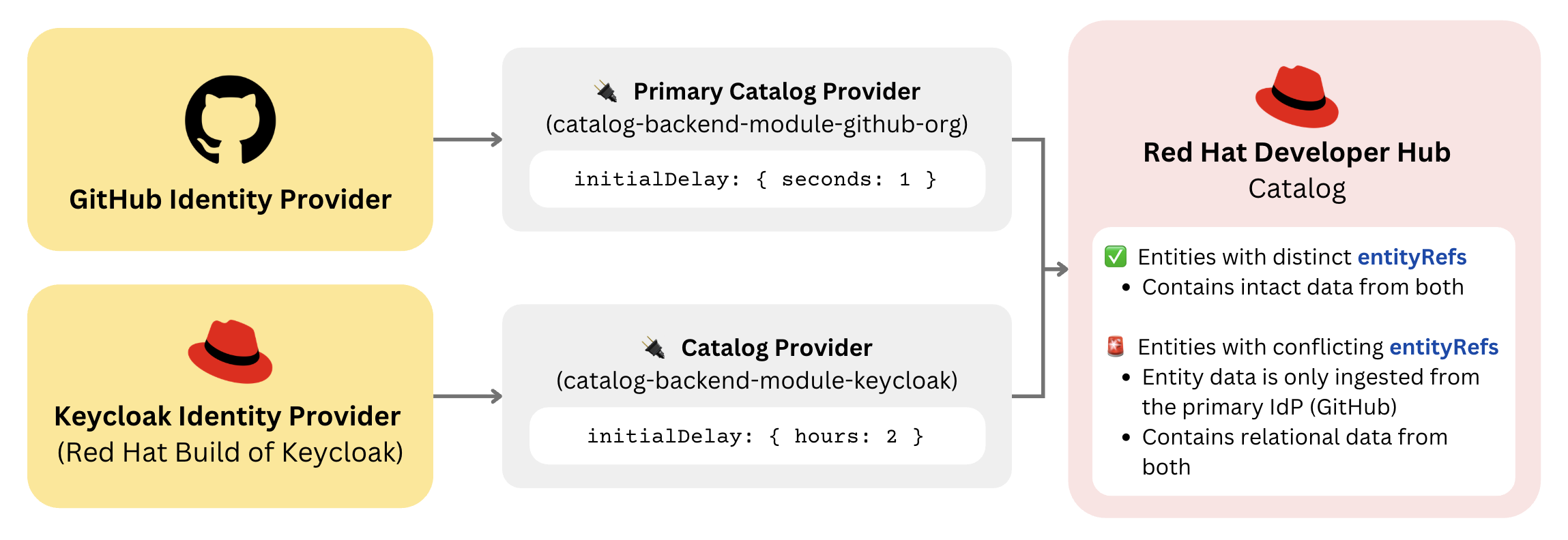
Conflicts occur when two different catalog providers try to import an entity with the exact same entityRef. The catalog provider that successfully syncs the entity first is designated as the primary provider, and it claims priority to set all entity data. Subsequent attempts by other providers to sync the same entityRef will fail. Their entity data will be entirely discarded, except for the relation data (covered later).
Quick reference to user and group identifiers
To prevent entity conflicts, you must ensure that the identifier field used to construct the entityRef (specifically the metadata.name) is unique across all configured providers.
To prevent conflicts between your chosen IdPs, consult the table below to verify that their identifiers are unique.
Provider | User Identifier | Group Identifier |
|---|---|---|
Keycloak | ||
LDAP | ||
MsGraph | Normalized email address if exists, otherwise normalized user principal name | |
GitHub | ||
GitLab | Derived from full path of group |
Relation management
While only one provider controls the main entity data, all installed catalog providers can contribute to the entity's relations. This means that if a user with the same entityRef is imported by the GitHub provider, but is also a member of a group imported by the Keycloak provider, the relationship will still be established. This effectively allows relations to bypass the entity conflict.
For a more concrete example, let’s say that GitHub was chosen as the primary provider, but a user with the same entityRef also belongs in a Keycloak group defined by the following:
kind: Group
metadata:
  name: keycloak-group
spec:
  members:
    - jessicajhee
In this case, the relation is established from the Keycloak group entity referencing the user. The final entity of a user belonging to both the GitHub groups and the Keycloak group will be ingested as follows:
kind: User
metadata: # Primary Provider (GitHub) populates the metadata
  name: jessicajhee
  annotations:
    github.com/user-login: JessicaJHee
spec: # Primary Provider (GitHub) populates the user specs
  profile:
    displayName: Jessica He
  memberOf:
    - github-group
relations: # aggregated from ALL providers, even with conflict in metadata.name
  - type: memberOf
    targetRef: group:default/keycloak-group # Sourced from Keycloak Provider
  - type: memberOf
    targetRef: group:default/github-group # Sourced from GitHub Provider
Quick Tip: You can view the raw YAML of any ingested entity by clicking the three dots located in the top right corner, selecting Inspect entity, and navigating to the Raw YAML view.
Monitoring conflict warnings
When a conflict is detected in the backend, the secondary provider issues a warning. You can find these alerts by inspecting the Developer Hub backend logs.
The warning will clearly identify the entityRef in conflict, and the two providers involved:
catalog warn Source KeycloakOrgEntityProvider:default detected conflicting entityRef user:default/jessicajhee already referenced by github-multi-org-provider:development and now also keycloak-org-provider:default
Putting it all together
By default, Developer Hub catalog providers run in series. In this case, we want to intentionally configure the providers so that they run sequentially to avoid unexpected conflicts. This example demonstrates how to set the sync order so that GitHub is the designated primary provider for any conflicting entities.
To achieve this, set a lower (or zero) initialDelay in the app-config.yaml for the primary provider (GitHub) and a larger initialDelay value for the losing provider (Keycloak), like so:
<providerName>:
   <providerId>:
      schedule:
         initialDelay: { minutes: 30 }
The provider with the shorter delay runs its full sync first, ensuring its entity data is persisted before the other provider potentially attempts to sync the same entityRef.
The exact initialDelay time to be set depends on the duration of the ingested organization's full catalog sync. Refer to your backend logs to find the sync time:
{"class":"KeycloakOrgEntityProvider","level":"info","message":"Read 3 Keycloak users and 2 Keycloak groups in 1.5 seconds. Committing...","plugin":"catalog","service":"backstage","taskId":"KeycloakOrgEntityProvider:default:refresh","taskInstanceId":"bf0467ff-8ac4-4702-911c-380270e44dea","timestamp":"2024-09-25 13:58:04"}
{"class":"KeycloakOrgEntityProvider","level":"info","message":"Committed 3 Keycloak users and 2 Keycloak groups in 0.0 seconds.","plugin":"catalog","service":"backstage","taskId":"KeycloakOrgEntityProvider:default:refresh","taskInstanceId":"bf0467ff-8ac4-4702-911c-380270e44dea","timestamp":"2024-09-25 13:58:04"}
Explicitly controlling the entity ingestion timing ensures that conflicting entity data is sourced from the most trusted identity provider in a predictable and enforceable manner.
Figure 1 illustrates an overview of the catalog ingestion flow.
Step 2: Resolving user sign-in to the ingested entity
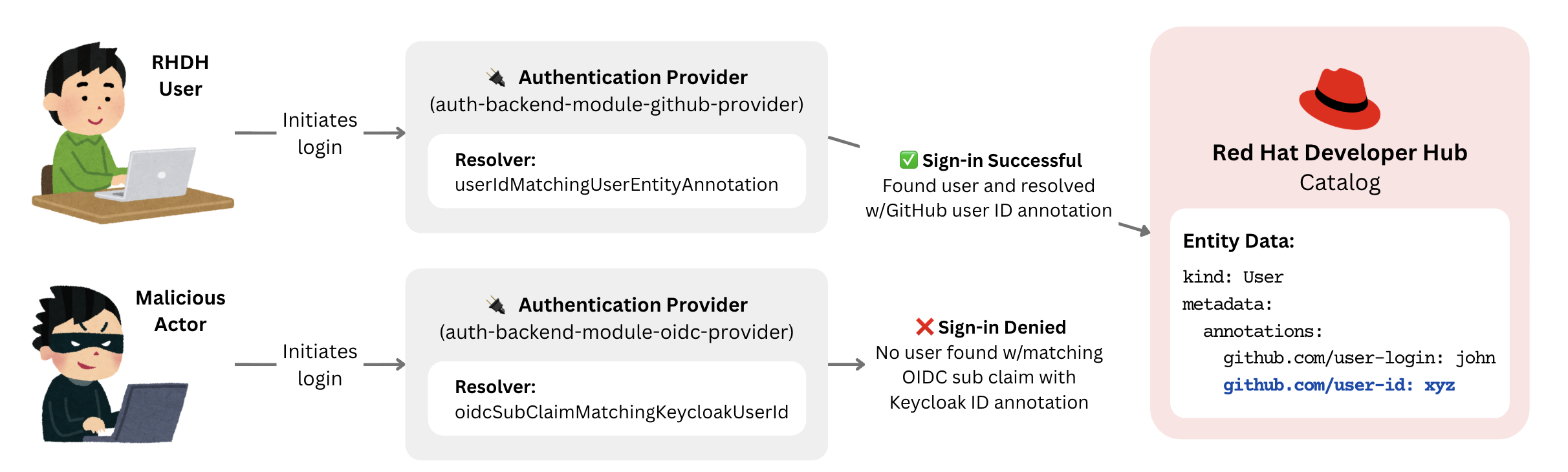
Once users are ingested, the sign-in process requires the authenticating user to match the entity in the catalog created by the primary provider. This linking is done by a sign-in resolver. The primary goal is to use the sign-in resolver that resolves based on the most reliable and immutable user attribute available.
Recommended resolution methods
The following table outlines the recommended sign-in resolvers. These are the default signInResolver options if the signInResolver configuration is omitted in the app-config.yaml.
Provider | Resolver | Identifier Mapped (Auth → Catalog) |
Keycloak | oidcSubClaimMatchingKeycloakUserId | OIDC sub claim → Keycloak user ID |
LDAP | oidcLdapUuidMatchingAnnotation | LDAP UUID → LDAP UUID annotation |
MsGraph | userIdMatchingUserEntityAnnotation | Microsoft User ID → User ID annotation |
GitHub | userIdMatchingUserEntityAnnotation | GitHub User ID → User ID annotation |
GitLab | userIdMatchingUserEntityAnnotation | GitLab User ID → User ID annotation |
Note that the GitHub and GitLab sign-in resolvers are currently in development and not yet available in the 1.9 Developer Hub release (expecting to be a part of the 1.10 release). For the time being, the usernameMatchingUserEntityName resolvers are the default and the best option available. Take special consideration when using these resolvers to ensure that users in the other configured provider(s) cannot change their username to impersonate a user from another IdP. With this setup, the Developer Hub instance will be secured from impersonation as illustrated in Figure 2.
Resolution methods to avoid
Avoid using resolvers based on email addresses (e.g., emailMatchingUserEntityProfileEmail). Emails are not immutable, and if the IdP does not enforce email verification, there is a risk of impersonation. For instance, a user from GitHub can change their email address to log in as a target Keycloak user. If email resolution is strictly necessary, ensure that email verification is enabled and enforced within your IdP configuration.
Step 3: Configure the frontend
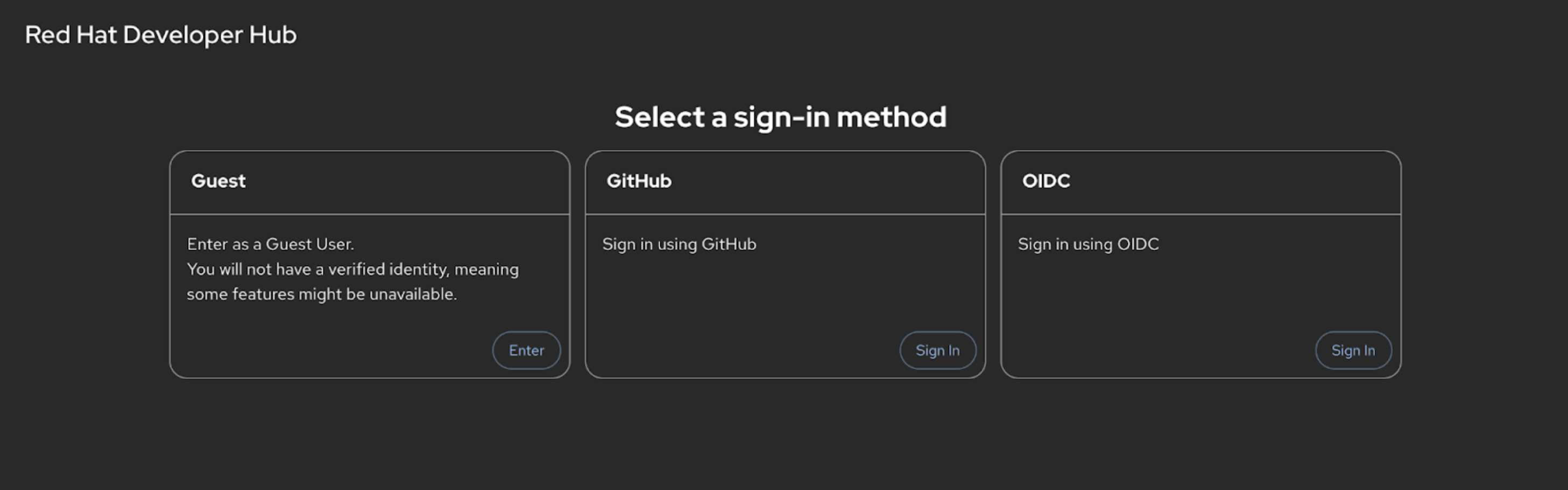
After setting up the catalog and authentication providers in the backend, configure the frontend to display the available sign-in options. Configure the signInPage options to list the desired providers in the app-config.yaml:
signInPage:
  - github
  - oidc
With this configuration, the resulting sign-in page will look like Figure 3.
Security and caveats
As far as data integrity and authority go, the most critical security consideration when setting up multiple catalog providers is managing entities with conflicting entityRefs. Always ensure the provider chosen to be the primary provider is the most trusted and authoritative source for that entity's data. The primary provider controls the entire entity’s core data.
There are caveats when using RBAC, such as the fact that some RBAC policies rely on attributes being present on the ingested entity. When using conditional policies that expect an annotation like HAS_ANNOTATION, verify that the necessary annotations are included in the entities provided or update the policies to reflect the setup to accommodate entities from multiple providers.
Policies based on relations, such as IS_ENTITY_OWNER will function correctly as relations are aggregated from all sources.
Looking ahead
By integrating these strategies, from the catalog ingestion to secure sign-in resolution, your Developer Hub instance can successfully manage a multi-source user base while maintaining data authority and security.
To further this multiple authentication provider setup for a future release, the goal is to implement namespace configuration for users and groups. This will allow entities from different catalog providers to reside in their own distinct namespaces, effectively eliminating entityRef conflicts and the need for manual sync-delay management.

