The Red Hat Security Data API provides a powerful interface to access common vulnerabilities and exposures (CVE) data, empowering developers, security professionals, and researchers with direct access to critical security information for Red Hat products. This guide will show you how to use curl and jq to retrieve and format CVE data in readable text and structured CSV formats, making it adaptable for a variety of data analysis and security tasks.
We will use Red Hat Enterprise Linux 9 (RHEL 9) as an example, but you can query this API for CVE data on any Red Hat product.
What is the Security Data API?
The Red Hat Security Data API is an open API that provides CVE and security data in JSON format. It's ideal for those who need to stay current with vulnerabilities affecting Red Hat products or require access to historical CVE data for research or analysis. It is also ideal for integrating real-time security data into applications, workflows, or monitoring systems. The API supports filters for parameters like date, severity, and specific CVE identifiers, making it flexible and suited for various use cases (i.e., security audits, vulnerability assessments, and compliance monitoring).
Key benefits of Security Data API
- Real-Time access to vulnerability data: Stay updated with the latest CVE data affecting Red Hat products.
- Programmatic access: Automate data retrieval for security monitoring or integrate it into existing systems.
- Flexible querying: Customize queries based on specific needs like severity level, date range, or specific CVEs.
By using tools like curl and jq, you can easily pull CVE data in a structured, readable format, making it manageable for processing, storing, or further analysis.
Prerequisite tools
Before beginning, ensure you have installed curl and jq. These tools will help you fetch data from the API and transform it into readable or structured formats.
- curl: Allows us to make HTTP requests from the command line, an essential tool for fetching data from web APIs.
- jq: A command-line JSON processor that allows us to parse, manipulate, and format JSON output efficiently.
On most Unix-based systems (Linux or macOS), you can install these tools using the following package managers:
Install curl
- RHEL:
sudo yum install curl - Debian/Ubuntu:
sudo apt-get install curl - macOS:
brew install curl
Install jq
- RHEL:
sudo yum install jq - Debian/Ubuntu:
sudo apt-get install jq - macOS:
brew install jq
To get started with the Security Data API, let's look at two examples that demonstrate how to retrieve and format CVE data in different ways. The first example shows how to display the data in a human-readable text format, while the second example focuses on exporting the data in a structured CSV format for easy analysis.
Example 1
In this example, we will retrieve and format CVE data as readable text. To retrieve the most recent 10,000 CVEs related to RHEL 9 (or any other specified Red Hat product), we’ll start with a command that formats the data for readability in plain text.
curl -s "https://access.redhat.com/labs/securitydataapi/cve.json?per_page=10000&product=Red%20Hat%20Enterprise%20Linux%209" | jq -r '
    (to_entries | .[] |
    "\nCVE Entry \(.key + 1):\nCVE ID: \(.value.CVE)\nSeverity: \(.value.severity)\nPublic Date: \(.value.public_date)\nCVSS Score: \(.value.cvss_score)\nCVSS3 Score: \(.value.cvss3_score)\nBugzilla: \((try .value.bugzilla.description // "N/A"))\nDescription: \(.value.description)\n\n")' > recent_10000_cves_rhel9.txt
- curl request: Fetches the latest 10,000 CVE records, specifically for RHEL 9. To query a different product, simply replace
product=Red%20Hat%20Enterprise%20Linux%209with the desired product name (e.g.,product=Red%20Hat%20OpenShift). - jq formatting:
to_entries: Converts the JSON array to a format that enables adding an index.- Field access: Each field (CVE, severity, public_date, etc.) is accessed individually, with
"N/A"as a fallback for missing values.
- Output: Saves results to
recent_10000_cves_rhel9.txt, formatted for readability.
The following is a sample output:
CVE Entry 1:
CVE ID: CVE-2024-10491
Severity: moderate
Public Date: 2024-10-29T16:23:21Z
CVSS Score: null
CVSS3 Score: 5.4
Bugzilla: N/A
Description: null

CVE Entry 2:
CVE ID: CVE-2024-10452
Severity: low
Public Date: 2024-10-29T15:16:22Z
CVSS Score: null
CVSS3 Score: 2.2
Bugzilla: N/A
Description: null
Example 2
In this example, we will retrieve and format data as a CSV.
curl -s "https://access.redhat.com/labs/securitydataapi/cve.json?per_page=10000&product=Red%20Hat%20Enterprise%20Linux%209" | jq -r '
    # Define CSV headers
    (["Index", "CVE_ID", "Severity", "Public_Date", "CVSS_Score", "CVSS3_Score", "Bugzilla", "Description"] | @csv),

    # Create an index variable and iterate over each item
    ( . as $list |
      reduce range(0; length) as $i (
        [];
        . + [[
            ($i + 1),                                 # Index
            ($list[$i].CVE // "N/A"),                 # CVE ID
            ($list[$i].severity // "N/A"),            # Severity
            ($list[$i].public_date // "N/A"),         # Public Date
            ($list[$i].cvss_score // "N/A"),          # CVSS Score
            ($list[$i].cvss3_score // "N/A"),         # CVSS3 Score
            (try $list[$i].bugzilla.description // "N/A"), # Bugzilla description
            ($list[$i].description // "N/A")          # Description
        ]]
      ) | .[] | @csv
' > recent_10000_cves_rhel9.csv
The following is an explanation:
- curl request: Retrieves CVEs specific to RHEL 9 (or another specified product).
- jq processing:
- CSV header: Creates a header row for the CSV.
- Loop with index: Uses
reduceto generate a custom index for each entry, adding it along with the CVE data. - Field access: Each field is processed with
"N/A"as a fallback for missing values.
- Output: The
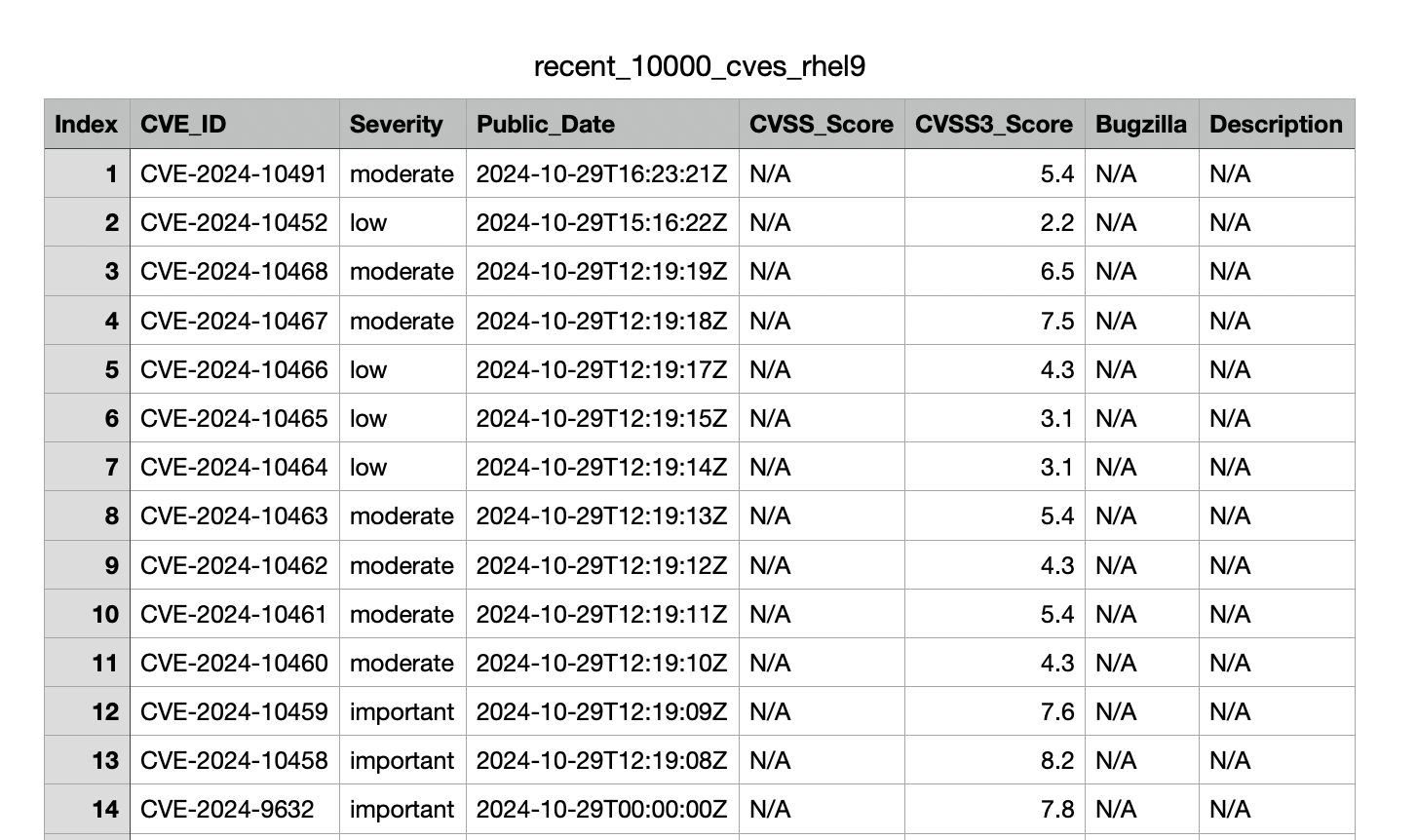
recent_10000_cves_rhel9.csvCSV file is structured for easy analysis with tools like Excel.
Figure 1 illustrates a sample output in the CSV.
Tips for customizing API queries
The API offers flexibility for refining queries for specific data. One of the best features of the Security Data API is tailoring queries for any Red Hat product. By adjusting the parameters, you can fine-tune queries for product-specific vulnerability data.
These are examples of custom querying options:
- Product-specific queries: Retrieve CVEs for specific products by changing the
productparameter. For instance, query Red Hat OpenShift withproduct=Red%20Hat%20OpenShift. - Date filtering: Use
after=YYYY-MM-DDandbefore=YYYY-MM-DDto limit results to specific date ranges. - Severity filtering: Filter results by severity (e.g.,
severity=High) to only include high-impact vulnerabilities. - Pagination: Control data size with
per_pagefor the number of results per request and usepageto navigate through results if necessary.
Wrap up
Using curl and jq with the Red Hat Security Data API, you can easily pull and format vulnerability data to suit your needs. These command-line tools provide flexibility, allowing you to generate human-readable text files for quick reviews and structured CSV outputs for more detailed analysis. By leveraging these methods, security professionals and developers can incorporate Red Hat CVE data into broader monitoring, reporting, and vulnerability management workflows. The result is a streamlined approach to tracking Red Hat-specific vulnerabilities and making data-driven security decisions.

