Redhat Developers  Logo
  • Products

    Platforms

    • Red Hat Enterprise Linux
      Red Hat Enterprise Linux Icon
    • Red Hat AI
      Red Hat AI
    • Red Hat OpenShift
      Openshift icon
    • Red Hat Ansible Automation Platform
      Ansible icon
    • See all Red Hat products

    Featured

    • Red Hat build of OpenJDK
    • Red Hat Developer Hub
    • Red Hat JBoss Enterprise Application Platform
    • Red Hat OpenShift Dev Spaces
    • Red Hat OpenShift Local
    • Red Hat Developer Sandbox

      Try Red Hat products and technologies without setup or configuration fees for 30 days with this shared Red Hat OpenShift and Kubernetes cluster.
    • Try at no cost
  • Technologies

    Featured

    • AI/ML
      AI/ML Icon
    • Linux
      Linux Icon
    • Kubernetes
      Cloud icon
    • Automation
      Automation Icon showing arrows moving in a circle around a gear
    • See all technologies
    • Programming languages & frameworks

      • Java
      • Python
      • JavaScript
    • System design & architecture

      • Red Hat architecture and design patterns
      • Microservices
      • Event-Driven Architecture
      • Databases
    • Developer experience

      • Productivity
      • Tools
      • GitOps
    • Automated data processing

      • AI/ML
      • Data science
      • Apache Kafka on Kubernetes
    • Platform engineering

      • DevOps
      • DevSecOps
      • Red Hat Ansible Automation Platform for applications and services
    • Secure development & architectures

      • Security
      • Secure coding
  • Learn

    Featured

    • Kubernetes & cloud native
      Openshift icon
    • Linux
      Rhel icon
    • Automation
      Ansible cloud icon
    • AI/ML
      AI/ML Icon
    • See all learning resources

    E-books

    • GitOps cookbook
    • Podman in action
    • Kubernetes operators
    • The path to GitOps
    • See all e-books

    Cheat sheets

    • Linux commands
    • Bash commands
    • Git
    • systemd commands
    • See all cheat sheets

    Documentation

    • Product documentation
    • API catalog
    • Legacy documentation
  • Developer Sandbox

    Developer Sandbox

    • Access Red Hat’s products and technologies without setup or configuration, and start developing quicker than ever before with our new, no-cost sandbox environments.
    • Explore the Developer Sandbox

    Featured Developer Sandbox activities

    • Get started with your Developer Sandbox
    • OpenShift virtualization and application modernization using the Developer Sandbox
    • Explore all Developer Sandbox activities

    Ready to start developing apps?

    • Try at no cost
  • Blog
  • Events
  • Videos

Improve efficiency with OpenStack Services on OpenShift

December 19, 2025
Gil Rosenberg
Related topics:
Developer ProductivityVirtualization
Related products:
Red Hat OpenShift

    The OpenStack cloud infrastructure has always efficiently monitored the utilization of its compute services and schedule workloads according to the available resources on the compute hosts. That was on day one when the virtual machine (VM) workload was initially scheduled. But what about day two? How can we manage workload rebalancing in the event of host downtime, planned and unplanned? How can we avoid the occasionally pesky “noisy neighbor?" Fortunately, there is a way: Introducing the Red Hat OpenStack Services on OpenShift workload optimization operator in Feature Release 4. 

    What to expect

    Users can expect optimized workload distribution and reduced infrastructure hotspots caused by running an imbalanced workload after creation.

    Users can also expect reduced operational costs by balancing the workload. We can enable better infrastructure resource usage, which can result in:

    • Lower hardware needs.
    • Reduced utilities (power, cooling, etc.).
    • Fewer hotspots and congestions means fewer service outages and scrambling engineers.
    • Enhanced performance: A balanced infrastructure can facilitate more workloads, more demands, and eventually business growth. 

    OpenStack Workload Optimization

    OpenStack Workload Optimization (OWO) is based on the OpenStack Watcher upstream project, which provides a robust framework to help you achieve a wide range of infrastructure resource utilization goals, ultimately reducing data center operating costs. 

    The optimized service framework includes a metrics receiver, a complex event processor and profiler, an optimization processor, and an action plan applier. 

    Similar to the other control plane services, the OWO runs on top of the OpenStack Services on the OpenShift cluster and interacts with the different services, as depicted in Figure 1.
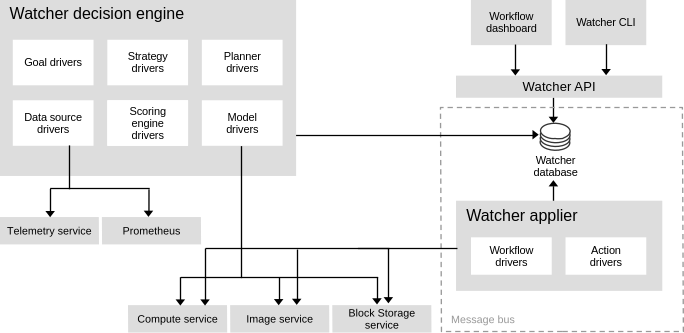
    A diagram illustrates the OWO running on top of the OpenStack Services on the OpenShift cluster.
    Figure 1: The OWO interacts with different services.

    To install the OWO operator (currently in tech preview), create the following CR in the openstack-operators project and apply it as follows:

    apiVersion: operators.coreos.com/v1alpha1
    kind: Subscription
    metadata:
      name: watcher-operator
      namespace: openstack-operators
    spec:
      name: watcher-operator
      channel: stable-v1.0
      source: redhat-operators
      sourceNamespace: openshift-marketplace
    oc apply -f watcher-operator.yaml

    Alternatively, you can just choose it from the operator-catalog in the OpenShift console. Red Hat will merge the OWO-Watcher operator into the openstack-operator at GA time (Figure 2).
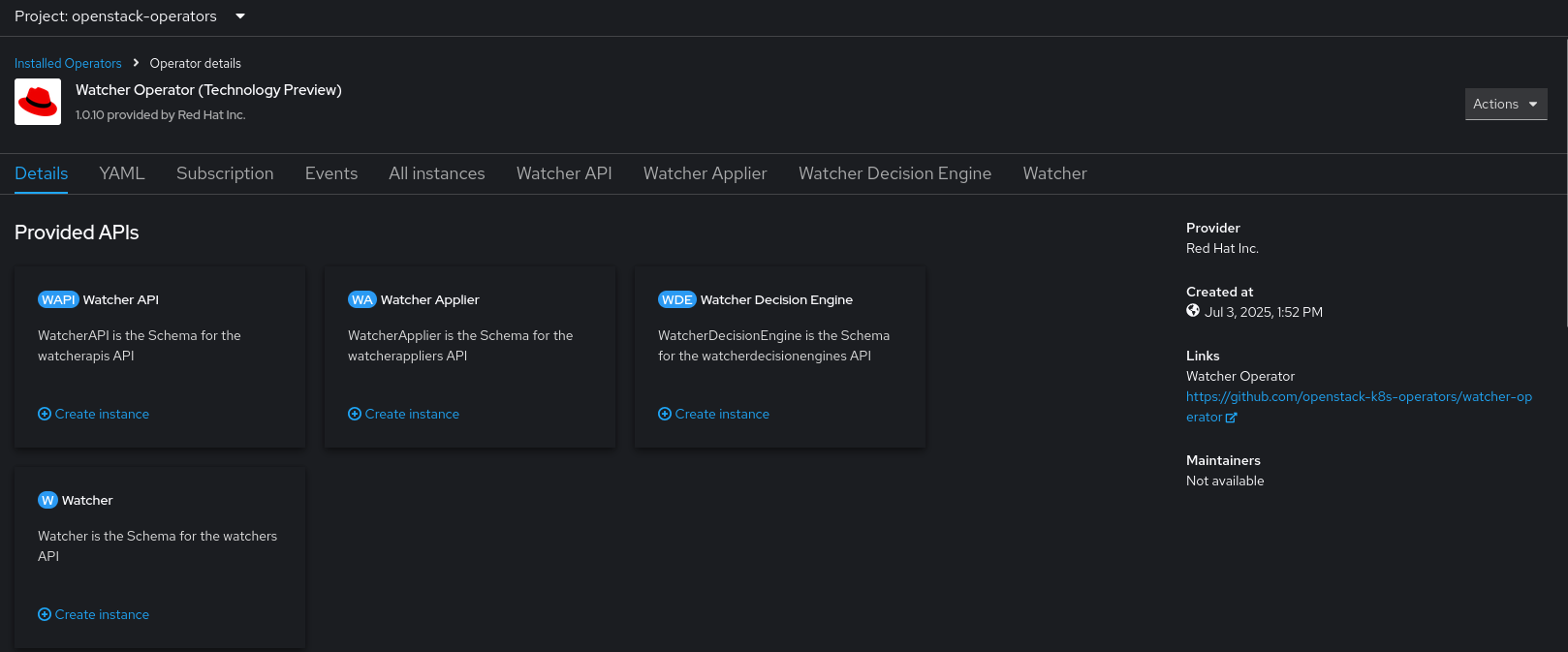
    The OWO-Watcher operator in the OpenShift console.
    Figure 2: The OpenStack Workload Optimization (OWO) watcher operator is deployed from the OpenShift operator catalog.

    Once set up, the OpenStack Services on OpenShift administrator can use the optimization service to create a workflow that results in moving VM workloads within a given environment. 

    For example, to reduce the number of compute nodes required to save energy, an administrator can create a VM consolidation workflow. At a high level, the workflow resembles Figure 3.
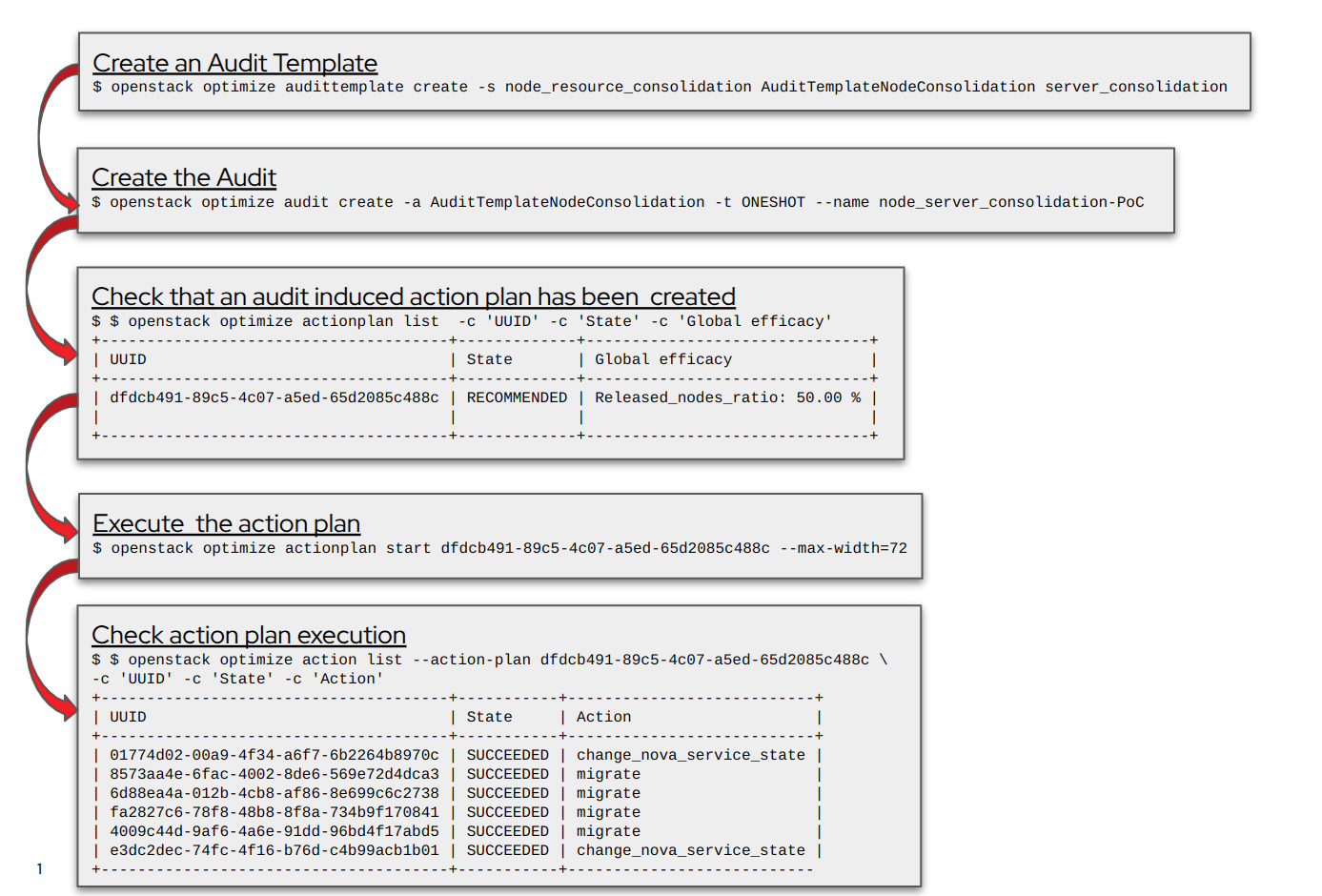
    A diagram illustrates a VM consolidation workflow.
    Figure 3: This VM workflow provides a high-level view, starting from the audit template to the creation and execution of the action plan.

    The optimization workflow can go through the OpenStack CLI or the Horizon UI. Here is a quick demo using OWO from the Horizon UI.

    YouTube Video
    Thu, 12/18/2025 - 22:10
    ywilliam

    OWO workflow creation

    In the OWO workflow creation, we need to know a few key concepts:

    • Goals:

      Represents the main objective of an optimization. For example, you might have a goal to save energy, consolidate servers, or balance workloads across your cloud. Each goal is associated with one or more strategies that define how to achieve that objective.

    • Strategies:

      The "how-to" for achieving a goal. Strategies are the algorithms and logic that OWO (watcher) uses to analyze the current state of your cloud and determine the best course of action. They are pluggable and customizable. You can use the default strategies provided with OWO (watcher) or create your own to meet your specific needs. Examples of strategies include basic offline consolidation, VM workload consolidation, and workload balance migration.

    • Audit templates:

      Audit templates are reusable configuration for an audit. Think of it as a preset that defines what you want to do and specifies the goal, strategy, and any other parameters for an optimization task. This allows for consistency and makes it easier to run the same type of audit multiple times.

    • Audits:

      This is the process of running an optimization. An audit is a request for OWO (watcher) to analyze your cloud and generate an action plan. It can be triggered manually or automatically. You can launch a one-time audit, schedule them to run continuously, or trigger them based on specific events in your cloud. When an audit runs, the OWO (watcher) decision engine uses the specified strategy to generate a solution.

    • Action plans:

      This is the output of a successful audit. An action plan is a series of steps that need to be taken to achieve the desired optimization and presented for review. Before any changes are made, the action plan is in a recommended state, allowing an administrator to approve or deny it. Once approved, the action plan moves to an ongoing state and executes the actions.

    • Actions:

      The actions are the individual tasks within an action plan. These are the specific operations that OWO (watcher) will perform on your cloud. Examples of actions include live migrating a virtual machine, changing the power state of a host, or even evacuating of a complete set of hosts (i.e., a zone) to enable maintenance or other day-2 operations. The OWO (watcher) applier is the component responsible for executing these actions.

    Figure 4 is an example of a zone migration at a high level.
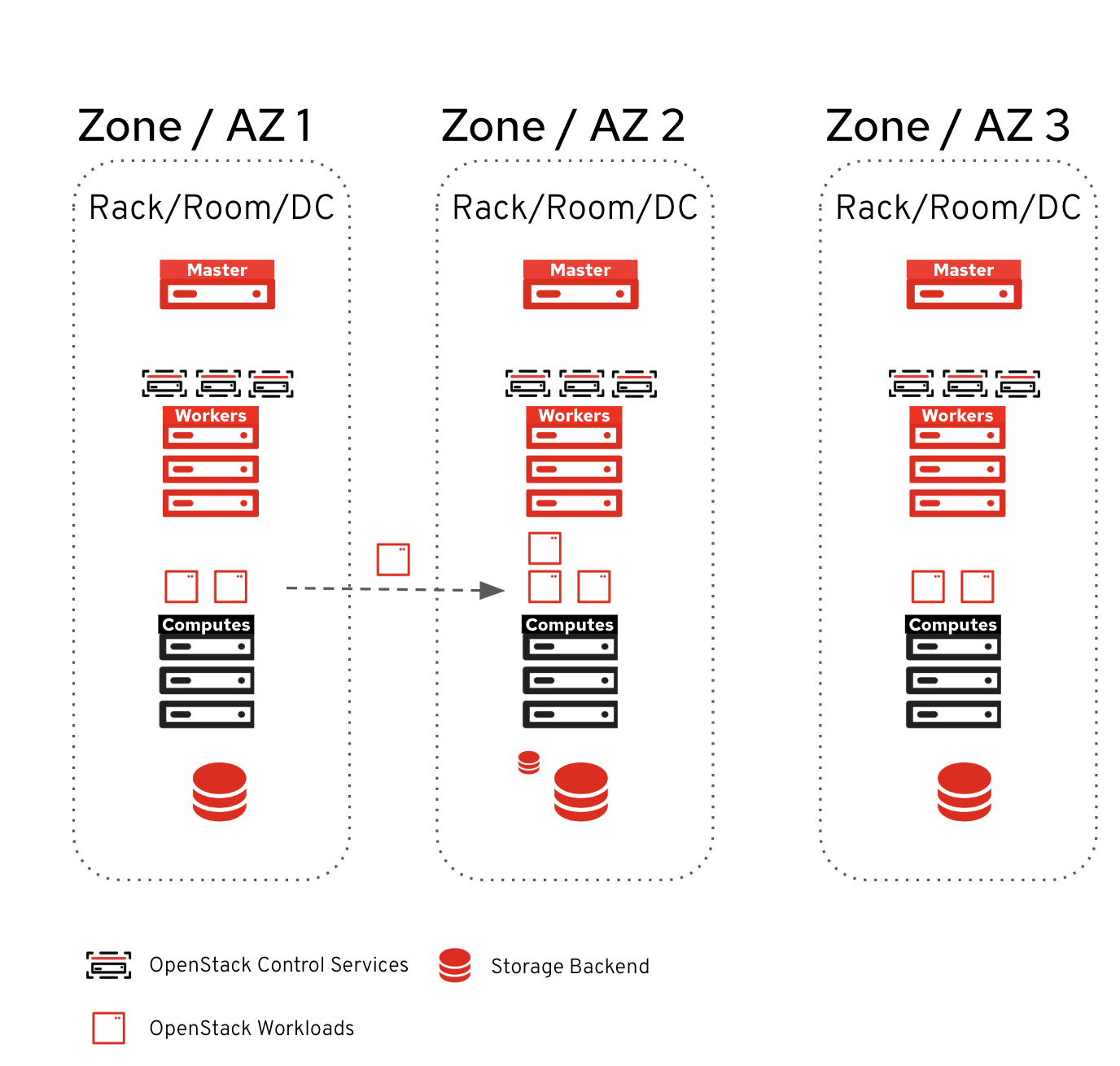
    A diagram of an example of a zone migration.
    Figure 4: This is an example of a zone migration workflow executed by OWO (Watcher).

    Wrap up

    Based on OpenStack watcher, OWO is a powerful new tool that helps cloud administrators manage their workloads more efficiently and productively. For more information, please visit our official documentation.

    Related Posts

    • How to deploy EVPN in OpenStack Services on OpenShift

    • How to update OpenStack Services on OpenShift

    • Optimize workloads with right-sizing recommendations

    • How Kruize optimizes OpenShift workloads

    Recent Posts

    • Monitoring OpenShift Gateway API and Service Mesh with Kiali

    • Improve efficiency with OpenStack Services on OpenShift

    • Quantum-secure gateways in Red Hat OpenShift Service Mesh 3.2

    • Quantum-secure gateways in Red Hat OpenShift Service Mesh 3.2

    • Deploy and customize JBoss Web Server on Red Hat OpenShift

    What’s up next?

    Operating OpenShift Share image

    Operating OpenShift: An SRE Approach to Managing Infrastructure

    Rick Rackow +1
    Red Hat Developers logo LinkedIn YouTube Twitter Facebook

    Platforms

    • Red Hat AI
    • Red Hat Enterprise Linux
    • Red Hat OpenShift
    • Red Hat Ansible Automation Platform
    • See all products

    Build

    • Developer Sandbox
    • Developer tools
    • Interactive tutorials
    • API catalog

    Quicklinks

    • Learning resources
    • E-books
    • Cheat sheets
    • Blog
    • Events
    • Newsletter

    Communicate

    • About us
    • Contact sales
    • Find a partner
    • Report a website issue
    • Site status dashboard
    • Report a security problem

    RED HAT DEVELOPER

    Build here. Go anywhere.

    We serve the builders. The problem solvers who create careers with code.

    Join us if you’re a developer, software engineer, web designer, front-end designer, UX designer, computer scientist, architect, tester, product manager, project manager or team lead.

    Sign me up

    Red Hat legal and privacy links

    • About Red Hat
    • Jobs
    • Events
    • Locations
    • Contact Red Hat
    • Red Hat Blog
    • Inclusion at Red Hat
    • Cool Stuff Store
    • Red Hat Summit
    © 2025 Red Hat

    Red Hat legal and privacy links

    • Privacy statement
    • Terms of use
    • All policies and guidelines
    • Digital accessibility

    Report a website issue
