Redhat Developers  Logo
  • AI

    Get started with AI

    • Red Hat AI
      Accelerate the development and deployment of enterprise AI solutions.
    • AI learning hub
      Explore learning materials and tools, organized by task.
    • AI interactive demos
      Click through scenarios with Red Hat AI, including training LLMs and more.
    • AI/ML learning paths
      Expand your OpenShift AI knowledge using these learning resources.
    • AI quickstarts
      Focused AI use cases designed for fast deployment on Red Hat AI platforms.
    • No-cost AI training
      Foundational Red Hat AI training.

    Featured resources

    • OpenShift AI learning
    • Open source AI for developers
    • AI product application development
    • Open source-powered AI/ML for hybrid cloud
    • AI and Node.js cheat sheet

    Red Hat AI Factory with NVIDIA

    • Red Hat AI Factory with NVIDIA is a co-engineered, enterprise-grade AI solution for building, deploying, and managing AI at scale across hybrid cloud environments.
    • Explore the solution
  • Learn

    Self-guided

    • Documentation
      Find answers, get step-by-step guidance, and learn how to use Red Hat products.
    • Learning paths
      Explore curated walkthroughs for common development tasks.
    • See all learning

    Hands-on

    • Developer Sandbox
      Spin up Red Hat's products and technologies without setup or configuration.
    • Interactive labs
      Learn by doing in these hands-on, browser-based experiences.
    • Interactive demos
      Click through product features in these guided tours.

    Browse by topic

    • AI/ML
    • Automation
    • Java
    • Kubernetes
    • Linux
    • See all topics

    Training & certifications

    • Courses and exams
    • Certifications
    • Skills assessments
    • Red Hat Academy
    • Learning subscription
    • Explore training
  • Build

    Get started

    • Red Hat build of Podman Desktop
      A downloadable, local development hub to experiment with our products and builds.
    • Developer Sandbox
      Spin up Red Hat's products and technologies without setup or configuration.

    Download products

    • Access product downloads to start building and testing right away.
    • Red Hat Enterprise Linux
    • Red Hat AI
    • Red Hat OpenShift
    • Red Hat Ansible Automation Platform
    • See all products

    Featured

    • Red Hat build of OpenJDK
    • Red Hat JBoss Enterprise Application Platform
    • Red Hat OpenShift Dev Spaces
    • Red Hat Developer Toolset

    References

    • E-books
    • Documentation
    • Cheat sheets
    • Architecture center
  • Community

    Get involved

    • Events
    • Live AI events
    • Red Hat Summit
    • Red Hat Accelerators
    • Community discussions

    Follow along

    • Articles & blogs
    • Developer newsletter
    • Videos
    • Github

    Get help

    • Customer service
    • Customer support
    • Regional contacts
    • Find a partner

    Join the Red Hat Developer program

    • Download Red Hat products and project builds, access support documentation, learning content, and more.
    • Explore the benefits

How PagedAttention resolves memory waste of LLM systems

July 24, 2025
Abhijit Roy
Related topics:
Artificial intelligence
Related products:
Red Hat AI

Large language models (LLMs) use a key-value (KV) cache to store the context of ongoing text generation. However, managing the memory for this cache is challenging because its size is dynamic and unpredictable. In other words, when we run LLMs, we store something called the KV cache in memory. This helps the model remember what it has generated so far.

The KV cache is tricky, because:

  • It grows and shrinks as the model generates text.
  • We don’t know ahead of time how long each request will be or how long it will live.

Current LLM serving systems handle this in a very basic way:

  • They store the KV cache in one big chunk of memory (contiguous memory).
  • They also pre-allocate memory based on the maximum possible length of the request, not how long the request will actually be.

This article explains how PagedAttention solves the memory waste problem of traditional LLM systems by breaking the cache into small, on-demand blocks (similar to virtual memory).

Memory waste (fragmentation)

Let’s say we allow a max length of 2048 tokens.

But in reality:

  •  User A sends 50 tokens.

  •  User B sends 300 tokens.

  •  User C sends 700 tokens.

Without PagedAttention, the system reserves 2048 tokens worth of memory for each user, even though they use much less. This results in significant wasted memory due to the reserved full chunk, therefore other users can’t use that free space.

Here we have found three types of memory waste: 

  • The first is internal fragmentation, that is we are preallocating the memory since we don’t know how much token the model will generate. So if the model is generate less token than the allocated memory then the free part of the memory is wasted.
  • The second is reservation not used at the current step, but used in future.
  • External fragmentation request A and request B may have different sequence length.

External fragmentation happens when KV caches require large contiguous blocks but leave behind scattered gaps, preventing efficient reuse of total GPU memory (Figure 1). 

memory fragmentation
Figure 1: An illustration of external fragmentation.

[Image source: Efficient Memory Management for Large Language Model Serving with PagedAttention]

PagedAttention

How does PagedAttention solve this problem? PagedAttention in vLLM mainly solves external fragmentation Here the large kv cache is divided into block of pages(kv blocks) and here we avoid preallocation the contiguous memory as a result the chance of memory wastage becomes less. Also here the memory need not to be allocated in contiguous fashion.

vLLM used the concept of virtual memory and paging in OS.

We virtualize the kv cache in logical and physical blocks and we will have a block table to map them (Figure 2).
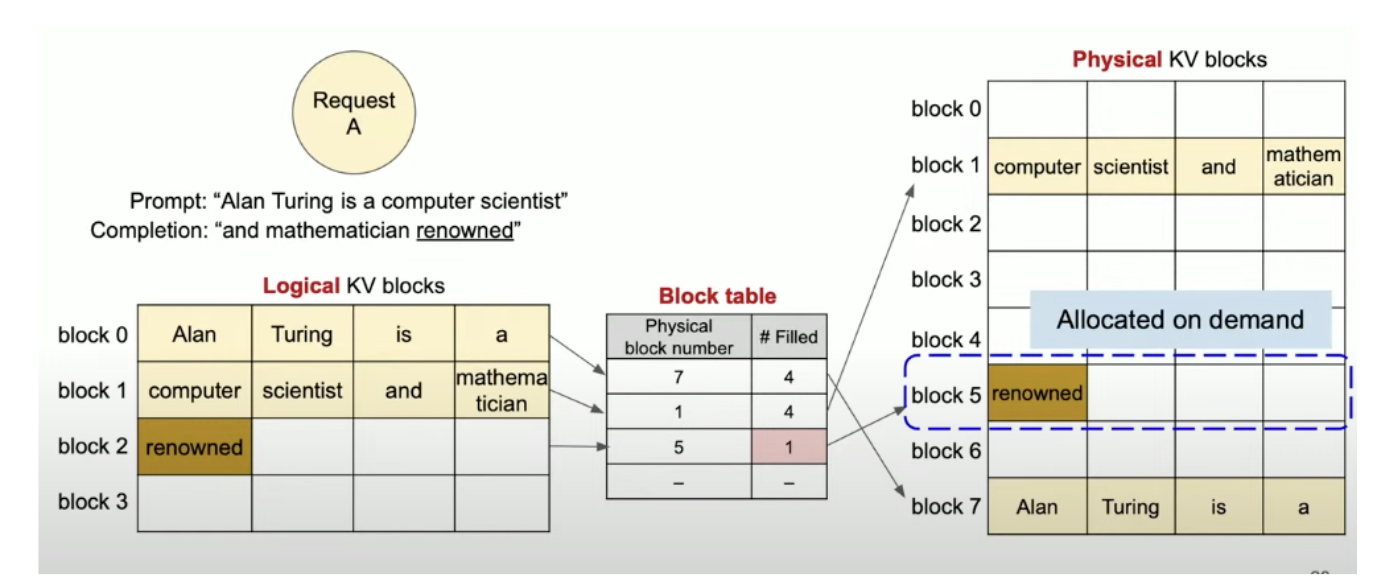
pagedattention
Figure 2: An illustration of the design.

[Image source: Efficient Memory Management for Large Language Model Serving with PagedAttention]

In logical view the tokens are stored in a continuous fashion but in the physical view token are may not necessary to be stored in continuous fashion (Figure 2).

The mapping between logical and physical blocks are stored in a block table (Figure 2).

This design helps in several ways:

  • Since blocks are small and added only when needed, it avoids wasting memory inside big pre-allocated chunks.
  • Since all blocks are the same size, it prevents memory getting too fragmented over time.
  • It lets the system share blocks between different sequences. For example, when using advanced text generation (like beam search), the model doesn't have to store the same information more than once.

Say for example the model has generated a new token renowned the new token will be first appended to the last logical block and using the block table the respective token will be stored in the physical kv blocks (Figure 2).

In short we are allocating memory on demand instead of pre-allocating a big chunk.

Here, we only have minimal internal fragmentation. There will be no external fragmentation since we will have same block size.

Final thoughts

PagedAttention is an advanced technique designed to overcome the memory inefficiencies in serving large language models (LLMs). By dividing the KV cache into fixed-size, reusable memory pages and using a lightweight indirection table for access, it enables fine-grained memory allocation and reuse. This approach significantly reduces memory fragmentation, improves GPU memory utilization, and allows for higher throughput under variable-length and concurrent workloads. For more details refer to: Efficient Memory Management for Large Language Model Serving with PagedAttention.

Related Posts

  • Distributed inference with vLLM

  • LLM Compressor is here: Faster inference with vLLM

  • Structured outputs in vLLM: Guiding AI responses

  • vLLM V1: Accelerating multimodal inference for large language models

  • The road to AI: A guide to understanding AI/ML models

Recent Posts

  • Federated identity across the hybrid cloud using zero trust workload identity manager

  • Confidential virtual machine storage attack scenarios

  • Introducing virtualization platform autopilot

  • Integrate zero trust workload identity manager with Red Hat OpenShift GitOps

  • Best Practice Configuration and Tuning for Linux and Windows VMs

What’s up next?

This short e-book examines the compelling combination of open source and artificial intelligence (AI), showcasing the benefits of effective open source-licensed models and tools for developers.

Get the e-book
Red Hat Developers logo LinkedIn YouTube Twitter Facebook

Platforms

  • Red Hat AI
  • Red Hat Enterprise Linux
  • Red Hat OpenShift
  • Red Hat Ansible Automation Platform
  • See all products

Build

  • Developer Sandbox
  • Developer tools
  • Interactive tutorials
  • API catalog

Quicklinks

  • Learning resources
  • E-books
  • Cheat sheets
  • Blog
  • Events
  • Newsletter

Communicate

  • About us
  • Contact sales
  • Find a partner
  • Report a website issue
  • Site status dashboard
  • Report a security problem

RED HAT DEVELOPER

Build here. Go anywhere.

We serve the builders. The problem solvers who create careers with code.

Join us if you’re a developer, software engineer, web designer, front-end designer, UX designer, computer scientist, architect, tester, product manager, project manager or team lead.

Sign me up

Red Hat legal and privacy links

  • About Red Hat
  • Jobs
  • Events
  • Locations
  • Contact Red Hat
  • Red Hat Blog
  • Inclusion at Red Hat
  • Cool Stuff Store
  • Red Hat Summit
© 2026 Red Hat

Red Hat legal and privacy links

  • Privacy statement
  • Terms of use
  • All policies and guidelines
  • Digital accessibility

Chat Support

Please log in with your Red Hat account to access chat support.