Redhat Developers  Logo
  • AI

    Get started with AI

    • Red Hat AI
      Accelerate the development and deployment of enterprise AI solutions.
    • AI learning hub
      Explore learning materials and tools, organized by task.
    • AI interactive demos
      Click through scenarios with Red Hat AI, including training LLMs and more.
    • AI/ML learning paths
      Expand your OpenShift AI knowledge using these learning resources.
    • AI quickstarts
      Focused AI use cases designed for fast deployment on Red Hat AI platforms.
    • No-cost AI training
      Foundational Red Hat AI training.

    Featured resources

    • OpenShift AI learning
    • Open source AI for developers
    • AI product application development
    • Open source-powered AI/ML for hybrid cloud
    • AI and Node.js cheat sheet

    Red Hat AI Factory with NVIDIA

    • Red Hat AI Factory with NVIDIA is a co-engineered, enterprise-grade AI solution for building, deploying, and managing AI at scale across hybrid cloud environments.
    • Explore the solution
  • Learn

    Self-guided

    • Documentation
      Find answers, get step-by-step guidance, and learn how to use Red Hat products.
    • Learning paths
      Explore curated walkthroughs for common development tasks.
    • Guided learning
      Receive custom learning paths powered by our AI assistant.
    • See all learning

    Hands-on

    • Developer Sandbox
      Spin up Red Hat's products and technologies without setup or configuration.
    • Interactive labs
      Learn by doing in these hands-on, browser-based experiences.
    • Interactive demos
      Click through product features in these guided tours.

    Browse by topic

    • AI/ML
    • Automation
    • Java
    • Kubernetes
    • Linux
    • See all topics

    Training & certifications

    • Courses and exams
    • Certifications
    • Skills assessments
    • Red Hat Academy
    • Learning subscription
    • Explore training
  • Build

    Get started

    • Red Hat build of Podman Desktop
      A downloadable, local development hub to experiment with our products and builds.
    • Developer Sandbox
      Spin up Red Hat's products and technologies without setup or configuration.

    Download products

    • Access product downloads to start building and testing right away.
    • Red Hat Enterprise Linux
    • Red Hat AI
    • Red Hat OpenShift
    • Red Hat Ansible Automation Platform
    • See all products

    Featured

    • Red Hat build of OpenJDK
    • Red Hat JBoss Enterprise Application Platform
    • Red Hat OpenShift Dev Spaces
    • Red Hat Developer Toolset

    References

    • E-books
    • Documentation
    • Cheat sheets
    • Architecture center
  • Community

    Get involved

    • Events
    • Live AI events
    • Red Hat Summit
    • Red Hat Accelerators
    • Community discussions

    Follow along

    • Articles & blogs
    • Developer newsletter
    • Videos
    • Github

    Get help

    • Customer service
    • Customer support
    • Regional contacts
    • Find a partner

    Join the Red Hat Developer program

    • Download Red Hat products and project builds, access support documentation, learning content, and more.
    • Explore the benefits

Scaling virtio-blk disk I/O with IOThread Virtqueue Mapping

September 5, 2024
Stefan Hajnoczi Kevin Wolf, Emanuele Giuseppe Esposito, Paolo Bonzini, and Peter Krempa
Related topics:
Virtualization
Related products:
Red Hat Enterprise Linux

    This article covers the IOThread Virtqueue Mapping feature for Kernel-based virtual machine (KVM) guests that was introduced in Red Hat Enterprise Linux (RHEL) 9.4.

    The problem

    Modern storage evolved to keep pace with growing numbers of CPUs by providing multiple queues through which I/O requests can be submitted. This allows CPUs to submit I/O requests and handle completion interrupts locally. The result is good performance and scalability on machines with many CPUs.

    Although virtio-blk devices in KVM guests have multiple queues by default, they do not take advantage of multi-queue on the host. I/O requests from all queues are processed in a single thread on the host for guests with the <driver io=native …> libvirt domain XML setting. This single thread can become a bottleneck for I/O bound workloads.

    KVM guests can now benefit from multiple host threads for a single device through the new IOThread Virtqueue Mapping feature. This improves I/O performance for workloads where the single thread is a bottleneck. Guests with many vCPUs should use this feature to take advantage of additional capacity provided by having multiple threads.

    If you are interested in the QEMU internals involved in developing this feature, you can find out more in this blog post and this KVM Forum presentation. Making QEMU’s block layer thread safe was a massive undertaking that we are proud to have contributed upstream.

    How IOThread Virtqueue Mapping works

    IOThread Virtqueue Mapping lets users assign individual virtqueues to host threads, called IOThreads, so that a virtio-blk device is handled by more than one thread. Each virtqueue can be assigned to one IOThread.

    Most users will opt for round-robin assignment so that virtqueues are automatically spread across a set of IOThreads. Figure 1 illustrates how 4 queues are assigned in round-robin fashion across 2 IOThreads.
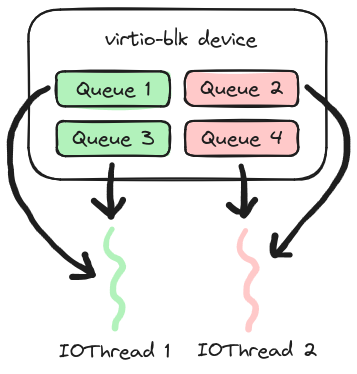
    A depiction of a virtio-blk device with four queues assigned to two IOThreads. Queue 1 and Queue 3 are green and assigned to IOThread 1. Queue 2 and Queue 4 are red and assigned to IOThread 2.
    Figure 1: A virtio-blk device with 4 queues assigned to 2 IOThreads.

    The libvirt domain XML for this configuration looks like this:

    <domain>
      …
      <vcpu>4</vcpu>
      <iothreads>2</iothreads>
      …
      <devices>
        <disk …>
          <driver name='qemu' cache=’none’ io=’native’ …>
            <iothreads>
              <iothread id='1'></iothread>
              <iothread id='2'></iothread>
            </iothreads>

    More details on the syntax can be found in the libvirt documentation.

    Configuration tips

    The following recommendations are based on our experience developing and benchmarking this feature:

    • Use 4-8 IOThreads. Usually this is sufficient to saturate disks. Adding more threads beyond the point of saturation does not increase performance and may harm it.

    • Share IOThreads between devices unless you know in advance that certain devices are heavily utilized. Keeping a few IOThreads busy but not too busy is ideal.

    • Pin IOThreads away from vCPUs with <iothreadpin> and <vcpupin> if you have host CPUs to spare. IOThreads need to respond quickly when the guest submits I/O. Therefore they should not compete for CPU time with the guest’s vCPU threads.

    • Use <driver io=”native” cache=”none” …>. IOThread Virtqueue Mapping was designed for io=”native”. Using io=”threads” is not recommended as it does not combine with IOThread Virtqueue Mapping in a useful way.

    Performance

    The following random read disk I/O benchmark compares IOThread Virtqueue Mapping with 2 and 4 IOThreads against a guest without IOThread Virtqueue Mapping (only 1 IOThread). The guest was configured with 8 vCPUs all submitting I/O in parallel. See Figure 2.
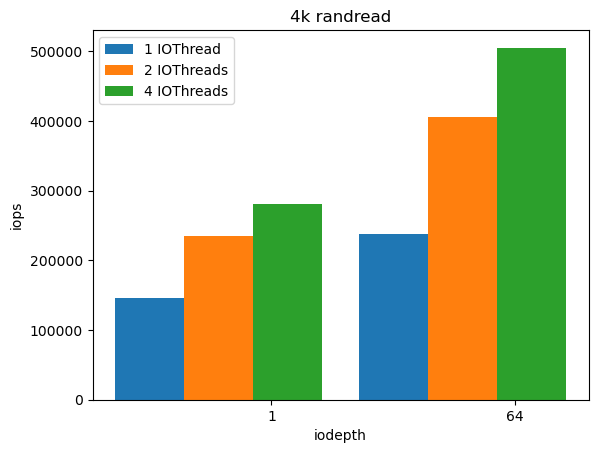
    A bar graph depicting random read disk I/O benchmark comparing IOThread Virtqueue Mapping with 2 and 4 IOThreads against a guest without IOThread Virtqueue Mapping (only 1 IOThread). The y axis is labeled iops and the x axis is labeled iodepth.
    Figure 2: Random read 4 KB benchmark results for iodepth 1 and 64 with IOPS increasing when comparing 1, 2, and 4 IOThreads.

    The most important fio benchmark options are shown here:

    fio --ioengine=libaio –rw=randread –bs=4k --numjobs=8 --direct=1
        --cpus_allowed=0-7 --cpus_allowed_policy=split

    This microbenchmark shows that when 1 IOThread is unable to saturate a disk, adding more IOThreads with IOThread Virtqueue Mapping is a significant improvement. Virtqueues were assigned round-robin to the IOThreads. The disk was an Intel Optane SSD DC P4800X and the guest was running Fedora 39 x86_64. The libvirt domain XML, fio options, benchmark output, and an Ansible playbook are available here.

    Real workloads may benefit less depending on how I/O bound they are and whether they submit I/O from multiple vCPUs. We recommend benchmarking your workloads to understand the effect of IOThread Virtqueue Mapping.

    A companion article explores database performance with IOThread Virtqueue Mapping.

    Conclusion

    The new IOThread Virtqueue Mapping feature in RHEL 9.4 improves scalability of disk I/O for guests with many vCPUs. Enabling this feature on your KVM guests with virtio-blk devices can boost performance of I/O bound workloads.

    Last updated: September 11, 2024

    Related Posts

    • What's new in Red Hat Enterprise Linux 9.4?

    • Virtio live migration technical deep dive

    • First steps with the data virtualization Operator for Red Hat OpenShift

    • Configure and run a QEMU-based VM outside of libvirt with virt-manager

    • Why you should use io_uring for network I/O

    Recent Posts

    • Debugging image mode with Red Hat OpenShift 4.20: A practical guide

    • EvalHub: Because "looks good to me" isn't a benchmark

    • SQL Server HA on RHEL: Meet Pacemaker HA Agent v2 (tech preview)

    • Deploy with confidence: Continuous integration and continuous delivery for agentic AI

    • Every layer counts: Defense in depth for AI agents with Red Hat AI

    What’s up next?

    This cheat sheet covers the basics of installing .NET on Red Hat Enterprise Linux (RHEL), how to get a simple program running, and how to run a program in a Linux container.

    Get the cheat sheet
    Red Hat Developers logo LinkedIn YouTube Twitter Facebook

    Platforms

    • Red Hat AI
    • Red Hat Enterprise Linux
    • Red Hat OpenShift
    • Red Hat Ansible Automation Platform
    • See all products

    Build

    • Developer Sandbox
    • Developer tools
    • Interactive tutorials
    • API catalog

    Quicklinks

    • Learning resources
    • E-books
    • Cheat sheets
    • Blog
    • Events
    • Newsletter

    Communicate

    • About us
    • Contact sales
    • Find a partner
    • Report a website issue
    • Site status dashboard
    • Report a security problem

    RED HAT DEVELOPER

    Build here. Go anywhere.

    We serve the builders. The problem solvers who create careers with code.

    Join us if you’re a developer, software engineer, web designer, front-end designer, UX designer, computer scientist, architect, tester, product manager, project manager or team lead.

    Sign me up

    Red Hat legal and privacy links

    • About Red Hat
    • Jobs
    • Events
    • Locations
    • Contact Red Hat
    • Red Hat Blog
    • Inclusion at Red Hat
    • Cool Stuff Store
    • Red Hat Summit
    © 2026 Red Hat

    Red Hat legal and privacy links

    • Privacy statement
    • Terms of use
    • All policies and guidelines
    • Digital accessibility

    Chat Support

    Please log in with your Red Hat account to access chat support.