Page
Automate the import for discovered hosted clusters
Now it's time to configure the automated import process by defining the policy and Go template, creating the placement definition, and binding the resources to ensure automatic detection and import of discovered hosted clusters into Red Hat Advanced Cluster Management for Kubernetes (RHACM).
In this lesson, you will:
- Configure the policy.
- Understand the Go template.
- Create the placement definition.
- Bind the import policy to a placement definition.
- Validate the policy.
- Verify cluster discovery.
- Check HyperShift add-on logs.
- Import existing HCP clusters (optional).
Step 1: Configure the policy
To configure your policy to import all your discovered hosted clusters, create a YAML file for your DiscoveredCluster custom resource and edit the configuration that is referenced in the following example:
Note
You MUST create the file. Don't use "cat EOF".
cat policy-mce-hcp-autoimport.yaml

apiVersion: policy.open-cluster-management.io/v1
kind: Policy
metadata:
  name: policy-mce-hcp-autoimport
  namespace: open-cluster-management-global-set
  annotations:
    policy.open-cluster-management.io/standards: NIST SP 800-53
    policy.open-cluster-management.io/categories: CM Configuration Management
    policy.open-cluster-management.io/controls: CM-2 Baseline Configuration
    policy.open-cluster-management.io/description: Discovered clusters that are of
      type MultiClusterEngineHCP can be automatically imported into ACM as managed clusters.
      This policy configure those discovered clusters so they are automatically imported.
      Fine tuning MultiClusterEngineHCP clusters to be automatically imported
      can be done by configure filters at the configMap or add annotation to the discoverd cluster.
spec:
  disabled: false
  policy-templates:
    - objectDefinition:
        apiVersion: policy.open-cluster-management.io/v1
        kind: ConfigurationPolicy
        metadata:
          name: mce-hcp-autoimport-config
        spec:
          object-templates:
            - complianceType: musthave
              objectDefinition:
                apiVersion: v1
                kind: ConfigMap
                metadata:
                  name: discovery-config
                  namespace: open-cluster-management-global-set
                data:
                  rosa-filter: ""
          remediationAction: enforce
          severity: low
    - objectDefinition:
        apiVersion: policy.open-cluster-management.io/v1
        kind: ConfigurationPolicy
        metadata:
          name: policy-mce-hcp-autoimport
        spec:
          remediationAction: enforce
          severity: low
          object-templates-raw: |
            {{- /* find the MultiClusterEngineHCP DiscoveredClusters */ -}}
            {{- range $dc := (lookup "discovery.open-cluster-management.io/v1" "DiscoveredCluster" "" "").items }}
              {{- /* Check for the flag that indicates the import should be skipped */ -}}
              {{- $skip := "false" -}}
              {{- range $key, $value := $dc.metadata.annotations }}
                {{- if and (eq $key "discovery.open-cluster-management.io/previously-auto-imported")
                           (eq $value "true") }}
                  {{- $skip = "true" }}
                {{- end }}
              {{- end }}
              {{- /* if the type is MultiClusterEngineHCP and the status is Active */ -}}
              {{- if and (eq $dc.spec.status "Active")
                         (contains (fromConfigMap "open-cluster-management-global-set" "discovery-config" "mce-hcp-filter") $dc.spec.displayName)
                         (eq $dc.spec.type "MultiClusterEngineHCP")
                         (eq $skip "false") }}
            - complianceType: musthave
              objectDefinition:
                apiVersion: discovery.open-cluster-management.io/v1
                kind: DiscoveredCluster
                metadata:
                  name: {{ $dc.metadata.name }}
                  namespace: {{ $dc.metadata.namespace }}
                spec:
                  importAsManagedCluster: true
              {{- end }}
            {{- end }}
This policy seems a little scary. But don't worry. It's already set up and ready to go. Just create it.
oc apply -f policy-mce-hcp-autoimport.yamlUnderstand the Go template
Let's dissect the template to understand each part:
Loop over all
DiscoveredClusters:{{- range $dc := (lookup "discovery.open-cluster-management.io/v1" "DiscoveredCluster" "" "").items }}lookup queriesallDiscoveredClustersin the cluster.$dcis the iteration variable.
Previous import check:
{{- $skip := "false" -}} {{- range $key, $value := $dc.metadata.annotations }} {{- if and (eq $key "discovery.open-cluster-management.io/previously-auto-imported") (eq $value "true") }} {{- $skip = "true" }} {{- end }} {{- end }}- Avoid re-importing already imported clusters.
- Use annotation to mark processed clusters.
Import conditions:
{{- if and (eq $dc.spec.status "Active")
           (contains (fromConfigMap "..." "mce-hcp-filter") $dc.spec.displayName)
           (eq $dc.spec.type "MultiClusterEngineHCP")
           (eq $skip "false") }}
Cluster will be imported IF:
- Status is Active.
DisplayNamecontains the filter fromConfigMap.- Type is
MultiClusterEngineHCP. - Not previously imported.
Import action:
- complianceType: musthave objectDefinition: apiVersion: discovery.open-cluster-management.io/v1 kind: DiscoveredCluster metadata: name: {{ $dc.metadata.name }} namespace: {{ $dc.metadata.namespace }} spec: importAsManagedCluster: true- Sets
importAsManagedCluster: trueon theDiscoveredCluster. - Triggers RHACM's import process.
- Sets
Step 2: Placement definition
Create the placement definition that selects only the local-cluster, which is a managed hub cluster. Use the following YAML sample:
cat <<EOF | oc apply -f -
apiVersion: cluster.open-cluster-management.io/v1beta1
kind: Placement
metadata:
  name: policy-mce-hcp-autoimport-placement
  namespace: open-cluster-management-global-set
spec:
  tolerations:
    - key: cluster.open-cluster-management.io/unreachable
      operator: Exists
    - key: cluster.open-cluster-management.io/unavailable
      operator: Exists
  clusterSets:
    - global
  predicates:
    - requiredClusterSelector:
        labelSelector:
          matchExpressions:
            - key: local-cluster
              operator: In
              values:
                - "true"
EOF
Why local-cluster? DiscoveredClusters are created on the hub, so the policy needs to run there to query them.
Step 3: Bind the import policy to a placement definition
Connect the resources by using a PlacementBinding resource. See the following example where placementRef references the placement that you created, and subjects references the policy that you created:
cat <<EOF | oc apply -f -
apiVersion: policy.open-cluster-management.io/v1
kind: PlacementBinding
metadata:
  name: policy-mce-hcp-autoimport-placement-binding
  namespace: open-cluster-management-global-set
placementRef:
  name: policy-mce-hcp-autoimport-placement
  apiGroup: cluster.open-cluster-management.io
  kind: Placement
subjects:
  - name: policy-mce-hcp-autoimport
    apiGroup: policy.open-cluster-management.io
    kind: Policy
EOF
Step 4: Policy validation
Verify if the policy was created and is compliant.
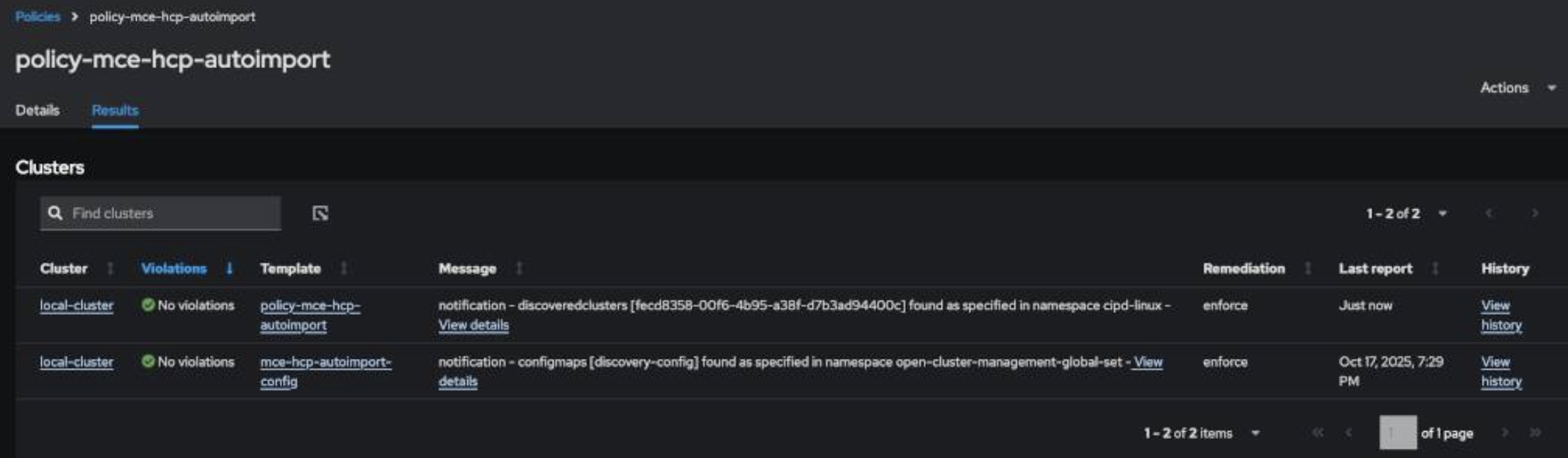
Go to Governance > Policies, click
policy-mce-hcp-autoimportthenResults. If everything is correct, there will be no violations.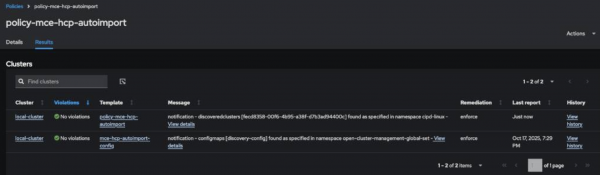
Figure 1: MCE HCP Autoimport policy results. Or use the CLI:
oc get policies.policy.open-cluster-management.io policy-mce-hcp-autoimport -n open-cluster-management-global-setExpected output:
NAME                        REMEDIATION ACTION   COMPLIANCE STATE   AGE
policy-mce-hcp-autoimport   enforce              Compliant          2m
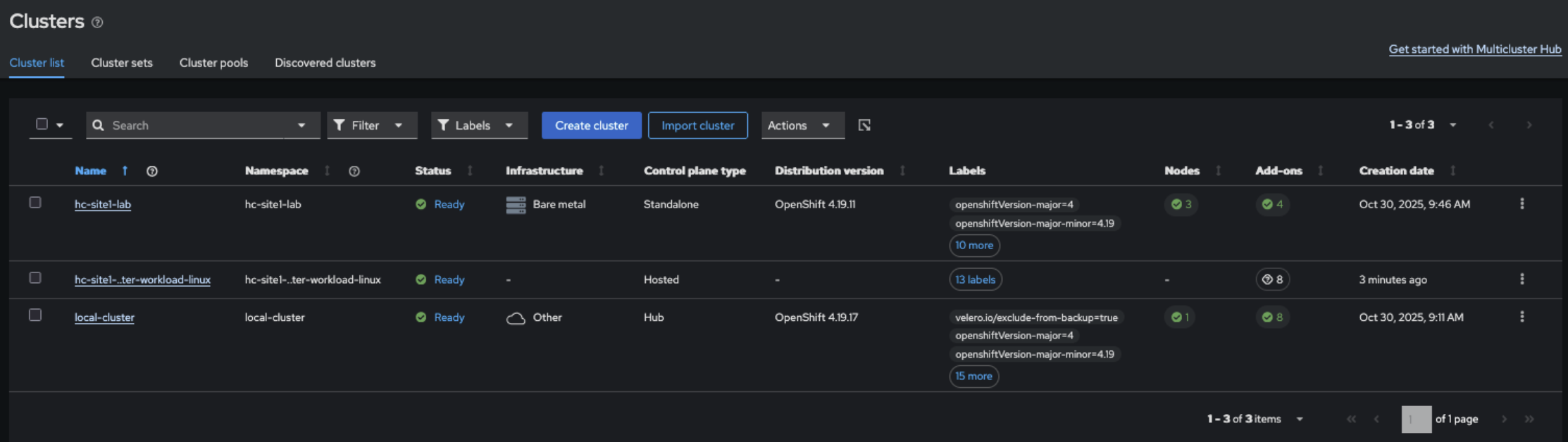
You're now ready to go! All new hosted clusters that you create in your imported MCE cluster will be automatically detected and imported into RHACM!
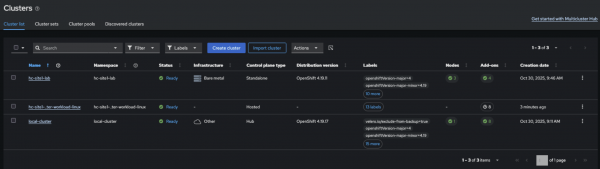
Figure 2: Hosted cluster autoimporting.
Step 4: Check discovery in RHACM
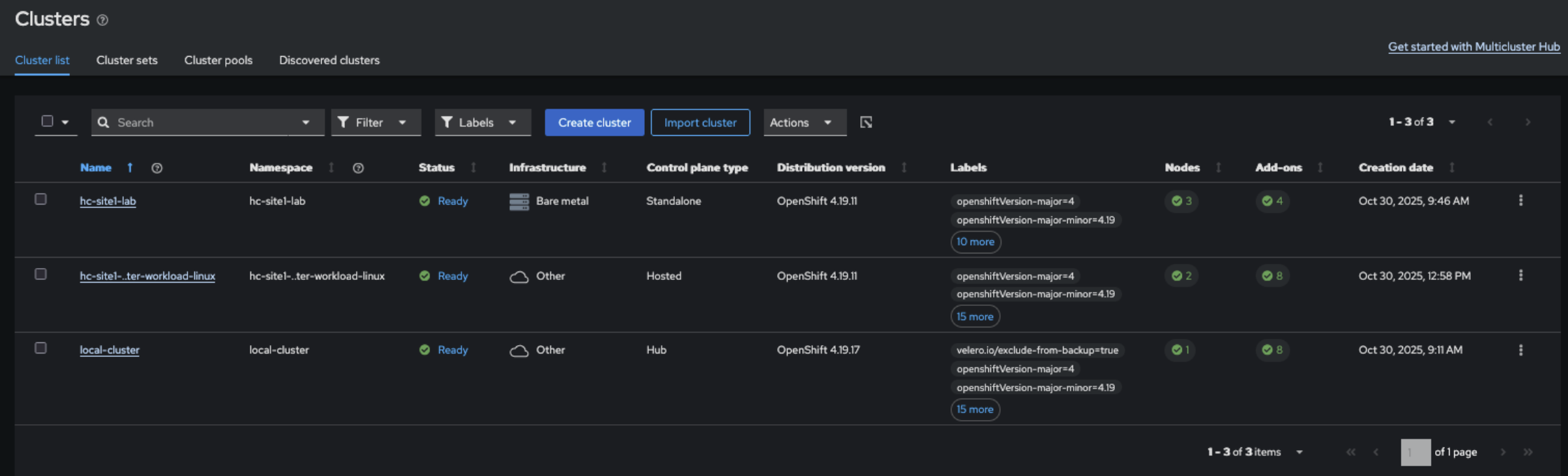
Wait a few minutes and verify if the cluster was discovered:
oc get discoveredcluster -AExpected output:
NAMESPACE      NAME                                   DISPLAY NAME                          CLOUD PROVIDER   STATUS   AGE
hc-site1-lab   f74a752d-6209-4bd2-8978-9374e437445b   hc-site1-lab-cluster-workload-linux   agent            Active   15m
Inspect the discovered cluster details:
oc get discoveredcluster -n hc-site1-lab f74a752d-6209-4bd2-8978-9374e437445b -o yaml

apiVersion: discovery.open-cluster-management.io/v1
kind: DiscoveredCluster
metadata:
  creationTimestamp: "2025-10-30T15:58:48Z"
  generation: 2
  labels:
    hypershift.open-cluster-management.io/hc-name: cluster-workload-linux
    hypershift.open-cluster-management.io/hc-namespace: hc-site1-lab
  name: f74a752d-6209-4bd2-8978-9374e437445b
  namespace: hc-site1-lab
  resourceVersion: "145526"
  uid: 900f11b2-e7b6-4e88-9204-b8c33229675c
spec:
  apiUrl: https://X.X.X.X:6443
  cloudProvider: agent
  creationTimestamp: "2025-10-30T15:57:05Z"
  credential: {}
  displayName: hc-site1-lab-cluster-workload-linux
  importAsManagedCluster: true
  isManagedCluster: false
  name: f74a752d-6209-4bd2-8978-9374e437445b
  openshiftVersion: 0.0.0
  status: Active
  type: MultiClusterEngineHCP
Step 5: Check HyperShift add-on logs
Confirm the add-on is working correctly:
oc logs -n open-cluster-management-agent-addon-discovery \
  deployment/hypershift-addon-agent -f
You should see something like this:
INFO  agent.controller-manager-setup  agent/agent.go:257  starting manager
INFO  agent.agent-reconciler  agent/agent_helper.go:48  local cluster name is local-cluster
INFO  agent.agent-reconciler.addon-status-controller  agent/addon_status_controller.go:66  reconciling Deployment hypershift/operator
INFO  agent.agent-reconciler.addon-status-controller  agent/addon_status_controller.go:104  done reconcile Deployment hypershift/operator
INFO  agent.agent-reconciler  install/upgrade.go:75  hypershift operator management is disabled. Skip installing or upgrading the hypershift operator
Perfect! The add-on is configured to discover clusters, but not manage the operator, which already exists on MCE.
Bonus step: Import existing HCP clusters
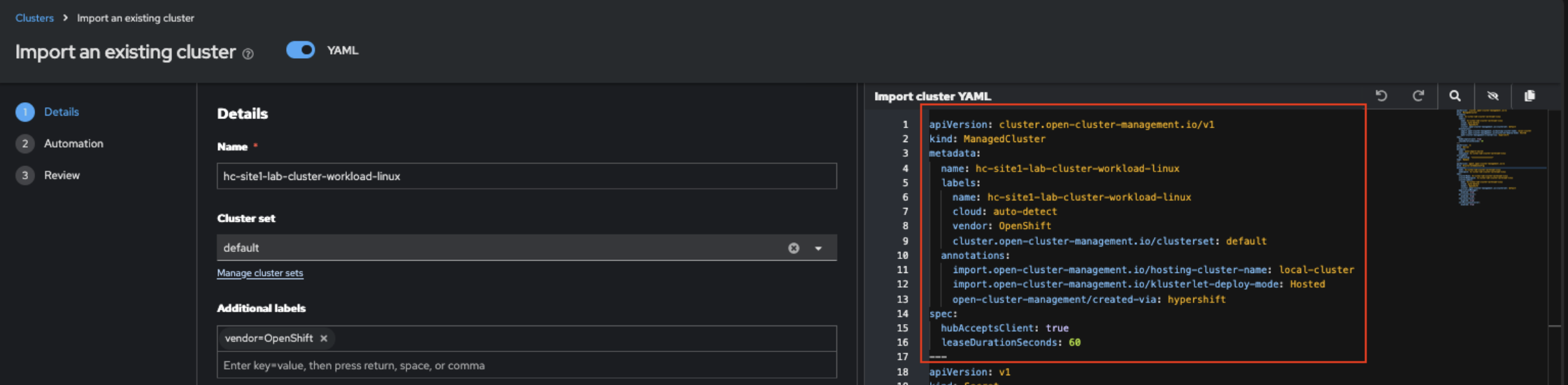
To import existing HCP clusters, go to Infrastructure > Clusters > Import Cluster.
Enable YAML view, and customize your manifest as indicated.
For this learning path, we are using the following cluster names:
- Hosting Cluster Name (your MCE cluster):
hc-site1-lab - Hosted Cluster Agent Nodes:
cluster-workload-linux
- Hosting Cluster Name (your MCE cluster):
The imported hosted cluster name must be a concatenation of
<managed-cluster-name>-<hosted-cluster-name>, as stated in Lesson 3.Example name:
hc-site1-lab-cluster-workload-linux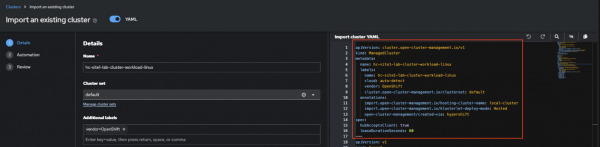
Figure 4: Hosted cluster manual import. For reference, here is the example YAML used in this lab.
apiVersion: cluster.open-cluster-management.io/v1
kind: ManagedCluster
metadata:
  name: hc-site1-lab-cluster-workload-linux
  labels:
    name: hc-site1-lab-cluster-workload-linux
    cloud: auto-detect
    vendor: OpenShift
    cluster.open-cluster-management.io/clusterset: default
  annotations:
    import.open-cluster-management.io/hosting-cluster-name: local-cluster
    import.open-cluster-management.io/klusterlet-deploy-mode: Hosted
    open-cluster-management/created-via: hypershift
spec:
  hubAcceptsClient: true
  leaseDurationSeconds: 60
---
apiVersion: v1
kind: Secret
metadata:
  name: auto-import-secret
  namespace: hc-site1-lab-cluster-workload-linux
stringData:
  kubeconfig: "********************"
type: Opaque
---
apiVersion: agent.open-cluster-management.io/v1
kind: KlusterletAddonConfig
metadata:
  name: hc-site1-lab-cluster-workload-linux
  namespace: hc-site1-lab-cluster-workload-linux
spec:
  clusterName: hc-site1-lab-cluster-workload-linux
  clusterNamespace: hc-site1-lab-cluster-workload-linux
  clusterLabels:
    name: hc-site1-lab-cluster-workload-linux
    cloud: auto-detect
    vendor: OpenShift
    cluster.open-cluster-management.io/clusterset: default
  applicationManager:
    enabled: true
  policyController:
    enabled: true
  searchCollector:
    enabled: true
  certPolicyController:
    enabled: true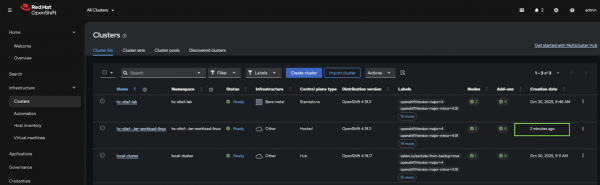
Figure 5: ACM hub showing successful manual import. Figure 5: RHACM hub showing successful manual import.
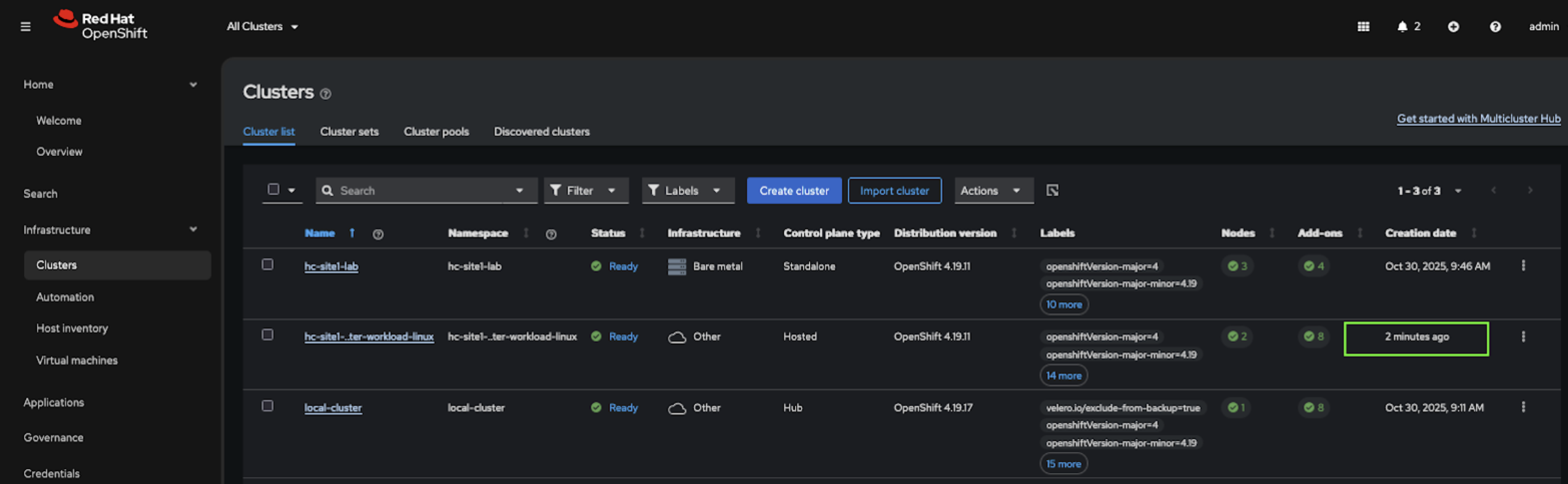
Success! The hosted cluster has been manually imported into RHACM.

