Redhat Developers  Logo
  • Products

    Platforms

    • Red Hat Enterprise Linux
      Red Hat Enterprise Linux Icon
    • Red Hat AI
      Red Hat AI
    • Red Hat OpenShift
      Openshift icon
    • Red Hat Ansible Automation Platform
      Ansible icon
    • See all Red Hat products

    Featured

    • Red Hat build of OpenJDK
    • Red Hat Developer Hub
    • Red Hat JBoss Enterprise Application Platform
    • Red Hat OpenShift Dev Spaces
    • Red Hat OpenShift Local
    • Red Hat Developer Sandbox

      Try Red Hat products and technologies without setup or configuration fees for 30 days with this shared Red Hat OpenShift and Kubernetes cluster.
    • Try at no cost
  • Technologies

    Featured

    • AI/ML
      AI/ML Icon
    • Linux
      Linux Icon
    • Kubernetes
      Cloud icon
    • Automation
      Automation Icon showing arrows moving in a circle around a gear
    • See all technologies
    • Programming languages & frameworks

      • Java
      • Python
      • JavaScript
    • System design & architecture

      • Red Hat architecture and design patterns
      • Microservices
      • Event-Driven Architecture
      • Databases
    • Developer experience

      • Productivity
      • Tools
      • GitOps
    • Automated data processing

      • AI/ML
      • Data science
      • Apache Kafka on Kubernetes
    • Platform engineering

      • DevOps
      • DevSecOps
      • Red Hat Ansible Automation Platform for applications and services
    • Secure development & architectures

      • Security
      • Secure coding
  • Learn

    Featured

    • Kubernetes & cloud native
      Openshift icon
    • Linux
      Rhel icon
    • Automation
      Ansible cloud icon
    • AI/ML
      AI/ML Icon
    • See all learning resources

    E-books

    • GitOps cookbook
    • Podman in action
    • Kubernetes operators
    • The path to GitOps
    • See all e-books

    Cheat sheets

    • Linux commands
    • Bash commands
    • Git
    • systemd commands
    • See all cheat sheets

    Documentation

    • Product documentation
    • API catalog
    • Legacy documentation
  • Developer Sandbox

    Developer Sandbox

    • Access Red Hat’s products and technologies without setup or configuration, and start developing quicker than ever before with our new, no-cost sandbox environments.
    • Explore the Developer Sandbox

    Featured Developer Sandbox activities

    • Get started with your Developer Sandbox
    • OpenShift virtualization and application modernization using the Developer Sandbox
    • Explore all Developer Sandbox activities

    Ready to start developing apps?

    • Try at no cost
  • Blog
  • Events
  • Videos

Simplifying transit router deployment in Open Virtual Network

January 21, 2026
Mairtin O'Loingsigh
Related topics:
Hybrid CloudKubernetes
Related products:
Red Hat Enterprise LinuxRed Hat OpenShift

    Today, Open Virtual Network (OVN) provides transit routers using standard logical routers with specific configuration. However, the introduction of the transit router (TR) component to the OVN Interconnect simplifies their deployment and configuration.

    Introduction

    Transit routers allow users to connect and configure routing across independent OVN deployments, also known as availability zones (AZs). Currently, adding a transit router to a deployment requires users to manually manage logical router and logical router port tunnel keys across multiple AZs. This process is tedious and error-prone as the number of AZs increases. 

    With the introduction of TRs to OVN Interconnect, you can configure routers and router ports on multiple AZs without manually adding network components or managing tunnel keys for each zone.

    OVN interconnect integration

    OVN Interconnect is an OVN feature that connects multiple OVN deployments. It uses two global databases shared across all AZs and a daemon for each zone. When an AZ enables the OVN-IC daemon and configures the IC-NB and IC-SB databases, the transit router and transit router ports entries in IC-NB serve as the source of truth for creating the corresponding logical routers and ports. Each OVN-IC daemon creates logical routers in its AZ and synchronizes its configuration (for example, tunnel keys, MAC addresses, and IP addresses). OVN Interconnect manages tunnel keys for transit devices, which it allocates from a dedicated global pool to avoid clashes with existing keys across all AZs.

    The following diagram (Figure 1) illustrates the steps to add a transit router using the ovn-ic-nbctl command-line tool: 

    1. First, a new transit router entry is created in the Transit router table of the IC-NB database using ovn-ic-nbctl.
    2. The OVN-IC daemon in each AZ monitors IC-NB for updates.
    3. When the OVN-IC daemon sees the new entry, it competes with other daemons to create a datapath entry in the IC-SB using a tunnel key from the global pool.
    4. Once the IC-SB datapath entry is available, the local OVN-IC daemon creates a logical router is created per AZ and configures it to use the tunnel key provided in IC-SB.
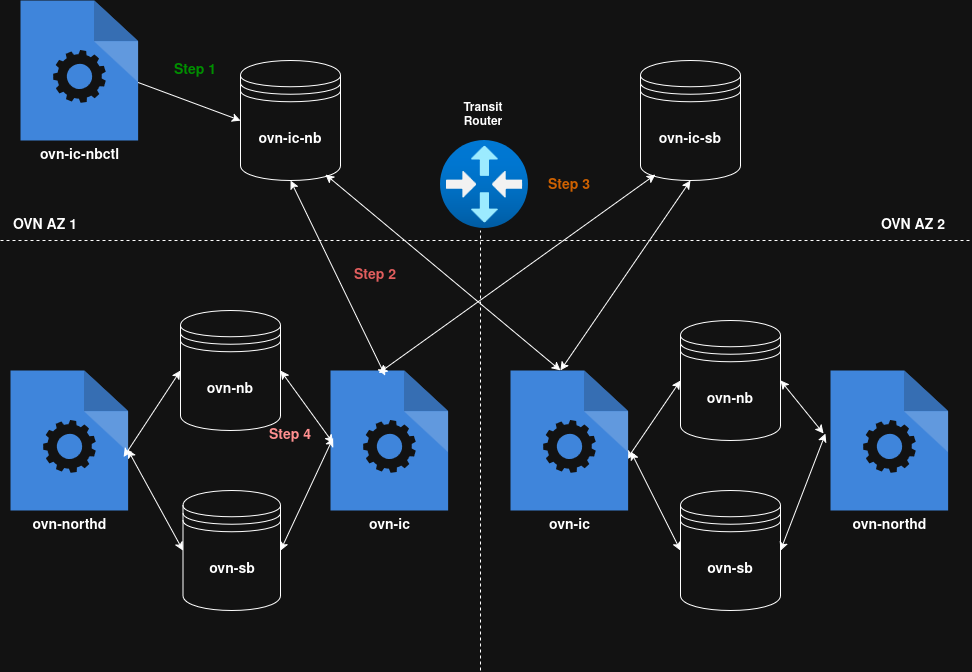
    Flowchart showing data synchronization between IC-NB, IC-SB, and local OVN databases across two availability zones to create a transit router.
    Figure 1: Sequence of events when a transit router is created.

    Transit router ports are added in a similar fashion with one caveat: TR ports have an assigned chassis when created and remain local to the AZ where that chassis resides. In Figure 2, a TR port assigned to Chassis 1 in AZ 1 creates a port of type patch in AZ 1 and remote in AZ 2.
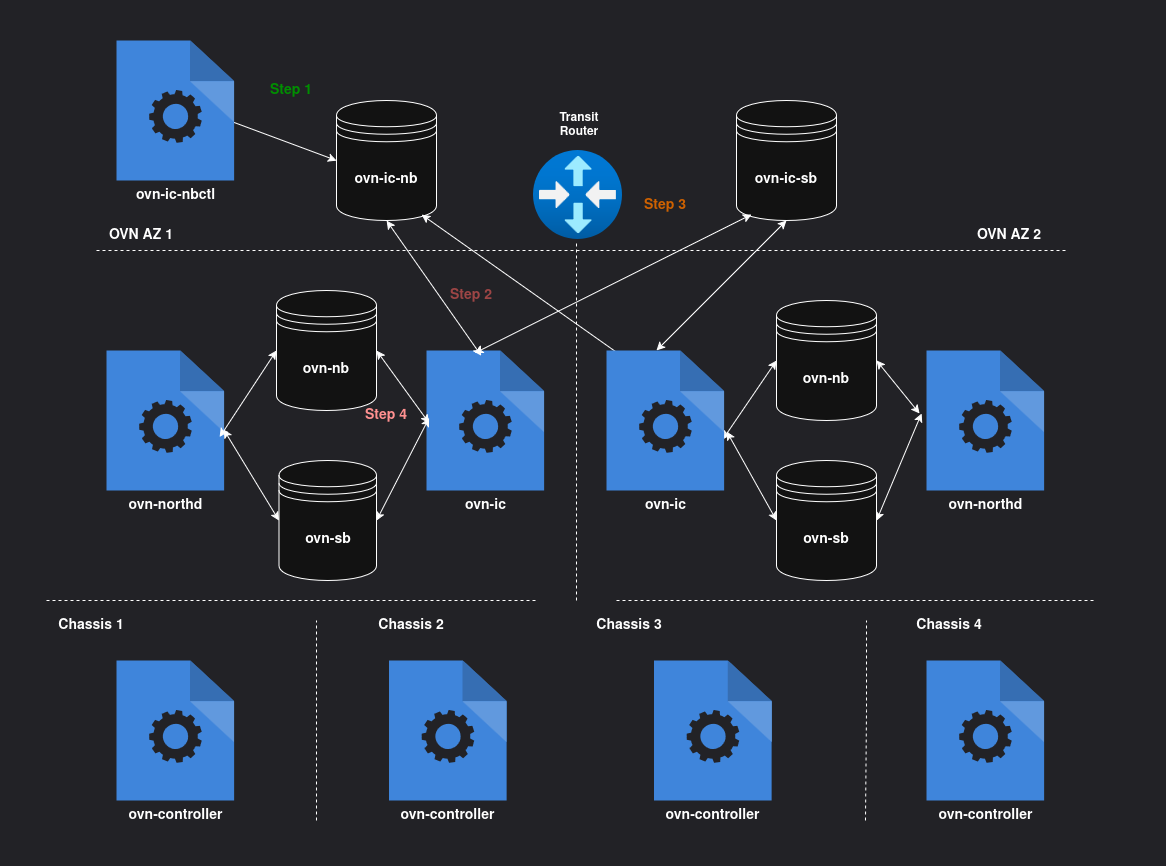
    Architectural diagram of a transit router deployment spanning two availability zones, with Chassis 1 through 4 connected to local OVN databases.
    Figure 2: Example deployment with two AZs.

    Summary

    The introduction of TRs and TR ports to OVN Interconnect reduces the configuration required for each zone, which simplifies deployments and lowers the risk of errors.

    Feedback welcome    

    Please share your questions or suggestions for this feature on the OVS/OVN mailing list. I would love to hear your feedback.

    Additional resources

    • Transit router - The distributed router for OVN interconnect.
    • OVN Interconnect
    • Using OVN interconnect for scaling OVN kubernetes deployments

    Related Posts

    • Monitor OVN networking events using Network Observability

    • Palo Alto Networks' NGFW now supporting OVN-Kubernetes

    • Save power with OVS-DPDK PMD thread load-based sleeping

    • Detect network issues in Open vSwitch using Red Hat Lightspeed

    • Debugging Open vSwitch logs: long poll interval, blocked waiting

    • Troubleshooting Open vSwitch: Is the kernel to blame?

    Recent Posts

    • Simplifying transit router deployment in Open Virtual Network

    • Selective network hosting with BGP router in OpenShift

    • Troubleshooting with fault tree analysis and PIOSEE

    • AI quickstart: How to build an AI-driven product recommender with Red Hat OpenShift AI

    • Deploy an Oracle SQLcl MCP server on Red Hat OpenShift

    Red Hat Developers logo LinkedIn YouTube Twitter Facebook

    Platforms

    • Red Hat AI
    • Red Hat Enterprise Linux
    • Red Hat OpenShift
    • Red Hat Ansible Automation Platform
    • See all products

    Build

    • Developer Sandbox
    • Developer tools
    • Interactive tutorials
    • API catalog

    Quicklinks

    • Learning resources
    • E-books
    • Cheat sheets
    • Blog
    • Events
    • Newsletter

    Communicate

    • About us
    • Contact sales
    • Find a partner
    • Report a website issue
    • Site status dashboard
    • Report a security problem

    RED HAT DEVELOPER

    Build here. Go anywhere.

    We serve the builders. The problem solvers who create careers with code.

    Join us if you’re a developer, software engineer, web designer, front-end designer, UX designer, computer scientist, architect, tester, product manager, project manager or team lead.

    Sign me up

    Red Hat legal and privacy links

    • About Red Hat
    • Jobs
    • Events
    • Locations
    • Contact Red Hat
    • Red Hat Blog
    • Inclusion at Red Hat
    • Cool Stuff Store
    • Red Hat Summit
    © 2025 Red Hat

    Red Hat legal and privacy links

    • Privacy statement
    • Terms of use
    • All policies and guidelines
    • Digital accessibility

    Report a website issue