Traditional transaction monitoring systems are capable, but they can be difficult to manage. Users must navigate rigid rule builders, write complex conditions, or rely on static thresholds that don’t adapt to real spending behavior. As personal finance data grows richer and more dynamic, these approaches start to feel outdated.
The spending transaction monitor AI quickstart demonstrates a different approach: agentic AI. Instead of forcing users to configure rules manually, the system lets them describe alert conditions in natural language. It then uses autonomous AI agents to interpret, validate, and execute those rules against live transaction data. This AI quickstart showcases how agentic workflows can provide intelligent financial monitoring on infrastructure suited for enterprise environments.
What are AI quickstarts?
AI quickstarts are a curated catalog of ready-to-run, industry-focused AI solutions designed for rapid experimentation and extension. Instead of building complex architectures from scratch, these AI quickstarts provide a path to deployment on open, enterprise-grade platforms.
The primary goal of the catalog is to provide an accessible environment where users can explore hands-on examples of how to use AI in real-world applications. By lowering the barrier to entry, these tools help organizations move straight into testing and refining their AI strategy.
The spending transaction monitor is a prime example of this approach. It demonstrates how agentic AI can support sophisticated personal finance alerting systems.
Why agentic AI for transaction monitoring?
Conventional alerting systems have long relied on static logic characterized by predefined thresholds, hard-coded categories, and brittle rules that require constant manual updates. Agentic AI changes this model by shifting the focus from simple execution to active reasoning. Instead of following a rigid script, the system interprets the underlying goal of a task to deliver better results.
A significant shift is the move toward natural language intent. This lets users describe their alerts in plain English—for instance, asking the system to notify them if dining expenses increase compared to the previous month—instead of navigating complex configuration menus. Using autonomous reasoning, AI agents translate that human intent into executable logic, analyze the context of a transaction, and validate the results for accuracy.
This model also introduces adaptive intelligence into the financial workflow. Rather than remaining static, the system recommends new rules by learning from historical spending patterns. This approach makes it easier for users to start while enabling a much more expressive and intelligent level of alerting behavior.
Key features
The spending transaction monitor combines agentic AI with a modern cloud-native stack to deliver the following capabilities.
Agentic rule creation
AI agents parse natural language rules, generate Structured Query Language (SQL) queries, and validate them against real data. This process helps ensure correctness without manual intervention.
Intelligent recommendations
The system analyzes historical spending behavior to suggest alert rules that might be useful to users.
LangGraph-orchestrated workflows
Multi-step agent workflows are orchestrated using LangGraph. This setup supports structured reasoning, branching logic, and validation.
Multi-channel notifications
Alerts are delivered through configurable channels such as email or SMS, ensuring timely awareness.
Kubeflow pipelines
This AI quickstart includes a production-ready pipeline to train, save, register, and serve the alert-recommender model. This model uses live data derived from actual spending transactions found in the database.
Architecture overview
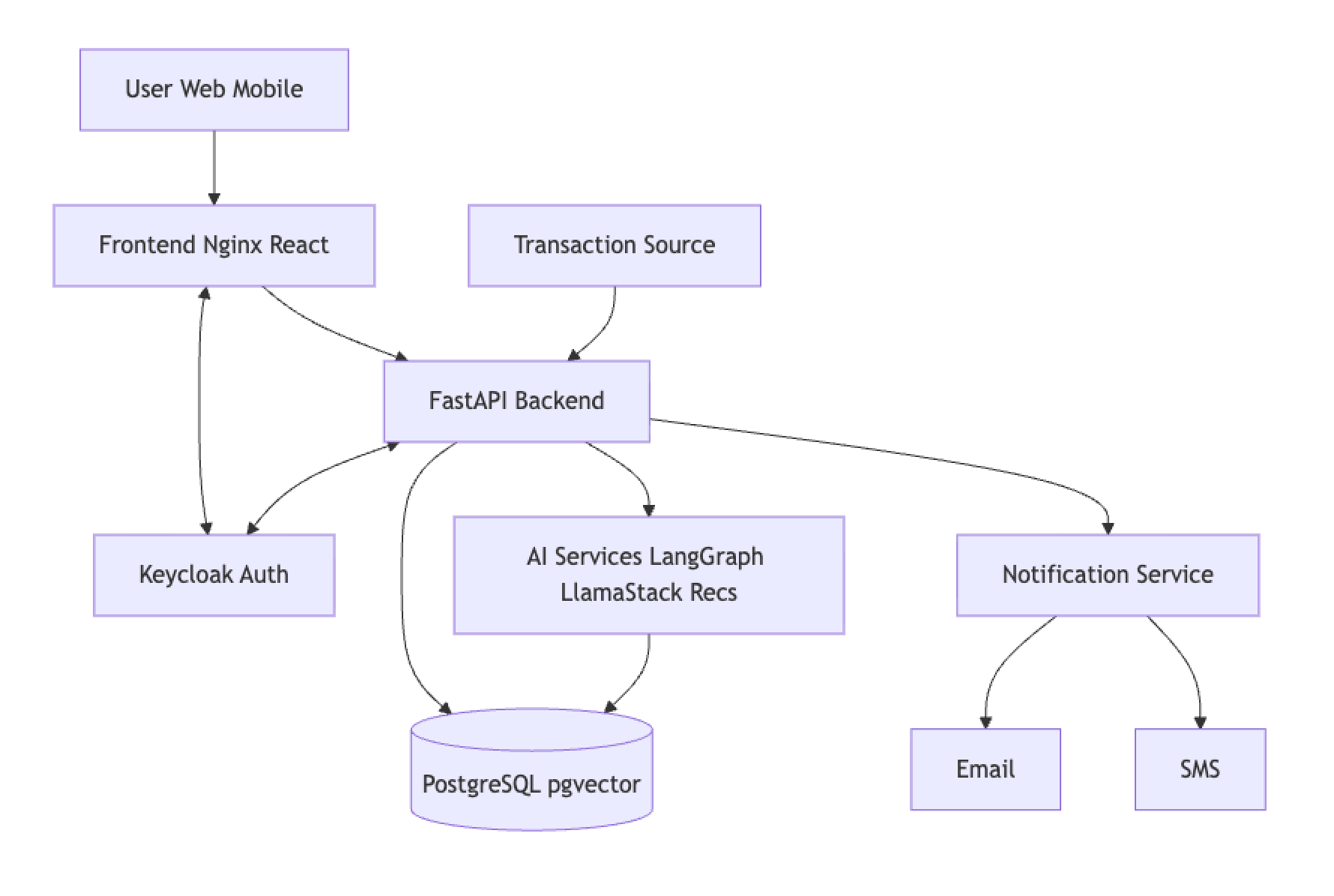
The solution is deployed on Red Hat OpenShift and integrates multiple components. Figure 1 shows a high level overview.
Agentic workflows in action
Agentic workflows allow the system to handle complex tasks by breaking them into smaller, manageable steps.
The mechanics of agentic rule creation
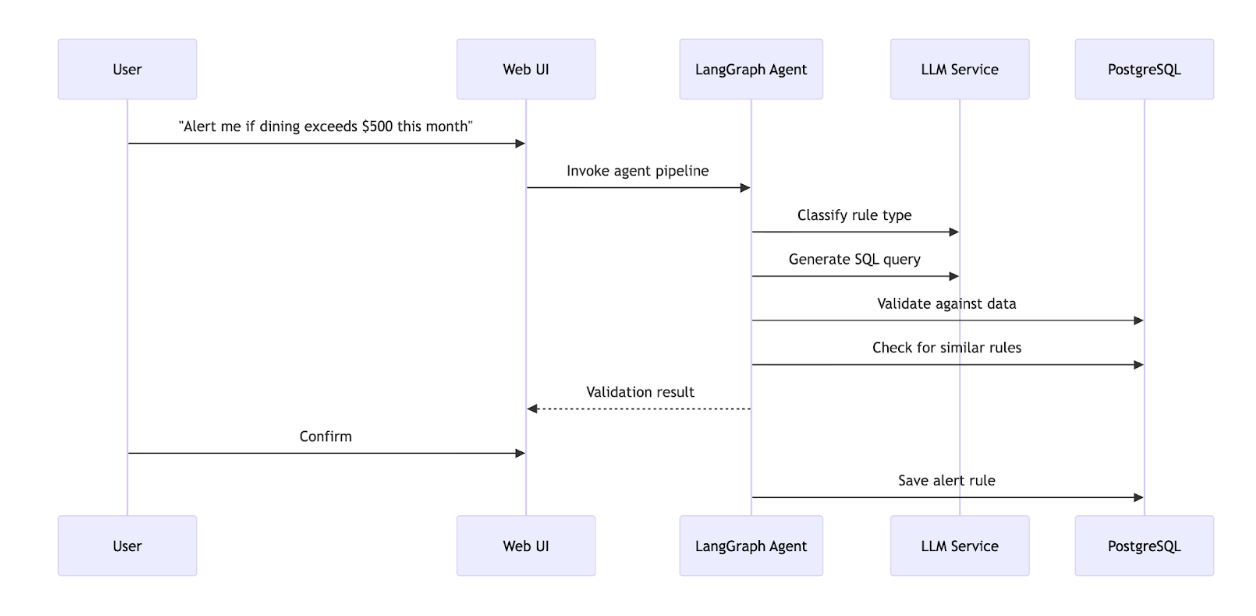
A LangGraph-powered agent pipeline manages the transition from a user’s simple request to a functional monitoring rule by coordinating several components in sequence, as illustrated in Figure 2. This workflow begins with the classification agent, which parses the user's natural language to identify the specific intent—such as spending thresholds, categories, merchants, or locations. Once categorized, the SQL generation agent translates that description into an executable database query.
To ensure the system remains reliable, the pipeline includes rigorous quality controls. A validation agent immediately tests the newly generated query against sample transaction data to confirm it produces the expected results. Meanwhile, a similarity agent uses vector embeddings to cross-reference the new rule against the existing database. By identifying duplicate or overlapping logic before a rule is activated, this process keeps the monitoring system accurate and free of redundant alerts.
Intelligent alert evaluation
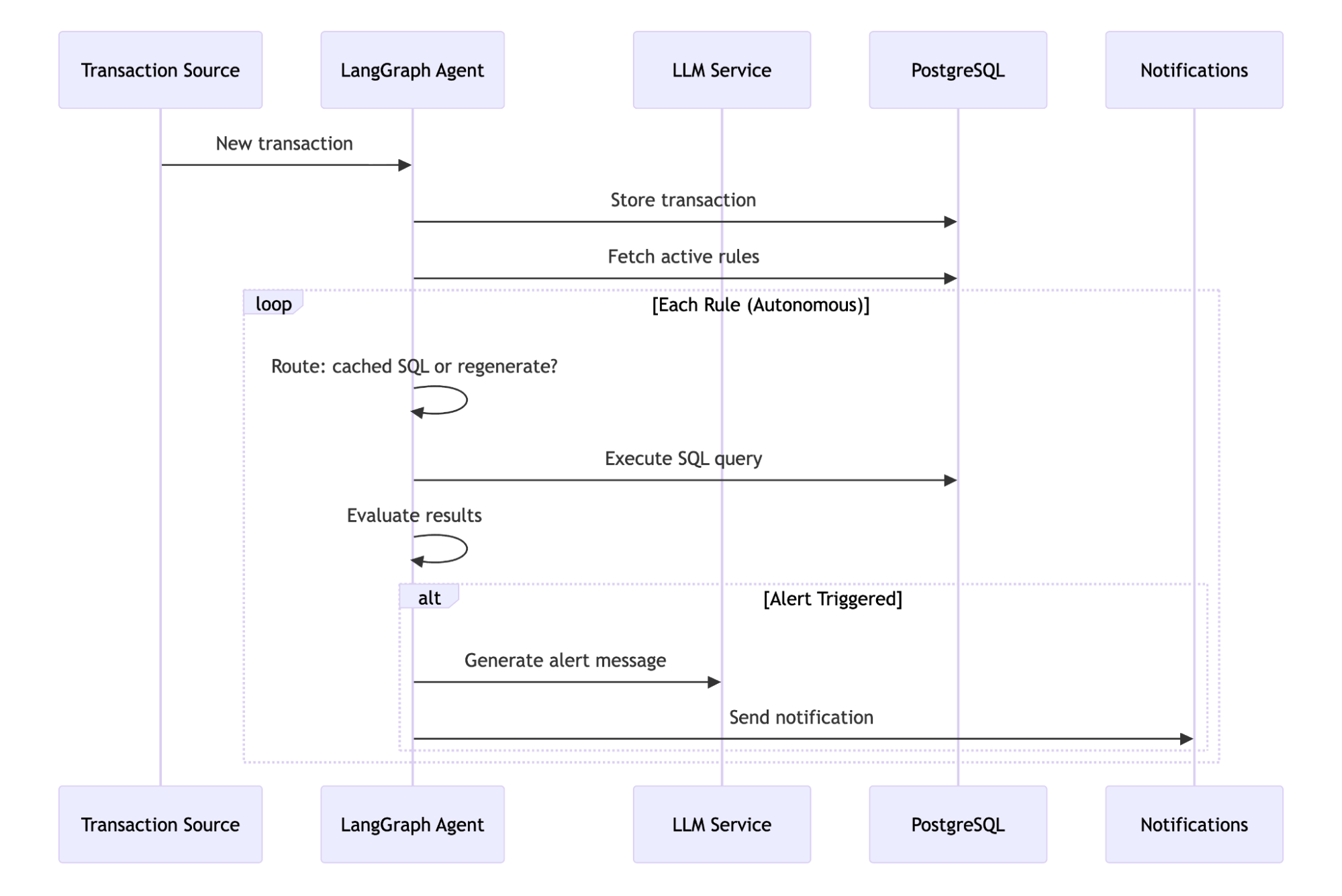
The spending transaction monitor also uses second agentic workflow to evaluate incoming transactions against active alerts, as shown in Figure 3. This real-time process is managed by a LangGraph state machine that uses conditional routing to balance performance with correctness. The cycle begins with a route decision phase, where the system determines whether to reuse a cached SQL query or regenerate the logic for new variables.
Next, the SQL execution layer runs the query against the most current transaction data to identify any matches. If the alert detection phase confirms that specific rule conditions have been met, the workflow moves into message generation. Rather than delivering a cryptic system notification, the agent produces a clear, human-readable alert message that explains why the notification was triggered. This automated yet reasoned approach ensures that users receive timely, understandable insights without the latency typically associated with manual data processing.
Example alert rules
The following table provides examples of how you can describe monitoring logic using natural language.
Rule type | Example |
|---|---|
| Spending | Alert when I spend more than $500 in one transaction. |
| Category | Notify me if dining exceeds my 30-day average by 40%. |
| Location | Alert for transactions outside my home state. |
| Merchant | Alert for any gas station purchases over $100. |
These examples highlight how expressive and flexible natural-language alerting can be.
Getting started
To begin exploring the AI quickstart, follow the deployment instructions below for either a local environment or OpenShift.
Local development
# Clone the repository
git clone https://github.com/rh-ai-quickstart/spending-transaction-monitor.git
cd spending-transaction-monitor
# Start all services
make run-local
# Setup test data
pnpm setup:data
Access the application
You can access the components of the spending transaction monitor through your local browser. The primary interface is available via the frontend at http://localhost:3000. You can also explore the interactive API documentation at http://localhost:8000/docs.
To verify that your agentic alerts are firing correctly, you can monitor the test email UI at http://localhost:3002. This tool captures and displays all outgoing notifications in a local environment.
Test alert rules
You can verify your setup by running the provided test scripts to see sample rules in action.
# List sample alert rules
make list-alert-samples
# Interactive testing
make test-alert-rules
OpenShift deployment
Use the following command to deploy the solution to your OpenShift cluster.
# Quick deploy
make build-deploy
Deploying the ML pipeline
Run the following commands to deploy the full machine learning pipeline and model serving.
make build-all
make deploy-with-ml-dspa
For complete instructions, see the README.
Technology stack
The spending transaction monitor uses the following frameworks and tools to enable agentic AI.
| Layer | Technology |
|---|---|
| Agentic AI | LangGraph + LangChain |
| LLM integration | LlamaStack / OpenAI |
| Vector search | pgvector |
| Frontend | React + TypeScript + TanStack |
| Backend | FastAPI + SQLAlchemy |
| Database | PostgreSQL |
| Authentication | Keycloak (OAuth2/OIDC) |
| ML pipelines | Kubeflow/Data Science Pipelines |
Final thoughts
The spending transaction monitor illustrates how agentic AI unlocks a new interaction model for financial applications—one where users express intent naturally, and autonomous agents handle the complexity. By combining LangGraph-driven workflows with a cloud-native stack on OpenShift, this AI quickstart demonstrates production-ready patterns for building intelligent, adaptive AI systems.
If you’re exploring how agentic AI can simplify complex user workflows while maintaining enterprise rigor, this AI quickstart is a great place to start.
Learn more
- Project README: Setup and deployment
- Developer guide: Development documentation
- API documentation: API reference
- LangGraph documentation: Agent orchestration framework
Get started
Dive into the AI quickstart catalog or explore our repository for more information. You can also try OpenShift AI in the Red Hat product trial center. This gives you 60-day no-cost access to a fully managed environment where you can test these production-grade tools.

