Creating a golden image (a pre-configured, secure, and standardized system template) is the cornerstone of any scalable IT strategy. However, manually building these images for multiple environments (AWS, Azure, bare metal, and so on) while ensuring they contain the correct packages and security profiles can be a time-consuming and error-prone process.
The Red Hat Lightspeed Model Context Protocol (MCP) changes the game by bringing natural language simplicity to the Red Hat Lightspeed image builder (formerly Insights image builder). Instead of navigating complex wizards or manually editing JSON blueprints, you can now orchestrate your image-building lifecycle through simple conversation.
What is Red Hat Lightspeed image builder?
Red Hat Lightspeed image builder is a hosted service that allows you to assemble customized Red Hat Enterprise Linux (RHEL) images optimized for your specific target platforms. It enables you to:
- Customize blueprints: Select specific packages, repositories, file system layouts, and more.
- Standardized and repeatable deployments: Establish standardized and repeatable deployments for your images.
Streamlined image creation with natural language
By connecting your LLM to image builder via the MCP, you can move from clicking through menus to declaring intent. The AI agent uses underlying platform APIs to manage blueprints and trigger image composes on your behalf. Figure 1 shows the report of a successful image built using Red Hat Lightspeed.
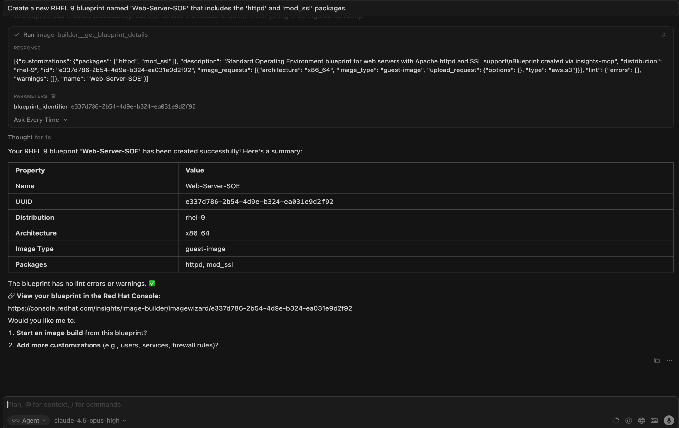
Image management and customization use cases
Use these prompts to simplify how you design and deploy your RHEL templates:
- Blueprint creation: "Create a new RHEL 9 blueprint named ‘Web-Server-SOE' that includes the ‘httpd' and ‘mod_ssl' packages."
- Security hardening: "Update the ‘Finance-App' blueprint to apply the CIS Benchmark Level 1 security profile."
- Cloud push: "Build a fresh AMI from my ‘Production-Base' blueprint and share it with my AWS account 123456789."
- Package verification: "What additional packages are currently included in the ‘Database-Gold-Image' blueprint?"
Advanced orchestration: Closing the loop
The real power of the MCP lies in its ability to combine image builder with other services like compliance and inventory. Here are some example prompts for related functions:
- Compliance Auditing: "Show me all systems in inventory that were built using a non-compliant image blueprint."
- Lifecycle Planning: "I need to upgrade to RHEL 10. List all my current RHEL 9 blueprints so I can clone them for the new version."
- Full Workflow: "Identify the latest security profile for HIPAA, update my ‘Healthcare-Node' blueprint with it, and trigger a new build for Azure."
Why use MCP for image builder?
The Red Hat Lightspeed MCP for Image Builder is currently available in developer preview. We invite you to connect your LLM of choice—whether it's VS Code, Claude, or a custom tool—and start automating your RHEL image lifecycle today. There are several good reasons for using MCP for image builder, including:
- Efficiency: Rapidly iterate on system designs without extensive knowledge of Red Hat Hybrid Cloud Console or API syntax.
- Consistency: Ensure every image follows your organization's SOE by letting AI handle the complex configuration details.
- Integration: Seamlessly bridge the gap between designing an image and monitoring its health once it's deployed.
Your feedback is essential to refining these capabilities. Please share your experiences, feature requests, or bug reports through the Red Hat Issue Router (select the MCP component) or through our GitHub repository.

