Announcing Red Hat Developer Studio 11.0.0.GA and JBoss Tools 4.5.0.Final for Eclipse Oxygen
This is a quick reference for JBoss EAP open source technologies, including web server, messaging, clustering and high availability, and caching.
Hugo delivered this lightning talk at Red Hat Summit 2017 and explains containers and the Red Hat container certification services for Red Hat software partners.
A lightning talk from Red Hat Summit 2017. Here is the transcription:
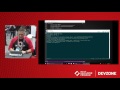
[00:11] I have a VM here. Let me just run the .NET command to show you. It's not there, so we're going to install .NET on RHEL. The first thing I'm going to do is become Super User, otherwise I have to type pseudo for every command and that's just a hassle.
[00:33] I'm just going to copy and paste the commands here. The point isn't that I type out every command, the point is that you see it's only a couple of commands to get it installed. The first thing I'll do is get my subscription manager attached to the correct pool of RPMs, that's the packages I pulled down.
[00:49] When you install .NET on RHEL you're getting the package from Red Hat. You're not getting it from Microsoft. We get the source code from Microsoft and then we build it to run on RHEL. Red Hat packages are, I like to say vetted. That is, we test them and make sure they work really well so you're not just pulling down software and hoping it works.
[01:12] Now I'm going to enable the repo. I've attached to it and now I have to enable it. Notice at the end where it says, "RHEL 7 Server..." There's also a work station, and there's also one for an HP [high performance] special computing thing that I'm not really familiar with. The point is you're probably going to use a RHEL server to install .NET.
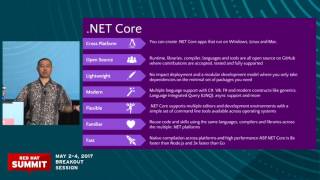
[01:26] One of the cool things about the new .NET core as opposed to the old one is the new .NET is much smaller. Whereas before, when you installed .NET, you would drop in a DVD, or a CD, and wait forever for it install, and you would get 4 gigabytes of .NET. Now it's just a couple hundred megabytes.
[01:49] I'm going to YUM install this scl utils. It doesn't matter what they do. They just enable installation. Let's just leave it at that. There's nothing to do because I've done that before, but that's OK. It's better to have nothing to do than to skip the step.
[02:08] Now here's the actual install itself. I want you to notice it's just a command line and it's a YUM installed .NET core 1.1, which is version 1.1. It's going to go up to the inner webs and pull down everything it needs to install it.
[02:17] Your limiting factor here is going to be your Internet speed. Other than that, that's it for installing .NET. It really is that small and that fast. After it's installed, you have to enable it to be available in Bash. Once that's done, we'll bring it up and we'll see .NET.
[02:36] One final step here. In just a few minutes we went from not having .NET...I don't know if I can copy and paste here, bear with me.
[02:47] It's enabled. Now we should have .NET command available. There it is. We'll do a .NET new which will create a new program. The first time you do a .NET new it's going to run this little expand. That might be considered the final step of installing .NET, that's it. That's all you have to do to install .NET, that's it.
Thank you.
S-RAMP is an emerging OASIS standard for a Service Oriented Architecture repository (and accompanying protocol for accessing that repository).
Hear from John Osborne, Sr. Solutions Architect, Red Hat, Harold Wong, Cloud Architect, Microsoft, and Jason Dudash, Specialist Solution Architect, Red Hat in this breakout session at Red Hat Summit 2017 For the past several years, Microsoft's approach has been to make Linux and open source technologies first class citizens in the public cloud. Microsoft engineers participate in key open source communities. In this joint session with Red Hat and Microsoft, we'll demonstrate technologies like .NET and SQL Server running on Red Hat Enterprise Linux-based containers in OpenShift on premise and in Azure. We'll also discuss the development and operational perspectives and things like security patching and scans. https://www.redhat.com/en/summit/2017/agenda/sessions
In this two-hour session, Douglas Shakshober (Shak) and Larry Woodman will explore the system performance analysis and tuning necessary to maximize the performance of systems running Red Hat Enterprise Linux 5 and 6. They will focus on large systems that run the most common applications such as database servers, Internet servers, and various financial applications on a variety of the common hardware platforms.
If applications can run in containers and extract the maximum performance from the underlying hardware while respecting security and resource boundaries, why can’t databases? This video demonstrates MongoDB database deployed with Red Hat Enterprise Linux using Linux containers. Red Hat Enterprise Linux 7 enables your database environments to stay both flexible and current by utilizing Linux container technologies. This demo focuses on the advanced deployment scenarios called sharding and discusses the benefits of running containers for that purpose.
Key features, themes, and objectives of Red Hat Enterprise Linux 6, in a talk delivered by Engineering Vice President Tim Burke. Find out what's new, what's improved, and what is most important in the newest release of the Red Hat operating system.
Red Hat® Enterprise Linux® has a kernel feature called control groups, or cgroups. This feature allows you to allocate resources–such as CPU time, system memory, network bandwidth, or a combination of these resources–among user-defined processes. This feature is also used to implement Linux containers. See how system administrators can gain fine-grained control over system resources and divide them among tasks and users, thus increasing overall system efficiency.
What was Red Hat thinking when it set out to create Red Hat Enterprise Linux 7, it's most ambitious release to date? Hear from Brian Stevens, Denise Dumas, and other key strategists at Red Hat as they discuss the intent behind Red Hat Enterprise Linux 7.
ING Services Poland needed to reduce IT architecture maintenance costs and accelerate delivery of platforms on which the business applications for clients from the ING Group are built. After implementing Red Hat Enterprise Linux and Red Hat JBoss Middleware technologies, the company has met its objectives to speed up the applications delivery from weeks to days, to reduce costs of services to 1/3 and has managed to win new internal clients.
Intro to OpenShift Express (Fedora) - This video demonstrates how to install the OpenShift Express client utilities on the Fedora operating system. Furthermore, it provides a walk through of signing up for an RHN account using the OpenShift website and details steps to allow a user to create their first express domain. Please go to openshift.redhat.com for more details.
Red Hat Taste of Training: Installing software using YUM Using content from our Red Hat System Administration I (RH124) course, this video will teach you how to install software using YUM, an application that stacks on top of the Red Hat RPM package format. During the complete 5-day course, students will learn about key command-line concepts and other enterprise-level tools. Through hands-on labs, students are taught how to manage physical storage, how to install and configure software components, how to monitor and manage processes, how to access Linux file systems and secure files, and much more. For more information about Red Hat System Administration I (RH124): http://www.redhat.com/en/services/training/rh124-red-hat-system-administration-i
Since its introduction more than a decade ago, Red Hat Enterprise Linux has become the world's leading enterprise Linux platform. Hear from Red Hat executives how Red Hat Enterprise Linux 7 raises the bar yet again and brings the next-generation of IT to customers. Learn more at http://www.redhat.com/virtual
The Linux container technology in Red Hat Enterprise Linux now combines resource management, process isolation, and file system separation. Docker uses the Linux container capabilities to provide standardization, ease of use, and portability. See a demo of how to set up multiple containers, deploying an assortment of workloads, and measuring the performance impact of running them at the same time using prototype user interface.
Red Hat® Enterprise Linux® Atomic Host is a small footprint kernel optimized for running containers. This video demonstrates the deployment of an HPC application (Linpack) across multiple environments and discusses the benefits of running HPC applications in containers.
See a demo of new identity management features in Red Hat Enterprise Linux and ways to use them. Specifically, you will see: - How easy it is to join Red Hat Enterprise Linux systems into Active Directory (realmd, SSSD) and create IdM cross-realm trust. - The end-to-end two-factor one-time password (OTP)-based authentication and centralized management of identities.