As explained in the article How to install and upgrade Data Grid 8 Operator, the Data Grid operator (a Go application) deploys Red Hat Data Grid, which is Red Hat's solution for in-memory caching. Data Grid helps avoid database bottlenecks and expensive AI retrieval operations.
The Data Grid operator provides five APIs to create resources: Data Grid Infinispan cluster, caches, batch, backup, and restore. The Data Grid operator provides custom resources (CRs) based on template files called custom resource definitions (CRDs). These resources are user-configurable and determine how Data Grid is deployed and functions within a cluster.
In this case, the user creates the Data Grid cluster using the Infinispan CR and the caches using the Cache custom resource (Cache CR).
Data Grid cross-site replication in OpenShift
As explained in the Data Grid cross-site replication guide, one approach to deploying Data Grid is to use multi-site installations in more than one OpenShift cluster. These sites can reside in different geographic locations, such as Montreal, New York City, or London. This redundancy helps protect data in memory, persistent storage, or both during an OpenShift cluster outage. For SSL configuration, the Red Hat Customer Portal support solution Data Grid 8 Cross site with SSL configuration demo and troubleshooting notes that the Data Grid operator mounts the truststore inside /etc/encrypt/truststore-site-tls/.
Figure 1 shows the replication diagram of a Data Grid cluster to another cluster.
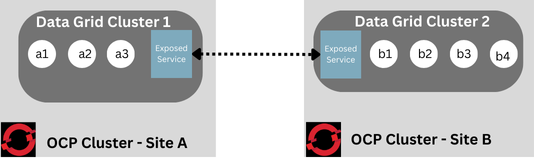
Red Hat Data Grid allows four types of cross-site configurations, as detailed in the following table.
| Route | The Route type relies on Red Hat OpenShift's Ingress for communication. | The Route type uses Ingress (HAProxy) to redirect traffic across all shared services, requiring SNI to determine the destination. |
|---|---|---|
| Service type Load Balancer | The load-balancer service type relies on the underlying infrastructure load balancer. | The load-balancer service type creates a load balancer outside the OpenShift cluster exclusively for the gossip router. |
| Service type Node Port | The node-port service type relies on the underlying NodePort configuration. | This leverages a NodePort configuration to route external traffic directly to the underlying pods using the node's IP address. |
| ClusterIP | Use this option for testing within the same OpenShift cluster; it is not supported in production environments. | It uses an internal service for communication. |
Route type via manual vs automatic settings
TThere are two approaches for Route type communication; both routes use the pattern <CR>-route-site-<NAMESPACE>.apps.example.com:443, but procedural differences exist.
| Method | Details | Example |
|---|---|---|
| Automatic | Cluster 1's Data Grid operator communicates with cluster two to obtain the Route host. In other words, the Data Grid operator uses oc get route to retrieve the host. | openshift://<CR>-route-site-<NAMESPACE>.apps.example.com:443 |
| Manual | User sets the full Route for the communication, including port. | infinispan+xsite://CR-route-site-NAMESPACE.apps.example.com |
Encrypted versus non-encrypted cross-site replication
Data Grid cross-site replication only works with SSL when using the Route type, because routes typically operate on ports 80 and 443 and serve multiple shared services by default. The architecture uses TLS, SNI, and passthrough routing to direct traffic to the gossip router pod. Therefore, configurations without SSL must use the load-balancer service type.
Example Infinispan custom resource with cross-site replication
The spec field Infinispan.sites.local configures cross-site replication and lists the locations available for the cache backup:
    service:
      type: DataGrid
      sites:
        local:
          name: SiteA
          expose:
            type: ClusterIP
          maxRelayNodes: 1
        locations:
          - name: SiteB
            clusterName: dg-cluster-nyc
            namespace: dg-test-nyc
Here is an example using a cache custom resource or a cache ConfigMap:
distributedCache:
  backups:
    NYC:
      backup:
        strategy: "ASYNC"
        timeout: "10000"
The following example shows the resulting configuration, which you can print live by following the instructions in How to print the configuration used by Data Grid 8 at startup:
<jgroups>
   <stack name="xsite" 1
          extends="udp"> 2
      <relay.RELAY2 xmlns="urn:org:jgroups" 3
                    site="LON" 4
                    max_site_masters="1000"/> 5
      <remote-sites default-stack="tcp"> 6
         <remote-site name="LON"/> 7
         <remote-site name="NYC"/>
      </remote-sites>
   </stack>
</jgroups>
How JGroups cross-site communication works
There are two stacks for JGroups communications: one for the cluster and one for cross-site replication. Cross-site communication uses standard JGroups messages sent over the cross-site replication stack from one site to another. The RELAY2 protocol connects both sites, so the configuration must include it.
Because these relay messages are small, RELAY2 nodes can process them with low latency.
For most use cases, Red Hat recommends an active-passive configuration rather than an active-active one. In an active-passive setup, only one site actively processes data, determined by access patterns per entry on each side. This configuration simplifies usage, minimizes entry contention, and reduces network traffic.
As explained in the Red Hat Customer Portal support solution Gossip Router pod in DG 8 OCP 4, the Red Hat Data Grid operator 8.3.x introduced cross-site data exchange via a GossipRouter pod using the JGroups TUNNEL protocol. You can tune this pod using the routerExtraJvmOpts argument, as detailed in Gossip Router pod in DG 8 OCP 4.
Data Grid deployment challenges and alternatives
The Data Grid operator is the Red Hat OpenShift mechanism to deploy a Red Hat Data Grid cluster by installing custom resources in an OpenShift 4 cluster, where you handle custom resources directly. Another alternative is to use Helm charts to customize the underlying StatefulSet configuration.
As explained in A beginner's guide to the Shenandoah garbage collector, using the non-generational Shenandoah garbage collector for large Java heaps is highly effective. However, performance might decrease during the random allocation and deallocation typical of non-generational workloads. This matches Data Grid’s core behavior: cache eviction and expiration trigger irregular, large-scale memory allocation cycles rather than predictable, incremental, and gradual cleaning processes.
Problematic scenario 1: Cross-site exchange and non-generational garbage collectors
Consider a hypothetical scenario where cross-site replication for Red Hat Data Grid runs alongside the non-generational Shenandoah garbage collector. As explained in A beginner's guide to the Shenandoah garbage collector, Shenandoah's default heuristic settings expect a constant rate of memory allocation and deallocation. Red Hat Data Grid does not behave this way; instead, it allocates and deallocates memory in batches during massive access spikes.
Solution: Use a generational garbage collector instead
While non-generational collectors like Shenandoah can perform well with constant workloads, Red Hat Data Grid requires a different approach. Data Grid deallocation is random and unpredictable. Therefore, the correct approach is to use a generational garbage collector instead of forcing non-generational Shenandoah to fit a workload it cannot support. This principle also applies to other non-generational collectors, such as ZGC. During a communication interruption that triggers a high volume of SITE_UNREACHABLE messages, non-generational collectors perform poorly compared to generational alternatives. This problem is summarized in the Red Hat Customer Portal support solution Considerable amount of SITE_UNREACHABLE events in heap in RHDG 8.
Problematic scenario 2: Network glitch
In a hypothetical scenario, a network hiccup can cause a brief communication gap between two cross-site replication clusters. This gap leads to an accumulation of messages that can flood the heap with JGroups messages once connectivity is restored. The sudden influx reduces garbage collection efficiency, especially when using the non-generational Shenandoah collector, because it processes all messages simultaneously rather than tracking them across generations.
A network glitch causes a massive accumulation of messages that places severe stress on garbage collectors (GCs). Generational garbage collectors, such as the G1 garbage collector, handle this influx more effectively by using distinct pauses and memory regions for each generation. In contrast, a non-generational garbage collector attempts to clear millions of objects simultaneously, increasing GC pauses, latency, and CPU utilization. Increasing the JGroups thread size will not solve this problem.
Solution: Configure the take-offline feature
Failing to prepare a cluster for communication issues can lead to severe performance drops. To prevent this, you can configure the take-offline feature in the Infinispan CR. If the remote site fails to respond to consecutive pings, the operator takes that site offline.
Problematic scenario 3: CPU throttling
Although not specific to cross-site replication, CPU throttling occurs when a system is undersized. Depending on the kernel version, a Red Hat OpenShift cluster might experience throttling during intense traffic spikes because the CPU spends its resources processing concurrent messages. This issue worsens previous performance issues and creates standalone stability challenges.
Solution: Balance container resource requests and limits to avoid throttling
One solution is to configure different resource requests and limits for the Data Grid containers. This feature, introduced in Red Hat Data Grid operator 8.3.x, lets pods use independent values for CPU and memory allocations. CPU throttling directly affects container performance and Java Virtual Machine (JVM) processing, which can cause execution threads to stall or halt completely.
Problematic scenario 4: Incorrect cross-site route configuration
If you configure cross-site replication using the infinispan-external route (which is intended for Hot Rod or REST traffic) instead of the dedicated site route, communication will fail.
Solution: Set the correct manual route
The manual route must use the pattern infinispan+xsite://CR-route-site-NAMESPACE.apps.example.com, ensuring it includes the -route-site string.
Tuning and settings for each pod
Given the complexity here, the following table summarizes the tuning and the details.
| Pod | Tuning | Details |
|---|---|---|
| Data Grid operand | Via Via | The Data Grid operand pod is the Infinispan pod itself. For Metaspace adjustments, review the Red Hat Customer Portal support solution Can you customize Metaspace and MaxMetaspace in DG as JVM argument in DG Operator? |
| Data Grid gossip router | Via spec.container.routerExtraJvmOpts | The gossip router pod manages data exchange between Data Grid cross-site replication environments. |
| Data Grid configListener pod | Via spec.configListener.cpu and memory fields | The configListener pod monitors bidirectional reconciliation, such as when you create a new cache. |
| Data Grid operator pod | Via Subscription Resource: spec.config.resources | The operator pod monitors the following custom resources: Infinispan, Cache, Batch, Backup, and Restore. |
Tuning the gossip router pod heap ratio
As explained in the Red Hat Knowledgebase solution Gossip Router pod in DG 8 OCP 4, the Red Hat Data Grid operator 8.3.x introduced cross-site data exchange via a GossipRouter pod using the JGroups TUNNEL protocol.
The gossip router pod is unbounded by default, which means its constraints match the physical or virtual host limits.
The gossip router pod passes messages similarly to a network switch. The JVM quickly clears these messages from young generation memory instead of letting them accumulate in the old generation.
The gossip router pod has a default heap ratio of 25%, compared to the 50% ratio used by other Red Hat Data Grid containers. This configuration occurs because its JVM starts with the java-run.sh script, causing it to adopt the default 25% ratio from the Red Hat build of OpenJDK. If necessary, you can increase the gossip router resource limits as shown in the following example configuration:
        discovery:
          launchGossipRouter: true
          memory: "2Gi:1Gi"
          cpu: "2000m:1000m"
In this setup, each site can have its own router pod, but a Red Hat Data Grid cross-site replication configuration requires only a single GossipRouter pod. If you deploy two pods for redundancy and one site crashes, the remaining site uses the other site's GossipRouter—providing direct fault tolerance.
Scaling relay nodes for traffic distribution
You can tune the number of relay pods to increase redundancy and distribute your traffic load. You set this value using the service.sites.local.maxRelayNodes field in the Infinispan CR. While adding relay nodes does not prevent a cluster crash, it helps distribute traffic if a single node becomes overwhelmed.
These relay nodes, also known as cross-site master nodes, transmit cross-site replication messages. If the default relay node fails, the cluster automatically spawns a replacement pod. You can also define the exact number of pods permitted to transmit these relay messages.
Resolving ConfigListener resource constraints
The configListener pod provides bidirectional reconciliation for the Red Hat Data Grid operator. This means that when you create a cache custom resource (CR), the Infinispan configuration updates automatically to reflect the new cache, and changes to the configuration update the CR.
Although the configListener pod has a default allocation of 250 MB of memory, which is enough for most deployments, you might need to allocate more in certain environments. This change is necessary if you have a large number of caches to reconcile. You can configure its log levels for debugging in the Infinispan custom resource, as shown in the following example:
  configListener:
    cpu: '1'
    enabled: false
    logging:
      level: info
    memory: 1Gi
Managing operator subscriptions and resource thresholds
Because the Red Hat Data Grid operator manager pod is a container running a Go application, cgroups impose distinct limits on its memory and CPU allocation. You might need to increase these resource limits in larger environments.
You can define these resource allocations in the operator Subscription object:
apiVersion: operators.coreos.com/v1alpha1
kind: Subscription
metadata:
  name: datagrid
spec:
  channel: stable
  installPlanApproval: Manual
  name: datagrid
  source: redhat-operators
  sourceNamespace: openshift-marketplace
  startingCSV: datagrid-operator.v8.5.1
  config:  <---------------------------------------- example more resources for DG Operator pod settings
    resources:
      requests:
        memory: "64Mi"
        cpu: "250m"
      limits:
        memory: "128Mi"
        cpu: "500m"
Troubleshooting Data Grid and node crashes
When managing a distributed system, unexpected failures can occur at both the application layer and the underlying infrastructure layer. Use the following guidelines to diagnose and isolate the root cause of these cluster disruptions.
Investigating container crashes from infrastructure updates
When Red Hat OpenShift nodes crash or undergo upgrades, the structural disruptions affect your running containers. The Red Hat Customer Portal support solution Data Grid 8 operation in case of OpenShift nodes crashing or upgrading addresses how these events affect each container and pod. If a pod crashes due to a memory or connection issue, you can troubleshoot the problem using collected logs, heap dumps, and VM.info files for native investigations.
The next troubleshooting steps will depend on the context or cause of the crash.
How OpenShift node crashes affect Data Grid clusters
In addition to container or pod crashes, an entire Red Hat OpenShift node can occasionally fail, which requires investigating its system logs. Nodes can crash for several reasons, such as resource exhaustion or kernel bugs. Because Red Hat Enterprise Linux CoreOS is based on Red Hat Enterprise Linux (RHEL), any upstream kernel bugs can affect the node.
However, an OpenShift node crash does not necessarily cause the Data Grid cluster to cease operations completely, for two reasons:
First, if the Data Grid operator goes down, it does not affect cluster operations.
Second, if the Data Grid cluster contains more than one container, it will not shut down completely, so some entries remain available. In this situation, the cluster might be partially affected if more than 50% of its containers stop running and it enters a degraded state. Do not confuse this with Shenandoah's degenerated state, which occurs when the garbage collector attempts to avoid a full garbage collection (Full GC).
Cross-site logging
In Data Grid cross-site replication scenarios, a standard operation looks similar to the following log snippet:
2024-07-09T15:41:19.815295955Z 15:41:19,814 INFO  (jgroups-8,infinispan-0-26946) [org.infinispan.XSITE] ISPN000439: Received new cross-site view: [site1,site2]
2024-07-09T15:41:19.820527976Z 15:41:19,820 INFO  (jgroups-5,infinispan-0-26946) [org.jgroups.protocols.relay.RELAY2] _infinispan-0-26946:site1: joined bridge cluster 'xsite'
2024-07-09T15:41:46.310431581Z 15:41:46,310 INFO  (jgroups-5,infinispan-0-26946) [org.infinispan.CLUSTER] ISPN000094: Received new cluster view for channel example: [infinispan-0-26946|1] (2) [infinispan-0-26946, infinispan-1-3395]
This log output shows two sites, site1 and site2, on the example channel.
How to troubleshoot Red Hat Data Grid cross-site replication
Follow these steps to troubleshoot cross-site replication issues:
- Print the configuration by following the steps in How to print the configuration used by Data Grid 8 at startup.
- The inspect bundle provides all the necessary details. The encrypted data displays secret data length rather than actual contents.
- Configure the
suspectEventsandcontainer.memory.routerExtraJvmOptsparameters by following Gossip Router pod in DG 8 OCP 4. The Data Grid operand pod reviews SSL aliases when you use the
spec.container.extraJvmOpts: '-Djavax.net.debug=all'configuration:logging: categories: org.jgroups: trace org.jgroups.protocols.TCP: error org.jgroups.protocols.relay.RELAY2: error container: extraJvmOpts: '-Djavax.net.debug=all'
Use the following diagnostic steps to gather the specific system logs and resource definitions required for your investigation:
Collect the inspect file from both Data Grid's OpenShift 4 sites:
oc adm inspect ns/namespaceThe inspection output contains logs for the Red Hat Data Grid operator, the
configListenerpod, the gossip router pods, and the Data Grid cluster pods. If a site experiences an issue, the relevant details appear in these logs. If enabled, the output also includesconfigListenerdebug logs and JGroups trace logging, as shown in the following example:logging: categories: org.infinispan.SERVER: debug org.jgroups: debugCollect the Infinispan custom resources from each side:
oc get infinispan -o yaml > infinispan.yamlThe
statussection reveals the current state of each site and indicates the type of problem encountered.
Additional resources
To learn more about the Shenandoah garbage collector, review the upstream OpenJDK documentation for additional details and architectural diagrams.
For other specific inquiries, open a support case through the Red Hat Customer Portal. Red Hat engineers can help you resolve Java and garbage collection issues.
Acknowledgments
I would like to thank Brendan Shirren for his input on OpenShift 4 cluster issues throughout the years. I am also grateful to my mentor at Red Hat, Roman Kennke, for his guidance during our mentorship for Shenandoah and OpenJDK.
Finally, thanks to Dennis Reed, who provided valuable feedback over the years for Red Hat Data Grid and cross-site replication.

