This article covers how to install the Red Hat Data Grid operator in a disconnected environment. You can follow this process for other products and operators, such as Red Hat JBoss Enterprise Application Platform (JBoss EAP), Red Hat AMQ, and Cryostat.
We chose to focus on the Data Grid operator to build on a previous article, How to install and upgrade Data Grid 8 operator, where Alexander Barbosa and I explain the process in detail. The Data Grid operator is easy to use and backward compatible, which supports multiple tests and installations.
This article complements How oc-mirror will help you reduce container management complexity. and the official Red Hat OpenShift Container Platform 4.20 guide, DMirroring images for a disconnected installation using the oc-mirror plugin. It also builds on How oc-mirror version 2 enables disconnected installations in OpenShift 4.16.
Note: This article was written by a human and refined for clarity using AI.
Core components and architecture
To successfully mirror images, you should first understand how the operator, its operands, and the Operator Lifecycle Manager (OLM) interact within the OpenShift ecosystem.
How the Data Grid operator manages operands
The Data Grid operator is a Go application that uses custom resources to deploy Red Hat Data Grid, a Java-based caching solution.
Originally, the Data Grid operator could only install one specific Data Grid version. To increase flexibility, Data Grid operator 8.4 and later versions allow you to deploy several different operands:
- Red Hat Data Grid 8.2 and 8.3: Each Data Grid operator deploys one operand.
Red Hat Data Grid 8.4: Each Data Grid operator deploys one or more operands:
 "name": "datagrid-operator.v8.4.0",
 ...
           "name": "datagrid-8-rhel8-operator-3ccb20ab75afd33407bbe541da57d127b9fb33f0c5c11c022e43e82d16ace1e6-annotation",
           "name": "manager",
           "name": "openjdk_8_4_0_1",
           "name": "openjdk_8_3_1_1",
This detail is important for mirroring because the index image includes both the operator and the operand images.
How Operator Lifecycle Manager installs operators
This section builds on the OLM framework description in the article How to install and upgrade Data Grid 8 Operator. OLM streamlines operator installation by fetching indexes from the CatalogSource (CS) and retrieving bundles that point to the Data Grid operator image.
The OLM workflow follows these steps:
- The
CatalogOperatorlistens to theCatalogSource. - The
CatalogSourceruns the catalog index image. - The index image fetches the package manifest.
- The manifest includes the bundle.
- The bundle includes the
ClusterServiceVersion(CSV) image. - OLM installs the operator.
Figure 1 shows the OLM installation process.
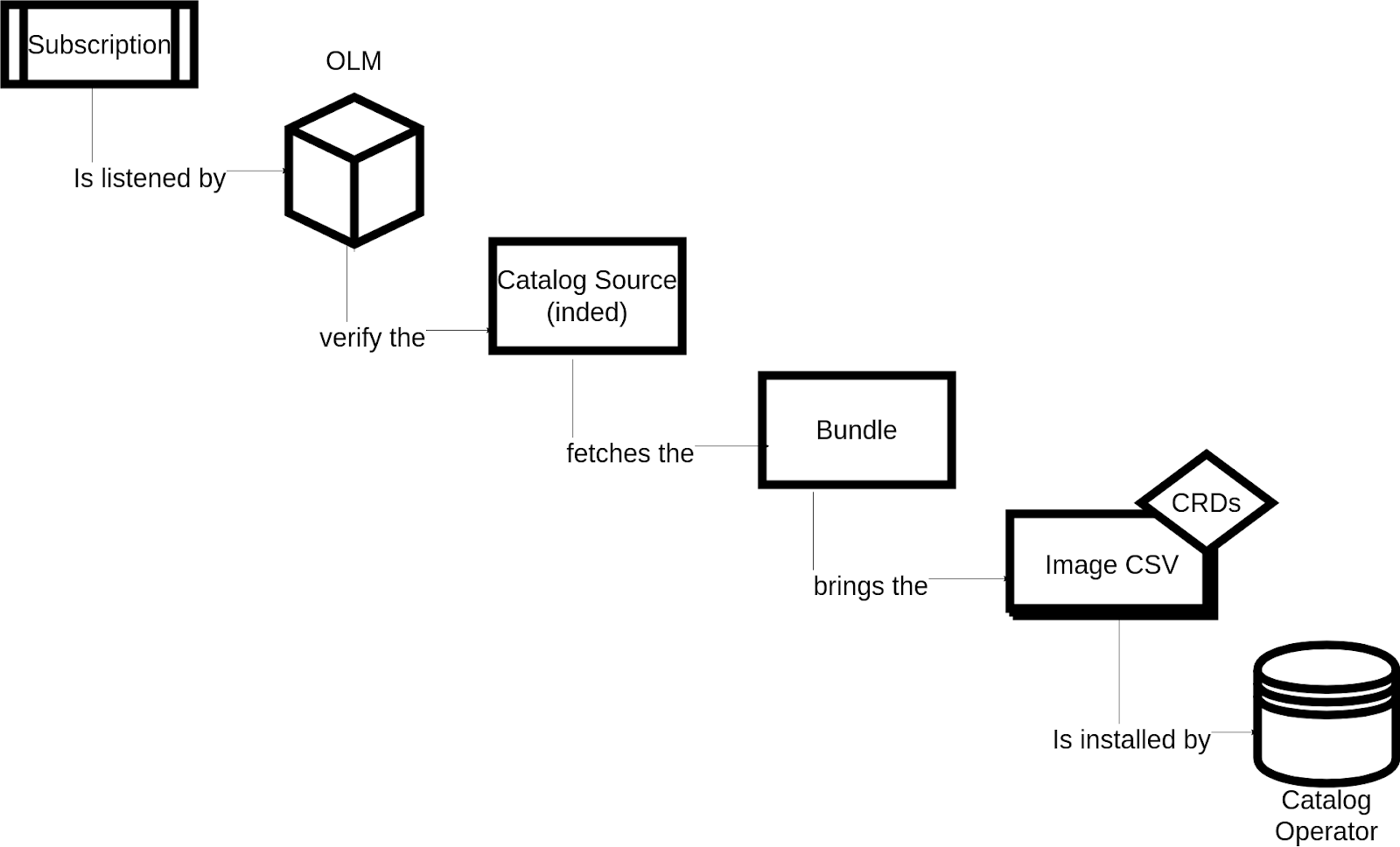
The ClusterServiceVersion (CSV) in an operator bundle includes the Custom Resource Definitions (CRDs). The CatalogOperator is responsible for installing the required CSV. It is located in the openshift-operator-lifecycle-manager namespace along with the OLM operator manager pod.
In the openshift-operator-lifecycle-manager namespace, you can see how these three components work together:
$ oc project openshift-operator-lifecycle-manager
Now using project "openshift-operator-lifecycle-manager" on server "https://api.example.support:6443".
$ oc get pod #### pods in OLM ns:
NAME                         READY   STATUS      RESTARTS   AGE
catalog-operator-id          1/1     Running     0          28d <-------------- CO Operator
collect-profiles-id          0/1     Completed   0          40m <-------------- Collect profiles
collect-profiles-id          0/1     Completed   0          25m
collect-profiles-id          0/1     Completed   0          10m
olm-operator-id              1/1     Running     0          28d <-------------- OLM Operator
package-server-manager-id    2/2     Running     0          28d <-------------- Package Server Manager
packageserver-id             1/1     Running     0          28d
packageserver-id             1/1     Running     0          28d
These three components work together in the openshift-operator-lifecycle-manager namespace:
- OLM: Installs an operator using the
olm-operatorpod. - CatalogOperator: Runs the
CatalogSourceindex container image and monitors for changes using thecatalog-operatorpod. - Package server: Fetches and maintains the package manifests listed by the
CatalogSourceusing thepackageserverpod.
The following steps summarize the OLM workflow:
- The
CatalogSourceruns a container image (the index), which fetches resources through theCatalogOperator. - This allows OLM to fetch the package manifests.
- This data populates OperatorHub and the web console.
- The bundle includes resources, such as the
ClusterServiceVersion(CSV).
Bundle annotations can prevent a version from being included in an index image for specific versions of OpenShift Container Platform.
CatalogSource resource details
The CatalogSource resource defines the content of the container image:
apiVersion: operators.coreos.com/v1alpha1
kind: CatalogSource
metadata:
  name: redhat-operators
  namespace: openshift-marketplace
spec:
  displayName: Red Hat Operators
  ...
  icon:
    base64data: ''
    mediatype: ''
  image: 'registry.redhat.io/redhat/redhat-operator-index:v4.19'
The example above shows the image registry.redhat.io/redhat/redhat-operator-index:v4.19. Opening this image provides details on Red Hat Data Grid operator versions. The following output from the OpenShift Container Platform 4.19 index shows the available channels:
########################################## OPM Render ##########################################
./opm render registry.redhat.io/redhat/redhat-operator-index:v4.19 | grep '"name":'
    "name": "datagrid",
    "name": "8.2.x",
            "name": "datagrid-operator.v8.2.x"
    "name": "8.3.x",
            "name": "datagrid-operator.v8.2.x"
            "name": "datagrid-operator.v8.3.x"
    "name": "8.4.x",
            "name": "datagrid-operator.v8.2.x"
            "name": "datagrid-operator.v8.3.x"
            "name": "datagrid-operator.v8.4.x"
    "name": "stable",
            "name": "datagrid-operator.v8.2.4",
            "name": "datagrid-operator.v8.2.x"
            "name": "datagrid-operator.v8.3.x"
            "name": "datagrid-operator.v8.4.x"
            "name": "datagrid-operator.v8.5.x"
Red Hat Data Grid has four channels: 8.2.x, 8.3.x, 8.4.x, and stable. Each channel contains specific operator versions.
The following details show the CRDs and image information for each operator:
#############################################################################
################################### DG 8.2.5 ################################
#############################################################################
      "name": "datagrid-operator.v8.2.5",
                            "name": "backups.infinispan.org", <--------------------- CRD
                            "name": "restores.infinispan.org",<--------------------- CRD
                            "name": "caches.infinispan.org",  <--------------------- CRD
                            "name": "batches.infinispan.org", <--------------------- CRD
                            "name": "infinispans.infinispan.org", <----------------- CRD
                        "name": "Release information", ...
                        "name": "Red Hat"
                    "name": "Red Hat"
            "name": "openj9",
            "name": "", <------------------------------------------------------------- there is no OpenJ9 image
            "name": "datagrid-8-rhel8-operator-1435aa60e8ab4d25c86daae68dcb93d14999f50d7c1e11a3c5726a86d3d30453-annotation",
            "name": "infinispan-operator",
            "name": "openjdk", <------------------------------------------------------- there is one OpenJDK image
#############################################################################
################################### DG 8.4.0 ################################
#############################################################################
    "name": "datagrid-operator.v8.4.0",
                            "name": "backups.infinispan.org",
                            "name": "batches.infinispan.org",
                            "name": "caches.infinispan.org",
                            "name": "infinispans.infinispan.org",
                            "name": "restores.infinispan.org",
                        "name": "Release information",...
                    "name": "Red Hat"
            "name": "",
            "name": "datagrid-8-rhel8-operator-id-annotation",
            "name": "manager", <------------------------------------ the image above is the manager
            "name": "openjdk_8_4_0_1", <---------------------------- Operand 8.4.0-1
            "name": "openjdk_8_3_1_1", <---------------------------- Operand 8.3.1-1
The CatalogSource index contains several pieces of information critical for mirroring:
- These four channels contain 45 different Red Hat Data Grid operator versions. This means the index includes 45 bundles, which the operator bundles section explains in more detail. These are explained in the operator bundles section.
- Each operator version includes the following CRDs:
backups,batches,caches,infinispans, andrestores. These resources belong to the*.infinispan.orgAPI group, which is important if the operator APIs change. - Each operator entry typically specifies one image. However, version 8.4.0 and later versions include both the
managerand the operand images. - If multiple images are associated with the Data Grid operator, the operator image is named
manager. The operands use the OpenJDK and Red Hat Data Grid versions.
The following additional details are important:
Each CatalogSource creates a pod in the openshift-marketplace namespace.
$ oc get pod
                    NAME                                                              READY   STATUS      RESTARTS      AGE
certified-operators-cmjz2                                         1/1     Running     0             14m
community-operators-pprh7                                         1/1     Running     0             25m
marketplace-operator-5d48d98c5d-glkqj                             1/1     Running     1 (29d ago)   29d
my-custom-catalog-kp2vr                                           1/1     Running     0             8d
redhat-marketplace-jn8cd                                          1/1     Running     0             3d8h
redhat-operators-5m8qf                                            1/1     Running     0             49m
redhat-operators-n8lj8                                            0/1     Running     0             17s
The default Red Hat operator catalogs and custom catalogs created with oc-mirror use the gRPC protocol.
OLM uses gRPC for high-performance communication and starts a registry pod in the openshift-marketplace namespace to run a gRPC server. OLM queries this server to identify available versions of products like JBoss EAP.
Operator bundles
The CatalogSource index image lists all required images, including the operator bundle.
An operator bundle is a non-runnable container image that stores Kubernetes manifests and operator metadata. Each Data Grid operator version includes a bundle that packages the files and labels required for installation.
Review the Containerfile for the Data Grid operator 8.5.13-1 bundle:
## \
    FROM scratch
###### START image 'datagrid/datagrid-8-prod-operator-bundle:8.5.13'
###### \
        # Copy 'datagrid/datagrid-8-prod-operator-bundle' image general artifacts to '/manifests/' destination
        COPY \
            manifests \
            /manifests/
        # Copy 'datagrid/datagrid-8-prod-operator-bundle' image general artifacts to '/metadata/' destination
        COPY \
            metadata \
            /metadata/
        # Set 'datagrid/datagrid-8-prod-operator-bundle' image defined environment variables
        ENV \
            JBOSS_IMAGE_NAME="datagrid/datagrid-8-prod-operator-bundle" \
            JBOSS_IMAGE_VERSION="8.5.13"
        # Set 'datagrid/datagrid-8-prod-operator-bundle' image defined labels
        LABEL \
            com.redhat.component="datagrid-8-prod-operator-bundle-container"
            ...
            summary="Red Hat Data Grid Operator" \
            version="8.5.13"
###### /
###### END image 'datagrid/datagrid-8-prod-operator-bundle:8.5.13'
## /
## END target image
The following JSON output shows the index details derived from the bundle:
{
    "schema": "olm.bundle",
    "name": "datagrid-operator.v8.4.0",
    "package": "datagrid",
    "image": "registry.redhat.io/datagrid/datagrid-8-prod-operator-bundle@sha256:b00117ea247e95385e60da4b8ec664db61e15bd718d241f61454acf3cc5166e5",
    "properties": [
        {
            "type": "olm.gvk",
            "value": {
                "group": "infinispan.org",
                "kind": "Backup",
            }
        }...{
            "type": "olm.csv.metadata",
            "value": {
                "annotations": {
                    "alm-examples": "[\n  {\n    \"apiVersion\": \"infinispan.org/v1\",\n    \"kind\": \"Infinispan\",\n   ...
                    \"extraJvmOpts\": \"-Djava.property=me\",\n        \"memory\": \"1Gi\"\n      }\n    }\n  }\n]",
                    },
                "apiServiceDefinitions": {},
                "crdDescriptions": {
                    "owned": [
                        {
                            "description": "Backup is the Schema for the backups API",
                            "displayName": "Backup",
                            "kind": "Backup",
                            "name": "backups.infinispan.org",
                            =,,,,
                "description": "...
                "displayName": "Data Grid",
                "installModes": [
                    {
                        "supported": true,
                        "type": "OwnNamespace"
                    },
                    {
                        "supported": true,
                        "type": "SingleNamespace"
                    },...
                ],...}}],
    "relatedImages": [
        {"name": "", "image": "registry.redhat.io/datagrid/datagrid-8-prod-operator-bundle@sha256:b00117ea247e95385e60da4b8ec664db61e15bd718d241f61454acf3cc5166e5"},
        {"name": "datagrid-8-rhel8-operator-3ccb20ab7-annotation", "image": "registry.redhat.io/datagrid/datagrid-8-rhel8-operator@sha256:3ccb20ab75afd3"},
        {"name": "manager", "image": "registry.redhat.io/datagrid/datagrid-8-rhel8-operator@sha256:3ccb20ab75afd3"},
        {"name": "openjdk_8_4_0_1", "image": "registry.redhat.io/datagrid/datagrid-8-rhel8@sha256:532dca6facb58"},
        {"name": "openjdk_8_3_1_1", "image": "registry.redhat.io/datagrid/datagrid-8-rhel8@sha256:fef9789befa5796"}
    ]
}
Using package manifests to verify available operators
You can use the PackageManifest resource to verify that OLM has successfully retrieved and processed the operator details from your catalog. This resource provides information about available channels, versions, and metadata.
$ oc get packagemanifest | grep datagrid
datagrid                                              Red Hat Operators            2d20h
...
$ oc get packagemanifest datagrid -o yaml
apiVersion: packages.operators.coreos.com/v1
kind: PackageManifest
metadata:
  labels:
    catalog: my-custom-catalog
    ...
  name: datagrid
  namespace: openshift-operator-lifecycle-manager
spec: {}
status:
  catalogSource: my-custom-catalog
  catalogSourceDisplayName: Francisco Custom Operators
  catalogSourceNamespace: openshift-marketplace
  catalogSourcePublisher: Francisco
  channels:
  - currentCSV: datagrid-operator.v8.5.13
    currentCSVDesc:
      annotations:
        alm-examples: |-
          [
            {
              "apiVersion": "infinispan.org/v1",
              "kind": "Infinispan",
              "metadata": {
                "name": "example-infinispan"
              },
              "spec": {
                "replicas": 1
              }
            },
            {
              "apiVersion": "infinispan.org/v2alpha1",
              "kind": "Backup",
              "metadata": {
                "name": "example-backup"
              },
              "spec": {
                "cluster": "example-infinispan",
                "container": {
                  "cpu": "1000m",
                  "extraJvmOpts": "-Djava.property=me",
                  "memory": "1Gi"
                }
              }
            },
            {
              "apiVersion": "infinispan.org/v2alpha1",
              "kind": "Batch",
              "metadata": {
                "name": "example-batch-inline"
              },
              "spec": {
                "cluster": "example-infinispan",
                "config": "create counter --concurrency-level=1 --initial-value=5 --storage=VOLATILE --type=weak batch-counter\n"
              }
            },
            {
              "apiVersion": "infinispan.org/v2alpha1",
              "kind": "Cache",
              "metadata": {
                "name": "example-cache"
              },
              "spec": {
                "clusterName": "example-infinispan",
                "name": "mycache",
                "template": "\u003cdistributed-cache /\u003e"
              }
            },
            {
              "apiVersion": "infinispan.org/v2alpha1",
              "kind": "Restore",
              "metadata": {
                "name": "example-restore"
              },
              "spec": {
                "cluster": "example-infinispan",
                "container": {
                  "cpu": "1000m",
                  "extraJvmOpts": "-Djava.property=me",
                  "memory": "1Gi"
                }
              }
            }
          ]
        capabilities: Deep Insights
        categories: Database
        certified: "false"
        containerImage: registry.redhat.io/datagrid/datagrid-8-rhel9-operator@sha256:d719d778b0848588a7e61d3c3fa689763f51a6533af4cf9e1c738c4ed8fac760
        createdAt: 2025-12-04T06:26:42 UTC
        description: Create and manage Red Hat Data Grid clusters.
        ...
        operators.openshift.io/valid-subscription: '["Red Hat Data Grid", "Red Hat
          Runtimes", "Red Hat Integration", "Red Hat Process Automation"]'
        operators.operatorframework.io/builder: operator-sdk-v1.24.1
        operators.operatorframework.io/project_layout: go.kubebuilder.io/v3
        repository: https://github.com/infinispan/infinispan-operator
        support: Red Hat
      apiservicedefinitions: {}
      customresourcedefinitions:
        owned:
        - description: Backup is the Schema for the backups API
          displayName: Backup
          kind: Backup - name: backups.infinispan.org
        - description: Batch is the Schema for the batches API
          displayName: Batch
          kind: Batch
          name: batches.infinispan.org
          version: v2alpha1
        - description: Cache is the Schema for the caches API
          displayName: Cache
          kind: Cache
          name: caches.infinispan.org
          version: v2alpha1
        - description: Infinispan is the Schema for the infinispans API
          displayName: Infinispan Cluster
          kind: Infinispan
          name: infinispans.infinispan.org
          version: v1
        - description: Restore is the Schema for the restores API
          displayName: Restore
          kind: Restore
          name: restores.infinispan.org
      description: |
        Red Hat Data Grid is a distributed, in-memory data store built from tried and trusted open-source technology.
       ...
      displayName: Data Grid
      installModes:
      - supported: true
        type: OwnNamespace
      - supported: true
        type: SingleNamespace
      - supported: true
        type: MultiNamespace
      - supported: true
        type: AllNamespaces
      keywords:
      - infinispan
      - key value
      - database
      - datagrid
      - open source
      links:
      - name: Release information
        url: https://access.redhat.com/documentation/en-us/red_hat_data_grid/8.5/html/data_grid_operator_8.5_release_notes/
      - name: Documentation
        url: https://access.redhat.com/documentation/en-us/red_hat_data_grid/8.5
      - name: Operator source code
        url: https://github.com/infinispan/infinispan-operator
      - name: Product page
        url: https://www.redhat.com/en/technologies/jboss-middleware/data-grid
      maintainers:
      - email: customerservice@redhat.com
        name: Red Hat
      maturity: alpha
      minKubeVersion: 1.24.0
      provider:
        name: Red Hat
      relatedImages:
      - registry.redhat.io/datagrid/datagrid-8-rhel8@sha256:bcb040bf640691568a93a4c71c80
      - registry.redhat.io/datagrid/datagrid-8-rhel8@sha256:54bc26a0fddc160a4e0d1a813a
      - registry.redhat.io/datagrid/datagrid-8-rhel9@sha256:48cf13e71953cea6f62354289f0d8
      - registry.redhat.io/datagrid/datagrid-8-rhel9@sha256:6e1766784b684561666134d41dca
      - registry.redhat.io/datagrid/datagrid-8-rhel8@sha256:b56269cb849afca34e7f82cc8e
      - registry.redhat.io/datagrid/datagrid-8-rhel8@sha256:bf7760520f5bea151a531d538
      - registry.redhat.io/datagrid/datagrid-8-rhel8@sha256:24cf79efa89bbfa495665b1711a27
      - registry.redhat.io/datagrid/datagrid-8-rhel8@sha256:d522a20ca6909bd464f85967d8
      - registry.redhat.io/datagrid/datagrid-8-rhel8@sha256:532dca6facb584c1261c0480c4
      - registry.redhat.io/datagrid/datagrid-8-rhel9@sha256:0d368459c98c5788dd55d2add5b
      - registry.redhat.io/datagrid/datagrid-8-rhel8@sha256:78a6bed6fcb6962e5689b928067
      - registry.redhat.io/datagrid/datagrid-8-rhel9@sha256:6b78aaf15558c0522d22ba300324
      - registry.redhat.io/datagrid/datagrid-8-rhel9@sha256:ad4f91f984b4b898012963d5
      - registry.redhat.io/datagrid/datagrid-8-rhel9@sha256:9bc0b730570ab55fbeca8307594
      - registry.redhat.io/datagrid/datagrid-8-rhel9@sha256:879f3dcc24ffe795472779f777
      - registry.redhat.io/datagrid/datagrid-8-rhel9@sha256:11bfe5c8109d26164cff4282
      - registry.redhat.io/datagrid/datagrid-8-rhel9@sha256:f59ae21773dfc207454a709a
      - registry.redhat.io/datagrid/datagrid-8-rhel9@sha256:5656cd188d054551489d45
      - registry.redhat.io/datagrid/datagrid-8-rhel8@sha256:985193caf9bc3698c4d85aee
      - registry.redhat.io/datagrid/datagrid-8-rhel9@sha256:a711c50e489995fb60e5dec
      - registry.redhat.io/datagrid/datagrid-8-rhel8@sha256:c15d4fd827f554291c14851f187
      - registry.redhat.io/datagrid/datagrid-8-rhel9-operator@sha256:d719d778b0848588a7e
      - registry.redhat.io/datagrid/datagrid-8-rhel8@sha256:4dbe1b7a1a36990c0a31d5a66
      - registry.redhat.io/datagrid/datagrid-8-rhel9@sha256:4b9bf39d2ff14bcf
      - registry.redhat.io/datagrid/datagrid-8-rhel8@sha256:ae852e4679978725bb
      - registry.redhat.io/datagrid/datagrid-8-rhel8@sha256:424b30dccd773f69c079b
      - registry.redhat.io/datagrid/datagrid-8-rhel8@sha256:554b831a0803d55a4e3b70
      - registry.redhat.io/datagrid/datagrid-8-rhel9@sha256:c25e3152d6a6b6d5cd
      - registry.redhat.io/datagrid/datagrid-8-rhel8@sha256:9223b4b5c1c866a91033dac4
      - registry.redhat.io/datagrid/datagrid-8-rhel8@sha256:9d9e466b7c367d040640
      - registry.redhat.io/datagrid/datagrid-8-rhel9@sha256:1d5525d2d575dcc9d90da57a
      version: 8.5.13
    entries:
    - name: datagrid-operator.v8.5.13
      version: 8.5.13
    name: stable
  defaultChannel: stable
  packageName: datagrid
  provider:
    name: Red Hat
The oc-mirror tool
As explained in the OpenShift Container Platform Guide 4.16, you can use the oc-mirror tool to mirror (download or pull) images. Download the tool from the Red Hat Hybrid Cloud Console.
The oc-mirror tool mirrors the full dependency graph required by OLM. It mirrors the full dependency graph (catalogs, bundles, and images) required to install and run an Operator.
The oc-mirror process
The mirroring process involves two primary stages:
- Mirroring: Fetch and save the required container images.
Component creation: Generate the OpenShift components described in the following sections. The tool generates these components during the manifest generation phase:
/mirror/my-local-mirror/working-dir/.history$ ls -las
total 928
0 drwxr-xr-x. 1 fdemeloj fdemeloj    406 Jan  7 22:41 .
0 drwxr-xr-x. 1 fdemeloj fdemeloj    172 Jan  7 22:40 ..
44 -rw-r--r--. 1 fdemeloj fdemeloj  41616 Jan  7 19:13 .history-2026-01-08T00:13:32Z
The
.historyfiles confirm thatoc-mirrorv2 is tracking your progress. In the v2 architecture, these files are the source of truth for differential mirroring.
OpenShift resources for cluster mirroring
Use these three resources for the OpenShift cluster process:
CatalogSource: Defines the index and stores available operator metadata.ClusterCatalog: Helps resolve dependency issues between operators.ImageDigestMirrorSet: Translates image pull specs between the source and local registries.
Example
After you download the oc-mirror tool, create an ImageSetConfiguration file:
kind: ImageSetConfiguration
apiVersion: mirror.openshift.io/v2alpha1 # Use v2 for modern clusters
mirror:
 operators:
   - catalog: registry.redhat.io/redhat/redhat-operator-index:v4.19 <-- Index Catalog OCP 4.19
     packages:
       - name: compliance-operator
         channels:
           - name: 'stable'
             minVersion: '1.2.0'
       - name: local-storage-operator
Execute the oc-mirror command:
$ ./oc-mirror.rhel9/oc-mirror  --config ./ImageSetConfiguration.yaml           file://my-local-mirror           --v2
2026/01/07 19:07:54  [INFO]   : 👋 Hello, welcome to oc-mirror
2026/01/07 19:07:54  [INFO]   : ⚙️  setting up the environment for you...
2026/01/07 19:07:54  [INFO]   : ⚙️  environment version: 4.20.0-202512070314.p2.gf4775a2.assembly.stream.el9-f4775a2
2026/01/07 19:07:54  [INFO]   : 🔀 workflow mode: mirrorToDisk
2026/01/07 19:07:54  [INFO]   : 🕵  going to discover the necessary images...
2026/01/07 19:07:54  [INFO]   : 🔍 collecting release images...
2026/01/07 19:07:54  [INFO]   : 🔍 collecting operator images...
...
...
  ✓   (2s)  redhat-operator-index:v4.19 ➡️  cache
52 / 52 (3m30s) [======================================================================] 100 %
 ✓ (34s)  openshift-compliance-content-rhel8@sha256:dee91b7c0551a01fe2a3e6fcf3788e76…
2026/01/07 19:13:14  [INFO]   : === Results ===
2026/01/07 19:13:14  [INFO]   :  ✓  52 / 52 operator images mirrored successfully
2026/01/07 19:13:14  [INFO]   : 📦 Preparing the tarball archive...
2026/01/07 19:13:32  [INFO]   : mirror time     : 4m28.427927167s
2026/01/07 19:13:32  [INFO]   : 👋 Goodbye, thank you for using oc-mirror
Review the mirrored output files
When the process is complete, the tool stores the images in the mirror_000001.tar file. oc-mirror v2 also stores images as an Open Container Initiative (OCI) layout in a directory.
In this example, using the file://my-local-mirror-v3 command syntax triggers the mirror-to-disk workflow. This workflow packages the content into a sequential .tar archive for physical transport.
The output contains the following files and directories:
mirror_000001.tar: This 27.5 GB archive contains the container images, operator manifests, and catalogs defined in yourImageSetConfigurationfile. This is the payload you move to the disconnected environment.working-dir/: This directory stores the metadata and history required for differential mirroring.cluster-resources/: This directory contains theImageDigestMirrorSet(IDMS) andCatalogSourceYAML files you must apply to OpenShift to configure image routing.dry-run/: This directory is created when you executeoc-mirrorwith the--dry-runflag. Use the following examples to test your configuration:oc-mirror --from file://my-local-mirror docker://your-internal-registry.io/namespace --v2 --dry-runoc-mirror --config ./ImageSetConfiguration2.yaml --from file://my-local-mirror-v3 docker://localhost:5000/ocp-mirror --v2 --dry-run --dest-tls-verify=false
Data Grid operator default mirroring
First, mirror the Data Grid operator by adding only the package name. This configuration does not specify a channel or a version range.
kind: ImageSetConfiguration
apiVersion: mirror.openshift.io/v2alpha1 # Use v2 for modern clusters
mirror:
  operators:
    - catalog: registry.redhat.io/redhat/redhat-operator-index:v4.19
      packages:
        - name: datagrid
Because this configuration does not specify channels, all four channels (8.2.x, 8.3.x, 8.4.x, and 8.5.x) are available. The OpenShift 4.19 index includes all Data Grid operator bundles.
The following results show:
2026/01/07 19:36:49  [INFO]   : 🚀 Start copying the images...
2026/01/07 19:36:49  [INFO]   : 📌 images to copy 130
 ✓ (30s)  datagrid-8-rhel8@sha256:e4f1862e798442a905a9b70bc5db7d9603f040d0f938d32cb1…
 ✓ (42s)  datagrid-8-rhel8@sha256:532dca6facb584c1261c0480c499af9f857c70dc390e0d46e4…
 ✓ (43s)  datagrid-8-rhel8@sha256:fece483d511100d5daabf24ccf001f86c7eb09a704b9c021e5…
 ...
 ...
 ✓ (15s)  datagrid-8-rhel9-operator@sha256:60786dd91f9019d25ab5e271f27eb94bffd4c41d4…
 ✓ (1s)  datagrid-8-prod-operator-bundle@sha256:3e4a8df97d131faf137d01f45eb23d83c7f8…
 ✓ (2s)  datagrid-8-prod-operator-bundle@sha256:71dd33d86f60634d673e167fcce70279781e…
 ✓ (2s)  datagrid-8-prod-operator-bundle@sha256:6fade134ce3f2e3a25836cb953a15ddc28b5…
 ✓ (1s)  datagrid-8-prod-operator-bundle@sha256:815ecdac2f33f65e5eea58c91def29261116…
 ...
 ✓ (18s)  datagrid-8-rhel8-operator@sha256:434c600e78bfdb101178db8c69747302f827441ce…
 ✓ (1s)  datagrid-8-prod-operator-bundle@sha256:65432a48a8e1b4fec1ab8fa05979f881cb9c…
130 / 130 (8m48s) [====================================================================] 100 %
 ✓   (2s)  redhat-operator-index:v4.19 ➡️  cache
This configuration does not restrict channels or versions, so the process mirrors 45 bundle images and their respective Red Hat Data Grid operators and operands.
Mirroring a specific range of Data Grid operator versions
For this use case, refer to the Red Hat Knowledgebase article How to mirror only a specific version of an operator using oc-mirror plugin.
This example mirrors three Data Grid operator versions, which require three bundles:
- Data Grid operator 8.5.11
- Data Grid operator 8.5.12
- Data Grid operator 8.5.13
kind: ImageSetConfiguration
apiVersion: mirror.openshift.io/v2alpha1 # Use v2 for modern clusters
mirror:
  operators:
    - catalog: registry.redhat.io/redhat/redhat-operator-index:v4.19
      packages:
        - name: datagrid
          channels:
            - name: 'stable'
              minVersion: 8.5.11
              maxVersion: 8.5.13
The results are shown below, with three bundles:
$ oc-mirror  --config ./ImageSetConfiguration2.yaml           file://my-local-mirror           --v2
2026/01/07 21:50:35  [INFO]   : 👋 Hello, welcome to oc-mirror
2026/01/07 21:50:35  [INFO]   : ⚙️  setting up the environment for you...
2026/01/07 21:50:35  [INFO]   : ⚙️  environment version: 4.20.0-202512070314.p2.gf4775a2.assembly.stream.el9-f4775a2
2026/01/07 21:50:35  [INFO]   : 🔀 workflow mode: mirrorToDisk  --> mirror to Disk
2026/01/07 21:50:36  [INFO]   : 🕵  going to discover the necessary images...
2026/01/07 21:50:36  [INFO]   : 🔍 collecting release images...
2026/01/07 21:50:36  [INFO]   : 🔍 collecting operator images...
 ✓   (0s) Collecting catalog registry.redhat.io/redhat/redhat-operator-index:v4.19
2026/01/07 21:50:37  [INFO]   : 🔍 collecting additional images...
2026/01/07 21:50:37  [INFO]   : 🔍 collecting helm images...
2026/01/07 21:50:37  [INFO]   : 🔂 rebuilding catalogs
2026/01/07 21:50:37  [INFO]   : 🚀 Start copying the images...
2026/01/07 21:50:37  [INFO]   : 📌 images to copy 35
 ✓ (2s)  datagrid-8-rhel9-operator@sha256:d719d778b0848588a7e61d3c3fa689763f51a6533a…
...
 ✓ (0s)  datagrid-8-prod-operator-bundle@sha256:8f21ef… <--- bundle 1
 ✓ (0s)  datagrid-8-prod-operator-bundle@sha256:2461b1… <--- bundle 2
 ✓ (1s)  datagrid-8-prod-operator-bundle@sha256:d7a4f9… <--- bundle 3
35 / 35 (25s) [========================================================================] 100 %
 ✓   (2s)  redhat-operator-index:v4.19 ➡️  cache
2026/01/07 21:51:03  [INFO]   : === Results ===
2026/01/07 21:51:03  [INFO]   :  ✓  35 / 35 operator images mirrored successfully <---- 35 operator images
2026/01/07 21:51:03  [INFO]   : 📦 Preparing the tarball archive...
2026/01/07 21:51:12  [INFO]   : mirror time     : 35.926219932s
2026/01/07 21:51:12  [INFO]   : 👋 Goodbye, thank you for using oc-mirror
The process pulls only one operator image: datagrid-8-rhel9-operator@sha256:d719d778b084. This occurs because the index catalog shows that multiple versions share an image. For example, Data Grid operator versions 8.5.12, 8.5.11, and 8.5.10 all use the same image:
#################################################
        "name": "datagrid-operator.v8.5.11",
...
            "name": "datagrid-8-rhel9-operator-d719d778b084-annotation",
            "name": "manager",
#################################################
        "name": "datagrid-operator.v8.5.12",
...
            "name": "datagrid-8-rhel9-operator-d719d778b084-annotation",
            "name": "manager",
#################################################
        "name": "datagrid-operator.v8.5.13",
...
            "name": "datagrid-8-rhel9-operator-d719d778b084-annotation",
            "name": "manager",
In total, the process mirrors the following items:
- One Data Grid operator manager image:
datagrid-8-rhel9-operator-d719d778b084-annotation - Three Data Grid operator bundles
- 31 operands: From
openjdk_8_4_3_1toopenjdk_8_5_1_1.
Verify the files in the output directory:
/mirror/my-local-mirror$ ls
mirror_000001.tar  working-dir
Mirroring a Data Grid operator custom index
As previously demonstrated, operator versions come from the index image. Unless you apply a filter, the process mirrors every version in the index, which covers most use cases.
A custom index is an ideal option if you need more control over the index for these specific use cases:
- You want to restrict the operator range to be installed beyond the default index.
- You want to expand the operator range to be installed beyond the default index.
Standard filtering only allows you to select from existing default bundles and operators. A custom index provides more flexibility. For example, I recently mirrored a single version of the Data Grid operator. I explain this process in detail here: Full process of creating and deploying a Custom Index in the Catalog Source in Openshift 4.
To create a custom index, define the entries in a catalog.yaml file:
schema: olm.channel
package: datagrid
name: stable
entries:
 - name: datagrid-operator.v8.5.13 <---- DG version
Validate the structure with the ./opm validate my-catalog command and then build it:
docker build -t quay.io/my-repo/my-operator-index:v1.0.0 -f my-catalog.Dockerfile my-catalogThe following example shows a CatalogSource resource:
apiVersion: operators.coreos.com/v1alpha1
kind: CatalogSource
metadata:
  name: redhat-operators
  namespace: openshift-marketplace
spec:
   displayName: Red Hat Operators
   image: 'registry.redhat.io/redhat/redhat-operator-index:v4.19'
   priority: -100
   publisher: Red Hat
   sourceType: grpc
   updateStrategy:
   registryPoll:
   interval: 10m
Transfer content to a disconnected environment
Use one of the following options to transfer the mirrored images to your disconnected environment.
Mirror images with physical disk transfer
Use this method for production air-gapped environments with a physical gap between networks. This is a high-complexity process because it requires handling physical disks. Use the oc mirror --from file:// command to transfer the images.
Mirror images with a bastion host
Use this method for development or testing environments. A bastion host acts as a controlled bridge between networks. This medium-complexity setup uses the oc mirror --config command to move images through a host that has access to both the source and the disconnected environment.
Mirror images with a transient registry
Use this method for prototypes or temporary setups. This low-complexity option establishes a temporary connection to move images using the oc mirror --from docker:// command.
In my example, the environment is connected, so you use the following procedure:
Push images directly from your local computer to the OpenShift internal registry using the file as an argument:
$ oc mirror --from file://mirror-disk docker://$HOSTThe following example shows the command syntax:
HOST=$(oc get route default-route -n openshift-image-registry -o jsonpath='{.spec.host}')
$ oc mirror --from file://mirror_seq1_000001.tar docker://$HOST
Troubleshoot common mirroring scenarios
Use the following methods to identify and fix issues with your mirroring environment.
Resolve broken paths in custom indexes
Using custom paths or mirroring multiple operators can result in broken paths, especially in custom index use cases.
Verify the oc-mirror plug-in version
The oc-mirror v2 plug-in uses a different file hierarchy than v1. Review your file structure to ensure compatibility when upgrading.
Fix OLM installation timeouts
If an operator fails to install, OLM might time out. This timeout often indicates a configuration error that requires further investigation.
Comparing oc-mirror v1 and v2
Compare the file hierarchy and directory structures between the two versions of the mirroring plug-in.
In oc-mirror v1, the plug-in stores metadata in the my-local-mirror-v3/working-dir/metadata/mappings.txt file and saves log files to the working directory.
In oc-mirror v2, the directory structure changes to improve organization. The plug-in stores logs in my-local-mirror-v3/working-dir/logs and places operator catalogs in the my-local-mirror-v3/working-dir/operator-catalogs/redhat-operator-index directory. You can find your filtered catalogs in the my-local-mirror-v3/working-dir/operator-catalogs/redhat-operator-index/ind/filtered-catalogs/ path.
The oc-mirror version is independent of OLM version changes.
- OLM v0: This version includes nine APIs and allows you to modify resources, such as the Subscription API, at runtime.
- OLM v1: This version uses three APIs and prevents you from modifying generated resources at runtime.
More information can be found here: OCP 4.20's Chapter 6. Migrating from oc-mirror plugin v1 to v2.
Summary and next steps
Mirroring Red Hat Data Grid ensures that the operator and Operator Lifecycle Manager framework (OLM v0) work together in disconnected environments. This mirroring process ensures that the operator and OLM frameworks function together effectively in your production environment. Use these steps to install and upgrade specific operator versions in disconnected environment.
You can apply this process to other application operators, such as JBoss EAP, Red Hat AMQ, migration toolkit for applications, Cryostat, and Red Hat build of Keycloak.
Finally, the example deploying Red Hat Data Grid is straightforward because it uses one pod and five backward compatible CRDs. This architecture makes Data Grid a flexible option for environment testing and deployments.
Additional resources
To learn more about oc-mirror tool, see the solutions:
- oc mirror : A Comprehensive tool for Image Mirroring (one of the best solutions on this matter)
- oc-mirror only mirrors the latest version
- How to use the oc-mirror plug-in to mirror operators?
- How to mirror only a specific version of an operator using oc-mirror plugin
To learn more about the Data Grid operator, read the article How to install and upgrade Data Grid 8 Operator.
For any other specific inquiries, open a case with Red Hat support. Our global team of experts can help you with any issues.
Special thanks to Gricel Barrera and Randy Bollinger for their collaboration at Red Hat. Thank you.

