As organizations scale their generative AI initiatives, the challenge quickly shifts from simply running a model to securely serving it at enterprise scale. To eliminate idle GPUs, reign in soaring token costs, and establish centralized governance, platform engineering teams are increasingly adopting a Models-as-a-Service (MaaS) approach. However, securely exposing these complex, heavily-governed AI gateways to user-facing dashboards creates a new set of architectural hurdles—specifically around browser Cross-origin resource sharing (CORS) failures, duplicated authentication stacks, and tightly coupled front ends.
Red Hat OpenShift AI's Models-as-a-Service (MaaS) pattern lets you publish, govern, and consume large language models through a gateway. The platform spans several components: A Kubernetes controller that reconciles tenant resources, a REST API that manages subscriptions and API keys, a gateway API ingress that routes inference traffic, and a dashboard that lets users interact with all of it.
Connecting this user-facing dashboard to the rest of the MaaS infrastructure presents an architectural challenge. Without a back-end layer, the dashboard would have to call the MaaS API directly from the browser, which brings CORS issues on cross-origin gateways, tight coupling between UI and API schemas, duplicated authentication logic, and Kubernetes API interactions through a TypeScript library, which is not ideal. A Backend-for-Frontend (BFF) written in Go gives you language-native access to the Kubernetes API, a natural place to compose data from multiple backend services, and it moves API management away from UI developers, where it never belonged.
Co-deployed with the dashboard, this thin service acts as the single API surface for the MaaS UI. This article walks through the design patterns we used, why each one exists, and what we learned from building and operating the BFF in production.
The case for a back-end layer
Before discussing patterns, it helps to understand the forces that drove us toward a BFF.
- Same-origin enforcement: The MaaS API lives behind a gateway on a hostname like
maas.apps.cluster.example.com, while the dashboard runs on a different origin. The browser's same-origin policy blocks these calls unless the API serves CORS headers.Adding CORS to a shared, multi-tenant gateway opens an attack surface we preferred not to manage. - Gateway URL discovery: The dashboard needs to know the gateway hostname, which on Red Hat OpenShift is derived from the cluster's ingress domain. Because the frontend has no access to the Kubernetes API to discover it, the back-end component is needed to resolve
config.openshift.io/v1/Ingress→spec.domain→https://maas.{domain}/maas-apiand hand that URL to the UI. - Authentication continuity: Users authenticate to the dashboard with OpenShift OAuth, whereas the MaaS API authenticates with Authorino (Kubernetes TokenReview + API keys). The BFF bridges these two mechanisms by receiving the user's forwarded access token, passing it through unchanged, and letting the gateway's auth stack validate it. As a result, the UI never touches raw tokens.
- API contract isolation: The MaaS API evolves independently with new fields, version bumps, schema changes. The BFF absorbs these changes so the frontend contract stays stable. For example, when the API added
modelDetailsto the/v1/modelsresponse, the BFF mapped it to the existing UI schema without requiring a single frontend change. - Service composition: The dashboard's "Create API Key" flow needs data from both the MaaS API (for subscriptions) and the Kubernetes API (using SelfSubjectAccessReview for admin checks). The BFF composes these into a single response. Without it, the frontend would need multiple round-trips and complex, RBAC-aware logic written in TypeScript.
Architecture overview
Rather than building a single monolithic backend, the MaaS BFF runs as one of several BFFs inside the dashboard pod. Each BFF explicitly owns a distinct domain:
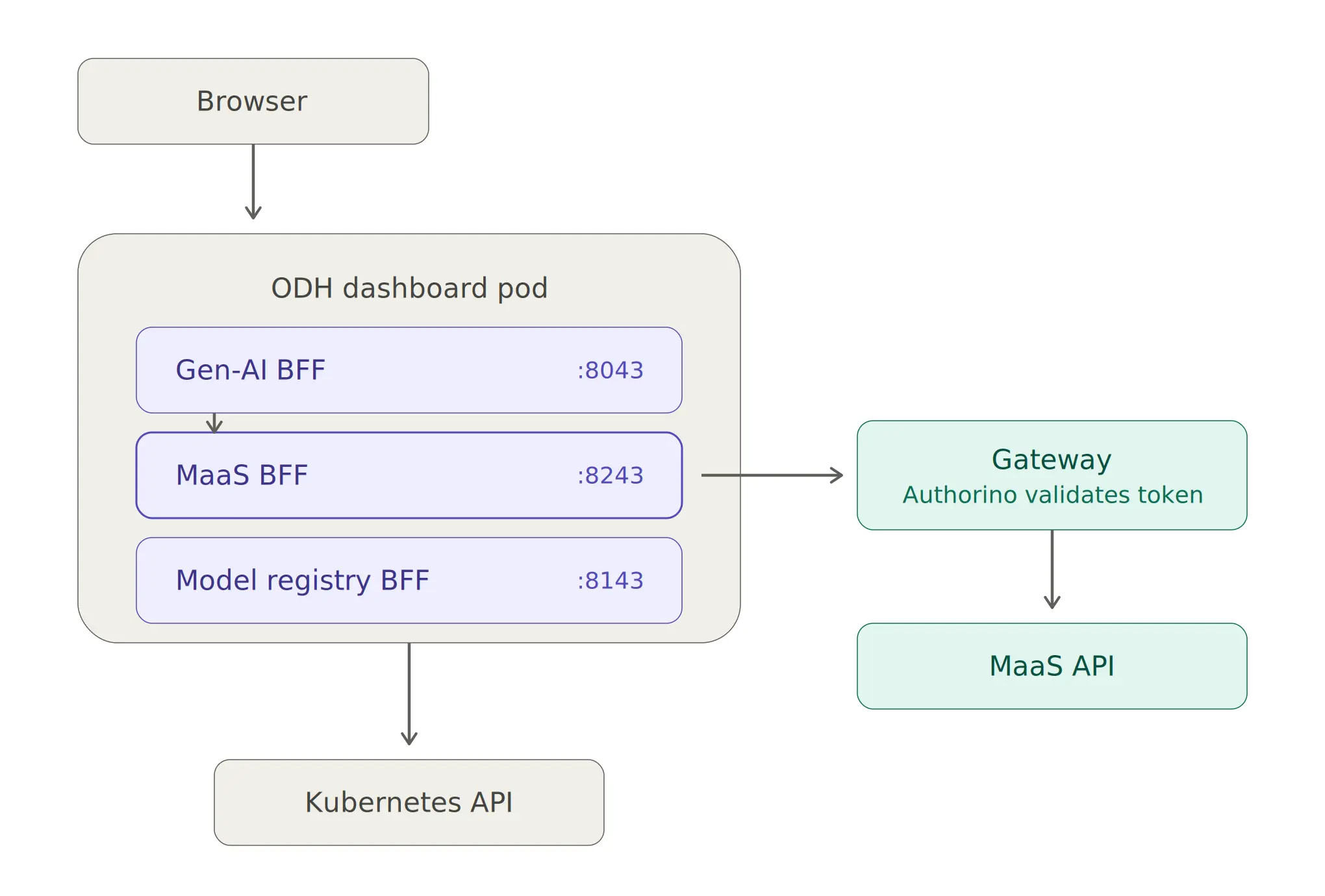
In the design illustrated in figure 1, the Dashboard's Node.js front end proxies all /maas/* requests locally to the MaaS BFF running on localhost:8243. Once a request is received, the BFF resolves the in-cluster gateway URL, injects the user's authentication token, and forwards the traffic to the upstream MaaS API allowing the response to flow back securely through the exact same path.
To handle internal routing, BFFs communicate with each other over localhost. For example, the Gen-AI BFF calls the MaaS BFF's /api/v1/api-keys endpoint to create ephemeral tokens for playground inference sessions. This inter-BFF pattern keeps domain boundaries clean, ensuring that the Gen-AI BFF does not need to understand how API keys work internally — it only needs to know the MaaS BFF's contract.
Pattern 1: Transparent token forwarding for stateless identity
The critical design pattern in the BFF is that it never actually validates tokens, it strictly forwards them.
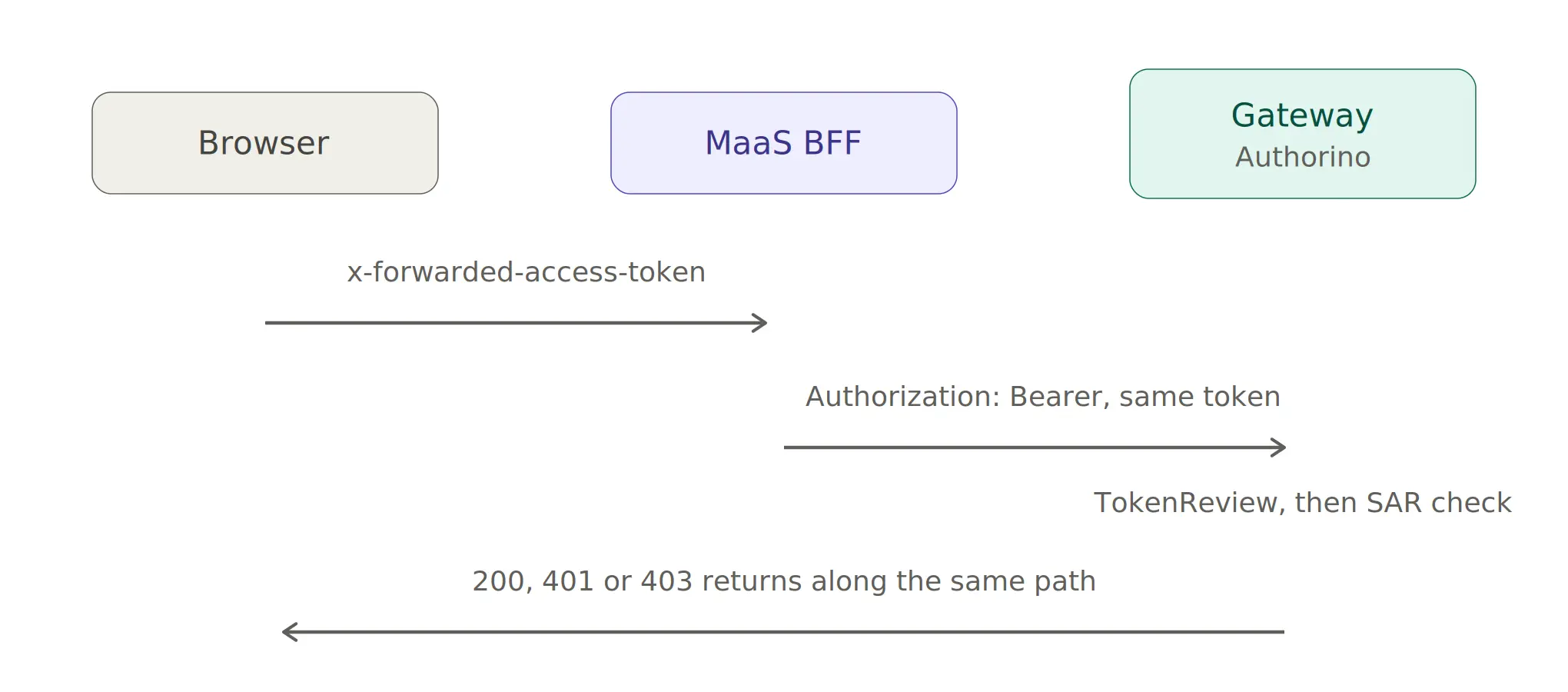
To achieve this, the middleware extracts the token from the incoming request header (this is configurable, but it is x-forwarded-access-token by default, or kubeflow-userid in Kubeflow mode) and stores it safely in the request context:
func (app *App) InjectRequestIdentity(next http.Handler) http.Handler {
    return http.HandlerFunc(func(w http.ResponseWriter, r *http.Request) {
        identity := app.kubernetesClientFactory.ExtractRequestIdentity(r)
        ctx := context.WithValue(r.Context(), constants.RequestIdentityKey, identity)
        next.ServeHTTP(w, r.WithContext(ctx))
    })
}
Every downstream HTTP call then reads the identity from this context and sets the Authorization header according:
func addIdentityHeaderToRequest(ctx context.Context, r *http.Request) {
    identity, ok := ctx.Value(constants.RequestIdentityKey).(*kubernetes.RequestIdentity)
    if ok {
        r.Header.Set("Authorization", "Bearer "+identity.Token)
    }
}
Why this matters: The BFF contains no token database, no session store, and no secret keys. It is completely stateless. If the BFF is compromised, an attacker can only forward tokens that users have already provided — they cannot mint new ones. All authentication and authorization decisions stay firmly in the gateway's Authorino stack, exactly where they belong.
Pattern 2: Dynamic in-cluster gateway discovery
Because the BFF runs inside the cluster, it needs to dynamically discover the gateway's external hostname to construct URLs that the MaaS API accepts (because the gateway validates the Host header). Hard-coding this URL would break the deployment on every new cluster.
To solve this, the BFF reads the OpenShift Ingress configuration at startup:
func GetClusterDomainUsingServiceAccount(ctx context.Context, logger *slog.Logger) (string, error) {
    config, err := rest.InClusterConfig()
    // ...
    gvr := schema.GroupVersionResource{
        Group: "config.openshift.io", Version: "v1", Resource: "ingresses",
    }
    ingress, err := client.Resource(gvr).Get(ctx, "cluster", metav1.GetOptions{})
    domain, found, err := unstructured.NestedString(ingress.Object, "spec", "domain")
    return domain, nil
}
Using this data, the BFF dynamically constructs https://maas.{domain}/maas-api and uses it for all upstream calls.
To ensure flexibility across different environments, the gateway URL is resolved using a three-tier configuration priority:
- Explicit override:
MAAS_API_URLenvironment variable - Automatic discover: In-cluster OpenShift Ingress discovery
- Graceful fallback: if both fail, the BFF starts, but MaaS endpoints return errors when called
This three-tier approach means the BFF works out-of-the-box on managed OpenShift (like Red Hat OpenShift Service on AWS or Microsoft Azure Red Hat OpenShift) without configuration, on self-managed clusters with custom domains via the environment variable, and in local development with a mock server.
Pattern 3: Repository abstraction for clean architecture
To cleanly separate data access from request handling, the BFF implements a repository layer:
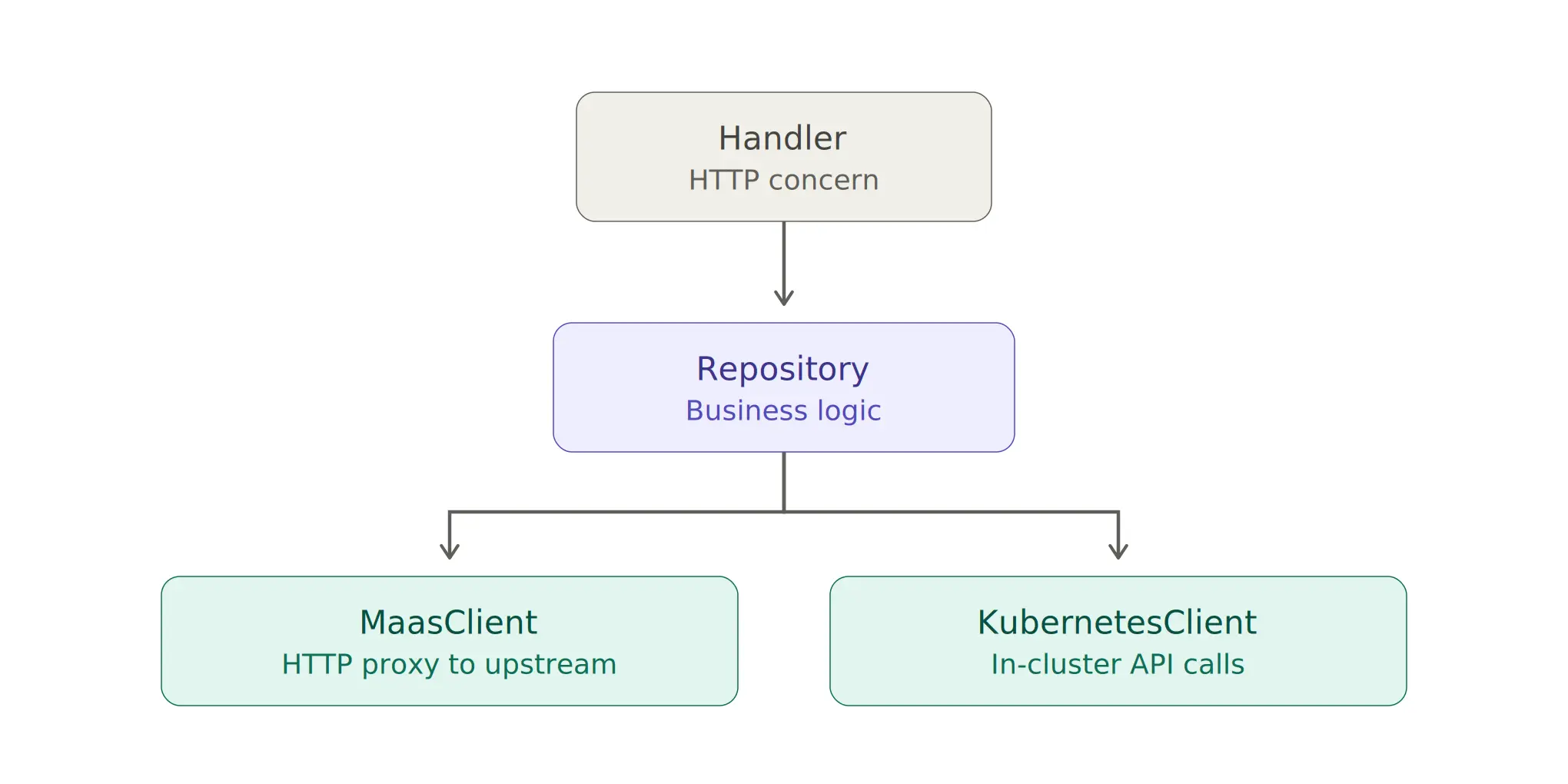
In this architecture, illustrated in figure 3, handlers parse the request and serialize the response, repositories compose data from multiple sources, and clients handle the underlying transport.
type App struct {
    repositories *repositories.Repositories
}

type Repositories struct {
    HealthCheck   HealthCheckRepository
    User          UserRepository
    Namespace     NamespaceRepository
    APIKeys       APIKeysRepository
    Models        ModelsRepository
    Subscriptions SubscriptionsRepository
    Policies      PoliciesRepository
    MaaSModelRefs MaaSModelRefsRepository
}
Why separate layers? The "create API key" flow illustrates this value perfectly. The handler validates the request body. The repository then calls maasClient.CreateAPIKey() to create the key upstream, and wraps the response in the BFF's envelope format. If we later need to check a Kubernetes resource before creating the key (for example, verify the user has a valid subscription), the repository is the natural place — not the handler, and not the HTTP client.
This separation also enables robust unit testing. Because repositories accept interfaces, tests can easily inject a mock MaasClient that returns canned responses without hitting a real gateway.
Pattern 4: Standardizing responses with envelope wrapping
To ensure a uniform contract with the UI, all BFF responses are wrapped in a consistent envelope:
type Envelope[D any, M any] struct {
    Data     D `json:"data"`
    Metadata M `json:"metadata,omitempty"`
}
This structure matches the ODH dashboard's existing conventions, allowing the front end to use a single, unified response parser for all MaaS endpoints:
{
  "data": {
    "key": "sk-oai-abc123...",
    "name": "my-key",
    "createdAt": "2026-07-01T12:00:00Z"
  }

}
Similarly, error responses follow this exact same structure while utilizing the MaaS API's error format. By catching upstream errors and returning them with their original HTTP status codes, the BFF handles failures transparently:
type MaasUpstreamError struct {
    StatusCode int
    Message    string
}
As a result, the frontend never needs to distinguish whether an error originated from the BFF or the upstream API.
Pattern 5: Domain isolation with inter-BFF communication
Because the dashboard pod runs multiple BFFs, they communicate efficiently over localhost HTTP, rather than routing through the external cluster network:
// Gen-AI BFF calling MaaS BFF
resp, err := http.Post("http://localhost:8243/api/v1/api-keys",
    "application/json", body)
For instance, the Gen-AI BFF creates ephemeral API keys for playground sessions by directly calling the MaaS BFF, forwarding the user's token so the key is created under the correct user's identity.
To enforce strict contract definitions, the MaaS BFF publishes a CONSUMERS.md file that explicitly lists the endpoints, request shapes, and response shapes that other BFFs depend on. Any changes to these endpoints require updating this consumer contract first.
Ultimately, this pattern keeps domains modular. Because the Gen-AI BFF does not import MaaS types or call the upstream MaaS API directly, replacing the MaaS key format ensures that only the MaaS BFF needs to change.
Pattern 6: Managing cross-cutting concerns with a middleware stack
To handle cross-cutting concerns, the BFF utilizes an ordered middleware stack (see figure 4).
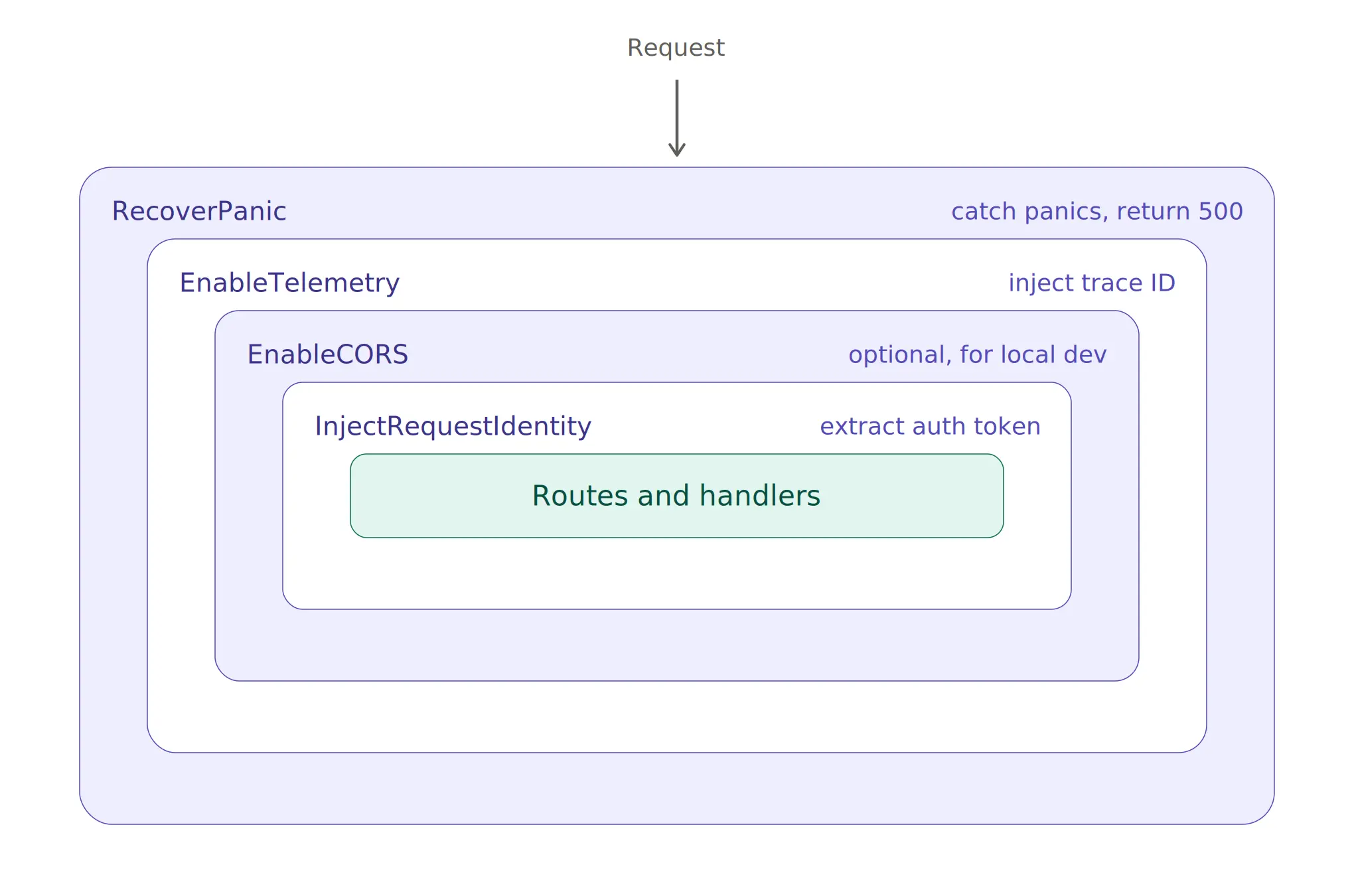
Specifically, the middleware wraps the router as RecoverPanic(EnableTelemetry(EnableCORS(InjectRequestIdentity(router)))), so panic recovery acts as the outermost layer and identity extraction is closest to the handlers.
Because each middleware is independent and composable, the system is highly resilient. For instance, the panic recovery middleware ensures that a nil pointer in a handler does not crash the process. Similarly, the telemetry middleware injects a trace ID that propagates through the upstream call, making it possible to correlate across the entire request path, from the dashboard through the BFF and gateway, all the way to the MaaS API logs.
Lessons learned
Operating this architecture in production taught us several valuable lessons:
- Gateway URL assumptions break on custom gateways. While the BFF constructs
https://maas.{domain}/maas-apiusing the cluster's ingress domain, it assumes the gateway hostname matches it. However, users with custom gateways often set a different URL. Since users don't have permission to list Gateway resources, the BFF cannot discover the correct endpoint by reading the Gateway object. Going forward, we are adding a dedicated MaaS backend API that returns the exact gateway URL, removing the assumption entirely. - The BFF should not be smart about auth. Early versions attempted to pre-validate tokens with a SelfSubjectAccessReview before forwarding them. This added latency and created false negatives when RBAC was misconfigured. As a result, we removed pre-validation and let the gateway handle all auth decisions. The BFF is now a pure pass-through for authentication.
- Inter-BFF communication needs versioning. Because BFFs communicate over untyped HTTP, schema changes in one BFF can silently break consumers. To solve this, we added a CONSUMERS.md contract and now treat inter-BFF endpoints as stable APIs with backward compatibility guarantees.
When the BFF pattern makes architectural sense
Although BFF patterns are not suitable for all use cases, they are an ideal architectural fit when:
- Cross-origin conflicts: Your frontend and API are on different origins, making CORS avoidance a priority
- Sensitive credential management: The upstream API requires credentials that the frontend should not hold or process
- Complex service composition: You need to compose data from multiple backends for a single UI view
- Independent API evolution: The upstream API evolves independently of the UI, requiring a stable contract for the front end
- Diverse frontend requirements: Multiple UI modules consume the same backend but have distinctly different schema needs
However, it is important to remember that introducing a BFF adds operational complexity. It requires yet another service to deploy, monitor, and debug. Therefore, this pattern is not justified for simple CRUD applications where the frontend can securely call the API directly.
Conclusion
Introducing a Backend-for-Frontend is not just about solving CORS issues or simplifying frontend code, it also establishes a scalable boundary between your user-facing dashboard and your AI infrastructure. By centralizing token routing, gateway discovery, and service composition, the BFF pattern allows your UI to evolve independently of the underlying Models-as-a-Service (MaaS) APIs.
As referenced throughout this article, the MaaS BFF we built is part of the OpenDataHub Dashboard project and is a core component of Red Hat OpenShift AI, which provides the robust model serving, monitoring, and multi-tenant infrastructure that the BFF sits in front of. The stateless authentication and rate limiting are handled by Red Hat Connectivity Link. The traffic routing uses the gateway API implementation in Red Hat OpenShift Service Mesh. The BFF pattern described here works with any Kubernetes-native API gateway, but the tight integration between these components is what makes the architecture practical at enterprise scale.
If your organization is looking to move from being merely an AI token consumer to becoming an internal token provider, explore the following public resources to get started with Red Hat's MaaS capabilities:
- Read the architectural overview: Check out A guide to Models-as-a-Service to learn how centralizing model access accelerates enterprise AI adoption and governance
- See the platform in action: Walk through the point-and-click MaaS Interactive Demo (red.ht/MaaS) or watch our Accelerate enterprise software development with NVIDIA and MaaS video to see how self-service API generation works
- Try it yourself: Start a 60-day trial of Red Hat OpenShift AI to begin deploying, serving, and governing your own models on your preferred infrastructure

