Redhat Developers  Logo
  • Products

    Platforms

    • Red Hat Enterprise Linux
      Red Hat Enterprise Linux Icon
    • Red Hat AI
      Red Hat AI
    • Red Hat OpenShift
      Openshift icon
    • Red Hat Ansible Automation Platform
      Ansible icon
    • See all Red Hat products

    Featured

    • Red Hat build of OpenJDK
    • Red Hat Developer Hub
    • Red Hat JBoss Enterprise Application Platform
    • Red Hat OpenShift Dev Spaces
    • Red Hat OpenShift Local
    • Red Hat Developer Sandbox

      Try Red Hat products and technologies without setup or configuration fees for 30 days with this shared Red Hat OpenShift and Kubernetes cluster.
    • Try at no cost
  • Technologies

    Featured

    • AI/ML
      AI/ML Icon
    • Linux
      Linux Icon
    • Kubernetes
      Cloud icon
    • Automation
      Automation Icon showing arrows moving in a circle around a gear
    • See all technologies
    • Programming languages & frameworks

      • Java
      • Python
      • JavaScript
    • System design & architecture

      • Red Hat architecture and design patterns
      • Microservices
      • Event-Driven Architecture
      • Databases
    • Developer experience

      • Productivity
      • Tools
      • GitOps
    • Automated data processing

      • AI/ML
      • Data science
      • Apache Kafka on Kubernetes
    • Platform engineering

      • DevOps
      • DevSecOps
      • Red Hat Ansible Automation Platform for applications and services
    • Secure development & architectures

      • Security
      • Secure coding
  • Learn

    Featured

    • Kubernetes & cloud native
      Openshift icon
    • Linux
      Rhel icon
    • Automation
      Ansible cloud icon
    • AI/ML
      AI/ML Icon
    • See all learning resources

    E-books

    • GitOps cookbook
    • Podman in action
    • Kubernetes operators
    • The path to GitOps
    • See all e-books

    Cheat sheets

    • Linux commands
    • Bash commands
    • Git
    • systemd commands
    • See all cheat sheets

    Documentation

    • Product documentation
    • API catalog
    • Legacy documentation
  • Developer Sandbox

    Developer Sandbox

    • Access Red Hat’s products and technologies without setup or configuration, and start developing quicker than ever before with our new, no-cost sandbox environments.
    • Explore the Developer Sandbox

    Featured Developer Sandbox activities

    • Get started with your Developer Sandbox
    • OpenShift virtualization and application modernization using the Developer Sandbox
    • Explore all Developer Sandbox activities

    Ready to start developing apps?

    • Try at no cost
  • Blog
  • Events
  • Videos

Integrate Claude Code with Red Hat AI Inference Server on OpenShift

March 26, 2026
Alexander Barbosa Ayala
Related topics:
Artificial intelligenceDeveloper productivity
Related products:
Red Hat AI Inference ServerRed Hat AIRed Hat Enterprise Linux AIRed Hat OpenShift AIRed Hat OpenShift Container Platform

    Agentic coding tools help developers build software efficiently. Claude Code, Anthropic's terminal-based coding agent, improves productivity by letting you interact with your codebase through natural language—directly from the console.

    One advantage of Claude Code is its flexibility. Rather than being locked to Anthropic's cloud models, you can connect it to any backend that uses the Anthropic Messages API. 

    This article explores how to integrate Claude Code with a local model served by Red Hat AI Inference Server (a downstream version of vLLM) on Red Hat OpenShift. This approach keeps the inference process private on your infrastructure while retaining the full Claude Code workflow. By doing so, you keep all prompts and responses within your environment while benefiting from Claude Code's developer-focused workflows.

    Prerequisites

    You will need:

    • An OpenShift cluster with GPUs enabled and the NVIDIA Operator installed. For a local OpenShift installation, follow the steps in How to enable NVIDIA GPU acceleration in OpenShift Local.
    • A Hugging Face account and active API token.
    • Access to the Red Hat image registry.

    Environment

    I executed the steps in this article using an environment with the following specifications:

    • Single-node OpenShift 4.21
    • GPU: NVIDIA RTX 4060 Ti
    • CPU: Intel Core i7-14700 × 28
    • Host machine operating system: Fedora 43

    Disclaimer

    Because this testing machine is not part of a supported environment, this demo is for testing only and does not represent an official Red Hat support procedure.

    Deploy the Red Hat AI Inference Server

    The first step is to deploy Red Hat AI Inference Server. For this demo, I created a Helm chart to simplify the deployment in an OpenShift 4.21 environment. You can alternatively follow the manual deployment procedure. 

    Clone the project:

    git clone https://github.com/alexbarbosa1989/rhai-helm

    Set the minimal required environment variables:

    export HF_TOKEN=hf_xxxxxxxxxxxxxxxxxxxxxxxxxxxxxxxxxx
    export AUTHFILE=$XDG_RUNTIME_DIR/containers/auth.json
    export STORAGECLASS=<ocp-storageclass>

    Alternatively, you can configure your own values in the rhai-helm/values.yaml file—for example, a different model from Hugging Face or a custom namespace.

    Hint: Before setting AUTHFILE, verify whether auth.json already exists at the expected path. This file is created automatically when you authenticate using Podman in the terminal.

    podman login registry.redhat.io

    Once you define the required environment variables, you can install the Helm chart. For example, to use the default rhai-helm/values.yaml, run:

    helm install rhai-helm ./rhai-helm \
    --create-namespace --namespace rhai-helm \
    --set persistence.storageClass=$STORAGECLASS \
    --set secrets.hfToken=$HF_TOKEN \
    --set-file secrets.docker.dockercfg=$AUTHFILE

    Check the created resources:

    oc get secrets
    oc get pvc model-cache
    oc get deployment
    oc get svc
    oc get route

    Finally, check the running pod. This might take a few minutes, depending on hardware resources.

    oc get pod
    NAME                        READY   STATUS    RESTARTS   AGE
    qwen-coder-5f6668b767-hp585   1/1     Running   0          5m11s

    Install and configure Claude Code

    Configure this on your developer workstation. Follow the official installation instructions, or install it directly using the convenience script for Linux and macOS:

    curl -fsSL https://claude.ai/install.sh | bash

    Claude Code uses environment variables for configuration. By overriding the default Anthropic settings, you can redirect requests to a local model served by vLLM. Use this example configuration:

    ANTHROPIC_BASE_URL="<RHAI-Inference-exposed-route>" \
    ANTHROPIC_API_KEY="vllm" \
    ANTHROPIC_DEFAULT_OPUS_MODEL="qwen-coder" \
    ANTHROPIC_DEFAULT_SONNET_MODEL="qwen-coder" \
    ANTHROPIC_DEFAULT_HAIKU_MODEL="qwen-coder" \
    CLAUDE_CODE_FILE_READ_MAX_OUTPUT_TOKENS="2000" \
    CLAUDE_CODE_MAX_OUTPUT_TOKENS="4096" \
    MAX_THINKING_TOKENS="0" \
    claude

    The ANTHROPIC_BASE_URL environment variable must point to the exposed OpenShift route of the Red Hat AI inference service. This is the endpoint Claude Code uses for all requests. 

    Replace the example value with the route generated in your OpenShift cluster. Retrieve the route by running:

    oc get route -n <namespace>

    Also, the values for CLAUDE_CODE_FILE_READ_MAX_OUTPUT_TOKENS and CLAUDE_CODE_MAX_OUTPUT_TOKENS should be tuned according the hardware capabilities to avoid exhausting the context window.

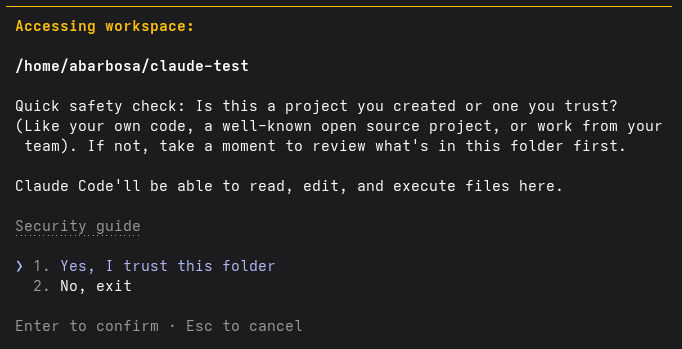
    Once you set the environment variables, launching Claude Code prompts an interactive setup to initialize the workspace (Figure 1).
    claude setup
    Figure 1: Claude Code setup.

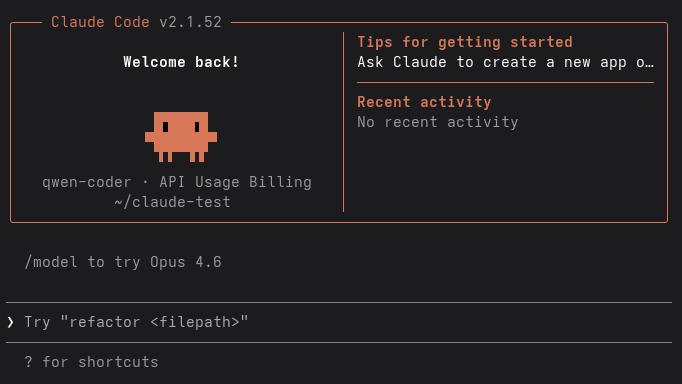
    Select ❯ 1. Yes, I trust this folder. At this point, Claude Code is fully initialized and ready for use, as shown in Figure 2.
    claude-setup2
    Figure 2. Claude Code initialization.

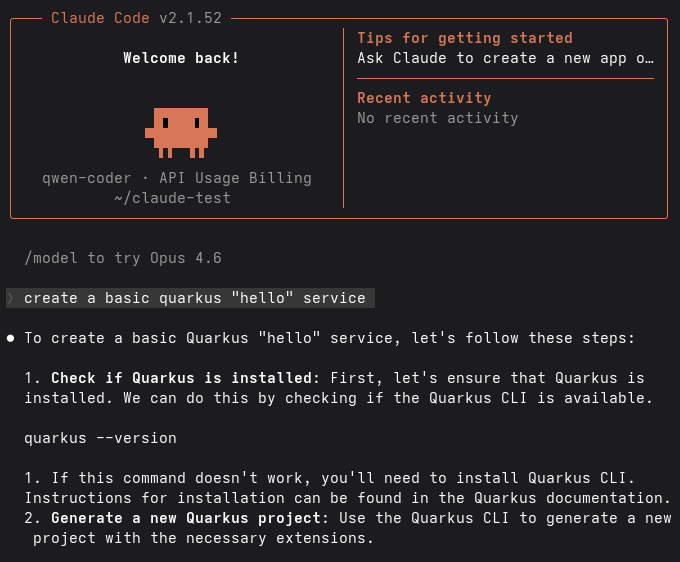
    In this example, the following instruction was provided:

    ❯ create a basic quarkus "hello" service

    Claude Code immediately begins processing the request using the locally served model, as illustrated in Figure 3.
    claude-demo1
    Figure 3: Claude Code interactive session.

    You can also verify the interaction directly from the vLLM backend pod in the OpenShift cluster. Successful requests appear in the logs as calls to the /v1/messages API endpoint:

    (APIServer pid=1) INFO:     10.128.0.2:43662 - "POST /v1/messages?beta=true HTTP/1.1" 200 OK
    (APIServer pid=1) INFO:     10.128.0.2:43664 - "POST /v1/messages?beta=true HTTP/1.1" 200 OK

    This confirms that Claude Code successfully routes requests to the OpenShift-hosted inference service.

    Key takeaways

    By integrating Claude Code with a vLLM-based inference service on OpenShift, you gain access to effective AI-assisted coding workflows while keeping models, data, and inference under your control.

    This demonstration uses a lightweight Qwen model. With specialized, higher-performance hardware, you can serve larger models that provide advanced coding and reasoning capabilities.

    Overall, this approach combines the productivity of Claude Code with the security and scalability of OpenShift. It is a practical solution for organizations that need private, on-premises AI development environments.

    Related Posts

    • Introduction to distributed inference with llm-d

    • Deploy an LLM inference service on OpenShift AI

    • Why vLLM is the best choice for AI inference today

    • Profiling vLLM Inference Server with GPU acceleration on RHEL

    • vLLM or llama.cpp: Choosing the right LLM inference engine for your use case

    • Getting started with llm-d for distributed AI inference

    Recent Posts

    • Integrate Claude Code with Red Hat AI Inference Server on OpenShift

    • Scale LLM fine-tuning with Training Hub and OpenShift AI

    • Reproducible builds in Project Hummingbird

    • Getting started with the vLLM Semantic Router project's Athena release: Optimize your tokens for agentic AI

    • Dynamic resource allocation goes GA in Red Hat OpenShift 4.21: Smarter GPU scheduling for AI workloads

    What’s up next?

    Featured image for LLM Compressor.

    Red Hat AI Inference Server

    Move larger models from code to production faster with an enterprise-grade...

    Red Hat Developers logo LinkedIn YouTube Twitter Facebook

    Platforms

    • Red Hat AI
    • Red Hat Enterprise Linux
    • Red Hat OpenShift
    • Red Hat Ansible Automation Platform
    • See all products

    Build

    • Developer Sandbox
    • Developer tools
    • Interactive tutorials
    • API catalog

    Quicklinks

    • Learning resources
    • E-books
    • Cheat sheets
    • Blog
    • Events
    • Newsletter

    Communicate

    • About us
    • Contact sales
    • Find a partner
    • Report a website issue
    • Site status dashboard
    • Report a security problem

    RED HAT DEVELOPER

    Build here. Go anywhere.

    We serve the builders. The problem solvers who create careers with code.

    Join us if you’re a developer, software engineer, web designer, front-end designer, UX designer, computer scientist, architect, tester, product manager, project manager or team lead.

    Sign me up

    Red Hat legal and privacy links

    • About Red Hat
    • Jobs
    • Events
    • Locations
    • Contact Red Hat
    • Red Hat Blog
    • Inclusion at Red Hat
    • Cool Stuff Store
    • Red Hat Summit
    © 2026 Red Hat

    Red Hat legal and privacy links

    • Privacy statement
    • Terms of use
    • All policies and guidelines
    • Digital accessibility

    Report a website issue