Large language models (LLMs) are efficient general-purpose tools, but they work much better when you give them the right context. Whether you're using a coding assistant (yes, you can run your own private coding assistant), building an agentic application, or trying to get more accurate answers from your favorite model, there are two main ways to extend what an LLM can do: Model Context Protocol (MCP) servers and skills.
Both expand the context window of your model, but they solve fundamentally different problems. This article explains what each option does, how they work technically, and how to choose between them—or use both.
Why LLMs need context
An LLM is a prediction engine trained on massive datasets, and it can identify the history of Red Hat, determine which SQL command inspects a database schema, or write a Dockerfile. Most models are great at answering these types of general questions. However, getting the right answer for your specific use case requires providing the right context.
Let's say, for example, you're asking a model for help working with your team's database. In addition to your question, the model will need relevant context. This might include the configuration your team uses for development or production environments, the formatting of queries to send, or a tool executed to check which tables are available. Providing this information used to be entirely manual: copy-pasting documentation, writing long and detailed prompts, and hoping the model understands your question and puts it all together correctly. The workflow shift from manual parsing to an automated context pipeline is illustrated in Figure 1.
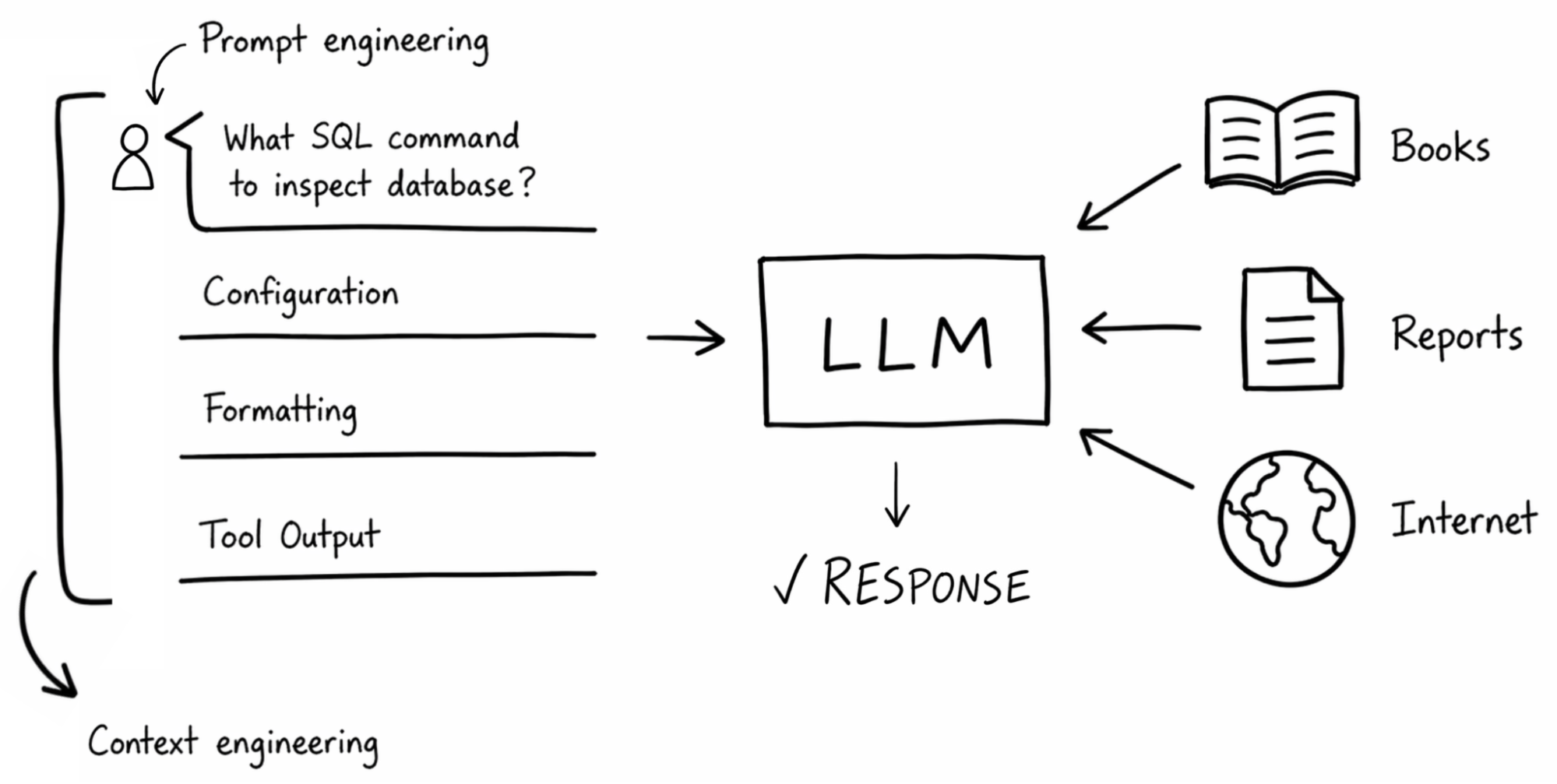
This is where context engineering comes in. It goes beyond prompt engineering, which only provides instructions, personas, and basic guidelines. Context engineering is about curating the right data, tools, and instructions, so that the model has everything it needs to give you a correct, useful answer. So the question is, how do we provide that context?
Connecting external data with the Model Context Protocol
Let's say the context your agent needs lives in an external service: a customer relationship management (CRM) solution, a database, or a cloud provider's API. Previously, with AI agents, you had to manually convert the service's API documentation into a custom tool with an authentication token, instruct the LLM to update the customer's contact info, and hope for the best.
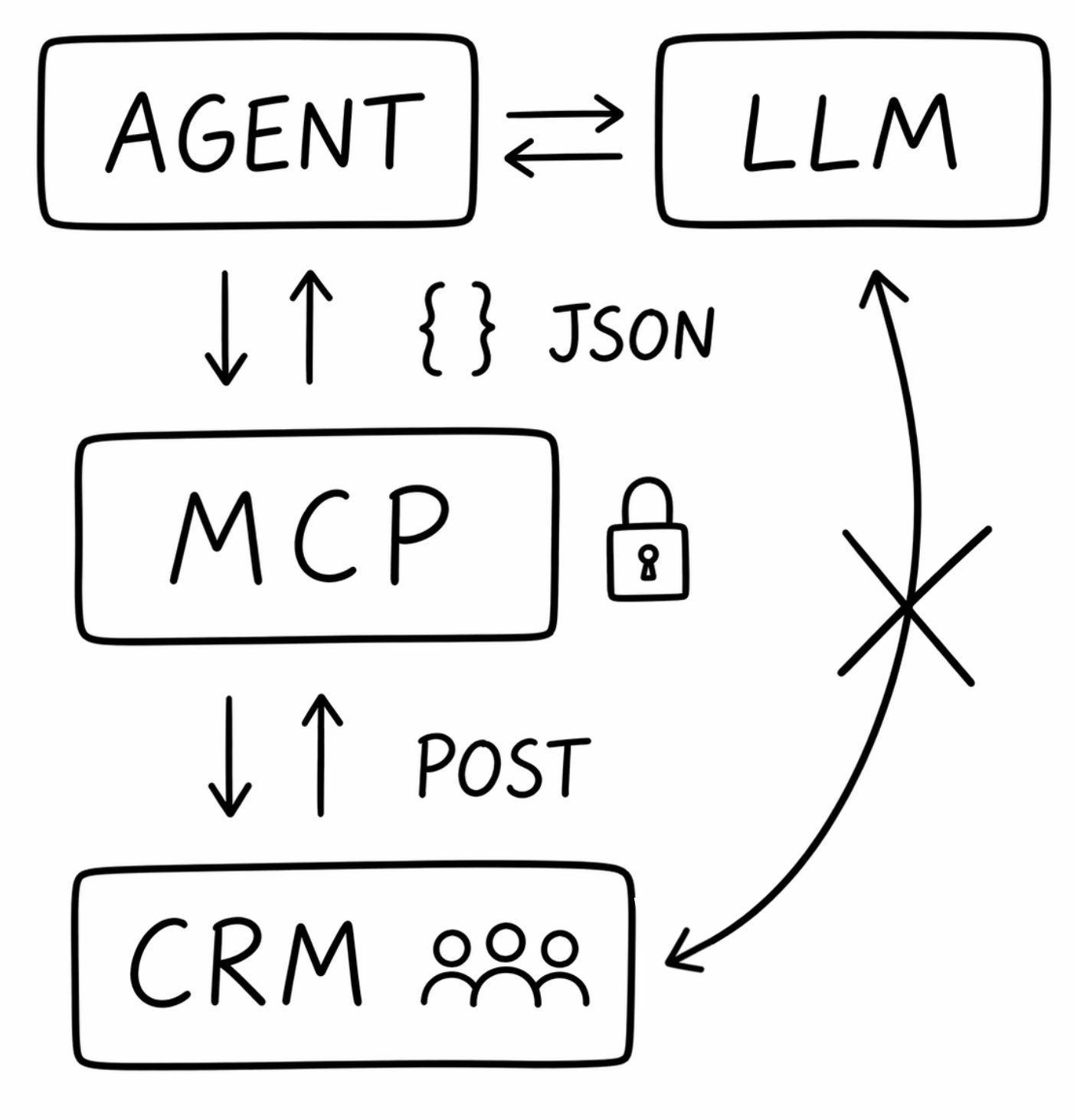
Model Context Protocol (MCP) standardizes how your AI agent talks to external data sources. Instead of custom integrations for every tool, MCP provides a universal interface that:
- Abstracts service APIs into a simple, LLM-ready format.
- Manages authentication by issuing your AI model a scoped access token with specific permissions (for example, read or write).
- Instructs the LLM to provide specific JSON to interact with the MCP server (for example, using
GETto fetch a record orPOSTto submit an update). - Defines the structured JSON inputs the LLM must produce to call tools on the MCP server.
This systemic separation of concerns between the agent, protocol, and external APIs is visualized in Figure 2.
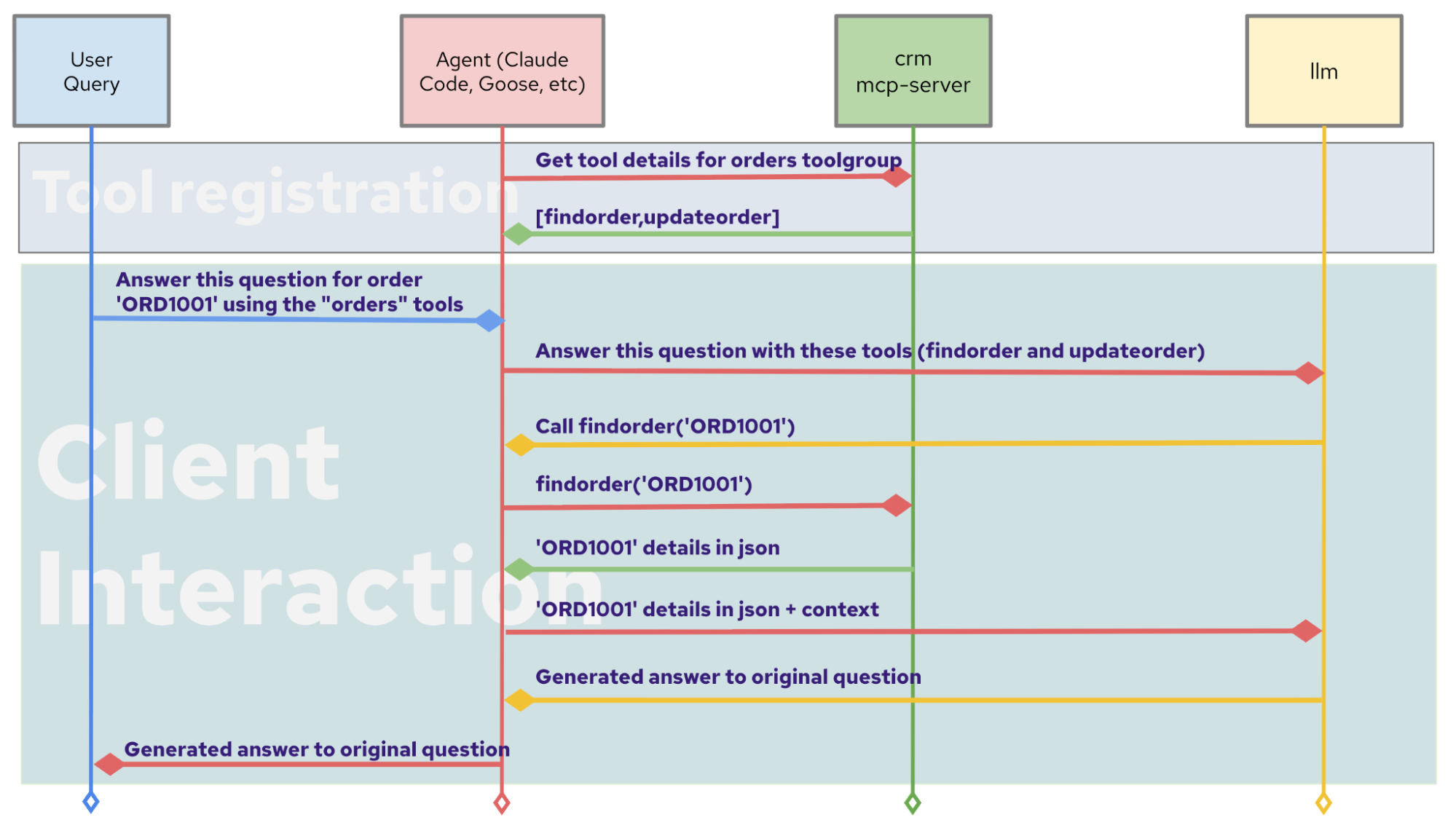
Behind the scenes, when you add an MCP server to your IDE or AI application, the agent client discovers available tools and appends descriptions to the model's context, signaling that it can view active Kubernetes resources. When the user makes a request, the model sees those tool descriptions alongside the conversation and decides which tools to call and with what arguments (Figure 3).
MCP was introduced by Anthropic in November 2024 as an open standard and has since been widely adopted, with support from major AI tools and providers. In December 2025, Anthropic donated the protocol to the Linux Foundation through the Agentic AI Foundation, which includes Red Hat as a member.
Structure of an MCP server interaction
Here's a simplified example of what an MCP interaction looks like. Let's say your AI agent has a CRM MCP server configured to look up customer information, and the user requests the contact information for customer_123. The LLM then generates the following JSON:
{
  "tool": "crm_get_contact",
  "parameters": {
    "customer_id": "cust_12345"
  }
}
This abstracts the LLM from the MCP server, which handles the actual API call, authentication, and response formatting. The LLM gets back structured data it can reason about. For a deeper look at how agentic AI uses MCP servers, check out the MCP servers for Red Hat OpenShift AI and a guide on Building effective AI agents with Model Context Protocol.
Adding domain expertise with skills
While MCP solved the problem of “how do we give external data to an LLM,” there's another challenge: how do we give the LLM domain expertise it might not already have?
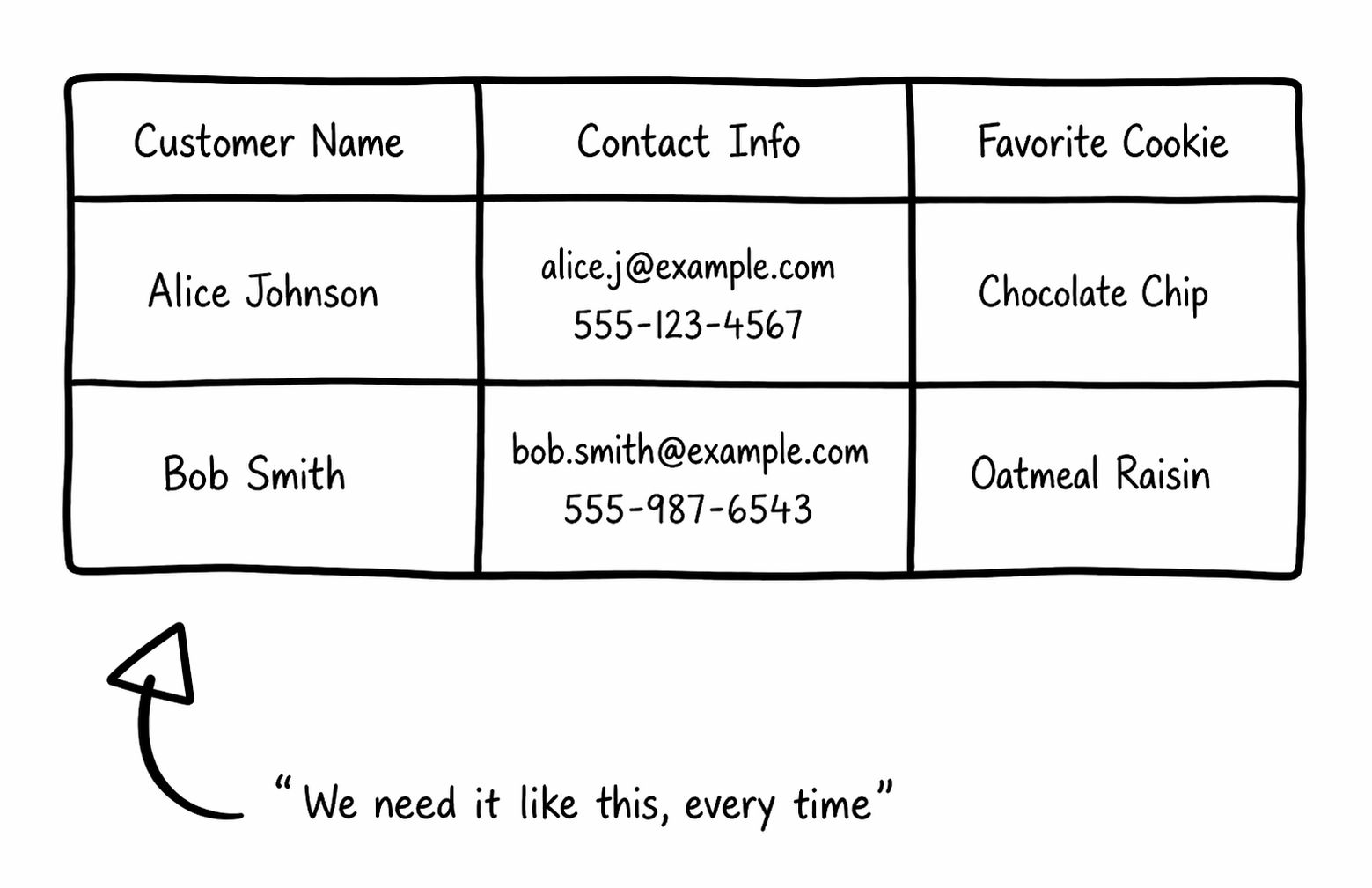
Sure, with MCP, you can pull those customer records from a CRM, but your sales team wants the output formatted exactly the same way every time: customer name, contact info, and their favorite cookie flavor (Figure 4). Without explicit instructions, the model will format things differently each time.
Skills are reusable, structured instructions that teach your LLM how to do something. Think about the tasks you might use an LLM for repeatedly:
- Cleaning up Excel documents in a specific format
- Debugging code (for example, always running
maven verifybefore suggesting fixes) - Running compliance checks against a standard template
- Formatting reports according to your team's style guide
Each of these can be packaged into a skill, which contains the following three parts:
- Title: How you and the model identify the capability
- Description: When the skill should be added to the model's context
- The prompt: Instructions, examples, templates, and scripts
The key feature of skills is auto-loading. The underlying agent loads the relevant skill into its context window only when needed. A code debugger skill only activates when you ask about code errors. A document formatting skill only loads when you're working with documents. This keeps the context window efficient while providing specialized expertise on demand. With the rising cost of LLMs, this capability helps manage resource spending efficiently.
Skills have become a widely adopted pattern across AI tools. The skill.md format, popularized through coding assistants like Claude Code, has become a de facto standard across multiple platforms. You can find community-maintained skill libraries with thousands of entries covering everything from front-end design to Kubernetes deployment and data analysis.
Anatomy of a skill definition
Here's a basic skill.md definition, pulled from Claude Code's documentation:
---
name: explain-code
description: Explains code with visual diagrams and analogies. Use when explaining how code works, teaching about a codebase, or when the user asks "how does this work?"
---
When explaining code, always include:
1. **Start with an analogy**: Compare the code to something from everyday life
2. **Draw a diagram**: Use ASCII art to show the flow, structure, or relationships
3. **Walk through the code**: Explain step-by-step what happens
4. **Highlight a gotcha**: What's a common mistake or misconception?
Keep explanations conversational. For complex concepts, use multiple analogies.
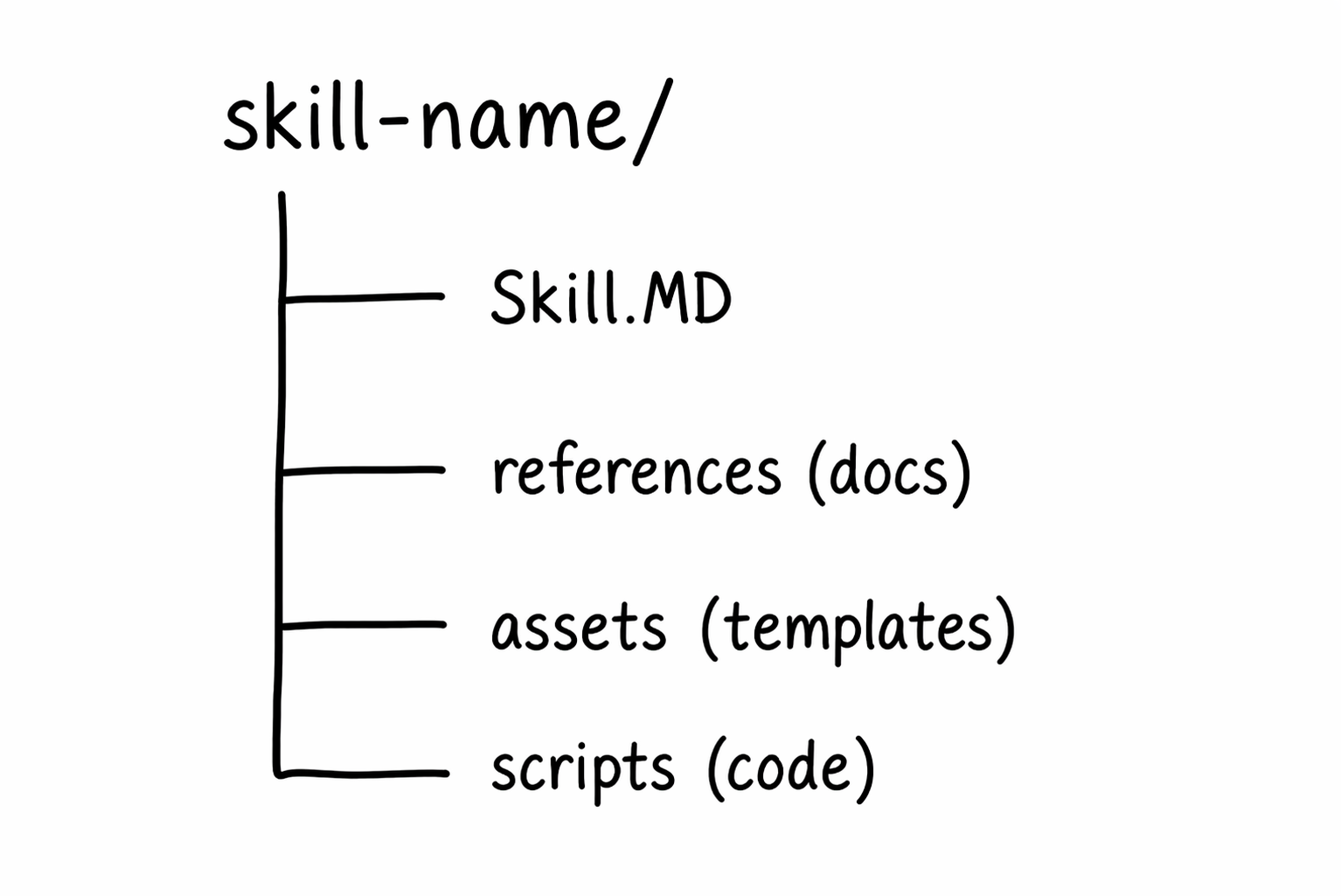
Once added to your AI coding assistant or AI agent, if a user asks, “How are we handling database queries in our development environment?” the skill auto-loads. The model then follows these standardized conventions automatically. In addition to the markdown file, you can include optional folders like references, assets, or scripts to provide context. The standard directory layout of a packaged skill is shown in Figure 5.
When to use MCP servers
Use MCP when your AI application needs access to real-time, external data in a controlled, tightly permissioned way. MCP is an integration layer between agents and tools. It lets you query what virtual machiness are currently running, determine the cluster state in your cloud provider, or request contact information for a customer.
MCP is the right choice when the value comes from the data itself, not from how the model processes it. The model needs to read from or write to an external system, and MCP provides a security-focused, standardized pipeline to do that.
When to use skills
Setting up and configuring an MCP server can be overkill if you only need to add a reusable, custom capability to your AI. That's where skills shine.
Skills are lightweight and tell your model how to do something: for example, how to fetch investment data and analyze it using scripts or examples included in the skill. Use skills when you're repeating the same prompts across conversations, or need consistent output formatting across your team, or want to give domain-specific best practices to your model.
Combining MCP and skills for comprehensive workflows
MCP and skills aren't competing approaches; they're complementary, and the most effective AI agents use both. Let's think about a scenario where you're building an AI agent for your DevOps team:
- MCP connects the agent to your Kubernetes cluster, your monitoring stack, and your incident management system. The agent can query pod status, pull metrics, and create incident tickets.
- A skill teaches the agent your team's incident response runbook: how to triage alerts, what thresholds matter, how to format a post-incident report, and which Slack channels to notify.
Without MCP, the agent cannot access your systems. Without the skill, the agent has access, but doesn't know your processes. Together, your agent can monitor active statuses and respond according to your team's processes.
Next steps for your automation architecture
Both MCP and skills are open source capabilities widely adopted across AI environments. Most providers offer an official MCP server, specific skills, or both. You can import these directly to your AI coding assistant or agent. Review the underlying code and execute these elements in sandboxed environments to verify behaviors safely.

