Anyone who has deployed a naive retrieval-augmented generation (RAG) system has likely run into the same frustrating outcome: a retrieved chunk that appears relevant at first glance, yet fails to answer the question. It might be mathematically similar to the user's query, but contextually, it misses the point entirely.
The problem is that vanilla semantic search optimizes for vector similarity and quietly ignores everything else that matters in the enterprise: user intent, recency, access boundaries, and domain context. Closing that gap requires more than just a more capable embedding model. It calls for a layered retrieval strategy: metadata filtering to narrow the search space, hybrid retrieval that combines dense and sparse signals, and neural reranking to refine the final results. Together, these techniques transform a simple proof-of-concept chatbot into a production-ready synthesis engine.
OGX, or Open GenAI Stack, (formerly Llama Stack) is an open source framework for building production-ready RAG applications because it provides a standardized API layer across inference, vector stores, agents, tools, safety, evaluation, and telemetry. Its OpenAI-compatible APIs allow developers to use familiar OpenAI-style clients while running models and retrieval infrastructure on their own platform. For RAG specifically, OGX supports vector store workflows that associate files and documents with vector databases such as Milvus, making it easier to build retrieval pipelines, apply metadata-aware search, and evolve from a simple chatbot into a portable enterprise RAG architecture.
In this article, we will explore how to evolve a naive RAG chatbot to enterprise RAG by applying metadata filtering, hybrid search, and neural reranking using the OGX framework in Red Hat OpenShift AI.
Understanding metadata filtering
Metadata filtering is one of the most practical ways to move a RAG application beyond basic semantic search. Instead of retrieving chunks only because they are mathematically close to the user's query, metadata filters allow the system to narrow the search space using structured attributes such as document type, category, customer, department, date, language, source system, security level, or topic. This makes retrieval more precise because the vector search runs only over content that matches the user's real context and business constraints.
Why using metadata matters
Using metadata filters provides practical benefits that help your retrieval pipeline move beyond basic semantic search:
- Increases application accuracy by retrieving context that better matches the user's intent and business context.
- Lowers hallucination risk because the model receives fewer unrelated or misleading chunks.
- Reduces token usage and cost by sending only the most relevant content to the generation step.
- Allows access control by filtering results based on user permissions, roles, departments, or security levels.
- Supports multi-tenancy by ensuring users or customers only retrieve data that belongs to their own tenant or workspace.
- Increases recency-based retrieval by filtering documents using timestamps, publication dates, or version metadata.
- Allows domain-specific filtering such as filtering by case type, document category, product, region, language, or source system.
- Increases explainability by making it clearer why specific documents or chunks were selected for the response.
OGX supports metadata at multiple levels, and each level serves a different purpose in a production RAG application.
Vector-store metadata is useful for describing and organizing the vector store itself, such as the domain, tenant, version, environment, or ingestion pipeline that created it. This helps when you manage multiple knowledge bases across teams, customers, or applications.
File or document-based metadata applies to the source document as a whole, such as document type, owner, department, language, access level, publication date, or category. All chunks in the same document will have the same metadata. This is especially useful when you want to filter retrieval to a specific set of documents before searching. For example, "only HR policies," or "only documents from 2025."
Chunk-based metadata is the most granular level and is attached to each retrieved text chunk, such as section title, page number, topic, incident type, source file name, or security classification. This level is critical when the answer depends on precise context, traceability, and citation back to the exact part of the document.
Together, these metadata layers make RAG retrieval more controllable. Vector metadata helps organize knowledge bases, file metadata narrows the search scope, and chunk metadata improves answer relevance, filtering precision, and explainability.
Hybrid search and ranking algorithms
Hybrid search is an advanced information retrieval technique. It combines dense vector search and sparse keyword search in parallel and merges their results.
Vector search is effective at finding semantically related content, even when the user uses different wording from the source documents, while keyword-based search, such as BM25, is better at matching exact terms, names, IDs, product codes, or domain-specific phrases.
By merging both signals, a RAG pipeline can retrieve context that is both meaningfully related and lexically precise. This is especially valuable in enterprise use cases where users might ask natural-language questions but still expect exact matches for entities, policies, error codes, or technical terms.
Hybrid search reduces missed results, improves recall, lowers the chance of irrelevant context being passed to the large language model (LLM), and produces more accurate and grounded answers.
Vector search and keyword-based retrieval use fundamentally different scoring models. Dense vector similarity typically produces normalized scores between 0 and 1, while keyword retrieval methods generate unbounded relevance scores based on term frequency and document statistics. Because these scoring systems are not directly comparable, hybrid search combines them using ranking algorithms:
Reciprocal Rank Fusion (RRF) does not rely on raw retrieval scores. Instead, it evaluates the ranking position of each document across multiple retrieval methods. Documents that consistently appear near the top of different result lists receive higher final rankings. As a result, RRF favors documents that demonstrate strong relevance signals from both semantic understanding and keyword matching, leading to more balanced and reliable retrieval results.
Weighted Average Fusion combines retrieval methods by preserving their original relevance scores while normalizing them into a common scale, typically between 0 and 1. After normalization, configurable weighting factors are applied to control how much influence each retrieval method contributes to the final ranking. This approach provides fine-grained control over hybrid retrieval behavior, allowing teams to prioritize either semantic vector search or keyword-based retrieval depending on which performs better for their domain.
OGX provides hybrid search through the Vector Store Search API by allowing the application to set search_mode="hybrid" while specifying ranking options when searching a vector store with a supported provider like Milvus.
Neural reranking using cross-encoder models
Traditional embedding models use a bi-encoder architecture where the query and documents are encoded independently into dense vector representations. For example:
- The user query is converted into a vector embedding.
- Each document or chunk is also converted into its own vector embedding.
- Retrieval is then performed by comparing these vectors using similarity metrics such as cosine similarity.
This design is highly scalable because document embeddings can be precomputed and stored in a vector database during ingestion time, allowing fast similarity search at query time. However, the approach has an important limitation where the query and document are encoded separately and never directly interact during retrieval. As a result, the model might miss deeper contextual relationships between the query and the retrieved content, which can lead to less accurate ranking of results.
Cross-encoder models use a fundamentally different retrieval strategy compared to traditional bi-encoders. Instead of encoding the query and document separately, a cross-encoder processes both together as a single input pair through the transformer model. The model then produces a single relevance score that reflects how well the document answers the query.
Because the query and document interact directly across all transformer layers, cross-encoders can capture much richer contextual relationships between terms, phrases, and intent.
This allows significantly more accurate relevance ranking, especially when semantic similarity alone cannot determine whether a document truly answers the user's question. However, this accuracy comes at the cost of performance, because the model must perform inference for every query-document pair individually. This makes cross-encoders considerably more computationally expensive than traditional bi-encoder retrieval. Figure 1 compares the data flows of the bi-encoder and cross-encoder architectures.

To see these advanced retrieval strategies in action, you can set up a hands-on demo environment using Red Hat OpenShift AI.
Prerequisites
- Access to an OpenShift cluster with Red Hat OpenShift AI 3.4 or later installed with the LlamaStack/OGX operator enabled.
- A configured NVIDIA GPU operator with at least one NVIDIA GPU (for example, A10, A100, L40S, T4, or similar).
Demo setup
In this demo, we will use the AG News dataset from Hugging Face, which contains news articles along with their corresponding categories. These categories will be used as metadata to improve retrieval in the RAG pipeline.
- Clone the GitHub demo repository to bring the sample notebooks and deployment assets into your local environment.
In your terminal, log in to your OpenShift cluster:
oc login --token=<token> --server=<server>Create a new OpenShift project:
PROJECT="agnews-rag-demo"
oc new-project ${PROJECT}
oc label namespace ${PROJECT} opendatahub.io/dashboard=true --overwrite
Install the Helm chart into the project.
helm install agnews-rag-demo ./chart --set namespace=${PROJECT}- Log in to the OpenShift AI dashboard and create a workbench of type Jupyter minimal CPU inside the
agnews-rag-demoproject. Inside the workbench, upload the notebook files from the cloned folder named
notebooks(Figure 2).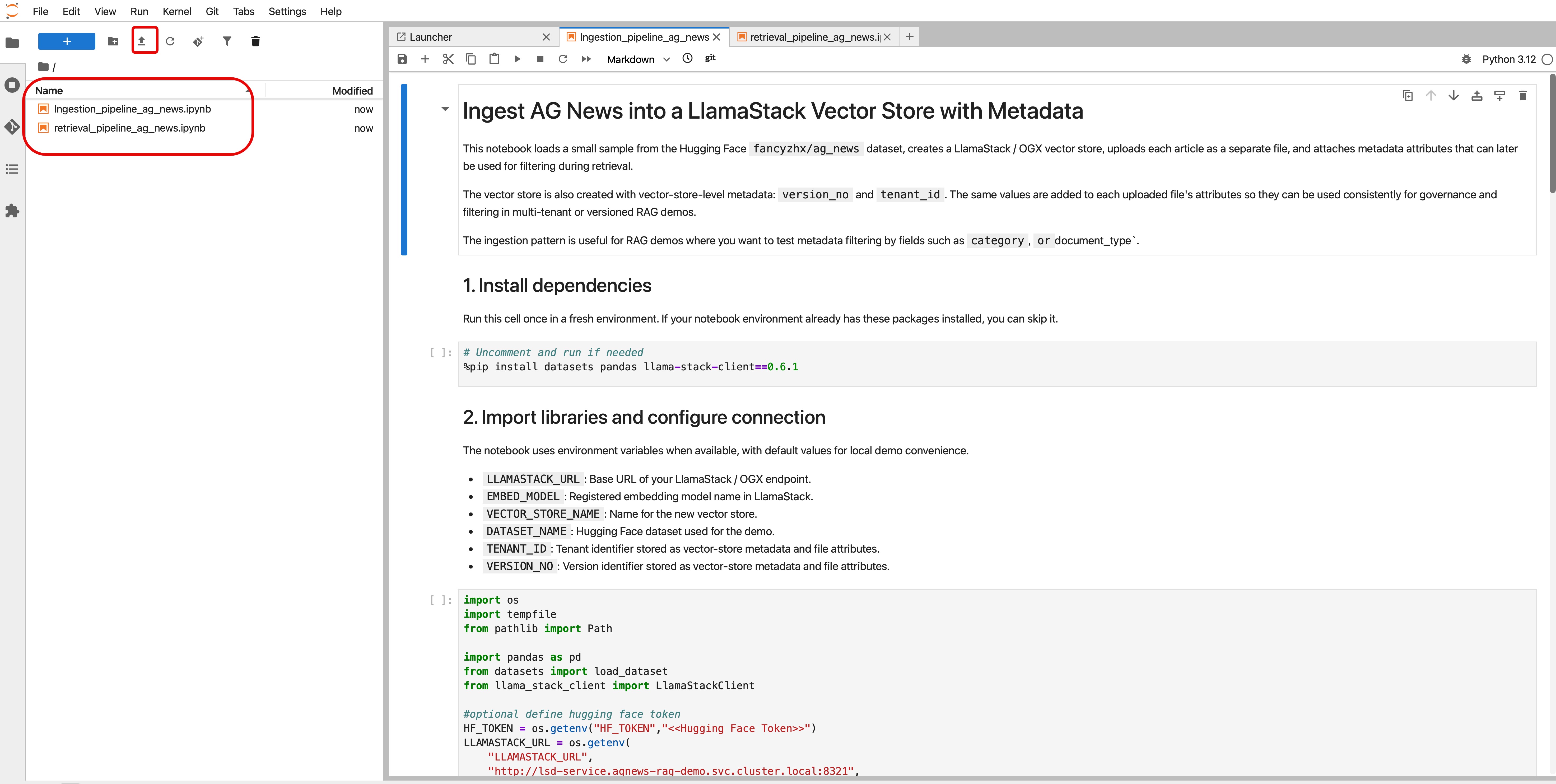
Figure 2: Import notebook files into the workbench.

The demo uses the following deployed models, each serving a specific role in the RAG pipeline: generation, embedding, and reranking (Figure 3).
| Model name | Purpose | Runtime |
|---|---|---|
| llama-32-3b-instruct | LLM | vLLM NVIDIA GPU |
| granite-embedding-125 | Embedding model | OGX inline provider sentence-transformers |
| qwen3-reranker-0.6b | Cross-encoder reranker | vLLM on CPU (for demo purposes, a CPU is used) |

Ingestion pipeline
The Ingestion_pipeline_ag_news notebook uses a file-based ingestion pattern with OGX vector stores (illustrated in Figure 4):
- The pipeline creates a vector store and configures it with the selected embedding model and vector store-level metadata such as
version_noandtenant_idto support versioning and tenant isolation. - For each AG News article, the pipeline creates a text document and uploads that file through the Files API.
- The pipeline associates the uploaded file with the created vector store. During the association step, the pipeline attaches metadata attributes such as category and document type.
- The OGX server handles the heavy lifting: chunking the content, generating embeddings with the configured embedding model, and indexing the vectors into the Milvus vector store.

Retrieval pipeline
The following flow (illustrated in Figure 5) is implemented in the retrieval_pipeline_ag_news notebook:
- The user asks something like: "Find business news about oil prices." The chatbot receives the query as the starting point for the retrieval pipeline.
- The user's query is first processed by the LLM using function calling to extract relevant metadata from the natural language query, using
chat.completionswith a tool such asbuild_metadata_filterto understand whether the query implies any structured filters. - The chatbot performs vector store search in hybrid mode using
vector.stores.search()with the original user query, the vector store ID,search_mode="hybrid", and the extracted metadata filter. - The chatbot then sends the retrieved candidate documents to the
/rerankendpoint, together with the original query. The reranker compares the query against each candidate result to determine which is more relevant. - The chatbot makes a final
chat.completionscall with a system prompt and the retrieved context. The model is instructed to answer only using the reranked results.

Summary
In this article, we explored how to evolve a naive RAG chatbot into a reliable enterprise RAG application using the OGX framework. The article explained how metadata filtering, hybrid search, and neural reranking improve retrieval accuracy, reduce irrelevant context, and produce more grounded answers. It also demonstrated these techniques using the AG News dataset, Milvus, open embedding models, and a reranker model. Finally, it walked through the ingestion and retrieval pipelines, showing how OGX APIs can orchestrate file ingestion, vector search, metadata-aware filtering, reranking, and final answer.
Ready to build your own enterprise retrieval pipeline? Explore the AG News RAG demo repository to experiment with metadata filtering and neural reranking on Red Hat OpenShift AI.

