AI applications often call model provider APIs such as OpenAI, Anthropic, or Google directly from the application code. In many cases, the application contains the logic for calling the provider endpoint, handling authentication, and formatting requests.
This works well when an application relies on a single provider. However, many teams quickly find themselves working with multiple models. They might want to test newly released models, route certain workloads to different providers, or run their own models for specific use cases. When the provider integration lives inside the application code, switching models or providers can require code changes.
To simplify this, some teams introduce a gateway between the application and the model providers. The application sends requests to the gateway, and the gateway routes them to the appropriate provider or to self-hosted models. This allows the application to interact with a consistent API while the routing logic lives in a separate service.
With the release of Red Hat OpenShift AI 3.4, this architecture is natively supported through the built-in Models-as-a-Service (MaaS) capability. Powered by Red Hat Connectivity Link, MaaS acts as an integrated AI inference gateway directly within the platform. It provides centralized governance while routing requests through a single unified endpoint to both self-hosted models (using vLLM) and external providers. Ultimately, OpenShift AI helps organizations manage and scale AI models within the same environment using this native capability or by deploying alternative, standalone proxies like LiteLLM.
The challenge of switching between model providers
Some AI applications in production call model provider APIs directly from the application code. In these setups, the application contains the logic for selecting the model, calling the provider endpoint, and handling authentication. While this works initially, it becomes harder to manage as teams start working with multiple models and providers.
Several practical challenges appear as applications evolve:
Changing models requires application changes
When the model name is embedded in application code, switching models often requires modifying the code, rebuilding the application, and redeploying it. For example, changing from OpenAI GPT-4o to a newer model, or from Claude Opus to another provider, becomes an application change instead of a configuration change.
Provider-specific issues are harder to debug
Authentication failures, request format differences, and unsupported parameters vary between providers. When these integrations live inside the application code, diagnosing API errors can require digging through multiple parts of the codebase.
Routing workloads to different models becomes complex
Teams might want to use different models for different tasks, such as routing reasoning workloads to one provider while sending other requests to a self-hosted model. When this routing logic lives inside the application, adjusting it often requires application changes and redeployments.
Lack of centralized management and visibility
When applications integrate directly with multiple providers, usage and configuration are often scattered across services. This makes it difficult for platform teams to monitor requests, track usage, or manage model access in a centralized way. A gateway layer introduces a single entry point where these concerns can be managed consistently.
As organizations begin experimenting with multiple models, this tight coupling adds engineering overhead and slows down the ability to adopt new models quickly.
Model portability
You can achieve model portability by introducing an abstraction layer between the application and the model providers. Instead of calling a provider API directly, the application sends requests to a gateway or routing layer that exposes a consistent interface.
This layer decides where the request should go. It can forward requests to frontier model providers like OpenAI, Anthropic, or Google, or route them to self-hosted models running on OpenShift AI (see Figure 1).
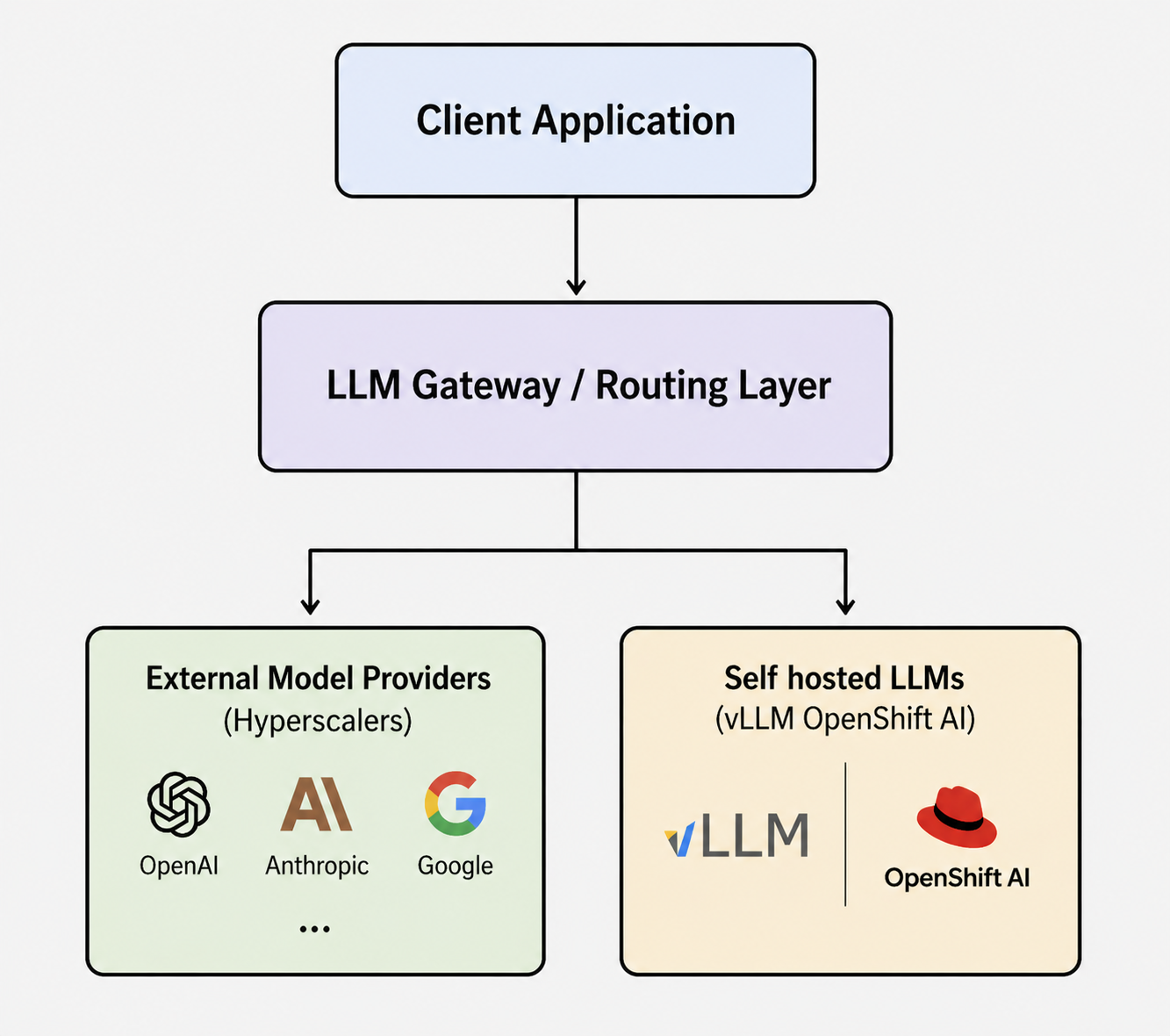
Because the application interacts only with the gateway, you can switch providers without changing the application code. The routing layer handles provider-specific concerns such as authentication, endpoint selection, and request translation when needed.
This approach also makes it easier to use different models for different workloads. A team might choose one provider for reasoning tasks, another for multimodal use cases, and self-hosted models for workloads that require more control over cost, performance, or data locality. You can manage all of these models with a single gateway deployment on the same OpenShift AI cluster.
Deploy the LiteLLM gateway on OpenShift AI
While OpenShift AI provides an LLM gateway within the product, it also supports alternate gateways like Red Hat Connectivity Link, Portkey AI Gateway, and LiteLLM. In this example, LiteLLM Proxy is the central LLM gateway that provides a unified OpenAI-compatible API for multiple model providers. The gateway can route requests to external providers such as OpenAI, Anthropic, Google, or to self-hosted models running on OpenShift AI. In some environments, this layer might run behind an API gateway that provides infrastructure-level capabilities like authentication, rate limiting, and traffic policies.
In this setup, LiteLLM runs as a standard deployment on OpenShift and exposes an OpenAI-compatible API endpoint on port 4000. The self-hosted side of the architecture runs on OpenShift AI using a vLLM-based ServingRuntime and a KServe InferenceService.
The following LiteLLM YAML configuration defines a list of models backed by different providers. Entries point to external APIs and self-hosted models running inside the OpenShift AI cluster. This allows the application to call multiple models through a single interface while the gateway handles the routing logic.
apiVersion: v1
kind: ConfigMap
metadata:
  name: litellm-config-file
data:
  config.yaml: |
    model_list:
      - model_name: gpt-5.4-mini
        litellm_params:
          model: openai/gpt-5.4-mini-2026-03-17
          api_base: https://api.openai.com/v1
          api_key: os.environ/OPENAI_API_KEY
      - model_name: gemini-3.1-flash-lite-preview
        litellm_params:
          model: gemini/gemini-3.1-flash-lite-preview
          api_key: os.environ/GEMINI_API_KEY
      - model_name: llama-3.1-8b-instruct
        litellm_params:
          model: openai/llama-3.1-8b-instruct
          api_base: http://llama-3-1-8b-isvc-predictor.llmliteproxy.svc.cluster.local:8080/v1
          api_key: dummy-key
---
apiVersion: v1
kind: Secret
type: Opaque
metadata:
  name: litellm-secrets
data:
  OPENAI_API_KEY: <base64-encoded-openai-key>
  GEMINI_API_KEY: <base64-encoded-gemini-key>
---
apiVersion: apps/v1
kind: Deployment
metadata:
  name: litellm-deployment
  labels:
    app: litellm
spec:
  selector:
    matchLabels:
      app: litellm
  template:
    metadata:
      labels:
        app: litellm
    spec:
      containers:
        - name: litellm
          image: docker.litellm.ai/berriai/litellm:main-stable
          args:
            - "--config"
            - "/app/proxy_server_config.yaml"
          ports:
            - containerPort: 4000
          volumeMounts:
            - name: config-volume
              mountPath: /app/proxy_server_config.yaml
              subPath: config.yaml
          envFrom:
            - secretRef:
                name: litellm-secrets
      volumes:
        - name: config-volume
          configMap:
            name: litellm-config-file
---
apiVersion: v1
kind: Service
metadata:
  name: litellm-service
spec:
  selector:
    app: litellm
  ports:
    - protocol: TCP
      port: 4000
      targetPort: 4000
  type: ClusterIP
The preceding manifest defines logical model names in the LiteLLM configuration. The application can send requests for gpt-5.4-mini, gemini-3.1-flash-lite-preview, or llama-3.1-8b-instruct.
Second, it moves provider-specific configuration out of the application layer and into the gateway. API keys and backend URLs are managed through OpenShift resources instead of being embedded in application code.
Third, it exposes a single internal endpoint for all model traffic. Client applications send requests to LiteLLM, and LiteLLM handles the routing.
The LiteLLM proxy also provides an optional Admin UI for operational visibility. Platform teams can use the interface to monitor requests, track model usage, manage API keys, and update model configurations without modifying the application layer. This introduces a centralized control plane for model access while applications continue using a single OpenAI-compatible API endpoint.
Verify the LiteLLM gateway startup
After deploying the LiteLLM proxy, the container logs confirm that the gateway has started successfully and loaded the configured models.
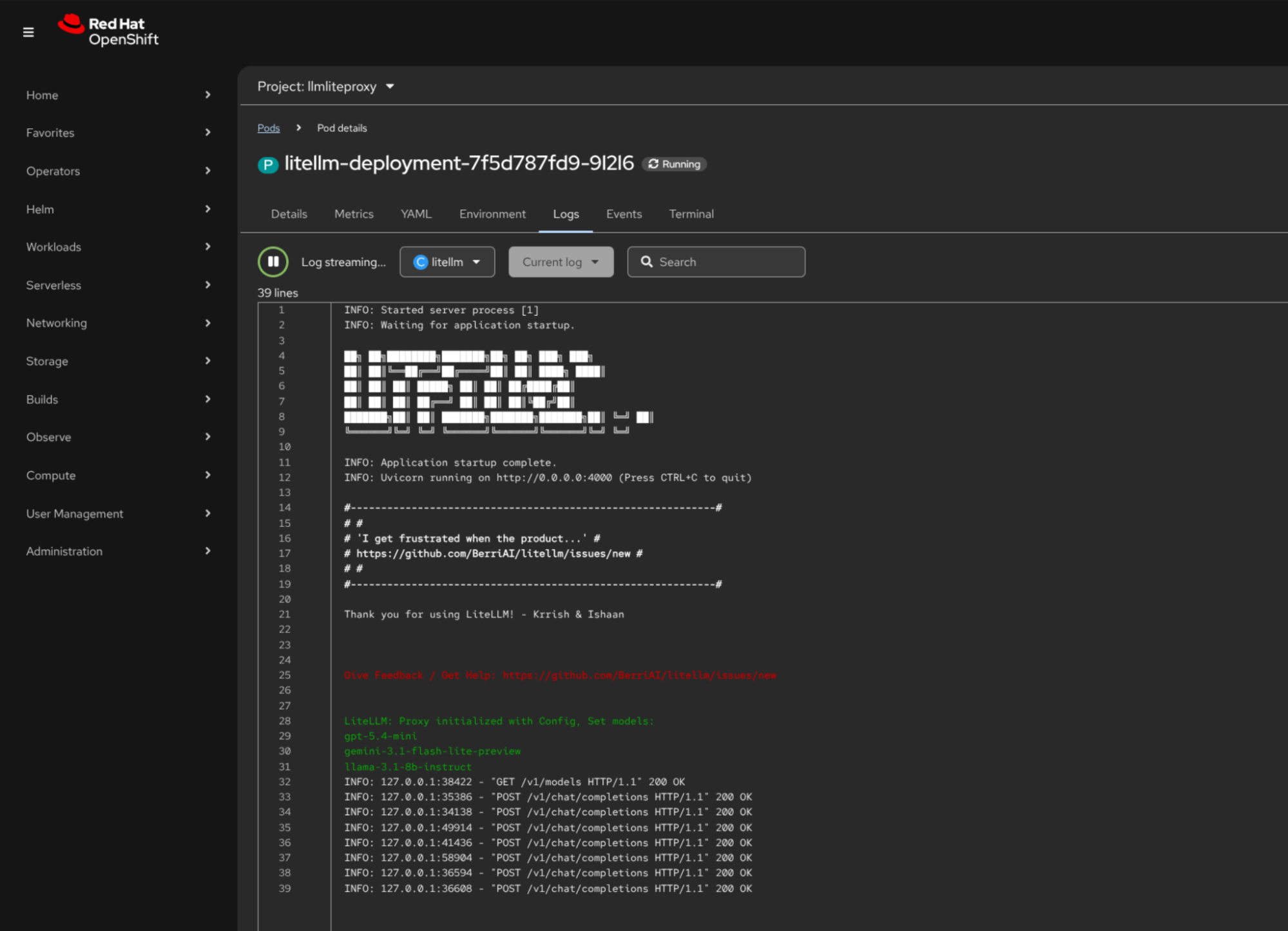
The logs show that the LiteLLM proxy successfully started its OpenAI-compatible API server and loaded the configured models: gpt-5.4-mini, gemini-3.1-flash-lite-preview, and the self-hosted llama-3.1-8b-instruct model running on OpenShift AI. Subsequent requests to /v1/chat/completions demonstrate that the gateway is correctly routing inference requests across providers.
Deploy the self-hosted model on OpenShift AI
This example uses a lightweight Llama-3.1-8B model for demonstration. Production deployments might use larger or more specialized models depending on workload requirements.
The InferenceService references an imagePullSecret named oci-registry. This secret allows the cluster to pull the modelcar image from the Red Hat registry.
Create the secret in the same namespace:
oc create secret docker-registry oci-registry \
  --docker-server=registry.redhat.io \
  --docker-username=<username> \
  --docker-password=<password> \
  --namespace=llmliteproxy
Once the secret exists, the InferenceService can pull the model artifact from the registry and start the vLLM runtime.
apiVersion: serving.kserve.io/v1alpha1
kind: ServingRuntime
metadata:
  annotations:
    opendatahub.io/recommended-accelerators: '["nvidia.com/gpu"]'
    opendatahub.io/template-display-name: vLLM CUDA ServingRuntime
    opendatahub.io/runtime-version: 'v0.18.0'
  labels:
    opendatahub.io/dashboard: 'true'
  name: vllm-cuda-servingruntime
  namespace: llmliteproxy
spec:
  annotations:
    opendatahub.io/kserve-runtime: 'vllm'
    prometheus.io/port: '8080'
    prometheus.io/path: '/metrics'
  multiModel: false
  supportedModelFormats:
    - autoSelect: true
      name: vLLM
  containers:
    - name: kserve-container
      image: registry.redhat.io/rhaiis/vllm-cuda-rhel9:3.3.1-1775680192
      command:
        - python
        - -m
        - vllm.entrypoints.openai.api_server
      args:
        - "--port=8080"
        - "--model=/mnt/models"
        - "--served-model-name=llama-3.1-8b-instruct"
      env:
        - name: HF_HOME
          value: /tmp/hf_home
      ports:
        - containerPort: 8080
          protocol: TCP
---
apiVersion: serving.kserve.io/v1beta1
kind: InferenceService
metadata:
  annotations:
    openshift.io/display-name: llama-3-1-8b-isvc
    serving.kserve.io/deploymentMode: RawDeployment
  labels:
    networking.kserve.io/visibility: exposed
    opendatahub.io/dashboard: 'true'
  name: llama-3-1-8b-isvc
  namespace: llmliteproxy
spec:
  predictor:
    imagePullSecrets:
      - name: oci-registry
    maxReplicas: 1
    minReplicas: 1
    model:
      modelFormat:
        name: vLLM
      runtime: vllm-cuda-servingruntime
      storageUri: oci://registry.redhat.io/rhelai1/modelcar-llama-3-1-8b-instruct:1.5
      resources:
        limits:
          cpu: '10'
          nvidia.com/gpu: '1'
          memory: 20Gi
        requests:
          cpu: '6'
          nvidia.com/gpu: '1'
          memory: 16Gi
In this setup, the LiteLLM proxy forwards requests for llama-3.1-8b-instruct to the internal vLLM endpoint exposed by the InferenceService, while other requests continue to external providers.
Test the setup in-cluster
Once both services are deployed, you can use the same OpenAI-compatible API to reach all three backends through the LiteLLM gateway.
First, forward the LiteLLM service running inside the cluster to your local machine:
oc port-forward svc/litellm-service 4000:4000 -n llmliteproxyNext, send requests to the gateway endpoint. The following script demonstrates how the same API can access different model providers and a self-hosted model running on OpenShift AI.
#!/usr/bin/env bash
set -euo pipefail
echo "Testing Gemini..."
curl -s http://localhost:4000/v1/chat/completions \
  -H "Content-Type: application/json" \
  -d '{
    "model": "gemini-3.1-flash-lite-preview",
    "messages": [
      {
        "role": "user",
        "content": "Write a haiku about the sea in spring."
      }
    ]
  }'
echo
echo "Testing OpenAI..."
curl -s http://localhost:4000/v1/chat/completions \
  -H "Content-Type: application/json" \
  -d '{
    "model": "gpt-5.4-mini",
    "messages": [
      {
        "role": "user",
        "content": "How are you today?"
      }
    ]
  }'
echo
echo "Testing self-hosted LLaMA..."
curl -s http://localhost:4000/v1/chat/completions \
  -H "Content-Type: application/json" \
  -d '{
    "model": "llama-3.1-8b-instruct",
    "messages": [
      {
        "role": "user",
        "content": "Describe yourself in a few sentences."
      }
    ]
  }'
Switching providers is simply a matter of changing the model value in the request. The application continues to call the same endpoint while LiteLLM handles the provider-specific routing behind the scenes.
Conclusion
This article shows how to deploy an LLM gateway on OpenShift and route requests between multiple model providers and a self-hosted model running on OpenShift AI using a single API endpoint. By deploying an LLM gateway on OpenShift, teams can expose a single API endpoint while routing requests to different providers or to self-hosted models running on the platform.
This approach allows organizations to run their own models when needed, integrate with frontier model providers, and switch between them without modifying application code. With OpenShift AI handling model serving and the gateway managing routing, teams can adopt new models and providers while keeping their applications stable.
To learn more about deploying and serving models on the platform, see the OpenShift AI model serving documentation or check out the blog post Scaling enterprise AI: Delivering Models-as-a-Service with OpenShift AI 3.4.
Last updated: June 1, 2026
