As explained in this Red Hat solution, Red Hat Advanced Cluster Management for Kubernetes integrates with Argo CD. For example, you can use the Argo CD operator ApplicationSet Custom Resource. This combination uses the Channel and Subscription features in Red Hat Advanced Cluster Management to allow clusters to subscribe to a Git repository and track changes.
Argo CD supports both push and pull models. You can combine these with the Application Manager add-on to use Red Hat Advanced Cluster Management add-ons that extend application functionality.
Note
While the principles in this article remain relevant, the implementation landscape has evolved. Please note that AppSub (including Channels and Subscriptions) is now considered a legacy component. Furthermore, the ecosystem is transitioning from the pull-model toward the Argo CD Agent architecture. We recommend cross-referencing these sections with the latest documentation for current best practices.
Understanding subscriptions and channels
The subscription feature (subscription.apps.open-cluster-management.io) allows clusters to subscribe to a source repository, also known as a Channel. You can use a Git repository, a Helm release registry, or an object storage repository as a source.
The complete process is explained in the Red Hat Advanced Cluster Management for Kubernetes 2.11 - GitOps Section. If you encounter errors, check the Red Hat Advanced Cluster Management and GitOps logs.
Argo CD demo
After you install the Red Hat OpenShift GitOps operator and create the ArgoCD custom resource, create an Application or ApplicationSet, such as the following example:
spec:
  destination:
    namespace: gitops-app-test
    server: 'https://kubernetes.default.svc'
  project: default
  source:
    path: .
    repoURL: 'https://github.com/FranciscoMeloJr/rh-case-03752258'
    targetRevision: HEAD
  syncPolicy:
    automated: {}
    syncOptions:
      - CreateNamespace=true
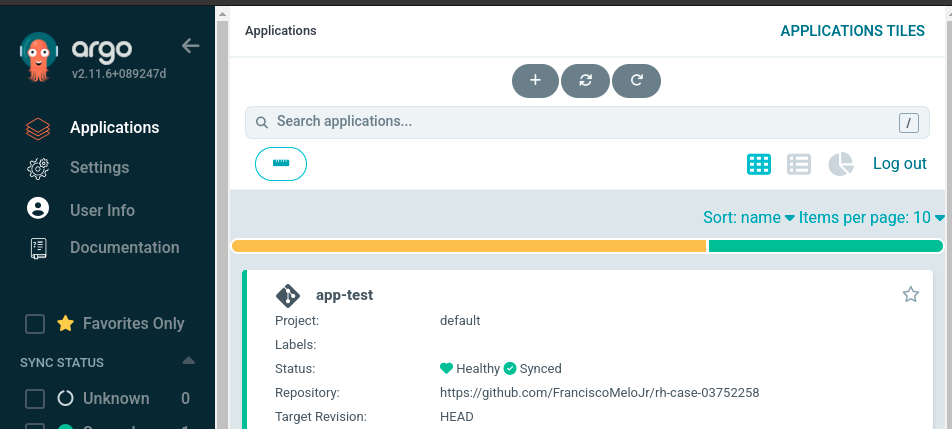
After you create the application, the Argo CD console (accessed via the Route) lists the application, as shown in Figure 1.
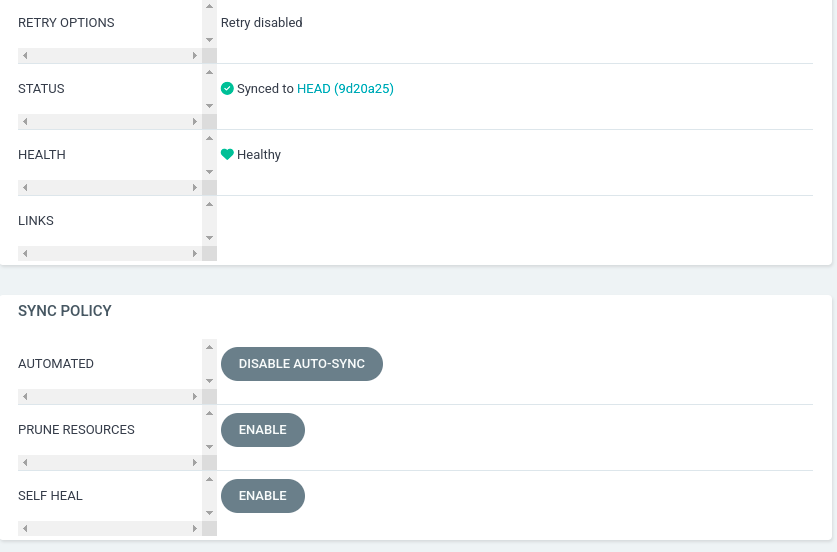
In the application settings, pay close attention to the Sync Policy configuration options:
- Automated: Disabled or no auto-sync.
- Prune resources: Enabled or disabled.
- Self heal: Enabled or disabled.
Audit logs
As explained in the OpenShift Container Platform 4.16, Section: Security and compliance - Viewing audit logs, there are two types of audit logs:
kube-apiserveraudit logs: These logs cover the primary execution component.openshift-apiserveraudit logs: These logs cover an extension that assists thekube-apiserverwith specific tasks.
For example, if you delete a Route, the action only appears in the openshift-apiserver logs because that component serves the Route resource. Other components that are not below openshift-apiserver will not be on its audit logs.
When investigating audit logs, match the service account (SA) with the application. It is essential to use the correct names. If you use the default SA from the default project, the audit logs show user=...serviceaccount:default:default. You can then investigate which component granted access through that serviceaccount.
The article How to classify Red Hat OpenShift audit logs provides several examples of operations and how the system records them.
The deletion method affects logging. Deleting a resource through the Argo CD console is not recorded as a user or SA action. Instead, it is recorded in the openshift-gitops-application-controller logs:
time="2024-09-11T21:39:06Z" level=info msg="Deleting resources" application=openshift-gitops/https-gitops-tester
time="2024-09-11T21:39:06Z" level=info msg="Deleting application's resources with Foreground propagation policy" application=openshift-gitops/https-gitops-tester
time="2024-09-11T21:39:06Z" level=info msg="Refreshing app status (controller refresh requested), level (1)" application=openshift-gitops/https-gitops-tester
time="2024-09-11T21:39:06Z" level=info msg="Comparing app state (cluster: https://kubernetes.default.svc, namespace: https-gitops)" application=openshift-gitops/https-gitops-tester
time="2024-09-11T21:39:06Z" level=info msg="5 objects remaining for deletion" application=openshift-gitops/https-gitops-tester
openshift-apiserver audit log example:
{"kind":"Event","apiVersion":"audit.k8s.io/v1","level":"Metadata","auditID":"570afa85-5527-4b7b-888b-405ea4598ebe","stage":"ResponseComplete","requestURI":"/apis/metrics.k8s.io/v1beta1?timeout=32s","verb":"get","user":{"username":"system:serviceaccount:openshift-gitops:gitops-service-cluster","groups":["system:serviceaccounts","system:serviceaccounts:openshift-gitops","system:authenticated"],"extra":{"authentication.kubernetes.io/pod-name":["cluster-6c5dd549d4-pvk6b"],"authentication.kubernetes.io/pod-uid":["00a6d8f6-4385-406c-8694-80ad3a70f5ff"]}},"sourceIPs":["10.0.94.231","10.128.0.1"],"userAgent":"backend-http/v0.0.0 (linux/amd64) kubernetes/$Format","responseStatus":{"metadata":{},"code":200},"requestReceivedTimestamp":"2024-09-11T19:26:27.072078Z","stageTimestamp":"2024-09-11T19:26:27.090558Z","annotations":{"authorization.k8s.io/decision":"allow","authorization.k8s.io/reason":"RBAC: allowed by ClusterRoleBinding \"system:openshift:discovery\" of ClusterRole \"system:openshift:discovery\" to Group \"system:authenticated\""}}kube-apiserver audit log example:
{"kind":"Event","apiVersion":"audit.k8s.io/v1","level":"Metadata","auditID":"b8fa1e31-ec78-49fa-bbcc-5b07cc086cbf","stage":"ResponseComplete","requestURI":"/apis/argoproj.io/v1alpha1/namespaces/openshift-gitops/applications/https-gitops-tester","verb":"get","user":{"username":"system:serviceaccount:openshift-gitops:openshift-gitops-argocd-server","uid":"6ed0fc21-4bac-45ea-a55a-47bef1e4da8f","groups":["system:serviceaccounts","system:serviceaccounts:openshift-gitops","system:authenticated"],"extra":{"authentication.kubernetes.io/pod-name":["openshift-gitops-server-6c8bc8bd44-4f2sq"],"authentication.kubernetes.io/pod-uid":["180063c7-4198-4d33-8ef4-83f5b207d474"]}},"sourceIPs":["10.0.90.237"],"userAgent":"argocd-server/v0.0.0 (linux/amd64) kubernetes/$Format","objectRef":{"resource":"applications","namespace":"openshift-gitops","name":"https-gitops-tester","apiGroup":"argoproj.io","apiVersion":"v1alpha1"},"responseStatus":{"metadata":{},"status":"Failure","message":"applications.argoproj.io \"https-gitops-tester\" not found","reason":"NotFound","details":{"name":"https-gitops-tester","group":"argoproj.io","kind":"applications"},"code":404},"requestReceivedTimestamp":"2024-09-11T20:30:09.173626Z","stageTimestamp":"2024-09-11T20:30:09.175366Z","annotations":{"authorization.k8s.io/decision":"allow","authorization.k8s.io/reason":"RBAC: allowed by ClusterRoleBinding \"openshift-gitops-openshift-gitops-argocd-server\" of ClusterRole \"openshift-gitops-openshift-gitops-argocd-server\" to ServiceAccount \"openshift-gitops-argocd-server/openshift-gitops\""}}
{"kind":"Event","apiVersion":"audit.k8s.io/v1","level":"Metadata","auditID":"7ac5605c-2c92-4a57-bc80-8cb3e4227731","stage":"ResponseComplete","requestURI":"/apis/argoproj.io/v1alpha1/namespaces/openshift-gitops/applications","verb":"create","user":{"username":"system:serviceaccount:openshift-gitops:openshift-gitops-argocd-server","uid":"6ed0fc21-4bac-45ea-a55a-47bef1e4da8f","groups":["system:serviceaccounts","system:serviceaccounts:openshift-gitops","system:authenticated"],"extra":{"authentication.kubernetes.io/pod-name":["openshift-gitops-server-6c8bc8bd44-4f2sq"],"authentication.kubernetes.io/pod-uid":["180063c7-4198-4d33-8ef4-83f5b207d474"]}},"sourceIPs":["10.0.90.237"],"userAgent":"argocd-server/v0.0.0 (linux/amd64) kubernetes/$Format","objectRef":{"resource":"applications","namespace":"openshift-gitops","name":"https-gitops-tester","apiGroup":"argoproj.io","apiVersion":"v1alpha1"},"responseStatus":{"metadata":{},"code":201},"requestReceivedTimestamp":"2024-09-11T20:30:09.399761Z","stageTimestamp":"2024-09-11T20:30:09.405610Z","annotations":{"authorization.k8s.io/decision":"allow","authorization.k8s.io/reason":"RBAC: allowed by RoleBinding \"openshift-gitops-argocd-server/openshift-gitops\" of Role \"openshift-gitops-argocd-server\" to ServiceAccount \"openshift-gitops-argocd-server/openshift-gitops\""}}
Integrate Red Hat Advanced Cluster Management with Argo CD
Red Hat Advanced Cluster Management integration with Argo CD supports both push and pull models for application control. You can also configure Argo CD to watch kind: Policy resources used by Red Hat Advanced Cluster Management.
Warning
Changing these policies can significantly impact your clusters. Use caution when updating them.
To integrate clusters with Argo CD through Red Hat Advanced Cluster Management, complete the following steps:
- Create a
ManagedClusterSetcustom resource on the GitOps cluster. - Create a
Placementcustom resource on the GitOps cluster. - Create a
GitOpsClustercustom resource on the GitOps cluster (thePlacementmust match the above).
The Placement resource is associated with the GitOpsCluster. This is useful because each policy requires a Placement, depending on your integration.
In Red Hat Advanced Cluster Management, a policy applies resources to a cluster to ensure it complies with your requirements. It's part of the governance architecture, as described in Red Hat Advanced Cluster Management for Kubernetes 2.11 documentation.
Troubleshooting
To begin troubleshooting, verify the Argo CD console and the Red Hat OpenShift GitOps operator logs. As shown in the previous examples, the deletion operation should appear there.
If you open a support case, Red Hat will likely request a must-gather from Red Hat OpenShift GitOps. This tool bundles logs and custom resources (CRs), such as Application and ApplicationSet, into a single package.
Use the following command to get it:
oc adm must-gather –image registry.redhat.io/openshift-gitops-1/must-gather-rhel8:v<image_version_tag>Note that this must-gather output does not use the same directory hierarchy as other Red Hat products.
As mentioned earlier, audit logs can also be helpful, depending on the type of resource deleted.
Finally, Red Hat Advanced Cluster Management logs and custom resources, such as Policy and PolicyGenerator objects, might be required for troubleshooting the integration.
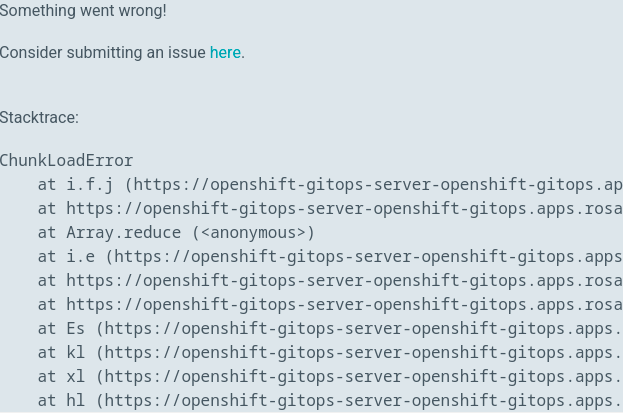
If a Red Hat OpenShift 4 cluster node disconnects, you might see a ChunkLoadError instead of a timeout, as shown in Figure 3.
General recommendations
Follow these procedures to avoid production mishaps that can impact deployments.
Organization
When you create namespaces, avoid using similar names to prevent accidental changes to the wrong environment.
Governance
Establish a change window to allocate specific times for service updates. This also provides time for testing and familiarizing your team with new versions. Additionally including warnings and communications in-and-out team to make sure the users know about the changes and impact.
Furthermore, the following three main aspects can be observed in terms of application changes:
- Prevention: How to prevent a problem.
- Detection: How to detect the production environment is impacted
- Resilience: how to bring the environment up as soon as possible.
Procedural
To remove artifacts without deleting associated resources, use --cascade=false. The default setting is --cascade=true, which means deleting an application also deletes all related resources.
Understanding
Review the integration between Red Hat Advanced Cluster Management and Argo CD regarding application management and policy enforcement. Understand how a change in one area affects the other. The user handling the policies must be aware of how they impact the cluster (and its components).
Conclusion
This article introduced Argo CD and its integration with Red Hat Advanced Cluster Management on Red Hat OpenShift 4.
We covered deploying an application in GitOps, the integration process, and troubleshooting paths. We also looked at examples of what to expect in the audit logs.
I hope this article helps you understand these tools and how they manage clusters and application deployments.
Additional resources
To learn more, see the Red Hat OpenShift GitOps documentation. For details on integrating Red Hat Advanced Cluster Management with Argo CD, refer to this Red Hat solution.
For other specific inquiries, open a case with Red Hat support. Our global team of experts can help you with any issues.
Special thanks to Gricel Barrera and Ryan Spagnola for contributing to this article and Alexander Barbosa for reviewing it.
Last updated: March 25, 2026
