I've been building with generative AI for a while now, starting with the early coding-assistant autocomplete days, then GPT, and now agents. But the question I keep getting from platform teams isn't which model to choose. It's a much harder one: How do we let every developer in the company use AI, without losing control of costs, security, and the models we're actually depending on?
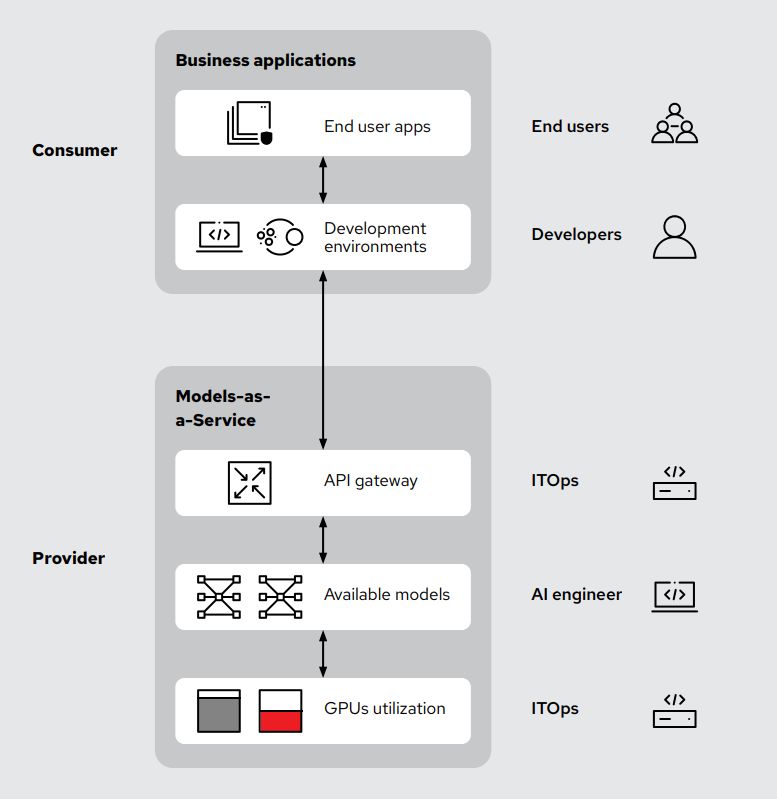
That's the problem Model-as-a-Service (MaaS) solves. Now, as of Red Hat OpenShift AI 3.4, it's a generally available, production-ready capability on OpenShift. Figure 1 demonstrates a typical use case: running a private AI code assistant for developers.
What is Model-as-a-Service?
Think about how you already use AI today. You're not renting GPUs from OpenAI or Anthropic; instead, you connect to their API endpoints. Their team handles the hardware, serving, autoscaling, and rate limits. You send a request and receive tokens back. Model-as-a-Service applies that same concept, but instead of being a token consumer, you become a token provider.
It's an approach to delivering AI models as shared resources inside your organization through standardized API endpoints. Just as you'd use SaaS for ticketing, identity, or storage, your platform team operates an internal MaaS so developers can build with AI without each team having to stand up its own inference stack. This architecture provides:
- A small number of curated, governed model endpoints
- API keys, rate limits, and usage tracking per team
- One observability stack for every AI workload in the company
- Full control over the underlying models, data paths, and infrastructure
Why MaaS and why now?
There are a few specific operational problems that MaaS solves that I think are quite important.
Solving shadow AI
Back in the day, before we had nice cloud application platforms—whoops, didn't think I'd already be saying thatdevelopers would stand up their own infrastructure and deploy their applications, a practice formally known as shadow IT. The same exists for AI applications and models: when developers can't easily get access to a model, they sign up for whatever public API they can access. The Stanford Digital Economy Lab's enterprise AI playbook of 51 case studies found that 70 to 80% of employees using AI at work rely on tools not approved by their employer.
MaaS instead gives developers a fast, self-service path to approved models. With a single click, you receive an API key and an endpoint.
Surviving model deprecations
You've probably experienced this scenario. Every few months, a frontier model provider deprecates an older model, sometimes even without notice. If 30 of your internal applications are wired to a version that's about to disappear, you must perform 30 emergency migrations, test for regressions in behavior, fix prompts, and so on. With Model-as-a-Service, your platform team owns the model lifecycle, not a vendor.
Sovereign and air-gapped AI
For regulated industries like healthcare, financial services, the public sector, and beyond, public-cloud AI endpoints aren't an option. MaaS lets you become your own private AI provider. Developers get the same experience of POST /v1/chat/completions as they would with a public model, but on a disconnected infrastructure where data remains in your environment.
Insight into your user community
Every prompt flows through the gateway, which means you obtain audit logs at no cost to use for fine-tuning custom models. The code patterns are super interesting, for example, revealing what developers are trying to build, providing clearer insights than a manual survey. With public APIs, that signal goes to the vendor. With MaaS, it stays with you.
This visibility, combined with accurate cost attribution (token-level metering per team and per model), makes this architecture a rapidly growing choice for enterprise AI workloads.
How are teams using Model-as-a-Service in production? I'm glad you asked!
MaaS in action: A private code assistant for developers
Let's walk through what this looks like end-to-end. For this scenario, I'm a platform administrator, and my engineering organization wants to use AI coding assistants on our infrastructure with our own models.
Step 1: Deploying a model as an admin
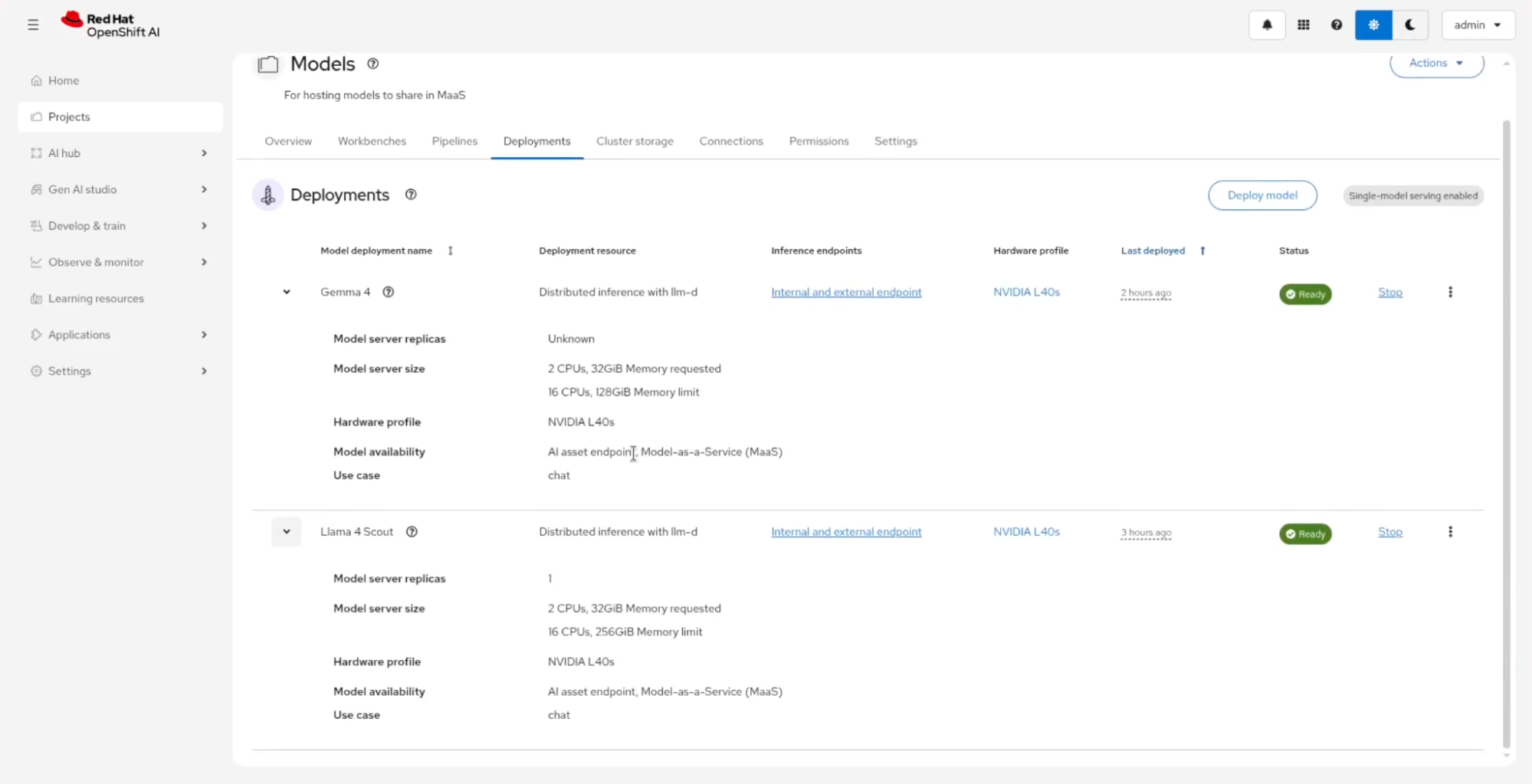
It all starts in the OpenShift AI dashboard, which provides AI/ML capabilities for OpenShift. From the Projects → Deployments tab, I can see what's already being served, for example, Gemma 4 and Llama 4 Scout. Both run with distributed inference with llm-d on NVIDIA L40s hardware profiles, which can result in three times the output tokens and 10 times faster time to first token.
Hint
Notice the Model availability field on each deployment, as shown in Figure 2, which displays the AI asset endpoint, Model-as-a-Service (MaaS). That's the toggle that makes a model available through the MaaS API gateway instead of just leaving it as an isolated deployment.
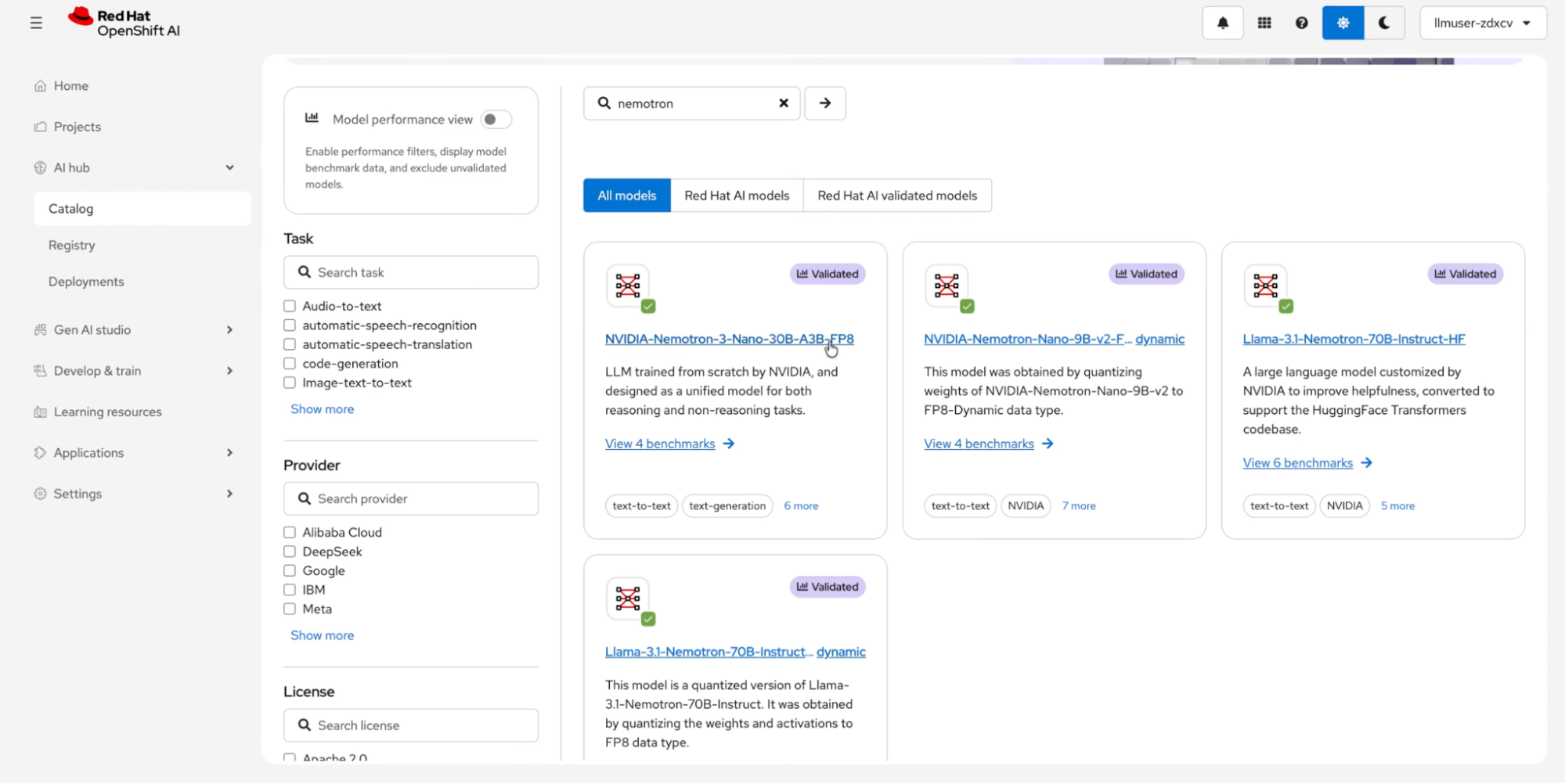
For deploying new models, the AI hub → Catalog (shown in Figure 3) is where you can start. OpenShift AI ships with a catalog of validated models, including NVIDIA Nemotron variants, DeepSeek, and Granite. This catalog includes benchmarks, so you don't have to guess which model will perform well on your hardware.
Step 2: Developers get self-service access
Here's where the experience changes for developers. Instead of filing a ticket and waiting for someone on the platform team to provision an endpoint for them, a developer logs in to the OpenShift AI dashboard, opens Gen AI studio → AI asset endpoints, and sees the models their tenant has access to. Clicking into an endpoint reveals the API route and an API key, generated on the spot, scoped to the developer's subscription, and instantly revocable.
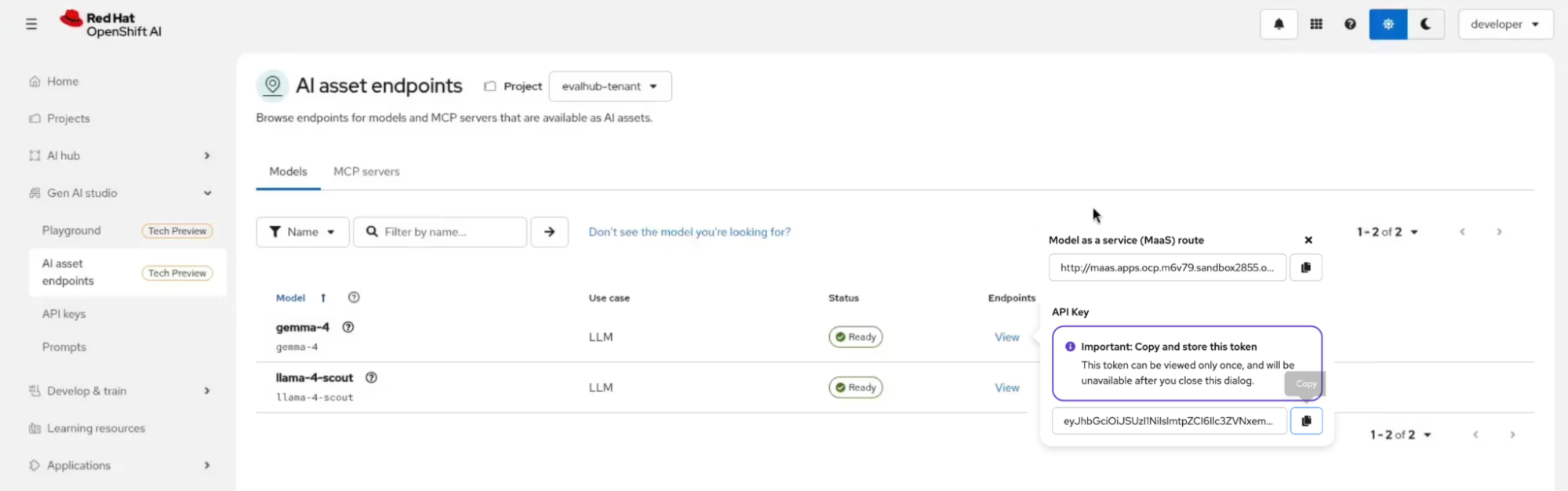
Figure 4: From the developer's perspective, approved models are visible as ready-to-use endpoints, with the option to test them in a playground.
Step 3: Use the AI model in your IDE as a code assistant
The engineer then takes that endpoint URL and API key and drops them into their preferred tool, such as Claude Code or OpenCode. In this example, they use Continue, an open source VS Code extension for AI coding assistance (Figure 5).
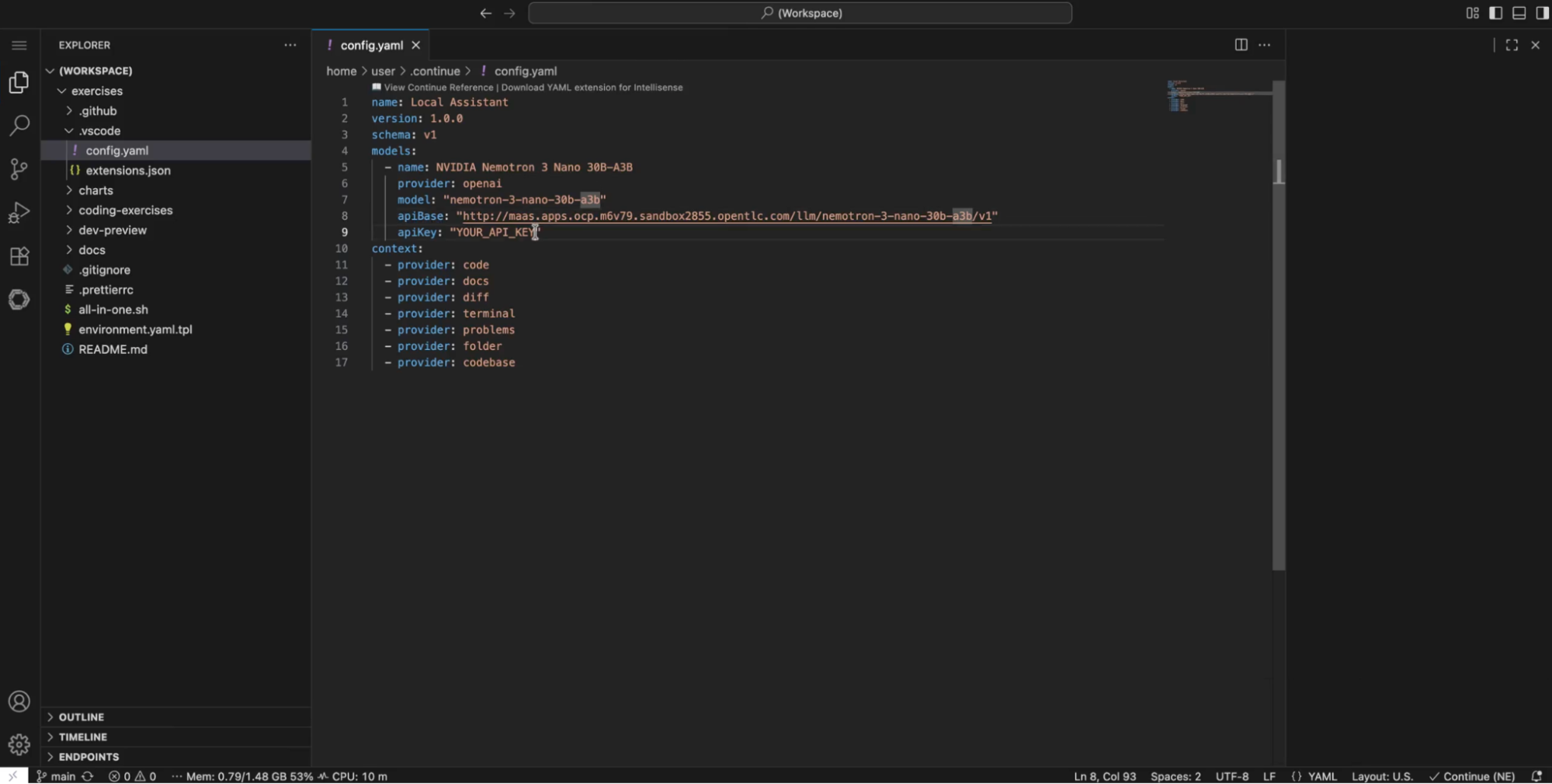
The entire integration requires six lines of YAML in the ~/.continue/config.yaml file:
models:
  - name: Meta Llama 4 Scout
    provider: openai
    model: "llama-4-scout"
    apiBase: "http://maas.apps.ocp.m6v79.sandbox2855.opentlc.com/llm/llama-4-scout/v1"
    apiKey: "YOUR_API_KEY"
Step 4: The platform team can monitor or observe AI usage
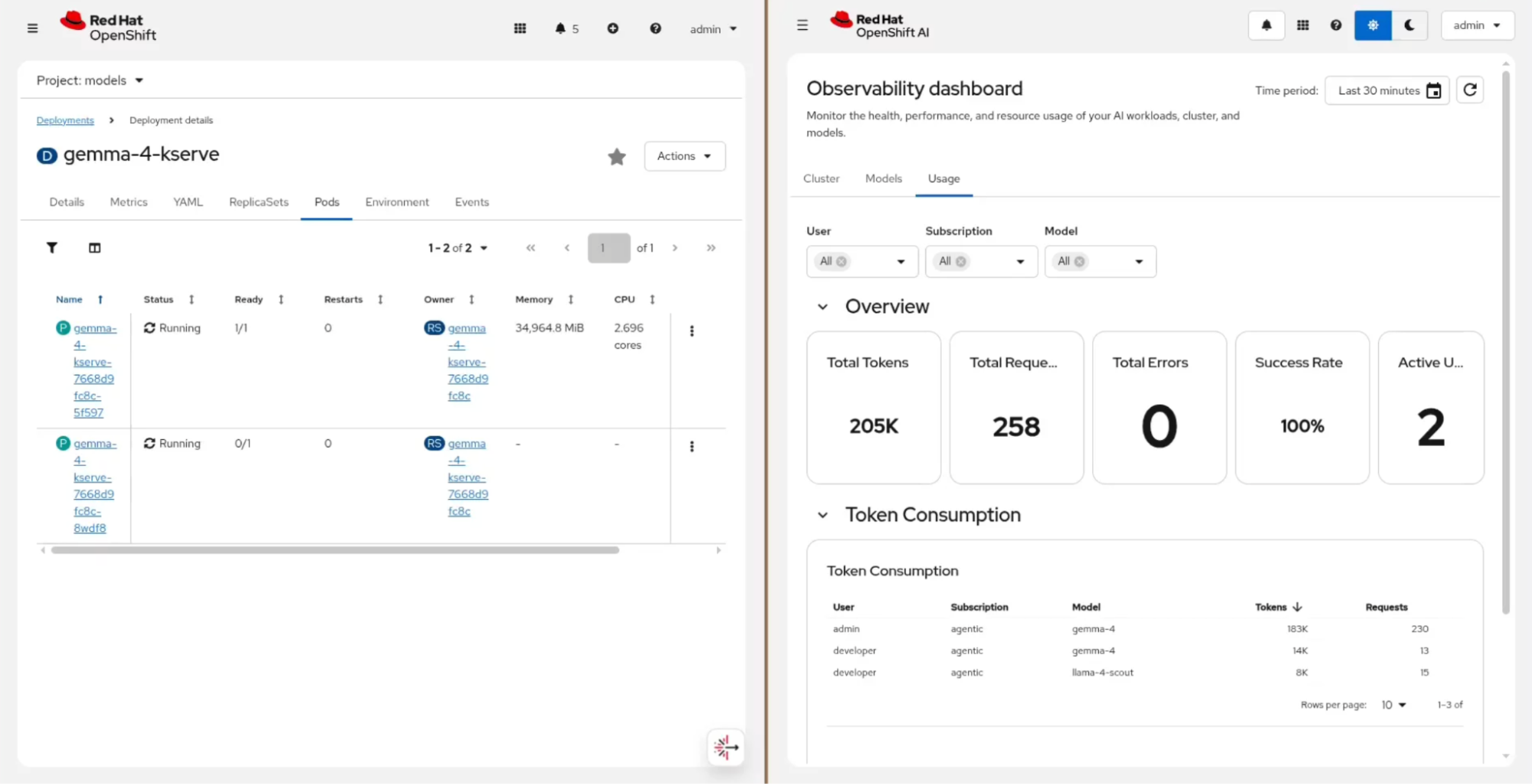
Back on the admin side, every request the developer makes flows through the AI gateway and lands in observability. The Observe & monitor → Dashboard view (in technology preview) in OpenShift AI gives the platform team a unified picture of token use across the whole organization, as shown in Figure 6.
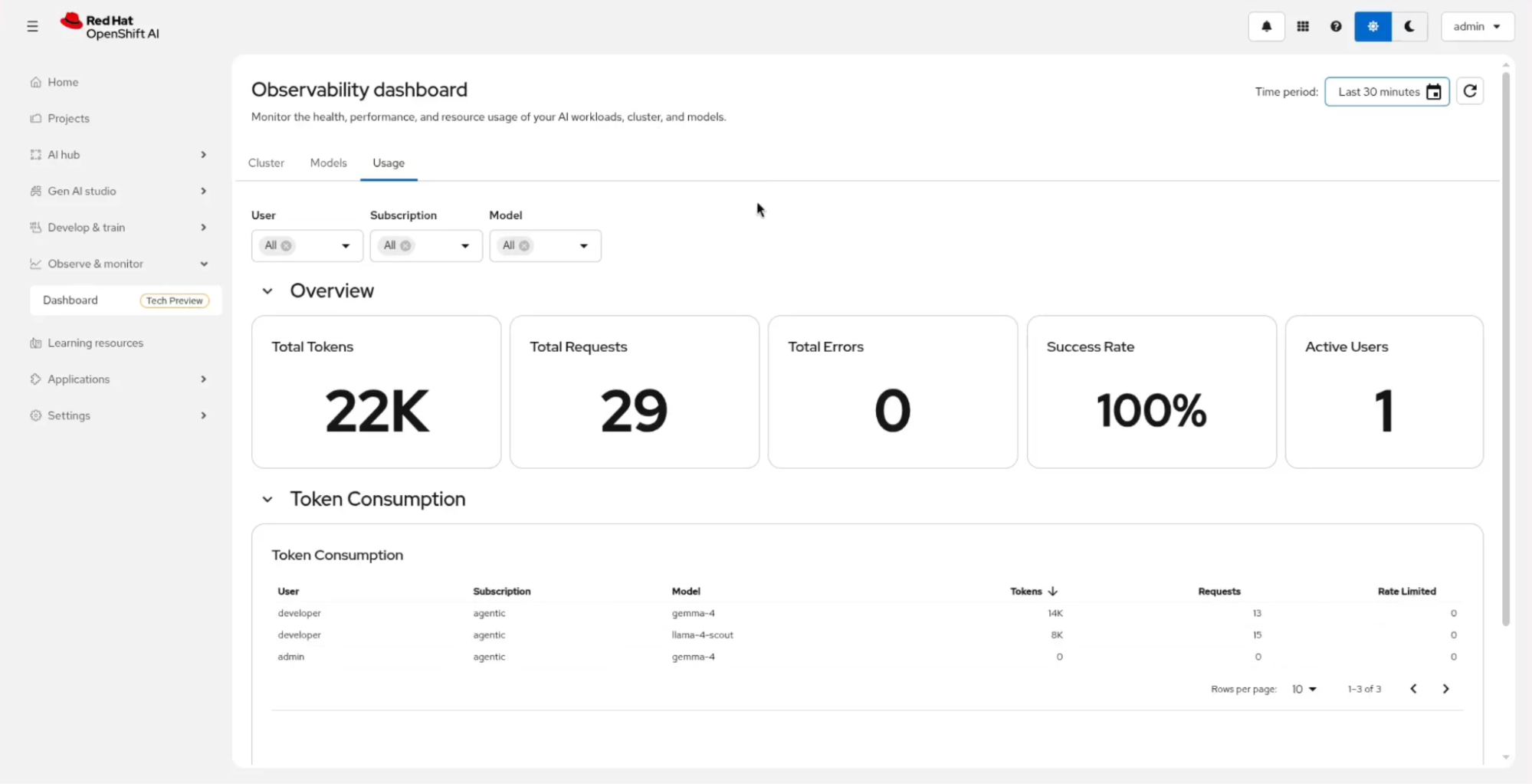
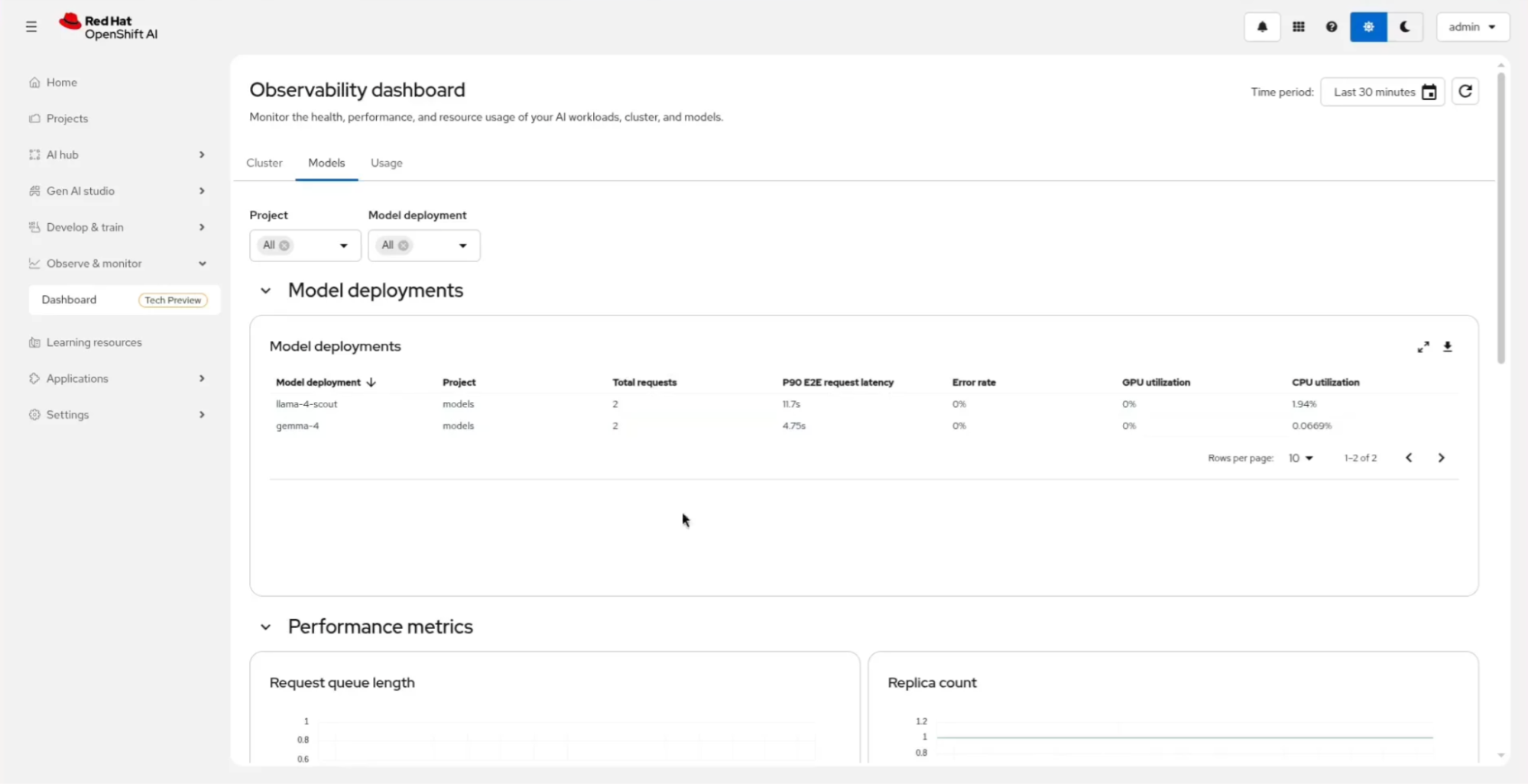
For example, the developer user pulled 14K tokens against gemma-4 and 8K against llama-4-scout. For deeper performance tracking such as P90 latency (the slowest 10% of requests), error rates, GPU utilization, and request queue length—the Models tab surfaces the metrics site reliability engineers (SREs) care about (Figure 7).
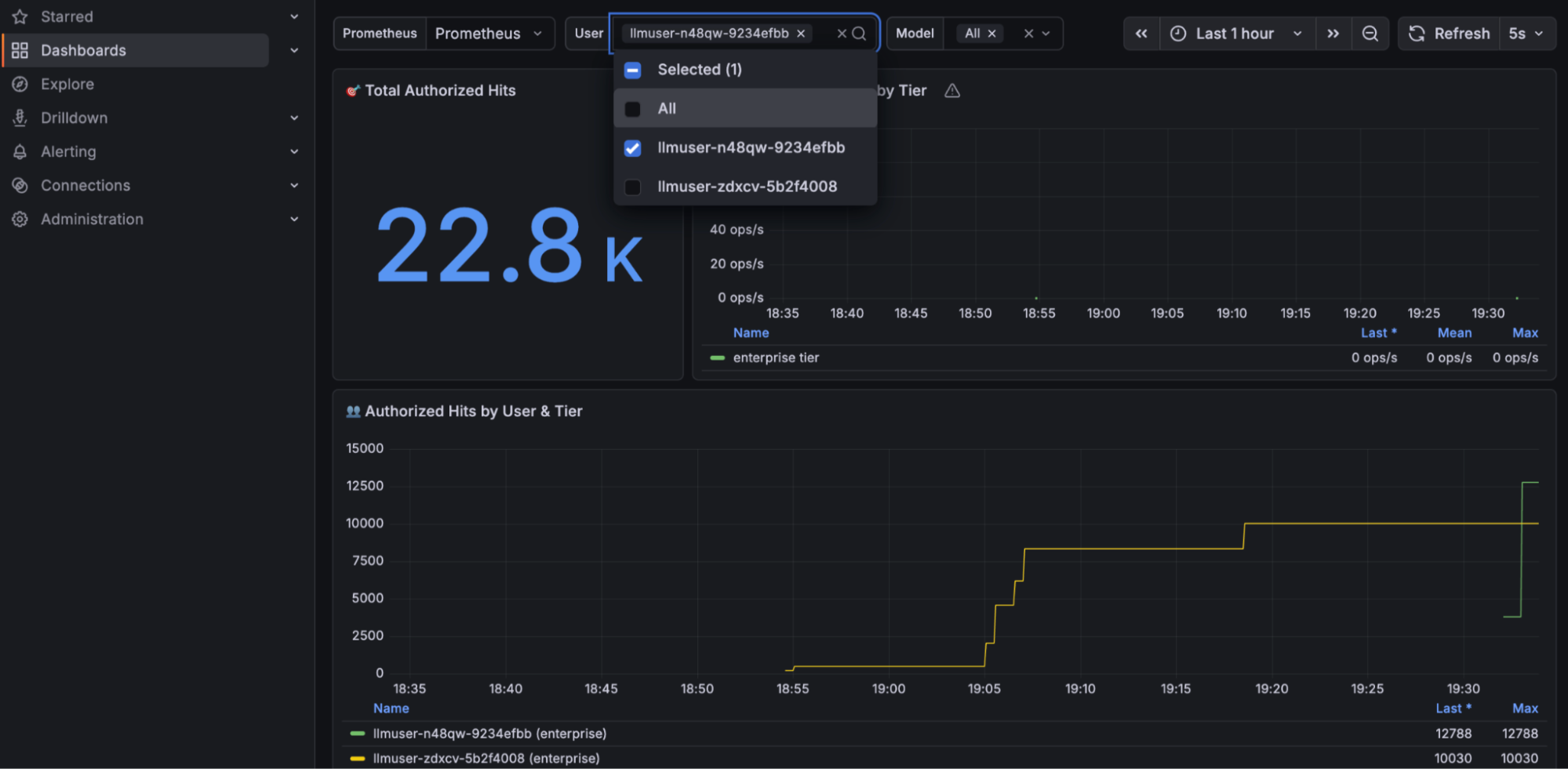
Because it's all built on Prometheus and Grafana under the hood, your existing Grafana dashboards work as well. Figure 8 shows a custom dashboard pulling token use by user and tier directly from the MaaS metrics.
When you want to correlate model behavior with what's happening on the cluster, such as a spike in latency against a specific GPU node, you can navigate directly to the OpenShift console to inspect the underlying pods (Figure 9).
The architecture of Model-as-a-Service
How does all this work behind the scenes? Let's take a look at the components that make up MaaS.
The base: Infrastructure and orchestration
At the base is Kubernetes or Red Hat OpenShift, which provides an enterprise-ready distribution with built-in capabilities). This architecture provides a single foundation across on-premises, cloud, and edge environments. The same control plane runs your AI workloads everywhere, which matters a lot when sovereign AI requirements mean a model has to run inside a specific country.
A platform designed for AI workloads
Vanilla Kubernetes can serve models, but it doesn't know what a model is. That's where Red Hat OpenShift AI helps by providing standardized model-serving runtimes, GPU-aware scheduling, model lifecycle management. This layout delivers an environment built for machine learning engineers and data scientists rather than cluster administrators.
The engine for model serving: vLLM
Chances are, you don't have just one customer using your application, but dozens, thousands, or even millions of users. Just as Apache serves web content over HTTP, vLLM is an open source inference engine that serves AI models through APIs. The engine includes optimizations for large language models (LLMs) that make serving AI at scale cost-effective. You can use this cost calculator to compare public API provider rates against self-hosting with vLLM, which can show up to 97% infrastructure savings.
An AI gateway for standardization
You can run a model, but to expose it to your entire organization safely, you need an AI gateway for authentication, authorization, rate limiting, token quotas, and usage tracking. Red Hat Connectivity Link is built on open source projects that you might already know for connectivity: Envoy, Kuadrant, and Istio. You can expose an OpenAI-compatible /v1/chat/completions endpoint from a vLLM-hosted model on the cluster or from external providers like AWS Bedrock, Azure, or Anthropic. Many developers use a mix of open source and proprietary models.
Observability and governance for AI
The architecture integrates with open source observability tools like Prometheus for metrics, Grafana for dashboards, and Jaeger for distributed tracing. With MaaS on OpenShift AI, you can view per-team token consumption, request rates, latency, and error rates alongside the GPU and infrastructure metrics your SREs are already watching.
What's the impact and what's next
Three things happen when MaaS becomes the default pattern for deploying AI internally. First, developers stop waiting on tickets, because with self-service API keys issued, the platform team isn't a bottleneck, and approved models (and guardrails) are readily available with enforceable rate limits.
Second, the platform team shifts from being a token consumer to a provider. Instead of debugging multiple teams' AI deployments, you operate a single MaaS stack, similar to how you would operate a centralized database as a service for the organization.
Finally, AI metrics integrate with your existing observability stack. Key data points like token usage, model latency, and GPU utilization collect in Prometheus and Grafana alongside your core infrastructure and cluster performance metrics.
While Red Hat OpenShift AI 3.4 made MaaS generally available, you can check out the community documentation for the latest installation and configuration information, as well as the Red Hat AI guide for Models-as-a-Service. This guide details how Red Hat's internal AI team runs MaaS for our company of approximately 20,000 employees.

