This article is the third and final part of the series about Kubernetes storage concepts. I will explain how Container Storage Interface (CSI) drivers enable advanced storage features necessary for production environments and CI/CD pipelines. This article also underscores the need for storage products designed for Kubernetes versus storage designed for traditional physical and virtual data centers or Infrastructure-as-a-Service (IaaS) clouds.
Follow the series:
The first part of this series explains why storage is important, even for developers who are developing stateless applications based on microservices architectures. I describe the unique needs of containerized applications. It also explains the role of Kubernetes in managing and providing storage volumes for applications running as pods.
I explain why a developer's concept of volumes, persistent volume claims, and storage classes matter. It also describes the concepts of persistent volumes and storage provisioners and how they enable system administrators to manage storage for a Kubernetes cluster while, at the same time, offering developers self-service to storage.
How CSI drivers evolved
As organizations deploy more applications for production in Kubernetes, organizations need advanced storage features that support backups and disaster recovery. Dynamic storage provisioners were traditionally limited by the small feature set of PVCs and PVs. As Kubernetes moved into mainstream IT, it needed new storage APIs.
Another issue with Kubernetes storage provisioners is that deploying them was a manual process, unique for each provisioner. There was no standard for which components were required on the control plane and computed nodes, and there were no troubleshooting aids.
The Container Storage Interface (CSI) specification defines APIs to add and configure storage provisioners in Kubernetes clusters (Figure 1). These APIs enable the discovery of storage capabilities and define new Kubernetes resources to manage advanced storage features such as snapshots and clones.
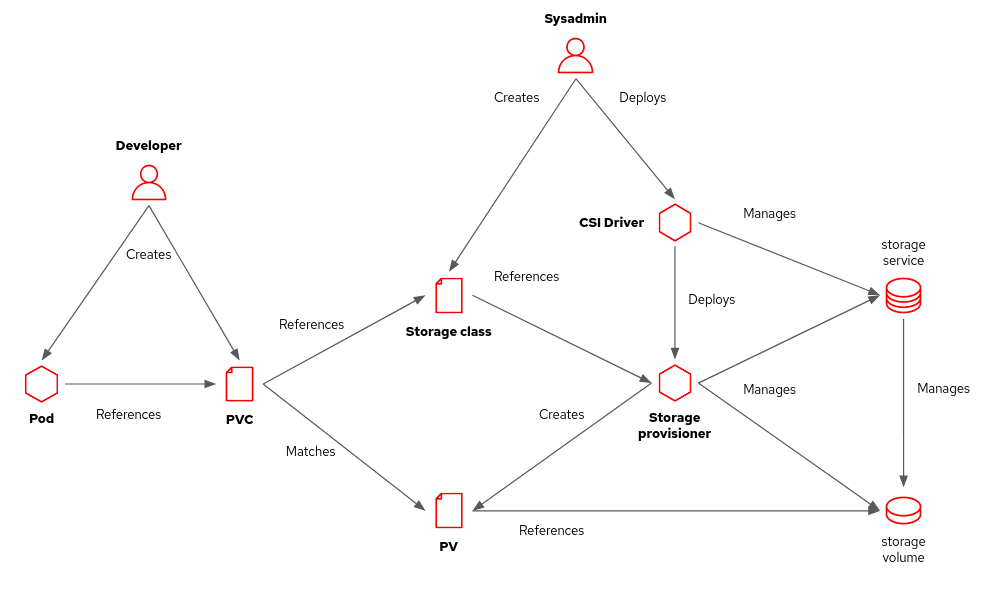
Storage vendors provide CSI drivers for their storage products, preferably packaged as Operators. Kubernetes administrators install those drivers in their clusters. Administrators configure one or more storage classes using provisioners from these CSI drivers.
Unless you develop administrative tools, such as a backup application, you probably will not deal with the CSI API directly. You will be fine with just PVCs and storage classes. But you might want to learn some of the other storage APIs enabled by CSI to create a snapshot of a test data volume that you can revert to after each run of your integration tests.
Developers working in their local clusters can also use CSI capabilities by installing a CSI driver based on Linux LVM.
Container storage vs. traditional storage
Not all applications need unique storage products designed for Kubernetes. Most Network Attached Storage (NAS), Storage Area Network (SAN) vendors, and cloud providers already provide CSI drivers. Their capabilities might suffice for your needs. But the heightened demands of volatile containers that scale up and down quickly can strain many traditional storage providers.
Developers designed most on-premises and cloud-based stored products for a server-based world of manual labor and long provisioning times. They might support dynamic creation and destruction of virtual machine (VM) instances and disk volumes on demand, but usually not at the frequency of container changes. You could face API throttling, response time, and stability issues from your storage vendor.
Another difference between VM and container environments is that data does not usually move from one VM to another. Most VMs live far longer and are less "ephemeral" than containers. Kubernetes deployments put pressure on storage management APIs that your current products might not be able to handle.
Sometimes developers face such issues before production users because CI/CD pipelines dynamically deploy and tear down many instances of their applications, including their persistent volumes. Administrators later find other issues, such as the inability to move storage volumes between availability zones of a cloud region or a hypervisor or a hard limit on the number of LUNs they can create in a SAN appliance.
Sometimes it makes sense to use a traditional storage vendor as the backing storage that provides raw storage capacity to a newer storage product designed for Kubernetes. The Kubernetes-native storage can overcome the limitations of traditional storage and can even add new features, such as geo-replication.
One example would be the Rook operator with AWS EBS storage or Fibre Channel LUNs. Application PVCs refer to storage classes tied to the Rook CSI driver, whereas Rook uses PVCs that refer to storage classes connected to another CSI driver.
The role of the developer and Kubernetes
A Kubernetes developer defines data volumes in pod resources and configures persistent volume claims (PVCs) for those volumes. Each PVC specifies, at a very high level, what the pod needs from storage, such as capacity and shareability.
Name a storage class on each of your PVCs if you need to distinguish between storage options with different cost, performance, or reliability characteristics. Ask your cluster administrator about the storage services connected to each available storage class on your Kubernetes clusters. The administrator might have to create a new storage class for your application.
Nowadays, you can expect that your Kubernetes cluster can access capable, performant, and feature-rich storage that's as capable as the storage available to any virtual machine or physical server in your data center or on your cloud. There is no reason to assume that a virtualization layer or directly attached storage would best serve your storage needs. Nor do you need "low-level" access to disk devices that bypass Kubernetes. You can assume that storage managed by Kubernetes meets your disaster recovery and high availability constraints.
You can expect that storage vendors provide CSI drivers and that your Kubernetes administrators install and configure the required drivers. You need to know only about your application needs and which of the available storage classes connects to storage that satisfies these needs.
Local developer environments can also rely on CSI drivers. There are CSI drivers for storage provisioners based on local disks and folders. That way developers can use for local testing the same manifests for local development they would deployed to a quality assurance (QA) or production environment.
As with bare metal and virtualized servers, your application is responsible for data integrity. No containerization, virtualization, or storage layer provides reliable data sharing and transactional recovery for your data for free. You either code it as part of your application or rely on specialized middleware such as relational databases, caching servers, and messaging servers.
Try it out for yourself
Now that you know the concepts of storage for Kubernetes, you probably want to get your hands dirty. The following tutorials from Red Hat Developer provide complete, step-by-step instructions for deploying a MySQL database on Kubernetes and OpenShift using persistent storage:
- Persistent storage in action: Understanding Red Hat OpenShift's persistent volume framework
- How to maximize data storage for microservices and Kubernetes, Part 1: An introduction
Thanks a lot to Andy Arnold and Greg Deffenbau for their reviews of this article.
Last updated: October 31, 2023
