Table of contents:
- How Kueue and the Spark Operator divide the work
- What you will build
- Set up the integration
- Prove it works
- 3 things the reference docs will not tell you
- Set up operational rules for the queue
- Conclusion
A Spark cluster can run out of headroom long before it looks large on paper. A data engineer submits a massive run, an ML team launches feature engineering, and suddenly both developers are staring at stuck pipelines wondering why their driver pods won't schedule. The Kubernetes scheduler places individual pods, but it has no opinion about which application should receive a team's quota first. So every Spark submission turns into a race, and whoever gets pods scheduled first wins.
Kueue changes the question from "which pod fits on which node?" to "which application deserves resources right now?" It holds a SparkApplication at the gate, before the Kubeflow Spark operator ever creates a driver or executor pod. When the application's declared CPU and memory fit within an available quota, Kueue admits it and the Spark operator proceeds (see figure 1). When they do not fit, the application waits in a queue you can inspect instead of producing a half-started mess competing for nodes.
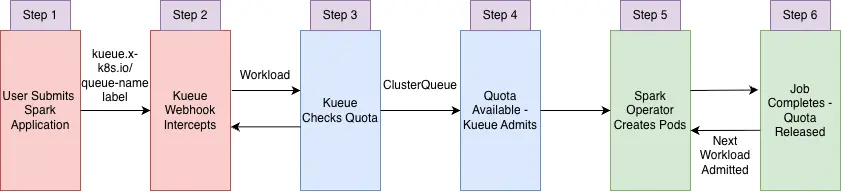
This article demonstrates how to set up that flow on Red Hat OpenShift AI. More importantly, it covers the operational decisions the reference documentation leaves to you: why self-managed queues beat auto-created ones, what preemption actually costs for Spark, and how to keep an unlabeled job from slipping past the queue.
How Kueue and the Spark Operator divide the work
Kueue doesn't replace the Kubernetes scheduler or the Spark Operator. Each controller keeps a distinct job, and understanding the handoff prevents the most common misdiagnoses.
1. Job submission
- What happens: User creates a SparkApplication with a local-queue label
- Observable state: SparkApplication created
2. Interception and suspension
- What happens: Kueue's webhook sets
spec.suspend: trueand creates a Workload — a CR representing the app's resource request inside Kueue's quota engine - Observable state:
Suspended
3. Quota evaluation
- What happens: Kueue compares the Workload's declared requests with ClusterQueue quota
- Observable state:
PendingorQuotaReserved
4. Workload admission
- What happens: Quota available — Kueue admits the Workload, sets
spec.suspend: false - Observable state:
Admitted
5. Pod creation
- What happens: Spark Operator creates driver + executor pods
- Observable state:
Resuming→Running
6. Job completion
- What happens: Application finishes; Kueue releases quota, admits next Workload
- Observable state:
Completed
There are 2 surprises here. First, a "pending" SparkApplication is not broken, it might simply be waiting for a quota. Second, Kubernetes node capacity and Kueue quota are separate constraints. If a Spark application won't start, check the Kueue Workload conditions before you look at pod events.
What you will build
The exercise in this article creates a self-managed queue (as in figure 2) for a project named spark-team-a.
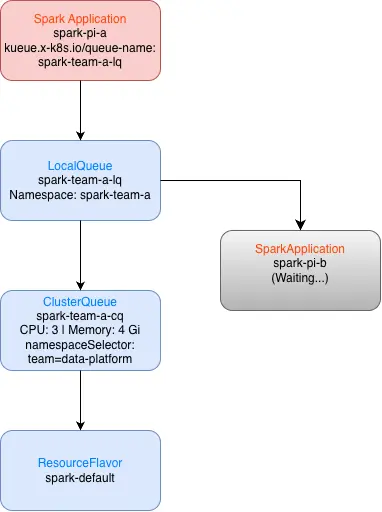
The ClusterQueue reserves 3 CPUs and 4 GiB. The sample app requests a driver and 2 executors (1 CPU, 512m each). One application fits. A second copy waits until the first finishes.
I use self-managed queues because they make quota boundaries explicit and work well with GitOps. OpenShift AI can auto-create queues (autoCreateQueues: true), but explicit ClusterQueue and LocalQueue resources give administrators tighter control and make code review straightforward.
Set up the integration
The complete manifests and step-by-step instructions live in the Kueue Spark administrator guide. Here is the condensed path to a working demo.
1. Install the Red Hat build of Kueue operator
Install the Red Hat build of Kueue from OperatorHub in the Red Hat OpenShift web console. Enable cluster monitoring for the openshift-kueue-operator namespace. The official installation guide covers the full steps.
2. Activate the Spark operator and set Kueue to unmanaged
oc patch datasciencecluster default-dsc \
 -n redhat-ods-operator --type=merge \
 -p '{"spec":{"components":{"sparkoperator":{"managementState":"Managed"},"kueue":{"managementState":"Unmanaged"}}}}'
Warning
Do not set Kueue to Managed in the DataScienceCluster. That refers to the deprecated embedded distribution and conflicts with the external Red Hat build of Kueue operator.
3. Add SparkApplication to the Kueue frameworks list
Edit the Kueue CR (oc edit kueue cluster) and add SparkApplication under spec.config.integrations.frameworks. Then apply the RBAC that lets Kueue manage SparkApplication finalizers. See the admin guide RBAC section for the full manifest.
If a SparkApplication stays suspended with no Workload created, check Kueue controller logs for blockOwnerDeletion errors. That means the RBAC is missing.
4. Create the project and queue hierarchy
oc new-project spark-team-a
oc label namespace spark-team-a \
 kueue.openshift.io/managed=true \
 team=data-platform --overwrite
Then create a ResourceFlavor, ClusterQueue (3 CPU, 4 GiB), and LocalQueue. The key resource is the ClusterQueue:
apiVersion: kueue.x-k8s.io/v1beta2
kind: ClusterQueue
metadata:
  name: spark-team-a-cq
spec:
  namespaceSelector:
    matchLabels:
      team: data-platform
  resourceGroups:
  - coveredResources: ["cpu", "memory"]
    flavors:
    - name: spark-default
      resources:
      - name: cpu
        nominalQuota: "3"
      - name: memory
        nominalQuota: 4Gi
The complete ResourceFlavor, ClusterQueue, and LocalQueue manifests are in the admin guide.
Prove it works
Submit a SparkApplication with the queue label. The only change from a standard manifest is 1 label:
metadata:
  labels:
    kueue.x-k8s.io/queue-name: spark-team-a-lq
A complete example manifest (spark-pi-kueue.yaml) is in the user guide. Submit it and watch the lifecycle:
oc apply -f spark-pi-a.yaml
oc get sparkapplication spark-pi-a -n spark-team-a -w
oc get workloads -n spark-team-a -w
Now submit a second copy (spark-pi-b) while the first is still running. It remains suspended—queued, not broken—because the first application consumes the full 3-CPU quota. When spark-pi-a completes, Kueue admits spark-pi-b automatically.
3 things the reference docs don't tell you
There are some subtleties about this process that are easy to miss, and that aren't necessarily spelled out in reference documentation.
Preemption is a restart, not a pause
When Kueue suspends a running SparkApplication, the Spark operator deletes every driver and executor pod. In-memory state, shuffle data, and ephemeral files are gone. Kueue does not checkpoint the application for you (see figure 3).
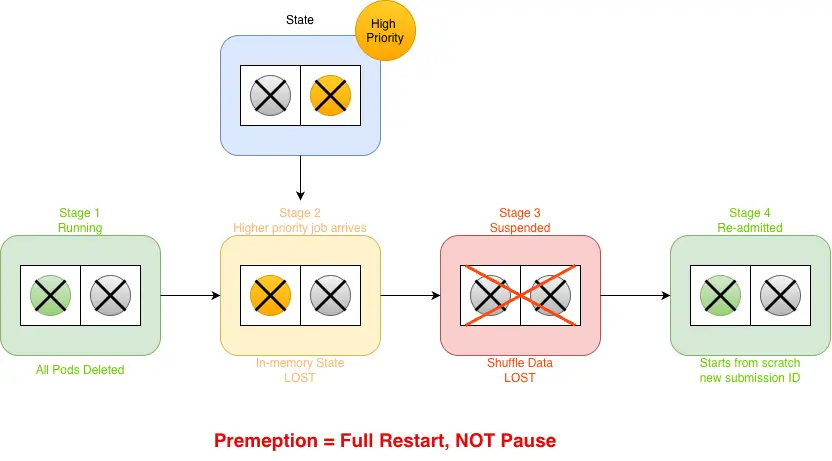
Start with non-preemptive quotas unless your workloads handle restarts gracefully. If you enable preemption later, require persistent output, idempotent transformations, and checkpoints stored outside the pods. Tell job owners that a higher-priority submission can terminate a lower-priority compute already in progress, not just delay it.
Note
Dynamic executor allocation is not supported with Kueue. Set executor.instances to a fixed value.
An unlabeled SparkApplication can bypass the queue
The kueue.openshift.io/managed=true namespace label activates Kueue webhooks, but the app still needs a kueue.x-k8s.io/queue-name label.
Quota is not utilization
Kueue reserves quota based on declared requests, not runtime consumption. A driver requesting 1 CPU but idling at 100m still holds 1 CPU of quota. Require explicit coreRequest values for both driver and executors in every manifest. A team with missing requests can throw off the quota math for everyone.
Set up operational rules for the queue
YAML is the easy part. Before onboarding more teams, your operating policy should answer four questions:
- Who owns each quota? Use namespace selectors and GitOps-reviewed queue resources so a team can't attach its LocalQueue to another team's capacity.
- What is the declared footprint? Require explicit driver/executor requests and fixed executor counts. If you leave this informal, nobody can trace consumed quota back to a specific application.
- When is preemption acceptable? Base the answer on restart cost, not just priority labels. A five-minute SparkPi is cheap to preempt. A 4-hour pipeline writing to ephemeral storage is not.
- How do users identify a healthy wait? Publish
oc get workloadsandoc describe workloadso users can tell the difference between queued and misconfigured.
Conclusion
The configuration surface is small: 1 Kueue CR update, 1 RBAC manifest, and 1 label per SparkApplication. Instead of every application racing for pods on submission, Kueue gives platform teams predictable queue management and quota boundaries for fixed-footprint Spark jobs.
Test it by submitting 2 copies of the same application. The second one waits without creating any pods, then starts automatically when the first finishes. If it does, then you have a controlled admission path.
To get started, try the hands-on walkthrough in the Kueue Spark administrator guide on a non-production cluster. Share the Kueue Spark user guide with your data engineering teams before enabling preemption so everyone understands how suspension affects running tasks.

