Page
Run the 5G core testing pipeline
In our use case, when a 5G core network function is pushed to Red Hat Quay, a webhook triggers the EventListener, which processes the event and runs the associated TriggerTemplate.
Now that the pipeline is ready, let’s add the following resources to the pipelines project to define the TriggerTemplate and run the pipeline.
Prerequisites:
- Create the full 5G core testing pipeline.
In this lesson, you will:
- Add
TriggerBinding,TriggerTemplate, andEventListenerresources to the pipelines project. - Trigger the pipeline by pushing the image you want to test to the inbound repository.
Run the pipeline
TriggerBinding
TriggerBinding captures fields from the webhook payload and maps them to parameters like imageRegistry, imageTag, and imageRepository.
Create this resource by running the following command:
oc apply -f https://raw.githubusercontent.com/rh-telco-tigers/open5gs-test-framework/refs/heads/main/Triggers/triggerbinding.yamlTriggerTemplate
TriggerTemplate defines the PipelineRun that runs when the EventListener detects a new image push to Quay.
Create this resource by running the following command:
oc apply -f https://raw.githubusercontent.com/rh-telco-tigers/open5gs-test-framework/refs/heads/main/Triggers/triggertemplate.yamlEventListener
An EventListener creates a service that listens for events and links a TriggerTemplate with a TriggerBinding.
Create this resource by running the following command:
oc apply -f https://raw.githubusercontent.com/rh-telco-tigers/open5gs-test-framework/refs/heads/main/Triggers/eventlistener.yamlList the service that is created in the pipelines namespace:
oc get svc -n pipelinesCreate a route to expose the previous service:
oc expose svc/el-<eventlistener-name> -n pipelinesTrigger the pipeline: Pass and fail cases
To trigger the pipeline, push the image you want to test to the inbound repository using either the following Docker or Podman command:
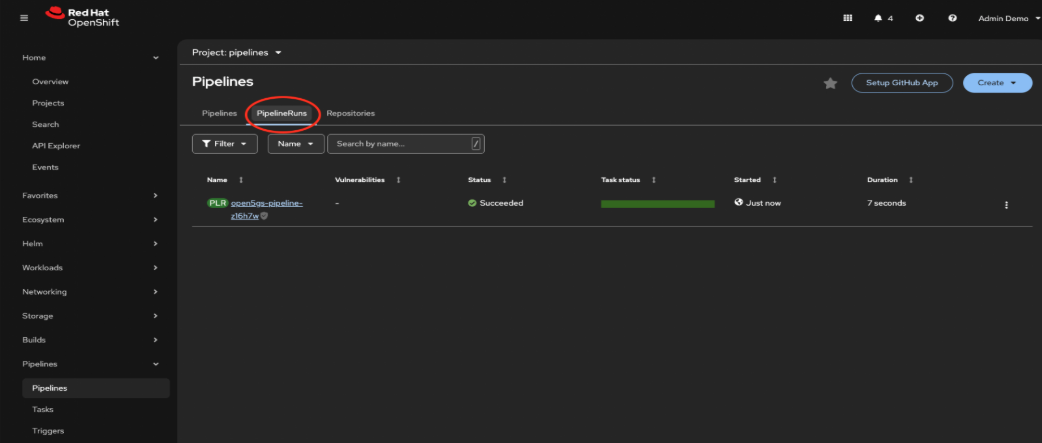
podman push <your-registry-hostname>/inbound-repository/open5gs-image:latestOnce the image is pushed, switch to the pipelines namespace in your Red Hat OpenShift cluster, then go to the Pipelines section and check the PipelineRuns tab (Figure 1). The pipeline should start running automatically.
When tests pass
In Figure 2, the Policy Control Function (PCF) image passed all test cases. The pipeline ran the promote-new-version task to push the image to the integration repository for the next phase of testing.

When tests fail
In Figure 3, the PCF image didn’t pass the test cases. As a result, the pipeline skipped the promote-new-version task and moved straight to cleaning up the test environment.

Summary
In this learning path, we walked through setting up a pipeline to automate PCF testing within a 5G core environment using OpenShift Pipelines and ABot by Rebaca Technologies. From pushing the image and sending real-time Slack notifications to promoting the image to the integration registry, everything runs smoothly without lifting a finger! This automation saves time, ensures core network functions behave correctly, and creates a reliable CI/CD workflow for 5G core components.

