Ray has emerged as a leading open source distributed compute framework for scaling enterprise AI workloads. After its donation to the PyTorch Foundation in 2025, adoption accelerated across the industry, and Red Hat OpenShift AI includes prebuilt, fully supported Ray cluster runtime images.
Training Hub is a Python package providing a standardized set of fine-tuning algorithms for large language models (LLMs). It supports supervised fine-tuning (SFT), offline supervised fine-tuning (OSFT), Low-Rank adaptation (LoRA), and group relative policy optimization (GRPO). Starting with Red Hat OpenShift AI 3.5, Training Hub is preinstalled in a Ray CUDA runtime image, meaning you can run any of these algorithms on a Ray cluster without pip installs, without dependency management, and in air-gapped environments.
This article walks you through running a LoRA fine-tuning job on Ray using Training Hub and the CodeFlare software development kit (SDK). You'll submit a training job fine-tuning Qwen2.5-1.5B-Instruct for SQL generation and evaluate the fine-tuned model, all from a Jupyter notebook.
You can find complete step-by-step notebooks for all 4 algorithms in the Red Hat AI examples repository. Clone the repo and follow along.
Why Ray for fine-tuning?
You might already be using the Kubeflow Training backend for SFT, OSFT, and LoRA fine-tuning on Red Hat OpenShift AI. Ray provides a second backend with its own strengths:
- Elastic scaling. Ray clusters scale dynamically. If your job needs 4 GPUs, Ray provisions 4 workers; when it finishes, those resources are released.
- Unified runtime. Data preprocessing, training, and serving can all run on the same Ray cluster, simplifying multi-stage pipelines.
- verl integration. OpenShift AI includes verl, an open source library for distributed reinforcement learning. It coordinates the rollout phase (where the model generates trial answers) and the training phase across your Ray cluster automatically.
Both backends consume the same algorithms (SFT, OSFT, LoRA, and GRPO) from Training Hub, Red Hat's unified fine-tuning interface, and produce the same fine-tuned models. Choose based on your infrastructure:
| Kubeflow Trainer | Ray | |
|---|---|---|
| Submit from | Kubeflow SDK | CodeFlare SDK |
| Cluster management | Automatic (TrainJob) | Explicit (RayCluster + RayJob) |
| Scaling | Static | Elastic |
| Best for | Teams already using Kubeflow | Teams already using Ray, or multi-stage pipelines |
| GRPO backend | ART | verl (Ray-native) |
The fine-tuned models are interchangeable. A LoRA adapter trained on Ray works identically to one trained on Kubeflow Trainer. If you already have Ray clusters for other workloads, fine-tuning fits in naturally.
What is available
Red Hat OpenShift AI 3.5 ships 4 fine-tuning algorithms on Ray:
| Algorithm | Description | Use case |
|---|---|---|
| SFT | Supervised fine-tuning | Teach domain knowledge from labeled examples |
| OSFT | Offline supervised fine-tuning | Learn new knowledge while preserving existing capabilities |
| LoRA_SFT | Low-Rank adaptation | Parameter-efficient fine-tuning with a smaller memory footprint |
| LoRA_GRPO | Group relative policy optimization | Reinforcement learning from verifiable rewards (reasoning, tool calling) |
Each algorithm has a complete working example in the Red Hat AI examples repository, including data preparation, cluster configuration, training, and evaluation.
Prerequisites
Before starting, ensure your environment meets the following infrastructure and developer requirements.
Cluster administrator requirements
You need access to a Red Hat OpenShift cluster with the following:
- Red Hat OpenShift AI (version 3.5 or later) with the dashboard, workbenches, and Ray components enabled.
- An OpenShift storage provisioner supporting dynamic provisioning of persistent volume claims (PVCs) with ReadWriteMany (RWX) access mode.
- A worker node with an NVIDIA GPU (A100 or H100 recommended). For multi-GPU distributed training, you need a node with multiple GPUs or multiple GPU nodes.
Note on OpenShift storage
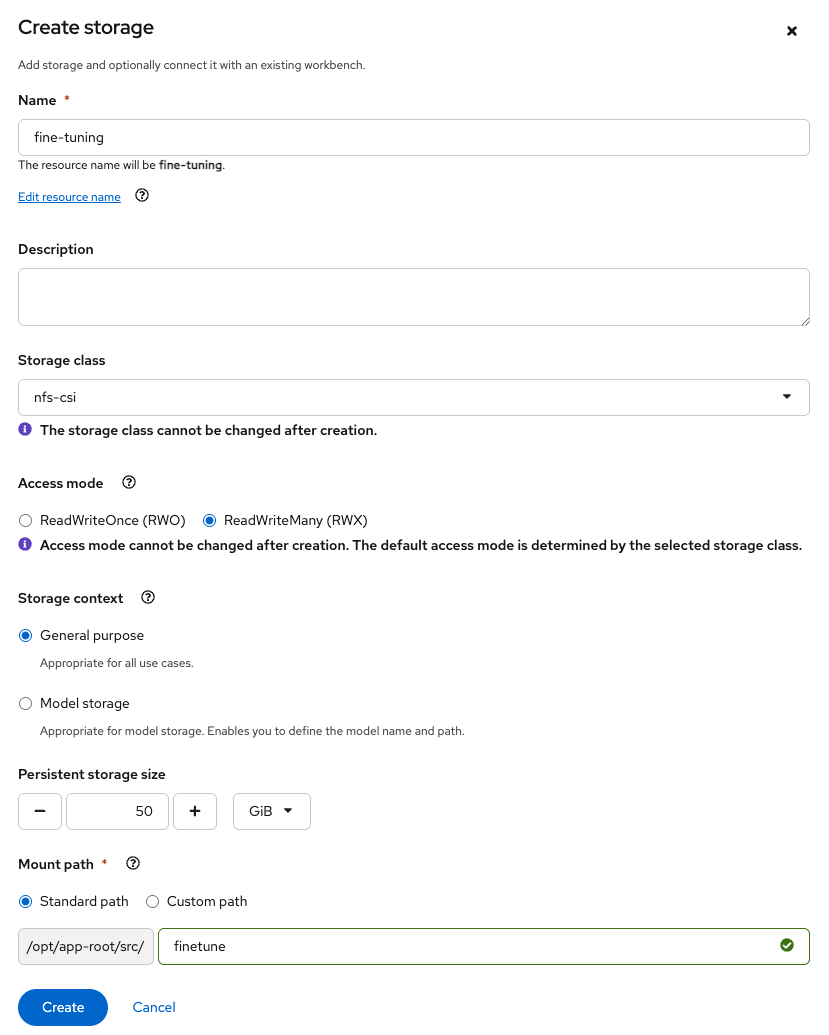
RWX access mode is required because both the workbench and the Ray cluster pods need to mount the PVC simultaneously. The workbench writes the model and data. The Ray cluster reads them for training and writes checkpoints, and the workbench then reads those checkpoints for evaluation.
Developer requirements
- Access to an OpenShift AI data science project.
- Permission to launch workbenches and create PVCs within your namespace.
Set up your environment
Prepare your Red Hat OpenShift AI environment by launching a workbench and configuring shared persistent storage.
Create a workbench
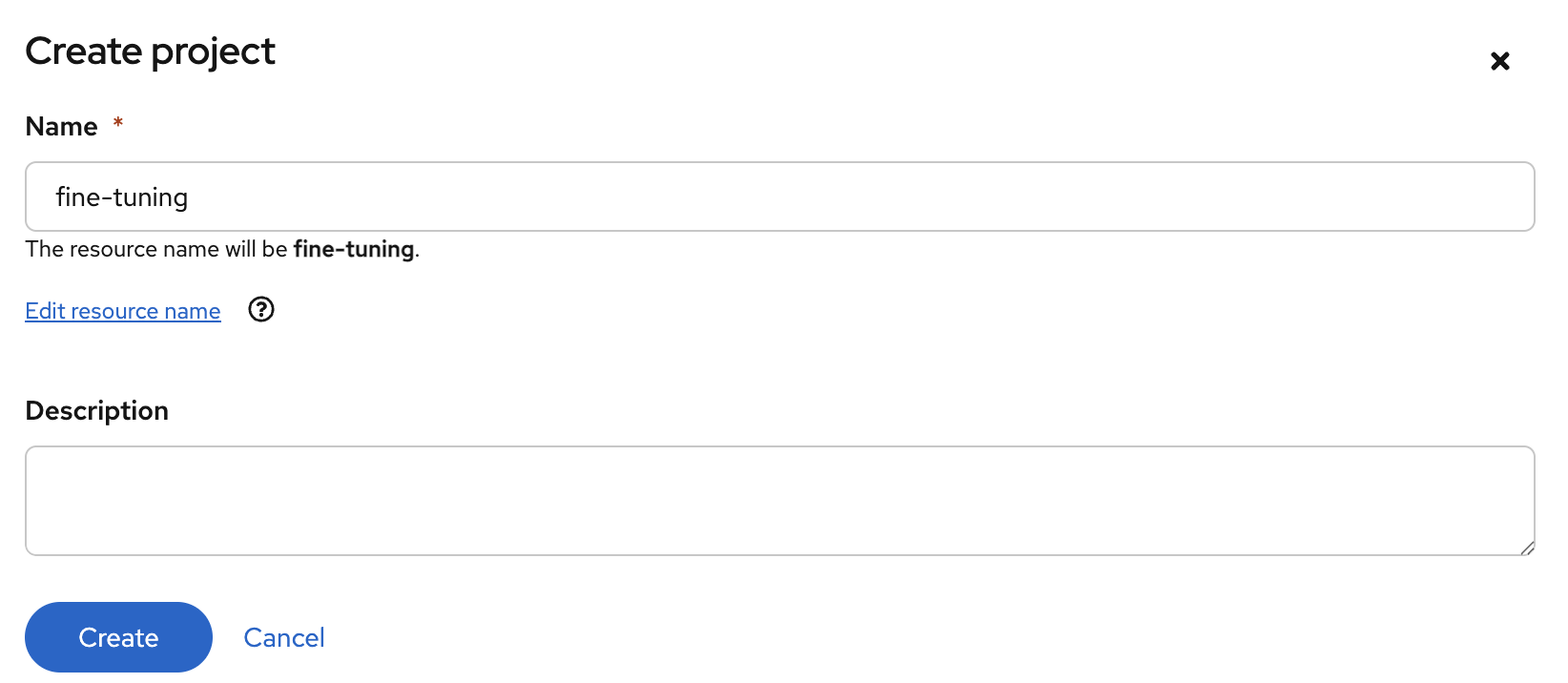
Access the Red Hat OpenShift AI dashboard from the top navigation bar of the OpenShift web console. Navigate to Data Science Projects and create a new project (Figure 1).
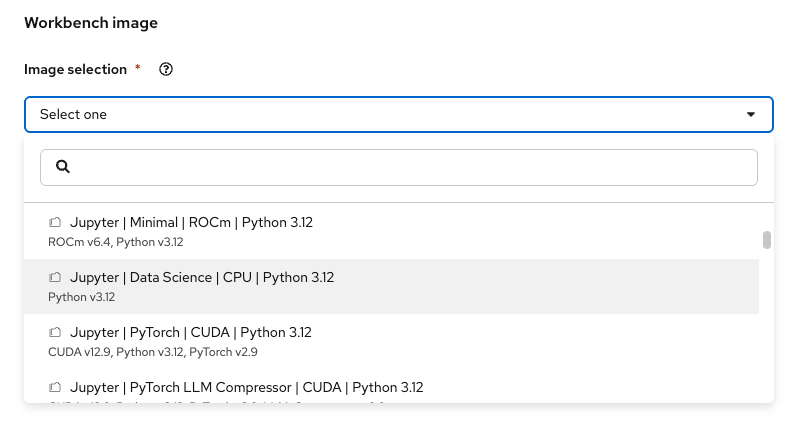
Select Create a workbench, then choose a standard data science notebook image (such as Standard Data Science or any image including the CodeFlare SDK). The workbench is your control plane. You use it to submit and monitor Ray jobs, not to run the training itself (Figure 2).
Note
The actual training runs on the Ray cluster, not the workbench. The workbench only needs the CodeFlare SDK to submit jobs and download results. The Ray CUDA runtime image already has Training Hub preinstalled.
Create shared persistent storage with RWX access mode (50 GiB recommended) for the model, dataset, and training checkpoints (Figure 3).
Once OpenShift provisions your workbench, select Open to launch JupyterLab.
Clone the example notebook
From the workbench, clone the examples repository:
git clone https://github.com/red-hat-data-services/red-hat-ai-examples.gitNavigate to examples/fine-tuning/lora_ray/ and open the LoRA notebook. (For other algorithms, navigate to the corresponding sft_ray/, osft_ray/, or grpo_ray/ directory.)
Prepare the model and data
The notebook begins by configuring paths and hyperparameters:
MODEL_ID = "Qwen/Qwen2.5-1.5B-Instruct"
MODEL_PATH = f"{PVC_MOUNT_PATH}/{MODEL_ID}"
DATA_PATH = f"{PVC_MOUNT_PATH}/lora_text_sql_output/train_data.jsonl"
CKPT_DIR = f"{PVC_MOUNT_PATH}/checkpoints/lora"

LORA_R = 16
LORA_ALPHA = 32
MAX_SEQ_LEN = 512
LEARNING_RATE = 1e-4
NUM_EPOCHS = 1
It then downloads the base model to the shared PVC:
from huggingface_hub import snapshot_download

snapshot_download(
    repo_id=MODEL_ID,
    local_dir=f"/opt/app-root/src/{PVC_PATH}/{MODEL_ID}",
    token=HF_TOKEN or True,
    resume_download=True,
    local_dir_use_symlinks=False,
)
Note
In air-gapped environments, preload the model and dataset onto the PVC using an alternative method (for example, copying from an internal registry). Training Hub doesn't require network access at training time.
We'll use the public b-mc2/sql-create-context dataset, which pairs natural language questions with valid SQL queries. The notebook formats these pairs into conversational prompts and saves them as JSONL files to your shared storage.
Configure the Ray cluster
The CodeFlare SDK provides a Python API for creating Ray clusters on Red Hat OpenShift AI. The notebook uses ManagedClusterConfig to define a single-GPU cluster. LoRA is parameter-efficient and runs well on 1 GPU:
from codeflare_sdk import ManagedClusterConfig, RayJob
from kubernetes.client import (
    V1PersistentVolumeClaimVolumeSource,
    V1Volume,
    V1VolumeMount,
)

pvc_volume = V1Volume(
    name="training-data",
    persistent_volume_claim=V1PersistentVolumeClaimVolumeSource(claim_name=PVC_NAME),
)
pvc_mount = V1VolumeMount(name="training-data", mount_path=PVC_MOUNT_PATH)

cluster_config = ManagedClusterConfig(
    image=IMAGE,
    num_workers=0,
    head_cpu_requests=4,
    head_cpu_limits=8,
    head_memory_requests=64,
    head_memory_limits=64,
    head_accelerators={"nvidia.com/gpu": 1},
    volumes=[pvc_volume],
    volume_mounts=[pvc_mount],
    envs=env_vars,
)
ManagedClusterConfig provisions a single-node cluster mounting your shared storage. Because the Ray CUDA container preinstalls the Training Hub runtime, all 4 fine-tuning algorithms run without manual dependency installation.
Build the entrypoint and submit the job
The training entrypoint calls training_hub.lora_sft() directly with the parameters configured earlier:
entrypoint = f'''python -c "
from training_hub import lora_sft

lora_sft(
    model_path='{MODEL_PATH}',
    data_path='{DATA_PATH}',
    ckpt_output_dir='{CKPT_DIR}',
    num_epochs={NUM_EPOCHS},
    max_seq_len={MAX_SEQ_LEN},
    learning_rate={LEARNING_RATE},
    lora_r={LORA_R},
    lora_alpha={LORA_ALPHA},
)
"'''
Submit the job using the CodeFlare SDK's RayJob API:
job = RayJob(
    job_name="lora-sft-training-hub",
    entrypoint=entrypoint,
    cluster_config=cluster_config,
    namespace=NAMESPACE,
    ttl_seconds_after_finished=600,
)

job.submit()
The SDK creates a RayJob custom resource with an embedded RayCluster spec. KubeRay spins up the cluster, runs the entrypoint on the head node, and tears everything down when the job finishes.
Monitor training progress
You can check job status directly from the notebook:
job.status()The status might show as PENDING while the RayCluster is spinning up and pulling the image. LoRA training is fast. With default parameters on a single L40S (48 GB), expect approximately 5–15 minutes depending on dataset size. You should see the loss decrease steadily over the course of training.
Evaluate the fine-tuned model
After training completes, the job saves the LoRA adapter to the shared PVC. The notebook loads the adapter, merges it with the base model, and tests SQL generation with a set of example prompts. To compare model responses before and after fine-tuning, you can first test the unmodified base model on the same prompts. Add the following cell to the notebook before section 8 ("Test the Trained Model"):
import torch
from transformers import AutoModelForCausalLM, AutoTokenizer

base_model = AutoModelForCausalLM.from_pretrained(
    MODEL_PATH,
    dtype=torch.float16,
    device_map="auto",
)
base_model.eval()
base_tokenizer = AutoTokenizer.from_pretrained(MODEL_PATH)

def generate_sql_base(question: str, schema: str, max_tokens: int = 64) -> str:
    messages = [
        {
            "role": "user",
            "content": f"Given the following database schema:\n\n{schema}\n\n"
                       f"Write a SQL query to answer this question: {question}",
        }
    ]
    prompt = base_tokenizer.apply_chat_template(
        messages, tokenize=False, add_generation_prompt=True
    )
    inputs = base_tokenizer(prompt, return_tensors="pt").to(base_model.device)
    outputs = base_model.generate(
        **inputs,
        max_new_tokens=max_tokens,
        temperature=0.1,
        do_sample=True,
        pad_token_id=base_tokenizer.eos_token_id,
    )
    response = base_tokenizer.decode(
        outputs[0][inputs["input_ids"].shape[1]:], skip_special_tokens=True
    )
    return response.strip()

test_examples = [
    {
        "schema": "CREATE TABLE employees (id INT, name VARCHAR, department VARCHAR, salary DECIMAL, hire_date DATE)",
        "question": "What is the average salary of employees in the engineering department?",
    },
    {
        "schema": "CREATE TABLE orders (order_id INT, customer_id INT, product_name VARCHAR, quantity INT, order_date DATE)",
        "question": "How many orders were placed in the last 30 days?",
    },
    {
        "schema": "CREATE TABLE students (student_id INT, name VARCHAR, grade INT, subject VARCHAR, score DECIMAL)",
        "question": "Find the top 5 students with the highest average score across all subjects.",
    },
]

for i, example in enumerate(test_examples, 1):
    print(f"\nExample {i}:")
    print(f"Question: {example['question']}")
    sql = generate_sql_base(example["question"], example["schema"])
    print(f"Generated SQL: {sql}")
    print("-" * 60)
Run this cell and check the output. Then continue with section 8 of the notebook, which loads the LoRA adapter, merges it with the base model, and runs the same test prompts:
base_model = AutoModelForCausalLM.from_pretrained(
    MODEL_PATH,
    dtype=torch.float16,
    device_map="auto",
)
model = PeftModel.from_pretrained(base_model, CHECKPOINTS_PATH)
model = model.merge_and_unload()
model.eval()
Comparing the results
The fine-tuned model outputs clean, bare SQL across all 3 test prompts:
| Test prompt | Fine-tuned output |
|---|---|
| Average salary | SELECT AVG(salary) FROM employees WHERE department = "Engineering" |
| Orders in last 30 days | SELECT COUNT(*) FROM orders WHERE order_date >= CURDATE() - INTERVAL 30 DAY |
| Top 5 students | SELECT student_id, name, AVG(score) AS avg_score FROM students GROUP BY student_id ORDER BY avg_score DESC LIMIT 5 |
If you are feeding model outputs directly into a database API, conversational preamble breaks your application. Fine-tuning teaches the model to return raw, executable SQL, saving you from writing fragile parsing logic. The difference is clearest when comparing raw outputs for the same prompt. The base model wraps the correct SQL in explanation and Markdown formatting:
To find the average salary of employees in the engineering department, you can
use the following SQL query:

SELECT AVG(salary) AS average_salary
FROM employees
WHERE department = 'engineering';

This query selects the average (AVG) salary from the employees table where the
department...
The fine-tuned model outputs the query directly:
SELECT AVG(salary) FROM employees WHERE department = "Engineering"The base model already knows SQL. It produces correct queries. What LoRA fine-tuning taught was the format: output the query directly, without preamble or explanation. This is exactly the pattern in the sql-create-context training data, where each example pairs a question with a bare SQL query.
Clean up
The RayCluster is automatically torn down when the job finishes. The RayJob custom resource is cleaned up after ttl_seconds_after_finished (600 seconds by default). Use job.delete() for immediate cleanup if needed:
job.delete()The 4 examples at a glance
Because all 4 algorithms share identical cluster and storage setups, switching from LoRA to GRPO or SFT requires changing only your dataset and function calls—not your underlying pipeline. Each of the 4 Ray examples in the Red Hat AI examples repository (sft_ray, osft_ray, lora_ray, and grpo_ray) follows the same core workflow:
| Example | Algorithm | Dataset | Evaluation |
|---|---|---|---|
sft_ray/ | SFT | Table reasoning | Extract-and-compare table results |
osft_ray/ | OSFT | Domain knowledge | JSON output + knowledge retention tests |
lora_ray/ | LoRA | SQL generation | SQL correctness check |
grpo_ray/ | GRPO | Tool calling | Tool call validation |
All 4 use the same cluster setup and PVC configuration. The only differences are the Training Hub algorithm flag and the evaluation criteria.
Learn more
Clone the Red Hat AI examples repository and run your first fine-tuning job in under 20 minutes.
To learn more about the platform components used in this guide, review the Red Hat OpenShift AI product documentation, the Training Hub repository, and the CodeFlare SDK documentation.

