In our previous article, we introduced networking based on data processing units (DPUs), using Red Hat OpenShift and NVIDIA DOCA Platform Framework (DPF). The next step is to bring Red Hat OpenShift hosted control planes and Red Hat Enterprise Linux CoreOS to the DPU cluster itself.
The implementation described here uses OpenShift hosted control planes (HCP), powered by HyperShift, to run the DPU cluster's control plane in the management OpenShift cluster. The Arm cores on NVIDIA BlueField-3 run Red Hat Enterprise Linux CoreOS workers. Supporting this architecture required adapting NVIDIA DOCA software and out-of-tree drivers to Red Hat Enterprise Linux CoreOS and integrating DPU installation with HyperShift-generated Ignition configuration.
This article explains the architecture and how BlueField software, kernel drivers, and installation configuration come together to create a Red Hat Enterprise Linux CoreOS worker.
An OpenShift control plane for the DPU cluster
The BlueField DPU has an Arm processor and runs its own operating system. In this deployment, the DPU becomes a worker in a separate OpenShift cluster dedicated to infrastructure services.
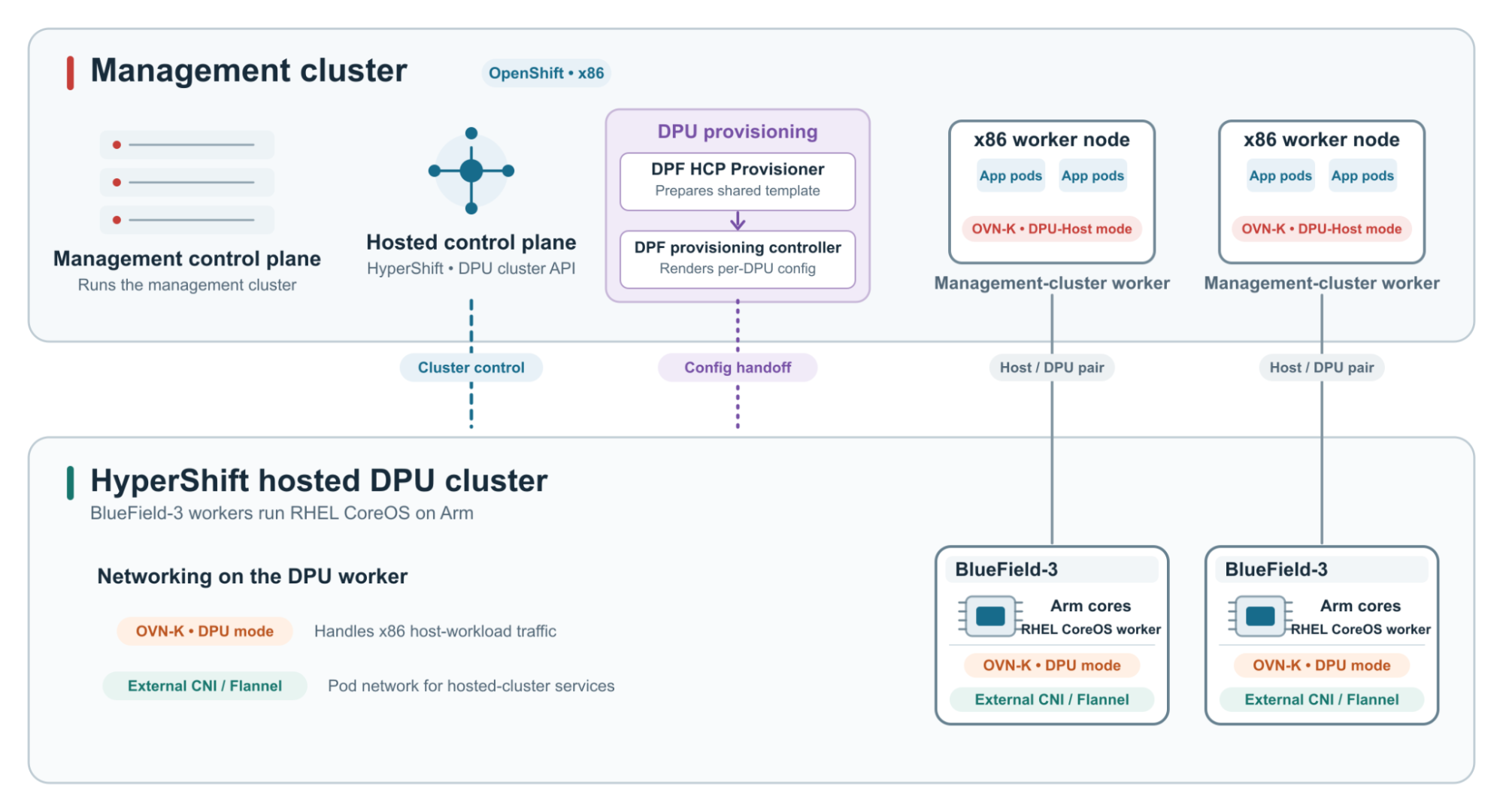
HyperShift hosts that cluster's control plane on the management OpenShift cluster. The DPU's Arm cores run the Red Hat Enterprise Linux CoreOS worker and DPU services; they do not host the cluster's control plane. Application workloads continue to run on the x86 hosts.
The DPF HCP Provisioner Operator connects these pieces. It creates the HyperShift HostedCluster and a zero-replica NodePool, supplies the DPU cluster's kubeconfig to DPF, prepares BlueField-specific Ignition, and approves eligible certificate signing requests from joining DPU workers.
OVN-Kubernetes spans the host-DPU pair: the x86 workers run DPU-Host mode, and their paired BlueField workers run DPU mode to handle x86 host workload traffic. The hosted DPU cluster needs its own pod network, provided through a Container Network Interface (CNI).
This deployment uses Flannel for that purpose. The HCP provisioner configures HyperShift to use external networking, while DPF carries the Flannel settings. Flannel provides connectivity for pods in the DPF cluster. OVN-Kubernetes DPU mode handles the x86 host networking path.
Figure 1 shows where the control plane and workers run, and separates the hosted cluster's pod network from the services handling host traffic.
A base BFB and an OS image layer for each release
The installation process uses 2 images: a boot image that launches the installation environment and the BlueField OS image that the DPU ultimately runs.
The Red Hat Enterprise Linux CoreOS BlueField Bootstream File (BFB) boots the live environment with an Ignition file. The provisioning Ignition configuration includes the installation scripts that write the initial system to disk. During provisioning, first-boot services stage the BlueField OS image selected for the target Red Hat OpenShift release.
A BFB is essentially a format that bundles a kernel, initramfs, and kernel arguments along with a few firmware blobs. NVIDIA provides several examples in their open source repository. We chose to integrate our BFB generation into OSBuild, enabling existing Red Hat Enterprise Linux CoreOS pipelines to generate these as part of their standard release process.
That BlueField OS image combines the target Red Hat OpenShift node image with the required NVIDIA software and adaptations. It is an OS deployment, distinct from the application containers later deployed through DPF.
The operator's image lookup derives the Red Hat OpenShift release version and looks for the corresponding tag in the configured BlueField image repository. It supplies the worker's OS deployment. DPF subsequently deploys application containers on that worker. If that version is unavailable, the lookup fails. An explicit OS image override is also available. A matching tag does not by itself prove compatibility; the selected image still needs validation.
Building the BlueField software into Red Hat Enterprise Linux CoreOS
Using Red Hat Enterprise Linux CoreOS changes how software and configuration are delivered.
The BlueField adaptations are assembled into the OS image at build time. Ignition then supplies machine-specific configuration and service dependencies during provisioning.
For example, NVIDIA software normally installed under /opt/mellanox is placed under /usr/opt/mellanox, with a compatibility link created at the expected path. The image build also adjusts library paths, includes device rules and SELinux policy, regenerates the initramfs, and commits the resulting OS container.
Package configuration needs similar care. In the build examined here, selected networking, kubenet, and services files from bf-release are removed before remaining files are copied into the Red Hat Enterprise Linux CoreOS image preserving existing files at their destination.
Together, those changes help ensure that the machine boots with the required drivers, finds its libraries, and starts services with consistent configuration.
Out-of-tree kernel modules add a dependency on the target kernel. The source-build path demonstrates how to build OFED and selected BlueField SoC modules against that kernel. The toolkit build instructions derive the kernel version from the Red Hat Enterprise Linux CoreOS image in the target OpenShift release payload. Official builds of the bluefield-ocp image layer include drivers signed by Red Hat to support UEFI Secure Boot on BlueField.
The selected Red Hat Enterprise Linux CoreOS kernel is therefore both an input to the driver build and a constraint on the resulting BlueField OS image.
Applying the installation configuration
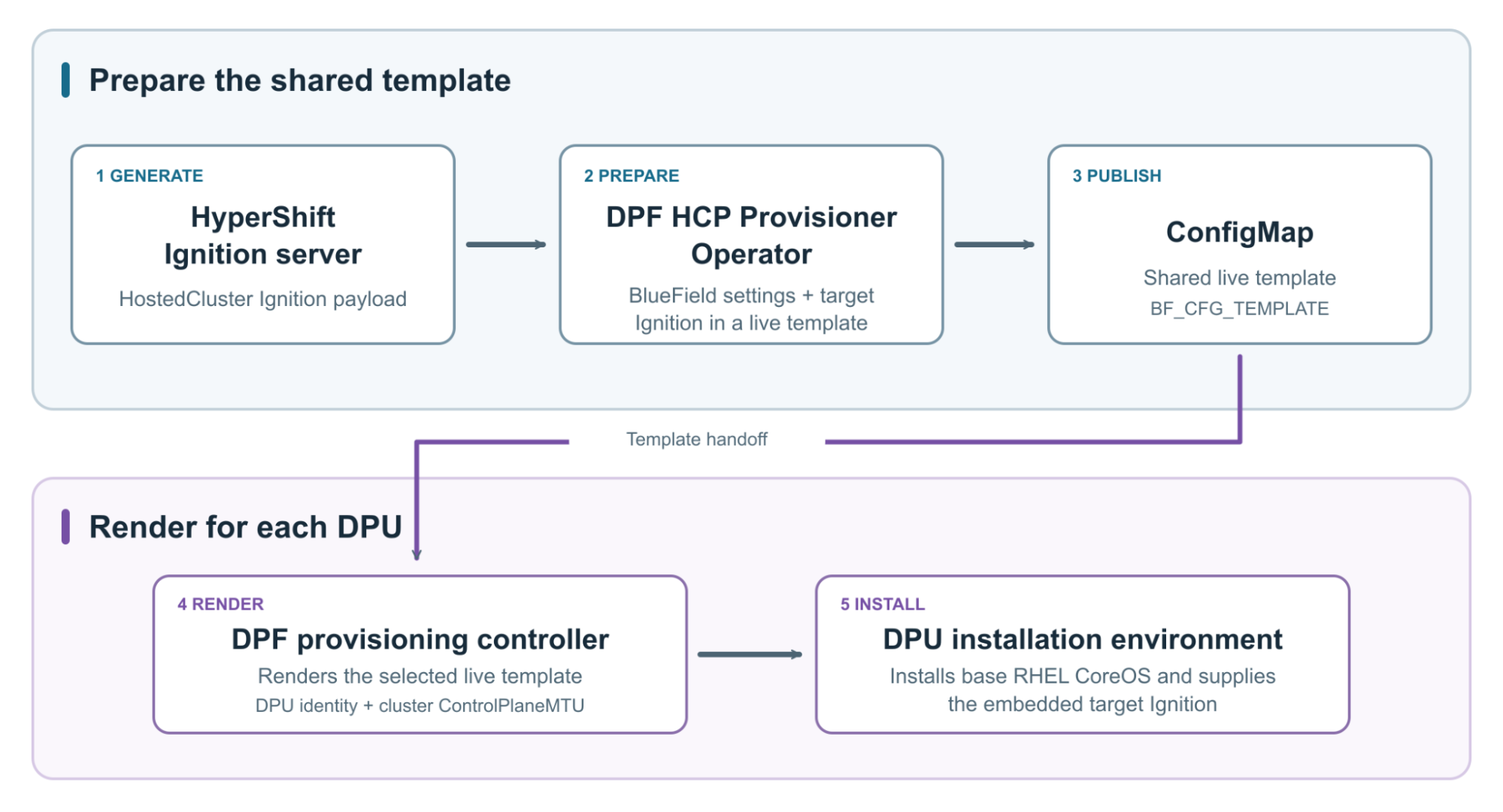
HyperShift's Ignition server generates a HostedCluster Ignition payload. The DPF HCP Provisioner Operator retrieves that payload and adds the BlueField-specific files, settings, and systemd units needed during installation and initial boot.
The HCP provisioner prepares the target Red Hat Enterprise Linux CoreOS configuration and embeds it in a live Ignition template for the installation environment. It makes that template available to DPF's provisioning controller through a ConfigMap. Before installation, the DPF provisioning controller fills in the placeholders with values for the individual DPU, such as its host name, name, namespace, and UID. This allows the HCP provisioner to prepare shared configuration while DPF supplies each DPU's identity, as shown in Figure 2.
The installation program uses the completed configuration to write the base system to disk and supply the target Ignition. During initial boot, Ignition applies the configuration, and the services it configures complete provisioning, including staging the selected BlueField OS image.
The DPU agent is installed as part of this process. In host-trusted mode, its installation service waits for host-agent connectivity, downloads the agent RPM from the host's agent repository, and extracts the executable on the DPU. Its delivery is separate from the BlueField OS image, but both are part of bringing up the same DPU worker.
One installation requirement is early connectivity. The base Red Hat Enterprise Linux CoreOS system must reach the registry to retrieve and stage the BlueField OS image before it can boot into that deployment. In the host-trusted path, the generated configuration establishes virtual function (VF) bootstrap networking for this stage.
The DPU-agent configuration also skips network and kubelet setup handled by the Red Hat Enterprise Linux CoreOS installation configuration. The resulting configuration combines the BlueField software with the settings needed to join the Red Hat OpenShift hosted cluster.
An OpenShift worker on BlueField
This architecture hosts the DPU worker's control plane on the management cluster while running Red Hat Enterprise Linux CoreOS and the required BlueField software on the DPU's Arm cores. The HCP provisioner prepares the worker configuration, and DPF completes the live template with each DPU's identity during provisioning.
For operators, this makes the target Red Hat OpenShift release, BlueField OS image, and installation configuration explicit provisioning inputs. For image builders, the central task is aligning the NVIDIA packages and drivers with the selected Red Hat Enterprise Linux CoreOS kernel and file system layout.
Explore the DPF HCP Provisioner Operator source to see how it assembles the shared Ignition template and connects hosted control planes with BlueField provisioning.

