Modern model serving is highly optimized using inference frameworks like llm-d and vLLM. These serving tools allow organizations to share a single model instance across hundreds or even thousands of concurrent users and applications, each with unique requirements.
Imagine a model being used by two development teams, one to routinely summarize documents, and the other as a chatbot for debugging code. When the first team's routine summarizations are taking place, the noisy-neighbor problem occurs and the request time for the second team's chatbot could rise exponentially, potentially degrading the expected level of service.
This hands-on guide demonstrates how to configure llm-d with flow control—a new technology preview feature with the release of Red Hat OpenShift AI 3.4. Flow control enables priority-based request queuing and fairness policies, ensuring important workloads are served first, thereby maximizing GPU utilization and protecting SLAs.
Why flow control matters
Platform teams can maximize GPU ROI by keeping GPU use high while protecting service SLAs. This eliminates the need to reserve dedicated GPUs or capacity, directly reducing hardware costs. Meanwhile, application teams gain predictable workload performance and protection against resource contention.
Use flow control in these key scenarios:
- Running multitenant applications with variable SLA requirements on a single model.
- Mixing interactive workloads with batch jobs.
- Protecting critical services from noisy-neighbor effects.
- Prioritizing key workloads when model saturation is possible.
Avoid using flow control when you have a single workload and SLA requirement, as it can add undue complexity.
How it works
Flow control benefits llm-d deployments by managing the queuing, prioritization, and fairness between requests, ensuring the correct request is dispatched based on strict criteria.
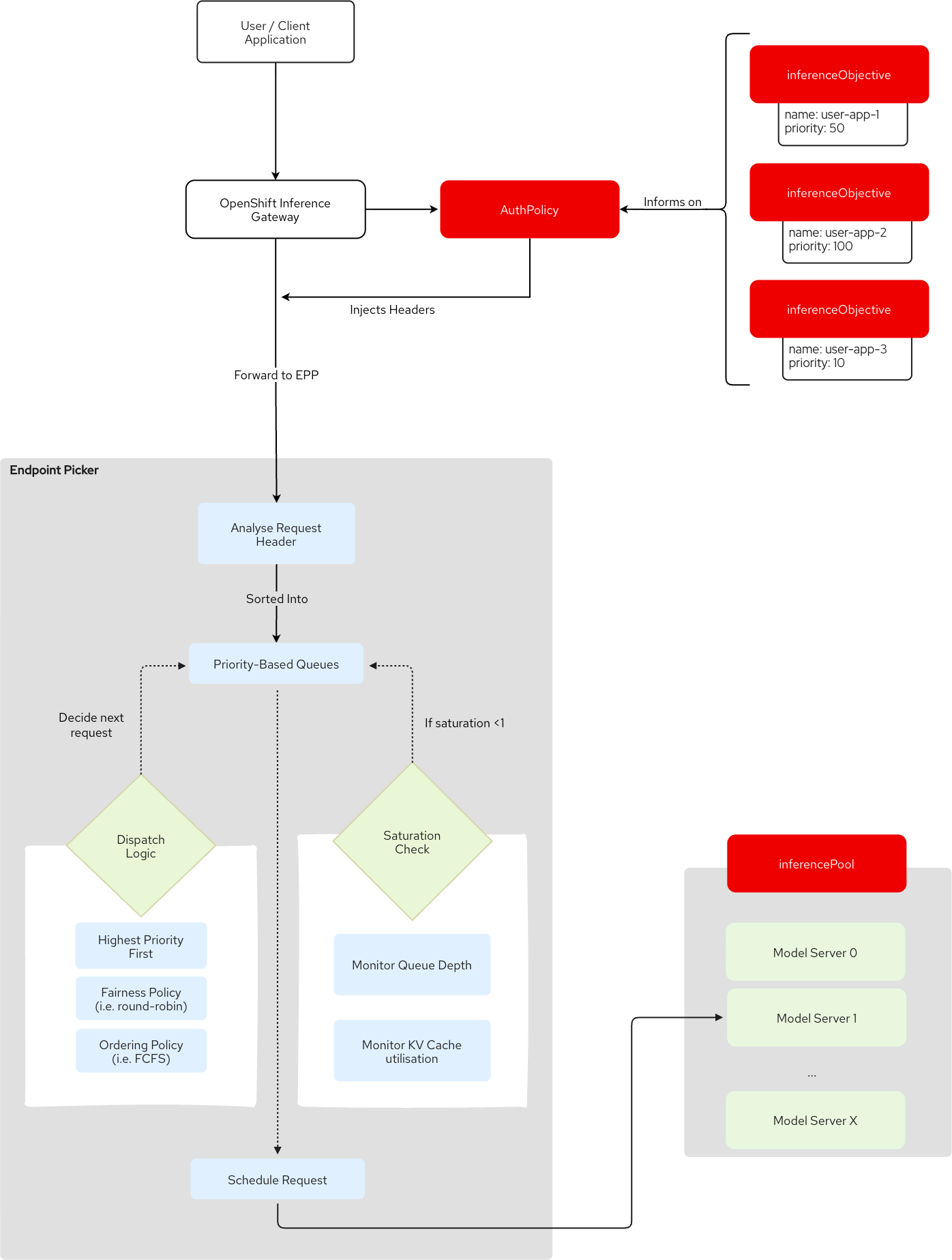
When a request arrives at the inference gateway, the following two headers are injected based on the request's authentication token.
x-gateway-inference-fairness-id: Groups requests from the same source.x-gateway-inference-objective: Maps the priority of the request viainferenceObjectiveresources.
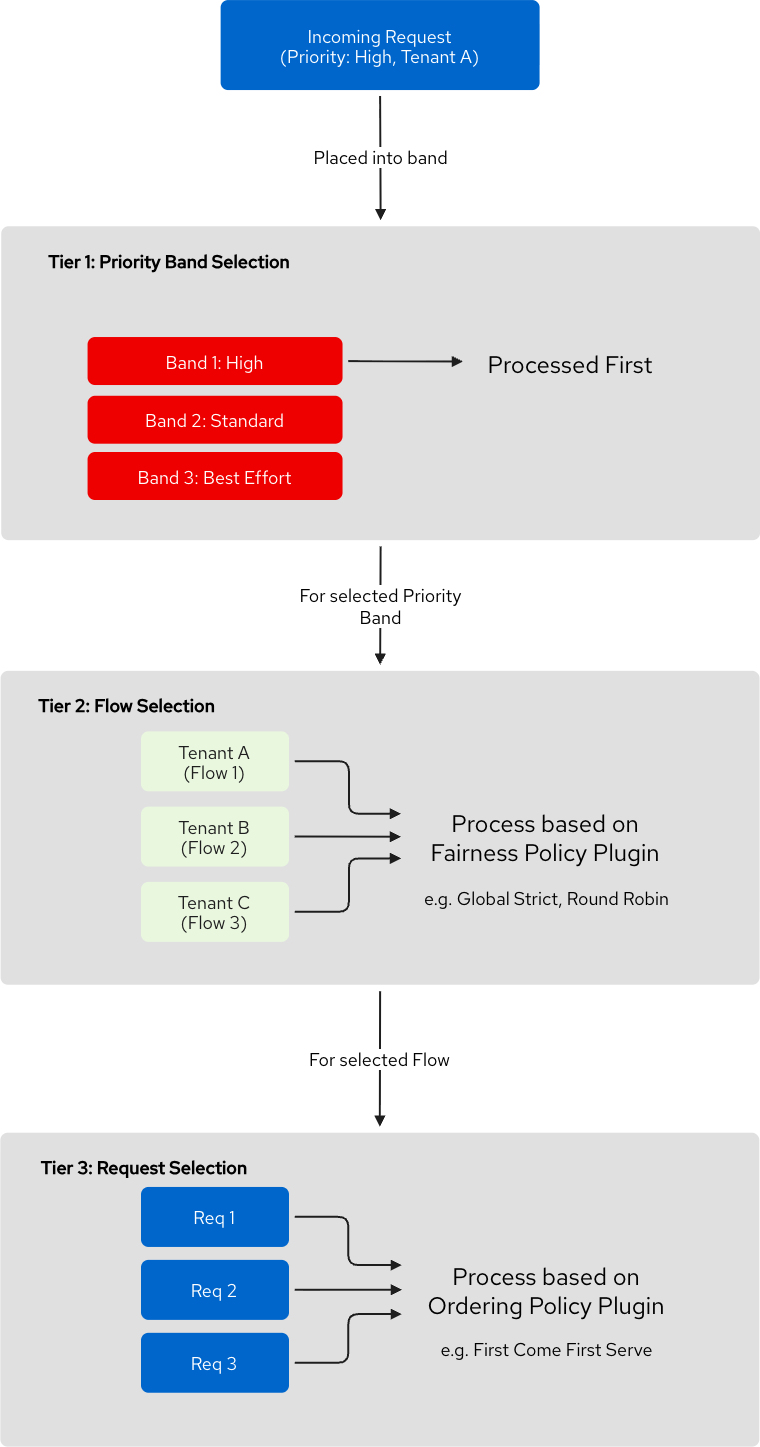
These headers combine to create a "flow key" that is assigned to the request. An in-memory queue is maintained for each flow key, and each flow key has a priority assigned to it. To route these requests, llm-d uses a routing component called the Endpoint Picker (EPP). The EPP traverses these in-memory queues in three ordered tiers to decide which request gets dispatched next to the inference pool. This can be seen in Figure 1.
- Priority: The highest priority queue always comes first.
- Fairness: Within a priority queue, the "fairness policy" determines which tenant (or flow) is chosen, for example, round-robin.
- Ordering: Within the flow, the "ordering policy" determines which request is chosen to dispatch, for example, first-come, first-served (FCFS).
Note
By default, the fairness policy is the global-strict-fairness-policy. This offers no tenant isolation and doesn't fix the noisy-neighbor problem. We recommend using the round-robin-fairness-policy, which is configured in the demonstration.
Figure 2 shows a broader flow of the request with these three tiers making up the dispatch logic. The Gateway’s AuthPolicy is informed by the inferenceObjectives, which injects the headers. llm-d’s EPP also includes a saturation detector that determines whether the inferencePool can take any more requests. Assuming it can, the request is scheduled to the most suitable model replica in the InferencePool.
Flow control provides a larger relative benefit the longer the requests are in the queues. The following demonstration shows this capability.
Get hands on
In this section, we deploy a single model replica with llm-d and flow control configured and then run two tests on it. Deployment takes approximately 10 minutes, and each test takes another 10 minutes.
Both tests send concurrent requests to the model, split 50% between high-priority and low-priority requests.
For both tests, wel compare each priority band of requests against two main metrics: Time to First Token (TTFT)—how quickly the first response appears—and End-to-End (E2E) latency—the total time to complete the request.
This approach demonstrates how high-priority requests are preferred and dispatched first. Results include the mean as well as P95 and P99 metrics, which represent the slowest requests.
In the first test, we compare the priority-band metrics when the model is not saturated. You'll see a 30% to 40% reduction in mean TTFT compared to low-priority requests.
In the second test, we compare metrics while the model is saturated and requests are queued. As mentioned before, the benefits of flow control increase the longer a request is queued. When the model is pushed to its limits, flow control reduces mean TTFT by about 90% and tail latency by nearly 40%
Find additional documentation in the llm-d-flowcontrol GitHub repository.
Prerequisites
- Red Hat OpenShift 4.20.0 or later with
cluster-adminaccess. - Red Hat OpenShift AI 3.4.0 or later
- Red Hat Connectivity Link 1.3.3 or later
- An NVIDIA L4 GPU or greater (minimum GPU memory: 24 GB)
- Authentication and authorization for an LLM inference service
Note
The benchmarking figures were produced on a single-node OpenShift installation with four NVIDIA L4 GPUs, though the test only used one. The results are typical of this configuration and not necessarily a demonstration of production-grade infrastructure.
Deploy a model with llm-d
Run the following commands:
git clone https://github.com/rh-aiservices-bu/llm-d-flowcontrol.git
cd llm-d-flowcontrol
helm install llmd-model helm-chart/
This deploys a single Qwen3.5-4B model replica using llm-d and configured with flow control.
oc get pods -n demo-llmd

NAME                                            READY   STATUS    RESTARTS   AGE
qwen-kserve-79c7cb4bf-dwtv7                     1/1     Running   0          1d12h
qwen-kserve-router-scheduler-5c5fb86c46-7rr2x   2/2     Running   0          1d12h
The deployment also creates two projects, serviceAccounts, and inferenceObjectives.
The projects and serviceAccounts demonstrate requests coming from two different sources. The inferenceObjectives map the priority to those sources. Notice how the name of the inferenceObjective matches the namespace of the serviceAccounts. This is required because the Gateway's AuthPolicy automatically injects the service account's namespace as the x-gateway-inference-objective header, which llm-d matches to the inferenceObjective.
For example:
oc get serviceAccounts -A -l app=llmd-demo

NAMESPACE      NAME             SECRETS   AGE
sa-high-prio   llm-inferencer   1         1d12h
sa-low-prio    llm-inferencer   1         1d12h

oc get inferenceObjective -n demo-llmd -l app=llmd-demo
NAME           INFERENCE POOL        PRIORITY   AGE
sa-high-prio   qwen-inference-pool   100        1d12h
sa-low-prio    qwen-inference-pool   10         1d12h
Run the unsaturated model test
Once the model is deployed and ready, you can run the first test. First, use the default configuration, which specifies max_tokens: 100. This model deployment can handle 120 concurrent requests with max_tokens set to 100, without hitting a saturation point. With short outputs, requests complete with minimal queuing.
# Install Python dependencies
pip3 install aiohttp pyyaml

cd flow-control-testing
tail -n 10 test_config.yaml

request:
  temperature: 0.7
  max_tokens: 100  # Same for both priorities
  top_p: 0.9
  timeout: 300
  stream: true

# Output Configuration
output:
  output_dir: trace_results
Start the test by running the following command:
python3 flow_control_test.pyOnce complete, the test outputs a summary comparing the set of high-priority requests to the low-priority set.
The output looks similar to:
===================================================================
📊 PRIORITY COMPARISON
===================================================================

📈 Request Volume:
  High-priority: 761 requests
  Low-priority: 666 requests

✅ Success Rates:
  High-priority: 100.0%
  Low-priority: 100.0%
  Difference: +0.0%

⏱️  End-to-End Latency (successful requests):
   High-priority mean: 18.91s
   Low-priority mean: 20.58s
   Difference: +8.1% (1.1x faster)

   High-priority P95: 33.43s
   Low-priority P95: 34.53s
   Difference: +3.2% (1.0x faster)

   High-priority P99: 36.76s
   Low-priority P99: 39.17s
   Difference: +6.2% (1.1x faster)

 ⚡ Time to First Token (successful requests):
   High-priority mean: 3.06s
   Low-priority mean: 4.50s
   Difference: +32.1% (1.5x faster)

   High-priority P95: 17.01s
   Low-priority P95: 18.05s
   Difference: +5.8% (1.1x faster)

   High-priority P99: 20.04s
   Low-priority P99: 22.58s
   Difference: +11.2% (1.1x faster)

 📈 Summary:
   ✅ High-priority TTFT 32.1% better
   ✅ High-priority mean latency 8.1% better
Run the saturated model test
Next, run the saturated model test. This demonstrates how the flow control configuration protects high-priority requests when other requests saturate the model.
To do this, increase max_tokens to 1500. This causes the model to take longer generating tokens per request, leading requests to queue up.
# On MacOS
sed -i '' 's,max_tokens: 100,max_tokens: 1500,g' test_config.yaml
# On Linux
sed -i 's,max_tokens: 100,max_tokens: 1500,g' test_config.yaml

tail -n 10 test_config.yaml

request:
  temperature: 0.7
  max_tokens: 1500  # Same for both priorities
  top_p: 0.9
  timeout: 300
  stream: true

# Output Configuration
output:
  output_dir: trace_results
Start the test by running the following command:
python3 flow_control_test.pyOnce complete, the test outputs a comparison summary.
===================================================================
📊 PRIORITY COMPARISON
===================================================================

📈 Request Volume:
  High-priority: 122 requests
  Low-priority: 100 requests

✅ Success Rates:
  High-priority: 100.0%
  Low-priority: 100.0%
  Difference: +0.0%

⏱️  End-to-End Latency (successful requests):
  High-priority mean: 142.85s
  Low-priority mean: 179.31s
  Difference: +20.3% (1.3x faster)

  High-priority P95: 166.55s
  Low-priority P95: 341.44s
  Difference: +51.2% (2.1x faster)

  High-priority P99: 189.19s
  Low-priority P99: 348.31s
  Difference: +45.7% (1.8x faster)

⚡ Time to First Token (successful requests):
  High-priority mean: 2.82s
  Low-priority mean: 51.92s
  Difference: +94.6% (18.4x faster)

  High-priority P95: 12.18s
  Low-priority P95: 267.68s
  Difference: +95.4% (22.0x faster)

  High-priority P99: 34.82s
  Low-priority P99: 268.48s
  Difference: +87.0% (7.7x faster)

📈 Summary:
  ✅ High-priority P95 latency 51.2% better
  ✅ High-priority TTFT 94.6% better
  ✅ High-priority mean latency 20.3% better
What our results tell us
The values presented in this section are the result of an average of 10 runs for each test to account for the variance and non-deterministic nature of LLMs. The results for the unsaturated model test show:
| Metric | Low priority | High priority | Improvement |
|---|---|---|---|
| Mean E2E latency | 21.0s | 19.0s | 9.6% faster |
| P95 E2E latency | 34.7s | 33.4s | 3.7% faster |
| P99 E2E latency | 41.6s | 36.2s | 13.0% faster |
| Mean TTFT | 4.7s | 2.9s | 37.4% faster |
| P95 TTFT | 18.1s | 17.0s | 6.1% faster |
| P99 TTFT | 24.8s | 19.5s | 21.5% faster |
The results for the saturated model test show:
| Metric | Low priority | High priority | Improvement |
|---|---|---|---|
| Mean E2E latency | 179.4s | 144.4s | 19.5% faster |
| P95 E2E latency | 344.0s | 172.4s | 49.9% faster |
| P99 E2E latency | 345.9s | 206.5s | 40.3% faster |
| Mean TTFT | 50.9s | 4.8s | 90.6% faster |
| P95 TTFT | 258.7s | 21.1s | 91.9% faster |
| P99 TTFT | 261.2s | 101.0s | 61.3% faster |
These results demonstrate the following key takeaways:
- Even when the model is unsaturated, flow control still benefits higher-priority requests, providing an approximate 37% reduction in mean TTFT.
- Flow control benefits increase significantly when models are saturated. This is especially clear in the tail-latency metrics, where an approximate 60 to 90% reduction in TTFT contributes to a 40% to 50% reduction in E2E latency.
In a real-world situation where a model is saturated, mean results demonstrate how enabling flow control makes the difference between a responsive user experience and a frustrating one.
P95 and P99 metrics highlight requests that might violate SLAs. Even in worst-case scenarios, flow control ensures the E2E latency of high-priority requests is approximately 60% of low-priority request latency.
Why use flow control in OpenShift AI
Red Hat OpenShift AI 3.4 includes flow control as a technology preview feature. Flow control introduces request management to LLM inference, enabling multitenant and multi-use-case models on shared infrastructure without compromising GPU use.
Key benefits include:
- Protected workload performance: TTFT and E2E metrics remain consistent for high-priority workloads, even during heavy model saturation. (Our tests showed 90% faster mean TTFT, 92% faster P95 TTFT).
- Maximized GPU use: High-priority workloads are always dispatched first, while low-priority traffic fills spare capacity to maximize GPU use without requiring dedicated GPU reservations to mitigate noisy neighbors.
- Authentication-based request priority: Priority assignments use OpenShift projects and service account tokens, requiring no code modifications for existing applications.
- Operational flexibility: Adding priority bands for new workloads requires creating a single OpenShift object, while updating ordering or fairness policies takes a single manifest update.
In our demonstration, configuring flow control yielded clear performance gains for high-priority requests:
- Mean TTFT: Approximately 37% faster in an unsaturated model
- Mean TTFT: Approximately 91% faster in a saturated model
- Tail TTFT and E2E latency: Approximately 75% faster tail TTFT (P95 and P99), contributing to an approximate 45% reduction in tail E2E latency in a saturated model
To explore further, read the OpenShift AI flow control documentation or deploy the hands-on demonstration using the llm-d flow control GitHub repository.

