Red Hat OpenShift has built container images with BuildConfigs for years. Builds for Red Hat OpenShift is the Kubernetes-native way to do the same work. Based on Shipwright, it runs builds without root privileges, and supports Buildah and source-to-image (S2I) strategies. Moving many BuildConfigs by hand is slow and easy to get wrong.
If your teams still build images with Red Hat OpenShift BuildConfigs, you can now convert them to builds for Red Hat OpenShift with a plug-in you install with a single command. This post takes a BuildConfig from the source cluster to a finished image on the target cluster. By the end, you have a converted build, know how to read its warnings, and know which BuildConfig features still need work by hand.
The plug-in is an upstream release of the Konveyor Crane project, a tool that moves application resources between Kubernetes clusters. It is not yet part of a supported Red Hat product.
What changed since January 2026
In January 2026, we announced a Developer Preview. That post turned a BuildConfig into a Shipwright build, the resource that builds for Red Hat OpenShift runs. You ran a separate crane convert command for it.
The conversion code now lives in its own plug-in, crane-plugin-buildconfig-to-builds. Its first release is v0.11.0, numbered to match the Crane release it works with. To fetch it from the Crane plug-in index, use the command:
$ crane plugin-manager add BuildConfigToBuildsPluginThe plug-in runs inside the export, transform and apply flow that Crane uses for the rest of a namespace. Your BuildConfigs move together with the Secrets, ConfigMaps and ServiceAccounts they need. The plug-in only reads and writes local files and never contacts a cluster, so you can read every converted build before anything reaches the target.
When the plug-in drops or changes a BuildConfig field, it writes a warning into the converted build and to the log. Each warning has a numbered entry in the support matrix, which says what happened and what to fix by hand. A BuildConfig the plug-in cannot convert stays in the output unchanged, with annotations that say why, and the run carries on.
What gets converted
Version 0.11.0 handles Git sources, image sources and binary sources. A binary source is local files you upload when the build starts, with oc start-build --from-dir or --from-file. The plug-in also carries over build args, environment variables, volumes, the builder image, output image labels, resource requests and limits, node selectors, timeouts and build history limits. Each BuildConfig strategy maps to a build strategy that the builds for Red Hat OpenShift operator installs:
| BuildConfig strategy | Builds for Red Hat OpenShift strategy | Outcome |
|---|---|---|
| Docker | buildah | Converted |
| Source-to-Image (S2I) | source-to-image | Converted |
| Custom | None | Skipped, left unchanged with annotations |
| JenkinsPipeline | None | Skipped, left unchanged with annotations |
Before you start
You need three things:
- A source cluster with the BuildConfigs you want to move, and
ocaccess to it. - A target cluster with the Builds for Red Hat OpenShift operator installed.
- Crane v0.11.0 or newer. Crane v0.11.0-alpha.1 also works. Earlier versions produce no Build.
The source and target can be the same cluster, as long as the Builds for Red Hat OpenShift operator is installed on it.
Try one of the Worked examples from the plug-in repository.
Example: Migrate a Docker build with a Git source
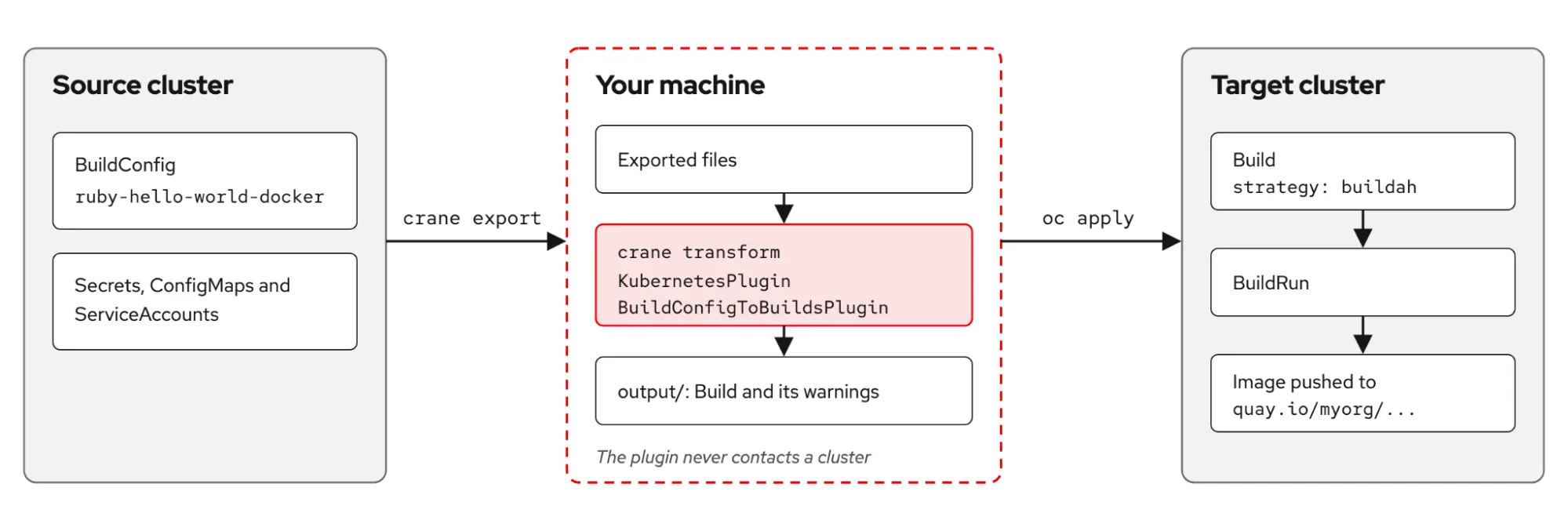
Using the same Ruby application as in the January article, BuildConfig can build ruby-hello-world from its own Dockerfile and push the image to an ImageStream. On the target cluster, the image goes to an external registry instead, as figure 1 shows.
Look at the BuildConfig
On the source cluster, in namespace buildconfig-test:
apiVersion: build.openshift.io/v1
kind: BuildConfig
metadata:
  name: ruby-hello-world-docker
  namespace: buildconfig-test
  labels:
    app: ruby-hello-world
    build-type: docker
spec:
  strategy:
    type: Docker
    dockerStrategy:
      dockerfilePath: Dockerfile
  source:
    type: Git
    git:
      uri: https://github.com/openshift/ruby-hello-world.git
      ref: master
  output:
    to:
      kind: ImageStreamTag
      name: ruby-hello-world:latest
    pushSecret:
      name: quay-push
  triggers:
    - type: ConfigChange
In this example, quay-push is a Secret in the same namespace that holds the credential for quay.io.
2. Install Crane
Download the binary for your platform from the Crane releases page. On Linux on x86:
$ CRANE_VERSION=v0.11.0
$ curl -Lo crane "https://github.com/migtools/crane/releases/download/${CRANE_VERSION}/crane_linux_amd64"
$ chmod +x crane
$ sudo mv crane /usr/local/bin/
$ crane version
The other downloads follow the pattern crane_<os>_<arch> (for example, crane_darwin_arm64).
3. Install the plug-in
The binary goes to $HOME/.local/share/crane/plugins, where crane transform finds it.
$ crane plugin-manager add BuildConfigToBuildsPlugin
$ crane plugin-manager list
4. Export, transform, and write the output
Log in to the source cluster, then run:
$ crane export -n buildconfig-test
$ crane transform KubernetesPlugin BuildConfigToBuildsPlugin \
 --optional-flags '{"registry-mapping":"image-registry.openshift-image-registry.svc:5000=quay.io/myorg"}'
$ crane apply
Here, crane export saves every resource in the namespace to local files, and then crane transform runs 2 plug-ins over those files. KubernetesPlugin is built into Crane and removes fields (such as uid and status) that would stop a resource from applying to another cluster. BuildConfigToBuildsPlugin converts the BuildConfigs.
The registry-mapping flag moves the output image off the internal OpenShift registry, which may not exist on the target, and onto quay.io/myorg. Replace myorg with your organization. Finally, crane apply writes the result to output/. Despite its name, it does not touch a cluster.
5. Read the build and its warnings
The Build is in output/resources/buildconfig-test/Build_shipwright.io_v1beta1_buildconfig-test_ruby-hello-world-docker.yaml:
apiVersion: shipwright.io/v1beta1
kind: Build
metadata:
  name: ruby-hello-world-docker
  namespace: buildconfig-test
  annotations:
    buildconfig-to-shipwright/conversion-outcome: converted-with-warnings
    buildconfig-to-shipwright/original-triggers: '[{"type":"ConfigChange"}]'
    crane.konveyor.io/conversion-warnings: |-
      [buildconfig-test/ruby-hello-world-docker] Output ImageStreamTag "ruby-hello-world:latest" resolved to fallback URL: quay.io/myorg/buildconfig-test/ruby-hello-world:latest
      [buildconfig-test/ruby-hello-world-docker] Output image for ImageStreamTag "buildconfig-test/ruby-hello-world:latest" was redirected off the internal registry to "quay.io/myorg/buildconfig-test/ruby-hello-world:latest"; the ImageStream will no longer be updated, so any Deployment or DeploymentConfig watching it to roll out will stop firing.
      [buildconfig-test/ruby-hello-world-docker] BuildConfig ruby-hello-world-docker uses runPolicy "Serial", which is dropped: OpenShift queued its builds and ran them one at a time, but Shipwright BuildRuns run concurrently. Serialize the runs in your CI/CD pipeline if build ordering matters, for example when several BuildRuns push the same image tag
      [buildconfig-test/ruby-hello-world-docker] BuildConfig ruby-hello-world-docker: ConfigChange trigger is dropped — the automatic first build will not happen; create a BuildRun manually once to start the first build.
      [buildconfig-test/ruby-hello-world-docker] Found 1 trigger(s) (ConfigChange) on BuildConfig ruby-hello-world-docker — none work in Shipwright today; builds must be started manually or by your own automation.
spec:
  output:
    image: quay.io/myorg/buildconfig-test/ruby-hello-world:latest
    pushSecret: quay-push
  paramValues:
  - name: dockerfile
    value: Dockerfile
  retention:
    failedLimit: 5
    succeededLimit: 5
  source:
    type: Git
    git:
      url: https://github.com/openshift/ruby-hello-world.git
      revision: master
  strategy:
    kind: ClusterBuildStrategy
    name: buildah
The Docker strategy became the Buildah strategy, and the Dockerfile path became a parameter. The Git source, the push secret and the labels carried over. The ImageStream output became a registry address on Red Hat Quay.io.
The 5 warnings are the to-do list for this build. The first 2 say the image goes to Red Hat Quay.io, so the ImageStream on the source cluster stops updating and any deployment that rolled out on it needs the new image address. The third says the Serial run policy, which ran one build at a time, is gone, so BuildRuns (the objects that run a build) can now run at the same time. The last 2 say the ConfigChange trigger is gone and no trigger runs builds today, so you start the first build yourself. Read them before you apply.
6. Apply to the target cluster and run the build
Log in to the target cluster, then run:
$ oc apply -R -f output/resources/
$ oc wait --for=jsonpath='{.status.registered}'=True \
  build.shipwright.io/ruby-hello-world-docker \
  -n buildconfig-test --timeout=120s
Because the trigger is gone, start the first build yourself:
$ cat <<'EOF' | oc create -f -
apiVersion: shipwright.io/v1beta1
kind: BuildRun
metadata:
  generateName: ruby-hello-world-docker-
  namespace: buildconfig-test
spec:
  build:
    name: ruby-hello-world-docker
EOF
# oc get buildrun -n buildconfig-test -w
The BuildRun runs as the pipeline service account, which the operator sets up. When it reaches Succeeded, the image is in quay.io/myorg/buildconfig-test/ruby-hello-world:latest. Our run took about a minute:
NAME                            SUCCEEDED   REASON      STARTTIME   COMPLETIONTIME
ruby-hello-world-docker-6bddt   True        Succeeded   62s         1s
Things to watch out for
First, write build.shipwright.io in oc commands, not build. On Red Hat OpenShift the short name build points at the OpenShift Build API, so oc get build shows the old builds and not your new build.
Second, oc apply may report an error for an ImageTag resource, specifically because spec is a required field during creation. Crane exports this resource along with the ImageStream, and the API refuses to create it. The build doesn't use it, so you can ignore the error or delete that file before you apply.
What the plug-in cannot convert yet
Some BuildConfig features have no match in builds for Red Hat OpenShift today. Custom and JenkinsPipeline strategies are skipped, and a Jenkins pipeline belongs in Red Hat OpenShift Pipelines. Webhook, ImageChange and ConfigChange triggers are dropped, and the trigger migration guide shows how to start builds from a webhook listener, a pipeline or a CronJob.
The known limitations page lists the rest, such as post-commit hooks, binary builds and Secrets used as build input, with a workaround for each.
Tell us how it handles your BuildConfigs
Run the plug-in against a copy of one namespace and read the warnings it writes. Then open an issue with the BuildConfig, with names and secrets removed, and the warnings you got. We want this feedback before we decide what the plug-in converts next.
Try it out, and report your BuildConfig results in the plug-in repository.

