In Trace Kubernetes resources for llm-d model serving, we generated the custom resources needed for llm-d model serving. But what actually happens inside your cluster when a prompt arrives? In this post, we follow a request from the ingress gateway down to individual vLLM pods to see how Kubernetes custom resources make real-time routing decisions.
Prefer a visual overview? Watch the following video to see how KServe and llm-d set up back-end resources, track KV cache locality, and route incoming traffic.
The llm-d endpoint picker
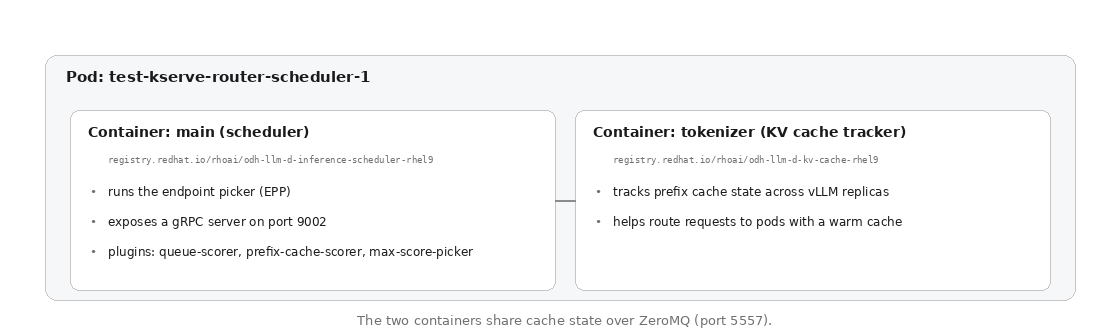
The scheduler configuration creates an endpoint picker (EPP) pod. The scheduler pod runs the endpoint picker, the process that decides which vLLM pod each request goes to. Its resource name is test-kserve-router-scheduler.
kubectl get pod -n llm-test -l app.kubernetes.io/component=llminferenceservice-router-scheduler
NAME                           READY   STATUS    test-kserve-router-scheduler   2/2     Running
There are two containers inside the scheduler pod.
Container 1: main (scheduler):
- Image:
registry.redhat.io/rhoai/odh-llm-d-inference-scheduler-rhel9 - Runs the endpoint picker (EPP), which determines which backend pod to use.
- Exposes a gRPC server on port 9002.
- Implements routing plug-ins:
queue-scorer,prefix-cache-scorer, andmax-score-picker.
Container 2: tokenizer (KV cache tracker):
- Image:
registry.redhat.io/rhoai/odh-llm-d-kv-cache-rhel9 - Tracks prefix cache state across vLLM replicas.
- Helps the scheduler route requests to pods with matching cache for better latency.
As shown in Figure 1, the scheduler pod contains two containers that share state over ZeroMQ.
Envoy ext-proc
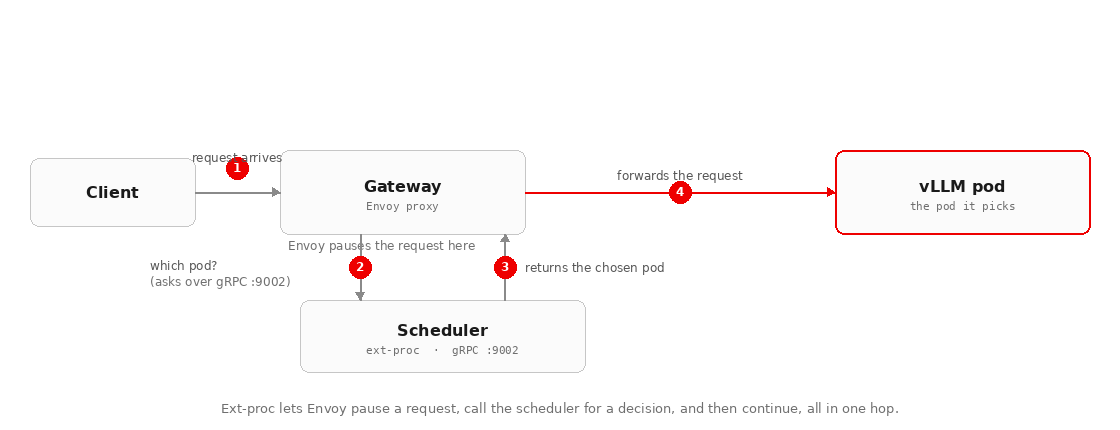
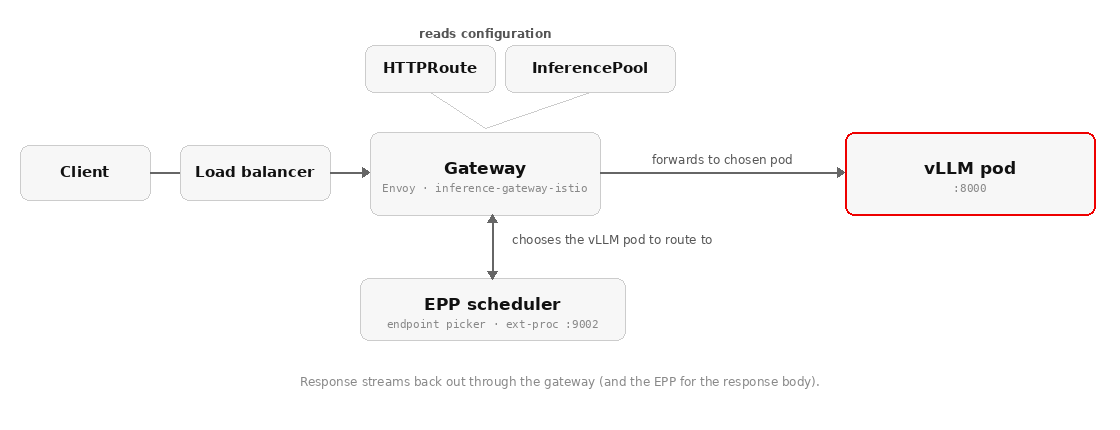
The scheduler acts as an Envoy external processor (ext-proc). The ext-proc feature lets Envoy call an external gRPC service and act on the response before continuing to process the request. In practice, when a request arrives at the gateway, Envoy processes it, calls the scheduler over gRPC to ask which backend to use, and forwards the request to the pod the scheduler picks.
The ext-proc interaction between Envoy and the scheduler is illustrated in Figure 2.
Inference resources
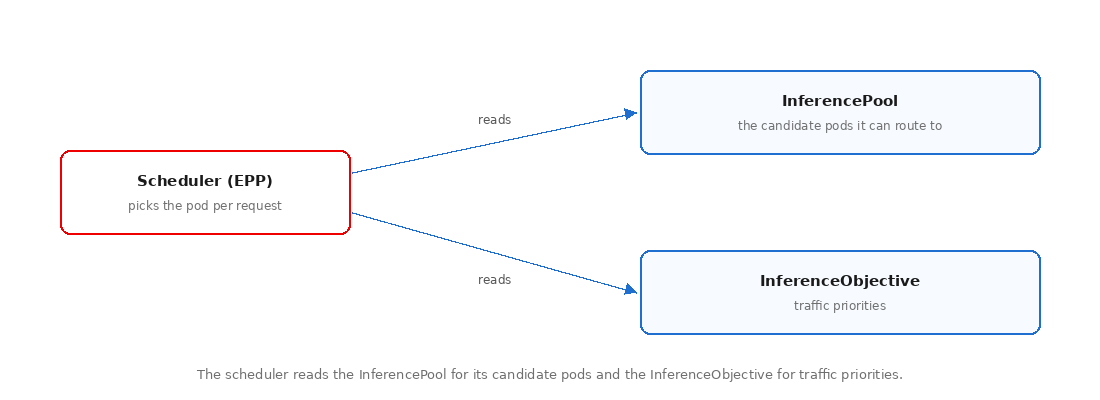
To make intelligent routing decisions, the scheduler uses resources that answer two questions: which pods it can route to, and how different requests should be prioritized. It reads each answer from its own Kubernetes custom resource:
InferencePool: The set of back-end pods to choose from, grouping the model's vLLM pods into a single target.InferenceObjective(optional): Defines traffic priorities. This basic deployment does not create anInferenceObjective, so every request receives equal treatment. The scheduler has permission to watch for them, and priorities take effect when added at scale.
Figure 3 shows how the EPP scheduler reads both custom resources to determine routing decisions.
Add an InferenceObjective when you need traffic priorities—for example, to keep latency-sensitive requests ahead of batch work under load.
An objective takes effect per request rather than globally. A client selects an objective by setting the x-gateway-inference-objective header to the objective's name (for example, high-priority). The scheduler then applies that objective's priority when it picks an endpoint, so higher-priority requests are favored when the pool is under load. Requests that omit the header fall back to the default treatment.
To add an InferenceObjective, apply the following configuration:
apiVersion: inference.networking.x-k8s.io/v1alpha2
kind: InferenceObjective
metadata:
  name: high-priority
  namespace: llm-test
spec:
  priority: 100          # higher value = more critical
  poolRef:
    name: test-inference-pool
    group: inference.networking.k8s.io
An InferenceObjective defines routing priorities in your cluster, which incoming requests invoke by passing a custom header.
x-gateway-inference-objective: high-priorityThe scheduler reads the header, looks up the matching InferenceObjective, and uses its priority to decide which queued request to dispatch first. A request without an objective defaults to priority zero, which is why every request in this deployment receives equal treatment.
Gateway watch permissions
The scheduler Role has watch permissions and reads both resources directly from the Kubernetes API, illustrating how the Gateway API Inference Extension works with Istio. The gateway pod does not have permission to access these resources. The Istio control plane (istiod) reads the InferencePool from Kubernetes and compiles it into the gateway configuration. The gateway pod itself never reads from the Kubernetes API. This compiled configuration instructs the gateway to call the scheduler.
| Component | InferencePool | InferenceObjective | Direct Kubernetes API access |
Scheduler (EPP)
| Watches | Watches | Yes (RBAC) |
istiod Istio control plane | Watches, compiles | No | Yes |
Gateway pod (Envoy)
| Via istiod's config | No | No |
With the scheduler and InferencePool established, examine their configuration and implementation details.
Inference pool
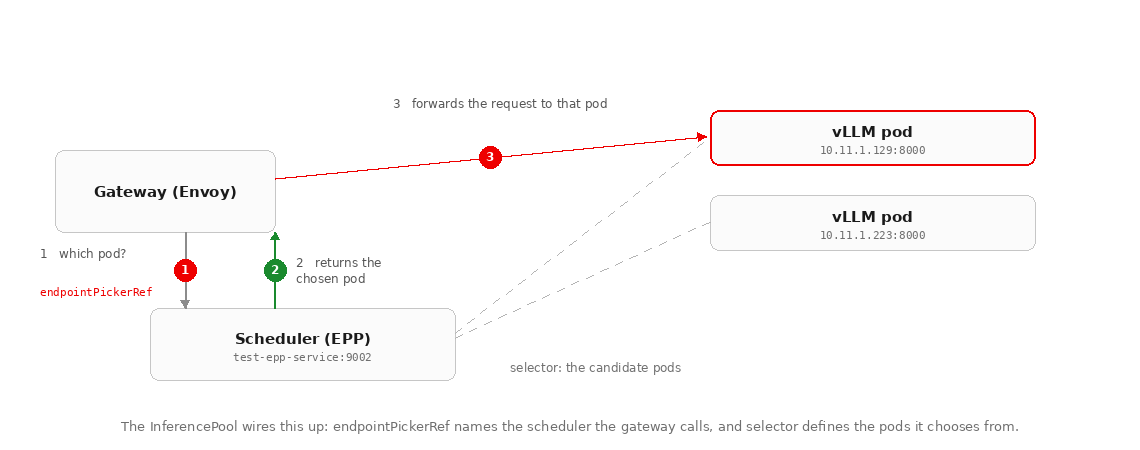
The InferencePool is a configuration resource that tells Envoy which endpoint picker to call and contains a selector to identify available backend pods.
kubectl get inferencepool test-inference-pool -n llm-test -o yamlapiVersion: inference.networking.k8s.io/v1
kind: InferencePool
metadata:
name: test-inference-pool
namespace: llm-test
spec:
endpointPickerRef:
failureMode: FailOpen
kind: Service
name: test-router-epp-service
port:
number: 9002
selector:
matchLabels:
app.kubernetes.io/name: test
kserve.io/component: workload
targetPorts:
- number: 8000The relationship between the InferencePool and the scheduler is depicted in Figure 4.
Failure modes
When you set failureMode: FailOpen, the gateway falls back to standard load balancing if the endpoint picker becomes unreachable. This keeps the system available even if intelligent routing breaks.
The alternative option is FailClose, which drops requests if the endpoint picker is unavailable. Choose FailClose when a request must never be served without the scheduler's decision, trading availability for that guarantee.
Service
The InferencePool creates a dynamic Service resource.
kubectl get svc -n llm-test | grep inference-pool
test-inference-pool-ip   ClusterIP   None   8000/TCP
The InferencePool gets its own backing Service so that the gateway has a stable in-cluster address for the pool, even though the routing decision itself is made by the scheduler.
Routing the request
The HTTPRoute connects an incoming request to the correct backend. It matches the request's URL path and forwards it to the InferencePool, which points the gateway at the scheduler. This is also where the shared gateway component plugs in.
Figure 5 demonstrates how the HTTPRoute matches and rewrites the incoming request URL path.
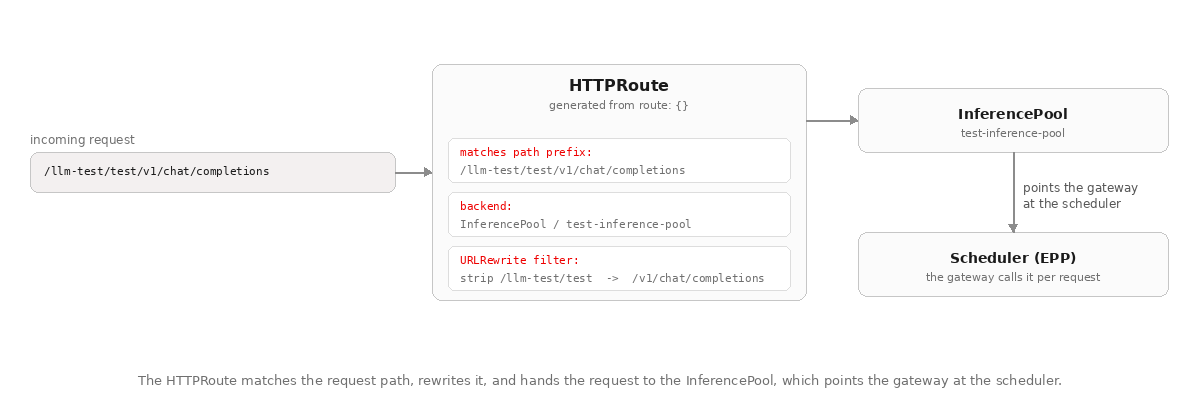
Mapping external URL paths to the InferencePool makes the model reachable at a predictable address, such as /llm-test/test-router/v1/chat/completions, rather than an internal pod IP.
Remember that we specified route: {} in the YAML, and the controller generated the routing rules automatically:
kubectl get httproute test-kserve-route -n llm-test -o yamlapiVersion: gateway.networking.k8s.io/v1
kind: HTTPRoute
metadata:
name: test-kserve-route
namespace: llm-test
spec:
parentRefs:
- group: gateway.networking.k8s.io
kind: Gateway
name: inference-gateway
namespace: redhat-ods-applications
rules:
- matches:
- path:
type: PathPrefix
value: /llm-test/test-router/v1/chat/completions
backendRefs:
- group: inference.networking.k8s.io
kind: InferencePool
name: test-inference-pool
port: 8000
filters:
- type: URLRewrite
urlRewrite:
path:
replacePrefixMatch: /v1/chat/completionsWhat the URL rewriting does
External clients call http://loadbalancer/llm-test/test-router/v1/chat/completions.
Then, the HTTPRoute strips the namespace and service prefix and forwards the request to Envoy. Envoy calls the EPP configured by the InferencePool to select a backend, like http://pool:8000/v1/chat/completions.
The HTTPRoute attaches to the platform's inference-gateway (configured in part 1).
kubectl get gateway inference-gateway -n redhat-ods-applications -o yamlapiVersion: gateway.networking.k8s.io/v1
kind: Gateway
metadata:
name: inference-gateway
namespace: redhat-ods-applications
spec:
gatewayClassName: istio
listeners:
- name: http
port: 80
protocol: HTTP
allowedRoutes:
namespaces:
from: All
status:
addresses:
- type: Hostname
value: inference-gateway-xyz.elb.us-east-1.amazonaws.com
listeners:
- attachedRoutes: 1
conditions:
- type: Programmed
status: "True"
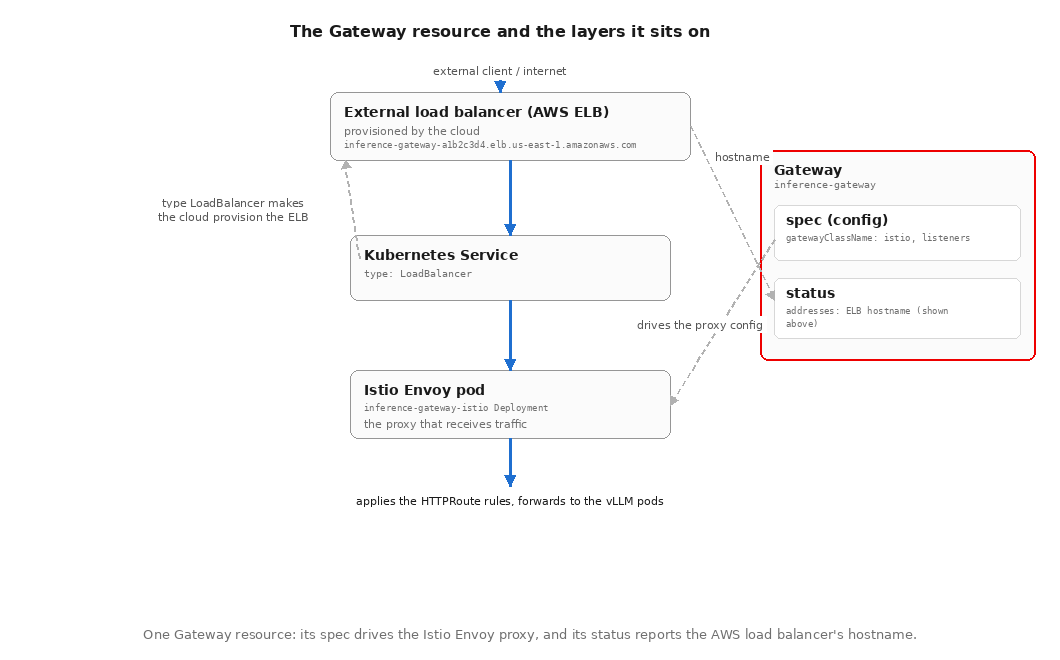
name: httpThere are two fields to pay attention to in the status block. First, the addresses field displays the external hostname the cloud provider assigned to your gateway. Clients send requests to this external hostname.
Second, the attachedRoutes: 1 field confirms the HTTPRoute you created is properly registered with the gateway.
The complete request path through the infrastructure layers is mapped out in Figure 6.
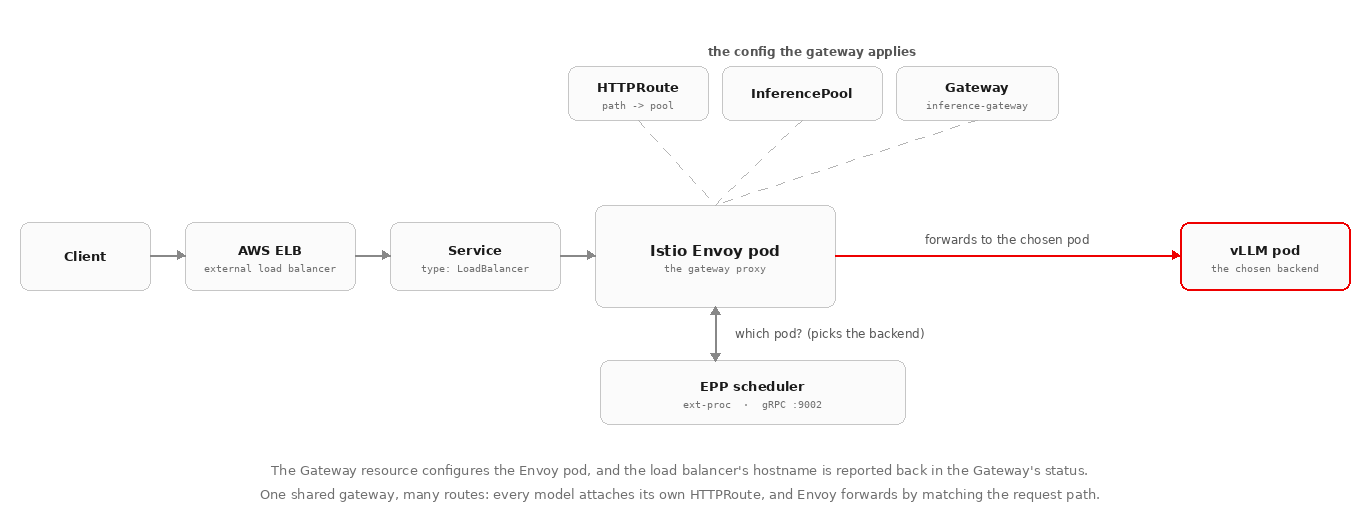
Let's break down the gateway layers.
- The gateway resource (
inference-gateway) contains the configuration and the status of the external address shown above. - The Gateway configuration is used by the Istio Envoy pod (via the
inference-gateway-istioDeployment). - The Istio Envoy pod is the proxy that receives incoming traffic and applies the
HTTPRouterules. - In front of the Istio Envoy pod is a Kubernetes Service of type
LoadBalancer. - The
LoadBalancertype triggers the cloud's controller to provision the external load balancer (an AWS ELB here). - The external load balancer's hostname appears in the gateway status.
The result is one gateway, many HTTPRoute resources.
- Every inference service in the cluster attaches its own
HTTPRouteto this shared gateway. - The Envoy proxy evaluates each of the routes.
- When the matched route's backend is an
InferencePool, the Envoy proxy calls the endpoint picker scheduler. - The scheduler responds by picking the appropriate endpoint.
- The Envoy proxy then forwards to the chosen pod.
Figure 7 illustrates the Gateway resource and its underlying infrastructure layers.
The endpoint picker Service
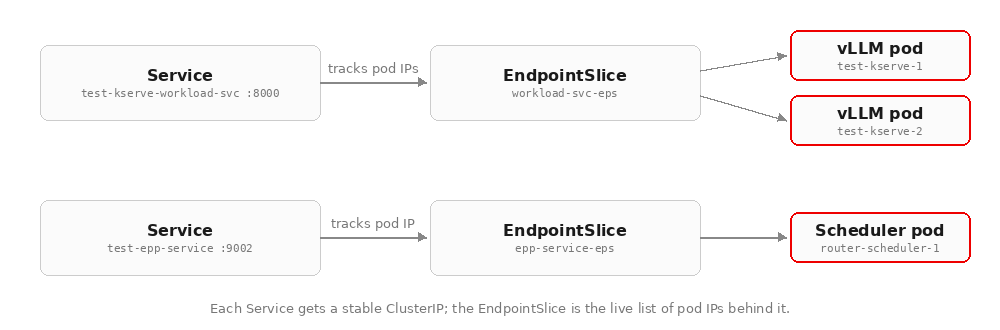
The Service for the endpoint picker scheduler pod provides a stable ClusterIP address for the gateway to call. The EndpointSlice contains the live list of pod IPs behind the Service, allowing traffic sent to the stable address to reach the running scheduler pod.
kubectl get svc test-router-epp-service -n llm-test -o wide
NAME               TYPE        CLUSTER-IP       PORT(S)
test-router-epp-service   ClusterIP   172.20.243.216   9002/TCP,9003/TCP,9090/TCP,5557/TCP
Ports:
- 9002: gRPC endpoint picker scheduler
- 9003: Health checks
- 9090: Prometheus metrics
- 5557: ZeroMQ channel that the scheduler (main) and the KV cache tracker (tokenizer) use to share prefix-cache state
Figure 8 displays how Service and EndpointSlice resources map stable IP addresses to backend pods.
Traffic policy (Istio)
A DestinationRule is an Istio resource that sets the policy for how traffic reaches a service once the decision of where to send it has already been made. Three rules configure how Istio handles traffic to the scheduler, the workload, and a shadow service:
kubectl get destinationrule -n llm-test
NAME
test-kserve-scheduler
test-kserve-shadow-svc
test-kserve-workload-svc
Behind the scenes, these DestinationRule resources manage connection pooling, circuit breakers, and mutual TLS. Istio keeps your pod-to-pod traffic encrypted and steady under load without requiring manual tuning.
Note
The shadow-svc rule covers shadow traffic. Istio can mirror live requests to another target without affecting the real response, which is useful for A/B testing. The platform sets up the policy; mirroring only happens if you enable it.
Identity and security
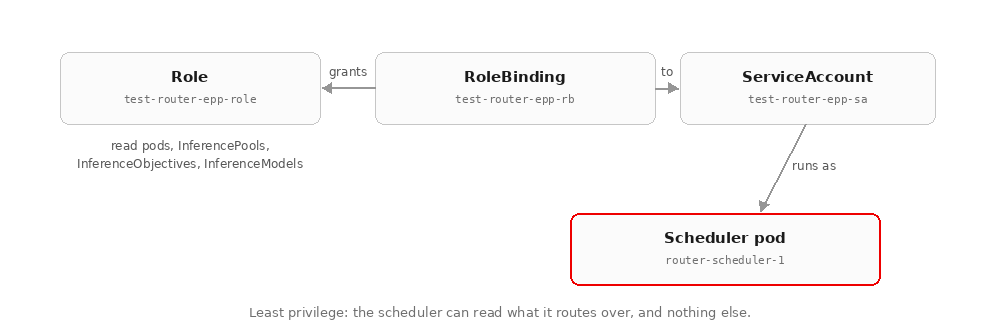
The scheduler runs with a least-privilege identity, meaning it can read the pods and routing resources it needs to make decisions, but cannot create, update, or delete anything. Role, RoleBinding, ServiceAccount, and Secret resources coordinate to make sure the platform resources are secure.
The RBAC relationship for the scheduler pod identity is shown in Figure 9.
Role and RoleBinding
The scheduler needs permission to watch pods, endpoints, and the InferencePool and InferenceObjective resources. A Role grants those read permissions, and a RoleBinding attaches the Role to the scheduler's ServiceAccount.
Role
kubectl get role test-router-epp-role -n llm-test -o yaml
rules:
- apiGroups: [""]
  resources: ["pods", "endpoints"]
  verbs: ["get", "list", "watch"]
- apiGroups: ["inference.networking.k8s.io", "inference.networking.x-k8s.io"]
  resources: ["inferencepools", "inferenceobjectives"]
  verbs: ["get", "list", "watch"]
RoleBinding
kubectl get rolebinding test-router-epp-rb -n llm-testThe RoleBinding binds the Role to the ServiceAccount.
 apiVersion: rbac.authorization.k8s.io/v1
  kind: RoleBinding
  metadata:
    name: test-router-epp-rb
    namespace: llm-test
  roleRef:
    apiGroup: rbac.authorization.k8s.io
    kind: Role
    name: test-router-epp-role
  subjects:
  - kind: ServiceAccount
    name: test-router-epp-sa
    namespace: llm-test
ServiceAccount
The ServiceAccount provides the identity for the scheduler pod. It cannot grant permissions by itself; it is simply the subject that the Role and RoleBinding attach access to.
kubectl get sa test-router-epp-sa -n llm-test apiVersion: v1
kind: ServiceAccount
metadata:
name: test-router-epp-sa
namespace: llm-testSecret
The Secret object holds a self-signed TLS certificate and key that the controller generates and mounts automatically to encrypt communication between platform components.
kubectl get secret test-router-kserve-self-signed-certs -n llm-testapiVersion: v1
kind: Secret
metadata:
annotations:
certificates.kserve.io/expiration: "2034-07-04T18:22:06Z"
name: test-router-kserve-self-signed-certs
namespace: llm-test
ownerReferences:
- apiVersion: serving.kserve.io/v1alpha2
kind: LLMInferenceService
name: test-router
type: kubernetes.io/tls
data:
ca.crt: <base64-encoded>
tls.crt: <base64-encoded>
tls.key: <base64-encoded>How a request flows through the stack
Putting it all together, we can see the full request path. As summarized in Figure 10, the request completes an end-to-end traversal of the entire serving stack.
Testing the stack
To test locally, port-forward the gateway.
kubectl port-forward -n redhat-ods-applications svc/inference-gateway-istio 8080:80Check that the model is accessible.
curl -s http://localhost:8080/llm-test/test-router/v1/models | jq .
{
  "object": "list",
  "data": [{
    "id": "Qwen/Qwen2.5-0.5B-Instruct"
  }]
}
Send an inference request.
curl -X POST http://localhost:8080/llm-test/test-router/v1/chat/completions \
  -H "Content-Type: application/json" \
  -d '{
    "model": "Qwen/Qwen2.5-0.5B-Instruct",
    "messages": [{"role": "user", "content": "Say hello"}],
    "max_tokens": 50
  }' | jq .
{
  "id": "chatcmpl-d7a03327-4974-47b8-b195-5c7403d3f59d",
  "object": "chat.completion",
  "model": "Qwen/Qwen2.5-0.5B-Instruct",
  "choices": [{
    "index": 0,
    "message": {
      "role": "assistant",
      "content": "Hello! How can I assist you today?"
    },
    "finish_reason": "stop"
  }],
  "usage": {
    "prompt_tokens": 31,
    "total_tokens": 41,
    "completion_tokens": 10
  }
}
Use request ID d7a03327-4974-47b8-b195-5c7403d3f59d to check the scheduler logs and verify that it received the request:
kubectl logs -n llm-test test-kserve-router-scheduler-1 -c main | grep d7a03327
{
  "level": "debug",
  "caller": "handlers/server.go:214",
  "msg": "EPP received request",
  "x-request-id": "d7a03327-4974-47b8-b195-5c7403d3f59d"
}
{
  "level": "debug",
  "caller": "handlers/server.go:390",
  "msg": "EPP sent response body back to proxy",
  "x-request-id": "d7a03327-4974-47b8-b195-5c7403d3f59d"
}
The log output shows that Envoy asked the EPP router for a routing decision, the EPP router responded with the chosen backend, and Envoy forwarded the request. The whole stack is working!
Key takeaways
- One YAML, many resources: The controller orchestrates workload, routing, RBAC, and networking from a single declarative specification.
- Routing is an additional layer for serving: vLLM pods handle inference, while the scheduler handles which pod receives which request.
- KServe uses intelligent llm-d defaults: Specifying
route: {}andgateway: {}generatesHTTPRouterules, URL rewriting, and gateway attachment automatically. - One gateway, many
HTTPRouteresources: Every inference service attaches its ownHTTPRouteto the single shared gateway, giving platform owners precise control over incoming public requests. - The platform, not the model, owns the experience at scale: Decisions about which pod serves a request, how failures are contained, and how traffic is prioritized all happen at the routing layer.
At production scale, inference becomes a routing, capacity, failure management, and priority enforcement problem. Red Hat AI Inference provides that routing layer as part of the platform with llm-d, handling routing decisions based on capacity, cache state, and traffic priorities.
| Component | Version |
| Red Hat AI Inference | 3.4.0 |
| vLLM | 0.18.0+rhaiv.7 |
| RHAI Operator | XKS 3.4.0 |
| Cloud Manager Operator | 3.4.0 (same image as RHAI operator) |
| llm-d inference scheduler | 0.7.1 |
| llm-d workload variant autoscaler | 0.6.0 |
| Gateway API | 1.4.0 |
| Gateway API inference extension | 1.3.1 |
| Istio | 1.27.8_ossm |
| Sail operator | 3.2.3 |
| cert-manager | 1.18.4 |
| LWS (Leader Worker Set) | 0.7.0 |
| KServe (LLMISvc controller) | 0.17.0 |
| EKS (Kubernetes) | 1.34.8-eks |
| Helm chart | 0.1.20887+863cde804 |
Ready to optimize your model-serving stack? Dive into these guides and community repositories to experiment with custom routing policies and KServe configurations:
- Combining KServe and llm-d for optimized generative AI inference (Red Hat Developer)
- LLMInferenceService configuration guide (KServe docs)
- Understanding LLMInferenceService (KServe docs)
- llm-d (the routing project)

