Most public LLM discussion centers on interactive inference—chatbots, coding assistants, agents—where latency is the headline, but production traffic is wider.
In production, teams run heavy-duty tasks: model evaluations, dataset scoring, massive embeddings for retrieval-augmented generation (RAG), backfills when policies or model versions change. These workloads are deadline-driven, not latency-sensitive. That is what batch is for: work the platform can advance when accelerator utilization is low, keep in the background relative to real-time users, and throttle or defer when interactive demand spikes—while still finishing inside an agreed window.
A job that finishes 50,000 prompts in four hours is equivalent to one that finishes in 20 minutes if both meet the same SLO. This difference creates a clear optimization opportunity: offline workloads can use spare GPU capacity, yield to interactive traffic during spikes, and align with pricing models such as differential batch rates.
Without a dedicated batch layer, operators often script loops against a chat endpoint, which scales poorly and leaves cancel, recovery, and alignment with cluster security and rate limits largely ad hoc.
Introducing the llm-d batch gateway
The llm-d batch gateway is a Kubernetes-native batch inference service that plugs into the same llm-d inference stack managed by Red Hat OpenShift AI. It addresses that gap with OpenAI-compatible /v1/batches and /v1/files, so existing clients can target your cluster without a parallel batch stack. Batch work follows the same OpenShift AI path as online traffic, including existing LLMInferenceService backends, with Red Hat Connectivity Link at the gateway for authentication, policy enforcement, and rate control.
In this article, we look at the architecture of the llm-d batch gateway, its integration with OpenShift AI and Connectivity Link, and the end-to-end workflow from job submission to result retrieval.
Background information
To understand how batch workloads operate efficiently, it helps to look at the underlying platform architecture and the limitations of traditional setups.
llm-d and Red Hat OpenShift AI
llm-d is an open source, Kubernetes-native platform for LLM inference featuring intelligent request routing, KV cache-aware scheduling, and disaggregated prefill/decode. Combined with Red Hat OpenShift AI, it powers production-grade online inference through the LLMInferenceService custom resource—which automatically provisions model servers, an Endpoint Picker (EPP) for prefix-aware routing, and Gateway API HTTPRoute resources.
The batch inference gap
While llm-d excels at interactive inference, production environments also need a way to handle high-volume offline workloads efficiently. Without a dedicated batch layer, teams typically resort to scripting loops of individual API calls—losing job-level lifecycle management, fault tolerance, and the ability to control how batch traffic interacts with interactive traffic on shared GPU resources.
The OpenAI Batch API standard
The OpenAI Batch API has established a widely adopted contract for batch inference: upload a JSONL input file, submit a batch job, poll for progress, and download results. The llm-d batch gateway implements the OpenAI-compatible contract (/v1/batches, /v1/files), so clients built for that contract can target a private gateway with the same paths and payloads—typically after changing only base URL, TLS, and authentication settings.
Core components
The platform relies on a distributed architecture where components share hardware resources but remain independent at the control plane.
Architecture overview
The batch gateway coexists with OpenShift AI's interactive inference stack on the same OpenShift cluster, sharing the Gateway API ingress while maintaining full separation of concerns (Figure 1).
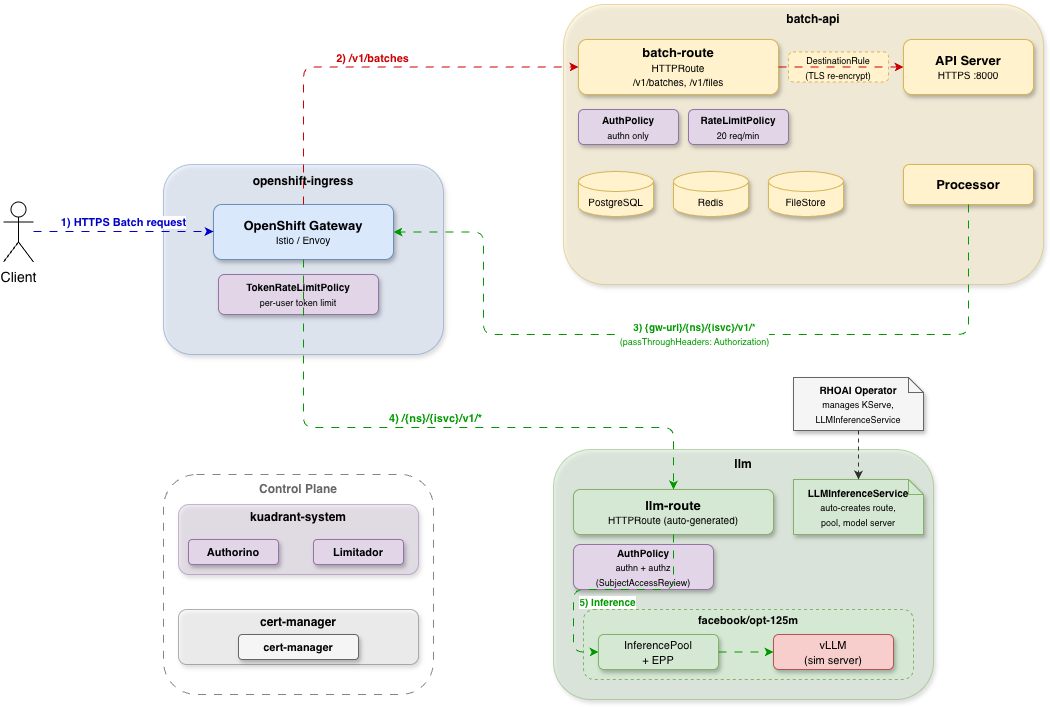
There are two traffic paths through the gateway:
- Interactive path: OpenShift AI automatically creates an
HTTPRoutefor eachLLMInferenceService. Requests flow to the llm-d Endpoint Picker (EPP), which applies prefix-aware routing to maximize KV cache hit rates before forwarding to vLLM worker replicas. - Batch path: A dedicated
HTTPRouteroutes/v1/batchesand/v1/filesto the batch gateway API server. The processor then asynchronously dispatches individual inference requests to theLLMInferenceServicebackend—the same model pods that serve interactive traffic.
Both paths share the same gateway and the same model pods, but each has its own security policies (AuthPolicy, RateLimitPolicy) and independent scaling. This means batch processing benefits from the same llm-d optimizations—KV cache-aware routing, disaggregated prefill/decode—that interactive workloads enjoy.
Batch gateway internals
The batch gateway itself consists of three distinct control components that manage the data lifecycle.
| Component | Role |
|---|---|
| API server | OpenAI-compatible REST API for /v1/batches and /v1/files. Accepts job submissions, tracks progress, and serves results. |
| Processor | Pulls jobs from a priority queue, builds per-model execution plans, dispatches requests to the inference backend within configured concurrency limits, and writes successful or failed lines to output or error files for final upload. |
| Garbage collector | Periodically removes expired files and cleans up completed batch resources. |
The data layer uses PostgreSQL for job and file metadata, Redis for the priority queue and event channels (cancellation and status updates), and file system or Amazon S3 bucket for input and output file storage.
Integration with OpenShift AI
The integration between the batch gateway and OpenShift AI is straightforward. The processor uses a model-to-URL mapping configuration, defined in modelGateways, that points each model name to the internal URL of the corresponding LLMInferenceService. When the processor dispatches a batch request, it sends a standard OpenAI-format inference request to that URL—matching the exact format used by interactive clients.
Because the batch gateway treats the LLMInferenceService as an OpenAI-compatible endpoint, it operates without needing detailed knowledge of vLLM, KV cache, or EPP internals. Adding a new model requires only a minor configuration change in the modelGateways parameter to map the new model name to its destination URL. No application code changes are needed, though you must restart the processor to apply the updated mapping.
Additionally, the pipeline forwards the caller's Authorization header directly to the inference backend using the passThroughHeaders parameter. This configuration allows the same Kubernetes role-based access control (RBAC) policies to apply to both interactive and batch requests.
Workflows and processes
Developers can interact with the batch ecosystem using standard tools and predictable execution paths.
User workflow
From the user's perspective, the batch gateway follows the same four-step workflow as the OpenAI Batch API:
Upload an input file. The input file is a JSONL file where each line represents one inference request:
{"custom_id": "req-1", "method": "POST", "url": "/v1/chat/completions", "body": {"model": "facebook/opt-125m", "messages": [{"role": "user", "content": "What is Kubernetes?"}]}}
{"custom_id": "req-2", "method": "POST", "url": "/v1/chat/completions", "body": {"model": "facebook/opt-125m", "messages": [{"role": "user", "content": "Explain KV cache."}]}}
Upload it via the Files API:
curl -X POST https://<gateway>/v1/files \
  -H "Authorization: Bearer ${TOKEN}" \
  -F "purpose=batch" -F "file=@input.jsonl"
Create a batch job. Submit the file ID to create a batch:
curl -X POST https://<gateway>/v1/batches \
  -H "Authorization: Bearer ${TOKEN}" \
  -H "Content-Type: application/json" \
  -d '{"input_file_id": "file-abc123", "endpoint": "/v1/chat/completions", "completion_window": "24h"}'
Poll for status. The job progresses through states:
validating→in_progress→completed(orfailed,expired,cancelled). Clients can poll or cancel at any point:# Check status curl https://<gateway>/v1/batches/batch-xyz789 -H "Authorization: Bearer ${TOKEN}" # Cancel if needed curl -X POST https://<gateway>/v1/batches/batch-xyz789/cancel -H "Authorization: Bearer ${TOKEN}"Download results. When the job completes (or ends with partial success), retrieve the output file and, if the job produces one, the error file—both use the JSONL format.
The output file has one line per successful request, typically containing the full inference response and token use. The error file has one line per failed or undispatched request, including error details and the corresponding
custom_idso you can reconcile against your input.{"id": "batch_req_...", "custom_id": "req-1", "response": {"status_code": 200, "body": {"choices": [{"message": {"content": "..."}}], "usage": {"prompt_tokens": 12, "completion_tokens": 64, "total_tokens": 76}}}}Example error-line shapes (depends on failure type):
{"id": "batch_req_...", "custom_id": "req-2", "error": {"code": "server_error", "message": "..."}}If your integration already targets OpenAI's Batch and Files APIs (
/v1/batches,/v1/files), you can aim the same client at your batch gateway instead. Because request shapes and paths match, this transition requires only configuration modifications—such as updating the base URL, TLS trust, and credentials—rather than a rewrite of your job workflow.
Internal processing flow
Behind the scenes, the processor manages the execution steps required to turn a single batch job into thousands of individual inference requests.
Batch Job Submitted
        │
        ▼
┌──────────────────┐
│  API Server      │  Validates input file, stores file,
│                  │  creates metadata in PostgreSQL,
│                  │  enqueues job in Redis priority queue.
└────────┬─────────┘
         │
         ▼
┌──────────────────┐
│  Processor       │  Dequeues job, downloads/reads input.jsonl,
│  (Ingestion)     │  builds per-model plans (offset, length,
│                  │  PrefixHash); sorts by PrefixHash per model.
└────────┬─────────┘
         │
         ▼
┌──────────────────┐
│  Processor       │  Executes the plan: for each model, walks
│  (Execution)     │  sorted entries, calls the same
│                  │  LLMInferenceService endpoints as interactive
│                  │  clients, within configured concurrency limits.
└────────┬─────────┘
         │
         ▼
┌──────────────────┐
│  Result Upload   │  Streams results to output file
│                  │  or error file as appropriate.
│                  │  Updates job status and request counts
│                  │  in real time.
└──────────────────┘
Key design decisions in the processing flow
To establish a stable platform architecture, the processing system implements several critical engineering choices at the control and data layers.
Bounded memory via disk-backed plans
To maintain stability, jobs use configurable limits (defaulting to 50,000 lines and a 200 MB input file). This approach enables memory-efficient ingestion so the processor never stalls on large files. By mapping offsets, sorting by PrefixHash, and using random access via ReadAt, the system maintains a minimal memory footprint even under heavy workloads.
Model isolation and prefix hash ordering for downstream cache
To organize execution paths, one goroutine per model drains that model's plan. Within a model, entries are sorted by PrefixHash, so requests with the same system prompt run back-to-back. That ordering is meant to improve prefix or KV cache behavior on the inference gateway, not to mix unrelated lines from the JSONL.
Dual writers for output and error logs
The engine routes logs through a dual-writer interface where successful completions append to output.jsonl, while inference failures and undispatched lines—such as those remaining after SLO expiry, user cancellation, or certain errors— are drained into error.jsonl with structured error entries. Finalization passes upload non-empty files and record both file IDs on the tracking job.
Tunable two-level concurrency controls
Tunable two-level concurrency controls maintain fairness under load. A global cap limits total in-flight inference for the processor, while per-model caps stop one model inside a multi-model job from crowding out the rest on shared backends.
Under the hood, the engine acquires per-model capacity before the global slot so a goroutine waiting on cluster-wide headroom avoids holding a global slot and starving other models. Operators rarely need to configure this detail, but it maintains stable scheduling balances under heavy load.
Separate concerns for shutdowns, deadlines, and cancellations
The system separates its operational concerns into three distinct routines governing shutdowns, deadlines, and active cancellations. A graceful shutdown makes sure that in-flight batches are not abruptly terminated when the system receives a SIGTERM or similar signal.
Meanwhile, deadline mechanics manage the completion_window parameter so jobs are processed within the promised timeframe.
Finally, cancellation provides a dedicated mechanism for users to manually stop batches, allowing the system to record distinct reasons like user cancellation, SLO limits, or structural shutdowns instead of grouping them as generic failures.
Startup recovery without checkpoint resumes
The platform performs startup recovery sequences without relying on checkpoint resumes. On container startup, the processor inspects leftover job directories from crashes caused by out-of-memory (OOM) errors, panics, or evictions. It correlates these findings with the PostgreSQL state and acts according to the job status.
For example, it will re-enqueue from scratch when there is no output yet, or upload partial output and mark a terminal failure when work should not be discarded. Checkpointed resume mid-plan is not used, as final outcomes remain fully observable via metrics.
Security model
The integration between the batch gateway, OpenShift AI, and Red Hat Connectivity Link creates a layered security model that separates authentication, authorization, and rate limiting across different components.
Authentication
All traffic through the gateway—both interactive and batch—is authenticated via Kubernetes TokenReview. Red Hat Connectivity Link's Authorino component validates that every request carries a valid ServiceAccount token. Unauthenticated requests receive an HTTP 401 response.
Authorization
The architecture supports two distinct authorization paths using a single identity. For interactive routes, OpenShift AI creates a gateway-level AuthPolicy that performs a Kubernetes SubjectAccessReview. Under this setup, only service accounts with get permissions on the specific LLMInferenceService resource can reach that model, maintaining fine-grained, Kubernetes-native RBAC.
Conversely, for batch routes, the batch AuthPolicy validates the token at the gateway layer but defers model-level permission checks downstream. When the processor dispatches individual inference requests to the LLMInferenceService, it passes the caller's original Authorization header through to the backend, where the same access control check applies.
Rate limiting
Red Hat Connectivity Link applies two distinct types of rate limiting across different routes to manage cluster resources. The first is token-level rate limiting for inference endpoints. Unlike standard request-count limits, a TokenRateLimitPolicy meters actual token use. For example, a single chat completion that generates 2,000 tokens is metered differently from one that generates 20 tokens, accurately reflecting the underlying accelerator cost. The gateway applies this policy per user.
The second type is request-count rate limiting for batch endpoints. A RateLimitPolicy on the batch HTTPRoute limits how many API calls each user can make per time window, preventing the abuse of the management API.
| Layer | Mechanism | Scope |
|---|---|---|
| Authentication | Kubernetes TokenReview (Authorino) | All routes |
| Inference authorization | SubjectAccessReview on LLMInferenceService | Inference routes only |
| Batch authorization | Token passthrough to inference backend | Enforced at dispatch time |
| Token rate limiting | TokenRateLimitPolicy | Inference endpoints |
| Request rate limiting | RateLimitPolicy | Batch endpoints |
This design means organizations don't need a separate identity system for LLM access. Existing Kubernetes RBAC policies—managed through GitOps, Open Policy Agent (OPA), or Kyverno—extend naturally to cover both interactive and batch inference.
Best practices
When deploying the batch gateway alongside OpenShift AI, keep these practices in mind.
Tune concurrency limits to your GPU capacity
The processor's global and per-model concurrency semaphores control how aggressively batch requests compete with interactive traffic. Start conservatively and increase as you understand your cluster's headroom.
Always enable token passthrough
Configure passThroughHeaders: {Authorization} so the processor forwards inference requests on behalf of the original user. This makes sure that the LLM route's AuthPolicy can enforce model-level authorization consistently across batch and interactive workloads.
Use per-model configuration for varied deployments
Each model in modelGateways can have its own timeout, retry count, and backoff settings. Larger models serving longer prompts typically need longer timeouts and more generous retry budgets.
Choose the right file storage backend
File system storage (PVC) works well for single-cluster deployments, while S3-compatible storage is better for multi-cluster or high-volume scenarios where you need durable, shared access to input and output files.
Apply token-level rate limiting for inference
Request-count rate limits don't reflect actual GPU cost. Use TokenRateLimitPolicy on inference endpoints to meter real token consumption—this prevents a single user with large prompts from consuming disproportionate resources.
Common challenges and solutions
Running high-volume offline workloads alongside real-time systems can sometimes introduce configuration bottlenecks. Review these common production issues and their resolutions to keep execution pipelines balanced.
Batch traffic starving interactive requests
Without concurrency limits, a large batch job could flood the model server. The processor's two-level semaphore design (global and per-model) prevents this. If you observe interactive latency degradation during batch processing, reduce the per-model concurrency limit.
Authorization failures during batch processing
If batch jobs fail with 403 errors, verify that the submitting user's ServiceAccount has get permission on the target LLMInferenceService resource. The batch route intentionally defers authorization to the LLM route—so RBAC must be configured for the model rather than the batch endpoint.
Processor crash mid-job
Recovery is supported, but the processor does not resume a job from an arbitrary mid-plan checkpoint. On restart, startup recovery reconciles local job directories with PostgreSQL—re-enqueuing from scratch when there is no output yet, or uploading partial output and marking a terminal state when work should not be discarded. Checkpointed resume mid-plan is not used, as final outcomes remain fully observable via metrics.
Model URL changes after redeployment
The processor resolves model URLs from modelGateways at job dispatch time. If you redeploy an LLMInferenceService, update the modelGateways URL in the Helm values and restart the processor to pick up the new endpoint.
Use cases and examples
The batch gateway processes workloads where throughput matters more than latency. Here are common operational scenarios:
- Model evaluation and benchmarking. Teams can run thousands of evaluation prompts against a new model version to collect structured results for comparison. This workflow runs without affecting the interactive inference services that serve the same model.
- Dataset scoring and labeling. This platform allows you to score or classify large datasets using LLMs to support training data preparation, content moderation pipelines, or quality assurance workflows.
- Embedding generation at scale. Engineers can generate embeddings for document corpora, search indexes, or recommendation systems as a batch operation. Running these resource-intensive tasks during off-peak windows takes advantage of available GPU capacity.
- Differential pricing. Because batch and interactive requests flow through separate
HTTPRouteresources with distinct policies, organizations can offer batch inference at a lower cost-per-token. This strategy reflects a lower infrastructure cost achieved through flexible scheduling and a higher tolerance for latency.
Wrap up
The llm-d project improves interactive inference by increasing speed and efficiency through KV cache-aware routing, disaggregated prefill and decode models, and multi-turn workload optimization. The batch gateway extends these capabilities to the other half of the inference workload spectrum: offline jobs that do not require results in milliseconds, but need them reliably before a deadline.
By integrating with Red Hat OpenShift AI and Red Hat Connectivity Link, the batch gateway turns a single OpenShift cluster into a unified inference platform that serves both workload classes. This architecture delivers security-focused, Kubernetes-native management alongside token-level rate limiting on inference traffic, request-aware limits on batch management APIs, and concurrency controls that prevent batch workloads from overwhelming the model servers serving live users.
Get started with the batch gateway
Ready to try it yourself? Once you spin up your Red Hat OpenShift AI environment, you can follow the deployment guide on OpenShift AI to deploy the batch gateway alongside your existing llm-d inference stack. The guide walks you through installing all prerequisites, deploying the gateway components, and configuring security policies step by step.
Learn more:

