Most of us have experienced "serendipitous collision"—the familiar experience of receiving critical information only because we happened to bump into a colleague at work or overheard a conversation during lunch. But time and place make up merely 4 dimensions, while people possess many more dimensions that can help them stay better connected with colleagues when using the right tools.
In this post, we walk through a Red Hat AI quickstart that can help organizations transform these chance encounters into a culture of continuous and purposeful global connectivity. We'll deploy an AI-driven matching engine on Red Hat OpenShift that turns natural-language queries like "Senior Xcode developer who knows how to play chess" into useful results (Figure 1). You'll also see how new members can share their information in seconds by uploading a resume, triggering a smart document pipeline that uses Docling with a large language model (LLM) to extract structured information automatically without requiring users to fill out forms manually.

Matching
PeopleMesh users can find colleagues, jobs, events, projects, and other entities of interest in 2 ways as shown in Figures 1 and 2: through explicit searches and through suggestions PeopleMesh makes based on their profiles—the skills, hobbies, roles, and other information they've chosen to share with the system. We cover both of these techniques in greater detail later, but note for now that both rely on AI capabilities to efficiently search and compare people and other types of entities across multiple dimensions.
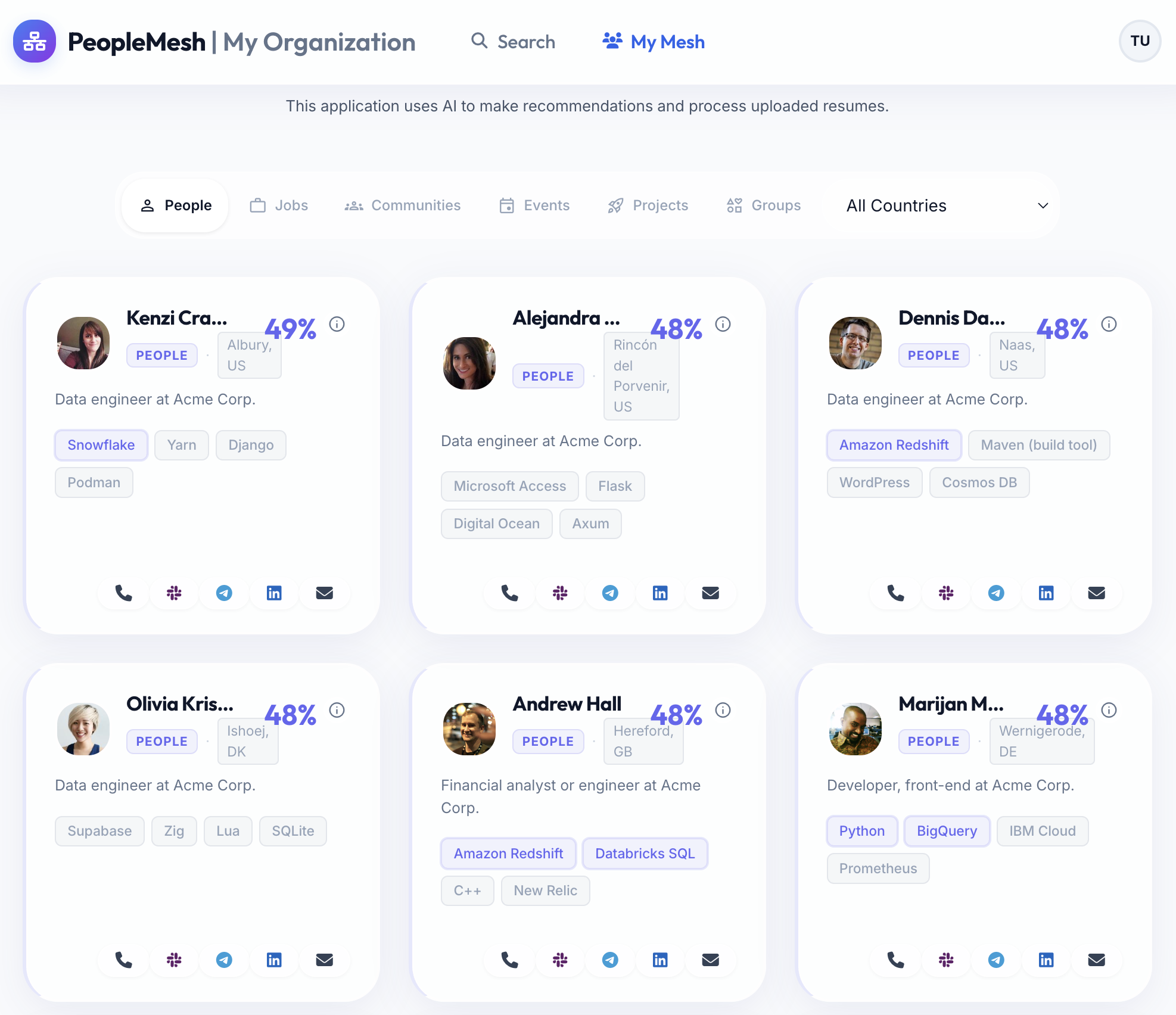
To implement this matching capability, however, we first need to get information into the system. While users can update their profiles manually through the user interface (UI), PeopleMesh provides an easier route by using something everyone already has: a resume.
Automated information extraction: Docling for structured data extraction
Organizations hold valuable data locked inside static PDFs, Word documents, and spreadsheets. AI document pipelines extract and structure this content automatically. On the left in Figure 3 is a fictitious PDF resume that lists a person's contact information, skills, spoken languages, and other information. PeopleMesh uses Docling and the Granite4:3B LLM to extract this information and import it into PeopleMesh automatically in the structured form shown on the right.
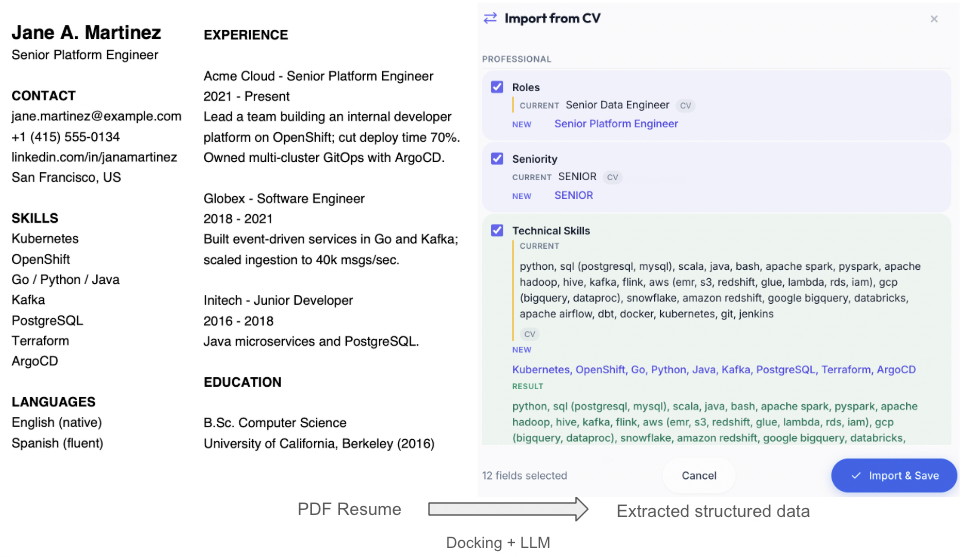
To extract structured information from diverse digital formats, PeopleMesh implements a multi-step pipeline, beginning with Docling, which converts a document into a DoclingDocument, an intermediate representation implemented using Python's pydantic library. The DoclingDocument class stores each document as a flat list of TextItem objects, each of which holds a label that describes its role. The following is a sample from our resume in Figure 3:
Top-level keys : ['schema_name', 'version', 'name', 'origin', 'furniture', 'body', 'groups', 'texts', 'pictures', 'tables', 'key_value_items', 'form_items', 'pages']
schema_name    : DoclingDocument
version        : 1.10.0
# text elements: 14   # tables: 0
--- text elements in Docling's recovered reading order (label -> text) ---
  [section_header ] Jane A. Martinez
  [text           ] Senior Platform Engineer
  [section_header ] CONTACT
  [text           ] jane.martinez@example.com +1 (415) 555-0134  linkedin.com ...
  [section_header ] SKILLS
  [text           ] Kubernetes OpenShift Go / Python / Java Kafka PostgreSQL ...
Notice the labels [section_header] and [text] indicate the roles their respective content serves in the document. Other labels might include a figure's caption, a document's footer, and so on.
If you're skeptical that this simple structure would work across all documents, particularly those that are complex and hierarchical, you're absolutely justified. Docling addresses hierarchical document layouts through additional information reachable using the top-level keys shown in Figure 3, specifically the body key, which returns a list of child objects, each of which can contain other children, and so on.
Each child references a TextItem to link it with its content. We can think of these structures like a table of contents (ToC) in a book. The ToC captures the book's hierarchical structure of chapters or topics, while page references link each section with its content. These structures work together to provide a faithful representation of a document's layout and content.
To handle the 35 different digital formats Docling supports, Docling combines existing third-party parsers, such as python-docx (Microsoft Word documents), openpyxl (Excel spreadsheets), and BeautifulSoup (HTML documents). Docling can readily parse these documents to capture the same semantic structure we would see when reading the documents, namely section headers, columns, paragraphs, and so on. This is true because these document types already do a good job of preserving their reading order. In contrast, the PDF standard encodes information to better support a document's printing order. Figure 4 makes this difference clear.
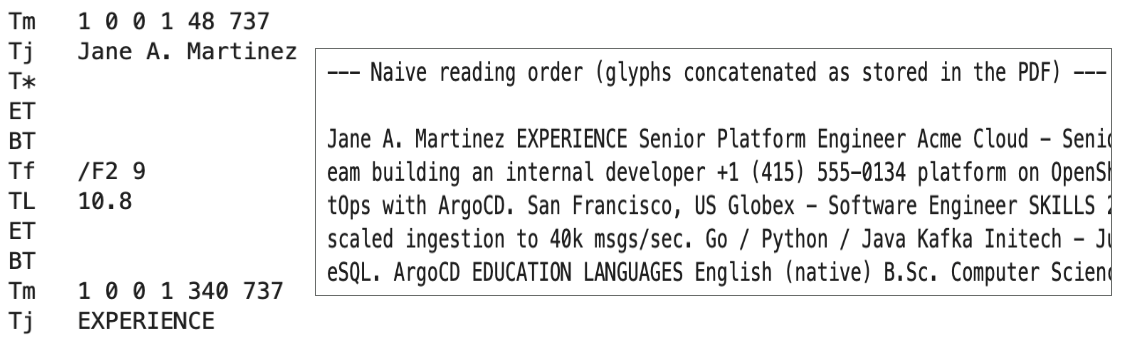
Notice the first 2 lines on the left in Figure 4 beginning with Tm 1 0 0 1 48 737. Tm is the text matrix operator that positions the print cursor at coordinates X = 48 and Y = 737. The next line prints Jane A. Martinez at these coordinates. The next text we see in Figure 4 is EXPERIENCE, since it's what would be printed next. The document's original reading order, which joins Jane with her role as a Senior Platform Engineer, is lost. Things get worse from here as Jane's email, work experience, and phone number follow in printing order. The PDF standard has evolved to include techniques that mitigate this semantic loss, but they are not widely used or reliable.
Docling's hybrid approach
Docling combines multiple clever approaches to solve this problem. First, Docling uses an AI model trained on 150,000 annotated samples to understand a document's layout—the location and size (bounding box) of each section and its semantic label (for example, whether the section is a page header, table caption, part of the main body, or another element).
To determine the text content of these sections, Docling uses the PDF structure shown in Figure 4 to map each Tm coordinate to its parent bounding box in the document's layout. This is challenging for several reasons, including that the layout and Tm coordinate systems are not the same and text often spans bounding boxes (for example, it's common for catalogs to overlay text headlines on background images). To learn more about how Docling addresses these challenges, explore Advanced Layout Analysis Models for Docling and docling-project/docling-layout-heron.
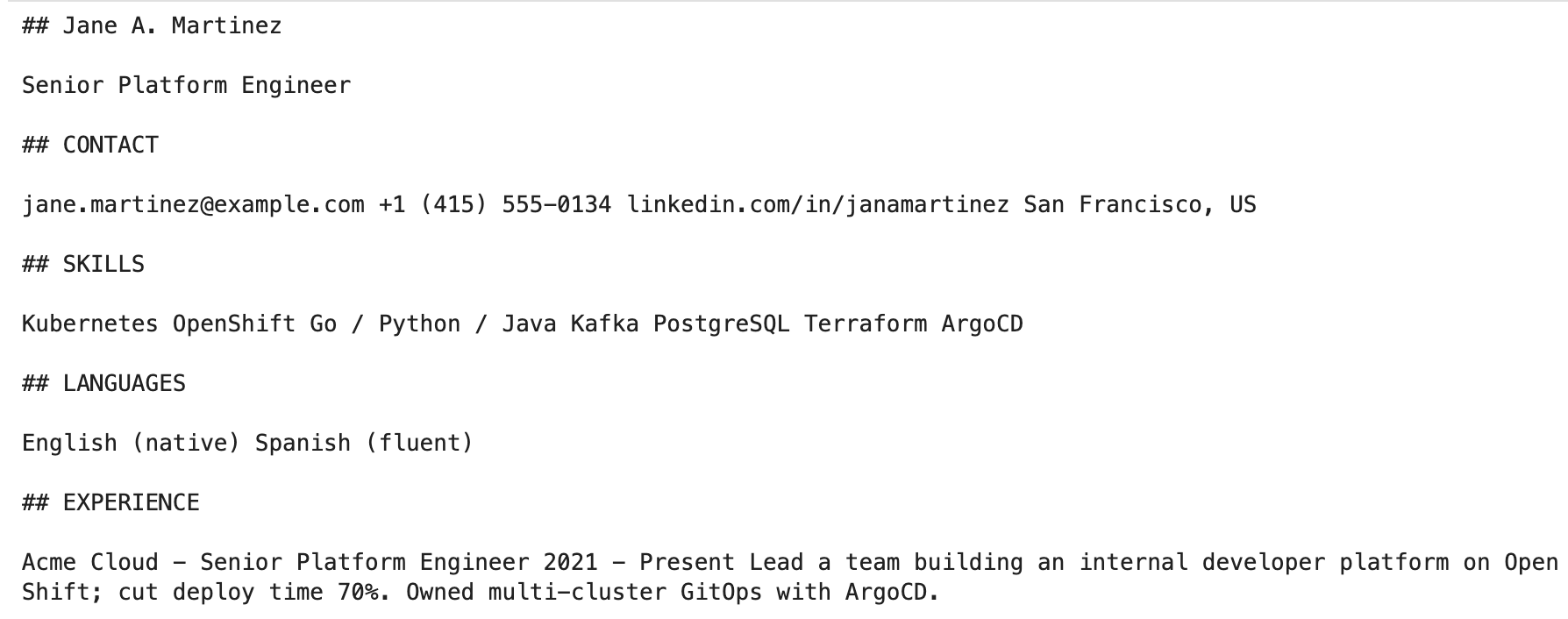
PeopleMesh takes advantage of Docling's capabilities by starting where it leaves off, which is the clean DoclingDocument representation of our resume shown in Figure 5.
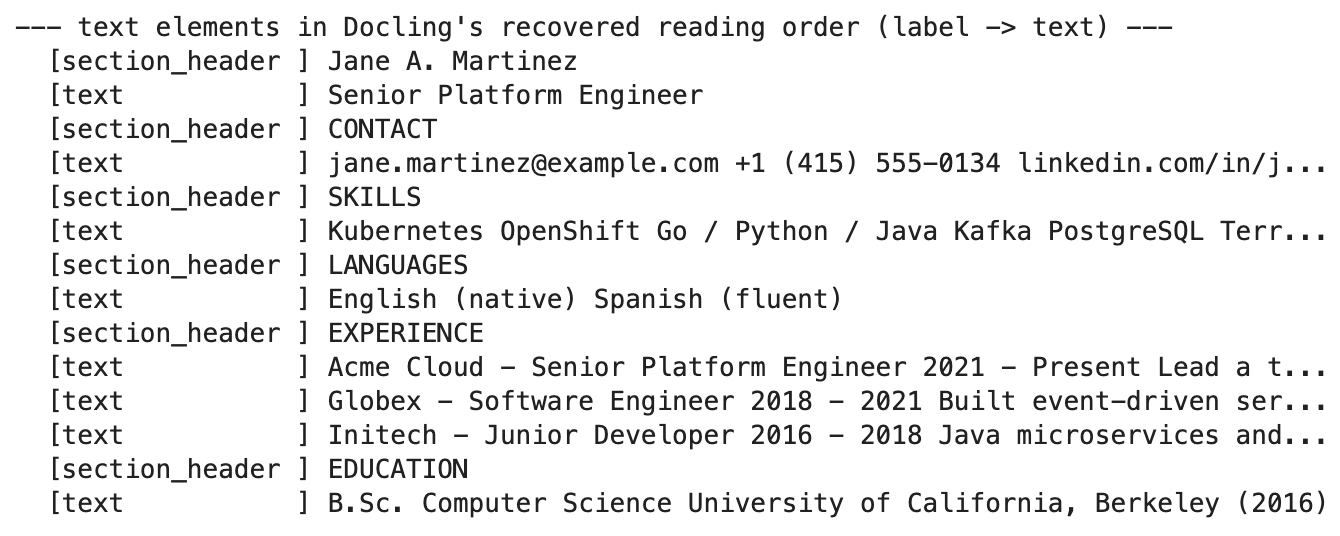
Notice Docling has set the stage for us to use this document's content apart from its formatting. Each TextUnit unit has a semantic label and a content body. The work Docling performs at this stage is the GPU accelerated step, and Red Hat OpenShift makes it easy to deploy Docling with hardware accelerators and drivers that allow Docling to process our resume in seconds.
From here, Docling allows us to export the DoclingDocument to the Markdown format shown in Figure 6. PeopleMesh then feeds the Markdown file to a Granite4:3B LLM to produce a structured JSON document we can ingest into the PeopleMesh database.
The following Python snippet shows a portion of the LLM's system prompt for this stage:
SYSTEM_PROMPT = '''You are an expert HR assistant. Parse the candidate CV (Markdown/textThe JSON must match this exact structure and key names:
{
  "profile_version": "1.0",
  "generated_at": "<ISO-8601 timestamp>",
  "professional": {
    "roles": ["<CURRENT role only, exactly one element>"],
    "seniority": "JUNIOR|MID|SENIOR|LEAD|EXECUTIVE",
    "industries": ["..."],
    "skills_technical": ["..."],
    "skills_soft": ["..."],
    "tools_and_tech": ["..."],
    "languages_spoken": ["..."],
    "work_mode_preference": "REMOTE|HYBRID|OFFICE|FLEXIBLE|null",
    "employment_type": "EMPLOYED|FREELANCE|FOUNDER|LOOKING|OPEN_TO_OFFERS|null"
  },
  "contacts": {
    "slack_handle": null,
    "telegram_handle": null,
    "mobile_phone": null,
    "linkedin_url": null
  },
  "interests_professional": {
    "learning_areas": ["..."],
    "project_types": ["..."]
  },
LLM-generated structured data: Guided decoding or defensive guardrails?
There are many applications where LLMs are used to generate structured output, such as text-to-SQL, text-to-Java, or, in our case, Markdown-to-JSON. While Docling does an impressive job with the difficult task of representing our resume as a Markdown file, the next step of converting this Markdown format to JSON is also non-trivial. The Markdown output is still unstructured text dressed up in a markup language, and mapping this to structured JSON requires the background knowledge and semantic abilities LLMs bring to the table.
While LLMs (both commercial and small variants) have become reliable structured-data generators, it's still wise, especially with smaller, open-weight models, to anticipate invalid output. 2 strategies that are in broad use are: (1) guided decoders during token generation and (2) defensive guardrails applied to the final output. The latter is often paired with a retry loop that resubmits invalid output to the LLM for correction.
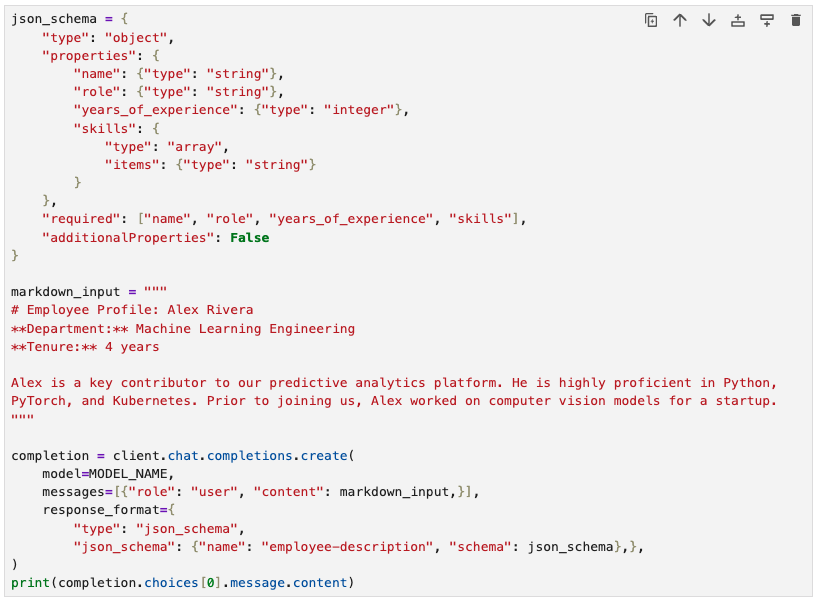
The vLLM inference server in Red Hat OpenShift AI supports guided decoding using the llguidance and xgrammar libraries (Structured Outputs - vLLM). Figure 7 shows the use of this technique to generate schema-compliant JSON. With guided decoding, vLLM uses the provided JSON schema during token generation to eliminate options that would violate the JSON schema. Guided decoding helps support 100% structural correctness.
Defensive guardrails, by contrast, defer validation until the LLM emits its full output using parsing libraries and deterministic validation logic.
Although useful, guided decoding presents some drawbacks, including the possibility of hallucinations if the LLM cannot generate valid output for the provided input. For example, notice we've indicated years_of_experience is a required property. If the input is missing this information (for example, if we remove the tenure line from the Markdown input), the LLM will still include years_of_experience and hallucinate a value for it. The output complies with our schema, but the data is wrong. Additional drawbacks include applications where mixed structured and unstructured output is expected and cases that require complex validation beyond what simple schema or grammar checks can provide.
For these reasons, PeopleMesh uses the defensive guardrail approach to apply several validation and normalization techniques to the final JSON output, including stripping fencing tags that wrap JSON text (such as json … ), deduplication of items within lists, whitespace trimming, clamping on skill levels, controlled vocabulary/domain list checking (for example, any value for the seniority field that is not 'junior', 'mid', 'senior', 'lead', or 'unknown' is mapped to 'unknown'), and conversion of single values to singleton lists where needed (such as with skills). PeopleMesh provides an extensible interface (SearchQueryParser) for implementing these validation checks should the default class (LlmSearchQueryParser) not meet your needs.
Once our final JSON text is validated and normalized, the results are stored in Postgres using a JSON binary data type and are used to represent the user's profile. Each type of entity, in fact, is stored in this fashion. An important component of each entity is the embedding text, which serves as the entity's compact natural-language description. The EmbeddingTextBuilder Java class computes this description, providing a specialized generator for each entity type (such as user, event, or community). In the case of users, for example, the embedding text is a flattened list of the user's roles, technical skills, tools, and many other attributes. To support semantic search, which we discuss next, PeopleMesh uses the text-embedding-3-small model to create a vector embedding representation for this text.
A deeper dive into PeopleMesh's matching algorithm
As we've seen, users can build their profiles by importing their resumes. PeopleMesh also supports importing from a GitHub account. Both techniques result in structured JSON in the user's database record. Other entity types, such as events and communities, are also stored as structured JSON.
If we can compare JSON objects to one another in a meaningful way, we can implement a matching capability that compares the logged-in user's JSON profile to the JSON profile of other entities to proactively find and display items that might be of interest to the user. Explicit searches would work similarly. For example, if we can convert a user's query (for example, "I'm looking for a mobile app developer who speaks English.") to JSON, then we can use this same underlying JSON matching technique to support ad hoc searches.
This is precisely the strategy PeopleMesh implements. Figure 8 depicts the processing pipeline in the context of ad hoc searches. Profile-based searches work similarly, except the user's stored JSON profile replaces step 1.
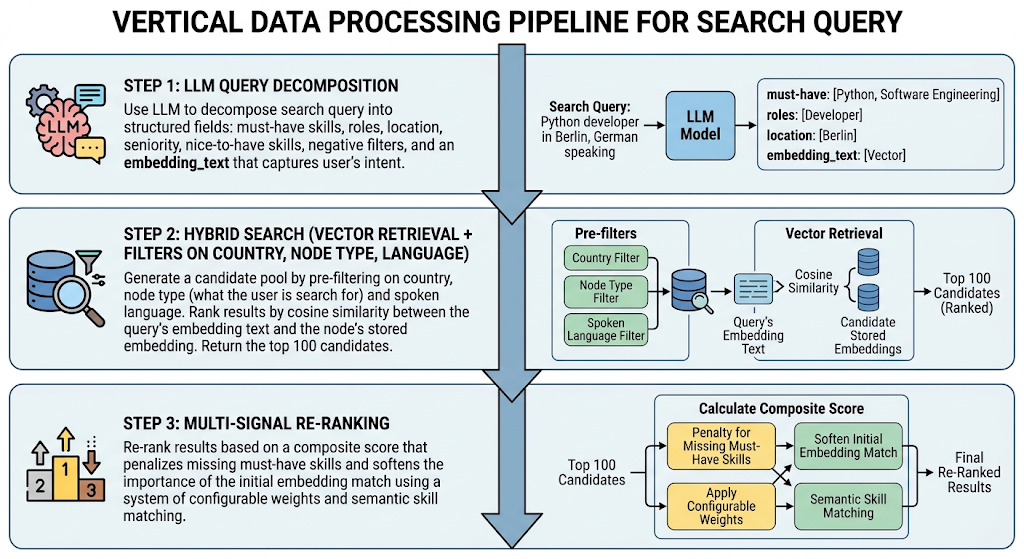
In step 1, PeopleMesh uses an LLM to decompose the user's free-form query into structured JSON. This representation includes regular text and numeric values PeopleMesh can use to build SQL-based filters, but it also includes a distilled version of the user's query, which we refer to as the query's embedding text. Query distillation is a critical step used in semantic search patterns, including retrieval-augmented generation (RAG), to separate the substance of a query from its framing. To use our earlier example ("I'm looking for mobile app developers who speak English."), the substance of the query excludes the phrase "I'm looking for".
In step 2, PeopleMesh uses the decomposed query to filter matches based on entity type, country, and language. The results are ranked by the cosine similarity between the vector embedding of the distilled query and the entity's stored embeddings. The top 100 candidates are returned. Hence, PeopleMesh applies a hybrid approach that uses structured information to implement traditional filtering followed by a stochastic-based semantic comparison that ranks and returns the top 100 results.
Step 3 applies a complex scoring algorithm that reranks the results using multiple factors, such as nice-to-have skills. Each factor, including the initial embedding cosine score, is weighted and added. The algorithm then applies 2 penalty multipliers for negative skills (those that are not desired in the ideal match) and missing must-have skills. You can override all weights by modifying the SearchOptions Java record. The composite score factors in 7 distinct information channels. In the next section, we'll look at why PeopleMesh bothers with this scoring and reranking step given its ability to implement semantic search using embeddings.
Embedding dilution: How to get to the middle of nowhere
When we feed long text input samples that represent multiple concepts through an embedding model, the precision of the resulting embeddings begins to suffer due to a concept known as embedding dilution. Embeddings become an average of too many latent concepts, and they lose their ability to discriminate the meaning of one input from another.
One solution is to chunk the input to smaller sizes and create separate embeddings for each. In our case, we can achieve this by creating separate embeddings for a user's skills, spoken languages, and other attributes. While this improves the precision of our embeddings and our searches, it introduces significant complexity and the additional problem of fusing all the embeddings to create a final score we can use to rank our search results. Techniques such as reciprocal rank fusion (RRF) work well for fusing multiple embedding comparisons, but they are more complex to implement.
PeopleMesh addresses this issue through the scoring algorithm described in step 3. This acts to moderate the embedding similarity scores with the additional channels of information. Though the default weights and specific scoring algorithm are notional and not likely to work for every use case and dataset, they provide a simple mitigation for the embedding dilution problem. They do not produce normalized probability or percentage scores (that is, they don't sum to 1) and can't be interpreted meaningfully in this sense. They serve only as a simple technique for ordering the results.
Conclusion
Don't let intersecting world lines dictate your career or project staffing needs. Break out of 4D and use all your dimensions to find ways to connect across your enterprise and find the right talent for every project. By pairing Red Hat OpenShift with Docling and Granite LLMs, PeopleMesh demonstrates how you can turn dormant digital assets—such as static PDFs and standard resumes—into a dynamic, searchable network that brings your organization closer together.
You already have the talent and the data; now it's time to build the connections. Try out the architecture for yourself and transform serendipitous collisions into purposeful, global connectivity. Install the PeopleMesh AI quickstart on Red Hat OpenShift to deploy your own intelligent matching engine today.

