Red Hat AI Inference on Amazon EKS: Exploring the Kubernetes resources covered platform installation. After setup, deploying an inference service on Red Hat AI involves submitting a YAML file and letting the controller manage the underlying infrastructure.
In this post, we deploy a model twice—first as a basic inference workload without routing, and then with the llm-d router block enabled. We trace the core Kubernetes resources created in both configurations to demonstrate how the platform sets up model serving and lays the foundation for intelligent routing.
Deploying an inference service
The gateway and controller pods are platform components that handle inference requests, and they are already running from the platform setup in part 1:
kubectl get deployment -n redhat-ods-applicationsNAME READY
inference-gateway-istio 1/1
llmisvc-controller-manager 1/1Gateway
The gateway handles external traffic through a load balancer. This example runs on Amazon Elastic Kubernetes Service (EKS) and uses an Amazon Web Services (AWS) Elastic Load Balancer, though any Gateway API-compatible gateway will work.
Controller
The controller reconciles our inference resources. We will configure and create our inference resources from an LLMInferenceService YAML. LLMInferenceService is the KServe custom resource that defines an inference service. The KServe controller reconciles this configuration into all the resources needed to serve the model consistently and at scale.
Note
KServe has two model-serving custom resources. InferenceService is the original, built for predictive (traditional machine learning) models and basic large language model (LLM) use cases, while LLMInferenceService is purpose-built for LLMs, adding capabilities and fields for intelligent (llm-d) routing, disaggregated prefill/decode, and Gateway API integration. This post uses LLMInferenceService throughout.
First, we deploy a simple LLMInferenceService, with no router block (the llm-d component) defined.
apiVersion: serving.kserve.io/v1alpha2
kind: LLMInferenceService
metadata:
  name: test
  namespace: llm-test
spec:
  model:
    uri: hf://Qwen/Qwen2.5-0.5B-Instruct
    name: Qwen/Qwen2.5-0.5B-Instruct
  replicas: 2
  template:
    containers:
    - name: main
      resources:
        limits:
          nvidia.com/gpu: "1"
    imagePullSecrets:
    - name: rhai-pull-secret
We have defined the following fields:
- Model: Qwen 2.5 (0.5B), pulled from Hugging Face. The
model.namefield is used by clients in OpenAI API requests ({"model": "Qwen/Qwen2.5-0.5B-Instruct"}). - Replicas: Deploy two identical vLLM pods, each with one GPU.
- Containers: Container name is a required value, and the name
mainis the convention for a single-container pod. - Resources: Each pod requests 1 GPU from Kubernetes.
Apply the YAML in our test namespace:
kubectl apply -f test-deploy.yaml
llminferenceservice.serving.kserve.io/test created
With the kubectl tree tool, we can view all the resources created after running kubectl apply, as shown in Figure 1:
kubectl tree llminferenceservice test -n llm-testLLMInferenceService/test
├─Deployment/test-kserve
│ └─ReplicaSet/test-kserve-rs
│ ├─Pod/test-kserve-1
│ └─Pod/test-kserve-2
├─Secret/test-kserve-self-signed-certs
└─Service/test-kserve-workload-svc
└─EndpointSlice/test-kserve-workload-svc-eps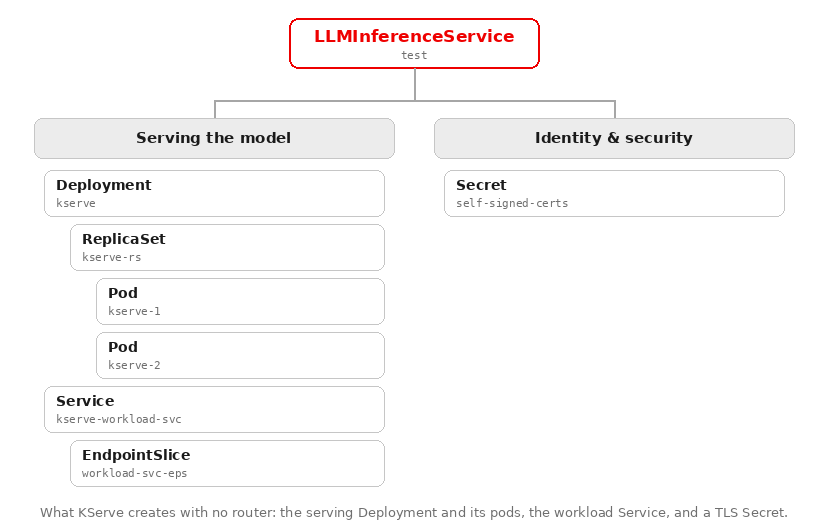
Note on names
To keep things readable, the resource names in this post are simplified. Pods managed by a ReplicaSet actually carry a template hash and a random suffix (for example, test-kserve-7bbcc796fb-gnhbx).
Let's walk through each of these components.
Serving the model
Each LLMInferenceService consists of a Deployment with ReplicaSets and Pods, and a Service with an EndpointSlice configuration.
In Kubernetes, a Deployment manages a ReplicaSet, and the ReplicaSet manages the state of the pods (Figure 2).
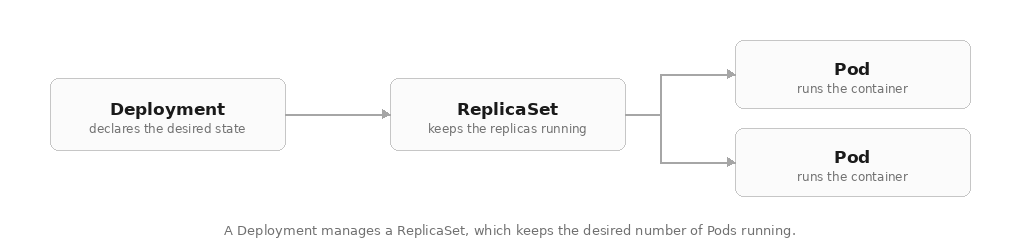
KServe creates a deployment resource (Deployment/test-kserve) that manages two (replicas: 2) of our model-serving pods through a single ReplicaSet (test-kserve-rs). A ReplicaSet is the Kubernetes controller that keeps the model available by managing the number of running pods.
kubectl get pod -n llm-test -l kserve.io/component=workloadNAME READY STATUS RESTARTS
test-kserve-1 1/1 Running 0
test-kserve-2 1/1 Running 0Each pod:
- Runs the vLLM inference engine (
registry.redhat.io/rhaii/vllm-cuda-rhel9). - Is allocated 1 GPU (
nvidia.com/gpu: "1"). - Serves an OpenAI-compatible API on port 8000, so any OpenAI client or tool is compatible.
- Exposes vLLM's Prometheus metrics on the same port (queue depth, KV cache usage, token throughput, latency, and more), which the scheduler will scrape once we add llm-d.
- Is automatically tagged by KServe with
kserve.io/component=workload.
Service
The inference workload’s Service function is to provide the model pods with a single stable ClusterIP address. Pods can restart and scale up or down without affecting the overall Service, though each restart assigns a new IP address to the pod. To address this possibility, the workload Service exposes a single internal address that doesn’t change (ClusterIP). An EndpointSlice stays in sync with the IPs of the ready pods and forwards incoming requests to an available pod IP.
kubectl get svc test-kserve-workload-svc -n llm-testNAME TYPE CLUSTER-IP PORT(S)
test-kserve-workload-svc ClusterIP 172.20.19.153 8000/TCPkubectl get endpoints test-kserve-workload-svc -n llm-test
NAME ENDPOINTS
test-kserve-workload-svc 10.11.1.129:8000,10.11.1.223:8000Note on serving inference at scale
With two replicas, round-robin across the pods works fine. As traffic grows, an even split stops being enough: once routing has to account for which pod has spare capacity or already has the relevant data cached, you need routing built for LLMs. That is the job of the scheduler, which the router Deployment runs.
Let's deploy an LLMInferenceService with intelligent routing.
Adding llm-d
Red Hat AI Inference implements the intelligent routing layer using llm-d, a Kubernetes-native distributed inference framework that routes requests to model servers such as vLLM.
We can configure llm-d routing by defining a router block.
router:
  scheduler:
    template:
      containers:
      - name: main
        imagePullSecrets:
        - name: rhai-pull-secret
  route: {}
  gateway: {}
Add the router block to the LLMInferenceService and reapply.
apiVersion: serving.kserve.io/v1alpha2
kind: LLMInferenceService
metadata:
  name: test
  namespace: llm-test
spec:
  model:
    uri: hf://Qwen/Qwen2.5-0.5B-Instruct
    name: Qwen/Qwen2.5-0.5B-Instruct
  replicas: 2

  # Router configuration (scheduler, route, gateway)
  router:
    scheduler:
      template:
        imagePullSecrets:
        - name: rhai-pull-secret
    route: {}
    gateway: {}

  # Workload configuration (vLLM pods)
  template:
    containers:
    - name: main # vLLM container (needs GPU)
      resources:
        limits:
          nvidia.com/gpu: "1"
kubectl apply -f test-deploy.yaml
llminferenceservice.serving.kserve.io/test configuredWhen the llmisvc-controller-manager (Red Hat's controller that extends KServe) registers the router field, it creates the llm-d resources in a set order, as shown in Figure 3.
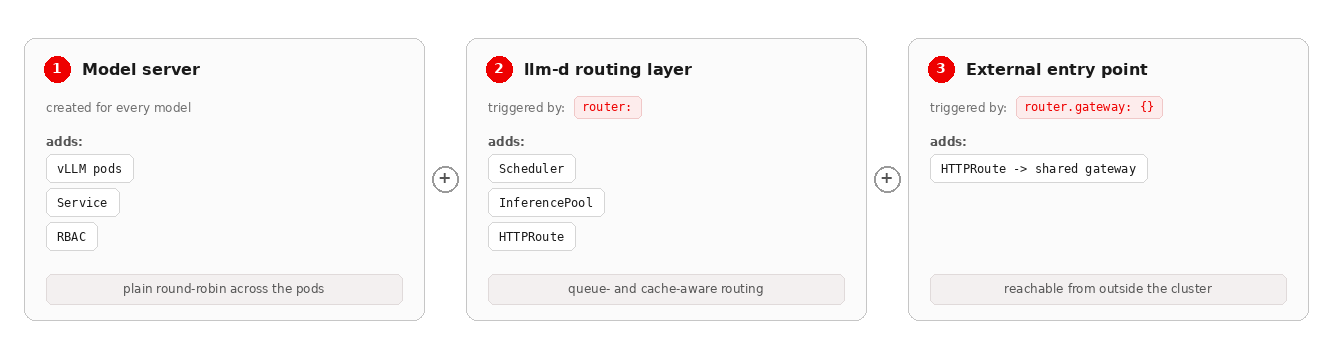
The controller logs from our deployment show the following sequence:
{"msg": "Reconciling Workload"}
{"msg": "Reconciling Router"}
{"msg": "Reconciling Scheduler"}
{"msg": "Reconciling HTTPRoute"}
{"msg": "Using InferencePool v1 API for HTTPRoute"}
Now run kubectl tree again to see everything the router configuration added.
kubectl tree llminferenceservice test -n llm-testLLMInferenceService/test
├─Deployment/test-kserve
│ └─ReplicaSet/test-kserve-rs
│ ├─Pod/test-kserve-1
│ └─Pod/test-kserve-2
├─Deployment/test-kserve-router-scheduler
│ └─ReplicaSet/test-kserve-router-scheduler-rs
│ └─Pod/test-kserve-router-scheduler-1
├─DestinationRule/test-kserve-scheduler
├─DestinationRule/test-kserve-shadow-svc
├─DestinationRule/test-kserve-workload-svc
├─HTTPRoute/test-kserve-route
├─InferencePool/test-inference-pool
├─InferencePool/test-inference-pool
│ └─Service/test-inference-pool-ip
│ └─EndpointSlice/test-inference-pool-ip-epsNote the tree lists InferencePool/test-inference-pool twice; this is not a duplicate. llm-d registers the pool under two API versions (the generally available inference.networking.k8s.io/v1 and the older inference.networking.x-k8s.io/v1alpha2), and the HTTPRoute references the v1 version, which is why the live backing Service and EndpointSlice hang off that entry.
Grouped by function, here is the updated resource tree (Figure 4).
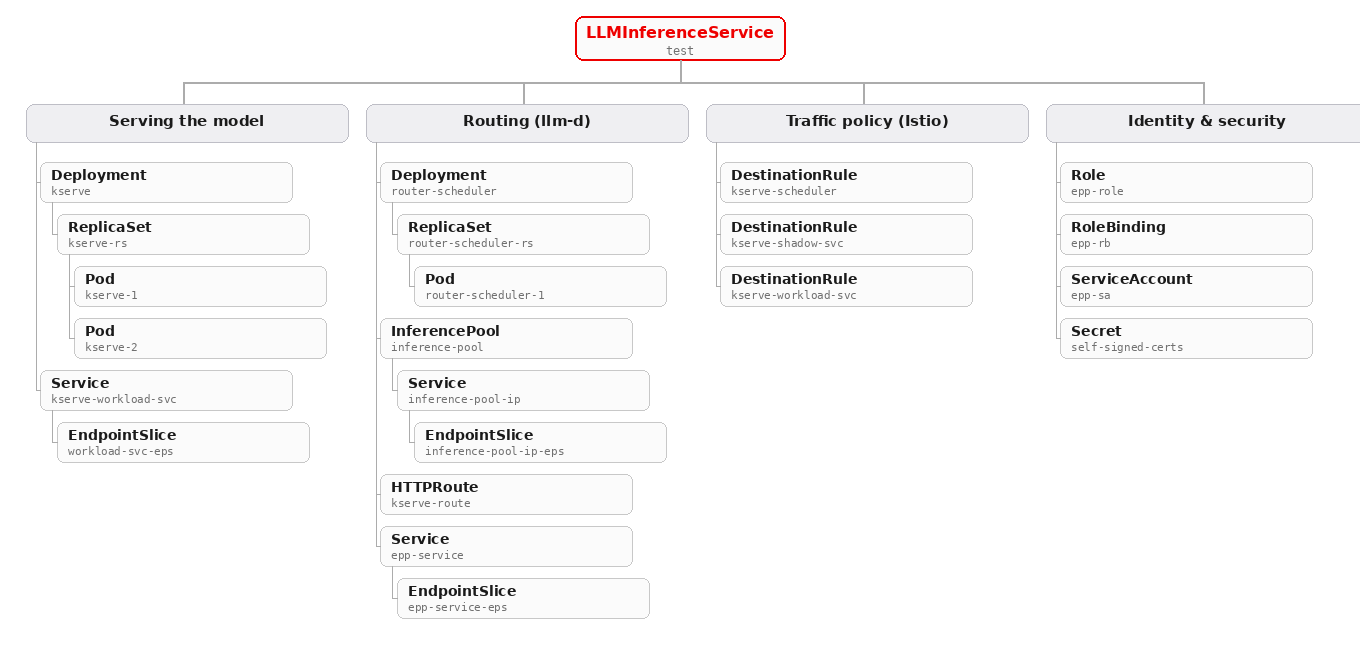
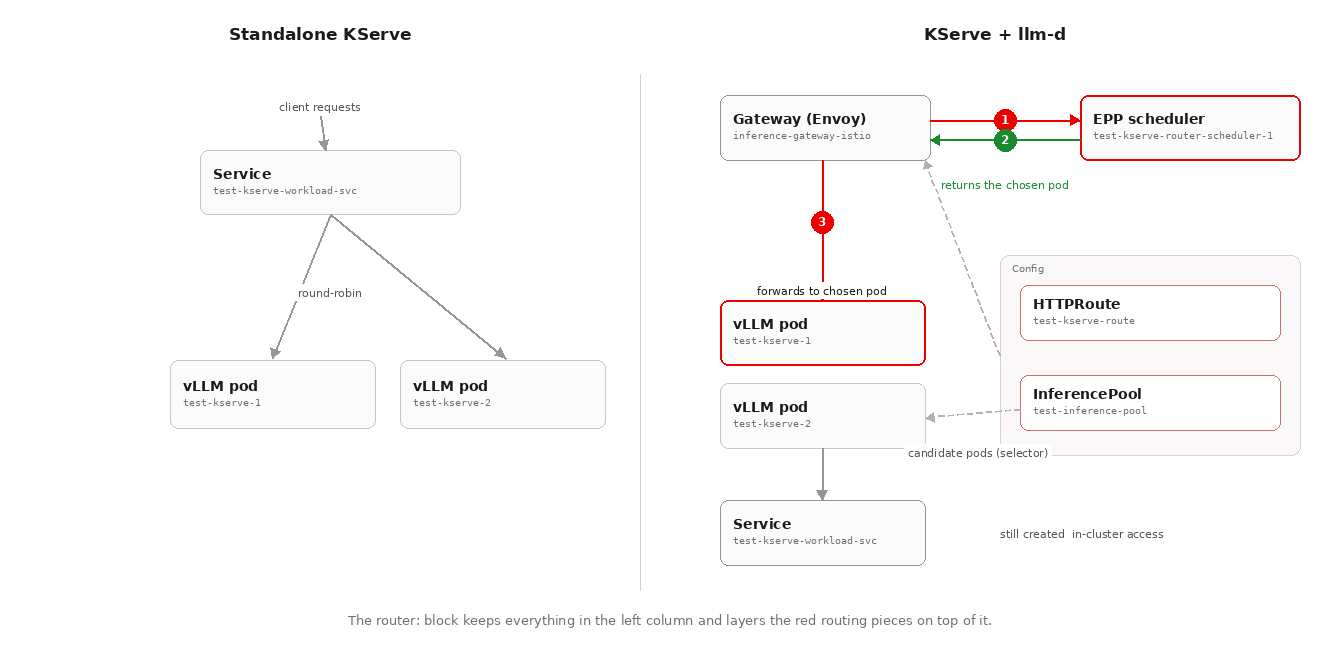
Adding llm-d keeps the base components of our first inference service and adds:
- The scheduler Deployment and pod, which decides which model pod each request should go to.
- The
InferencePool, the group of model pods the scheduler can choose from. - The
HTTPRoute, which routes matching requests to a backend (aService, or here anInferencePool) which maps to internal services, pods, or other workloads. DestinationRuleresources, which set the traffic policy (connection limits, retries, encryption) between components.- The EPP Service, which gives the scheduler a stable in-cluster address.
- RBAC resources (
Role,RoleBinding,ServiceAccount), the scheduler's identity and read-only permissions. - The Transport Layer Security (TLS) Secret, the self-signed certificate that encrypts traffic between components.
These additional resources allow us to route requests to a pod using scores based on metrics like queue depth and cache locality, as compared in Figure 5.
Router configurations
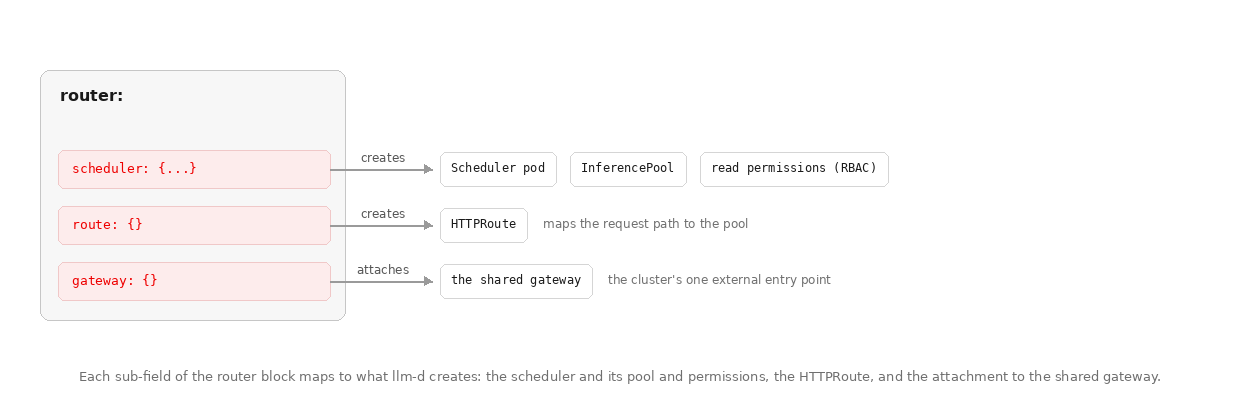
Now that we can see everything created via the router configuration, let's walk through the significance of each setting. Recall that the router configuration contains three main components: scheduler, route, and gateway, as illustrated in Figure 6.
  router:
    scheduler:
      template:
        containers:
        - name: main
        imagePullSecrets:
        - name: rhai-pull-secret
    route: {}
gateway: {}schedulercreates the scheduler pod, the pool of backend model pods it chooses from (theInferencePool), and the read permissions it needs.routecreates the routing rules that map external request paths to that pool (theHTTPRoute).gatewayattaches those routing rules to the platform's shared gateway, making the model reachable from outside the cluster.
Note
Leaving the route subfield empty (for example, route: {}) tells KServe to use sensible defaults (the full set of options is in the LLMInferenceService configuration guide).
Up next: Deep dive into endpoint picking and traffic flow
With the LLMInferenceService deployed and the router block configured, the controller has generated all the core workloads, routing specs, traffic policies, and permissions required by the platform.
Next, we'll take a closer look at how these generated resources process live traffic. We will explore the Endpoint Picker (EPP) scheduler and Envoy ext-proc mechanism, examine HTTPRoute URL rewriting, break down the RBAC security model, and follow an inference request end-to-end from gateway to vLLM pod.
Read it here: How llm-d routes model inference traffic on Amazon EKS
Learn more
- Combining KServe and llm-d for optimized generative AI inference (Red Hat Developer)
- LLMInferenceService configuration guide (KServe docs)
- Understanding LLMInferenceService (KServe docs)
- llm-d (the routing project)

