You've finalized your model training and confirmed its accuracy. Now, you're staring at a production cluster, trying to answer a simple question: Which GPU do you need, and how many replicas?
Most platform teams answer this based on gut feeling. You overprovision "just in case," eating into your budget, or you underprovision and watch latency spike hours after launch. You scramble to reconfigure, and the cycle repeats. "It worked on my laptop, why is it slow in production?" becomes the team's standard refrain.
Your deployments are expensive, and your models aren't optimized.
Production failures in LLMs usually stem from the same 3 issues:
- Cost overruns: GPUs sit at 12% utilization because we guessed the scale wrong.
- Latency spikes: Architecture mismatches result in unacceptable wait times for the end user.
- The guessing game: Planning relies on subjective feelings instead of hard, benchmark-driven data.
We developed Neural Navigator to replace the guesswork with engineering precision.
What makes LLM deployment planning different?
Production LLMs demand service level objectives (SLOs), not prompts alone. You need to track time to first token (TTFT), inter-token latency (ITL) for streaming quality, and end-to-end latency (E2E) for response delivery.
Operating without these metrics is hoping for the best. Through our work on the open source llm-d-planner project, we built Neural Navigator to convert natural language requirements into optimized infrastructure configurations. We believe production deployment should be a deterministic step, not a gamble.
Imagine transitioning from a requirement—"a high-speed chatbot for 30 users"—to a production-ready Kubernetes deployment in 30 seconds, validated against 1,200+ benchmarks.
The 4-step deterministic workflow
To convert natural language intent into deterministic infrastructure, Neural Navigator follows a four-step engineering workflow, illustrated in Figure 1.
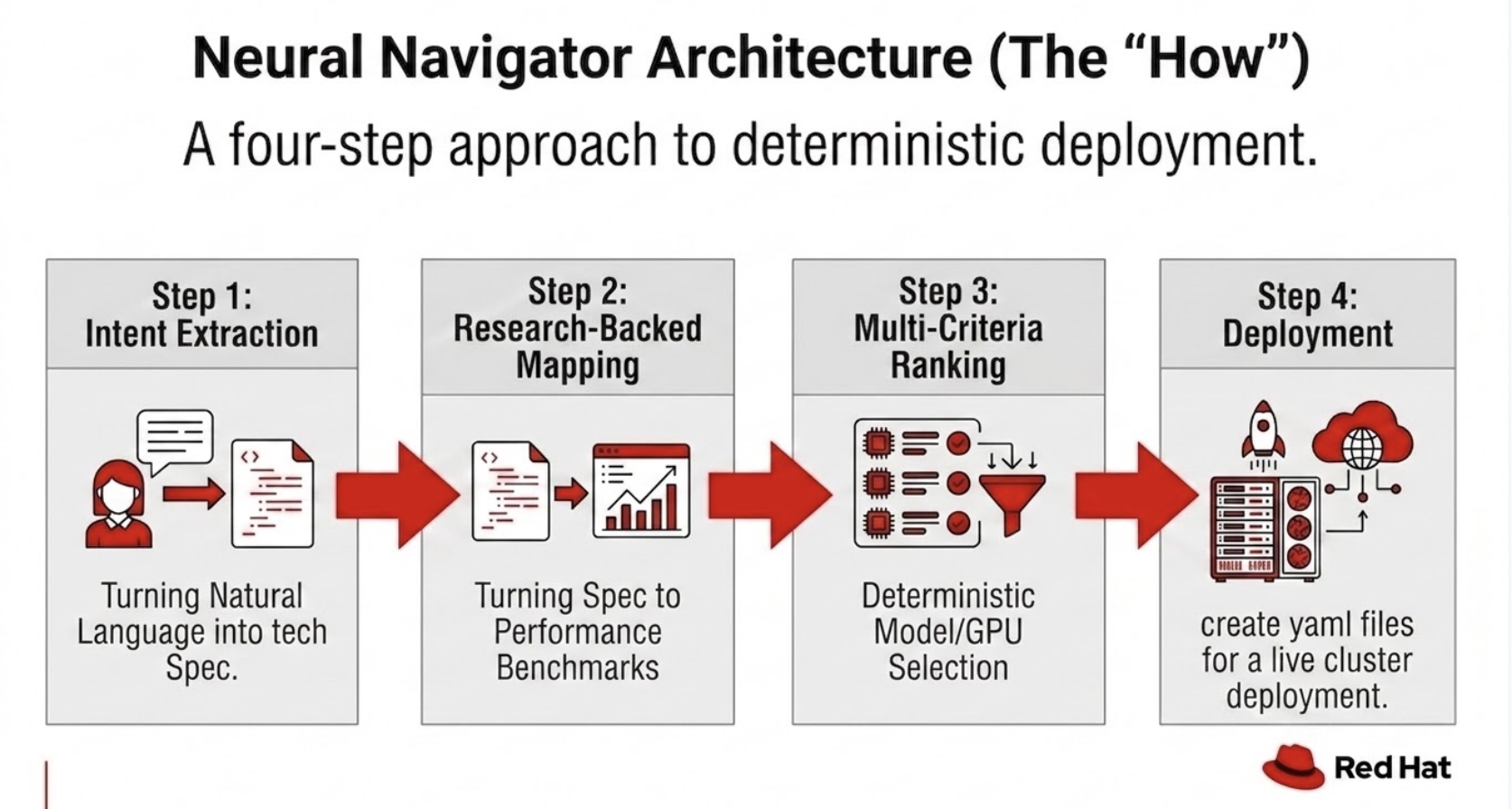
Step 1: Intent extraction
We use Qwen 2.5 7B to parse natural language into technical specifications with 95.1% weighted accuracy. Qwen 2.5 7B breaks down a request for a "customer service chatbot" into use case, user count, hardware preference, and priority. This distinction is the difference between a "vibe-based" request and actual requirements.
Step 2: Research-backed mapping
We cross-reference parsed intent with an extensive evaluation repository. Figure 2 shows the scope of our database.
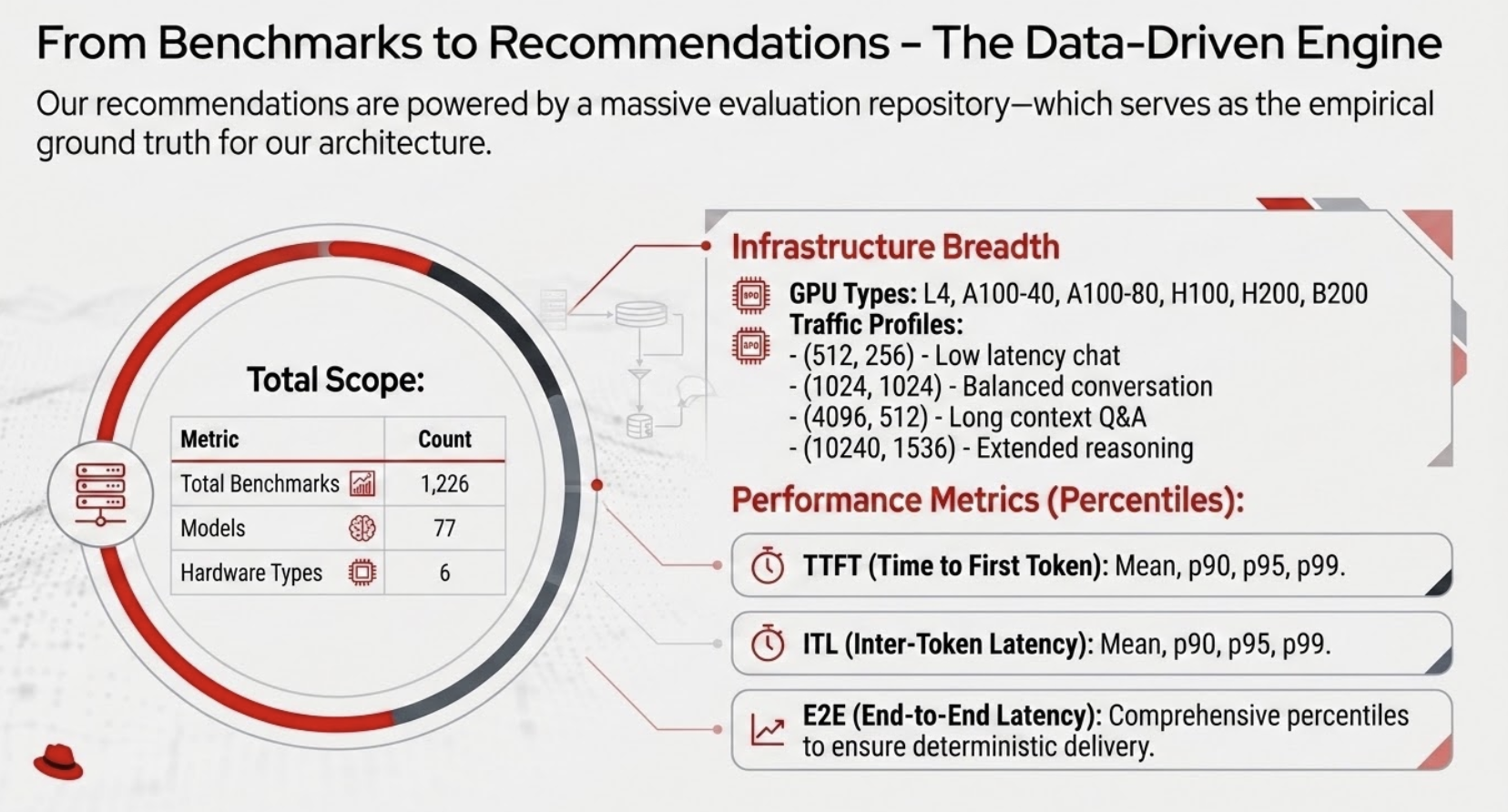
Our benchmark coverage includes:
- 1,226 total evaluations
- 77 models, including Llama 3.3, Mistral Large, and DeepSeek-V3
- 6 NVIDIA GPU types, from L4 to B200
- Diverse traffic profiles, including Poisson chat and long-context Q&A
Step 3: Multi-criteria ranking
We rank options across 4 dimensions: balanced (task-weighted trade-off), best accuracy (output quality), lowest cost (economic efficiency), and lowest latency (real-time responsiveness).
Step 4: 1-click deployment
Neural Navigator generates the production-ready Kubernetes YAML, including KServe InferenceService definitions, autoscaling rules, and Prometheus monitoring setups.
Engineering prompt accuracy: From 70% to 95%
Developing the intent engine wasn't a creative exercise; it was an engineering one. We treated prompt engineering like software testing (Figure 3).
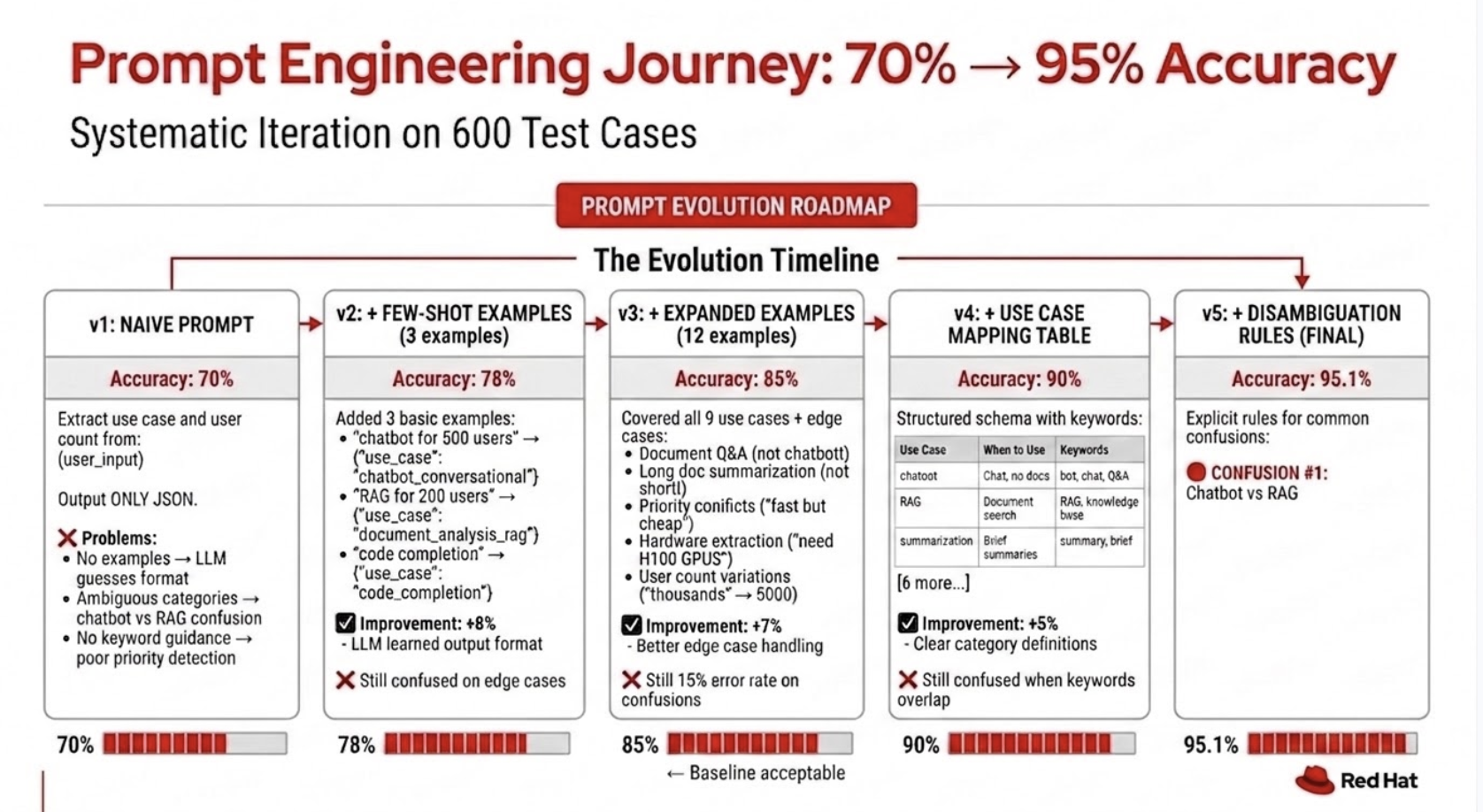
- Version 1 (naive): 70% accuracy. It struggled with ambiguity.
- Version 2 (few-shot): 78% accuracy.
- Version 3 (specialized): 85% accuracy. It addressed edge cases like distinguishing document Q&A from chatbots.
- Version 5 (schema-driven): 95.1% accuracy. We shifted from trying to parse "vibes" to structured keyword schemas.
Benchmarking the truth
We avoid generic, misleading scores. We use a mix of industry-standard benchmarks—such as MMLU-Pro, Graduate-Level Google-Proof Q&A (GPQA), and LiveCodeBench—that we weight based on your specific use case. Figure 4 shows how we prioritize benchmarks, and Figure 5 illustrates the full architecture.
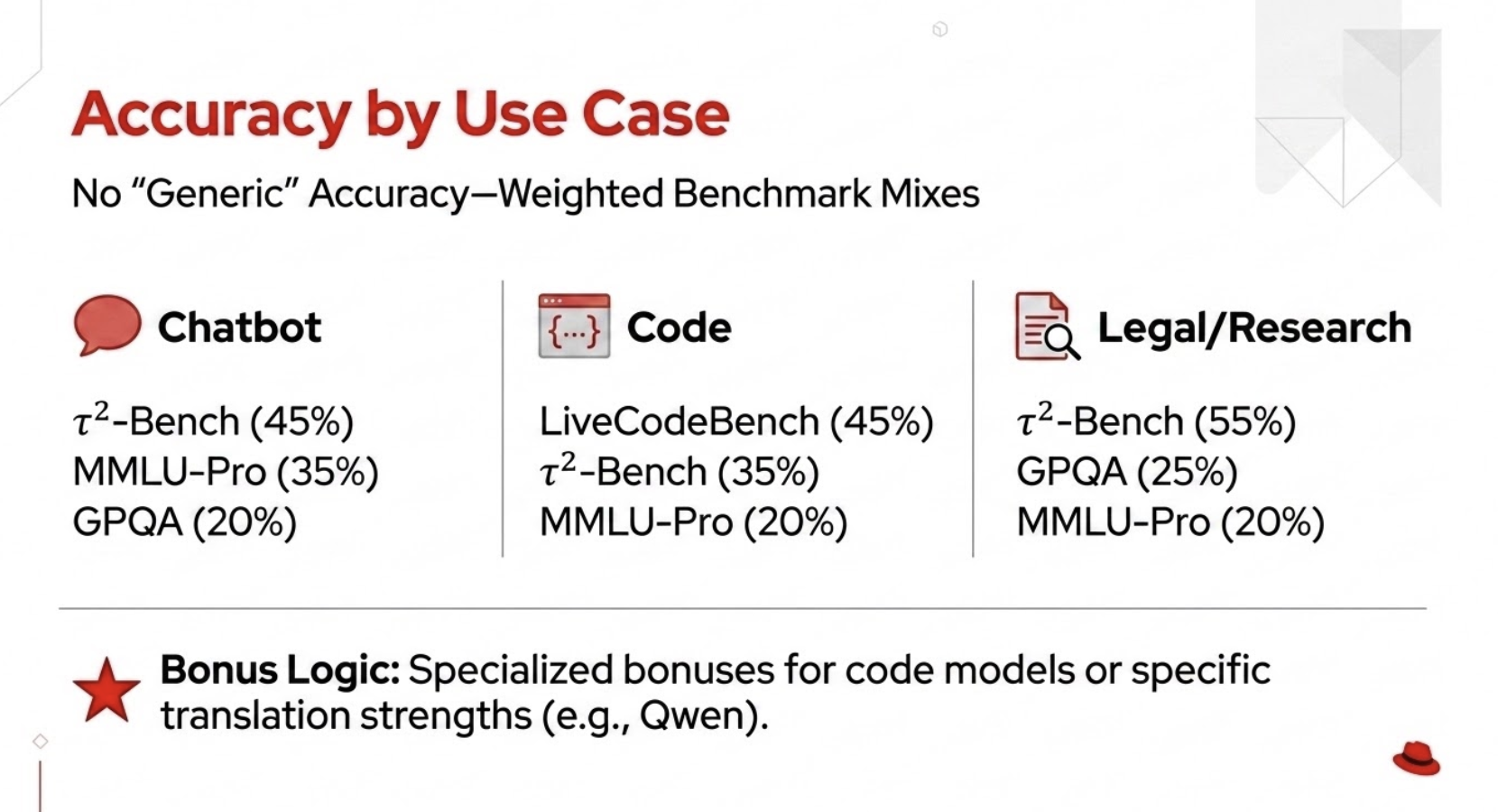
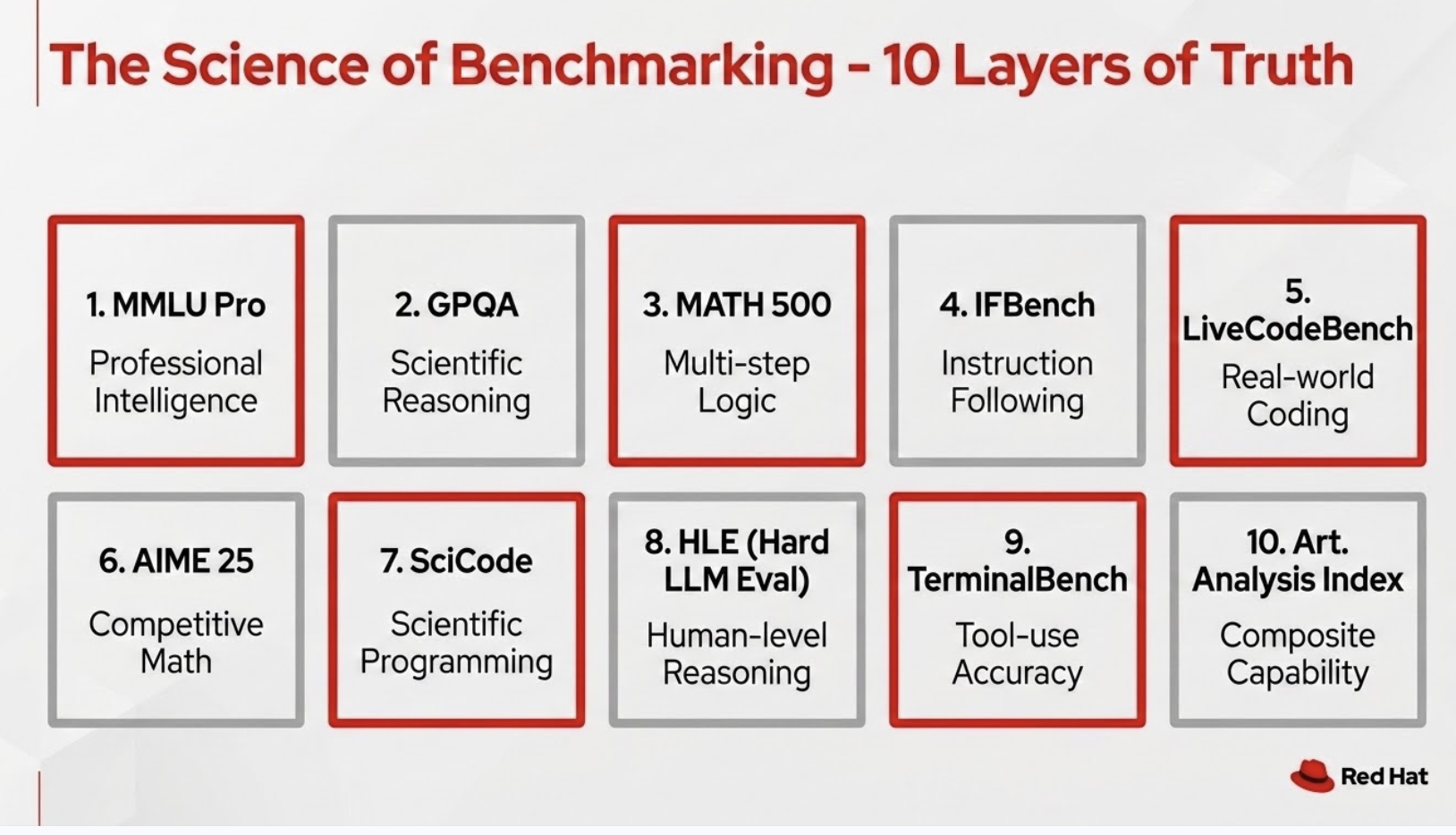
If you're building a conversational bot, we weight τ²-Bench and MMLU-Pro heavily. If you're building for code, we prioritize LiveCodeBench. This approach helps your hardware choice match your workload.
Running on Red Hat OpenShift AI
While Neural Navigator operates as an open source engine, running the generated configurations on Red Hat OpenShift AI provides built-in enterprise governance, automated scaling via KServe, and Day 2 operational monitoring out of the box.
The generated YAML is optimized for KServe on OpenShift AI.
- Input: Enter your natural language requirements.
- Review: Examine the generated KServe
InferenceServiceYAML (storage uniform resource identifier (URI), resource limits, etc.). - Execute: Deploy via the OpenShift command-line interface (CLI) (
oc apply). - Monitor: Check the status of your
InferenceServiceand pods.
The agentic ops vision
We view Neural Navigator as an API layer for infrastructure. In an agentic future, platform engineers can offload repetitive cluster sizing to autonomous agents that request SLO-compliant configs directly.
Imagine an autonomous agent programmatically requesting a deployment recommendation and receiving back a complete, SLO-compliant configuration. This capability allows agents to self-optimize and spawn inference endpoints independently.
Conclusion
Transitioning from synthetic to industry-standard benchmarks provided the credibility necessary for production. Prompt engineering is a systematic discipline, not a creative one. Define your targets as technical values, stop parsing "vibes," and start engineering.
Ready to eliminate guesswork from your LLM deployments? Visit the llm-d-planner repository on GitHub to test Neural Navigator with your workload specs, or explore how Red Hat OpenShift AI streamlines automated inference scaling.

