Stop reinventing the wheel each time you build a gen AI workflow. You might be manually coding data prep workflows, fine-tuning infrastructure, or evaluation frameworks from scratch. If so, you are spending time on solved problems instead of differentiating your AI applications. Teams often repeat the same work because they don't have a shared component library.
Red Hat OpenShift AI helps you build modular AI pipelines. This post covers how to use our existing component catalog as a baseline and extend it to support your organization's custom pipelines. You will find out why these components matter and how to contribute to the community. This path allows you to speed up AI development and focus on what differentiates your applications.
What are reusable components in Red Hat OpenShift AI?
Reusable components are standardized, modular building blocks for Kubeflow Pipelines (KFP) workflows. These workflows run on Red Hat OpenShift AI and are called AI pipelines. Think of them as functions you can plug into your AI workflows without writing code from scratch.
Each component handles a specific task. These tasks can include:
- Data preprocessing
- Model training
- Evaluation
- Model optimization
- Deployment
You might need to load data from Amazon S3 or preprocess text for a large language model (LLM). You might also need to run inference on a fine-tuned model. As the reusable components repository grows, more and more components are becoming available, which allows you to use a verified component instead of spending days writing and debugging your own implementation. This modular architecture allows you to focus on what makes your workflow unique. By selecting from the existing catalog, you can build a flexible pipeline tailored to your use case.
Figure 1 illustrates how these modular stages assemble into a unified workflow layout.
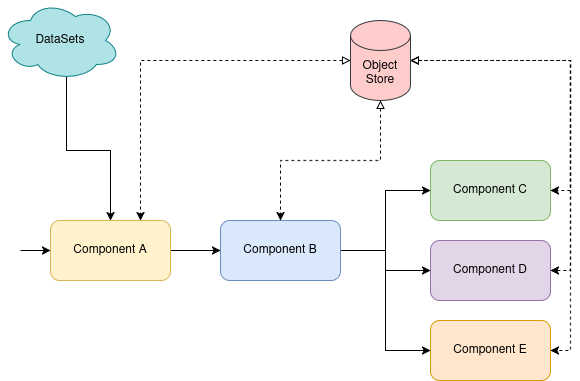
The benefits extend beyond time savings. Reusable components promote:
- Standardization: Teams use consistent logic across different projects.
- Collaboration: Shared implementations allow teams to work together more easily.
- Discovery: A centralized hub helps engineers and scientists find existing building blocks.
Common components include data loaders and text preprocessing utilities. They also include model fine-tuning runners, evaluation calculators, and deployment helpers. When teams use the same component for tokenization, you eliminate inconsistencies. This standardization also reduces the maintenance burden for your team.
Why this approach matters for gen AI workflows
Gen AI workflows are complex. A typical fine-tuning pipeline involves many steps:
- Data collection and cleaning
- Format conversion for training frameworks
- Distributed training orchestration
- Checkpoint management
- Evaluation across multiple metrics
- Deployment with inference optimization
Without reusable components, teams face painful challenges. They deal with duplicated code across projects. They see inconsistent implementations because different AI engineers make different choices. Teams also test in isolation without community validation. Finally, onboarding takes longer as new members struggle to understand custom code instead of documented components.
The value proposition differs by audience. AI engineers get tested building blocks that integrate with OpenShift AI infrastructure. They spend less time on plumbing and more on model performance. Data scientists who contribute components gain visibility for their work. They also help others solve similar problems. Technical leaders benefit from reduced development costs and faster time to production. They also see increased consistency across AI initiatives.
Consider a real-world scenario. Your team needs to fine-tune a language model for customer support. You can assemble a pipeline from existing components quickly. You do not need to write custom code for data loading, tokenization, or training. When you need a specialized preprocessing step, you build one new component. You do not have to rebuild the entire pipeline.
How composable AI pipelines work
AI pipelines in Red Hat OpenShift AI are used to build and deploy portable AI workflows. They help data scientists use existing OpenShift infrastructure without becoming Kubernetes experts. The platform provides a Python-centric experience through the KFP SDK. You define pipelines in familiar code rather than YAML configuration files.
At runtime, each component execution becomes a single container execution. This isolation ensures components do not interfere with each other. They can take advantage of different resources in the cluster, such as GPUs or CPUs. They can also run in parallel when possible. Components can also offload execution to multiple container jobs or distributed workload systems like Kubeflow Trainer or Ray.
The platform provides a rich user interface (UI) to:
- Visualize your pipeline structure.
- Monitor runs in real time.
- Support scheduled runs.
- Compare experiments and analyze results.
- Drill into container logs to see where a failure occurred.
It also provides a consistent API for automation to trigger runs based on custom events as part of the KFP SDK.
The composable approach means you write less code and maintain less infrastructure. You chain together focused components that each do one thing well. You no longer need to build monolithic training scripts. This modularity makes pipelines easier to understand, test, and modify. You might need to swap out a data loader or try a different evaluation metric. If so, you change one component instead of refactoring an entire code base.
The two-repository approach
Red Hat OpenShift AI uses a tiered repository approach. This tiering strategy balances community contribution with stability.
The primary upstream repository contains standard, generic components for the Kubeflow community. These items should be generic components that can be used across many platforms and environments.
The secondary repository serves as a more specialized space. Components go here when they have internal dependencies on Red Hat Data Services functionality or are specifically aligned with an OpenShift AI release. They might also be used for internal product enablement.
Component anatomy: What is inside?
Every component and pipeline follows a consistent structure. This tiered layout makes them easy to understand and maintain. The standardized architecture follows the following blueprint:
components/<category>/<subcategory>/
├── __init__.py          # Subcategory package
├── OWNERS               # Subcategory maintainers
├── README.md            # Auto-generated subcategory index (lists components)
├── shared/              # Optional shared utilities package
│   ├── __init__.py
│   └── training_utils.py # Common code for components in this subcategory
└── <component_name>/    # Individual component
    ├── __init__.py
    ├── component.py
    ├── metadata.yaml
    ├── OWNERS
    ├── README.md        # Auto-generated from metadata.yaml
    └── tests/
The component.py file contains the Python-based KFP component definition. This is where you define inputs, outputs, and the actual logic. You use the KFP SDK decorators to specify component metadata. One important rule enforced by continuous integration (CI): only standard library and KFP imports are allowed at the top level of component files. Heavy dependencies like pandas, torch, or datasets must be imported inside the function body. Each component runs in its own container with its own dependencies installed at runtime via packages_to_install.
For more details on the required files, check out the contribution guidelines, which cover:
- Required files for components or pipelines
metadata.yamlschemaOWNERSfile format- Dependency management
- Pre-commit validation
- Testing and quality (import guard, unit tests,
LocalRunnertests) - Base image policy
- README generation
- Workflow and review process (
/lgtmand/approve)
Here are two sample components for illustration purposes.
component_one/component.py:
component_one/component.py
from kfp import dsl
@dsl.component(base_image="python:3.11")
  def component_one(message: str = "Component 1") -> str:
      """Print a message and pass it downstream."""
      print(message)
return message component_two/component.py:
from kfp import dsl
@dsl.component(base_image="python:3.11")
def component_two(input_message: str, message: str = "Component 2") -> str:
      """Receive upstream output, print own message, return combined result."""
      print(f"Received: {input_message}")
      print(message)
      return f"{input_message} -> {message}"
Pipelines organize workflow resources using a similar folder hierarchy:
pipelines/<category>/<subcategory>/
├── __init__.py          # Subcategory package
├── OWNERS               # Subcategory maintainers
├── README.md            # Auto-generated subcategory index (lists pipelines)
├── shared/              # Optional shared utilities package
│   ├── __init__.py
│   └── workflow_utils.py # Common code for pipelines in this subcategory
└── <pipeline_name>/     # Individual pipeline
    ├── __init__.py
    ├── pipeline.py
    ├── metadata.yaml
    ├── OWNERS
    ├── README.md        # Auto-generated from metadata.yaml
    └── tests/
Here is an example of a pipeline using the two components described previously.
sample_pipeline/pipeline.py:
from kfp import dsl
from kfp_components.components.sample.component_one import component_one
from kfp_components.components.sample.component_two import component_two
                                                                                                                                                                                                                                                @dsl.pipeline(name="sample-pipeline", description="Chain two components together")
  def sample_pipeline(
      component_one_message: str = "Component 1",
      component_two_message: str = "Component 2",
  ):
      """Run component_one, pass its output to component_two."""
      task_one = component_one(message=component_one_message)
      component_two(input_message=task_one.output, message=component_two_message)
The repositories are coding-agent-ready with tailored AGENTS.md files that allow AI coding assistants to contribute, use, and maintain components autonomously. The guide defines three agent modes: contributing new components, building pipelines from existing ones, and maintaining repository infrastructure. Each mode includes example prompts you can use directly.
For instance, you can ask your coding agent to search components for similar functionality and reuse if possible, then scaffold a new component using make component CATEGORY=training NAME=my_model. The agent will then follow the repository conventions, generate the right files, and run validations.
Recommended practices for using components
Selecting which existing components to use begins with understanding your workflow requirements. Browse the repository to find components that match your specific requirements. Read the README to understand inputs and limitations. You can also ask your coding agent for guidance after you clone the repositories.
Check the stability level to assess production readiness. Alpha components work but might change. Beta components are more stable but still evolving. Stable components are safe for production use.
Start simple when building your first pipeline. A single-component pipeline helps you understand the execution model. You define a pipeline function and instantiate a component with parameters. Then, you compile it to YAML. Run it through the OpenShift AI Pipelines UI to verify it works.
Figure 2 shows the result of the sample pipeline and components introduced in the previous section.
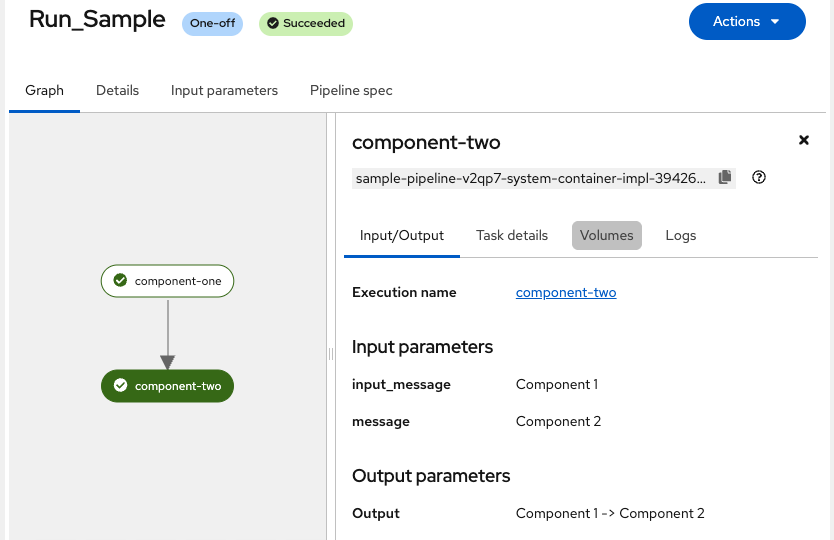
Multicomponent pipelines chain together multiple operations. You pass outputs from one component as inputs to the next. The KFP SDK handles data passing automatically through artifacts. You can extend a pipeline by importing reusable components. You then call them like functions in your code.
Parallelize pipelines when you have independent operations. You might need to preprocess multiple datasets or evaluate multiple models. If so, you can run components in parallel. The platform schedules containers efficiently across your cluster. This parallelization dramatically reduces total execution time.
You can run an entire pipeline as a component in another pipeline. This nesting capability enables hierarchical composition. Complex workflows are built from smaller, tested subworkflows. This abstraction promotes reuse at the pipeline level, not just the component level.
Implement conditional logic to skip specific steps. This logic is based on runtime conditions. If your data is already preprocessed, you can skip that step. If a model meets accuracy thresholds, you can skip additional training. The KFP SDK provides conditional decorators to make this easy.
Always test with small datasets first. This reduces iteration time and execution costs while you debug logic. Once the pipeline runs successfully, scale up to full data. This practice catches configuration errors early. You will avoid spending resources on large runs that might fail. For more information on how to get started with Kubeflow Pipelines, see the Kubeflow Pipelines Getting Started guide.
Recommended practices for contributing components
When you contribute components, you make them more valuable to the community. You should follow established quality standards. In addition to following the contribution guidelines, consider the following practices:
Start by using the built-in scaffolding commands to generate the required directory structure, boilerplate files, tests, and README:
# Scaffold a new component                                                                                                   make component CATEGORY=data_processing NAME=my_preprocessor

# Scaffold a new pipeline                                                                                                    make pipeline CATEGORY=training NAME=my_training_pipeline

# Generate or update the README from code                                                                                    make readme TYPE=component CATEGORY=data_processing NAME=my_preprocessor
These commands create all required files (component.py, __init__.py, metadata.yaml, OWNERS, README.md, and test stubs) following the exact repository conventions. This automation avoids missing files that will fail CI.
Input validation and error handling
Validate input parameters at the start of your component. This validation check prevents long-running failures. Nothing is more frustrating than a pipeline that runs for hours before failing. Check that file paths exist before you start processing. Verify that parameter combinations make sense together. You should also validate data formats early.
For example, your component might expect a model checkpoint directory. Check that the directory exists and contains the required files. Do this within the first few seconds of execution. This fail-fast approach saves time and compute resources.
Parameter naming
Use common prefixes for related parameters. This naming convention improves UI readability for the user. Your component might have multiple model-related parameters. If so, prefix them all with model_. You might use model_name, model_path, or model_version. This common prefix groups them visually in the pipeline UI.
Choose descriptive names over abbreviations. Use model_name instead of mdl. Use learning_rate instead of lr. Clarity is more important than brevity. Someone reading your pipeline should understand each parameter without checking documentation.
Support multiple input types
Components should accept artifact inputs, S3 URLs, and file paths. This multiple-input architecture maximizes flexibility for different users. Some users pass artifacts between pipeline components. Others reference datasets in S3. Some work with local file paths during development.
Your component should detect the input type and handle it correctly. If you receive an S3 URL, download the data first. If you receive a file path, verify it exists. This flexibility makes components work for many different user scenarios.
Packages and images
New components can have dependencies on upstream libraries. You must account for these in your design. The component should override the base image with a specialized image. Alternatively, it can install the required packages at runtime.
You must use custom images published to the GitHub image registry for upstream repos. For the red-hat-data-services repository, only approved Red Hat images are allowed.
Quality standards
Components are tagged with stability levels to clarify their development status. Use alpha for initial development and experiments. Use beta once core functionality works but you are still refining details. Move components to stable after community validation.
Components are flagged for verification if they are not validated within nine months. This validation prevents component rot as dependencies or SDKs evolve. Plan to revalidate your components periodically.
All components must pass linting and formatting checks. They must also pass documentation checks. This mandatory review process ensures consistency across the entire repository. Run linters locally before you submit your work.
Components must compile with the latest kfp.compiler. This catches compatibility issues before they reach users. The CI pipeline runs these checks automatically. Finally, include thorough tests. Cover normal operation, edge cases, and error conditions.
Start building composable AI pipelines today
Composable AI pipelines and reusable components accelerate gen AI development. They let you focus on what makes your workflows unique. You no longer have to rebuild common infrastructure.
An effective way to understand how they work is to start building. Explore existing components in the Kubeflow and Red Hat repositories. Read through the READMEs to understand what is possible.
Build your first pipeline on Red Hat OpenShift AI. Install the KFP SDK and select a few components for a basic task. Run it locally with small test data first. Then, deploy it to your OpenShift AI instance and scale up.
Contribute your own components when you need new functionality. Share your work back with the community. Start in the Kubeflow repository and follow the contribution guidelines. Write clear documentation and thorough tests.
Join the community to connect with other AI engineers and data scientists. Ask questions and share your experiences. Your lessons learned will help others build more efficient workflows.
Ship your first gen AI workflow faster than you thought possible. Start today.

