Storage live migration is a critical feature in modern virtualized environments, allowing administrators to move a running virtual machine's (VM) disk images from one storage volume to another with minimal downtime. This capability provides the flexibility to transition between storage providers or balance workloads across different storage classes without interrupting the virtual workload.
This article evaluates the performance and reliability of storage live migration within Red Hat OpenShift Virtualization. I focus on the analysis of native storage live migration results from OpenShift Virtualization version 4.21.
What is OpenShift Virtualization?
Built on the open source KVM hypervisor, OpenShift Virtualization is an operator included with Red Hat OpenShift. It offers simplified VM migration, and the ability to run virtual machines and containers in a consistent and integrated environment.
Test environment: Infrastructure and software
To ensure a reliable performance baseline, I utilized a dedicated hardware stack at the Red Hat Scale Lab. The setup consists of three control plane nodes and six worker nodes.
Hardware configuration
- Compute Nodes: Dell PowerEdge R650 servers.
- CPU: 112x Intel(R) Xeon(R) Gold 6330 CPU @ 2.00GHz.
- Memory: 512 GB.
- Network: 25 Gb/s connectivity.
- Storage (Source): OpenShift Data Foundation (ODF) using directly attached NVMe devices.
- Storage (Target): LVM storage cluster using 3x 1.5TB directly attached NVMe devices to the worker nodes.
Software Stack
- OpenShift Container Platform: 4.21.2
- OpenShift Data Foundation (ODF): 4.20.9.
- OpenShift Virtualization: 4.21.3.
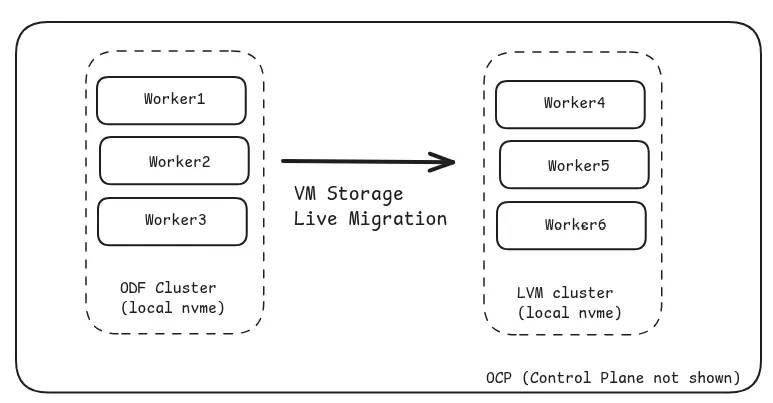
The performance and test results presented in this article are specific to the environment I've described and illustrated in figure 1, including OpenShift versions, hardware setup, and storage configuration. Variations in infrastructure—such as different storage systems, network configurations, hardware specifications, or software versions—may lead to different results. This document highlights the pattern or trend expected from these tests, rather than the actual numbers.
Performance analysis
My evaluation involved two primary test scenarios:
- No load tests: Migrating VMs across storageclasses while no I/O is running to observe baseline scaling.
- With load tests: Executing I/O workloads using fio (using simple-fio) during VM migration.
Baseline scaling (no load)
In scenarios with no I/O, the total storage migration time scales linearly as the number of VMs increases. While the total time grew, the average migration time per VM remained nearly constant. For example, a single VM migrated in 11 seconds, while 100 VMs took 653 seconds and 200 VMs took 1,337 seconds (see figure 2).
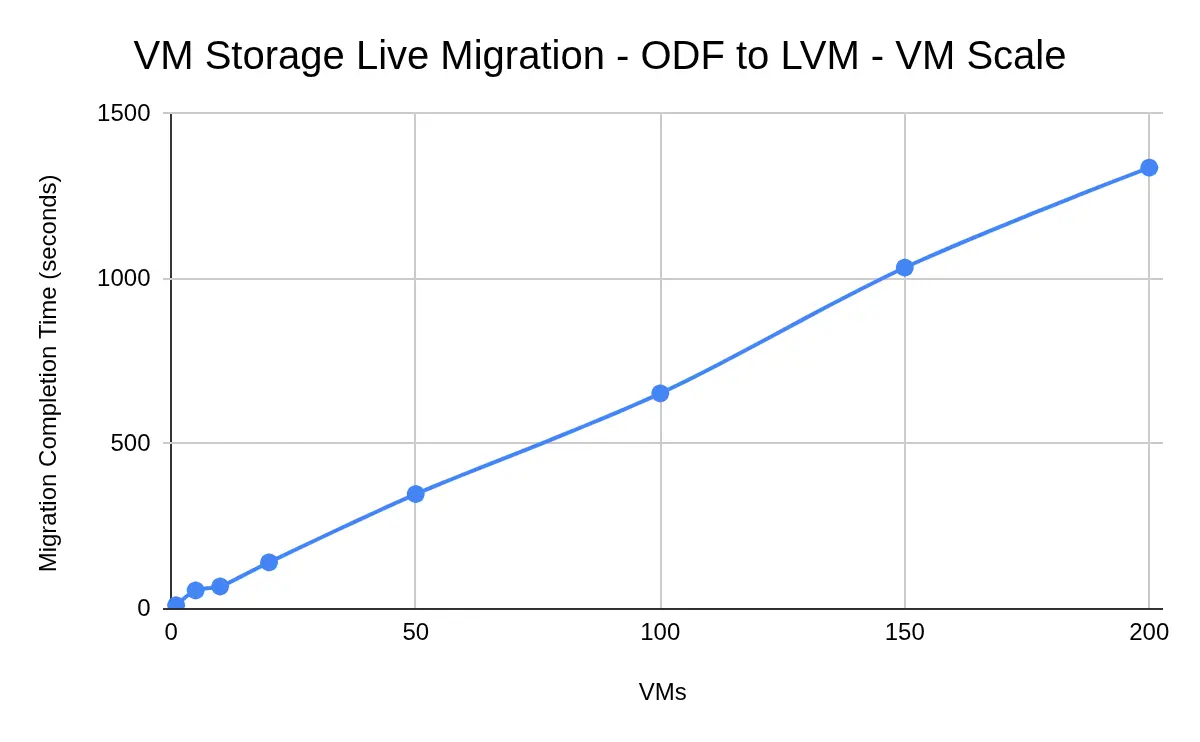
The above testing was executed using all default migration parameters.
Next, I kept all other parameters the same and modified the following parameters:
parallelMigrationsPerClusterfrom 5 (default) to 10parallelOutboundMigrationsPerNodefrom 2 (default) to 4
The migration time with the tuned parameters was almost half (figure 3) compared to what was observed with default values.
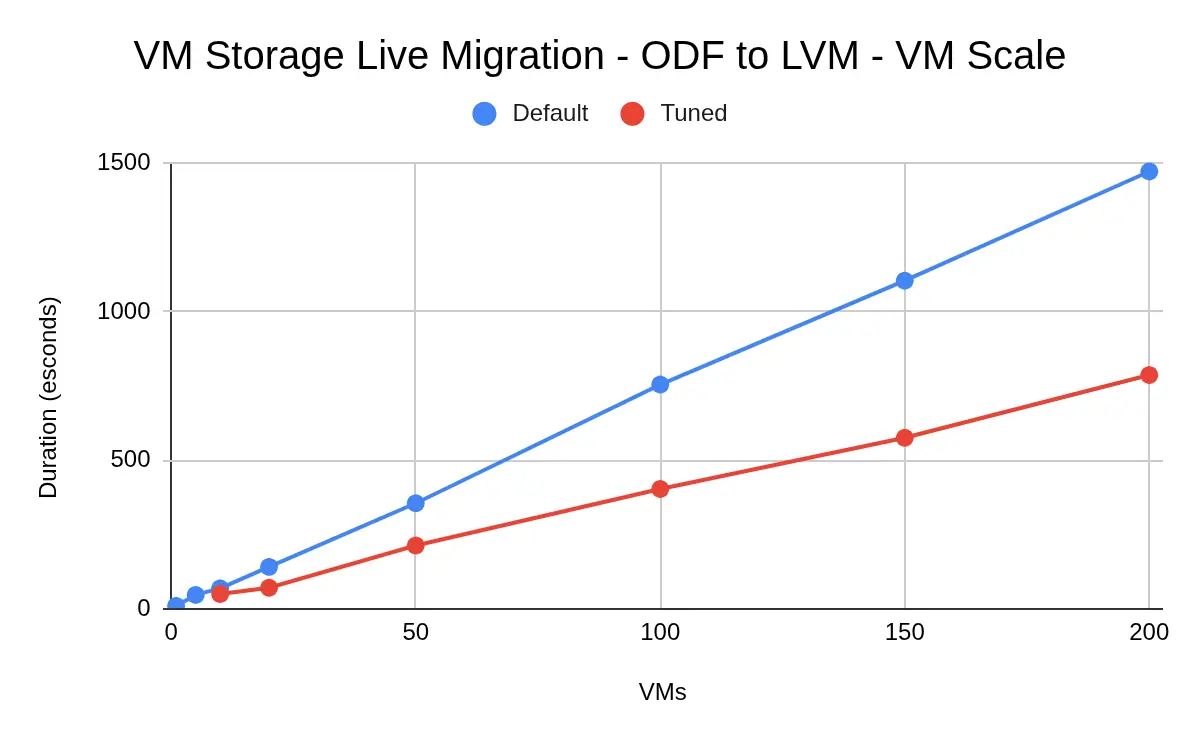
The migration parameters should be tuned while taking into account the CPU, memory and network load on the OpenShift nodes.
Scale observations
When scaling to 200 VMs, several system behaviors were noted:
- Pod latency: Pod start latency increased to approximately 40 seconds (up from less than 10 seconds in normal scenarios).
- Controller load: The
virt-controllerreached 800% CPU utilization.
Multi-namespace scaling (no load)
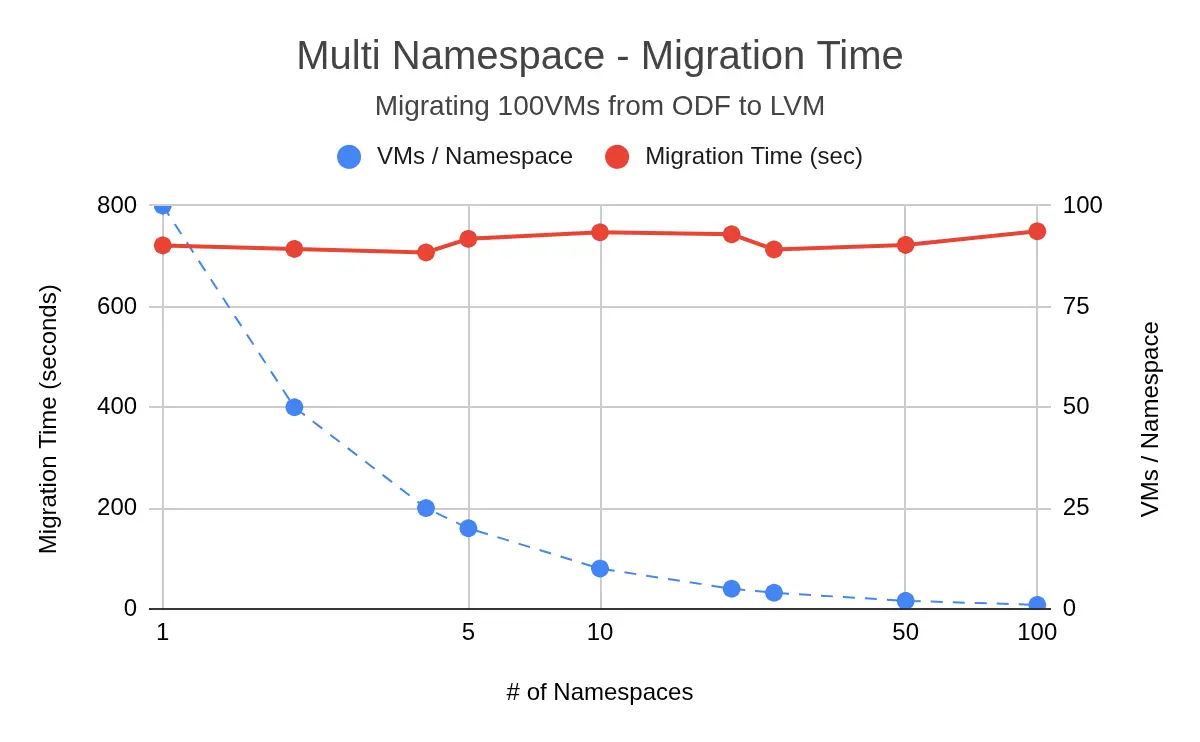
OpenShift Virtualization 4.21 supports migration of VMs across multiple namespaces. Testing the migration of 100 VMs distributed across multiple namespaces (from 1 to 100 namespaces) showed consistent total migration times, ranging between 700 and 750 seconds. This suggests that namespace distribution does not negatively impact the total duration of VM migrations (figure 4).
Migration under I/O load
I used 8 VMs for load testing with VM migration. Each VM had a 70 GB disk size, and the total migration data set was around 560 GB.
Mix random workload
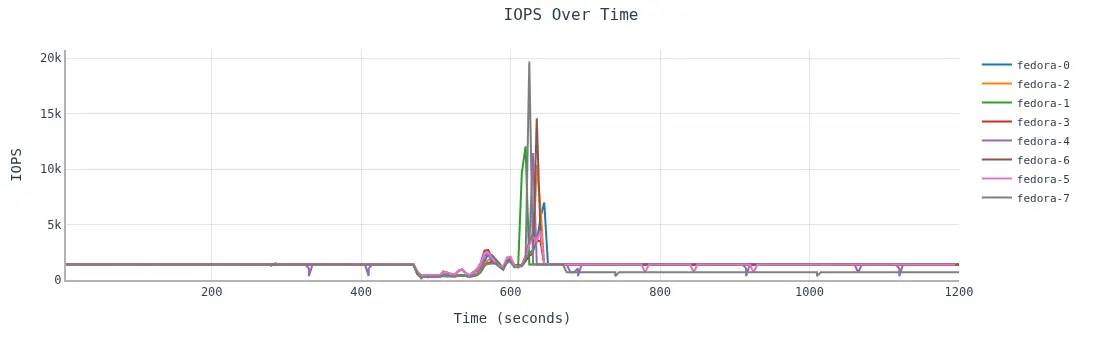
When using 8 KB random workload (70% read / 30% write), under a fixed high load (1400 IOPS /VM), the I/O performance dropped significantly when the migration started. However, once the migration was complete the IOPS jumped sharply to process the queued I/Os and then again IOPS hovered around 1400 which signifies that migration does not impact the overall performance (figure 5).
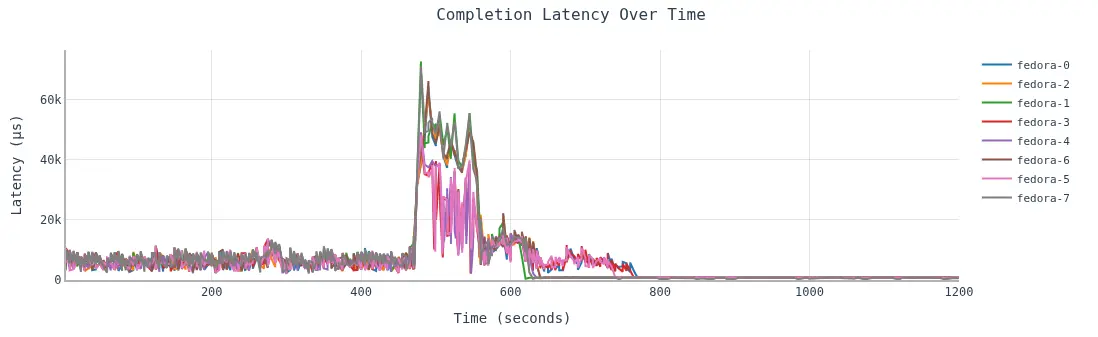
The response time (latency) decreased as the VM moved from ODF to local LVM storage (figure 6) because local LVM storage always performs better than ODF storage.
Sequential read
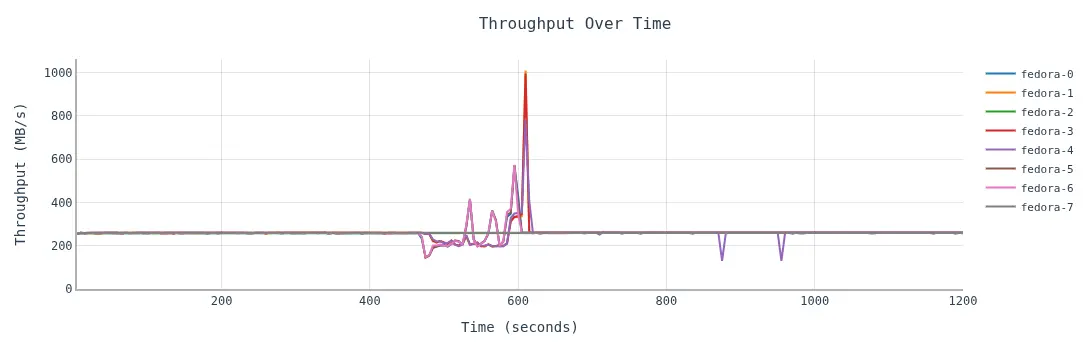
In this case, I chose a 1 MB block size and a fixed high I/O rate (280 IOPS/VM) as the workload. Migration was executed approximately 6 minutes after the I/O was started, and performance was slightly impacted during the migration process. Once the migration was complete, the performance was once again back to the original requested I/O rate (figure 7).
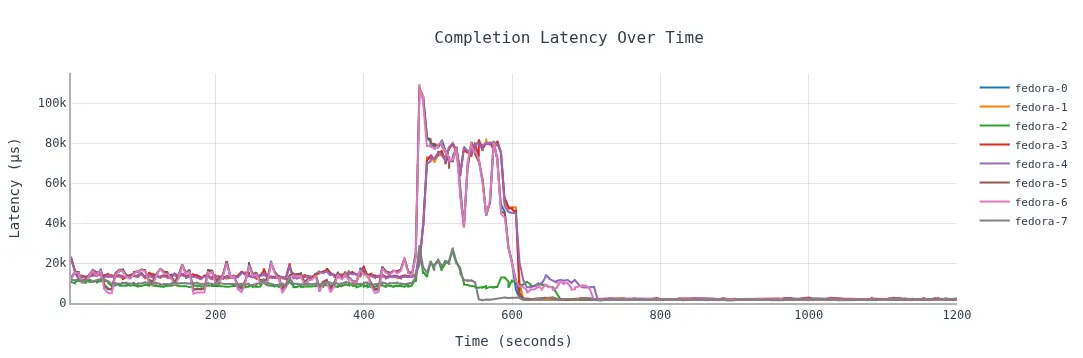
The response time followed the same pattern as the previous random workload, where the latency was higher when the VMs were using ODF storage while the latency reduced after the migration process was complete (figure 8).
Conclusion and recommendations
VM storage live migration in OpenShift Virtualization is a robust tool for workload management. While it performs excellently under low I/O loads, users should be cautious with high I/O workloads.
For optimal results:
- Prioritize low load: Schedule migrations during periods of low VM activity to ensure performance stability.
- Monitor controller resources: Be aware of
virt-controllerCPU demands during high-scale migrations (100+ VMs). - Leverage 4.21 native VM migration: Upgrading to version 4.21 provides measurable improvements in total migration time at high scale.
- Leverage multi-threaded IO: Multiple IO-threads were not supported with live migration using MTC (<OCP-4.19) but are now supported with native storage live migration (OCP-virt 4.20+).
Thanks to the Red Hat Performance and Scale Team, with special thanks to Shekhar Berry, Jenifer Abrams and Alexander Wels for guidance and reviewing this document.

