Training a large language model across multiple GPUs for days or weeks is an expensive undertaking. A single interruption from node maintenance, pod preemption, or a hardware failure can erase hours of progress and hundreds of dollars. In our previous article, we explored this problem in depth and introduced just-in-time (JIT) checkpointing, a capability that saves the training state the moment a termination signal arrives rather than waiting for the next scheduled checkpoint interval. We showed how this approach can save organizations over hundreds of thousands of dollars annually at enterprise scale by eliminating the vulnerability windows that make periodic checkpointing alone insufficient.
The previous article focused on the why. This article focuses on the how. Starting with Red Hat OpenShift AI 3.4 EA2 (early access release), the Kubeflow Training SDK provides built-in support for resilient model checkpointing with Persistent Volume Claim (PVC) and S3 compatible storage backends. In this hands-on guide, we will walk through the SDK APIs for configuring periodic checkpointing, JIT checkpointing, and automatic training resume. We will cover both storage options, explain when to choose them, and demonstrate a complete distributed training job with full checkpoint resilience. Whether you are running on a dedicated cluster with persistent volumes or training across pre-emptible instances with cloud storage, the SDK handles checkpoint saving, uploading, and recovery automatically with zero changes to your training code.
A complete step-by-step Jupyter notebook is available in the Red Hat AI examples repository. Clone the repo and follow along.
Prerequisites
You will need the following prerequisites:
- An OpenShift AI cluster (version 3.4 EA2 or later) with the trainer and workbenches components enabled
- S3 storage: S3 compatible object storage (AWS S3, MinIO, Ceph RGW, or equivalent) with a bucket created and access credentials
- PVC storage: A
PersistentVolumeClaimwithReadWriteMany(RWX) access mode in your project namespace
This example fine-tunes Qwen 2.5 1.5B Instruct on the Stanford Alpaca dataset using two nodes with 1 GPU each, 4 CPU cores, and 16 GiB memory per pod.
Set up your environment
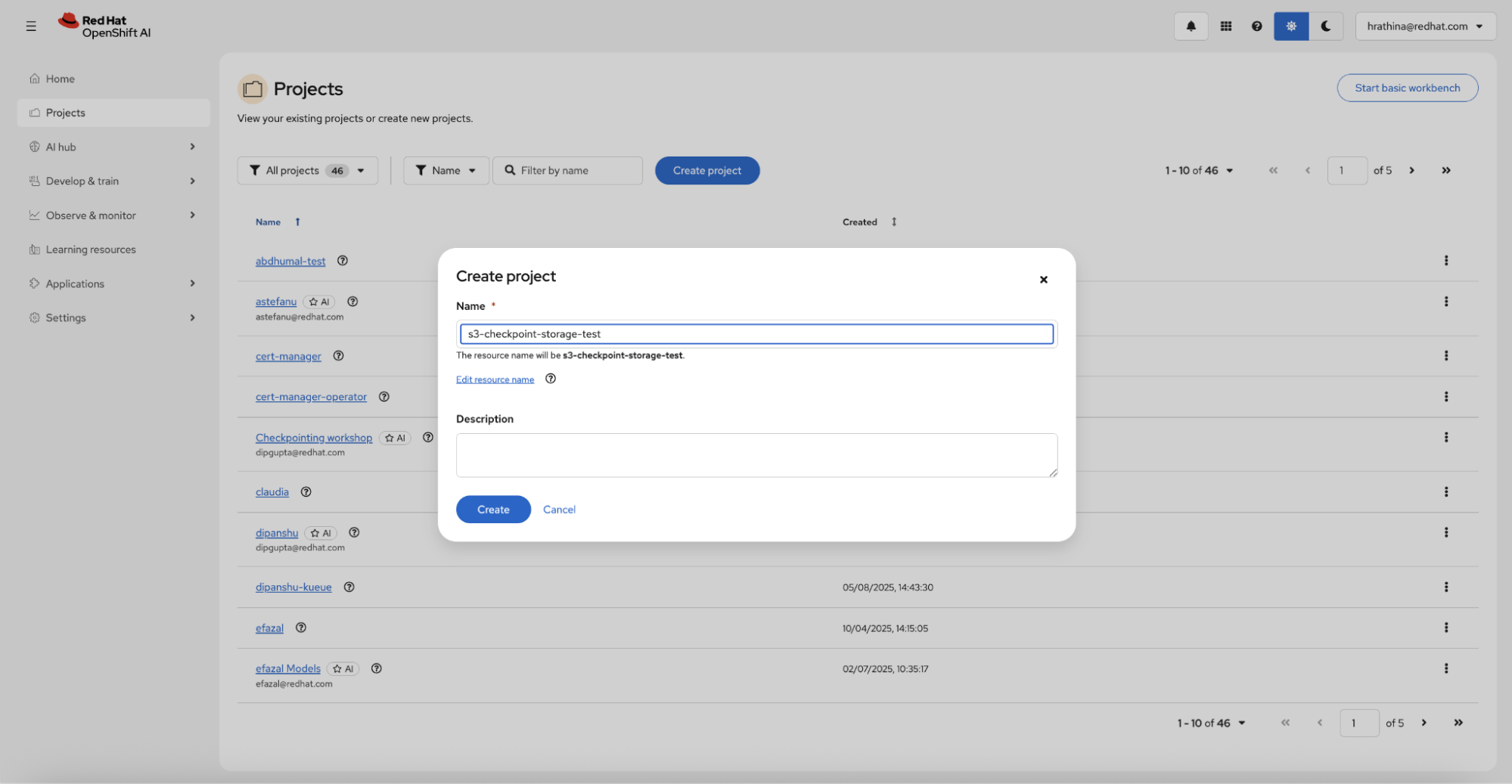
From the Red Hat OpenShift AI dashboard, create a data science project (Figure 1). Then set up a workbench.
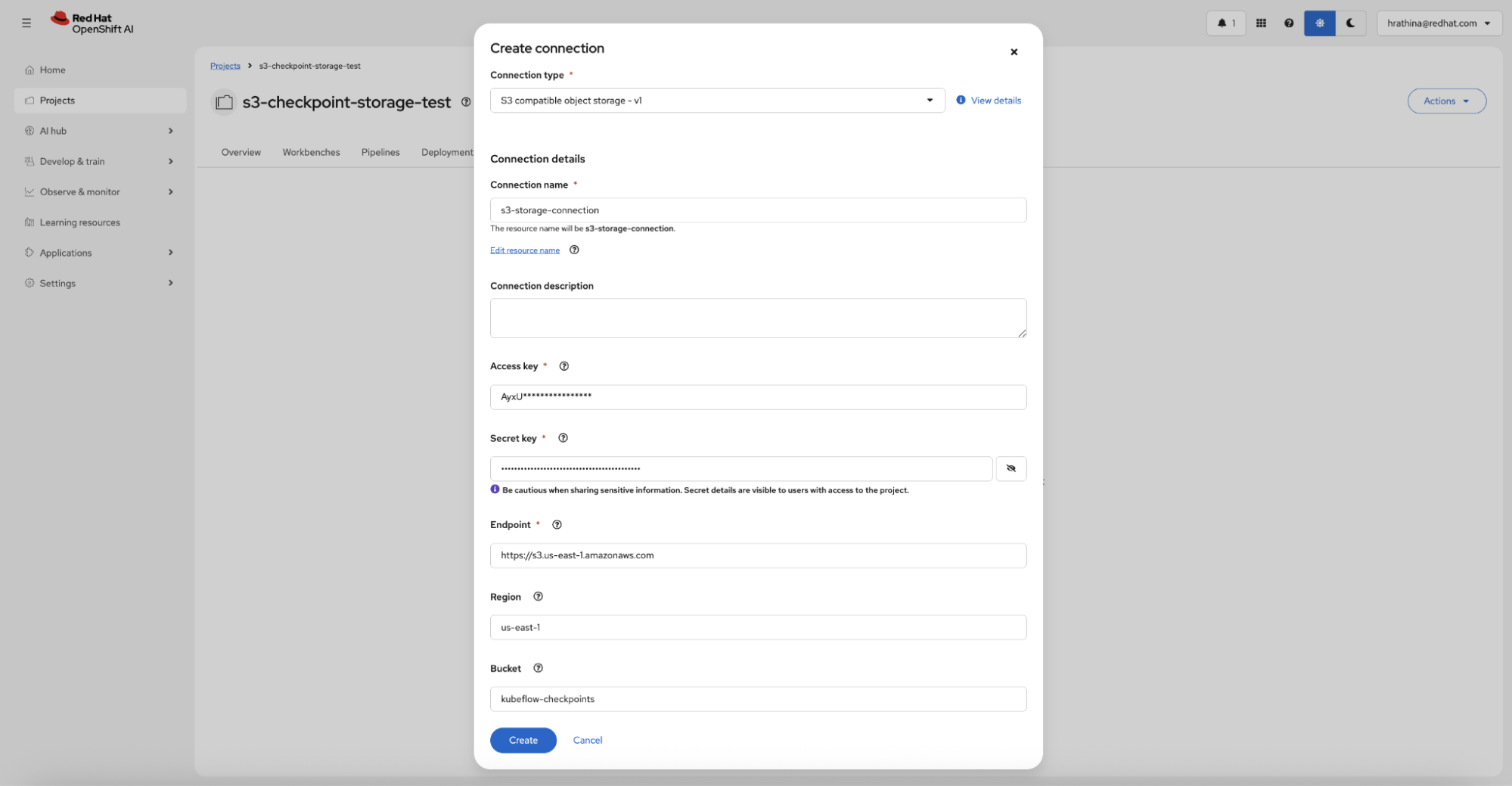
If you plan to use S3 storage, navigate to the Connections tab and create an S3 compatible object storage connection with your credentials (access key, secret key, endpoint, region, and bucket name), as shown in Figure 2.
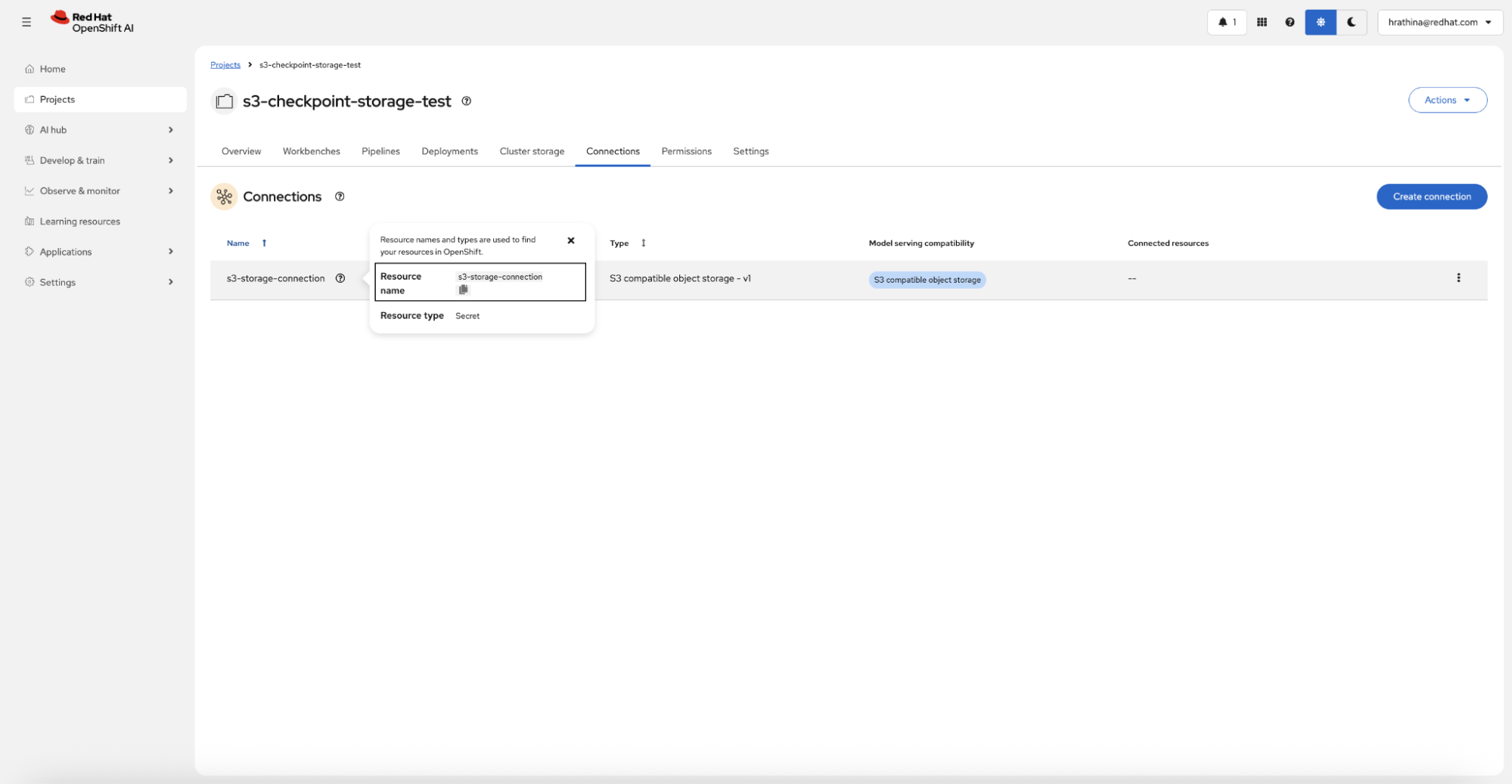
Note the connection's resource name after creation (Figure 3).
Once the workbench is running, clone the examples repository and open the notebook:
git clone https://github.com/red-hat-data-services/red-hat-ai-examples.gitNavigate to examples/trainer/s3-checkpoint-storage to follow along.
The training function
The training function contains no checkpoint logic. It simply loads the model and dataset, configures training hyperparameters, and calls trainer.train() to execute HuggingFace Transformers standard training loop.
def train_func():
    from transformers import AutoModelForCausalLM, AutoTokenizer, TrainingArguments
    from trl import SFTTrainer
    from datasets import load_from_disk
    model = AutoModelForCausalLM.from_pretrained(
        MODEL_LOCAL_PATH, torch_dtype="auto", attn_implementation="flash_attention_2",
    )
    tokenizer = AutoTokenizer.from_pretrained(MODEL_LOCAL_PATH)
    dataset = load_from_disk(DATASET_LOCAL_PATH)
    training_args = TrainingArguments(
        output_dir=OUTPUT_DIR, num_train_epochs=3,
        per_device_train_batch_size=2, gradient_accumulation_steps=2,
        learning_rate=5e-5, bf16=True, logging_steps=5,
    )
    trainer = SFTTrainer(
        model=model, args=training_args,
        train_dataset=dataset, processing_class=tokenizer,
    )
    trainer.train()
The Kubeflow Training SDK automatically injects JIT checkpoint handlers, periodic checkpoint callbacks, and resume detection at runtime. Your training code stays clean and focused on model training.
Two storage backends: PVC and S3
The SDK supports two checkpoint storage backends, each suited to different operational needs. Both storage backends share the same PeriodicCheckpointConfig for controlling how often to save checkpoints and how many to retain locally.
from kubeflow.trainer.rhai.transformers import PeriodicCheckpointConfig
checkpoint_config = PeriodicCheckpointConfig(
    save_strategy="steps",    # or "epoch"
    save_steps=20,            # save every 20 steps
    save_total_limit=2,       # keep 2 most recent checkpoints locally
)
Option 1: PVC storage
PVC storage is the simplest option. Specify a pvc:// URI as the output_dir, and the SDK automatically mounts the PVC to all training pods.
from kubeflow.trainer.rhai.transformers import TransformersTrainer
trainer = TransformersTrainer(
    func=train_func,
    num_nodes=2,
    resources_per_node={"nvidia.com/gpu": 1, "cpu": "4", "memory": "16Gi"},
    output_dir="pvc://my-checkpoints-pvc/llama3-fine-tune",
    enable_jit_checkpoint=True,
    periodic_checkpoint_config=checkpoint_config,
)
All pods read and write checkpoints directly to the shared PVC. This works well for single cluster setups where RWX storage is available. However, keep in mind that you must provision PVC capacity upfront, and that checkpoint storage can be significant. For instance, each checkpoint may be several GB or more, and creating checkpoints can require temporary storage potentially 40x larger than the final checkpoint. Remember that PVCs are tied to a specific cluster and namespace.
Option 2: S3 storage
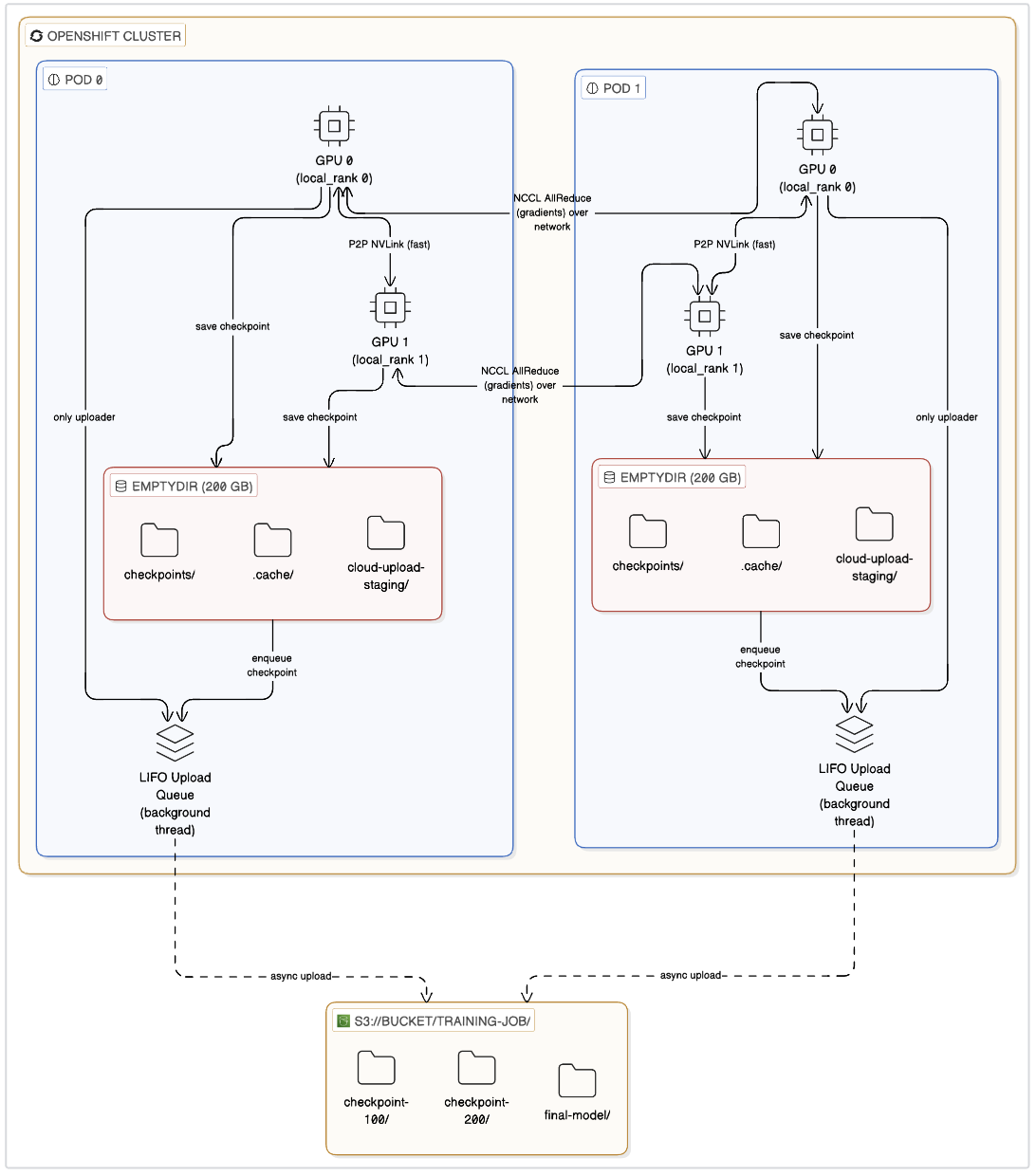
S3 storage makes checkpoints portable across clusters, scales without upfront sizing, and works with any cluster since each pod uploads independently. The SDK uses a local first architecture: checkpoints saved to fast local emptyDir storage on each pod, then uploaded to S3 in the background without blocking GPU training.
from kubeflow.trainer.rhai.transformers import TransformersTrainer
trainer = TransformersTrainer(
    func=train_func,
    num_nodes=2,
    resources_per_node={"nvidia.com/gpu": 1, "cpu": "4", "memory": "16Gi"},
    output_dir="s3://kubeflow-checkpoints/qwen-alpaca-finetune",
    data_connection_name="s3-storage-connection",
    enable_jit_checkpoint=True,
    verify_cloud_storage_ssl=False,
    verify_cloud_storage_access=True,
    periodic_checkpoint_config=checkpoint_config,
)
The S3 specific parameters perform the following:
output_dir: An S3 URI in the formats3://<bucket>/<prefix>. The bucket must exist. It creates the prefix automatically.data_connection_name: The resource name of the S3 data connection you created in the dashboard. The SDK reads credentials from the Kubernetes secret and injects them into the training pods.verify_cloud_storage_ssl: Set toFalsefor endpoints with self-signed certificates (such as MinIO). KeepTruefor production AWS S3.verify_cloud_storage_access: Validates S3 connectivity inside each training pod before training begins, catching configuration errors early.
The parameters common to both backends:
enable_jit_checkpoint: When a pod receives SIGTERM termination signal (due to preemption, eviction, or node maintenance), the system saves the training state at the next safe synchronization point before exiting.periodic_checkpoint_config: Controls how often to save checkpoints and how many to retain locally. With S3,save_total_limitonly controls local retention; all uploads to S3 remain permanently. With PVC, it controls how many checkpoints to keep on the volume.
How S3 checkpointing works
The key design principle is that checkpoint uploads never block GPU training. The SDK moves completed checkpoints to a staging directory and uploads them via a background thread using a LIFO queue, so the most recent checkpoint always uploads first.
The diagram in Figure 4 illustrates the S3 checkpoint lifecycle. Checkpoints move through four phases:
- Training start (resume): If a previous checkpoint exists in S3, each pod downloads the latest valid checkpoint to local storage and training resumes automatically.
- During training (periodic save): Checkpoints save to local storage at configured intervals (
save_steps). A background thread uploads them to S3 while training continues immediately. - Preemption or termination (JIT save): If it receives a
SIGTERMsignal, the system saves the current training state at the next safe synchronization point (after the current optimizer step completes) before the job exits gracefully. - Training end (final upload): The SDK waits for pending background uploads to complete, then uploads the final trained model to S3.
JIT checkpointing in action
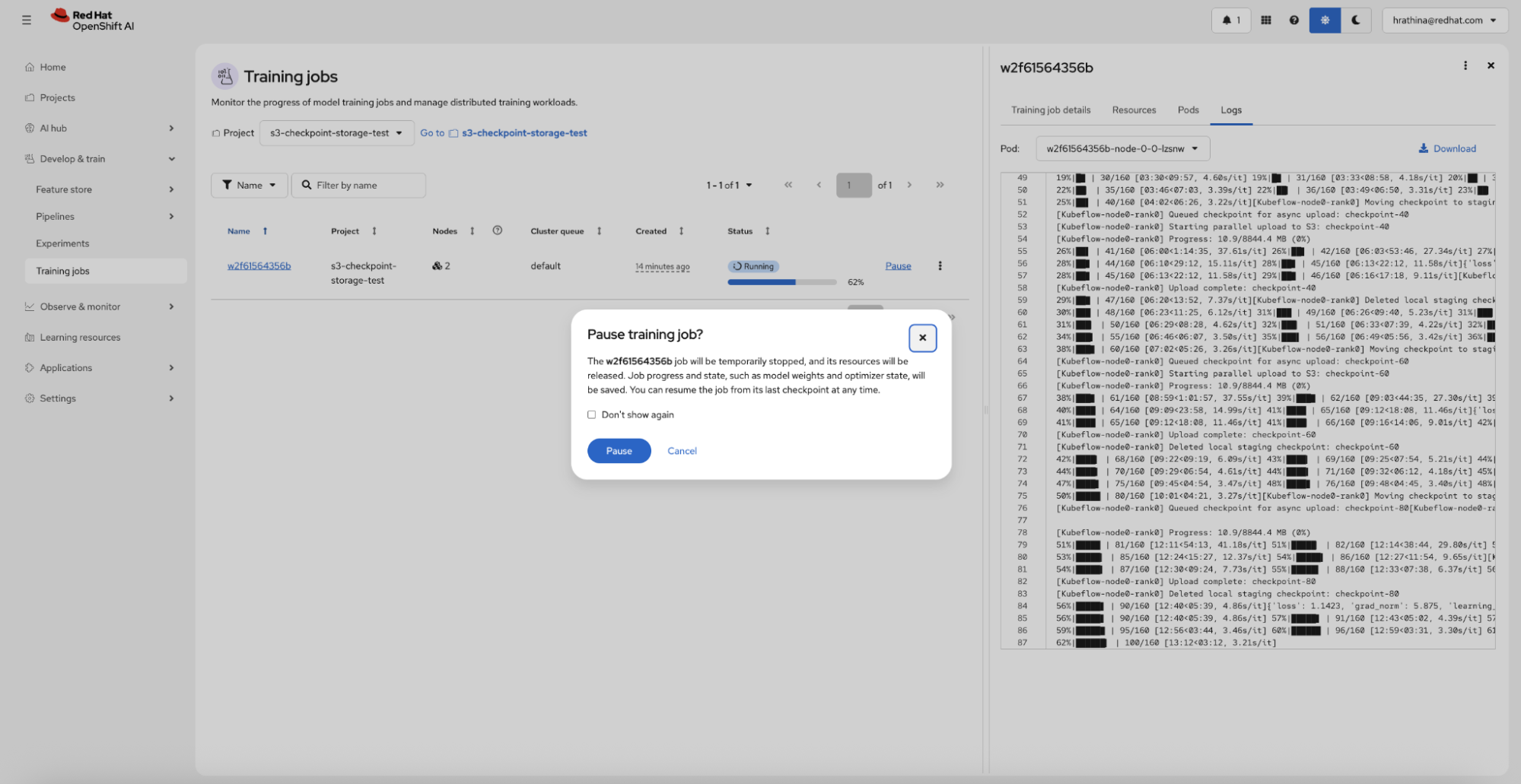
JIT checkpointing works with PVC and S3. When a pod receives SIGTERM, the signal handler sets a flag but does not save directly to avoid deadlocks in distributed training. Once every rank has finished its gradient update, the system reaches a safe synchronization point where it saves the current training state, and the job exits gracefully.
To demonstrate this, you can pause a running training job from the OpenShift AI dashboard (Figure 5).
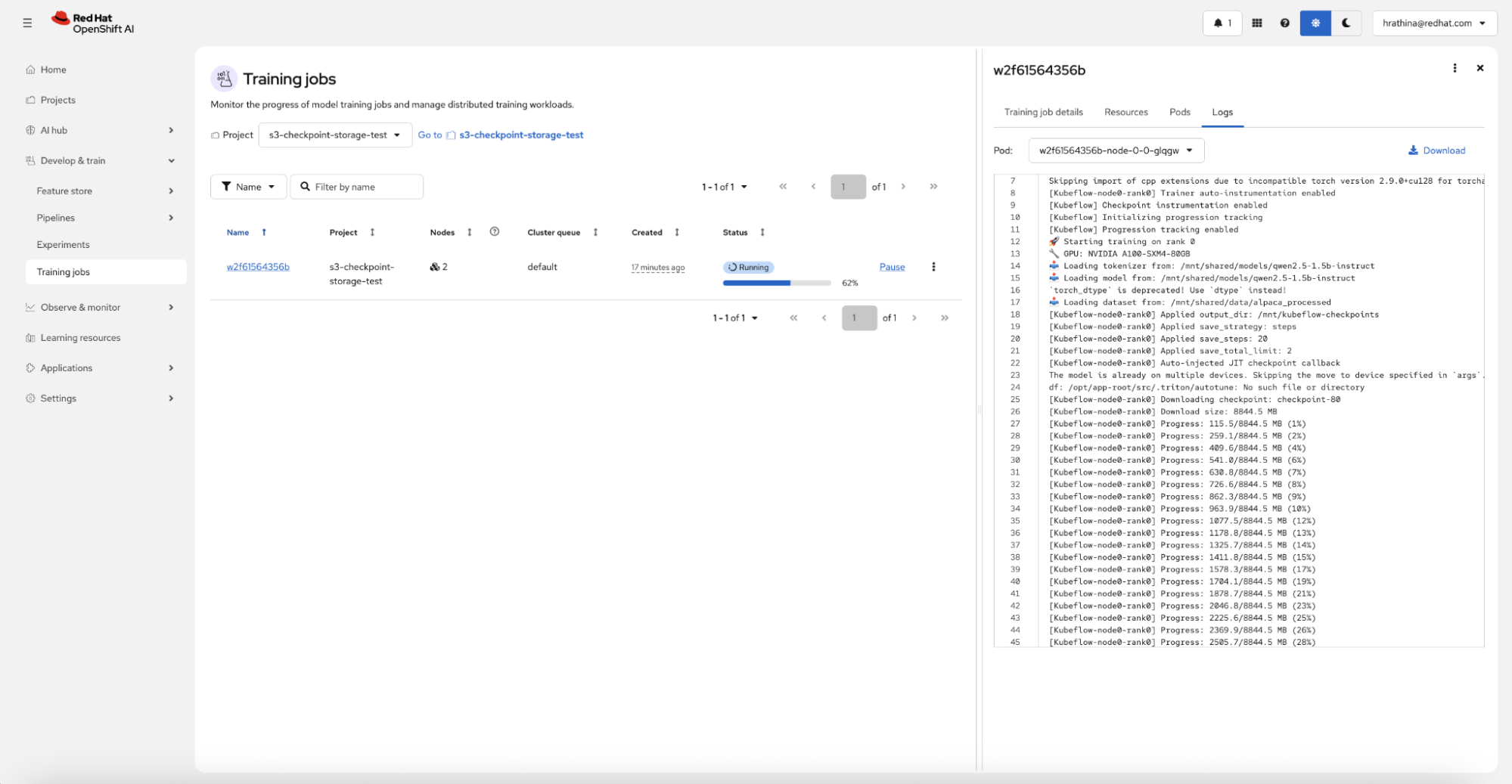
When you resume the job, it automatically detects the latest valid checkpoint, downloads it (if using S3), and continues training from where it left off, requiring no manual intervention (Figure 6).
Monitor checkpoints
With S3 storage, you can verify checkpoints appearing in your bucket as training progresses. The checkpoint structure follows a clear hierarchy.
s3://kubeflow-checkpoints/qwen-alpaca-finetune/
├── checkpoint-20/
├── checkpoint-40/
├── checkpoint-60/
└── final/
Checkpointing best practices
Checkpointing performance depends on GPU distribution, checkpoint intervals, and storage provisioning. For detailed storage sizing guidance, consolidation peak benchmarks, and node configuration recommendations, refer to the RedHat OpenShift AI 3.4 EA2 release docs.
Following these best practices will significantly improve training efficiency and resource utilization:
Maximize GPUs per node. Fewer pods with more GPUs results in fewer model and checkpoint downloads (GPUs on the same node share the same files), faster intra-pod GPU communication via NVLink, and less total local storage consumed. Two pods with 3 GPUs each is more efficient than 6 pods with 1 GPU each.
Avoid checkpointing too frequently. Periodic checkpoint saves are GPU-blocking operations. Saving every few steps can significantly slow training throughput. Choose an interval that balances recovery granularity with performance.
Plan for storage peaks with S3. Checkpoints write to local
emptyDirstorage before upload. During checkpoint consolidation, temporary storage can spike significantly. For example, with DeepSpeed ZeRO-3, consolidation peaks can exceed 40 times the final checkpoint size.Manage S3 retention separately. The SDK does not automatically delete old checkpoints from S3. Use S3 lifecycle policies or manual cleanup to manage storage costs.
Increase the termination grace period for large models. Large models take longer to save a JIT checkpoint and need a longer grace period before pod termination. If terminated too early, training progress will be lost. Full support for configuring TrainJob terminationGracePeriodSeconds is not yet available. Track progress at kubeflow/trainer#3285 and RHOAIENG-44392.
Learn more
In this article, we demonstrated the Kubeflow Training SDK APIs for configuring resilient model checkpointing on OpenShift AI. Whether you use PVC for simplicity or S3 for portability and scale, the SDK automatically handles checkpoint saving, uploading, and resume detection. Your training code requires zero modifications. The complete working example is available in the Red Hat AI examples repository. Clone the repo, configure your storage backend, and start training with resilient checkpointing.
For more information, consult the Kubeflow Trainer SDK documentation and the Red Hat OpenShift AI product documentation. To learn more about resilient model training on OpenShift AI, read this article: Resilient model training on Red Hat OpenShift AI with Kubeflow Trainer. When you’re ready to start, explore Red Hat OpenShift AI.

