In the modern healthcare enterprise, development agility often conflicts with strict security compliance. Organizations want to rapidly deploy modern AI models, but when processing protected health information (PHI), they must enforce zero trust policies to prevent data leakage.
This technical hands-on blog post explores how Red Hat OpenShift, confidential containers (CoCo), and Red Hat Enterprise Linux (RHEL) confidential virtual machines (CVMs) bridge this gap. We will demonstrate how to automate the deployment of sensitive AI workloads across multicloud environments.
Balancing developer speed and security
This deployment scenario involves two personas with conflicting goals: Janine, a developer, and Raj, an operational security administrator.
Janine is a data scientist focused entirely on speed. She needs to rapidly test her AI models in a production-like staging environment. She is unfamiliar with confidential computing and should not have to worry about security infrastructure. Her goal is to run production-like container workloads in OpenShift while maintaining the flexibility to test on standalone virtual machines (VMs) across different clouds for debugging.
Raj, on the other hand, is responsible for protecting patient data and maintaining cluster security. He enforces a zero trust model across all environments, which means he trusts nothing outside his on-premises datacenter.
Raj's policy follows a two-gate model:
- Gate 1 ensures only containers with trusted signatures can start. Running workloads must come from trusted sources.
- Gate 2 ensures that workload specific secrets are only released if the environment passes a hardware attestation check. Running workloads must run in a trusted enclave, regardless of whether the host environment is trusted.
In this scenario, both personas work for a hospital. Janine wants to deploy a model that anonymizes patient data so it can be safely shared with researchers to drive innovation.
The workload
The application at the center of this demonstration is a gatekeeper AI model, specifically the obi/deid_roberta_i2b2 model from Hugging Face.
Before a hospital can safely share patient data with researchers, this natural language processing (NLP) model identifies and de-identifies protected health information (PHI). PHI includes any information about health status, healthcare provision, or payment for health care that can be linked to an individual. In the United States, this data is defined and protected under the Health Insurance Portability and Accountability Act (HIPAA).
For example, if you provide the model with the sentence Dr. Strange admitted John Doe to Mount Rushmore Hospital on 2023-05-12, it transforms the text to Dr. [NAME] admitted [NAME] to [LOCATION] on [DATE]. Because the model processes raw patient data, it is an ideal use case for confidential computing, which protects data while in use.
Janine's implementation
To run this AI model as a container, Janine implemented this workflow:
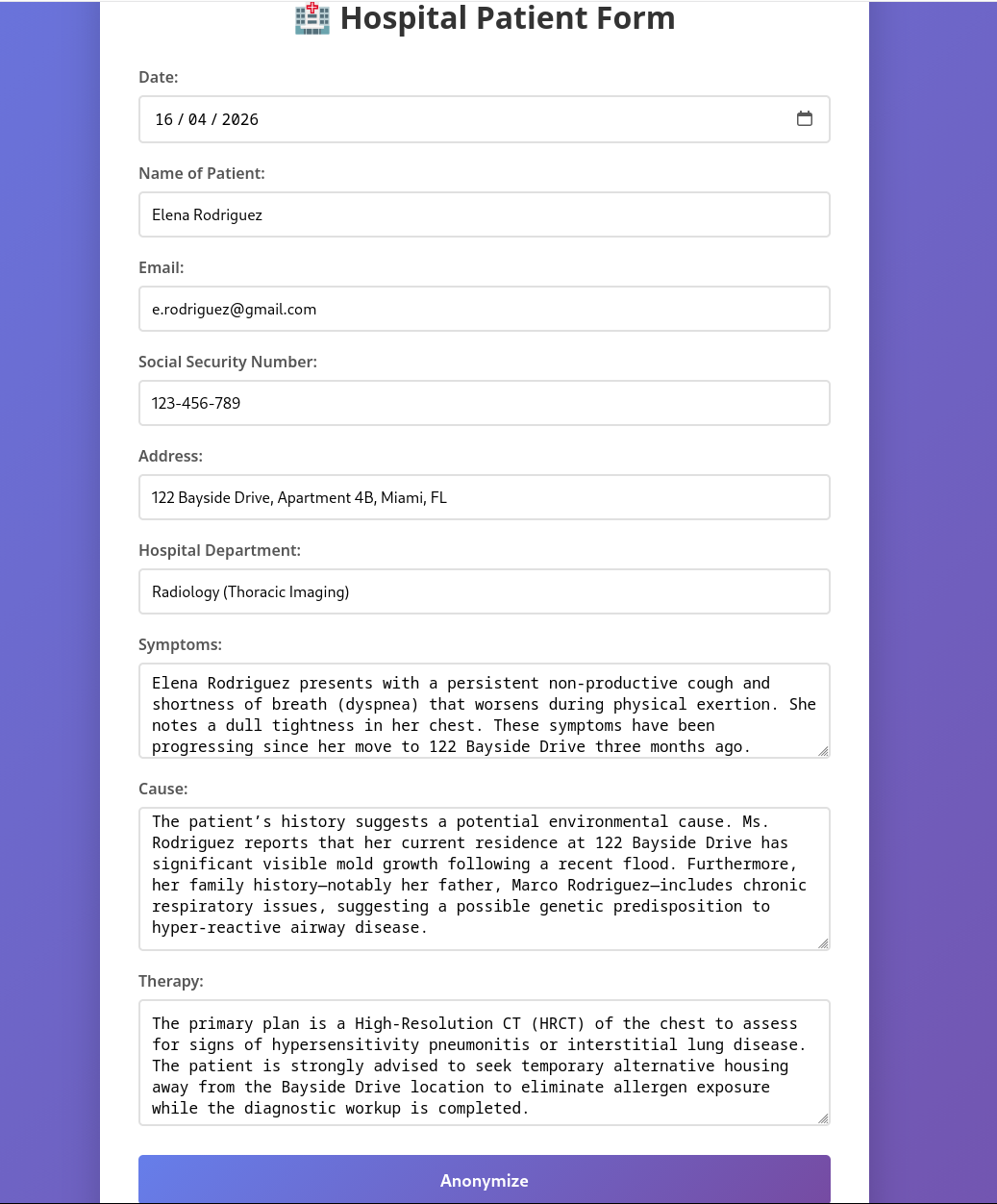
- A user, such as a doctor, uploads patient data using a web form (see Figure 1).
- The system provides the patient data to the AI model for anonymization.
- The model returns the anonymized data to the user to verify its accuracy.
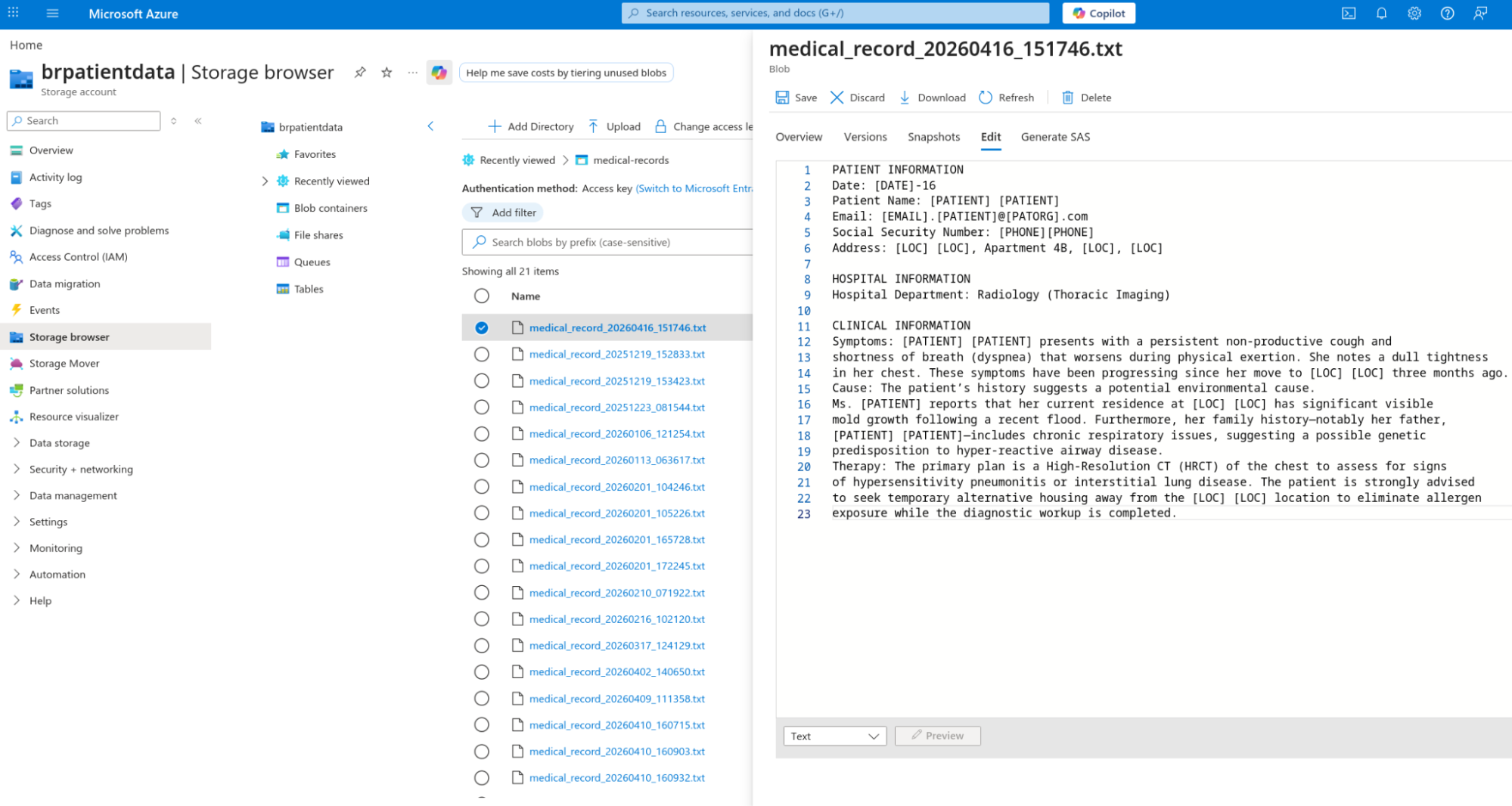
- After approval, the system uploads the data to a public Microsoft Azure Blob Storage bucket (Figure 2).
Raj's requirements
Raj, who manages security, must address several potential issues before running the container:
- Unauthorized users could dump patient data from memory while it is processed for clear text.
- The model could leak patient data through logs accessible to anyone with cluster access.
- The workload is data-sensitive but runs in an untrusted cloud environment.
How can Raj achieve this without placing the burden on Janine? The answer lies in automation.
Automation and hardening
In addition to the standard build pipeline, Raj adds pipelines to harden the container and transform it into a confidential workload.
The new pipelines perform the following tasks:
- Update the pod definition to include confidential specifications, such as
RuntimeClassand sealed secrets. - Add two sidecars to the pod definition: one wraps the AI server with an mTLS server for communication, and the other connects to Raj's security dashboard.
Raj requires that the system provides secrets—such as Azure credentials andcertificates—only if the workload is confidential. The application cannot run or process data until the system verifies that it is in a confidential computing environment.
This article does not cover the security dashboard, which will be the subject of a future post.
Architecture overview
To run this workload, we separate concerns into two distinct environments:
- Trusted cluster: An on-premises environment managed by Raj. This environment acts as the security anchor for the system and storessecrets that are shared with the workload only after the system verifies the environment is confidential. The trusted cluster also acts as an Argo CD hub, allowing it to manage Argo CD applications in the deployment cluster.
- Deployment cluster (untrusted): The environment where the confidential workload actually runs. This environment is managed by a cluster administrator who does not have access to the model or private data. Running the workload in a confidential environment helps safeguard data by limiting the ability of unauthorized parties to access the processed information.
We use specialized hardware and standard processes to protect data at rest, in transit and in use. Specifically, this hardware ensures that the workload memory is encrypted. Through attestation and a remote attester, we verify that the confidential workload uses the required hardware and a untampered software stack.
This article focuses on cluster setup and the user experience. For more information on attestation and data-in-use security, see our high-level overview.
First, let's review the workflows for confidential containers and CVMs.
Deploying a confidential container: The overall flow
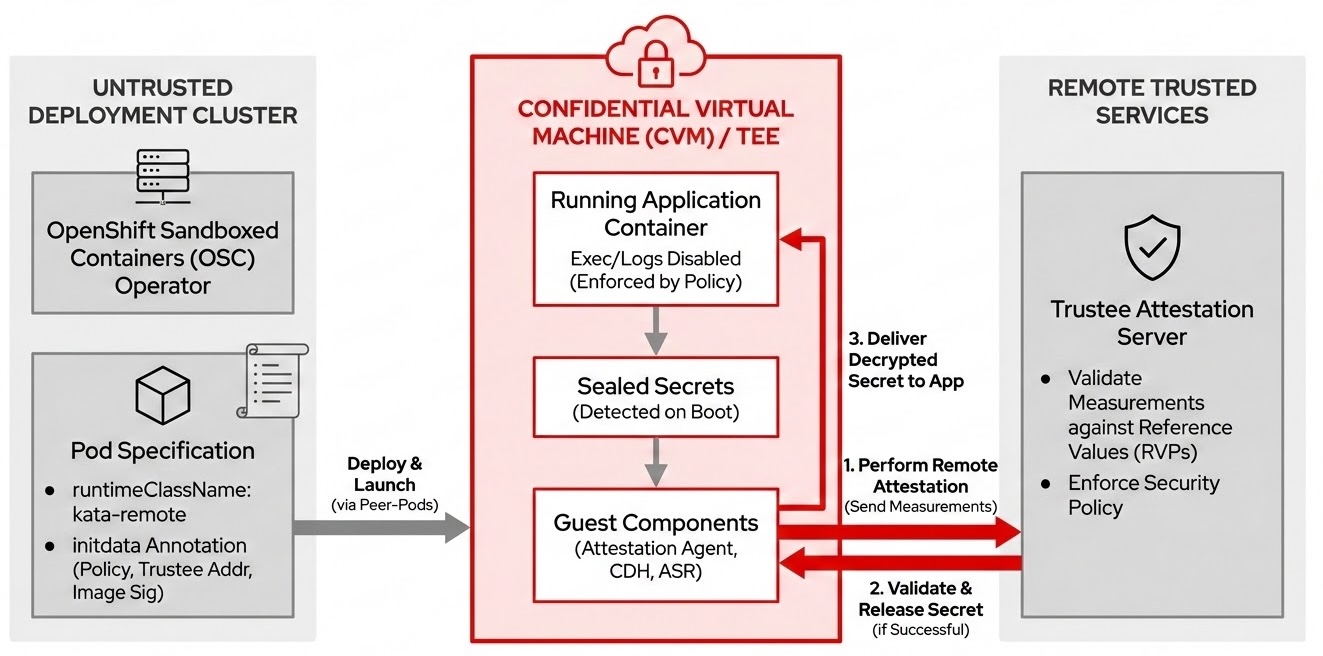
The confidential container (CoCo) flow runs on the untrusted deployment cluster and includes these technical steps and components.
Runtime environment
The deployment cluster must have the OpenShift Sandboxed Containers operator installed and configured. The containerized AI workload is deployed with the mandatory pod specification field runtimeClassName: kata-remote, which launches the pod inside a confidential virtual machine (CVM) using peer-pods technology.
Security policy and attestation anchoring
A crucial component called initdata is provided as a pod annotation. This data defines the pod's security policy, specifies the Trustee address, and dictates the image signature policy. The initdata component is measured and included in the attestation report. This process prevents administrators in the untrusted cluster from altering the policy without being detected by the remote Trustee.
Enforced data-in-use security
Security policies defined in initdata strictly enforce that pod exec and log visibility are disabled. This helps protect data-in-use security by preventing anyone from inspecting the data being processed.
Secret detection and local query
Application secrets are transformed into sealed secrets. When the container boots, the internal confidential container components automatically detect these sealed secrets and query a local server exposed by the guest component—such as the Attestation Agent, Confidential Data Hub, or API Server REST—to request the secret value.
Remote attestation and release
The guest component uses the Trustee address from initdata to contact the remote Trustee server. It performs the attestation process. If the hardware and software configuration matches the Reference Value Provider Service (RVPS), the Trustee delivers the secret to the application.
The coco-fy pipeline automatically implements this flow, as shown in Figure 3.
Deploying a CVM: The overall flow
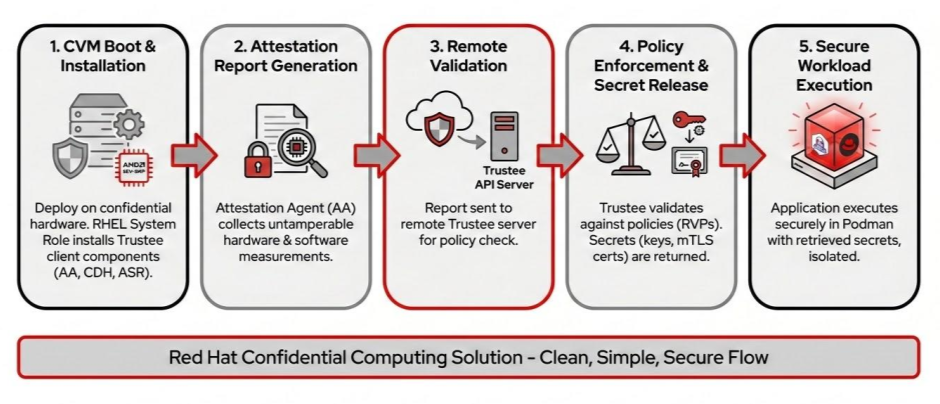
After the CVM pipeline deploys the RHEL confidential virtual machine on cloud infrastructure like Azure or Amazon Web Services (AWS), the process follows an attestation and secret retrieval sequence:
CVM boot and component installation
Similar to a confidential container, the RHEL CVM is deployed on specialized, hardware-backed confidential instance types such as Standard_DCas on Azure or m6a.large on AWS. These instances use AMD SEV-SNP technology to provide memory encryption. The CVM pipeline uses the RHEL Linux system role to install the necessary Trustee client components, including the Attestation Agent, Confidential Data Hub, and API Server REST.
Attestation report generation
As the machine boots or the workload attempts to retrieve secrets, the Attestation Agent collects an attestation report. This report contains hardware and software system measurements that help prevent tampering.
Remote validation
The Attestation Agent sends this attestation report to the remote attester, the Red Hat build of Trustee server, for validation.
Policy enforcement and secret release
The Trustee compares the received measurements against its defined RVPS. If the Trustee validates the attestation report against the security policy, it returns the necessary secrets. These secrets include the key required for automatic LUKS2 disk encryption and decryption for encrypted storage. They also include static workload secrets, such as Azure Blob Storage connection strings and mTLS certificates.
Secure workload execution
Once the keys and secrets are retrieved and the storage is mounted, the application runs on the CVM using Podman.
The cvm pipeline automatically implements this flow, as shown in Figure 4.
Trusted cluster components and setup
Raj's on-premise trusted cluster houses most of the logic and operators. This cluster stores the secrets used in the workflow. As the operational security lead, Raj is responsible for installing and configuring the trusted cluster.
Configuration for all components is available on GitHub in the hospital-demo-gitops repo.
The cluster requires these operators.
Red Hat build of Trustee
As the remote attester, Red Hat build of Trustee releases workload secrets only after checking that the confidential containers match the expected security policy.
You can install this operator like any other OpenShift operators. Refer to the official documentation to learn how to install the Red Hat build of Trustee.
Note
This article refers to the Red Hat build of Trustee as Trustee, which is the name of the upstream project.
Reference values
After installation, configure the required TrusteeConfig. For production environments, we recommend selecting restrictive mode to apply all default settings.
Raj's first step is to configure the reference values. These values define the expected hardware and software configuration for attestation.
When a confidential container starts or requests a secret, it sends an attestation report to the remote attester. This report contains system measurements that are hardware-verified to help prevent tampering. The remote attester compares the incoming report against its internal list of expected measurements, known as reference values. If a mismatch occurs, it indicates the confidential container is not running the expected hardware and software stack. In this case, Trustee does not release the secret.
A default empty reference value ConfigMap named trusteeconfig-rvps-reference-values is created during the TrusteeConfig configuration. To populate these values, Red Hat includes a set of reference values with its confidential container images. Find instructions for retrieving and updating these reference values in the workshop documentation.
Image signature verification
Raj also needs to configure a signature image verification policy to enforce CoCo runs only container images signed with a specific public key. In this example, we will configure a policy that allows only specific images signed by authorized keys. Follow these three steps to configure the policy:
- Provide the public key used to sign the container image to OpenShift as a secret. Find the key for the images used in this example in the GitHub repository
- Load the secret into Trustee by adding it to the KbsConfig custom resource definition (CRD).
- Create a custom signature image verification policy that allows only the images you authorize.
The official documentation provides more information on how to add secrets, load them into Trustee, and create a signature verification policy.
Workload secrets
Finally, Raj loads Trustee with static secrets, such as Azure Blob Storage connection strings and mTLS certificates. Trustee releases these secrets to the deployment cluster only if the hardware attestation succeeds.
In this example, we add an Azure secret, an Azure connection string to allow the workload to upload anonymized data to public storage. We also add mTLS sidecar certificates (1 and 2) to protect communication between the user and the AI model.
The repository contains other secrets for the security dashboard, but this example does not cover them.
Trustee as a standalone RPM
Trustee doesn't necessarily need to run in OpenShift. In future releases, Trustee will be available as a standalone RPM package for Red Hat Enterprise Linux. Learn how to install the package using RHEL Linux system roles in the section A new RHEL Linux system role.
This demo assumes Trustee is installed in OpenShift. Its specific location does not change the core workflow. Trustee must run in a trusted environment separate from where the confidential workloads run. It must also be reachable by the confidential container or VM running the workload.
Red Hat OpenShift Pipelines
Use the Red Hat OpenShift Pipelines operator to run the pipelines that build, transform, and deploy the workload on CVMs.
For this demo, all you need to do is install the Pipelines operator. The pipelines in the example repository handle the remaining steps.
Red Hat OpenShift GitOps
Finally, we need the Red Hat OpenShift GitOps operator to install Argo CD.
For this demo, install the GitOps operator. The application in the example repository's argocd folder handles the remaining configuration.
Configure the automation pipelines
After you install the main components, let's look at the pipelines.
The build pipeline
The build_pipeline folder contains an example of a standard build pipeline.
The pipeline fetches Janine's code, builds it, signs the container image, and pushes it into the container registry. Figure 5 shows a run of the build pipeline.
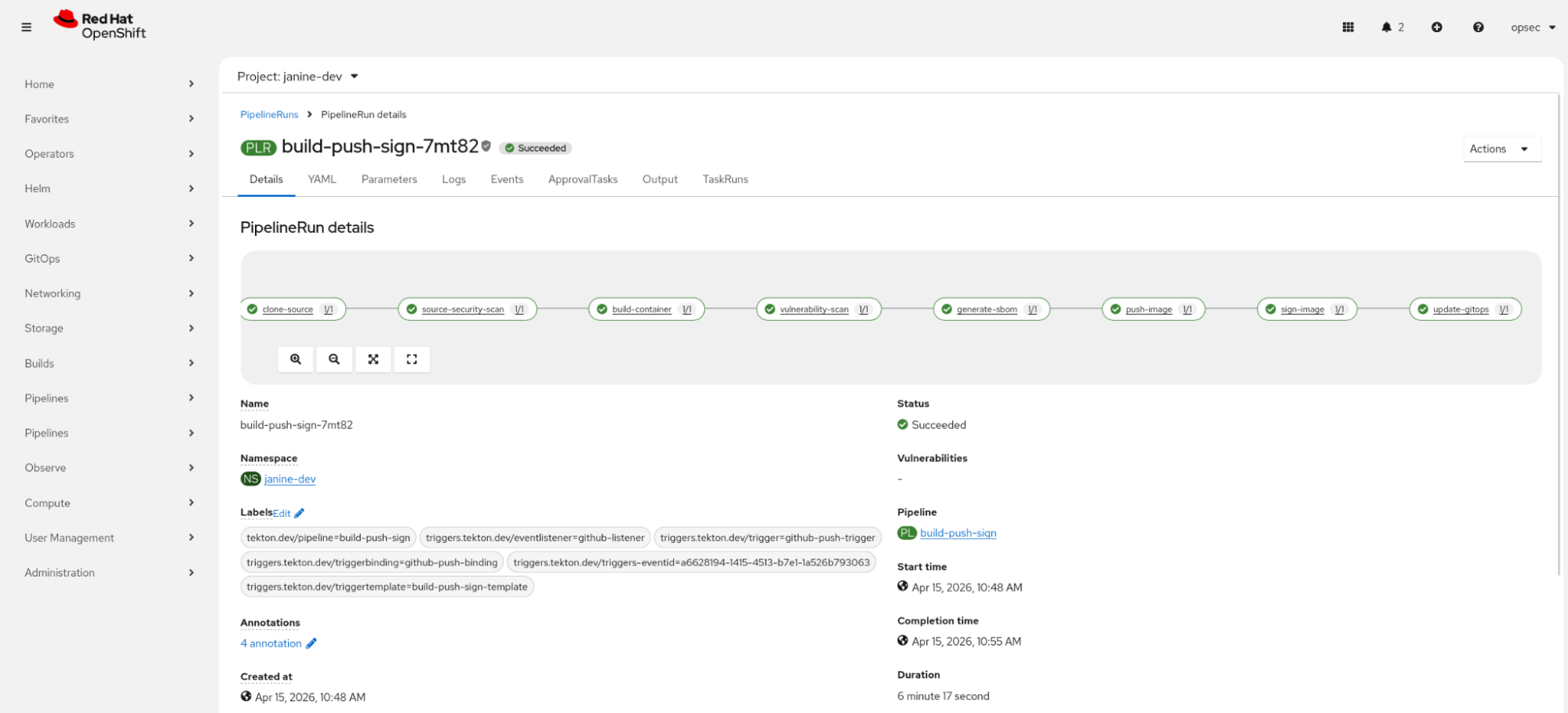
This pipeline also includes a task called update-gitops that updates the deployment template in the application/deid-roberta/templates/deployment.yaml file. This file is a deployment template and is not meant to be deployed directly.
The CoCo-fy pipeline
This pipeline takes the output from the build pipeline and hardens it to run as a confidential container. You can find this pipeline in the coco_pipeline folder of the repository.
This pipeline triggers automatically when the build pipeline updates the template deployment. It fetches cococtl, an upstream tool built by the Red Hat confidential containers team, and runs it against the deployment template. Figure 6 shows an example run of the CoCo-fy pipeline.
The cococtl tool performs the following actions:
- Adds the
runtimeClassName: kata-remotefield to the pod specification (podspec). - Attaches the mTLS sidecar and generates any necessary certificates.
- Transforms the application secrets into sealed secrets. A sealed secret replaces the actual value with a reference string, such as:
To receive this secret, request path x/y/secret_name from Trustee.When the container boots, the CoCo components detect the sealed secret and perform attestation to retrieve the actual secret from Trustee.
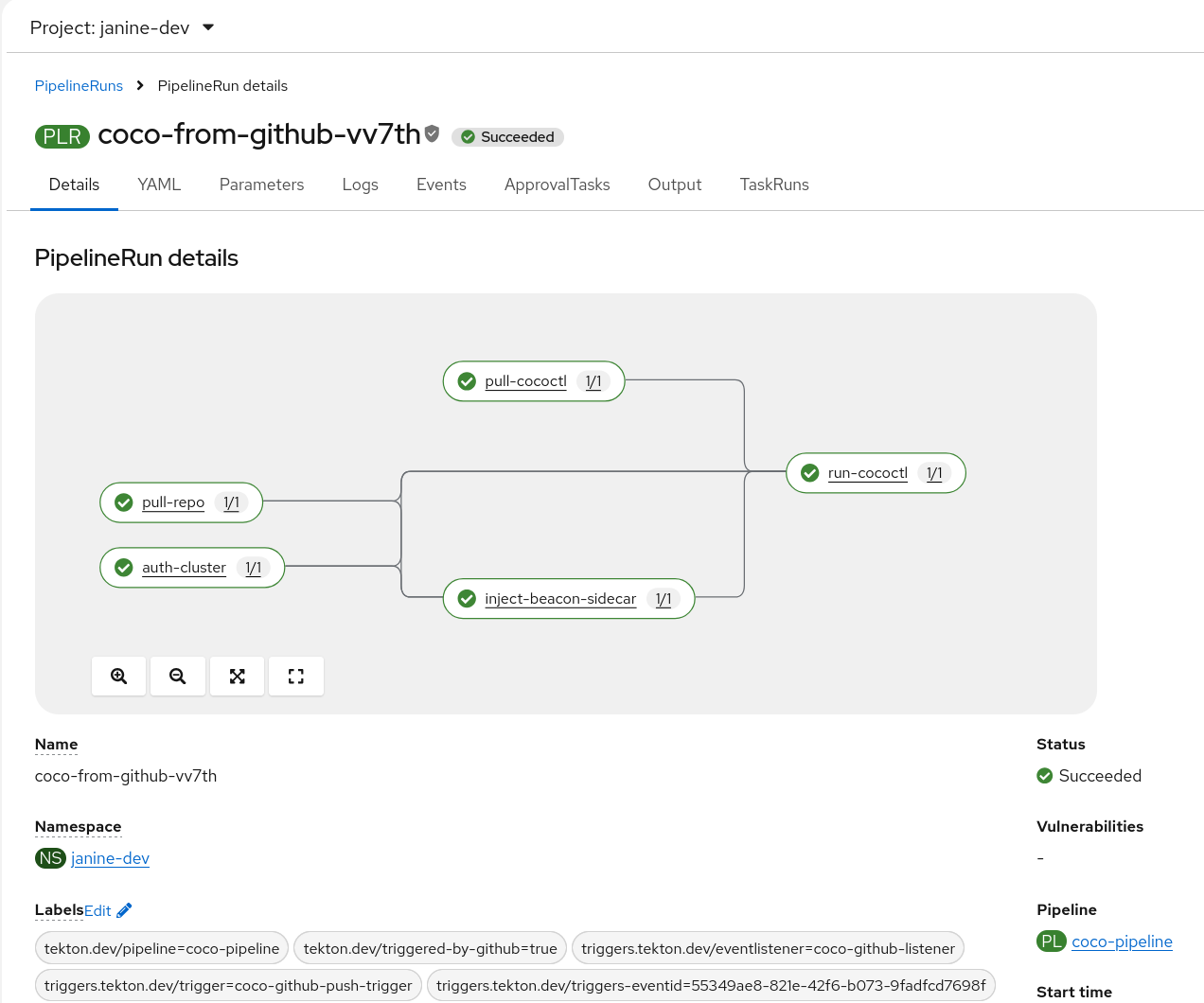
The pipeline also includes a task called inject-beacon-sidecar that adds a sidecar to connect with Raj's security dashboard. You can ignore this task for this example.
When the pipeline finishes, it updates the final deployment manifest and secrets in the manifests folder. You can then deploy these files to OpenShift, though this step is also automated through Argo CD.
The CVM pipeline
This pipeline fetches the finalized manifests folder and deploys it to two RHEL CVMs on Azure and AWS. You can find the pipeline in the cvm_pipeline folder.
The CVM pipeline also triggers automatically when the CoCo-fy pipeline updates the template deployment. As shown in Figure 7, it performs the following tasks:
- Deploys an Azure RHEL CVM.
- Deploys an AWS RHEL CVM.
- Installs the components required to connect the CVM to Trustee using a Linux system role.
- Runs the application using Podman.
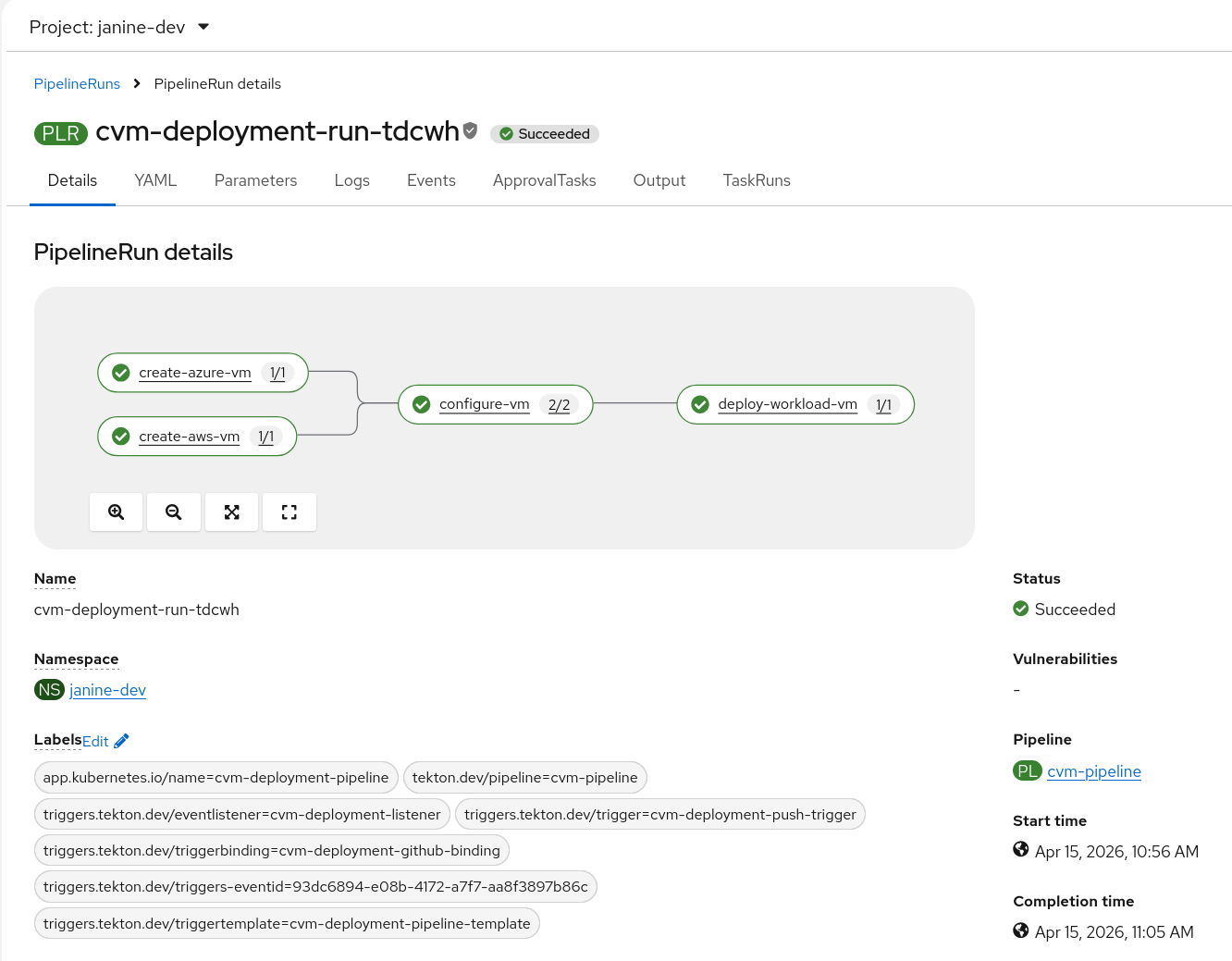
This process allows Janine to test her application in multiple cloud environments while meeting her data protection requirements.
A new RHEL Linux system role
To automatically install Trustee on RHEL, we developed a RHEL Linux system role. These roles are a collection of Ansible roles that provide a consistent configuration interface across Linux distributions. The trustee_client role installs the Trustee client components required to connect with the Trustee server. In this example, the server is the Red Hat build of Trustee operator in OpenShift.
Using Podman Quadlet, this role automates the deployment of guest components, including the Attestation Agent, Confidential Data Hub, and API Server REST. It integrates these components into the host as systemd services. In addition to basic deployment, the role enables automatic LUKS2 disk encryption and decryption by storing keys into the remote Trustee server.
This configuration helps protect sensitive data by allowing the machine to automatically decrypt and mount encrypted storage during the boot process using verified hardware attestation.
Configure Argo CD
Now that the pipelines are defined, you must deploy the hardened podspec and the built workload to the deployment cluster.
Use Argo CD to mirror any changes made to the manifests in the application/deid-roberta/manifests folder to the deployment cluster.
Follow the guide in the argocd folder to complete this two-step process:
- Grant the hub (trusted) cluster access to the deployment cluster.
- Deploy the deid-roberta application.
Figure 8 shows the deid-roberta application deployed in the deployment cluster.
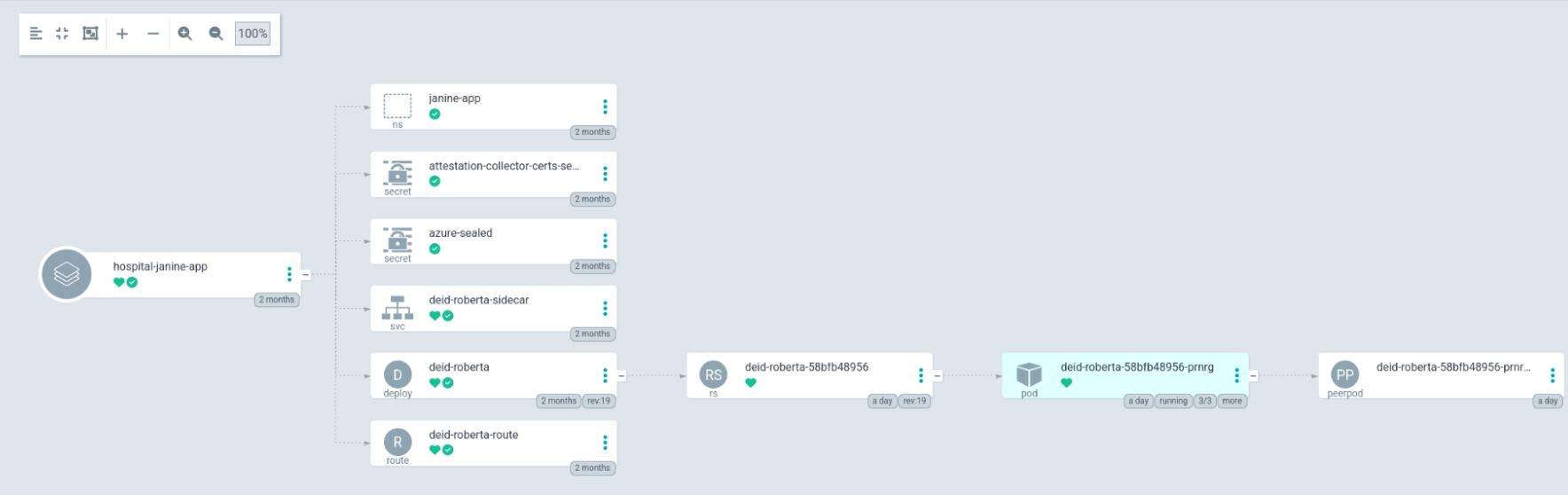
Figure 8: Argo CD application deployment
Deployment cluster components setup
This section covers the deployment cluster. This cluster runs on the public cloud and is considered untrusted. In this example, the cluster runs on Azure Red Hat OpenShift.
This section is divided into two parts to cover CoCo and CVMs.
Confidential containers
In this cluster, the administrator or developer installs the OpenShift Sandboxed Containers operator.
After installation, configure the operator to enable confidential containers. Once configured, any pod using runtimeClassName: kata-remote runs in a confidential virtual machine. This VM runs outside the worker node while appearing as a standard pod to OpenShift. Read this blog post to learn more about peer-pods.
A confidential container requires a RuntimeClass. You can also include optional fields to define the Azure CVM instance type or a custom initdata annotation.
The initdata component is significant because it defines the pod's security policy. These security policies help protect data-in-use by disabling pod exec and log visibility. This configuration helps prevent unauthorized users from viewing the container's activity.
The initdata component defines the security policy and provides the Trustee address to internal components and the image signature policy. This design allows the containerized workload to request secrets from the guest component's local server without needing specific configuration details. The guest component contacts Trustee, performs attestation, and delivers the requested value to the application.
While adding initdata as a pod annotation in an untrusted cluster might seem like a risk, it relies on hardware-backed verification. The initdata is measured and included in the attestation report. Trustee compares this measurement against a reference value to detect if the data was altered in the untrusted cluster.
Confidential virtual machines
When running natively on cloud infrastructure, the cvm_pipeline deploys hardware-backed confidential instance types. On Azure, the workload deploys to Standard_DCas virtual machines. On AWS, it uses m6a.large instances. Both instance types use AMD SEV-SNP technology, which provides memory encryption to help protect data-in-use.
Selecting these instances does not mean you must trust the cloud provider's confidentiality claims. The hardware itself is part of the attestation process. If an administrator alters the CVM hardware, Trustee detects the configuration change during attestation and denies the request for secrets.
Developer experience
This section recaps the workflow from the developer perspective. For Janine, the confidential computing workflow requires no new tools. She develops her application using her existing process.
When she commits a new feature to her model, the action triggers a Tekton build pipeline. This pipeline clones the repository, builds the container, scans for vulnerabilities, signs the container image with Cosign, and pushes it to a registry. Two additional pipelines then run to complete the deployment without requiring further manual steps from the developer.
And that's all! After Argo CD synchronizes the deployment, Janine can verify her model in two ways:
- Access the OpenShift deployment through the route in the development cluster. This production-like deployment uses security controls to help restrict unauthorized access to or inspection of the data during processing.
- Access the Azure or AWS confidential VMs using her credentials to check the containers. This development-focused approach allows her to access the VM through
sshto inspect internal components.
OpSec experience
From the OpSec perspective, each build is hardened with confidential computing and deployed to confidential environments without requiring additional developer training.
The pipelines automatically transform the standard deployment into a CoCo without human intervention. Raj only needs to monitor the system for attestation failures.
Raj monitors the fleet from a custom security compliance dashboard. This dashboard receives periodic pings from beacon sidecars running inside the attested workloads.
Conclusion
This demo shows how confidential computing integrates into the existing developer workflow and how the operational security lead can automate the technology through pipelines. We provided an example repository that demonstrates how to deploy a standard workload. It includes the GitOps pipelines that transform the workload into a confidential format and run it in OpenShift and RHEL confidential virtual machines using the Red Hat build of Trustee for attestation.
This example demonstrates how to deploy RHEL CVMs on Azure and AWS to provide a protected environment for developers to test their workloads.
A future article will cover the security dashboard and how an operational security administrator can use it to monitor confidential workloads.

