Most AI agents forget everything between conversations. They can't learn from past interactions or remember your preferences, requiring you to explain context every single time. This makes them useful for one-off queries but impractical for ongoing work. Hermes Agent, built by Nous Research, solves this with a closed learning loop. This article demonstrates how to deploy Hermes Agent on Red Hat OpenShift AI with GPU-accelerated vLLM model serving, giving you a production-grade AI agent that learns and remembers.
This is for platform engineers, OpenShift AI users, and SREs looking to deploy stateful AI agents with GPU acceleration and enterprise-grade persistence. If you're evaluating AI agent frameworks for production use on OpenShift, this deployment pattern demonstrates how to move beyond stateless chatbots to agents that actually learn.
What you'll learn
The Hermes agent creates skills from multi-step tasks, persists user context across sessions, and searches its full conversation history to provide continuity. Unlike frameworks that treat agents as stateless request handlers, Hermes treats memory and learning as core architecture.
You'll see the complete deployment pattern: UBI 9 container images, KServe InferenceService configuration, and persistent storage for skills and session data. The deployment takes under 10 minutes with oc apply, and you’ll get a multi-platform agent (Telegram, Discord, Slack, and HTTP API) that runs autonomously on Red Hat OpenShift.
You’ll also learn how to:
Integrate vLLM GPU-accelerated model serving with an AI agent framework
Build UBI 9 images for Node.js 20 applications on OpenShift
Configure persistent storage for agent skills and conversation history
Deploy self-improving AI agents that create reusable workflows
Why use Red Hat OpenShift AI
OpenShift AI extends vanilla OpenShift with production-ready AI/ML infrastructure, eliminating the need to build model serving from scratch. It provides the vLLM runtime templates, GPU scheduling, and model lifecycle management out of the box.
This deployment leverages OpenShift AI, specifically:
KServe model-serving platform (included in the OpenShift AI operator)
Preconfigured vLLM ServingRuntime templates for GPU inference
Integrated GPU scheduling and multi-tenant model serving
What makes Hermes Agent different
Hermes Agent isn't just another chatbot framework. It's the only open source agent with a built-in learning loop that makes it continuously improve rather than just execute tasks. It has procedural memory via skills. After completing a complex multi-step task, Hermes extracts it as a reusable skill. The next time you ask for something similar, it invokes the skill instead of reasoning from scratch. Skills self-improve during use based on failures and feedback.
With persistent user modeling, it uses Honcho for dialectic memory. The agent builds a model of who you are, what you prefer, and what context matters. This persists across sessions, not just within a single conversation. It provides cross-session search, a full-text search (SQLite FTS5) across all past conversations with LLM summarization. The agent can recall what was discussed about authentication from weeks ago and synthesize it into the current context.
With multi-platform continuity, we can start a conversation on Telegram, continue it on Discord, and finish it from CLI, all backed by the same agent state, skills, and memory. It transcribes voice memos automatically.
Hermes Agent also features scheduled autonomy. A built-in cron scheduler runs tasks unattended and delivers results to any platform. It provides daily reports, nightly backups, and weekly audits, all in natural language.
The learning loop isn't just a feature; it's the architecture. Hermes nudges itself to persist knowledge, curates memory autonomously, and creates abstractions from experience. Over time, it gets better at what you ask it to do. Unlike traditional agent frameworks that require manual skill installation and configuration, Hermes implements a closed learning loop that automatically generates reusable skills approximately every 15 tool calls based on what succeeds and what fails. This fundamental architectural difference means the agent gets faster and better at your specific workflows over time, rather than remaining static.
Where other frameworks require manual setup of third-party tools for cross-session memory, Hermes provides built-in, curated memory management through persistent files (MEMORY.md and USER.md) and full-text searchable SQLite conversation history. The memory isn't indiscriminately stuffed into context; it's intelligently retrieved based on relevance to the current task.
The self-improvement capability is particularly powerful. After completing complex multi-step tasks, Hermes automatically captures procedures, pitfalls, and verification steps into readable markdown skill files. When similar tasks arise weeks later, they execute faster and better, aligning with your preferences. Capability compounds over time rather than resetting each session.
Finally, Hermes is designed for always-on deployment from the ground up. The built-in messaging gateway (Telegram, Discord, and Slack) and natural-language cron scheduling aren't add-ons; they're core architecture. This makes it ideal for production workloads on OpenShift where the agent runs 24/7, serving your team across platforms.
The deployment architecture
Traditional deployments run Hermes on a local machine with CPU-only inference or cloud API calls to OpenAI/Anthropic. This works for prototyping but breaks down for production as follows:
- No GPU acceleration: Inference on CPU is 10-100x slower.
- No autoscaling: You pay for max capacity even when idle.
- No multi-tenancy: One agent per VM and no resource sharing.
- No enterprise security: No RBAC, audit logs, or compliance controls
Our solution is to deploy Hermes on OpenShift AI with vLLM InferenceService for GPU model serving.
Figure 1 shows the Hermes Agent deployment architecture on OpenShift AI.
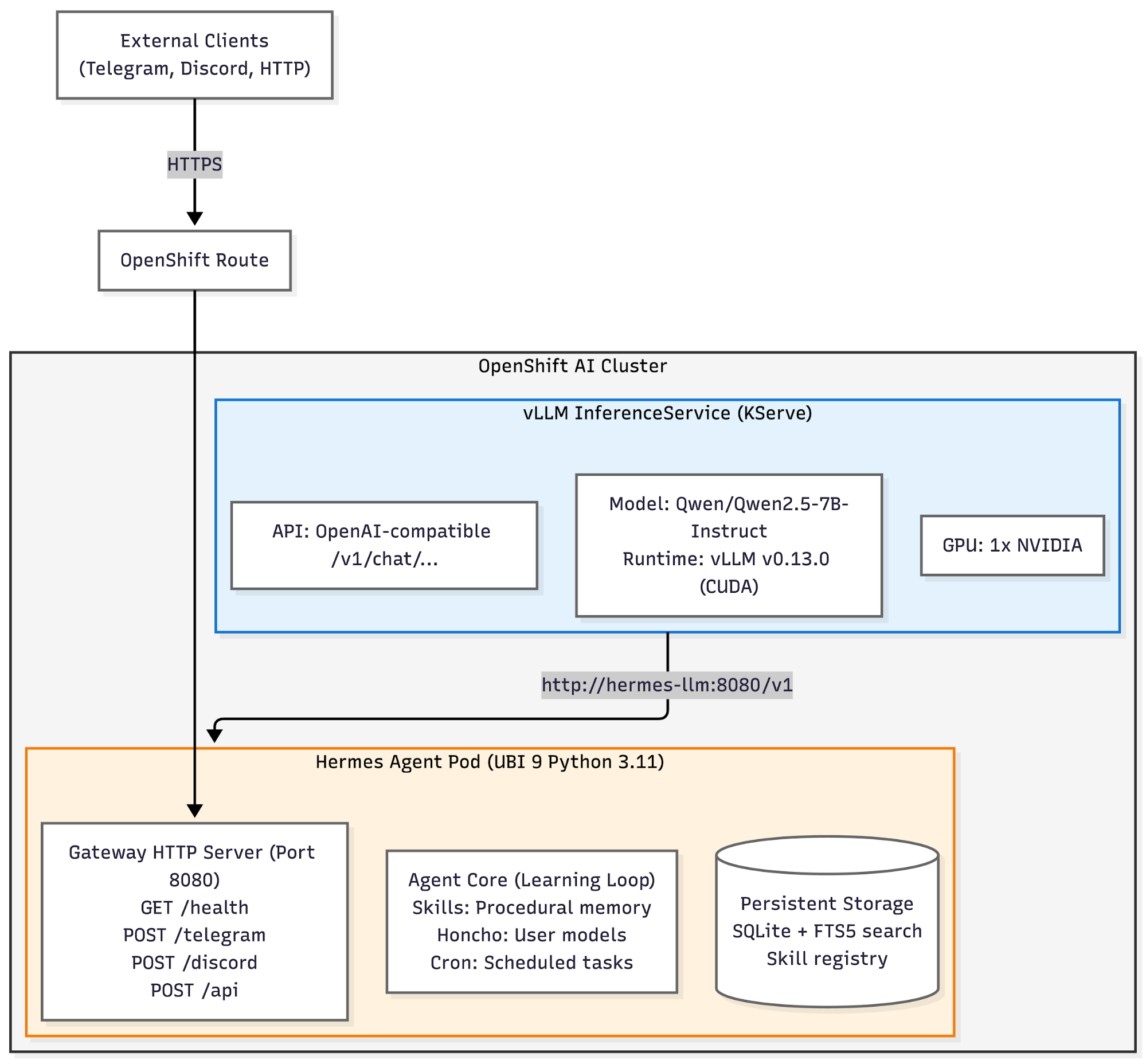
The deployment consists of two main components:
- vLLM InferenceService: KServe-managed model serving with GPU acceleration
- Runs Qwen/Qwen2.5-7B-Instruct (or any vLLM-compatible model)
- Exposes OpenAI-compatible API at
/v1/chat/completions - Autoscales based on load (min 1, max N replicas)
- GPU scheduling handled by OpenShift AI
- Hermes Agent deployment: UBI 9-based container with full agent stack
- Gateway HTTP server for messaging platforms and API
- Agent core with skills, memory, tools, and cron
- Persistent storage for all agent state
- Health probes for Kubernetes lifecycle management
The agent connects to vLLM via OPENAI_BASE_URL, making it provider-agnostic. Swap vLLM for any OpenAI-compatible endpoint without code changes.
Building the UBI 9 container image
OpenShift requires Red Hat Universal Base Image (UBI) containers. The challenge is that Hermes needs Node.js 20.x for its Vite-based web UI, however UBI 9 ships with Node.js 16.x. The solution is to install Node.js 20.x from the NodeSource RPM repository.
Dockerfile.ubi:
FROM registry.access.redhat.com/ubi9/ubi:latest

ENV PYTHONUNBUFFERED=1
ENV PLAYWRIGHT_BROWSERS_PATH=/opt/hermes/.playwright

# Install system dependencies
RUN dnf install -y \
    python3.11 python3.11-devel python3.11-pip \
    gcc gcc-c++ make git grep procps-ng openssh-clients \
    libffi-devel ca-certificates && \
    dnf clean all

# Install Node.js 20.x from NodeSource
RUN curl -fsSL https://rpm.nodesource.com/setup_20.x | bash - && \
    dnf install -y nodejs && \
    dnf clean all

# Create non-root user (OpenShift overrides UID at runtime)
RUN useradd -u 1001 -m -d /opt/data hermes

WORKDIR /opt/hermes

# Layer-cached dependency install
COPY package.json package-lock.json ./
COPY web/package.json web/package-lock.json web/
COPY ui-tui/package.json ui-tui/package-lock.json ui-tui/

RUN npm install --prefer-offline --no-audit && \
    npx playwright install chromium && \
    (cd web && npm install) && \
    (cd ui-tui && npm install)

# Source code
COPY . .

# Build web UI and TUI assets
RUN cd web && npm run build && \
    cd ../ui-tui && npm run build

# OpenShift permissions (arbitrary UID, always GID 0)
RUN chown -R 1001:0 /opt/hermes && \
    chmod -R a+rX /opt/hermes && \
    chmod -R g=u /opt/hermes

# Python virtualenv with all dependencies
RUN python3.11 -m venv /opt/hermes/venv && \
    . /opt/hermes/venv/bin/activate && \
    pip install --upgrade pip && \
    pip install -e ".[all,messaging]"

ENV HERMES_HOME=/opt/data
ENV PATH="/opt/hermes/venv/bin:${PATH}"

# Ensure data volume writable by group 0
RUN mkdir -p /opt/data && \
    chgrp -R 0 /opt/data && \
    chmod -R g=u /opt/data

VOLUME ["/opt/data"]

ENTRYPOINT ["/opt/hermes/venv/bin/python", "-m", "hermes_cli.main"]
CMD ["--help"]
Build and push the following:
cd /path/to/hermes-agent
podman build -f Dockerfile.ubi -t quay.io/aicatalyst/hermes-agent:latest --platform linux/amd64 .
podman push quay.io/aicatalyst/hermes-agent:latest
Deploy vLLM model serving with KServe
OpenShift AI includes KServe for unified ML model serving. We will use the vLLM runtime template (provided by OpenShift AI) for GPU-accelerated inference. The complete manifests are available on GitHub.
Create ServingRuntime and InferenceService:
apiVersion: serving.kserve.io/v1alpha1
kind: ServingRuntime
metadata:
  name: vllm-cuda-runtime
spec:
  containers:
  - name: kserve-container
    image: quay.io/modh/vllm@sha256:3ea9df1a9c8e...
    args:
    - --port=8080
    - --model=/mnt/models
    - --served-model-name={{.Name}}
    - --tensor-parallel-size=1
    resources:
      requests:
        nvidia.com/gpu: "1"
      limits:
        nvidia.com/gpu: "1"
  supportedModelFormats:
  - name: vLLM
    autoSelect: true
Deploy InferenceService:
apiVersion: serving.kserve.io/v1beta1
kind: InferenceService
metadata:
  name: hermes-llm
spec:
  predictor:
    model:
      modelFormat:
        name: vLLM
      runtime: vllm-cuda-runtime
      storageUri: "hf://Qwen/Qwen2.5-7B-Instruct"
      resources:
        requests:
          nvidia.com/gpu: "1"
Deploy:
oc apply -f manifests/03-vllm-servingruntime.yaml
oc apply -f manifests/04-vllm-inferenceservice.yaml
Verify:
$ oc get inferenceservice
NAME         URL                                                 READY
hermes-llm   http://hermes-llm-predictor.hermes.svc:8080        True

$ curl -X POST http://hermes-llm-predictor.hermes.svc:8080/v1/chat/completions \
  -H "Content-Type: application/json" \
  -d '{"model":"hermes-llm","messages":[{"role":"user","content":"Hello"}]}'
Deploy Hermes Agent
Create the ConfigMap with vLLM endpoint:
apiVersion: v1
kind: ConfigMap
metadata:
  name: hermes-config
data:
  OPENAI_BASE_URL: "http://hermes-llm-predictor.hermes.svc.cluster.local:8080/v1"
  LLM_MODEL: "hermes-llm"
  HERMES_HOME: "/opt/data"
  GATEWAY_ALLOW_ALL_USERS: "true"
  GATEWAY_PORT: "8080"
Deploy the Hermes Agent (refer to the full manifest on GitHub).
apiVersion: apps/v1
kind: Deployment
metadata:
  name: hermes-agent
spec:
  replicas: 1
  template:
    spec:
      securityContext:
        runAsNonRoot: true
        seccompProfile:
          type: RuntimeDefault
      containers:
      - name: hermes
        image: quay.io/aicatalyst/hermes-agent:latest
        command: ["/opt/hermes/venv/bin/python", "-m", "hermes_cli.main"]
        args: ["gateway"]
        envFrom:
        - configMapRef:
            name: hermes-config
        ports:
        - containerPort: 8080
        volumeMounts:
        - name: data
          mountPath: /opt/data
        resources:
          requests:
            memory: "2Gi"
            cpu: "500m"
          limits:
            memory: "4Gi"
            cpu: "2000m"
        livenessProbe:
          httpGet:
            path: /health
            port: 8080
        readinessProbe:
          httpGet:
            path: /health
            port: 8080
      volumes:
      - name: data
        persistentVolumeClaim:
          claimName: hermes-data
Deploy:
oc apply -k manifests/Verify:
$ oc get pods -n hermes
NAME                            READY   STATUS    RESTARTS   AGE
hermes-agent-7d9f8b5c6d-xk2p9   1/1     Running   0          2m

$ oc run test --rm -i --image=curlimages/curl -- \
  curl -s http://hermes-agent.hermes.svc.cluster.local:8080/health
{"status":"healthy","gateway":"running"}
Why this architecture matters for OpenShift AI teams
Deploying Hermes Agent on OpenShift AI with vLLM isn't just about running an agent in Kubernetes. It's about making AI agents production-ready with the same operational practices as any other enterprise workload.
For GPU multi-tenancy and autoscaling, vLLM on KServe enables multiple agents (or other workloads) to share GPU resources. KServe autoscales based on load, so you only pay for GPUs when they're in use. Traditional deployments lock a GPU to a single process.
It provides enterprise security and compliance, running under OpenShift's restricted-v2 security context constraint: runAsNonRoot: true, allowPrivilegeEscalation: false, all capabilities dropped, seccomp profile enabled. OpenShift has audit logs, RBAC, and network policies built in.
It also provides multi-platform continuity with persistent state, and the gateway supports Telegram, Discord, Slack, WhatsApp, Signal, and HTTP API from a single deployment. All platforms share the same agent state, skills, memory, and conversation history via the persistent volume.
The learning loop persists across pod restarts. Skills, user models, conversation history, and cron schedules all live in /opt/data backed by a PersistentVolumeClaim. If the pod crashes or gets rescheduled, the agent picks up where it left off with all accumulated knowledge intact.
With provider-agnostic LLM integration, the agent connects via OPENAI_BASE_URL, not hardcoded to a specific provider. Swap vLLM for OpenRouter (200+ models), NVIDIA NIM, Nous Portal, or any OpenAI-compatible endpoint without changing code.
Hermes requires Node.js 20.x for Vite, but UBI 9 ships with 16.x. The NodeSource RPM repository pattern solves this cleanly without manual compilation.
From deployment to usage
Once the stack is running, you can interact with Hermes via CLI, HTTP API, or messaging platforms.
CLI access (interactive terminal):
# Get shell in Hermes pod
POD=$(oc get pods -n hermes -l app=hermes-agent -o jsonpath='{.items[0].metadata.name}')
oc exec -it $POD -n hermes -- /opt/hermes/venv/bin/python -m hermes_cli.main

# Start a conversation
> Hello! Can you introduce yourself?

HTTP API (programmatic access):


import requests

url = "http://hermes-agent.hermes.svc.cluster.local:8080/api"
response = requests.post(url, json={
    "message": "What Kubernetes resources are available in this cluster?",
    "user_id": "test-user",
    "platform": "api"
})

print(response.json()["response"])

Telegram integration:


# Create secret with bot token
oc create secret generic telegram-token \
  --from-literal=TELEGRAM_BOT_TOKEN=your-bot-token \
  -n hermes

# Update deployment
oc set env deployment/hermes-agent \
  --from=secret/telegram-token \
  -n hermes

# Set webhook (if Route is deployed)
WEBHOOK_URL=$(oc get route hermes-agent -n hermes -o jsonpath='{.spec.host}')
curl -X POST "https://api.telegram.org/bot${BOT_TOKEN}/setWebhook" \
  -d "url=https://${WEBHOOK_URL}/telegram"
Now send a message to your Telegram bot. The agent responds using the vLLM-served model on OpenShift.
Skills in action
One of Hermes's most powerful features is autonomous skill creation. After completing a multi-step task, the agent extracts it as a reusable skill.
Here’s an example workflow:
User: Can you analyze the resource usage of all pods in the hermes namespace?

Agent: [executes multiple kubectl commands, parses output, calculates totals]

      I've analyzed resource usage:
      - Total CPU requests: 6.5 cores
      - Total memory requests: 26 GiB
      - GPU allocation: 1 NVIDIA

      Should I save this as a skill for future use?

User: Yes

Agent: Created skill "analyze-namespace-resources" with kubectl commands.
      Next time you ask, I'll invoke this skill directly.
The next time you ask about resource usage (even weeks later), Hermes invokes the skill instead of reasoning through the steps again. Skills self-improve based on errors and edge cases encountered during execution.
Scheduled tasks with cron
Hermes includes a built-in cron scheduler that runs tasks unattended and delivers results to any platform.
Here’s an example of adDaily cluster health report to Telegram:
User: Every morning at 9am, send me a summary of pod health in the hermes namespace

Agent: [creates cron schedule]

      ✓ Scheduled daily task at 9:00 AM
      Delivery: Telegram
      Task: Check pod status and report failures

      First run: Tomorrow at 9:00 AM
The agent will send a Telegram message every day at 9 a.m. with the cluster health report, even if you're not actively using the CLI.
Client access: CLI, API, and messaging
The CLI provides a full terminal UI with features such as multiline editing, slash commands, and conversation history.
oc exec -it $POD -n hermes -- hermesThe HTTP API is a RESTful endpoint for programmatic access.
POST /api
{
  "message": "...",
  "user_id": "...",
  "platform": "api"
}
Messaging platforms such as Telegram, Discord, Slack, WhatsApp, and Signal accessed via webhook endpoints:
POST /telegram   # Telegram webhooks
POST /discord    # Discord webhooks
POST /slack      # Slack events API
Health endpoint: Kubernetes probes:
GET /health
{"status":"healthy","gateway":"running"}
This allows your OpenShift cluster to act as a multi-tenant AI agent backend for your team's workflows across all platforms.
The bigger picture and caveats
Hermes Agent's learning loop fundamentally changes how AI agents operate. Instead of stateless request-response cycles, you get continuous improvement: skills that refine themselves, memory that deepens over time, and autonomy that delivers value even when you're not watching.
The integration of vLLM and OpenShift AI brings enterprise deployment patterns to open source agents: GPU multi-tenancy, autoscaling, audit logs, RBAC, and lifecycle management.
One caveat is this is a production deployment pattern, but Hermes Agent is under active development. Treat it as a powerful framework worth running, not a locked-down appliance.
There are gateway limitations. The current gateway implementation provides basic HTTP endpoints. Production use cases may require:
- OAuth/JWT authentication per platform
- Rate limiting per user
- WebSocket support for real-time messaging
- Message queuing for high-volume platforms
There is a single replica constraint. The deployment uses replicas: 1 because Hermes Agent state is local to the pod. Multi-replica deployments would need:
- Shared RWX storage or Redis-backed state
- Distributed locking for cron schedules
- Load balancer affinity for multi-turn conversations
For vLLM model selection, Qwen/Qwen2.5-7B-Instruct provides better quality with tool calling support (default). But larger models may give better results:
NousResearch/Hermes-3-Llama-3.1-8BHermes-tuned Llama 3.1meta-llama/Meta-Llama-3.1-70B-InstructMeta's largest Llama 3.1 requires multi-GPU.
The architecture shows what's possible when you combine Red Hat OpenShift AI's enterprise model serving with self-improving open source agents.
Final thoughts
We successfully deployed Hermes Agent as a production-grade self-improving AI agent on Red Hat OpenShift AI. This pattern brings enterprise deployment practices to open source AI agents, enabling GPU multi-tenancy, autoscaling, persistent learning, and cross-platform continuity.
The UBI 9 Dockerfile and vLLM integration demonstrate how Red Hat's expertise in enterprise deployments can make cutting-edge AI tools production-ready. If your team is exploring AI agents that actually learn and improve over time (not just execute tasks), the OpenShift deployment manifests make it easy to try. If you're running OpenShift 4.x with GPU nodes, you can have a running instance with oc apply -k.
More resources:
- Hermes Agent GitHub
- Hermes Agent is licensed under MIT. The OpenShift deployment manifests and UBI Dockerfile are under Apache 2.0.
- Hermes Agent documentation
- Skills Hub
- KServe
- UBI container images

