Building a truly reliable cloud environment requires more than redundancy. It demands architectural isolation to guarantee business continuity even when local infrastructure components fail. For environments leveraging high-speed, low-latency interconnections (i.e., large data centers or interconnected campus facilities), Red Hat OpenStack Services on OpenShift distributed zones (DZ) provide the necessary framework to deliver this level of resiliency. Distributed zones architecture is designed to allow cloud services to survive local and zone failures by splitting the cloud infrastructure into multiple autonomous failure domains similar to what is offered by public clouds.
While maximizing resiliency across these domains (e.g., racks, rows, or data centers), it still provides a unified experience through a single deployment, unified view, APIs, operations, and life cycle management. This allows organizations to strategically deploy workloads across zones to meet stringent service level agreements (SLAs). This article will explain how distributed zones leverage Red Hat OpenShift and OpenStack Services on OpenShift capabilities to achieve true operational isolation, focusing specifically on storage design.
General approach
Before we dive into storage considerations, let’s look at the bigger picture (Figure 1). To achieve true isolation, it’s necessary to isolate the control and data plane in case one zone goes down; the control plane still has two zones to rely on. It is especially important for services that are quorum based such as etcd and galera.
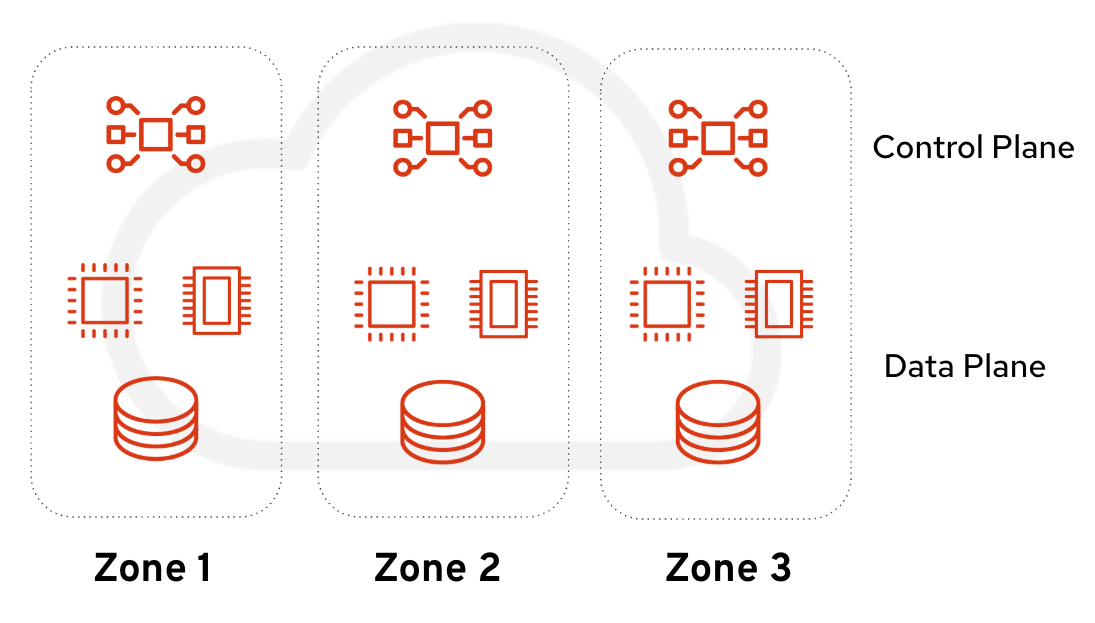
We need to ensure that the OpenShift and OpenStack Services on OpenShift control planes are evenly distributed. The architecture places one OpenShift master and a set of OpenShift workers per zone. We recommend having two or more workers per domain. Workers are the nodes hosting the OpenStack Services on OpenShift control plane services. Placing them across all zones ensures local resiliency.
In terms of storage, we follow the same principles: one dedicated backend per zone. This allows confining the blast radius of a zone failure, keeping workloads in the other zones running (Figure 2).
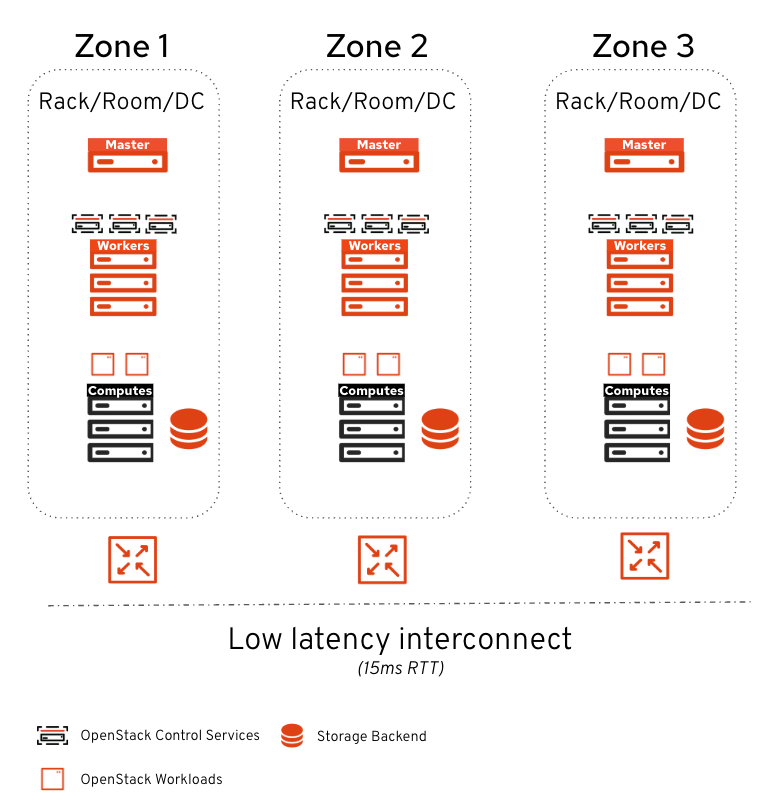
Because some control plane services are latency-sensitive, a 15ms maximum latency (RTT) is supported between zones. This makes the architecture particularly suited for isolation between data center failure domains (racks, rooms, floors) or between metro sites connected by fiber.
Storage design
Storage plays a crucial role in distributed zones. The backend as well as the associated OpenStack control services must be confined in their respective zones to ensure isolation.
Let’s dive into these storage aspects:
- Image management with Glance
- Persistent block storage with Cinder
- File shared storage with Manila
Image management with distributed zones
In OpenStack Services on OpenShift distributed zones, images are served locally to the zone similar to what we do with distributed compute nodes. This allows for the following:
- Direct local access with no cross-zone traffic.
- No cross-zone impact after a local failure.
- User choice regarding the zones of the images.
To achieve this, we leverage Glance multi-stores (Figure 3). We configure one store per zone and configure each store to consume the local-to-zone backend. When using Red Hat Ceph Storage, configure Glance with an RBD Glance store for native consumption. Alternatively, Glance uses Cinder as an image backend store when using third-party storage solutions.
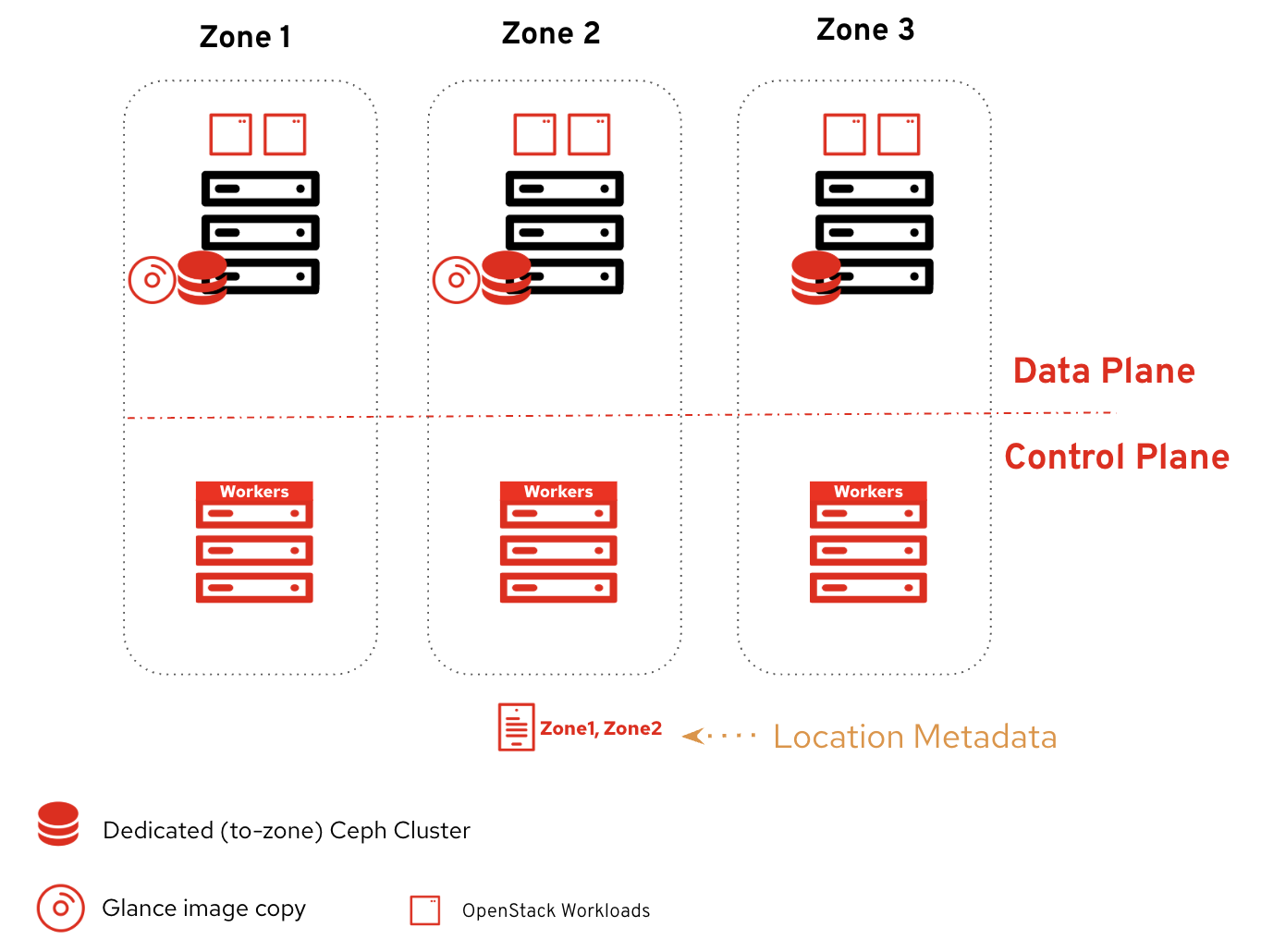
When uploading an image, users decide the stores for uploading the images. They can also decide to copy or remove images later on.
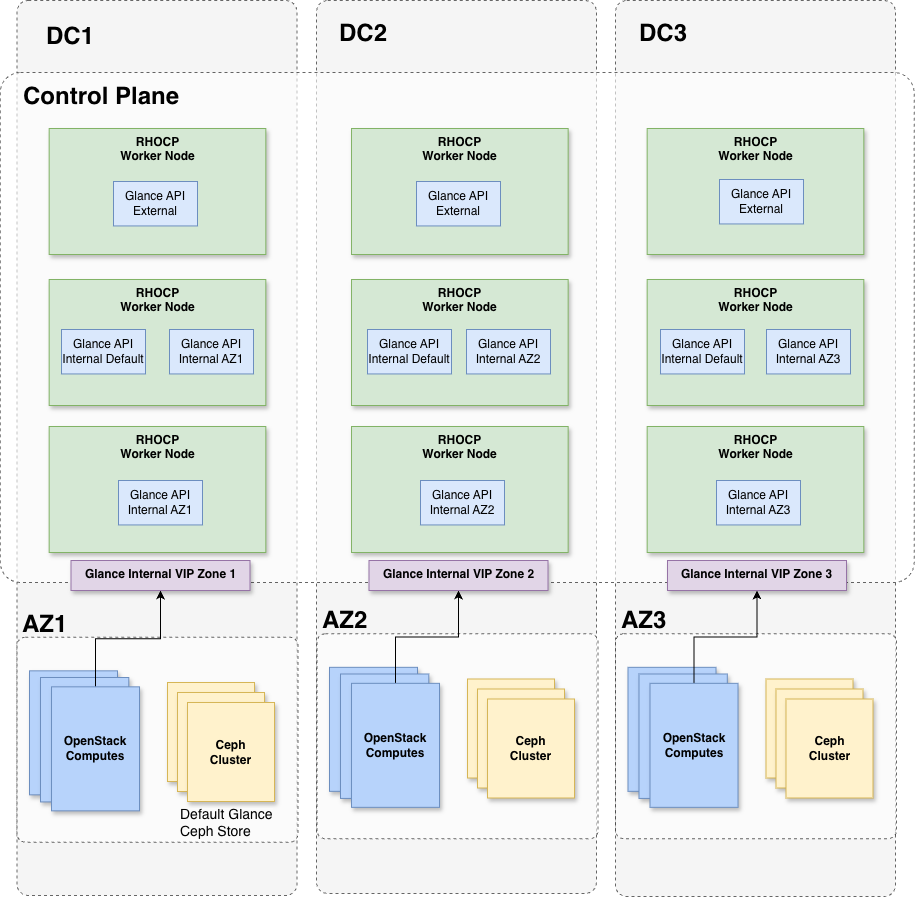
That covers the high-level view, but what about the control plane? To guarantee failure and traffic isolation, the deploy the Glance API services as follows:
- 3 External Glance APIs: Distributed evenly across the zones.
- 3 Internal Glance APIs: Distributed evenly across the zones to serve default requests.
- 2 Dedicated Glance APIs per zone: Serving the local store.
The key point here is the two dedicated Glance APIs per zone. These services are configured to serve local-to-zone image requests and scheduled to run only in their respective zones. Each local Glance service exposes a dedicated internal endpoint consumed by the local compute and cinder-volume services. Because Glance is not availability zone (AZ) aware, having a dedicated endpoint ensures locality awareness limiting cross-zone traffic.
Figure 4 shows a diagram that summarizes the Glance services placement across the zones.
Persistent block storage with distributed zones
Persistent block storage plays a crucial role in cloud environments. With distributed zones, we ensure that volumes are:
- Provisioned on the local-to-zone backend.
- Avoiding cross-zone traffic.
- Isolating outages to the local failure domain.
Each Cinder storage backend is dedicated to its local zone, and one Cinder AZ is configured for each. The Cinder AZ name matches the Nova AZ name. When users create a volume, they decide which zone the volume should be created in via the AZ parameter.
In terms of placement, we orchestrate the Cinder services as follows:
- 3 Cinder APIs: Distributed evenly across zones.
- 1 Cinder Scheduler: No zone affinity (can be scheduled anywhere, and scaling is not recommended).
- 1 Cinder Volume service per backend: Scheduled in the same zone as its local backend.
- 3 Cinder Backup services: Scheduled in the same zone as the backup target backend.
The Cinder API is not pinned to a specific zone. It serves all API calls across the environment, and we ensure it is spread evenly.
Things become interesting with cinder-volume. Because this service manages the relationship with the storage backend, we must schedule it in the same zone as that backend. One Cinder volume service is dedicated per backend. If two storage backends are present per zone, a total of six Cinder volume services will be deployed (two per zone).
In terms of backup, we are currently limited to a single backup target backend. Administrators must choose which zone hosts the backups. While the backup target backend is not AZ-aware, we can back up the volumes and restore to any zone. To avoid unnecessary cross-zone traffic, the cinder backup services run in the same zone as the backup backend, or they can be distributed evenly if the backup target is completely external to the environment.
In a future feature minor release of OpenStack Services on OpenShift, we’re planning to add backend AZ awareness so that volumes from a given zone are automatically backed up in a specific backend.
Figure 5 summarizes the Cinder services placement across the zones.
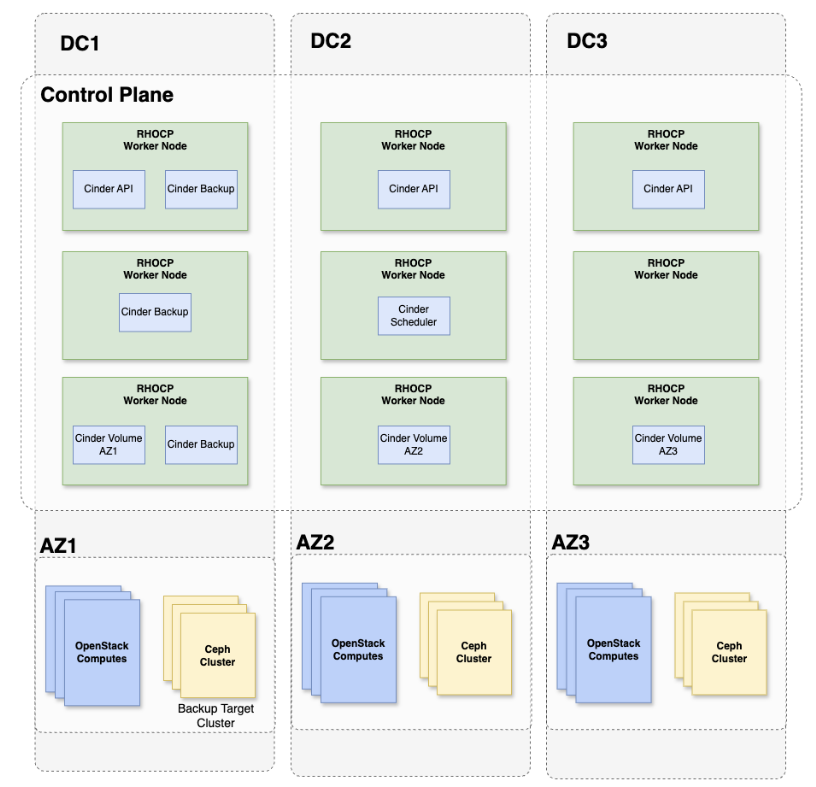
This deployment strategy allows the spreading of stateless services across the zones while keeping backend-dedicated services pinned to their respective zones.
File storage with distributed zones
File storage is a vital requirement for workloads that rely on shared file systems. When it comes to distributed zones, the objectives and design for Manila are very similar to Cinder:
- Provision shares on the local-to-zone backend.
- Isolate outages to the local failure domain.
Similar to Cinder, each backend is dedicated to its local zone and a Manila AZ is configured for each.
Manila allows cross-zone access to shares by design. Unlike block storage, shared file systems have legitimate cross-zone access patterns. For example, workloads across multiple zones may need to read from the same shared data set. If needed, administrators can prevent cross-zone share access at the network layer.
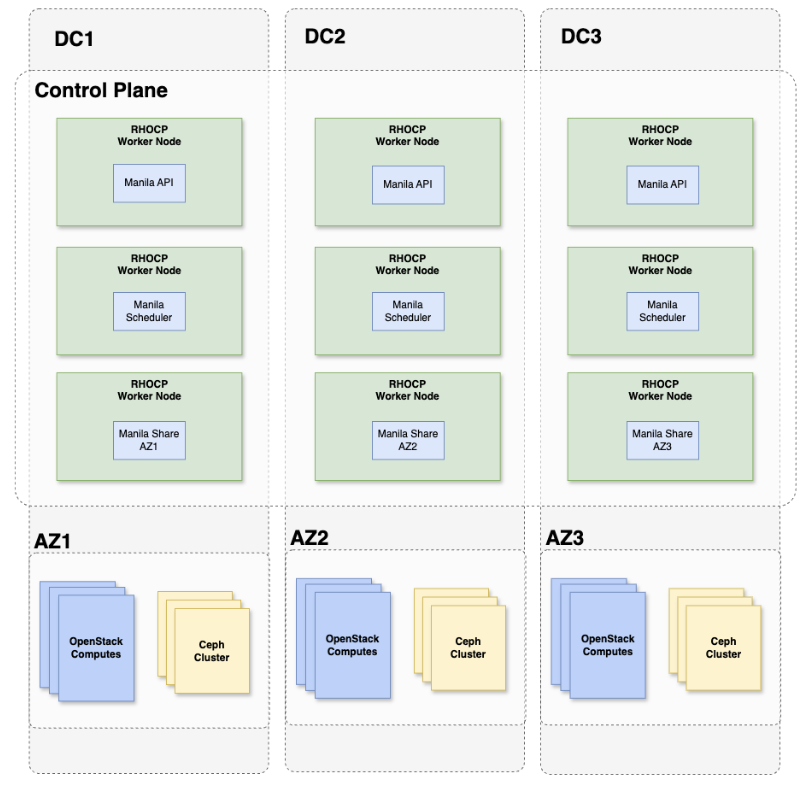
Manila's service distribution uses the same approach as Cinder:
- 3 Manila APIs: Distributed evenly across zones.
- 3 Manila schedulers: Distributed evenly across zones. Manila benefits from multiple schedulers for resilience since each scheduler can independently handle share provisioning requests across the environment.
- 1 Manila share service per backend: Scheduled in the local backend’s zone.
As with Cinder, stateless API and scheduler services spread across zones, while the backend-dedicated Manila share service is pinned to its respective zone.
When using Red Hat Ceph Storage with CephFS and NFS-Ganesha, the NFS gateway that serves Manila shares must also be zone-local to maintain isolation. The Manila share service manages this relationship with the backend. Therefore, it is scheduled in the same zone.
Figure 6 summarizes the different Manila services placement across the zones:
User experience
Now that we’ve reviewed the architectural design, let’s explore how it looks from a user perspective. Distributed zones act as a unified stretch cluster, meaning users still rely on traditional OpenStack Services on OpenShift APIs and leverage availability zones to schedule their workloads. Let’s look at an example where a user imports an image to Zone 2, creates a volume, and boots a virtual machine (VM) on that zone:
# Import image to zone 2
$ glance image-create-via-import \
--disk-format qcow2 --container-format bare --name cirros \
--uri http://download.cirros-cloud.net/0.4.0/cirros-0.4.0-x86_64-disk.img \
--import-method web-download \
--stores zone2


# Create volume from image on zone 2
$ IMG_ID=$(openstack image show cirros -c id -f value)
$ openstack volume create --size 10 --availability-zone zone2 cirros-vol-zone2 --image $IMG_ID


# Boot VM from volume on zone2
$ VOL_ID=$(openstack volume show -f value -c id cirros-vol-zone2)
$ openstack server create --flavor tiny --key-name mykey --network site2-network-0 --security-group basic \
--availability-zone zone2 --volume $VOL_ID cirros-vm

# Create an NFS share on zone2
  $ openstack share create --name shared-data-zone2 \
  --share-type zone2-gold --availability-zone zone2 NFS 50

 # List the export location for mounting
 $ openstack share export location list shared-data-zone2

  # Mount the share on the VM in zone2 (or any VM in another zone if networking permits)
  # the ability to cross attach makes Manila shares well suited for workloads that need
  # shared data across zones.

  $ sudo mount -t nfs <export_location> /mnt/shared-data
If a zone goes down, the impact is confined to that zone's resources. Volumes, shares, and images provisioned in the remaining zones continue to operate normally with no cross-zone impact.
Final thoughts
With distributed zones, OpenStack Services on OpenShift fundamentally redefines how organizations architect for infrastructure failures and ensure resiliency. By splitting the infrastructure into autonomous domains with locally confined storage backends, it ensures robust local failure management where one zone's outage cannot impact the others.
Ultimately, distributed zones provide a unified stretch cluster experience that gives users full control over scheduling workloads. By leveraging availability zones, organizations can strategically deploy these workloads to survive isolated failures and seamlessly meet the strictest SLAs. OpenStack Services on OpenShift distributed zones is GA for Red Hat Ceph Storage and certified third-party vendors. If you’re looking for implementation details, consult our official deployment guide.

