As more OpenStack-based clouds are adopted for multi-tenant applications, security remains a top priority. Network-level isolation and traffic control is critical in public or hybrid cloud environments. Red Hat OpenStack Services on OpenShift delivers an OpenStack cloud computing platform that runs as a virtual machine (VM) within Red Hat OpenShift Virtualization. This provides cloud-based advantages (e.g., enhanced scalability, faster deployment, and easier management) for new and traditional virtualized applications. This new architecture replaces the Red Hat OpenStack Platform control plane with a native, pod-based control plane running directly in Red Hat OpenShift. In this article, we will discuss Firewall-as-a-Service (FWaaS), its use cases, benefits, and how to enable and configure it.
What is FWaaS in OpenStack?
Although security groups provide sufficient capability to specify the security policy at a VM instance level or VM port level, it does not have support to specify policy at a network or router port level. Additionally, scenarios where it is required to explicitly deny specific traffic, security policies implemented using security groups only fall short.
The FWaaS project provides this additional capability to specify the security policies at the router port level and enables specifying multiple policy rules within the same policy group and also supports application of L3 policy at the router port level. FWaaS also provides support for NGFW third party plug-ins for integration with NGFW vendor solutions enabling firewall capabilities beyond the ACL level, and features and capabilities such as DPI, malware protection, IPS and IDP.
FWaaS (service plug-in for neutron) enables tenants and administrators to create firewall policies that apply to traffic passing through Neutron routers (Figure 1). It supports:
- Stateful layer 3/4 firewall rules
- Rules per tenant/project
- Policies assigned to routers
FWaaS v2 is the current supported version in most modern OpenStack deployments.
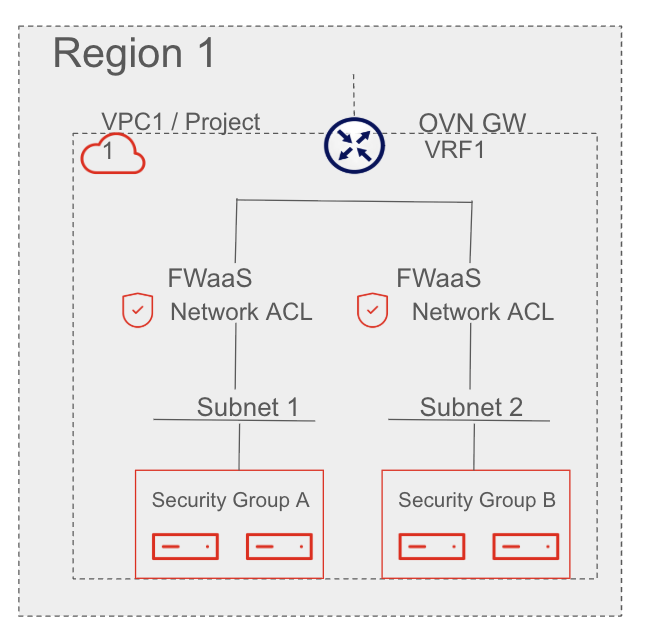
Key use cases
FWaaS enables several key security capabilities, including multi-tenant isolation to allow tenants to define and control traffic to and from their networks, microsegmentation for defining fine-grained rules for internal workloads, and East-West traffic control to prevent lateral movement across internal segments. Additionally, it offers Ingress/Egress restrictions to limit access to specific external services.
How FWaaS works
FWaaS is implemented as a Neutron service plug-in. It utilizes OVN port groups and ACLs and applies them to the logical router ports created in Neutron. Each tenant can:
- Define firewall rules
- Group them into firewall policies
- Define firewall group with ingress and/or egress policies
- Attach the policy to a router
Enable FWaaS v2 in OpenStack
Prerequisite: OpenStack Services on OpenShift 18 FR4 or later
Neutron-fwaas service plug-in is already included in the openstack-neutron-server container image. The only thing which needs to be done is enable it in the neutron configuration. That can be done through the customServiceConfig parameter in the OpenStackControlPlane CR.
$ oc -n openstack patch openstackcontrolplane openstack-galera-network-isolation --type=merge -p "

spec:

    neutron:

        template:

            customServiceConfig: |

              [DEFAULT]

              service_plugins = qos,ovn-router,trunk,segments,port_forwarding,log,firewall_v2

              [service_providers]

              service_provider = FIREWALL_V2:fwaas_db:neutron_fwaas.services.firewall.service_drivers.ovn.firewall_l3_driver.OVNFwaasDriver:default

"
Verify enabled service plug-in
To verify if neutron-fwaas is available in the environment, just check if the fwaas_v2 Neutron API extension is available.
openstack extension list --network | grep fwaas_v2Create a firewall for a tenant
Assume a project named "demo" with a router demo-router connecting a private and external network.
Create the firewall rules.
openstack firewall group rule create \
  --protocol tcp --source-port 22 --destination-port 22 \
  --action allow --enabled --description "Allow SSH"
openstack firewall group rule create \
  --protocol icmp --action allow \
  --enabled --description "Allow ping" \
  --project demo
Create a firewall policy and add rules.
openstack firewall group policy create demo-fw-policy --project demo

openstack firewall group policy rule add demo-fw-policy <rule-ssh-id>
openstack firewall group policy rule add demo-fw-policy <rule-ping-id>
Create a firewall group and apply to router ports.
openstack firewall group create demo-fw-group \
  --ingress-firewall-policy demo-fw-policy \
  --egress-firewall-policy demo-fw-policy \
  --port <router-port-id>
Get the router’s internal port ID.
openstack port list --router demo-routerFWaaS benefits & best practices
FWaaS offers several key benefits, including tenant control, allowing tenants to define their own traffic rules without needing admin intervention, and consistent policy enforcement across multiple routers and projects. It also provides granular control, down to protocol, port, and IP ranges, with the ability to specify the order of firewall rule application. Finally, it aids in compliance by helping to enforce internal segmentation for audits.
When deploying FWaaS within a OpenStack Services on OpenShift environment, adhering to established best practices ensures both optimal performance and a robust security posture. Foremost, organizations should exclusively standardize on FWaaS v2 because it offers a more granular and flexible object model, specifically the ability to apply firewall groups to multiple ports essential for the distributed nature of ML2/OVN-based deployments. To maintain a zero trust architecture, administrators must regularly audit firewall policies to enforce least-privilege access, ensuring that only strictly necessary traffic is permitted across project boundaries.
For a truly resilient defense-in-depth strategy, it is critical to combine FWaaS with security groups. While FWaaS operates at the perimeter of the project (the router level), security groups provide a stateful, port-level firewall directly at the VM instance, creating a layered defense that protects against both external threats and internal lateral movement. Finally, to ensure operational visibility, you should enable comprehensive logging for forensic analysis and real-time monitoring. By centralizing these logs within the OpenStack Services on OpenShift observability stack, teams can effectively track packet flow events and identify potential security breaches before they escalate.
Best Practice | Technical Context & Implementation |
Use FWaaS v2 | Leverages the OVN mechanism driver to manage logical routers and ports more effectively than the deprecated v1. |
Least-Privilege Audits | Utilizes RBAC policies to ensure only authorized projects can modify or attach to specific networking resources. |
Layered Defense | Uses FWaaS for North-South perimeter control and ML2/OVN security groups (stateful or stateless) for East-West micro-segmentation. |
Forensic Logging | Aggregates acl_log data in ovn-controller.log on compute nodes to monitor accepted or dropped sessions for security audits. |
Note: Due to a known issue where combining stateful security groups (SGs) with Firewall-as-a-Service (FWaaS) does not function as expected, we recommend using stateless SGs when implementing FWaaS.
Final thoughts
FWaaS brings powerful L3-L4 fire-walling capabilities directly into the OpenStack Neutron layer. For operators, enabling FWaaS means more secure, flexible, and tenant-aware networking. Whether you’re building secure enterprise workloads or multi-tenant clouds, FWaaS is a critical piece of cloud security posture.

